How to Use iTunes Match: The Complete Walkthrough

Jeff Benjamin, Nov 14, 2011

After a little bit of a delay, iTunes Match was released to the public today. iTunes Match is a service that’s built into the latest version of iTunes. It lets you match, upload, and play music on a variety of different devices.

This is an extremely cool service that allows you to take your entire iTunes library with you on the go, even if you have a measly 8GB iPhone.

Unfortunately, we don’t think that Apple has done a very good job explaining the full benefits of iTunes Match. For that reason, we’ve created this ultimate iTunes Match tutorial, FAQ, and video walkthrough…

iTunes Match Ultimate Video Walkthrough

The above video highlights most of the major aspects of iTunes Match, along with some of the idiosyncrasies of the service. I highly recommend you watch it to get a good grasp of everything iTunes Match is capable of. It’s quite lengthy, but I didn’t want to spare any of the important details. This video shows you how to check iCloud status, download status, how to use iTunes Match on a separate Mac or PC, how to delete iTunes Match songs from your iOS device, and much, much more.

What is iTunes Match?

iTunes Match can be broken up into 3 separate entities:

Matching
iTunes scans all of the music contained in your iTunes library to see if there is already a version of that song available in the iCloud library. If so, the song is matched, and Apple will let you stream their high quality version on your iPhone, Mac or PC, iPad, iPod touch, or Apple TV. This eliminates the need to upload your music to iCloud, saving bandwidth and precious time. If you listen to a lot of popular music, most of your tunes should be able to be matched.

Uploading
If iTunes can’t find a version of your song on iCloud, it will upload the song to iCloud for you. That way you can play that song on any of your devices that have iTunes Match enabled. The downside of this is that it takes time to upload, and it uses bandwidth. If you listen to a lot of obscure music not found on the iTunes store, then prepare to wait a while to upload. You can compare this portion of iTunes Match to Google Music, which is strictly an upload service at the moment.

Playing
The final aspect of iTunes Match is the ability to play either your matched or uploaded music to any of your iTunes Match enabled devices. That includes Macs, PCs, and iOS devices. This makes it possible to take your entire music library with you on the go.

How Much Does iTunes Match Cost?

iTunes Match costs $24.99 a year. You must install iTunes 10.5.1 or higher to enable iTunes Match. Once iTunes is installed go to Store > Turn On iTunes Match to subscribe. You will be billed against the same account that is used for your Apple ID.

What Are the Requirements for iTunes Match?

You must have an iOS 5 capable device, a Mac or a PC with iTunes 10.5.1, or an Apple TV with the latest firmware. For iPhone’s and iPad 3G’s you can download music while on the go. For iPod Touch, you must have a Wi-Fi connection to download music. You can always download the music you want to hear to your device and listen to it while on the go, you just can’t download it while not connected to a Wi-Fi hotspot.

How Long Does it Take iTunes Match to Match and Upload My Entire Library?

That will depend on how big your library is, and whether or not iTunes can match your content. Matching doesn’t take particularly long, but uploading can be time consuming depending on the amount of songs that need to be uploaded and your upload speed. I have over 5,000 songs and it took at least 8 hours to complete, if not more. Larger libraries will take more time.

How Can I determine Which Songs have been Matched and Which Songs Have Been Uploaded?

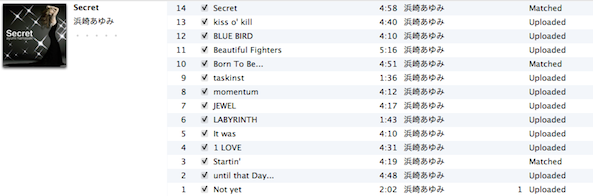
Our video walkthrough shows you in-depth how to check your iCloud Status using iTunes. In order to do so, right-click on the sort bar in iTunes, and select “iCloud Status” and “iCloud Download”.
What do the different iCloud Statuses mean, and is There a Limit to the Length or File Size of the uploads?

Here is a screenshot from the official support document from Apple regarding this:
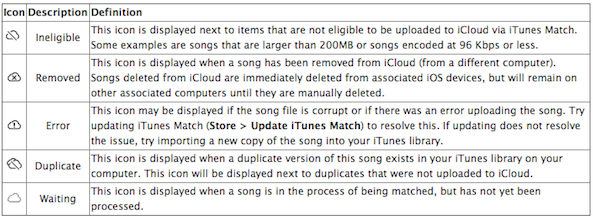
Thanks to The Loop for finding this document.

In addition to that, I’m pretty sure there’s a file length limit imposed as well, though we haven’t pinpointed exactly what that may be just yet.

My Music is Low Quality, How Will iTunes Match Handle That?

Any music that iTunes can match will be matched at 256Kbps AAC DRM-Free quality, even if the bit-rate is of a higher or lower quality.

How Much 3G Data Does iTunes Match Use

This will vary, depending on whether or not your song was uploaded or matched. Generally speaking, if your file meets the 256Kbps bit-rate standard, it will be the exact same size as stored on your local computer. Otherwise, size may vary heavily.

Is There a Limit to How Many Songs I Can Have?

iTunes Match is limited to 25,000 songs. 95% of all users will easily fit within that window.

Does iTunes Match Take Up Space on My iOS Device?

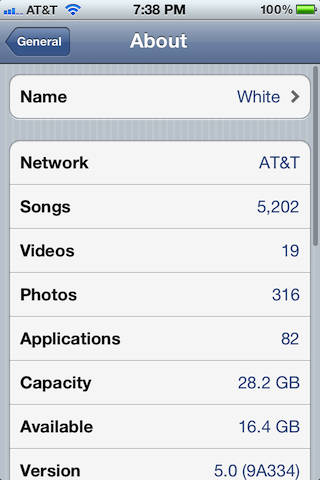
Yes and no. Yes if you decide to download the song by tapping the cloud icon. No if you have not downloaded the song. Just because your Music app shows a song or album doesn’t necessarily mean it’s stored locally on your device. Music isn’t stored locally until you play it and/or download it. See the video walkthrough for more details.
How Do I Delete iTunes Match Music From My iOS Device?

You can delete individual music tracks or delete entire albums by swiping from right to left on an album or individual song.
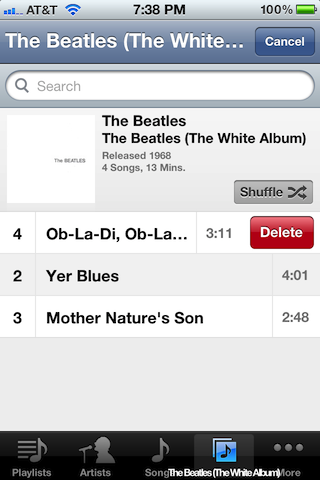
Why is the Song or Album I Deleted Still Being Displayed on My iOS Device?

By default, iTunes Match displays all of the songs available in your iCloud library, whether they exist on your local device or not. You can make it so it only shows content stored locally on your device by going to the Settings App > Music > and disabling “Show All Music”.

How Do I Play My iCloud Library on Another Mac or PC?

I recommend starting with a completely empty library on the second computer. That’s because iTunes Match will insist on using that computer’s library as a basis for iCloud matching and uploads. To cut down on any confusion, I suggests using an iTunes installation with an empty library. This way you can use your Mac or PC’s iTunes installation as if it were an iOS device.

Ensure iTunes 10.5.1 or higher is installed on the computer and go to Store > Turn On iTunes Match. Enter your Apple ID and Password, and you will receive a dialogue box that say “iTunes Match is matching a library from another computer.” Click “Match this computer”. iTunes Match only allows for one library to be matched at a time, that’s why I suggest starting with an empty library. You will then be able to access all of your iCloud Music library on the secondary computer. I recommend not adding any music to this computer, and using it strictly as a “jukebox” device. Please see the video walkthrough for more details.

How Many Devices Can Use a Particular iTunes Match Account?

Each account is limited to 10 devices.

Does iTunes Match Stream?

That’s still up for debate, but evidence suggests that Apple is streaming in some fashion, especially on a desktop computer. See our video walkthrough for more details.

How Does Shuffle Work With iTunes Match

Pretty awesomely. It will shuffle all music contained in your iTunes library, including music that hasn’t downloaded. iTunes Match gives you the ability to shuffle songs from your entire iTunes library while on the go as long as you have an Internet connection.

How do I Resync iTunes Match When I Add More Music to My Library?

Go to: Store > Update iTunes Match.

You Didn’t Answer My Question!

I’m sorry; feel free to ask your question below and if necessary we can add it to this FAQ. You can also read our follow-up post on more details concerning iTunes Match and iCloud.

 
  • http://twitter.com/JoeShanklin Joe Shanklin

    Hi Jeff

    One question I couldn’t see answered on your very thorough and helpful walkthrough…..

    I am taking the leap from PC to Mac in the new year. I have 6000 odd songs on my iTunes. To ensure a smooth transition of my entire music collection from one PC to the Mac without my Devices telling me “it’s syncing with a different library” I feel Match would sort this perfectly. I saw on your walk through you add match on another mac with blank library. Surely I would then download all or some of my 6000 tunes and save my storage on my Mac.

    This means I would have good quality copies on my new machine which is great but would I still need to export library and resync iPhones, pads and pods from scratch?

    I believe Match could be the answer I am looking for. For £25!

  • http://www.facebook.com/rsmetallix Ruben Soto

    What happens if after I import my cd on my iMac and it’s matched on iTunes, I delete the album I just imported from my iMac? Will it still stay on iCloud? Do I need to keep the music I import on at least one hard drive at all times?

  • http://www.facebook.com/eyalnevo Eyal Nevo

    Great answers to most questions, but one remains. It’s obvious you have to take song with you locally. On 3G it’s awfully slow, and of course there are places without cellular reception at all. Right now my iPhone is 99% full. I want to have some space for taking pictures and videos. How can I determine how much space music will take? I want to put it on 5GB, is there an elegant way to do it or do I need to delete some songs locally. Also, when I ask for new songs, will iTunes Match replace some of the local music I have or first fill up my memory? – Thanks!

  • Anonymous

    Wonderful guide, thanks. I was surprised that you could use ITunes Match from a PC! Now I’m wondering if there’s some way I can use it with my iTouch 2nd generation. Is there?

  • Anonymous

    question:

    It appears that i can’t sync non-downloaded songs to my iPod Shuffle. anyone have additional info on this? it looks like i’m going to have to maintain a master iTunes library of the “real” songs and use that to manage non-IOS devices. that kinda sucks…..

    great guide, btw!

  • Anonymous

    question:

    It appears that i can’t sync non-downloaded songs to my iPod Shuffle. anyone have additional info on this? it looks like i’m going to have to maintain a master iTunes library of the “real” songs and use that to manage non-IOS devices. that kinda sucks…..

    great guide, btw!

  • http://www.facebook.com/people/Chris-Coomey/741621247 Chris Coomey

    Can you run match and keep the iTunes local library seperAted in case you just want to stream match and play the local tracks when match is not available to stream?

  • Alexander Gilman

    Can I stream from the cloud on my original, home mac’s iTunes? I ask because all my music is saved to an external disk drive and I don’t want to always have to plug it in. When I tried it it said the file was missing.

  • http://www.facebook.com/profile.php?id=1145873845 Scott Clark

    Thanks for the video. It really pulls it all together. I’ve only been using iMatch for a while and I really like it. You answered a couple of specific questions that I hadn’t found elsewhere specifically managing storage on your iOS device.

    Ten years ago the idea of a “jukebox in the sky” started showing up on the web. I’ve been waiting that long for iMatch (blemishes and all).

  • http://www.facebook.com/profile.php?id=1302778048 Michael Meade

    Thanks Jeff,
    I had a lot of questions about Match, and you answered them all and then some!! I have a huge library with countless duplicates due to some unorganized backups stored on an external drive. I’m hoping this will help me organize and access my library a little easier. You are now in my bookmarks, I’m sure I’ll need your guidance again!!
    Mike

  • Crystal Mohrmann

    I don’t understand why there is a “download” song option…shouldn’t all the songs already be downloaded on my computer…why are there some that are showing up as not being on my local device?

  • Anonymous

    It seems that iTunes will not import new music while it is uploading. In my experience both eMusic and Amazon purchased content are not added to the iTunes library while uploading is in process.

  • Anonymous

    I am in the process of uploading 13,000+ songs and doing that process iTunes will not allow new songs to be added to the library, neither by syncing, as with eMusic and Amazon, by using the Add to Library function in the File menu or by dragging and dropping.

  • http://www.facebook.com/garbanzosmatematikoz Julio Ordóñez Orellana

    Hi, very nice job, what’s the name of the song you use in this videoclip?

  • Misti Clift

    Thanks so much for the tutorial. I just signed up for iMatch today and had no clue what to do with it. With over 13,000 songs stored on a hard drive, this is so great that I can now access ALL of them anytime. You did a great job with the step by step guide!!

  • http://www.facebook.com/people/Mountain-Bike-Threads/100002291489049 Mountain Bike Threads

    Thanks.

    If I delete itunes from my computer (installing it only for transfer of music) a) is my cloud still safe, b) what about files I move to an external hard drive– will I be able to use them?

    Also, it seems some files are lossless m4a, and some lossy m4a as AAC…I think I have this right…how does i tunes save them? I’ve heard different answers.

  • http://www.facebook.com/people/Frank-Fitzpatrick/1426692989 Frank Fitzpatrick

    Can I use iCloud to wirelessly sync calendar, contact and note content from my mac pro to my iphone 4 but sync photos and music through a direct line sync to my mac pro?

  • http://www.facebook.com/profile.php?id=805169045 Pablo Cuellar

    Jeff, My library is well over 25K songs, so iTunes won’t let me match.
    I’ve read that you can create a new library that’s under 25k and match it. This raises 2 questions:
    Can I re-assemble my original library once the matching process ends? (add the “deleted” songs)
    Which songs will be kept in iTunes match? the first 25K?, the latest 25K, All?

  • http://www.facebook.com/gurohy Roy Gur

    hi
    great guide. one question please
    i want to delete all my music collection both from the itunes library and my computer hard disk and store everything on the cloud. the question is how to download all the music again to my computer (not iOS) whenever i’ll want. 10x

  • http://twitter.com/esKay7 Samad Karim

    Awesome guide but i was just wondering about album artwork and proper names of songs..

    A LOT of my music doesn’t have the proper album artwork let alone proper names of the songs..
    will itunes match fix this? it would make sense if it did right? since it matching it and then giving me a high quality version shouldn’t it also give me proper album artwork?

  • Scott Delman

    How do I know exactly what music is in my iCloud? I want to use Music Match to remove all of the thousands of duplicates that are in my iMac? Can I do this by deleting all the music in my iTunes library and then turning on Music Match or will this create problems?

  • http://www.facebook.com/people/Willem-van-der-Ree/100000298206835 Willem van der Ree

    Great guide Jeff, tx

  • http://twitter.com/beeslikesteve Bees Like Steve

    So, if I move from my old iMac to a MacBook Air, can I sign into iTunes Match on the Air so I do not have to load any of my old music? And then the old computer I will need to turn off iTunes Match?

  • Laura Wardrip

    This is really informative, but unfortunately, this doesn’t address my particular issue. I love to just put my iPhone on shuffle and just let it play. However, I’ve noticed that after I signed up for the match program, the iPhone will download songs onto my iPhone from the cloud when I do this. This is an issue because, while I purchased a 32GB iPhone, I’ve pretty much filled it up and cannot fit my entire music collection onto my phone. Is there something I can tweak in the settings to prevent the shuffle function from inadvertently downloading songs from the cloud? I realize I could just create a playlist of all the songs on my iPhone, but I simply do not have the time to do that.

  • Brad Green

    If I delete music from my PC to save space on it will those songs also be deleted from my Match account?

  • http://www.facebook.com/joeowens Joe Owens

    Hot tip for eBooks and large files:

    You can upload ebooks if you encode them at 96kb/s and make the length under 4hours. That might work out to 200mb. All my files over 4hrs get ineligible, and files under 96kb/s too. Make sure to click the buttons for remember play position, and skip in shuffle, then switch the genre to audiobook, and the file type to music. It’s pretty easy from a device to grab the book from the genre section. you just have to remember what individual file your on. I star only the files I stop on which makes this easier.

    Also, remember to check if it’s stereo or not before choosing an encoding quality. If you’ve got a 48kb/s mono file you need to choose 192kb/s from the settings to get a 96kb/s final output, since mono is half automatically.

    These files will be much bigger than the originals which is a pain. But since their copies, you can just throw them on the cloud and delete them locally.

  • http://twitter.com/badobsession81 Bob O’Brien

    Great guide. Only question is around when you enable the library on your iphone – it says it will replace your local library, but I’ve found that my songs are still on there? (Maybe this is because a lot of them are manual downloads acquired from the ‘new’ itunes ‘purchased’/not on this iphone offering). Anyway, with the show all music toggle set to ‘off’ some of my music has a cloud next to it and some doesn’t – what does this indicate? Should I clear all local music first?

  • http://twitter.com/frojid Faraz Rojid

    Hi Jeff, I finished updating the whole music library in my mac using itunes match (and a substantial number of them are now 256 kbps). Question is, how do i upload those high quality audio now in my iphone, because the same songs are still in the <256 kbps format in my iphone?

    P.S: I might need to point out that I already set iTunes Match under the Music Settings on my iPhone to On prior to updating my mac iTunes Library.

    Thanks,
    Faraz.

  • http://www.facebook.com/honeybucket111 Aristai Brading

    Great tutorial, great service!

  • http://pulse.yahoo.com/_LMTHEHK5XCAEN5ZDLWA5GQA2DA Foxxstory

    Sorry if I am asking something already aswered but.. if you don;t download and store your music to your device.. does this service just streams your own music like pandora would? and if so, doesn;t it take a lot of your alloted data? My main concern with this is using all my alloted monthly data to stream music… a reason I don’t bother using pandora or any streaming service over 3g . I wish providers would cut some slack on 3g data usage when people use it when downloading apps or buying services/ stuff from apple.

  • http://www.facebook.com/profile.php?id=1578583757 Tom Carnegie

    I was wondering if it was possible to add a computer that has music to my iTunes match account without having iTunes Match upload all of the new music? I want my family to be able to access my music but I dont want theirs clogging up my account.

  • Diane Challenor

    Thanks for you video. It was very helpful. We’ve just subscribed to iMatch. I’m not sure if we need it but I thought it would be fun to see what it can do.

  • Robert Hughes

    I have itunes match. do you know if there is a way of showing TV programs and/or films that you have downloaded on my second Mac.
    thanks

  • Stuart Morrison

    Howdoi delete al music from itunes match and start over. I added albums i did not want but tried to delete them and they are still showing up., basically i want to redo my whole library. Help

  • http://twitter.com/moneymaywebster Randall Webster

    whys it take so long to load n album onto my phone?

  • Anonymous

    If i am not home, but i want to start up a song on my home computer, can this done?

  • http://twitter.com/july_beach_bum Cae Humie

    I’m looking at my music app on my iphone and its asking me to download the song. Is it charging me for each individual song I download on to my phone which are songs on my itunes library on my computer? Some of the songs are not songs I have purchased off of itunes.