Month: October 2010

GreenPois0n Download for Linux Now Available

A quick note to let you know that the GreenPois0n download for Linux is now available. Up until now, only the Windows version was available on the site.

Apparently, the Chronic Dev Team is having issues making GreenPois0n work on Mac and it might take a few days to get it done. Stay tuned as we'll keep you informed when it comes out.

In the meanwhile, you can always check our GreenPois0n guide for more information on how to use GreenPois0n to jailbreak your iPhone.

[FSM]

Apple Releases iOS 4.2 Beta 3

Apple just releases iOS 4.2 beta 3 for developers. As usual when a new iOS version comes out, you may want to stay away from it if you rely on your jailbreak and your unlock.

If you decide to download and install iOS 4.2 beta 3, make sure to leave us your first impressions by leaving a comment on this post.

Apple Trademarks the Phrase “There’s an App For That”

Apple's trademark filing for their famous catchphrase, "There's an App For That" has been approved by the United States Patent and Trademark Office. The patent is filed under the Advertising, Business and Retail Services, Computer and Software service and Scientific services categories.

The trademark applies to, "Retail store services featuring computer software provided via the Internet and other computer and electronic communication networks; retail store services featuring computer software for use on handheld mobile digital electronic devices and other consumer electronics."

This doesn't mean that there can't be anymore cheesy blog headlines with the catchphrase (which I have been guilty of a couple of times). It does mean that Apple can pursue a commercial infringement of the trademark with much greater ease in court... 

Jailbreak Your iPad with GreenPois0n [Guide]

This guide will show you how to jailbreak your iPad iOS 3.2.2 using GreenPois0n, the latest jailbreak tool by the Chronic Dev Team. If you have already jailbroken your iPad with LimeRa1n and it is working fine for you, then there is no need to jailbreak again using GreenPois0n.

At the time I am writing this, GreenPois0n is for Windows only, although a Mac version should be available soon.

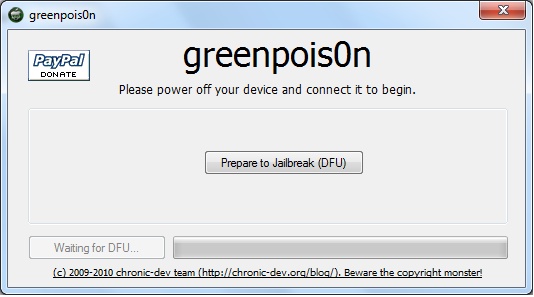
Step 1: Download GreenPois0n and run it as an administrator.

Step 2: Power off your iPad, and connect it to your PC.

Step 3: Walk through the steps to put your iPad into DFU mode to prepare for jailbreak.

Step 4: Once you’re in DFU mode, click the ‘Jailbreak!’ button to jailbreak your iPad.

Step 5: Now, just wait until the status bar shows complete, and your iPad will reboot to the home screen.

Step 7: You should now have a new “Loader” icon on your springboard. Launch Loader. Select Cydia > Install Cydia.

Step 8: One Cydia has successfully been installed, you will be asked if you want to remove Loader. Hit “Remove” and your iPad  will automatically reboot.

Your iPad 3.2.2 should now be successfully jailbroken using GreenPois0n. If you have any question or comment, make sure to add them in the comments section below.
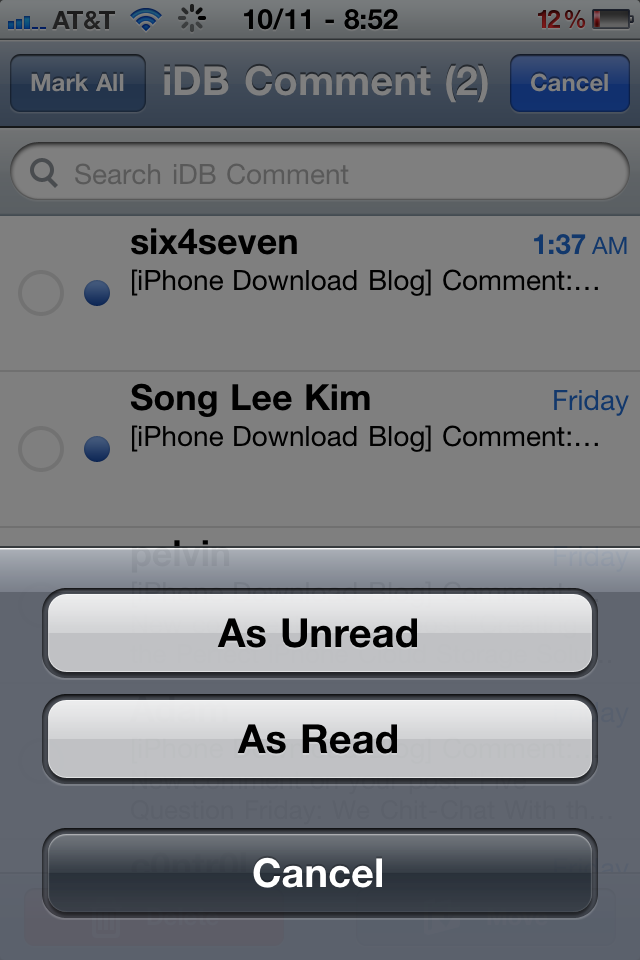
Mark Read Helps Keep Your iPhone’s Inbox Looking Good

Answer me this, how many times have you risen from a night’s slumber, only to find your email inbox littered with stuff that you don’t want to deal with at the moment? Or, what about mail that you just don’t need to read at all?

In times like these, it would be nice if the iPhone featured a “Mark As” feature to quickly mark email as being read or unread. I’m sure Apple will eventually get on the ball and add this strangely absent feature, but for those who are jailbroken, the future is now...

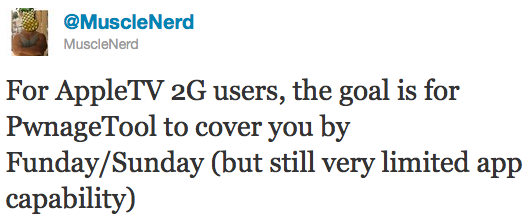
PwnageTool Jailbreak for iOS 4.1 Coming this Sunday

MuscleNerd announced on Twitter earlier today that the Dev Team will be releasing an updated version of PwnageTool to jailbreak iOS 4.1. Not only this version will work with the iPhone 3GS and iPhone 4, but it will also allow to jailbreak the new Apple TV.

PwnageTool is a Mac only tool that allows you to update the firmware while preserving the baseband. It is necessary for those of you who want to be on the latest iOS, while keeping their iPhone unlock. If you're on a PC and want to update to iOS 4.1 while not upgrading the baseband, you may refer to our tutorial...

Another Great Jailbreak App Falls by the Wayside: QuickReply for SMS is “Depreciated” but not “Dead”

After jailbreaking with Limera1n, one of the first apps I went to reinstall was QuickReply for SMS. QR is an app that allows you to reply to incoming text messages no matter where you are on your phone — without ever having to leave the current app.

I was disappointed to see the headline in the app description (now about a month old) that QuickReply is “depreciated, not dead, depreciated.” Author Gaurav Khanna goes on to explain that he’s dropped all support for QuickReply for SMS, meaning the bugs and problems with it are here to stay.

GreenPois0n Download

After a bit of a shaky start, the Chronic Dev Team has finally released the much anticipated greenpois0n jailbreak, and it's available for download now. Much like the already released limera1n, this jailbreak allows you to jailbreak iPhone running iOS 4.1 and iOS 4.2.1.

The GreenPois0n download is now available for both Windows and Mac, and a Linux version might be in the works. GreenPois0n will allow you to jailbreak the iPhone 3GS, iPhone 4, iPad, iPod Touch 3G, and iPod Touch 4G.

You can download GreenPois0n from our downloads section.

If you're not sure how to use it, you may want to refer to our guide on how to jailbreak the iPhone using GreenPois0n.

Tutorial: How to jailbreak your iPhone Using GreenPois0n

This step by step GreenPois0n guide and tutorial will show you how to jailbreak your iPhone 4.1 using GreenPois0n, the new jailbreak by Chronic Dev Team. This GreenPois0n guide will work for the iPhone 3GS, iPhone 4, iPad, iPod Touch 3G, and iPod Touch 4G.

GreenPois0n is is available for Windows, Mac, and Linux.

Although we encountered a few issues here and there, we were able to jailbreak our iPhone 4 successfully using greenpois0n. Once you get around a few hiccups, the process really isn't all that difficult.

Check inside as we step through the jailbreak process with greenpois0n using a Windows machine. The steps are exactly the same no matter what platform you use.

GreenPois0n Jailbreak for iPhone 4.1 Released

After a couple of days delay, the greenpois0n jailbreak was finally released early this morning. As you all have probably heard, the highly anticipated jailbreak was delayed due to the fact that Geohot released his jailbreak -- entitled limera1n -- shortly before greenpois0n was scheduled to be released.

As a result the Chronic Dev Team opted to use the same exploit Geohot used, instead of simultaneously releasing their infamous SHAtter into the wild for Apple to eventually stamp out.  The release, though, hasn't been without it's fair share of problems...

Did You Know Geohot Was a Musician Too?

Did you know that before becoming famous for his iPhone jailbreaks and unlocks, Geohot tried to get a piece of the music industry?

Fortunately for us, he's far better at hacking gadgets than he is at songwriting and singing. This was sent in by iDB reader Josh who apparently stumbled upon this little gem. Check it out...

Geohot even created a MySpace page with a couple other songs. What do you think of that?

Your Top 5 Cydia Minimalist Essentials

We all know the story. There's so many can't-live-without apps in Cydia. But once you install everything, your iPhone becomes a mess of apps competing for (system) power.

A few months later, you've sacrificed speed for functionality. Here's my list of the 5 Cydia downloads that I could be happy with...