Learn how to remove password protection from a locked PDF document so other people can open and read the file without typing the password.
How to remove known or forgotten password from a PDF on Mac

Learn how to remove password protection from a locked PDF document so other people can open and read the file without typing the password.

RGB, otherwise known as red/green/blue, is a color identification method used by digital computer monitors. Every color gets its own RGB value, and this is because a mixture of those three colors makes up the color you're looking at.
RGB values may be used for a variety of reasons, but mostly for those that do a lot of photo editing or who may be tinkering with graphics or web design.
A little-known feature of your Mac is that its operating system comes with a meter that can identify the RGB color of any single pixel on your screen, and in this tutorial, we'll show you just how that's done.

Mobile Mouse Remote is a great app that turns your iOS device into a powerful utilitarian accessory for your Mac or PC. So far, we've shown you how the app can be used as a mouse or trackpad for your computer and how you can use the app as a remote control for your computer, but it also has a lot of keyboard functionality built into it to make your device into a software-based keyboard for your computer.
In this tutorial, we'll show you how you can use Mobile Mouse Remote to type or perform keyboard commands on your Mac or PC directly from your iPhone or iPad.

It's somewhat depressing that Android manufacturers increasingly outfit their flagship smartphones with fast-charging capability while iPhones, and especially iPads, still take forever to charge from zero to hundred percent. And if you happen to actually use your iOS device while it's connected to power, you'll experience even slower-than-usual charging times.
But as it turns out, there's one simple trick everyone should employ every time they plug their iPhone, iPod touch or iPad into a power brick in order to make it charge faster.

Not long ago, we showed you how you can delete your Apple Music search history on your iPhone, iPod touch, and iPad to protect your song-searching privacy, but this capability can also be achieved on your Mac.
In this tutorial, we'll show you how you can clear your search history from Apple Music on your Mac directly from the iTunes app itself.

The biggest problem with subscription services like Apple Music, Spotify and others is the unnerving fact that labels make songs available for streaming on a time-limited basis. As a result, some of the tracks you add to Apple Music playlists may no longer be available for streaming, leaving you with no other choice but to purchase them on the iTunes Store.
Starting with iTunes 12.4, there's a new iCloud status of 'No Longer Available' which you can use to create a dynamically updated playlist containing the songs that you added to your Apple Music library that are no longer available for streaming, here's how.

Java, just like Adobe Flash, is often a major security flaw waiting to happen for both Mac and PC owners.
Although Apple takes security very seriously and just about forces Mac users with Java to check for Java updates automatically, it's still never a bad idea to check on your own from time to time.
Since we recently showed you how to check for Flash updates manually, it only made sense to follow up with a similar guide for Java, which is also a commonly-used web plugin.
In this tutorial, we'll show you how to see if you have the latest version of Java installed on your computer or not.

SnapBack, a long-standing and very easily overlooked Safari for Mac feature, can save you a ton of clicks if you search a lot, and most of us do. With SnapBack, you can go right back to the last full search results page, even after traveling multiple pages in from your search results.
Part of the reason most users aren't familiar with SnapBack has to do with Apple's decision to remove the little orange SnapBack icon from Safari's address bar and bury the feature in the menus.
Here's that secret SnapBack shortcut that everyone should start using right now.

Google Cardboard may be the simplest, most affordable way to experience virtual reality content on a smartphone, but up until recently Google's mobile YouTube app only supported Cardboard on Android.
Beginning with YouTube for iOS version 11.18, iPhone owners can watch YouTube in virtual reality mode on their device.
Here's how you can experience YouTube in VR mode on your iPhone.

Flash is among one of the most targeted web platforms for injecting computers with malware, including Macs, and that's why Adobe is always turning around with updates for Flash all the darned time.
If you're like me, then your security is important to you, and you may not trust automatic updates to deliver updates to you quickly enough.
This tutorial will show you how you can make sure Flash is up to date on your Mac, the manual way.
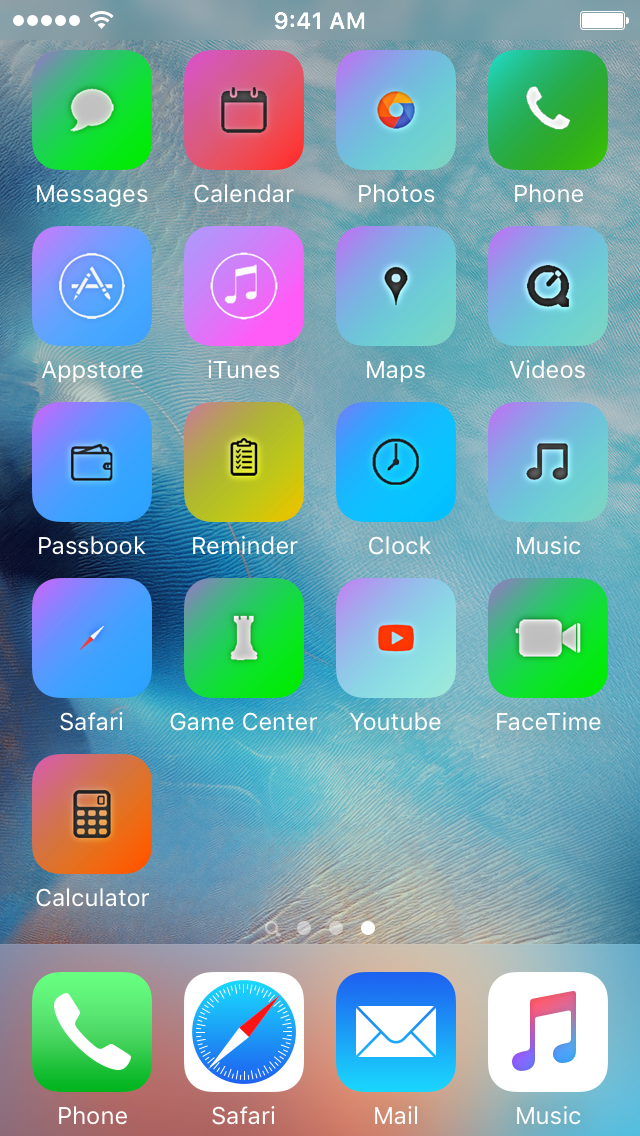
Theming your iPhone, iPod touch, or iPad has been a long time primary reason of jailbreaking. Unfortunately, as the wait for a new jailbreak becomes ever so longer in between iOS releases, the jailbreak scene is becoming less reliable for getting the features you want on the latest version of iOS.
For those who are tired of waiting, iSkin is a new platform that can be used directly from your Safari web browser to install themes on your iOS device without a jailbreak, and we'll show you how it's used in this tutorial.

You knew about three-dimensional buildings and landmarks on Apple Maps—a feature they're calling Flyover mode. But did you know that Apple's mapping service includes virtual tours of more than a hundred major metropolises worldwide? If not, that's because Apple hasn't exactly gone to great lengths to advertise it front and center in the Maps interface.
These virtual tours are basically auto-playing animations in Flyover mode, complete with three-dimensional buildings, terrain and landmarks. They're quite useful if you're visiting a city for the first time, though virtual tourists who want a quick overview of a major city will also find them fun and entertaining.
Here's how you can explore and enjoy 3D Flyover Tours on Apple Maps for the iPhone, iPod touch, iPad and Mac.