Maps

Disable Waze’s menu-based swipe gesture with FarewellGestureWaze

Waze is one of the most popular third-party navigation apps for the iOS platform, but some users find that the interface isn’t without its quirks. For example, the swipe gesture you might use to access the app’s built-in menu could potentially clash with other gestures.

If you experience this problem yourself, then a new free jailbreak tweak called FarewellGestureWaze by iOS developer CydiaGeek should remedy the problem. After installation, it prevents this gesture from launching the Waze app’s built-in menu.

Google Earth for iOS gains 3D imagery, guided tours, 64-bit support & more

Google today announced a major update for its popular Earth app for iPhone and iPad, bringing many new features that debuted on the desktop and web app in April of this year.

Importantly, it's received much needed support for 64-bit iPhone, iPad and iPod touch devices to ensure that it will continue to run on iOS 11 which does not support 32-bit apps at all.

But first, check out the key highlights of this release:

Choose your own adventure with Voyager—Experience interactive stories from around the world. Discover new places with Knowledge Cards—Flip through cards and learn about local landmarks. Orbit the world in 3D—Use the new 3D button or tilt the map with two fingers. Snap and share a Postcard—Capture snapshots of locations and share them with your friends. Feeling Lucky?—Roll the dice and see where the world takes you.

If you like the Flyover feature on Apple Maps, you'll love 3D imagery in Google Earth for iPhone and iPad. To switch to the three-dimensional view, tap a new 3D button and use two fingers to rotate and tilt your vantage point (hint: use this mode to explore Apple Park in all its glory).

You can also capture snapshots of the various locations you find in Earth and share them with your friends. To snap a virtual postcard, tap a new camera icon in the app's toolbar section.

And to help you plan your trip, Google Earth for iOS allows you to experience interactive stories from around the world. Called Voyager, this feature is available Under the Travel category.

There, you’ll find detailed multi-day itineraries for seventeen major cities around the world, including tours like “Paris with Kids”, “Beyond the Beaches of Rio de Janeiro” and many more.

Here are a few other Voyager tours worth checking out:

Natural Treasures from BBC Earth—Journey to six habitats, from islands to mountains to jungles, and learn about the unique and thrilling wildlife in each. Gombe National Park in Tanzania—Hear from Jane Goodall about her team’s chimpanzee research and conservation efforts. Mexico with Lola—Check out the little monsters featured in Sesame Street’s Girl Muppets Around the World, and learn about modern Mayan cultures.

If you'd like to jump to someplace new, you should try Google's “I'm Feeling Lucky” feature by tapping a new dice icon in the toolbar. Lastly, Knowledge Cards, another new feature in Google Earth for iPhone and iPad, makes it easy to see related facts for a place.

Just pull up from the bottom of the screen to bring up a card with rich information about the thousands of places and landmarks around the world. As I mentioned before, the app now supports 64-bit hardware and comes with a brand new icon for your Home screen.

Grab Google Earth for iOS for free from App Store.

iOS 11 Maps has crazy cool VR mode that lets you move around by walking

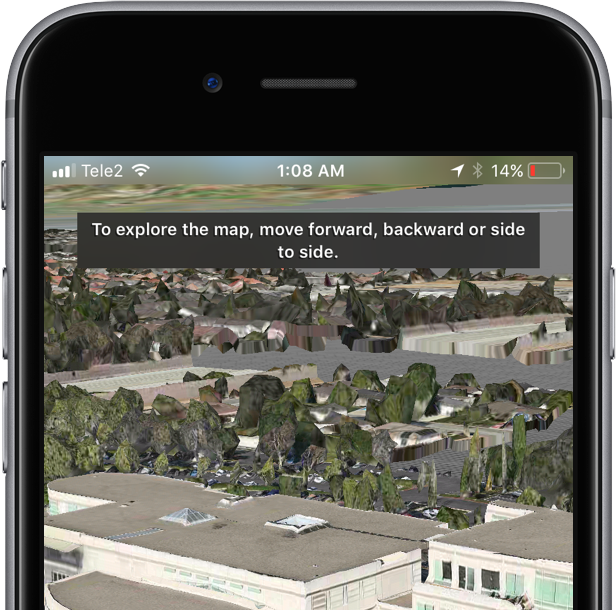
Apple Maps on iOS 11 beta 2 features a great new virtual reality (VR) mode that takes advantage of Apple's new ARKit framework to let you move around in 3D by walking.

This unapologetically cool feature seems to be tied to Flyover, which replaces satellite imagery with three-dimensional buildings, landmarks and other points of interest.

The new VR mode on iOS 11 Maps was highlighted yesterday by Twitter user @StijnDV, but it appears to have been originally discovered by Tweetbot developer Paul Haddad on Wednesday.

To try it out yourself, open Maps on iOS 11 beta 2, switch to 3D mode by tapping “3D”, then use the search field at the bottom to find a place that has Flyover.

On the place card, tap the Flyover button and move the device around to rotate the view. Better still, why don't you actually move forward, backward or side to side to explore the map in VR?

Mind blown.

So, how do we know this nifty feature actually uses ARKit? Because it displays a message when you cover the camera, just like any ARKit-powered app does, saying you should aim the device at a different surface because “more contrast is required”.

As a quick backgrounder, ARKit analyzes live camera feed in real-time, using computer vision to find horizontal planes in your real world, such as tables and floors. I was able to successfully test the feature on my iPhone 6s running a second beta of iOS 11. Because I don't currently own an iPad, I couldn't test VR mode in Maps on the Apple tablet.

WOW There is an VR mode in Apple maps on iOS 11! It seems to use ARKit for positioning! pic.twitter.com/IdXiGoed26

— Stijn (@StijnDV) June 24, 2017

At any rate, this appears to be the default mode for Flyover now, not a special setting. But don't you worry, there's the option to switch back to the old Flyover mode where you rotate and zoom your Flyover view using touch interactions.

This is honestly one of the coolest features in iOS 11! pic.twitter.com/Zjr6RRkKHk

— Stijn (@StijnDV) June 24, 2017

This is a wicked cool feature and I cannot help but wonder how it might look like when experienced through Apple's rumored digital glasses that, as per Robert Scoble, should use optics by German lens specialist and optical instruments maker Carl Zeiss.

You can actually move around by walking! This is crazy cool! pic.twitter.com/ttR6RaAo7D

— Stijn (@StijnDV) June 24, 2017

Some people couldn't get Maps' new VR mode to work, but I suspect it may have something to do with their hardware. Maps' VR mode uses ARKit, which tracks your actual position in the real world with the camera but requires newer hardware.

Holy Flyover Magic Window batman. pic.twitter.com/Fb8nPeLT5J

— Paul Haddad (@tapbot_paul) June 22, 2017

According to Apple, ARKit runs on the Apple A9 and A10 processors. “These processors deliver breakthrough performance that enables fast scene understanding and lets you build detailed and compelling virtual content on top of real-world scenes,” says the company.

In other words, anything older than iPhone 6s, iPhone 6s Plus, iPhone 7, iPhone 7 Plus, the 9.7-inch iPad (early-2017 model) or iPad Pro won't be able to run iOS 11 Maps' VR mode.

So, is this cool or what?

We'd obviously love to hear your thoughts and predictions regarding iOS 11 Maps' new VR mode and what it might signify in terms of possible new VR hardware from Apple.

Do us a favor and chime in with your thoughts in the comments section.

Google Maps gains 3D imagery of Apple Park

Google has updated its imagery on Earth and Maps services so you can now tour Apple's massive new headquarters in glorious 3D graphics. However, Google's data appears to be out of date as the Apple Park imagery shows the site in an earlier state, with the main ring-shaped building still being worked on and Steve Jobs Theater in its early stages of development.

According to the Google Maps team, they refresh 3D images of major landmarks and metropolitan areas at least once per year. As the screenshots attest, Google's data still shows the whole mountain of dirt which has since been reduced substantially as Apple is re-using the earth for landscaping, as evidenced by the latest drone flyovers.

To tour Apple Park in 3D on Google Maps, go to maps.google.com or fire up the Google Maps app on your iPhone or iPad, and search for “Apple Park Visitor Centre”. Now zoom all the way in, switch to Satellite view and click the “3D” icon in the lower-right corner of the interface.

You can now drag the view around, Control-click to rotate and more.

The best way to experience Apple Park headquarters in either 2D or 3D is definitely the recently overhauled Google Earth web app, but you'll need Chrome to use it.

Apple in March 2017 added 3D images of Apple Park to its own Maps service, including support for related details, descriptions and searchable geolocation tags.

Thanks, Carlos!

Google says Apple Watch support will be returning to Maps for iOS

Google has confirmed that it will be bringing back support for Apple Watch to the Maps app for iPhone and iPad at some point in the future. In a statement issued Tuesday to AppleInsider, a spokesperson for the search giant said: “We removed Apple Watch support from our latest iOS release, but expect to support it again in the future”.

The company provided no explanation for the removal of Apple Watch functionality from Maps for iOS, which went largely unnoticed because it wasn't mentioned in App Store release notes.

As we reported yesterday, recent updates to major iPhone apps like Google Maps, eBay, Amazon and Target came stripped of all Apple Watch support, perhaps indicating that watchOS features in them were not widely used.

Google brought its Maps app to Apple Watch in September 2015, with features like turn-by-turn driving, walking and transit directions for recently visited points of interest. The app lacked other features found in Apple's Maps for Apple Watch, such as no conventional map view and the inability to conduct searches without a tethered iPhone.