iPhone

Stay up-to-date on the latest iPhone news and learn new tips and tricks with our comprehensive tutorials. From software updates to new features, we’ve got you covered.

iOS 10 tidbit: using 3D Touch to rename folders and seeing their notifications badge breakdown

iOS 10 makes extended use of 3D Touch-driven gestures on the iPhone 6s and iPhone 6s Plus. For instance, you can 3D Touch the bottom row of icons in Control Center to set flashlight intensity, start the timer, go to your last calculation and jump directly into a Camera mode.

You can also clear all notifications with 3D Touch and now I've stumbled upon another handy 3D Touch shortcut on iOS 10: folder renaming and seeing apps inside a folder with missed notifications.

iOS 10 tidbit: battery life suggestions

One of the useful little things Apple's built into iOS 10 without even mentioning it during the WWDC keynote or in iOS 10 marketing materials is a brand new feature designed to suggest ways users can maximize their iPhone's battery life. Branded as Battery Life Suggestions, it appears automatically when your battery is not connected to power or using Low Power Mode.

iOS 10 preview: your new Lock screen with Raise to Wake, widgets, interactive notifications & more

Having taken a closer look at a much improved Messages app, which delivers more expressive and animated ways to message friends and family, our preview of big new features in iOS 10 continues with a detailed overview of an all-new Lock screen. Wait, the Lock screen in iOS 10 warrants an article?

As you know, the Lock screen has remained virtually unchanged since the iPhone's inception. With iOS 10, however, it's  undergone some major improvements in the form of a refined look and feel, including vastly redesigned widgets, and new features such as interactive notifications, Raise to Wake and expanded use of 3D Touch shortcuts.

We think that many folks are going to appreciate how iOS 10 makes their device's Lock and Home screens way more functional than before, so here's a detailed walkthrough of all the goodies included in iOS 10's freshened up Lock screen experience.

iOS 10 tidbit: clearing all notifications at once with a simple 3D Touch gesture

One of the longest-standing complaints about iOS has got to be its inexplicable lack of a Clear All button in the Notification Center that would permit users to clear out all of their missed alerts in one go rather than dismissing them one by one, like an animal.

Not anymore: iOS 10 makes expanded use of 3D Touch throughout the system, including making all missed notifications disappear with a single press.

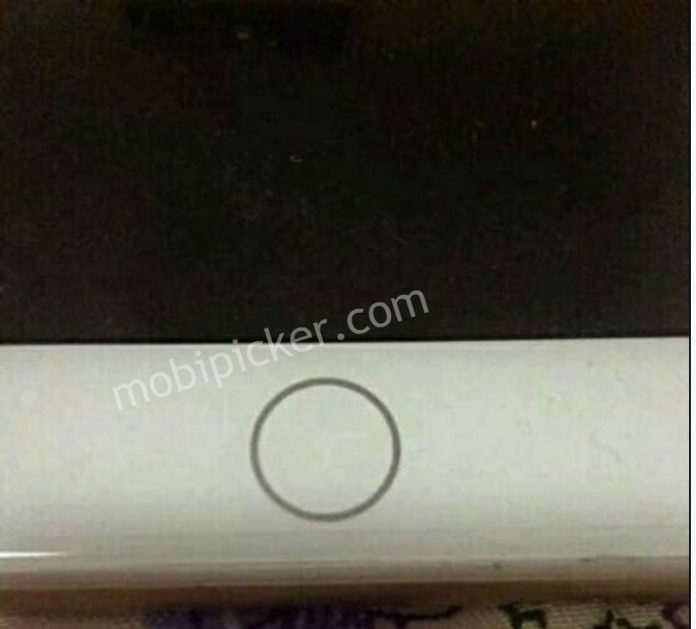
Did iPhone 7’s touch-sensitive Home button just leak?

Many sources are adamant that we'll have to wait until a tenth anniversary iPhone next year for a bezel-less device with an integrated Touch ID sensor and no Home button. As for the upcoming iPhone 7 revision, the most recent leak from MobiPicker suggests that the iPhone 7 might come outfitted with a touch-sensitive Home button that sits flush with the surrounding bezel, requiring users to perform tapping actions due to the absence of any moving parts.

Poll: will you upgrade to iOS 10 or keep your jailbreak?

Apple announced iOS 10 yesterday at the company's WWDC 2016 Keynote and awed the audience with some pretty neat new features.

Of course, the battle continues for those who want more control over their devices, and because of that, we want to know whether you're going to be updating to iOS 10 this Fall, or if you'll be keeping your iOS device(s) jailbroken on iOS 9 or earlier.

2016 Apple Design Award winners: Streaks, djay Pro, Lara Croft GO, and more

Following its WWDC keynote on Monday, Apple held a smaller event to announce the winners of its Apple Design Awards. This is an annual undertaking for the company, and the awards are highly coveted by developers.

Apple grants the awards to high quality apps and games, with unique and compelling designs that set them apart from other offerings. Winners get featured in the App Store, a trophy, and an assortment of Apple products.

30+ new iOS 10 features Apple didn’t mention today

In typical fashion, Apple used a portion of its WWDC keynote to go over some of the major—or "tentpole"—features coming in the next version of iOS 10. There's a more powerful Messages app, a new HomeKit app, redesigned Music and News apps, and more.

But obvioulsy Apple couldn't cover every new feature today, so it offered up a sneak peak at some other additions and improvements we can expect from the update. The slide you see above names 30+ new features coming in iOS 10, and we've listed them below.

Apple News gets simpler design, subscriptions and more in iOS 10

Among the new things Apple announced 10 today is a redesigned News application. This is a standalone news aggregation app, first introduced in iOS 9 last summer, and it's getting some significant improvements in the upcoming iOS 10 update.

These start with what Apple is calling an "all-new design." In the 'For You' tab, your stories are now broken up into clear sections like Top Stories, Trending—which shows you the top stories right now, and topics you follow, like cars or sports.

iOS 10 device compatibility list

Apple today during the WWDC 2016 keynote at the Bill Graham Civic Auditorium in San Francisco announced next major versions of its four main operating systems—iOS, tvOS, watchOS and macOS—that power its iOS devices, set-top boxes, watches and computers.

iOS 10, the tenth major revision of iOS, is now official, but will it work on your existing hardware? Not if you're still on the iPhone 4s or want to run iOS 10 on the original iPad mini or iPads older than the iPad 4.