iOS 6

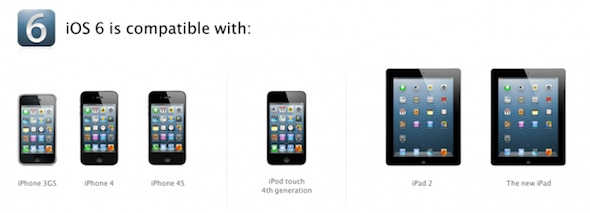
Complete guide to iOS 6 device compatibility

When Apple announced that iOS 6, the latest version of its mobile OS, would work with older devices all of the way back to the iPhone 3GS, people cheered. It's not typical these days for major software updates to support 3 year-old products.

But don't give Tim Cook and company the Nobel Peace Prize just yet. Some two-year old devices, like the original iPad, aren't getting any iOS 6 love. And even the ones that are supported aren't guaranteed to have access to all of its features...

Apple to Google: f**k you

Apple really stick it to Google by supplanting Google Maps in iOS 6 with in-house mapping service, didn't it? But more than anything, yesterday's WWDC keynote has proven that Apple is just as merciless without Steve Jobs.

As both tech giants fight tooth and nail for mindshare, Cupertino is now adamant to go thermonuclear on everything Google, not just Maps.

The iPhone maker demonstrated its incredible agility and willingness to fight Google on multiple dimensions yesterday. To that extent, iOS 6 could be viewed as the biggest step yet in the de-Googlification of iOS.

Here's why...

FaceTime over cellular spells trouble for capped data users

During its WWDC keynote yesterday, Apple announced that the latest version of their mobile operating system, iOS 6, would finally include the ability to make FaceTime calls over cellular networks.

Considering that this feature has been restricted to Wi-Fi connections since it was introduced in 2010, this was a pretty big deal. But it could end up causing major problems for capped data users...

iOS 6: Safari video demonstration

[tube]http://www.youtube.com/watch?v=tK2G-uRzNV4[/tube]

Safari doesn't look that different on iOS 6, but underneath the hood you'll find some interesting changes aimed at improving your mobile browsing experience. First of all, there's the ability to browse in full screen mode while in landscape on the iPhone. Secondly, there's the ability to sync tabs across other iOS 6 devices using iCloud. Next up to bat is a new update to Reading List that allows you to read those items while offline.

Take a look at our video demonstration inside that showcases all of these new features and more. Have you found anything in addition to these items? If you do, be sure to let us know in the comments.

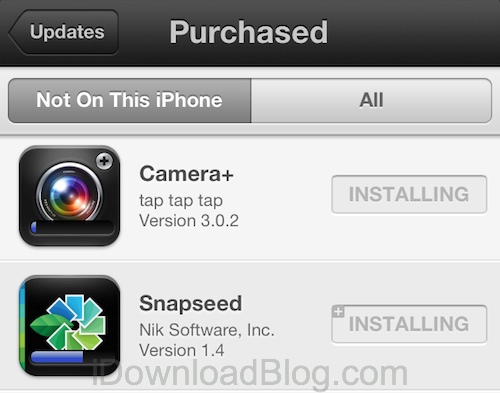
New in iOS 6: App Store app doesn’t close anymore when downloading an app

One major annoyance I had with iOS so far is that anytime you download an application from the App Store, the app would close and take you back to the Home screen. If you want to download a new app, you have to launch the App Store app again, and repeat the process.

iOS 6 puts an end to this small nonsense and now lets you download as many apps as you want without closing...

New in iOS 6: custom dictionary in the cloud

While we already know a ton about the major new features in iOS 6,  we are still learning about the update's lesser-known enhancements. Things that didn't make it into Apple's keynote yesterday.

The latest one we've come across, as pointed out by Gizmodo, is that your customized (personalized, whatever) dictionary gets the iCloud treatment in iOS 6, syncing it across all devices...

Apple also using Bing Maps images in iOS 6 Maps

Whoa, it looks like Apple's brand new in-house Maps solution in iOS 6 sources some content from Microsoft's Bing Maps.

The iPhone maker taps more than a dozen of providers for various mapping data used in iOS 6 Maps.

However, the Redmond giant is not officially included on Apple's list of Maps acknowledgments, even if some of the images used reportedly have Microsoft attribution...

iOS 6 color-matches status bar to the app you’re running

Here's another little tweak in Apple's upcoming iOS 6 mobile operating system that didn't got any mention at yesterday's WWDC keynote. According to the agile Reddit community, the status bar in iOS 6 changes color to match the app you're running.

This subtle visual hint doesn't seem to work with all apps (yet) so it's probably something that needs to be enabled by third-party developers. It's kinda cool, check out the screenies right below...

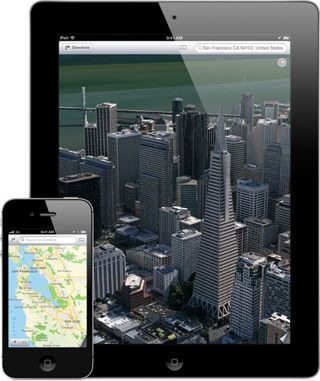
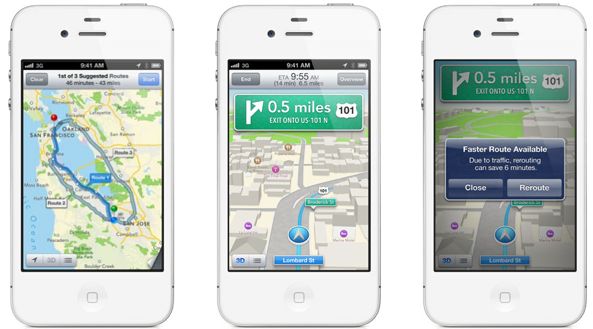
Turn-by-turn navigation and Flyover in iOS 6 Maps is limited to iPhone 4S, iPad 2 or later

Apple really stick it to Google with jaw-dropping 3D Maps and full turn-by-turn navigation in iOS 6. However, those headline features won't be supported on hardware released prior to 2011. In other words, you'll need at least A5-enabled iOS devices to enjoy Flyovers and turn-by-turn navigation.

This means either the latest iPhone 4S model or the second- or third-generation iPad. So, did Apple just pull a Siri, all over again?

MuscleNerd jailbreaks iOS 6 beta

It's true, MuscleNerd has successfully jailbroken iOS 6 on an iPod Touch 4th generation device. Unfortunately, that jailbreak isn't publicly available, and in its current form it's hardly what we'd expect anyway. While it's been technically jailbroken by the defacto leader of the iPhone Dev Team, essential items like Cydia still lack functionality, and it's just a tethered jailbreak.

Hence, it'll probably be a while before we see an official iOS 6 beta jailbreak from the Dev Team. It's just nice to know that they've already started tinkering around with the possibilities...

iOS 6: App Store video demonstration

[tube]http://www.youtube.com/watch?v=jXCrM1rzLZY[/tube]

Apple left little untouched with its iOS 6 overhaul, and that includes the App Store app. The App Store has remained relatively the same over the years, but this version is a completely new and improved iteration.

It's so different, that you might not even recognize it on first glance. Thankfully, the changes are for the better, as this new App Store refresh provides a much more intuitive and seamless experience overall. One of the best new features is the ability to download items without being kicked back to the Home screen time and again. It really is that much better than before. Please feel free to share your thoughts on the iOS 6 version of the App Store app in the comments.