iCloud

iCloud Photo Sharing: one of Apple’s best kept secrets

If you're a frequent reader then you may remember my thoughts on Apple's iCloud Photo Library beta and my lack of faith in Apple and its ability to keep my photos safe. Nobody wants to lose photographs of their kids or loved ones because Apple's cloud solution had a meltdown one day.

And I just don't have any expectation of that not happening at some point.

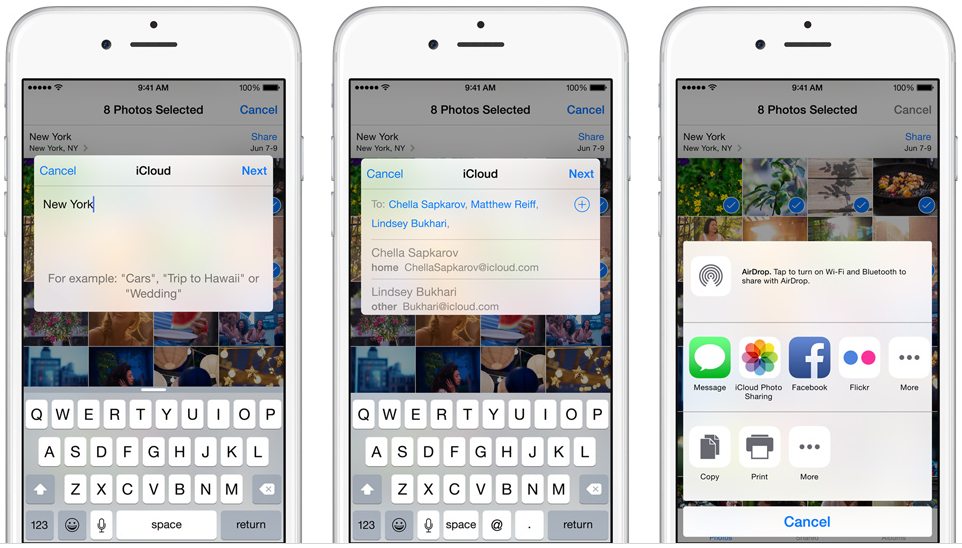
During my time spent testing iCloud Photo Library I rediscovered one feature that I had actually forgotten about since the days of the iOS 7 betas. It was as feature that I never made great use of at the time because some key members of my family didn't have iPhones, but now that they do, I decided to revisit it.

The feature I am talking about is iCloud Photo Sharing, and it's really rather good.

iWork for iCloud now available to everyone

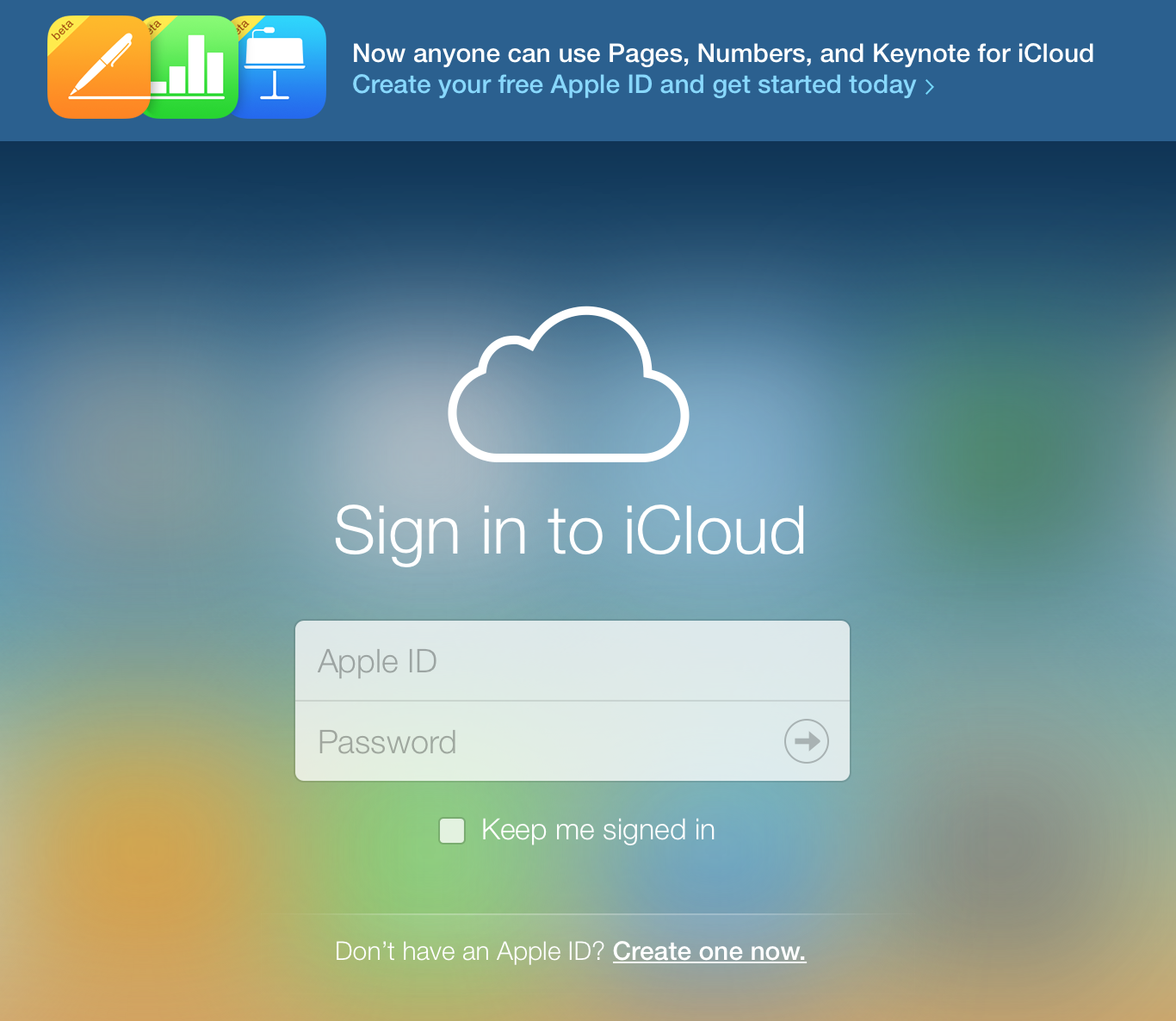
Apple today removed the beta tag from its iWork for iCloud productivity suite, which it opened up to non-Apple device owners earlier this month. Now, anyone with a modern browser and an Apple ID can utilize the web-based office apps which include Pages, Numbers and Keynote.

As seen in the above screenshot, users who don't have an Apple ID can create one by following the "Create one now" link, regardless of whether or not they own a Mac or iOS device. All that's required is that they give their name, email address, date of birth and pick security questions.

Word, Excel and PowerPoint for iOS gain iCloud storage integration

Windows maker Microsoft today announced it's bringing out new cloud storage integration to Word, Excel and PowerPoint apps for the iPhone and iPad, including the iCloud file picker on iOS and Office Online integration for viewing and editing.

The much appreciated support for Apple's cloud-based storage permits customers to store their documents, presentations and spreadsheets to iCloud and access them on their other iOS and Mac devices.

Will you trust iCloud with your memories?

The big news around the Apple blogs right now is the arrival of the first beta of Apple's new Photos application for the Mac. Coming as part of the OS X 10.10.3 beta of Yosemite, Photos is the long awaited replacement for the aging iPhoto and to some extent, Aperture. In a world where we create gigabytes of photos each and every year, in part thanks to our iPhones, having a way to keep those images organized is vitally important to many of us. Apple thinks Photos, in combination with iCloud, is how we're going to do just that.

But is it right?

iCloud.com’s Photos web app gets image zoom function and sharing via email

German enthusiast blog iFun.de has spotted a pair of useful additions concerning the Photos web app on iCloud.com.

Two new features, which were added over the weekend, let you zoom in on an image via a new slider in the toolbar and send photos as email attachments directly from the web UI.

Previously, sharing via email was a tedious multi-step process where you had to download a photo to your computer before attaching it to an email message using a third-party desktop email application or a webmail service.

Second Yosemite update looms: Wi-Fi fixes, iCloud Drive in Time Machine and more

Despite all the talk of a problematic decline in software quality, Apple is feeling your pain and isn't standing still.

Currently in testing, a second update to OS X Yosemite is due later this week. First of all, Mac OS X 10.10.2 apparently squashes that annoying bug which manifests itself annoyingly as intermittent Wi-Fi issues.

Another one resolves a bug preventing your Mac from reconnecting to a Wi-Fi network after waking from sleep, causing you to manually disable and re-enable Wi-Fi, which gets old fast.

Next, iCloud Drive should be now accessible directly in Time Machine, including the ability to track changes to files and documents.

Moreover, 10.10.2 prevents the so-called ‘Thunderstrike’ hardware exploit which targets Macs equipped with high-bandwidth Thunderbolt ports and also includes other important fixes.

Apple patents Touch ID iCloud sync, Apple Pay POS with embedded fingerprint sensor

Thursday, the United States Patent and Trademark Office published a very interesting and curious patent application by Apple which describes a technology seeking to synchronize Touch ID fingerprint data between devices through iCloud.

Titled “Finger biometric sensor data synchronization via a cloud computing device and related methods,” the invention would permit biometric data to be collected on a primary device, say your iPhone, and then uploaded to iCloud for dissemination to secondary devices.

Apple patches serious vulnerability that let hackers take over your Apple ID

As of today, brute-forcing your way into your ex's Apple ID or iCloud account by way of dictionary-based attacks is no longer a viable option.

As reported by James Cook of Business Insider, Apple's reportedly patched a vulnerability in its iCloud service that determined hackers were able to exploit in order to hack into your Apple ID account.

Even though Apple IDs that employ weak passwords and don't use Apple's vaunted two-step verification feature were at greatest risk, we're most certainly glad that Apple's moved so swiftly to increase online security of its users.

New Apple ID attack tool surfaces as Apple pulls Photos web app from iCloud.com

Friday, a new attack tool was posted to GitHub that uses brute-force dictionary attacks on iCloud and Apple ID accounts with weak passwords. Using a dictionary list containing more than 500 words, the 'iDict' tool pretends to be a legitimate iPhone device trying to log in to iCloud.com. Somehow, it manages to avoid Apple ID lockout restrictions.

People with complex passwords shouldn't be concerned but those with simple ones based on commonly used words such as pet names are at risk. If you fall in that category, you're wholeheartedly recommended to change your password and optionally enable two-step verification for your Apple ID.

Seemingly unrelated to 'iDict', the Photos web app mysteriously disappeared from the iCloud website this morning.

Elcomsoft’s Phone Breaker can now help access iCloud data protected with 2-step verification

Moscow-based Elcomsoft, which produces a mobile forensic tool used by law enforcement around the world to gain access to a suspect's iOS devices, has updated its Phone Breaker application which now makes it easier to bypass Apple's two-step verification for Apple ID accounts in order to access underlying iCloud data, Engadget reported Thursday.

Not only does this include iWork documents stored in iCloud, but also data in third-party apps such as WhatsApp communications, 1Password password databases — even user dictionaries that may contain secret words and phrases — provided a user has enabled the app in question to sync data with iCloud.

Although hackers still need both your Apple ID username/password and a two-factor code sent to your trusted device (or a digital token stolen from your computer), once they do gain access to your account Phone Breaker can then create a digital token granting them permanent access to iCloud data, no two-step verification code needed — until you change your Apple ID password, that is.

iCloud.com’s Find My iPhone replaces Google with Apple Maps for all users

Nearly two years after supplanting the stock Google Maps iOS app with its own much-maligned service that resulted in Scott Forstall's ousting, Apple's web-based Find My iPhone service available over at iCloud.com seems to have adopted Apple Maps backend for all users, reports 9to5Mac.

Previously, using the web-based version of Find My iPhone used to rely on Google Maps data. The move could indicate plans to roll out a web-based Apple Maps accessible to anyone through a web browser, allowing the iPhone maker to better compete with Google Maps.