How to

4 Ways to Improve Your iPhone’s Battery Life

Are you suffering from poor battery life on your iPhone? Will your trusty smartphone no longer get you through the day on a single charge? How about even half a day?

Your iPhone's battery could failing, but there are still ways to help maximize your battery life while you still can. We've collected four tips to help you squeeze the most juice out of your iPhone's battery...

How To: Manually Enable Multitasking for Cydia in iOS 4

Cydia's recent update made the jailbroken app store faster and brought about some other nice improvements. One of those new features was the ability to resume your place in Cydia after exiting the app, so you weren't forced to start over each time you closed it.

Though it was a major step up from the previous version, it's not real multitasking. Downloading something in Cydia typically renders the rest of your iPhone helpless, but what if I told you there was an easy way to enable true multitasking?

How to Use Google Music Beta on Your iPhone

You've all probably heard by now that Google has launched the beta version of its new cloud storage service. Google Music Beta is currently free and allows users to store up to 20,000 songs for playback on any Android device, but what about iOS?

If you're tired of waiting on Apple to launch their own cloud services, you can join in on the Google Music Beta party with your iDevice. Much like the Amazon cloud service, iOS users have found a way  to playback Google Music on their iDevices...

Everything You Need to Know About iOS 4.3.3 Jailbreak

Apple released iOS 4.3.3 (4.2.8 for Verizon iPhones) last Wednesday, less than three weeks after the previous software update. The new firmware included a fix for the location tracking file that Apple has gotten into so much water over (is that considered Cider?).

Chances are, most of you didn't consider 4.3.3 big enough to update from 4.3.2. But with the Verizon iPad 2 problem fixed and the infamous tracking bug patched, we may not see another update until iOS 5 is released. If that's the case, then this will likely be the last jailbreak for several months, so why not update?

How to Jailbreak iPad 4.3.3 with RedSn0w [Tutorial]

Three days ago, we told you that Apple released a new version of their iOS firmware. This update was specifically released to patch the location bug that made everyone so nervous.

We warned both original iPad and iPad 2 owners to avoid updating until we had official word from the jailbreak community that it was ok. We now have confirmation that iOS 4.3.3 is indeed susceptible to the current exploit.

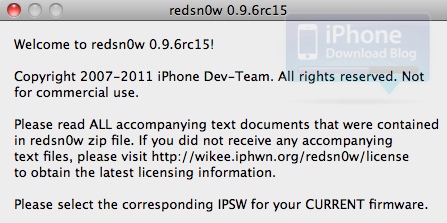
Earlier today, the Dev Team released updated versions of their jailbreak software. Now both PwnageTool and RedSn0w have the ability to hack Apple's new iOS 4.3.3. If you have an original iPad and have been dying to update it to get rid of the tracking file, check out this step by step tutorial:

This jailbreak is only for the original iPad, if you have an iPad 2 click here.

Step 1: Make sure your iPad is on the latest 4.3.3 firmware. It's also a good idea to make sure you are using the latest iTunes.

Step 2: Download RedSn0w 0.9.6.RC15 and iOS 4.3.3 for your iPad from here. I always recommend downloading everything to your desktop to help keep track of things.

Step 3: After launching RedSn0w, find the firmware you just downloaded, and click next. You'll then be given options like customizing your boot logo, once you've selected what you want, click next.

Step 4: Make sure your iPad is off and connected to your computer. Then just follow the instructions to get your iPad into DFU mode.

Step 5: Once you are successfully in DFU mode, RedSn0w will start its magic. This can take a while, but after it's done your iPad will restart.

You should now see the Cydia icon on your home screen, enjoy.

Any questions?

Jailbreak iPhone 4.3.3 with Sn0wbreeze 2.7 [tutorial]

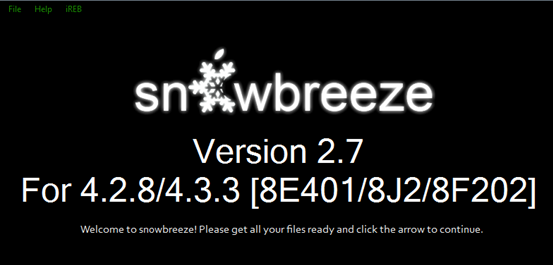
Most of you that have upgraded to Apple's latest firmware, have probably already jailbroken your iDevices using RedSn0w or PwnageTool. If you haven't yet, you may want to give Sn0wbreeze a try. As we reported earlier, the jailbreak software has joined the iOS 4.3.3 party, courtesy of i0n1c's untether.

Although generally mentioned last when discussing jailbreak options, Sn0wbreeze  is still a good choice for jailbreakers looking to hack their iDevices with ease. It's especially useful for folks with Verizon iPhones, as the software created by iH8sn0w is currently the only way to jailbreak 4.2.8...

How to Unlock your iPhone 4.3.3 with UltraSn0w

Thanks to the hard work of the iPhone Dev Team, the UltraSn0w unlock for iPhone has been updated to play well with iOS 4.3.3. As mentioned in our previous post about UltraSn0w, this will only work with iPhone 4 baseband 1.59.00, and iPhone 3G/3GS basebands 4.26.08, 5.11.07, 5.12.01, 5.13.04, and 6.15.00.

If your baseband is different from these, then you can't unlock for the time being. If your baseband matches one of those above but you are on an older firmware, use PwnageTool to update while preserving the baseband.

In this tutorial, we will show you how to unlock your iPhone 4.3.3 using UltraSn0w...

Jailbreak iPhone 4.3.3 with RedSn0w [Tutorial]

Just hours ago, the Dev Team released an update to their popular jailbreak tools RedSn0w and PwnageTool. Those 2 are now fully compatible with iOS 4.3.3 and can be used safely to jailbreak Apple's latest firmware.

RedSn0w 0.9.6rc15 will jailbreak any device on iOS 4.3.3 except for the iPad 2. This tutorial will show you how to jailbreak your iPhone running iOS 4.3.3 using UltraSn0w. If you have an iPod Touch or iPad, you may follow this guide as well because the steps are identical...

How to Spot a Failbreaker

For those who haven't been keeping up with the latest iPad 2 jailbreak news, let me bring you up to speed. Last week there was an unknown Twitter user proclaiming that he had created an iPad 2 jailbreak. He uploaded videos and pictures of what seemed to be an iPad 2 running Cydia.

He built up close to 1000 Twitter followers, and even had media outlets (including us) mentioning his work on Apple's tablet. Although we maintained a certain level of skepticism, a part of us wanted to believe the photos and the videos were real.

Some people got so wrapped up in their beliefs, that they blindly downloaded an unknown EXE file from the hacker. He claimed that this was the iPad 2 jailbreak everyone was waiting for. Luckily, it was nothing more than a simple app designed to error out. It could have easily been something much more malicious.

For folks who are looking for help to dismiss future fakes, the Chronic Dev Team have posted a video on their GreenPois0n website that educates the average joe on how to spot a fake video of a jailbreak.

http://www.youtube.com/watch?feature=player_embedded&v=4St2eJA6geQ

The Chronic Dev Team's GreenPois0n software has been a staple in the jailbreak community for the last few years. They are currently working on a real iPad 2 jailbreak, but have stated as recently as last week that it is no where close to being done.

While the fake jailbreak from last week can be written off as a bad prank, the next time folks may not be so lucky. We encourage you to check back here for the latest information on an official iPad 2 jailbreak.

How to Jailbreak iPad 4.3.2 with PwnageTool

Just like RedSn0w earlier this week, PwnageTool has been updated to support the new firmware 4.3.2 for iOS. As previously stated, there wasn't much reason for folks on the original iPad to update to this latest software.

But for the people that did, PwnageTool is recommended to jailbreak your iPad. It is simple and about as solid as it gets when it comes to jailbreak applications. If you've never done this before, or need a quick refresher, check out the tutorial below.

If you are looking for reasons to hack your iPad, check out our article, The Top 5 Reasons to Jailbreak here.

Important note: PwnageTool is for Mac OS only, for those that use Windows and want to jailbreak, check out our RedSn0w tutorial. Again this jailbreak is only for original iPads, the iPad 2 has not yet been jailbroken.

Step 1. Obviously make sure your iTunes is up to date and your iPad is on the latest firmware (4.3.2). You're also going to need to download the latest version of PwnageTool from here.

Step 2. It's a torrent, meaning you'll need a client like uTorrent to open the file once it's downloaded. After it's installed, open it up and select iPad and Expert Mode and click next. Browse to HD/Users/$urname$/Library/iTunes/iPadSoftwareUpdates and select the 4.3.2 firmware.

Step 3. If PwnageTool likes the firmware you picked, it'll take you to a menu where you can tweak the jailbreak. If you choose Cydia packages, you can preinstall tweaks and apps so when the jailbreak gets loaded onto your iPhone, its already set up.

Step 4. Once you are done tinkering, select the build option and click next. This is where PwnageTool does its magic. It'll take a bit, so be patient.

Step 5. After the custom firmware is done building, PwnageTool will have you put your iPad in DFU Mode, but don't worry, the software walks you through this.

Step 6. If you do it successfully, iTunes should recognize that you have a device plugged in and ask you to restore. Hold down the Option key while clicking restore to get the option to choose your custom firmware. Once it installs, your iPad reboots and you are finished!

Any questions?
How to Make Safari Load Faster on the iPhone

Although Safari may not be perfect, as far as truly native iPhone browsers go, it's all we've got. If one of your major problems with Apple's mobile browser is how long it takes to load, you're in good company.

It's Safari's built-in session saving feature that makes the browser so sluggish. In most cases, it will completely reload you're previous page you were on at launch. iOS doesn't have an option to disable this feature, but there might be a way around it...

How to Jailbreak iPhone 4.3.2 with RedSn0w

Just about 4 days after Apple released iOS 4.3.2 for iPhone, an updated version of the untethered jailbreak has been released earlier today by iPhone hacker i0n1c. This untethered jailbreak was used by the Dev Team who also updated their jailbreak tool RedSn0w.

In this post, we will show you how to use RedSn0w to jailbreak your iPhone on iOS 4.3.2. This jailbreak will work with any device on iOS 4.3.2, except for the iPad 2...