‘Other’ storage on your iPhone and iPad explained

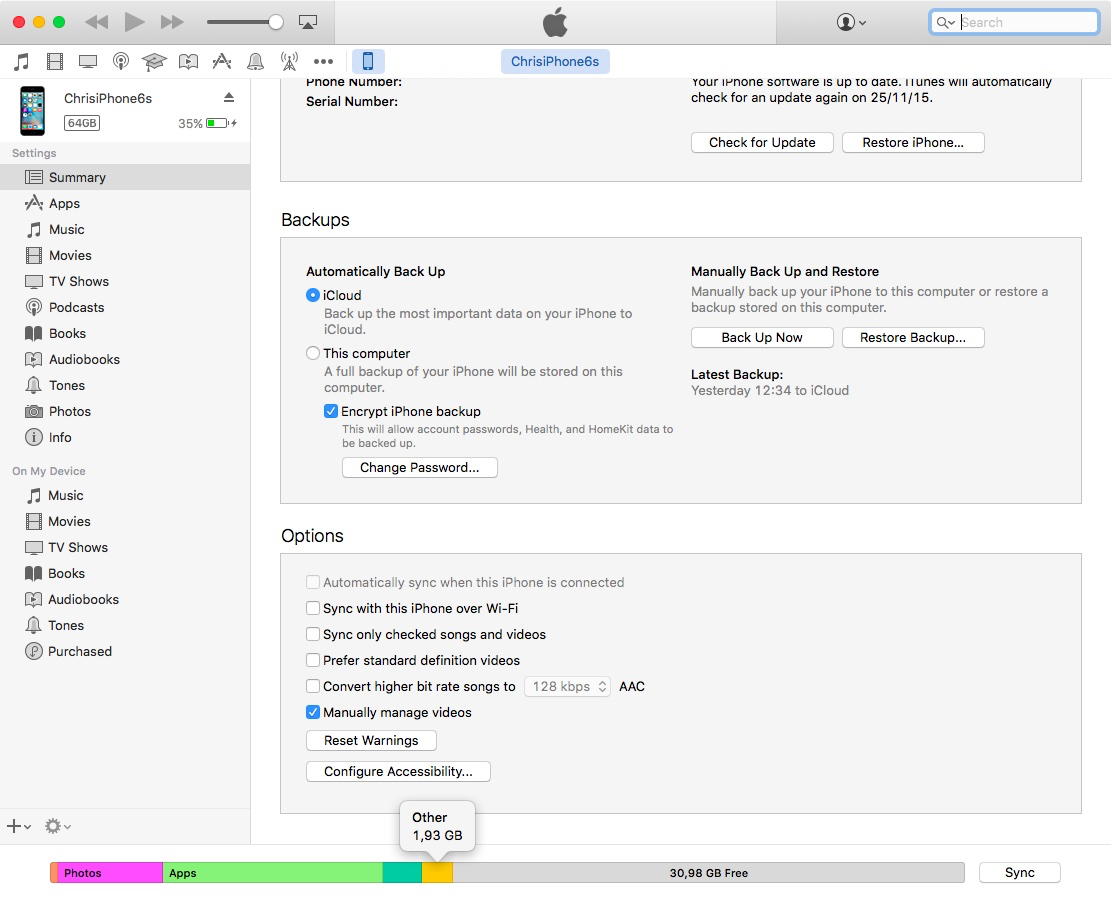
For most users, the ‘Other’ iOS storage category—reported after connecting an iOS device to desktop iTunes—is something of a mystery. ‘Other’ storage starts at one to five percent of total device capacity but can quickly creep in to a few gigabytes.

This post will unravel the mysteries behind 'Other' iOS storage, explain what it's used for, how iOS manages it and what you can do to decrease it.


Twitter rolls out a new timeline feature

Twitter's bird logo set against a transparent background

The pressure mounts on Twitter to re-ignite growth, which has virtually come to a halt as average users increasingly find the service too confusing and difficult to use. Today, the micro-blogging service unveiled yet another refinement designed to adjust how the timeline surfaces interesting content.

Similar to the “While you were away” timeline feature which released a year ago, Twitter will now put recommended, not the newest, tweets at the top of your timeline so that you never miss important updates from people you follow.

Some of the Mac apps known to be affected by the Sparkle vulnerability

A vulnerability discovered in an outdated version of the Sparkle updater framework that many third-party OS X apps depend on for serving the user with regular updates has been getting a lot of attention recently.

As we reported on Tuesday, the security problem affects a number of third-party Mac apps downloaded from the internet, and not apps downloaded from the Mac App Store. The vulnerability roots from the lack of an encrypted connection and gives a malicious hacker the ability to perform a man-in-the-middle attack.

But what OS X apps are affected? This is the information you need to know as soon as possible to keep your Mac safe from potential malware threats.

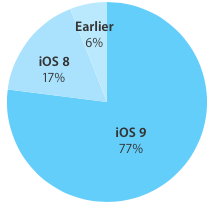
iOS 9 adoption keeps chugging along, now standing at 77 percent

According to the latest stats published today on Apple's App Store dashboard for developers, 77 percent of devices are now using iOS 9.0 or later.

The new data point, captured by the App Store on February 8, 2016, represents a one-point increase over the adoption rate of 76 percent recorded two weeks ago and a two-point gain versus the 75 percent figure that was captured a month ago.

Apple seeds beta 3 of OS X 10.11.4 and iOS 9.3 to public testers

Two days after seeding iOS 9 beta 3 and OS X 10.11.4 beta 3 to developers, Apple has made the updates available to public testers. Folks who are registered in the company's Beta Software Program can now install the new firmware on their various devices.

As usual, the new iOS 9.3 beta is available over-the-air via the Settings app to those already running 9.3, and the new El Capitan 10.11.4 beta can be found in the Updates tab of the Mac App Store. You just need to make sure your Mac or device is enrolled.

Latest El Capitan beta has fixed Safari’s mishandling of shortened Twitter “t.co” links

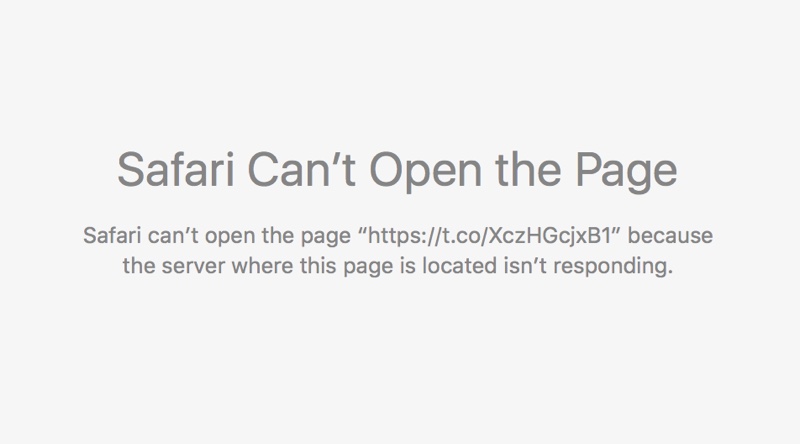
An annoying issue pertaining to broken Twitter links, which has persisted in Safari for Mac since November 2015, has been fixed in the third beta of the forthcoming OS X 10.11.4 El Capitan software update, according to user reports on the Apple Support Communities forums.

The “Safari can’t open the page because the server where this page is located is not responding” error page no longer appears when clicking shortened “t.co” Twitter links with the secure HTTPS protocol in Safari and third-party apps like Tweetbot.

Apple hiring engineers to join its Clock Face Team

Apple is seeking software engineer to join its 'Clock Face Team' to work on yet-to-be-released faces and complications for the Apple Watch.

As originally discovered by AppleInsider yesterday, an Apple job ad describes the position as helping build the watch faces and complications.

“You’ll work closely with the UI design, iOS Frameworks and QA teams to develop interactions of superior quality that will ship to millions of users,” reads the job ad.

Apple Music now available on Sonos wireless speakers worldwide

As of today, owners of Sonos systems around the world can stream Apple Music directly through their wireless speaker hardware, the company announced. Anyone with an Apple Music subscription, or even a free trial, can stream any song from Apple's catalog to their Sonos speakers.

Just choose Add Music Service in Sonos's companion iPhone app, scroll down to the Apple Music icon and log into your account.

Why and how to use a VPN on your iOS device or Mac

A virtual private network, commonly referred to as a VPN, is a type of connection you can use over the internet that helps to secure your identity as you surf the web.

Often times, they're used to improve your security and privacy on public Wi-Fi networks, but they're also used for a wide variety of other reasons. If you've been considering using a VPN on your iOS device(s) or Mac(s), then you've come to the right place. We're going to tell you all about why you should consider using one and how to use a VPN on iPhone, iPad, or Mac to your advantage.

What you need to know about the Sparkle vulnerability affecting some OS X apps

A new vulnerability has been discovered to affect a wide variety of third-party apps for OS X that have been downloaded from the internet and use an outdated version of the Sparkle updater framework.

The new vulnerability puts a number of users of affected third-party apps at risk of being hijacked when those apps attempt to use the outdated framework to alert users of new app updates.

How to disable suggested search terms in Safari

Google Suggestions while typing in Safari address bar

Safari Smart Search Field lets you type in either an URL to visit or a search query to send to the default search engine. It's also a place where search suggestions automatically pop up as you type. With this cool feature, you can type just the first few letters of a query and rely on the search engine (Google, Bing, Yahoo, etc.) to help you complete the search term without needing to type out the rest of your query. But, certain users may not be fond of this feature for privacy reasons.

If you're among them, use the step-by-step instructions provided in this tutorial to turn off suggested search terms in Safari for iPhone, iPad, and Mac.