This summer, endless people will take to the highways for road trips. Whether family vacations or spring break, when you’re on the road, it can be extremely handy to have a clip to hold your phone. This not only keeps it out of your hands, which helps you not text and drive, but it makes it easy to see your GPS or music.
We took to Amazon and found some of the top-rated clipping car mounts and put them to the test. Granted, there are many types of car mounts. Some are magnetic, some are cradles, some go in the cup holders, but for this, we just looked at just the ones that clip your phone from the sides and suctioned to your car.
We had some basic criteria for our car mounts before we started comparing them. They had to be among the best sellers on Amazon with good reviews, they needed to be suction cups that could adhere to the dash or windshield, be universal and not just for a specific model smartphone, work one-handed, and they needed to clip the phone from the sides. So now lets take a look at each contender on an individual basis.
The best suction car mounts
https://www.youtube.com/watch?v=eY5YO3T5rCI
Individual looks
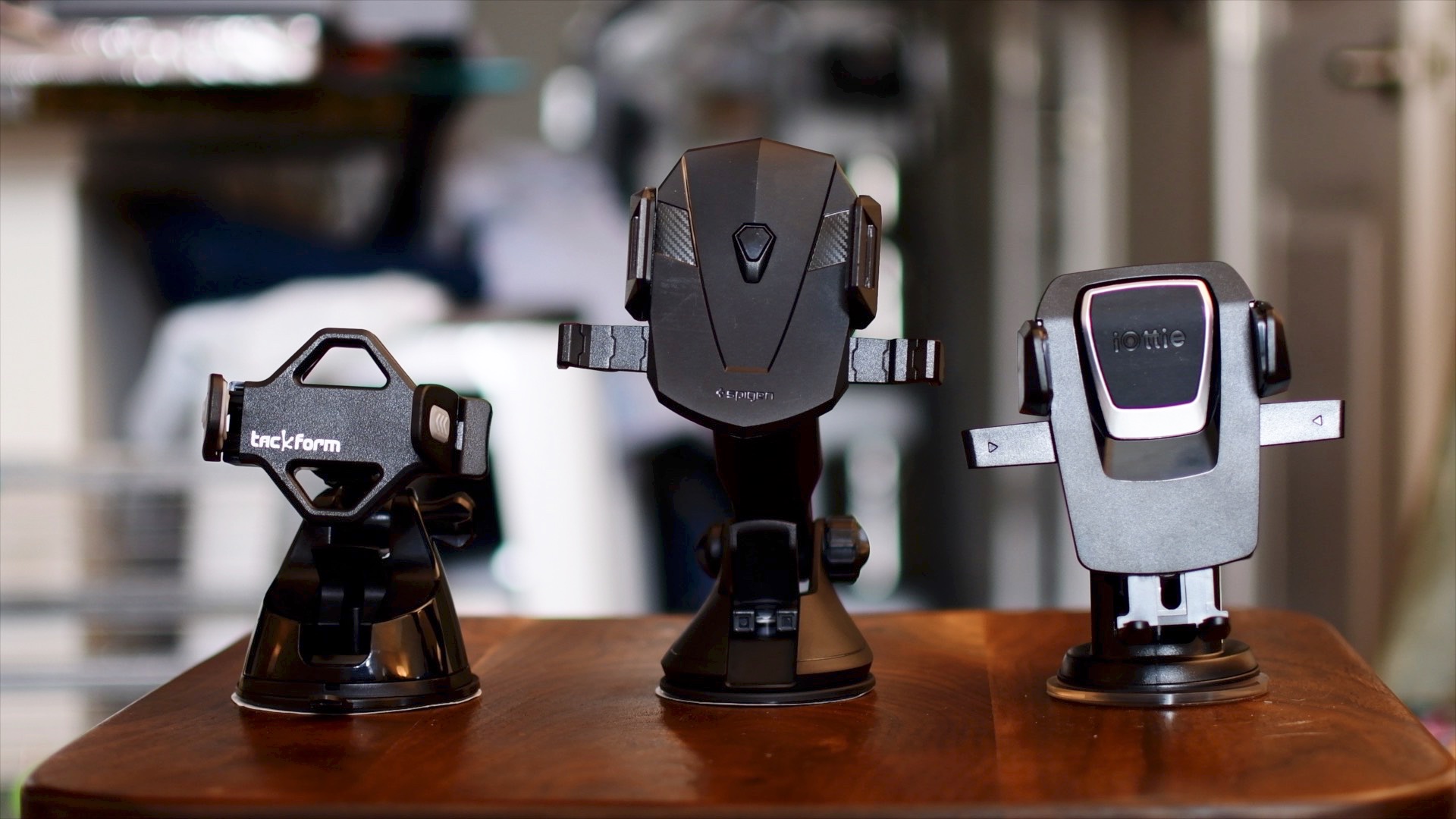
The three car mounts we dealt with were the iOttie Easy One Touch 3, Spigen Kuel OneTap, and the Tackform Ultra Grip Universal Car Mount. To start, lets take a look at each one individually and what makes the unique.
The iOttie Easy One Touch 3 is the 3rd generation of easy to use smartphone car mounts. It has a large extendable arm that reaches out to 8 inches. It also has an extremely easy to use one-touch grip. For those unfamiliar, this clipping mechanism works by having a trigger on the back of the mount. When you place the phone, it hits the trigger, and the sides come in to grab the phone. Then when you need to release it, you squeeze the sides, which releases the clips and you can grab your phone. The trigger is also quite large which makes it very reliable when placing your phone. It is also the only mount that has a positionable foot rest, which helps prevent your phone from dropping.
The Spigen Kuel OneTap car mount has a very similar setup to the iOttie. It has an extendable arm, though it is slightly longer than the iOttie. It also has the same style clip for your phone, though the trigger is significantly smaller, which can make it slightly less reliable to "trip" when placing your phone. A very handy feature is the cord clip on the underside that helps with managing your cables. The big downside, for me, is it actually fell. I could not get the suction cup to stick to my plastic dash. I had no issues with the other 2, but 2 or 3 times the Spigen did fall on me. When it comes to personal preference, that immediately disqualifies the Spigen for me. That said, it still has great reviews, so clearly this is not the case for everyone.
Tackform is the only one that does not have that spring-loaded clip, but it is still easy to use one-handedly. It has an adjustable clip where one side is fixed, and the other expands when you place your phone. The grip itself is very small and can rotate and twist with ease to work in many different orientations. It also does not have an extendable arm and instead goes for an ultra rigid design, meant to stay in place.
Group comparison
We did go hands on, driving around with each of these; GoPro in tow. Check out the video if you want to see for yourself, but to sum it up, all 3 mounts did a great job. They all have their perks, and all have their downsides.
Spigen wins the crown for the longest arm. So if you need that extension, this could be the one for you. It's also super handy when mounting to the windshield because you can mount it farther away, and use the arm to bring it closer to your view. However, those arms come with downsides as both the Spigen, and the iOttie had the most amount of movement while driving on the road. I have a newer car, so someone in an aging vehicle with worn down suspension may have even more movement than I did in testing.
Tackform by far was the most rigid with pretty much zero movement as I drove around. I was very impressed, but of course you lose that super handy spring loaded clip and extending arm for that to happen. Even without the arm, it still has a lot of versatility in the movement of the actual grip itself. Because it loses the arm, it also ends up being the smallest and most compact of all three. Smaller cars could benefit greatly from that.
Summary
So which is the best? Well, iOttie may be the most well rounded. Being stable (more stable with the arm retracted), the most secure section cup, and the biggest trigger for the quick connect clip. It also may be the most well known of the 3. However, with all the benefits, personally I think I am going to stick with the Tackform. The super steadiness is so preferable for me and in my car I didn't have the necessity for the extension arms. The quick connect is super handy on the other two, but it wasn't a deal-breaker for me as I could still use the Tackform one handed.
You probably can’t go wrong with any of these mounts, whether the Spigen, Tackform, or iOttie. Unless you were unlucky with the Kuel like I was, whatever your choice, you will be riding with a great companion for your smartphone.
Buy the Spigen Kuel OneTap for $19
Buy the Tackform Car Mount for $18
Buy the iOttie Easy One Touch 3 for $25
So after reading the reviews and watching the video, which car mount is your favorite? Or instead of the suction cup mounts do you prefer something like a vent clip or magnetic attachment instead?