Jeff Benjamin

Jeff has been with iDownloadBlog since 2010, acting as resident video specialist, and tutorial expert. He earned his degree in Computer Network Systems back in 2001, but decided Cisco routers and the like just weren’t for him. Since then, he’s been heavily involved with online writing. He’s written for numerous tech and video game sites since the late 1990′s, and has a knack for explaining things in a simple, clear, and concise manner. Jeff works primarily from the east coast on his Retina Macbook Pro, and shoots video with a Canon DSLR. During downtime he likes to travel the world, visiting the various Apple Stores across the globe. You can email him at jeff [at] idownloadblog.com and follow him on Twitter @JeffBenjam or on Google+.

Auxo Legacy Edition teased again, coming next month

With the recent release of the Auxo-inspired jailbreak tweak, Stratos, perhaps we can chalk this one up to impeccable timing? Indeed, Auxo Legacy Edition, a much anticipated revival of the original Auxo for modern firmware and devices, was teased by the official A3tweaks account this morning, and it looks good.

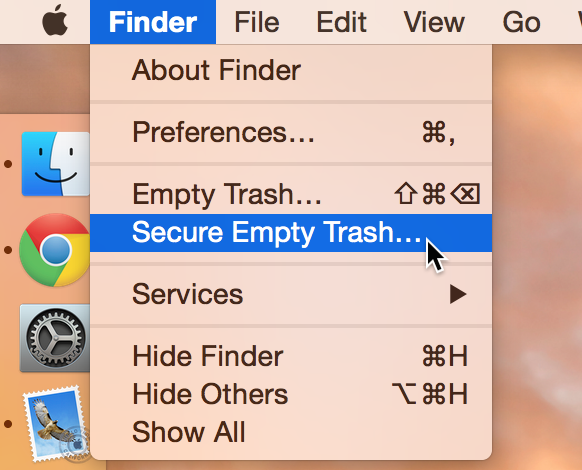
Empty Trash versus Secure Empty Trash – what’s the difference?

Did you know that there are actually two ways to empty the trash on your Mac? Perhaps you've seen both options before, but never gave it much thought. Just what is the deal with Empty Trash versus Secure Empty Trash? Which one should you use? By knowing what each empty trash command is capable of doing, you'll be able to make more informed future decisions with regard to handling your Mac's sanitation needs.

Podcasting basics part IV: recording, exporting and uploading

This is the second to last entry into my podcasting basics series. In part I, I talked about some of the preliminary steps needed before starting a podcast. In part II, I discussed the hardware that we use to record shows like Let’s Talk iOS and Let’s Talk Jailbreak. In part III, I broke down the software used. Now that you have a good idea of what hardware and software that we use, along with the basic overall methodology, let's talk about starting the actual recording.

Skrollerz: tap the status bar to scroll to the bottom of a page

On this week's episode of Let's Talk Jailbreak, I brought up one of the tweak concepts that I worked on recently. That concept, entitled Scrottom, envisions a jailbreak tweak that allows you to tap the status bar to scroll to the bottom of a page, similarly to how a tap on the status bar currently takes you to the top of a page.

I also reviewed a long-existing jailbreak tweak called TapToScroll. That tweak brought similar functionality to the table, but it required configuration, and it didn't perfectly implement my idea. In other words, it was satisfactory, but not totally ideal.

Today, a new jailbreak tweak entitled Skrollerz brings the closest representation of my concept thus far. In fact, I think it's pretty much executed it to a tee, and I'm extremely happy with it. If you're looking for a way to quickly scroll to the top or the bottom of a page, then you should definitely take a look at this free jailbreak tweak.

ReStats: automatically reset cellular statistics after a set time interval

If you have a limited data plan with your wireless carrier, then you're no doubt at least vaguely aware of how much data you burn through each month. While iOS has some built in statistics that can help you measure your wireless data usage, it's easy to forget to reset the usage statistics to correspond with your billing cycle. That's where a brand new jailbreak tweak called ReStats comes into play...

Axial brings new quick launch features to Control Center

Axial is a brand new jailbreak tweak for iOS 8 that brings new app launching features to Control Center. Wherever you're able to open Control Center, including while on the Lock screen, you'll be able to launch apps via Axial.

One of the tweak's hallmark features is its temporary auto-unlock for quicker access to your favorite apps while on the Lock screen. Auto-unlock makes it so that your device automatically inserts your passcode. This allows you to use pre-approved apps without manually entering a passcode or verifying with Touch ID.

Profluence lets you assign Workflow automation to Activator gestures

Workflow, the powerful automation app available on the App Store, is extremely popular right now, and for good reason. It's one of the first apps that brings true power-user features to the iPhone in an easy to digest package, and it capitalizes on the openness brought to the fore by iOS 8.

In fact, yesterday, our own Timothy Reavis posted an article to showcase 10 popular workflows. In his post, he highlights ways to view source code, shorten URLs, scan QR codes, and more—all with Workflow.

In and of itself, Workflow is a powerful app. But how much more powerful could it be if it were able to work closer together with Activator for jailbroken iPhones? Profluence, a brand new tweak that lets you invoke Workflow automation by means of an Activator gesture, helps to answer the question.

How to use Facebook stickers in iMessage conversations

One of the things that I learned while visiting Korea last year is that Koreans love using an app called KakaoTalk. Kakao is a messaging app that pretty much everyone in Korea uses. It's an app that's instantly recognizable due to the bright, colorful, animated stickers that litter the conversations of passersby.

I've always thought that it would be cool if iMessage users could use animated stickers within the Messages app, and now it's a reality thanks to a new jailbreak tweak called StickerMe. StickerMe takes the stickers available within the Facebook Messenger app, and brings them to an iMessage conversation near you.

Stratos: a highly anticipated Auxo-inspired App Switcher

Before I even begin talking about CortexDevTeam's Stratos, let's address the elephant in the room. Let's address the fact that the tweak looks and functions very much like Auxo legacy edition.

Indeed, Stratos takes many cues from Auxo of old, but that's one of the tweak's most appealing assets. There are some, even after two successful iterations, who never quite came around to Auxo 2 and its sequel. For those people, Stratos is a jailbreak tweak that's been highly anticipated for quite some time.

But that's not to say that Stratos is a mere carbon copy of Auxo and nothing more. The tweak brings a few of its own innovations to the table as well.

How to disable the camera on your Mac

Every Mac that Apple ships, sans the Mac mini, comes with an iSight camera embedded in the bezel at the top of the display. If my memory serves me correctly, Apple's computers were one of the first to really popularize the standardization of built-in cameras.

I'm probably not alone when I say that I rarely, if ever, use my MacBook Pro's iSight camera. In fact, it's become more of a worry to me when thinking about the potential hacking and privacy concerns. I'm far from a tin foil hat wearer, but I have to be honest and admit that the thought has crossed my mind before... you know, the one where hackers view my iSight camera unbeknown to me.

With all of that said, wouldn't it be nice if you could disable your Mac camera with a simple software tweak? Inside, I'll show you how to do just that.

Popular is an app launcher that tracks your most used applications

Popular is a $0.99 jailbreak tweak that replaces the recent contacts and favorite contacts shortcuts found in the App Switcher with an app launcher. Popular's launcher differs from other tweaks of this type, because it sorts the app icons based on usage. This makes it easy to quickly locate and launch the most popular apps on your iPhone.