Anthony Bouchard

Anthony Bouchard joined the iDownloadBlog.com team in 2016 after originally covering Apple and iPhone jailbreak news at ModMyi.com. As an experienced editor, he brings more than 15 years’ worth of jailbreaking knowledge to our in-depth guides, opinion pieces, and news articles. His passion for device customization and user choice sparks his strong push to empower readers with the tools they need to explore and enjoy the freedom that comes with jailbreaking. Anthony blogs about not only jailbreaking, but also Apple software & accessories, drones & photography, and Nintendo gaming systems. Anthony honed his advanced technical knowledge over the years with hands-on projects ranging from gaming PC builds to engine repair mechanics. His never-ending hunger for knowledge is why you’ll always find him tinkering – tearing things apart and putting them back together to understand what makes them tick.

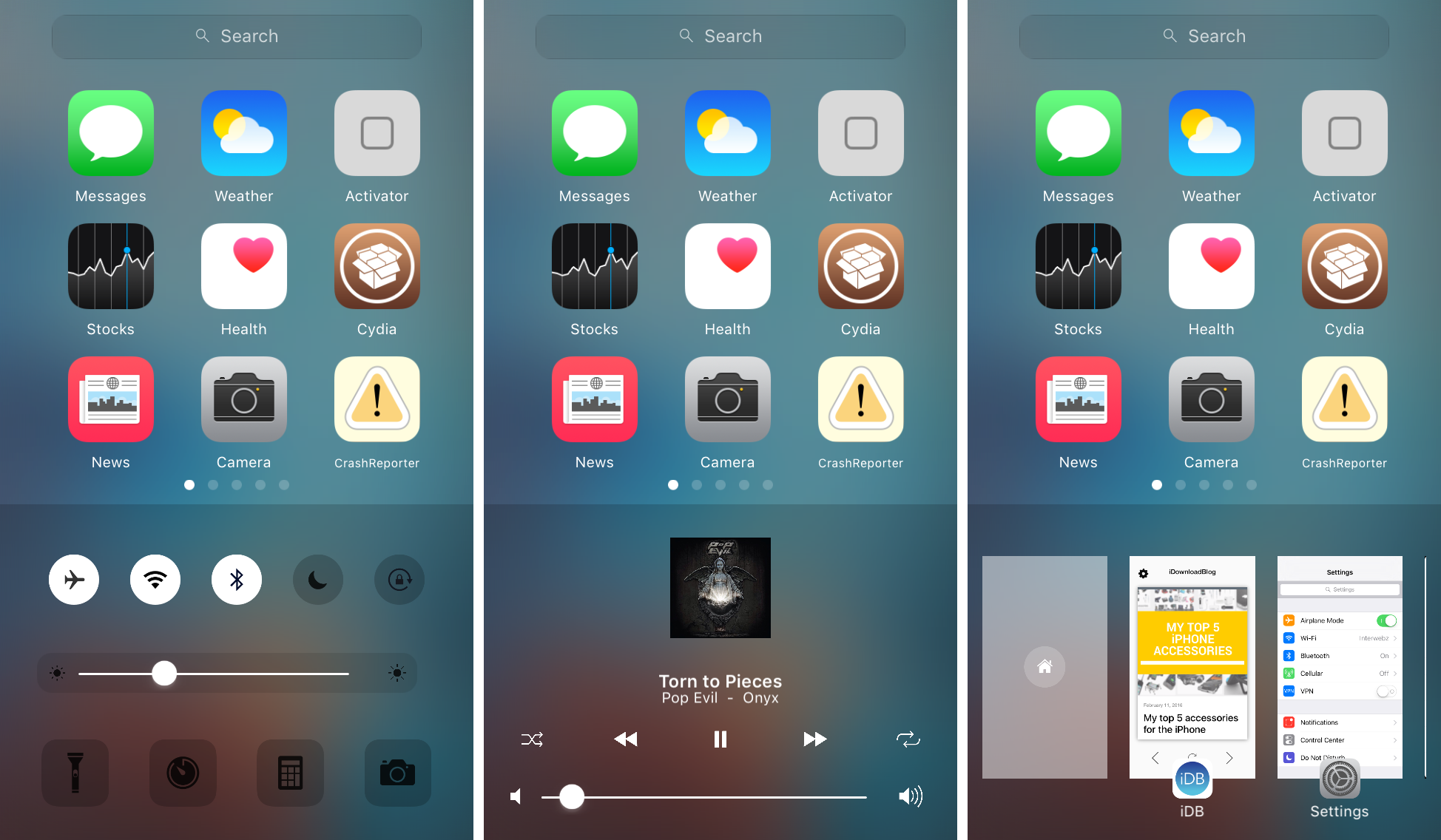
Zentrum offers an omni-interface for accessing multitasking, music controls, system toggles & shortcuts

In iOS, the Control Center and App Switcher interfaces are separate from one another and this means to get to one or another, you have to use a different gesture. It seems like some improvements could be made by merging the two interfaces into one, as we've seen with the popularity of previous jailbreak tweak releases such as Auxo 2 & 3.

A new jailbreak tweak called Zentrum is now available in Cydia's BigBoss repository for $1.99 and it introduces users to an all-new omni-interface for multitasking, viewing music controls, and accessing system toggles & shortcuts, but it even bakes into the mix a quick app launcher, which you can configure to your liking.

OtterBox iPhone cases shootout: which one should you get?

OtterBox is one of the most renowned case-makers in the smartphone industry, having a reputation for making cases that can withstand even the greatest of abuse from various kinds of treatment.

Among two of their most popular cases on the market are the OtterBox Defender Series and the OtterBox Commuter Series, and in this piece, we'll talk about the ups and downs of each. As a bonus, we'll even give you a look at OtterBox's new Statement Series case.

My top 5 accessories for the iPhone

There are seemingly endless choices for iPhone accessories out there, and I've got to tell you, I go through iPhone accessories like candy. One day I like something I'm using, and another day I find it to be a nuisance and I end up leaving it at home and buying something completely different to suit my needs.

Regardless, there are still some accessories that I still use on a day-to-day basis, and in this piece, I'll show you my top 5 favorite iPhone accessories that I actually use on a daily basis and why.

Some of the Mac apps known to be affected by the Sparkle vulnerability

A vulnerability discovered in an outdated version of the Sparkle updater framework that many third-party OS X apps depend on for serving the user with regular updates has been getting a lot of attention recently.

As we reported on Tuesday, the security problem affects a number of third-party Mac apps downloaded from the internet, and not apps downloaded from the Mac App Store. The vulnerability roots from the lack of an encrypted connection and gives a malicious hacker the ability to perform a man-in-the-middle attack.

But what OS X apps are affected? This is the information you need to know as soon as possible to keep your Mac safe from potential malware threats.

Why and how to use a VPN on your iOS device or Mac

A virtual private network, commonly referred to as a VPN, is a type of connection you can use over the internet that helps to secure your identity as you surf the web.

Often times, they're used to improve your security and privacy on public Wi-Fi networks, but they're also used for a wide variety of other reasons. If you've been considering using a VPN on your iOS device(s) or Mac(s), then you've come to the right place. We're going to tell you all about why you should consider using one and how to use a VPN on iPhone, iPad, or Mac to your advantage.

What you need to know about the Sparkle vulnerability affecting some OS X apps

A new vulnerability has been discovered to affect a wide variety of third-party apps for OS X that have been downloaded from the internet and use an outdated version of the Sparkle updater framework.

The new vulnerability puts a number of users of affected third-party apps at risk of being hijacked when those apps attempt to use the outdated framework to alert users of new app updates.

How to manage multiple accounts in Instagram

Instagram officially announced support for logging into more than one Instagram account at a time in its free iOS and Android apps on Monday, and many of you that use Instagram on a daily basis are probably wondering how you can get your hands dirty with the feature.

Although signing in with multiple Instagram accounts is a feature that is still currently rolling out to all users, it's possible to force your app to allow you to sign in with multiple accounts right now.

Once you get your Instagram app updated to the latest version and are ready to get started with using multiple user accounts in the app, you can follow this tutorial on how to manage all your Instagram accounts from the app.

How to rotate a video on your Mac

Every so often, you may come across the need to rotate a video after you've recorded it with your camera or iOS device because it didn't quite come out how you expected it to.

Fortunately, Apple's QuickTime app, which is built into the macOS operating system on your Mac, is powerful enough to do just that; and it's very easy to do.

In this tutorial, we'll be showing you how to rotate a video in any direction on your Mac using the QuickTime app.

Link your Spotify account with Shazam to enable full song previews & more

The Shazam app for iOS comes with the ability to link your Spotify account so you can stream the music you tag via Spotify directly from the Shazam app itself. A recent update to the app included a complete rewrite for this feature, so it's now more stable than ever before.

All you have to do is connect your Spotify account to the Shazam app, and the app will take care of the rest for you, allowing you to listen to full tracks in Shazam instead of just 30-second song previews.

In this tutorial, we'll be showing you how to link your Spotify account to the Shazam app in iOS.

How to view your download history in the Mac App Store

Heavy Mac App Store users will download, install, and delete apps from their Mac all the time. It may be because you're interested in experimenting with new utility releases, downloading games to get a thrill, or checking out the productivity apps that developers claim to be the "best" out there.

Through all this downloading, installing, and deleting, you may want to check out one of the apps you remember using from a long time ago to see if it got any cool new updates, and sometimes you don't particularly remember what the name of said app might be.

Fortunately, the Mac App Store comes with a way to see your purchase history, allowing you to see all of the apps you've ever downloaded from the Mac App Store whether they were free or paid ones. In this tutorial, we'll show you how to see your Mac App Store's download history.