Year: 2012

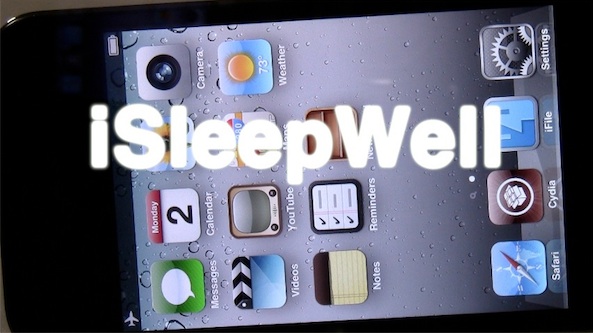
‘iSleepWell’ enables Airplane mode when your iPhone is face down

Don't you just hate it when you receive an unnecessary phone call or text in the middle of the night and it wakes you up?

Apparently the creators of iSleepWell experienced one too many wakeup calls themselves, hence this new jailbreak tweak.

With iSleepWell installed, your iPhone will monitor its accelerometer to know when it's placed face down. After a user defined time threshold, your device will be automatically placed into Airplane mode. This in turn prevents phone calls, texts, and other annoyances from disturbing your beauty sleep...
iPhone 4S still top-selling smartphone in the US

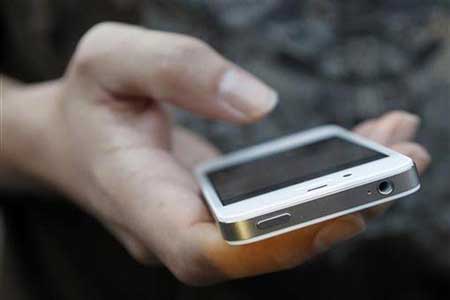
After months of redesign rumors, the iPhone 4S debuted last October without any kind of external changes. Much like the new iPad, the familiar-looking handset drew an onslaught of "disappointing" headlines from around the web.

But Apple obviously knew what it was doing. The 4S has broken a number of sales records, and helped Apple sell more than 37 million iPhones last quarter. And perhaps even more impressive, 6 months later, it's still on top...

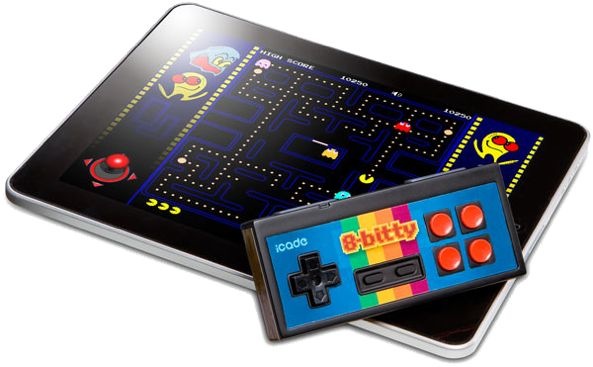
Is Apple developing a physical gaming controller for iOS devices?

That Apple is toying with a bunch of varied gaming controller concepts is anything but unknown. Two years ago, an interesting Apple patent detailing an accessory for playing games with portable devices surfaced in the United States Patents & Trademark Office's database.

It was originally filed back in September of 2008, meaning the company had likely begun researching the invention ahead of the original iPhone debut five years ago. The patent outlines a few exciting gaming accessories for portable devices, such as a receptacle system of sorts that could let your iPod be inserted to play games.

Another highlight worth mentioning is a gaming controller featuring cameras, motion sensing, a dual-display configuration and physical buttons on the back coupling a multitouch surface on the front.

And now, AnandTech drops a little nugget with claims that yes, Apple is in fact working on a gaming controller for iPads and other iOS devices...

‘Aero’ now available for download on Cydia

[tube]http://www.youtube.com/watch?v=kS86gtltKDw[/tube]

Aero is a brand new jailbreak tweak that allows you to switch apps in style via custom animations. We've already had some significant hands-on time with Aero last week, and we were excited by what we saw.

Aero adds a whole host of custom animations that allow you to switch between apps in very unique ways. It's a tweak designed by SBCoders, the same folks behind Deck, so you know it's quality.

If you've been waiting on pins and needles for Aero's release, then wait no more; Aero can be downloaded from Cydia's ModMyi repo for $1.99. What do you think?

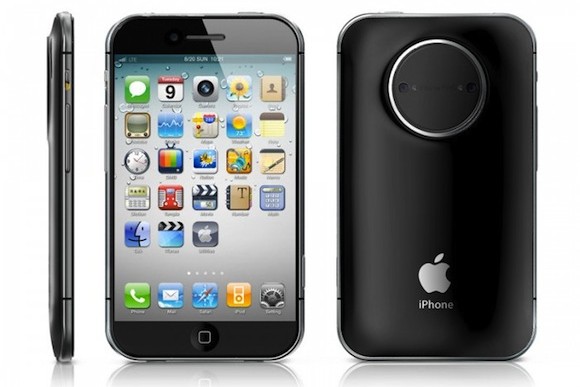
Check out this “iPhone Pro” concept with DSLR lens mount

As most of you know, we love a good iPhone concept here on iDB. Concepts allow us to see what kind of features could be implemented in the handset if conventional design rules didn't exist. And they're fun to look at too.

This latest mockup, which comes from designer Choi Jinyoung, is certainly no exception. The iPhone Pro, as he calls it, comes fully loaded with a 4.5-inch display, a built-in nano projector and a DSLR lens mount...

Speak your “now playing” song with ‘MediaSpeak’

If you do a lot of running or jogging, then you probably find your iPhone in your pocket while you listen to your favorite motivational music.

Unless you have a meticulously designed playlist, chances are you'll run into a song or an artist that you don't immediately recognize. Instead of pulling your phone out of your pocket mid stride, wouldn't it be nice if your iPhone could tell you all about the song itself?

With MediaSpeak, now it can. Check out our video demonstration or the details...

Facebook iPad app updated for Retina display

It took them a while but Facebook has finally updated their iPad application with Retina display graphics. The update also brings a few new features as well as minor bug fixes.

Considering how big Facebook is, I find it slightly disappointed they take so long to release such a simple update. Anyway, we have listed the full change log below for those of you interested...

‘UsefulIcons’ goes live on Cydia

[tube]http://www.youtube.com/watch?v=ChOMb2HlTwk[/tube]

UsefulIcons — a jailbreak tweak that we previewed last week — has gone live on Cydia.

The tweak adds a bevy of quick app icon shortcuts to your Home screen to control and toggle everything from WiFi to location services, respring, lock your device, and much more.

In all there are a dozen dynamic icons added to your Home screen courtesy of UsefulIcons. It can be had from Cydia's ModMyi repo for $0.99. Let us know what you think about it if you give it a go.

How to closely monitor your iPhone’s data with ‘Data Usage Monitor’

Data Usage Monitor is a cellular data monitoring tool available for $1.99 on Cydia's BigBoss repo. It's a tweak that has the ability to monitor and take specific actions once your cellular data reaches a user defined threshold.

On paper it looks to be a great tweak that could save you money from data overages, but as you'll see from our video walkthrough, it has a few opportunities for improvement before we'd deem it worthy of purchase...

Customize your Lock screen’s date with ‘LockDate’

Interested in customizing the look of your Lock screen's date display? Then look no further than LockDate — a tweak exclusively devoted to customizing the date reading on your iPhone's Lock screen.

With LockDate you can alter the date's font, color, style, and much more. There is also a provision to incorporate alternate calendar types and switch to them by swiping on the date with your finger.

LockDate certainly isn't a tweak that will find an audience with everyone one, but there's sure to be someone who is interested in this niche...

‘Transparency’ will make your app icons invisible

Transparency is one of those tweaks that allows you to do all sorts of things with respect to the look of your Home screen app icons. As its name suggests, the primary purpose is to make your icons transparent, or in many cases outright invisible.

Once installed, you'll receive a new settings panel in the Settings app that allows you to customize your app icons in a very granular way. Take a look at our video walkthrough for the detailed evidence...