Month: April 2011

Steve Jobs Authorized Biography Will Release in Early 2012

iSteve: The Book of Jobs is an upcoming biography of perhaps one of the most eccentric figures to ever come along in the technology sphere.

Sure, there have been plenty of behind the scenes biographies in the past -- some of the good, and some of them utter rubbish -- but this is an authorized biography of a man that's known for enjoying his privacy.

What convinced Jobs to go through with the book deal? It probably has a lot to do with the man who is penning the words on paper, Walter Isaacson...

Troubleshooting Cydia: Problems with Broken Repos

I had a scary experience last night. As I was searching for a certain tweak in Cydia, I noticed that I wasn't getting the results I was looking for. So I searched for a few more apps and tweaks, and I kept getting no results. I thought about it for a minute, and then realized that every item I had searched for was from the BigBoss repo.

I've recently upgraded to the iOS 4.3.1 jailbreak, and I haven't gotten to play around with my main iPhone setup that much yet.

To my surprise, the BigBoss repo was broken in Cydia. BigBoss is a pre-installed repo in Cydia, so it's very odd that it wasn't working. The good news is that there's a way to re-add default Cydia repos without re-jailbreaking the iPhone...

MobType – An Interesting Take on the iPhone Keyboard

Yesterday we ran a story about the state of Apple's current text input technology in iOS. While their keyboard is extremely popular, consumers lack any alternative method of text input. Though there currently doesn't appear to be any App Store solution at the moment (pending ShapeWriter return), jailbreakers do have an alternative.

That's why we jailbreak our iDevices, right? To have other options besides what Apple deems appropriate for their hardware? Anyways if you're sporting a hacked iPhone or iPod touch and have been looking for something different than the typical boring keyboard, you might want to check out MobType...

How to Access Your Apple TV’s File System With CyberDuck

Yesterday we showed you folks how to SSH into your jailbroken Apple TV2 through your desktop OS' command line prompt. Today we are going to show you how to create a connection with your hacked Apple TV2 in a much more user friendly way.

All you need is CyberDuck for Mac or Windows, and your Apple TV's IP Address. Of course you'll also need a jailbroken Apple TV2, and both it and your computer must be on the same Wi-Fi network. For those new to the game, you can find your IP in your Apple TV2's main menu, Settings > General > Network > IP Address.

Once CyberDuck is done downloading, fire it up. Your going to want to choose to create a new connection.

From the drop down menu, select SFTP. In the Server field type your IP Address that we had you get earlier.

In the Username section type root and for the password, type alpine.

Then just click Connect.

You should now be looking at your Apple TV's root directory. Besides the ability to view your ATV2's folder sub system, you also have write privileges. This is one way to install Plex or Firecore's ATV Flash.

Any questions?

Steve Wozniak Shares Insight on Tablet Revolution

The man who co-founded Apple still spends his days giving his opinions to high profile people. He is still on Apple's Board of Directors, and is listed on their payroll, so trust me when I say he's not out of the loop.

The genius credited with building the first Apple computer was asked his opinion on the new era of computing last weekend. During a keynote session at Storage Networking World in Santa Clara last week, Wozniak was asked how tablets would revolutionize the industry.

"The tablet is not necessarily for the people in this room,"

He told the audience of engineers.

"It's for the normal people in the world. I think Steve Jobs had that intention from the day we started Apple, but it was just hard to get there, because we had to go through a lot of steps where you connected things, and eventually computers grew up to where they could do... normal consumer appliance things."

Wozniak's remarks seem to be extremely in line (obviously) with what Apple has been saying all along, especially since the introduction of the iPad. Apple's goal hasn't ever been to be the fastest or have the highest tech specs.

They want to make products that appeal to the average consumer because there are so many more of them than there are people that care about the number of processors in a product.

Although the touch interface is quite nice on a tablet, it makes typing lengthy emails or putting together extensive spreadsheets tedious chores. The iPad is built for web browsing and viewing media content, things a normal person would do frequently. Thanks Steve for clarifying that for everyone, Motorola and company need to be taking notes!

What do you think? Is the tablet-PC meant more for normal people?

[Macworld]

App Picks of the Week: NoSpot, Grades, Witness

Every week, we select a few apps that catch our eye. These apps can be from the App Store, web apps, or jailbreak apps.

This week, we have a nifty jailbreak tweak for disabling Spotlight, an App Store app, and another iOS companion app for the Mac. Hope you enjoy this week's picks!

Watch Every SouthPark Episode for Free on Your iPhone

One of the major advantages to owning an iPhone is all of the access to free content. Apps like TV.com, WatchESPN, and others allow you to watch popular media for free on your iPhone, as long as you have an internet connection.

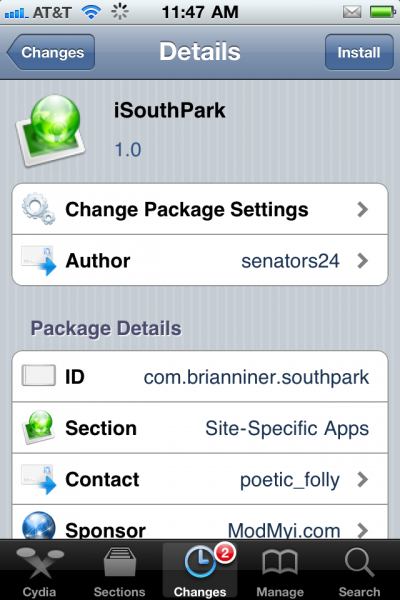
For all of you jailbroken users, I have another app for you that will fill the need to watch free content on your iDevice. Its name is iSouthPark and it claims to allow you to watch all 209 episodes of the popular South Park cartoon on your iPhone for free. It certainly sounds enticing, but how does this work?

Does Apple Need to Upgrade the iPhone’s Text Input Options?

I think most of us would agree that the iPhone keyboard is one of the best soft touch keyboards around. The keys are very responsive and touches are accurate. I also think Apple could stand to modernize a bit. Though their standard keyboard is great, they are falling behind the times when it comes to alternative text input.

While many of Google's Android handsets come with options like Swype preinstalled, Apple customers are left sitting on the bank throwing rocks. Those who have played with Swype know what I'm talking about, the concept is amazing. You just draw a line with your finger from letter to letter of the word you want to type on the virtual keyboard...

Apple Releases the iBoy

They've finally done it! After years of speculation, and months of anticipation, Apple has finally released the iBoy!

This video shows the complete unboxing of Apple's latest iOS device, and believe it or not, it's capable of doing a lot more than your iPhone 4.

Among other things, the iBoy can pout, cry, sing, laugh, and dance.

Okay, so it's just a parody from an Israeli television show, but I found it to be quite humorous...

Apple Snags Major Gaming PR Executives

It's no secret that Apple sees their iPhone and iPod touch products as gaming devices. Their unique combination of power and portability make them serious contenders in the handheld gaming market. But if you remember back to last fall, major console heavy weight Sony took some shots at Apple in a marketing campaign.

The popular TV ad referred to an iPhone-like device as "not built for big boy games." Well it looks as though Apple is planning something for the gaming community to put some points back up on the board. MCV, an overseas gaming site, reported yesterday that Apple has hired 2 high profile PR executives from the gaming community...

Top 10 iPhone News You Might Have Missed This Week

This is a summary of the most popular articles published on iDB and our sister, ziPadBlog, this past week.

Please make sure to spread our iPhone wisdom by sharing our posts on Twitter and Facebook.

Dev Team releases jailbreak for iOS 4.3.1 Jailbreak iPhone 4.3.1 How to update to 4.3.1 while preserving baseband 01.59.00 Certain jailbreak apps not compatible with 4.3.1 Man makes $50,000 jailbreaking iPhones Easily add multitouch gestures to iPhone 4.3.1 Tutorial: jailbreak iPhone 4.3.1 with RedSn0w Tutorial: jailbreak iPhone 4.3.1 with PwnageTool

From our sister iPad Blog, ziPadBlog.com:

First iPad 2 commercial Dev Team releases jailbreak for iPad 4.3.1 Guide: jailbreak iPad 4.3.1 with redsn0w Guide: jailbreak iPad 4.3.1 with PwnageTool Top 5 reasons to jailbreak your iPad Apple admits problem with Verizon iPad iPad 2 jailbreak to be released soon

How to Unlock iPhone 4.3.1

The Dev Team just released their unlock for iPhone 4.3.1. This updated version of ultrasn0w brings support for the iPhone 3Gs and the iPhone 4 that are exclusively using these basebands: 01.59.00, 04.26.08, 05.11.07, 05.12.01, 05.13.04, and 06.15.00.

In this post, we'll guide you into unlocking your iPhone 3GS or iPhone 4 on any of the above basebands, and running the latest iOS 4.3.1...