Month: October 2010

GreenPois0n iOS 4.1 Jailbreak to Hacktivate the iPhone

Here is some good news for jailbreakers and unlockers waiting for the GreenPoison jailbreak, which should now come out anytime soon. According to tweet by GreenPois0n developer P0sixninja, the new jailbreak tool will be able to hacktivate the iPhone.

This is particularly interesting to those of you who don't have an official SIM card to activate the iPhone, which is a necessary step in being able to use the iPhone... 
Xtand iPhone Dock [Review]

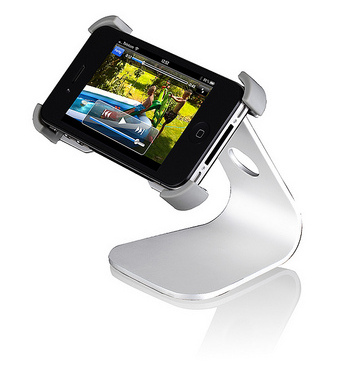
Finding the right way to make the iPhone part of the desktop is important for some of us. Enter the Xtand from JustMobile. While there are plenty of mounts and stands for the iPhone, few of them truly capture the aesthetic functionality blend that makes Apple distinct. The Xtand does just that.

It holds the iPhone landscape or portrait at adjustable angles. The aluminum stand looks very similar to the iMac stand. The stand doesn't block any buttons or connections, gripping perfectly at the four corners of the device. The bottom of the stand features a gripping rubber surface to keep it from moving during use...

An iPad Made of Legos

I wonder if this iPad made of Legos is running iOS 4.2 or 3.2.2. Either way, I'm pretty sure it doesn't handle multitasking very well. Very creative. What do you think?

[xCoreyxSucks]

Google Goggles Arrive on the iPhone

The Google Mobile app for iPhone was just updated to support Google Goggles, a feature that has been available on Android for awhile. So what is Google Goggles? And why is it a big deal?

Google Goggles is the next step toward merging the physical world with the online world. While it’s definitely a baby step, Googles is still groundbreaking in the search and mobile space. Goggles allows you to take a picture of essentially anything in real life: buildings, books, wine bottles, or just plain text, and get results from Google about that object...

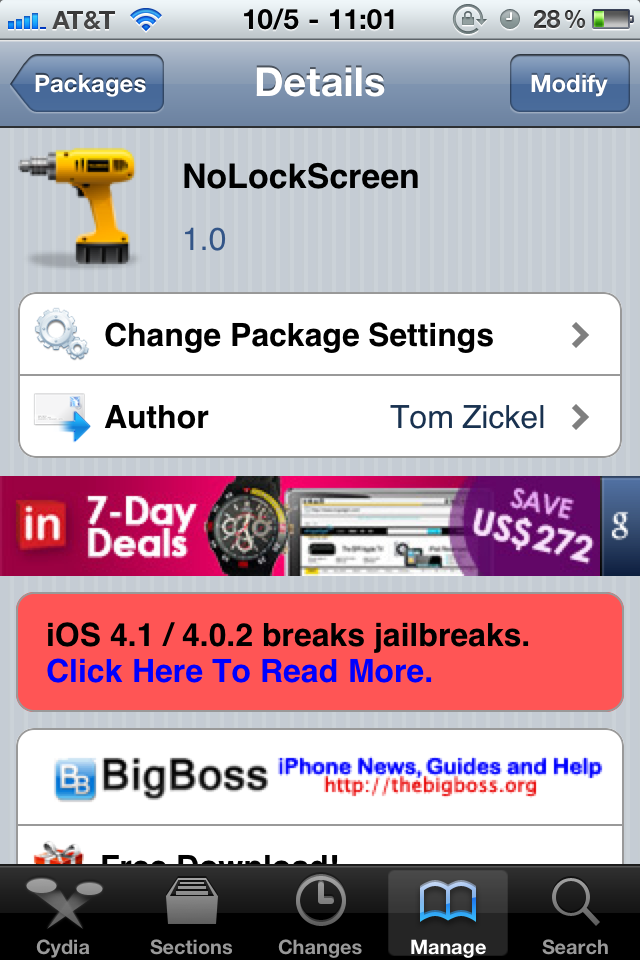
Disable Your iPhone Lockscreen “Intelligently” With NoLockScreen

Pfft, lock screens, who needs ‘em anyway? With this latest tweak from Tom Zickel, you can say sayonara to that annoying lock screen for good. Of course for those of you who use your lock screen for various widgets for e-mail, weather, and the like, this may not be for you.

But for those who want to get right down to the action without delay, NoLockScreen fulfills its promises, but not without some caveats... 

How to Put Your Apple TV in DFU Mode

Since we now know that it is possible to jailbreak the Apple TV (and install apps on it), one thing we need to learn sooner rather than later is to put the Apple TV in DFU mode. Putting the Apple TV in DFU mode is not complicated, assuming you know how to press a couple buttons together...

Step 1: Make sure your Apple TV is connected to your computer via a mini USB cable.

Step 2: On the remote, press and hold the Down and Menu button together for a few seconds. Your Apple TV will start blinking. You can now release.

Step 3: Now press and hold the Menu and Play button together for another few seconds.

Step 4: Done! Your Apple TV should now show up in iTunes, from where you'll be able to restore it.

Next step is getting a jailbreak for this Apple TV. I can't wait for that.

[FSM]

Get an iPhone 4 in Less Than a Week

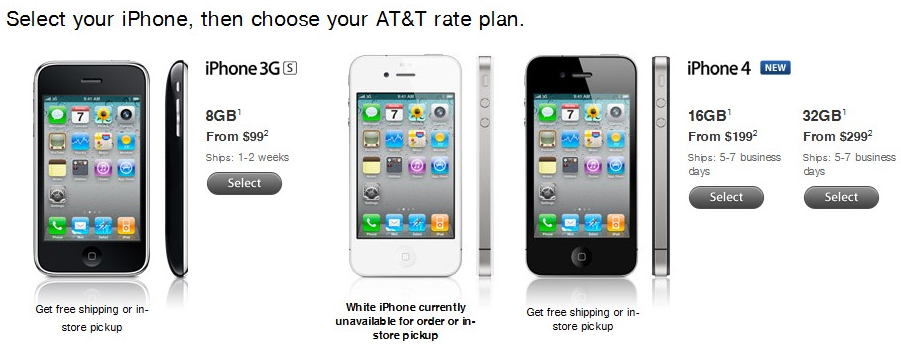
It’s funny. I had literally just checked Apple’s website yesterday to see if the shipping times for the iPhone 4 had improved any, and it was still on the 2-3 weeks schedule. Now I check today, and what do you know? Shipping is now an estimated 5-7 business days. Is supply finally catching up with demand? More importantly, does this bode well for the white iPhone 4?

Glif – the iPhone Accessory You’ve Been Waiting For

Glif is an upcoming iPhone 4 tripod and mount from the mind’s of Dan Provost and Thomas Gerhardt. Glif’s website describes the product as, “a simple iPhone 4 accessory with two primary functions: mounting your iPhone to a standard tripod, and acting as a kickstand to prop your phone up at an angle.”

The device is a small, L-shaped piece of injection-mold plastic with an embedded tripod mount. Glif locks around the long-sided part of your iPhone and snaps into any standard tripod... 

Potential Game Changing App Update Coming “Out in a Few Weeks…”

Pleco Software, the masterminds behind the aptly named -- Pleco Chinese Dictionary -- announced today that after minor delay, the latest update to their Chinese language software should be out in a few weeks. Why is this news for iPhone owners, and why should you care?

Well besides the fact that it’s one of the best tools available for learning Mandarin, Pleco’s latest update features a potentially game-changing Optical Character Recognition (OCR) feature that undoubtedly has other developers taking note...

Google Books on Your iPhone

I’ve always wanted an easy way to have a digital library of what I’ve read, what I’m reading, and what I want to read. A Kindle or iBooks library is helpful in having reference on what to read and what has already been read.

However, I haven’t found a good way to handle the recording of physical books I’ve read or books that I’ve read online in another format. I’ve been searching for an easy, cloud-based digital “shelf” for my reading life.

How silly of me to not look farther than Google for my answer. I am reliant on Google in my daily life for email, documents, RSS feeds, and of course, search. I’ve used Google Books only a couple of times to find something like an excerpt from a public domain book. It was not until today that I saw the “My Library” feature of Google Books. Lo and behold it was exactly what I was looking for...

10 iPhone Tips You Should Know About

Every once in a while I meet someone who has absolutely no idea the iPhone can do some very simple things such as moving icons around or even deleting applications. To most of you this will sound like basic iPhone features, however there are some really tech-challenged people out there. This article is for them!

If you're brand new to the iPhone, then read on because you're going to learn some simple and effective tricks...

Netflix iPhone App Now Gets Video Out

The latest update for the Netflix iPhone app just hit the App Store. It now boasts video-out capabilities for the iPhone 4 and iPod touch 4th generation. This update is huge for those of us who use out iDevice for everything.

I'm a little curious if this will make any difference in quality for those on the 3G/3GS using DisplayOut, TVOut2, or Resupported. Regardless, I'm excited to test out the new functionality, and may opt for some extension cables to make my iPhone AV cable reach the TV from the couch.