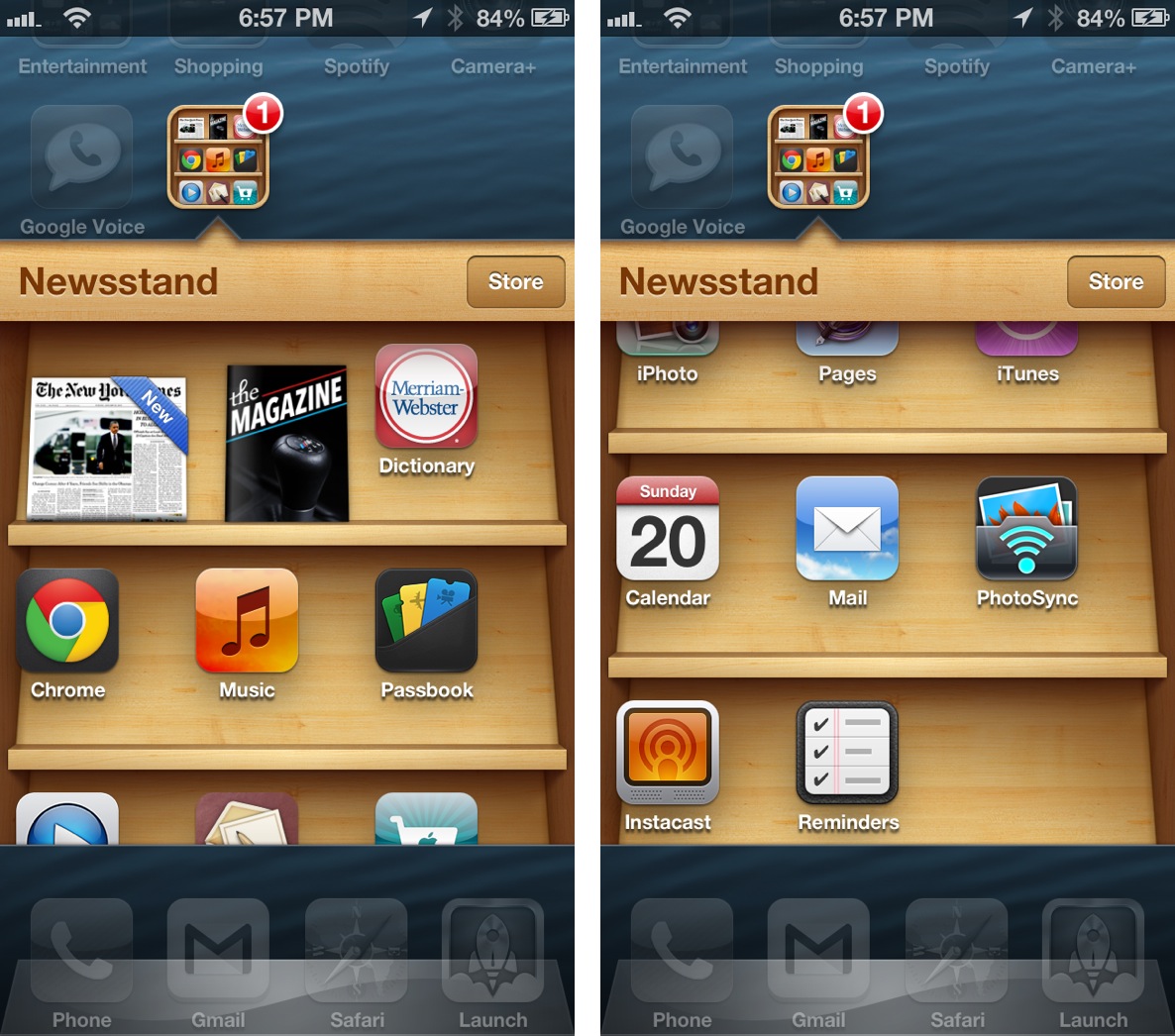
How to use Newsstand as an app folder without jailbreaking

By , Jan 20, 2013

Newsstand Hack infinite icons no jailbreak

A new non-jailbreak tweak was recently revealed to us via email, and it involves the ability to place and launch an unlimited amount of apps from the Newsstand folder on iOS 6. Yes, it works perfectly fine with the iPhone 5.

First sent to us by reader, Pim Oomen, the trick involves a little bit of timing and practice. The end result is an infinite scrollable folder that may contain as many apps as you can throw into it.

The nice thing about this trick is that it doesn’t rely on any external websites or apps in order to make it work. Take a look at our step-by-step video walkthrough inside to see how easy it is.

Video tutorial

How to do it

Step 1: Place the Newsstand folder anywhere on the second page of the Home screen.

Step 2: Place the apps that you would like to move into the Newsstand folder on the third page of the Home screen.

Step 3: Swipe to the third page of the Home screen containing the apps that you would like to move.

Step 4: Press the Home button once, and then immediately tap and hold on the app that you wish to move.

Step 5: Continue holding on the screen until the Home screen moves to the first page due to your press of the Home button.

Step 6: Release your hold on the screen and immediately swipe back to the second page containing the Newsstand folder

Step 7: If the trick worked correctly, then you should see wiggle mode enabled.

Step 8: Tap on the Newsstand folder to open it, and then press the Home button once to close it.

Step 9: You should see the app that you tapped and held on in Step 4 move into the Newsstand folder.

If wiggle mode did not enable when you performed step 7, then the trick was unsuccessful, so try again. It does take a little bit of practice to get this down correctly, so keep trying. Bear in mind that you don’t need to be lightning fast in order to do this, just do it exactly as explained in the tutorial and on the video.

Most likely, you will run into trouble on step 4. Be sure to tap and continue to hold on the app right after you press the Home button. The Home screen will switch to the first page as you tap and hold on the app. That is perfectly fine. You also have to make sure that once the screen switches to the first page, that you immediately swipe back over to the second page containing the Newsstand folder. You do need to be very quick on this part or else the trick will fail.

As I stated, you can continue to do this as many times as necessary. There is no limit to the amount of app icons that you can place into the folder.

One of the nice things about this trick is, unlike similar solutions in the past, you can still launch the apps contained within the Newsstand folder just like you normally would.

The only downside to this trick that I’ve found thus far, is that rebooting your iPhone will remove all of the apps from the Newsstand folder, forcing you to repeat the process all over again. You also cannot remove the items from the Newsstand folder without rebooting, so choose wisely.

Again, special thanks to our viewer and reader Pim Oomen for the heads up.
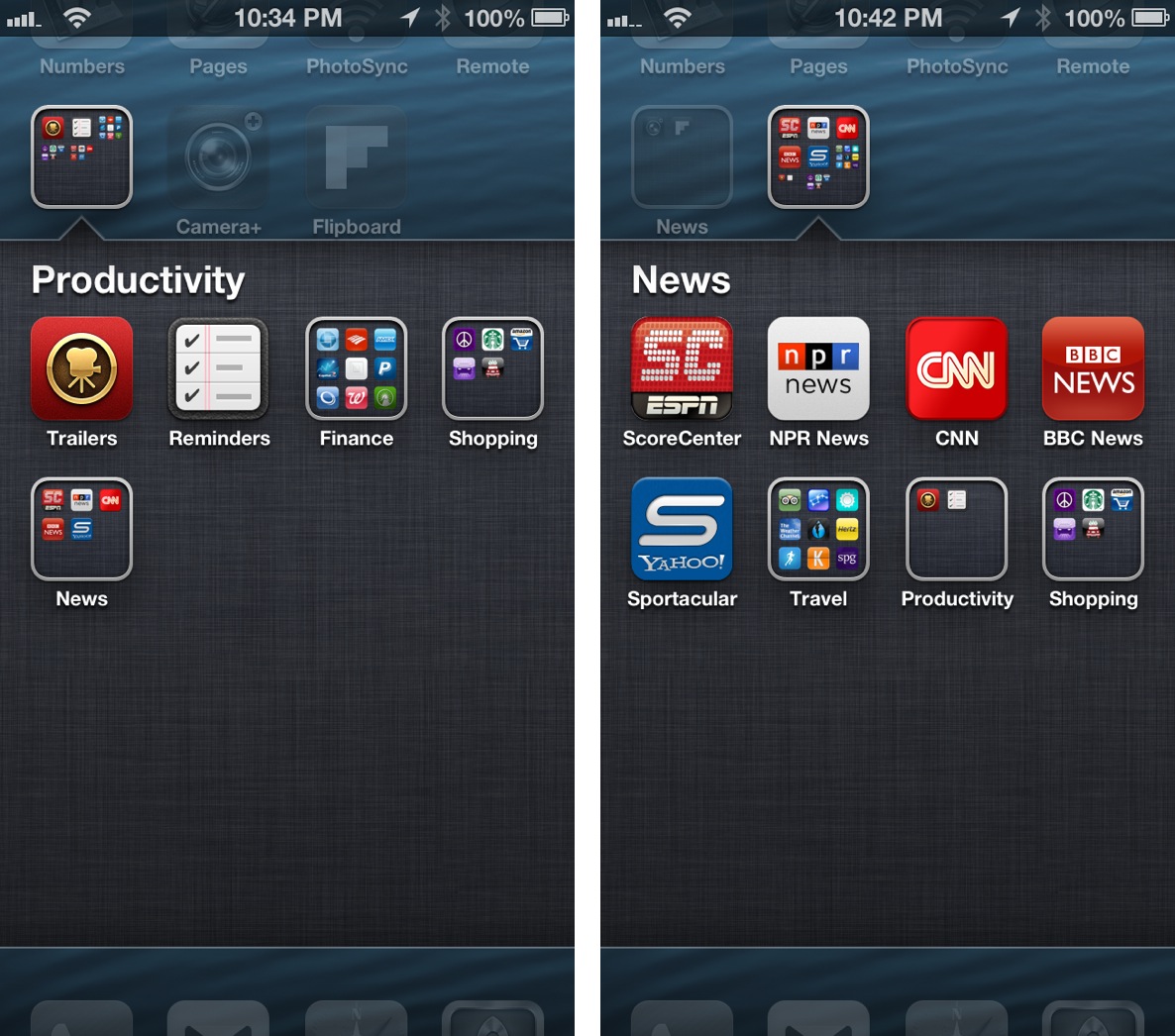
iPhone 5 Folders in Folders

Note: as you can see from the screenshot above, this also works with folders in folders, but I can’t recommend it. Placing a folder in a folder, and then trying to open any of the folders within a folder results in an immediate Springboard crash. If you do this, and you want to open a folder, first remove the folder from the folder.

  • Share:
  • Follow:
  • http://twitter.com/Max_Kas Max Kas

    Awesome work around

  • http://www.facebook.com/profile.php?id=100003172597133 Ecc Thanh

    I put a folder inside newstand and it rebooted. now all the apps went back to my homescreen. Have to start over =.-

  • http://twitter.com/Rauldzmartin Raúl D.Martín

    Why do that?

  • https://twitter.com/MrElectrifyer MrElectrifyer

    Impressive glitches. Looking forward one to install Cydia :)

    • Guest

      What you’d usually say:
      Stupid iSheeps like the glitches Crapple includes in their crap iOS.

      • disqus_roCB366dFi

        He’s no ignorant hater, he calls you guys what you act like; iSheeps who suck on Tim Cooks balls 24/7, that you can’t ever accept the truth about Crapple’s greed wherever you read it.

      • Guest

        Are you really such a dumbass? Everyone knows the truth about Apple, it’s exactly like all other companies, just money, money, money.
        P. S. “Us guys like we act”? How can you know how the previous commenter acts? Or how I act?

    • EpicFacepalm

      MrElectrifyer is not fandroid, in fact I saw several anti-android posts his own. Also, he uses an iPhone for sure (he is known for iOS piracy).

  • http://twitter.com/mwagg123 Mark Waggoner

    Works great! Is there a page for non-jailbreak required tweaks?

  • batongxue

    I’ll just pretend that I did not see the video.
    HAHA

  • Pepeloso

    What If I Dnt Want The App In The Newstand No More, How Can I Put It Back To The Home Screen.. It’s Not Allowing Me

    • http://www.facebook.com/jamie.tilden.9 Jamie Tilden

      Didn’t watch the video eh?

      • jose castro

        Lol reboot dude

    • http://www.facebook.com/brandon.higgins.12 Brandon Higgins

      Didn’t read all the way through either did you?

  • http://twitter.com/leothelion96 Leonard Wong

    I hope a dev could work this all out to a app that do this? Something like what stiflestand do

  • Martin

    Maybe it’s just me but I don’t like the apps being off center, so I’ll pass on this one.

  • jose castro

    Haha I actually like this glitch.. It’s not worthless

  • http://twitter.com/pimmie152 Pim Oomen

    Thats my trick :) Also credits to VideosdeBarraquito on YouTube!!

  • http://twitter.com/alexx1291 Cazz

    The things we do when we don’t have a jailbreak. Is this what it has come down to? Lol

  • Guest

    If you use stiflestand you canals stock apps disappear!

  • Christian

    If you use stiflestand you can make stock apps disappear.

  • http://twitter.com/iPhonBuzz iPhonBuzz

    i haven’t tried it yet! but it sounds awesome :)

  • Lorenzo

    Stupid tweak, why would one want to do that? I mean, usually non-fanboy users try to get rid of Newstand…

    • RarestName

      That’s the point. If you can’t permanently hide it, make good use of it.

  • Denmark

    It works on iPad 4 too,

  • Denmark

    Not so nice, it’s to studied to do it this way, Why do all this, when everything is gone after reboot

  • Guest

    WHYYY NO WORKKK!!??/ i tried like 50 times… AHHHH

  • AxY Network

    It doesnt work for me sadly. I’ve tried like 50 times.

    • http://www.facebook.com/profile.php?id=100002136300838 Michael Hulet

      Try rebooting your device and try again… Worked for me on my iPad 3 iOS 6.1 beta 4

  • ourjim

    Awesome. This method also allows you to move the newsstand icon into another folder. Finally it’s off my home screen :)

  • http://www.facebook.com/arnaud.ne Arnaud Nelissen

    You can also hide the newsstand icon into a folder, which is pretty cool !

    • http://www.facebook.com/osama.saadallah Osama Saadallah Al-Ta’ai

      Really !!!
      so tired of this useless thing in my phone :(

  • http://www.facebook.com/abhinandh.ajay Abhinandh Ajay

    Hey Jeff did you know that you can actually use this method to put newsstand in a folder without connecting it to the computer and using StifleStand!!!

  • http://www.facebook.com/osama.saadallah Osama Saadallah Al-Ta’ai

    Hey ….

    Thanks for the demonstration
    I found a way to move Apps out of Newsstand….
    1:Hold on the app you want
    2. before it goes to edit mode … press home button
    and the app is out of the newsstand !!

  • VideosdeBarraquito

    Please could you make a favorable reference about me? I’m the one who found this glitch. It is very difficult to get a little shine in this iworld. Thanks so much

    • http://twitter.com/pimmie152 Pim Oomen

      Yeah, I gave you credits in my mail to idb, but that didnt come through ;)
      I found an easier way, but you found the glitch at the beginning! (As I stated in my post to this tip :) )

  • Guest

    Porfavor, podríais hacer una reseña sobre mi? Yo soy quien encontró este glitch y me vendría muy bien algùn comentario positivo vuestro. Resulta muy complicado brillar un poquito en este universo.

  • http://twitter.com/snakefeet86 jonathan helliwell

    To take the app out of the news stand just hold the app and jest before it enters wiggle mode press the home button and the app is back where apple says it belongs. No need to reboot your phone

    • Jeff

      Great tip.

      • Ningu

        But is not him

      • http://twitter.com/pimmie152 Pim Oomen

        It actually is me…

      • John MacVoy

        But did you know how to move the apps back out? That’s what Jeff was talking about

      • http://twitter.com/pimmie152 Pim Oomen

        Yes I did, and I mailed iDB back, but too late for them to change the post I think ;)

      • Ninive

        You lie guy! Prove it if you can! Because I’ve seen that other tip that says jonathan, in related videos months ago, from BlusModz or Sirios6 or too Videosdebarraquito, maybe you will can go far lying, like i0n1c, but you will sick inside.

      • http://twitter.com/pimmie152 Pim Oomen

        Keep it easy man, I knew it, but I dont say I discovered it by myself?? The trick to get them out of it I’ve got from videosdebarraquito, and I’ve already talked about this tip with him, so dont panick please!

    • Pim Oomen

      AND: you can also get your newspapers and magazines out of Newsstand the same way :)

      • Shqipe

        I was able to move a magazine (Live Organic) out of the Newstand, but as soon as I moved it into another folder, it disappeared completely, I can only launch the Newspaper by searching it. Any suggestions for me? Do I have to reboot now ;( ? Rebooting is not a fair resolution by the way.

    • http://twitter.com/ax3ko74 ax3ko74

      Trying many times over but still can’t take them out of the news stand :(

      Do I have to do this on the second page??

      • http://twitter.com/ax3ko74 ax3ko74

        I don’t think this works for all the devices.. I had no prob moving apps into newsstand but still can’t take them out. I also watched the videos uploaded by those who found this glitch.

  • http://www.facebook.com/reynold.andika.336 Reynold Andika

    This is actually good.. You can put your bookmark like idownlodblog to newstand :D . I use it for my tech sites

  • http://www.facebook.com/ryanjames.christensen Ryan James Christensen

    I was playing around with this and you can also move APP FOLDERS into Newsstand. The only problem is that when you try to open the folder it reboots your phone.

    • tggt00

      YOU DONT SAY??

      • http://www.facebook.com/ryanjames.christensen Ryan James Christensen

        However if you do put a folder into newsstand, you can use it to hide apps. the forced reboot hides the folder and you can only access the app through spotlight.

      • tggt00

        YOU DONT SAY??!?!?!?!!!

  • iPhone5&sgs2

    AWSOME FOR ME

  • http://twitter.com/JonG325 Jonathan Alvarez

    How can I hide my carrier name like he mention

  • christodouluke

    I’ve actually wanted this exact thing since newsstand came out. Now I can put my news apps in newsstand, it just makes sense.
    I hope there’s a developer reading this article who will make a tweak to make this easier.

  • http://twitter.com/ClffyDntCre Fiscal Cliff

    I got it to work, but idk if i like it too much

  • http://www.facebook.com/bang.nguyen.1610 Bang Nguyen

    Success!Very useful

  • Tahmid

    This is a glitch that Videosdebarraquito found 5 months ago. You should give credit where credit is due.

    • Pim Oomen

      Read the Comments ;) I gave the credits to him, cause he certainly discovered it, but it was me who sent it in and polished it, cause my way is waay easier ;)

      • Tahmid

        Sorry, I just read it, you’re an honest man, and your way is certainly easier

      • Pim Oomen

        No problem man, I really like Videosdebarraquito’s YouTube channel, but the way he does his video’s is a bit unclear ;)

  • tggt00

    its not working for me :(

    does it works with jailbreaked device? does it works with folderenhancer?

  • Pim Oomen

    I really hope Apple doesnt patch this too in the last Beta or the GM :(

  • inc188

    Cool but un practical

  • http://www.jayvikpatel.co.uk Jayvik Patel

    My favourite non-jailbreak tweak so far. I hardly re-boot my device, so I’m all good. Won’t put too many apps in there…well initially.

  • http://twitter.com/zanaca Carlos Rios

    It look’s like the trick goes away after a respring

  • Twincklet

    Love this as I can put all my news apps in one place and it works on the iPad 4

  • mark roberts

    got it to work but i had to do it about 100 times screen will stall on swipe back that’s the trick you have to do that FAST

  • taylo2358

    Does this work for iPhone 4 also ?

  • taylo2358

    Does this work for iPhone 4 ?

  • http://www.facebook.com/david.pace.1671 David Pace

    Does the Newsstand folder have to be in that exact spot from the video? I can’t get it to work at all.

  • http://twitter.com/Zonulet Alex

    Is there a way to do it with a tweak? Now that the jailbreak has been released all the respringing will continuously ruin it.

  • Collin

    I put a folder in newsstand and its gone now what do I do to get it back?

  • 987654321z

    how do you do it with jailbreak

  • http://www.facebook.com/rungunnerrecall Ricky Tafoya

    Thank you! I have nearly 50 games and they will look all tidy in their wooden box next to the Game Center icon :)

  • DerpyDan

    Thanks! It really was easy!