‘WeKillBackground Pro’ makes killing apps a walk in the park

Jeff Benjamin, Feb 9, 2012

WeeKillBackground Pro is a very robust app management tweak that allows you to kill all backgrounded apps in one fell swoop.

Residing in iOS 5′s Notification Center, WeeKillBackground Pro is always at your fingertips when you want to quickly kill all of your running and/or backgrounded apps.

But that’s not all, this tweak lives up to its “pro” designation by featuring a generous helping of options along with its basic settings. Check inside for the full scoop…

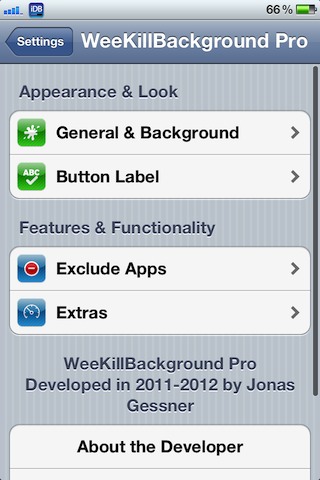
WeeKillBackground Pro features customization options for the look and feel of the Notification Center widget, along with font options to change the wording, text size, and text color.

There’s also a dedicated section made solely for excluding certain apps from being killed, and a Extras section to do things like automatic killing once Notification Center is closed.

At $0.99 on Cydia’s BigBoss repo, WeeKillBackground Pro is a modestly priced solution with a ton of options, which will surely please all but the toughest critics.

Let us know what you think about WeeKillBackground Pro in the comments below.

 
  • http://twitter.com/kylebshr Kyle Bashour

    The toughest critics… And @chpwn :P

  • http://twitter.com/M0esmac Modest Noreika – Moo

    KillBackground is better. Faster killing and stuff. Try it out and it’s free. +

  • Anonymous

    I still think “KillBackground” is better. =P

  • http://www.facebook.com/people/Angel-YoDuh-Castillo/674406718 Angel YoDuh Castillo

    My notification center is getting so full! Lol: I’m still using “RemoveBackground” via SBSettings but I may give this a shot. I like how much you can customize it. Thanks Jeff

    • Anonymous

      yeah my Notification Centre is also getting full with tweaks etc. However I use this tweak with IntelliScreenX Top Shelf setting.

      • http://www.facebook.com/people/Angel-YoDuh-Castillo/674406718 Angel YoDuh Castillo

        I too have intelliscreen x, but I don’t have an option to kill all apps..is it an add on or something?

  • http://www.facebook.com/oHHGoD Chet Hesch

    Where can I get the iDB carrier logo? that is so tight

  • http://www.facebook.com/people/Shu-Tse/100003031122741 Shu Tse

    @1.41 yeah, that’s why I prefer using zephyr with two fingers for left and right swipes.

    • http://pulse.yahoo.com/_2JFDZXSTUH2HWGIM6NSZX66KWA Kurt

      apple prefers you to use four fingers…oh so innovative.

  • Anonymous

    Very nice, if you like to play with a lot of unnecessary stuff or with things that don’t make your iPhone any better. Either KillBackground or Remove Background do the job quite well for free.

    • http://pulse.yahoo.com/_2JFDZXSTUH2HWGIM6NSZX66KWA Kurt

      every 50 uses of KillBackground will beg you to pay for it

      • Anonymous

        OK then use Remove Background. I’ve been using it for free for over a year now. Thanks for the tip, I never used it for more than 2 or 3 days.

  • Mutley HHB

    Works like a charm. I would recommend this to the fullest!!!

  • http://twitter.com/8bitty Грязный Блондин!

    RemoveBackground is better and faster

  • http://www.facebook.com/akingwong Alice Wong

    how to setting, to slide up at home screen to have double click home button effect?

    • Anonymous

      This is an tweak called Zephyr.

    • http://twitter.com/Jas_God Jas God

      u can set it in activator as well

    • http://twitter.com/Jas_God Jas God

      u can set it in activator as well

  • Anonymous

    with respect and not wanting to sound rude, what a load of crap. RemoveBG may not have all the bells and whistles of Alpha Settings and the like but that’s because it doesn’t need it. One activator setting, a short hold on the power button, or whatever else the user chooses, kills all apps and even has an exception option. This tweak is yet another pointless duplicate and as it’s not free it is not a solution for me.

  • Dan

    nice, I’ll probably use this in tandem with killbackground

    • http://twitter.com/blakestuhh Blake

      It’s pretty much the same

  • http://twitter.com/FootstepsOfTobi Justine Tobi Dayao

    I used it with Zephyr to avoid using my home button alot. And I can say I’m satisfied. It also has a timer that you could adjust every 0.5 up to 120 minutes to kill all the apps on the switcher automatically, pretty nice.

  • http://www.facebook.com/mehrashish Ashish Mehra

    Hi jeff, how u r able to put IDB carrier logo??

  • http://www.facebook.com/profile.php?id=1296598667 Roystan Ang

    WeeKillBackground has an option to kill all apps every X minutes (max 120minutes)