How to Enable Native FaceTime Over 3G Feature in iOS 5

By , Nov 16, 2011

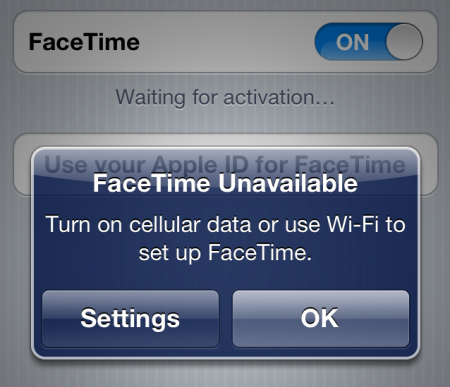
In the onslaught of rumors that we saw leading up to Apple’s Fall iPhone announcement, there was talk that iOS 5 would finally allow users to make FaceTime calls over 3G. As most of you know, FaceTime has been limited to Wi-Fi since its introduction.

As it turns out, the option actually exists in iOS 5, it’s just hidden. Apple obviously isn’t ready to release it to the public. But as usual, hackers have figured out how to enable the secret feature…

Sure, jailbreakers have been using utilities to make FaceTime calls over 3G for quite a while now. But unlike those apps, enabling the native iOS 5 feature won’t cost you anything. And you won’t need to open third party software to make calls.

But you will, however, still need to be jailbroken, as you will be editing a .plist file inside your device. That means this tip is for iPhone 4 users only at this time.

Step 1. Using iFile or any other file browser, navigate to /System/Library/CoreServices/SpringBoard.app/

Step 2. Locate the N90AP.plist and open it.

Step 3. Below the <dict> line, under <key>capabilities</key>, add in <key>3Gvenice</key><true/>
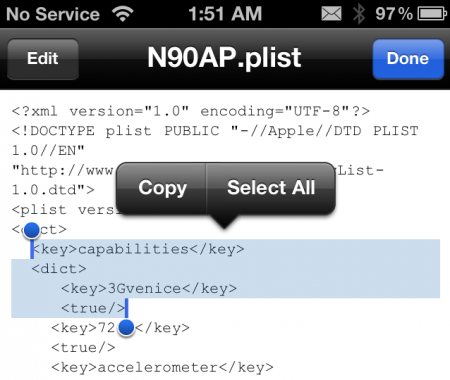
Step 4. Make sure to save your changes, and then exit the file browser.

That’s all there is to it. Remember to watch your usage if you aren’t on an unlimited data plan. Video calls can really rack up the MBs.

[FSM]

  • Share:
  • Follow:
  • http://pulse.yahoo.com/_BY5UUDHPAB25JJ2OZT4F5ZCKJM jose martinez

    HACKERS UNITE!!!!! Keep up the great work guys!

  • http://twitter.com/marc0809 Marc Martinez

    does ibackupbot work on this? I enabled panormic mode without being jail broken…

    • Kok Hean

      working??

    • Anonymous

      No, Mark. I also tried with ibackupbot. The .plist is not in scope as that whole directory branch does not show up. Otherwise, we would have been golden.

  • iamse7en

    I need to do this to my 4S. So many people are trying to facetime me but I can’t. I hardly am ever on WiFi. I hate these restrictions. I miss my jailbreak. Hurry up already hackers.

  • http://toobig.net TooBIG

    just download Tango until Apple stop crying about it

    • Anonymous

      From what I remember , AT&T blocked it , because of data consumption. Don’t know why reasons for other carriers , but probably the same reason

  • http://www.facebook.com/jaavvv Javier Russo

    Works perfect brother! thanks

  • http://twitter.com/mgriffioen Mark Griffioen

    Doesn’t work on my phone, maybe because it’s a CDMA model? I don’t have the N90AP.plist file, but in that same directory, I had a N92AP.plist file, that when opened was identical to the one highlighted in this article. I followed the steps, but it doesn’t seem to work when trying to make a FaceTime call over 3G. Huh.

    • Eric Morgan

      Restring your phone. Theyre not saying to do this fr some reason.

  • Anonymous

    worked

  • http://www.facebook.com/mr.spence Mike R. Spence

    I did it and now my Springboard would not restart. How can I get my phone out of the springboard clocking srceen???

    • http://twitter.com/kriss631 Kriss zavala

      If there isn’t a solution just restore it. But look I hope u save your iOS 5 because if not then u are going to receive 5.0.1 from apple since they don’t sign 5.0 anymore

      • http://www.facebook.com/mr.spence Mike R. Spence

        thanks….I didn’t save the 5.0, But I just saw there is a tehtered for 5.0.1 so I’ll just deal with the upgrade.

    • http://www.bloise.co.uk Frankie Bloise

      I had the same problem where the Springboard didnt want to restart and was going in an endless loop but you can save it without doing a restore. This happened to me with the Fake Siri tweak btw.

      You just need to connect the phone to the PC (via USB) and using a pc based file browser such as iFunBox you can see the iPhone content. Just navigate to that path, extract the N90AP.plist file off your iPhone, edit it using Wordpad (not notepad) removing the line you added before, then transfer the edited file back to the iphone using the same iFunbox.

      It worked for me.

  • http://twitter.com/kriss631 Kriss zavala

    Yeah mine says its “92″ not 90 and it’s also of course it’s CDMA. I haven’t tried putting those codes yet I don’t want to get stuck like that guy ^^^^ lol help soon :)

  • http://www.khaledscorner.com خالد

    thanks

  • http://www.facebook.com/nathanentwistle Nathan Entwistle

    Tried it, didn’t work. Resprung and success! I’ll probably never use it but it’s there just in case.

  • Eric Morgan

    Ridiculously laggy this way. With 3G unrestrictor there is much less lag on 3G. Guess that’s why Apple doesn’t allow it.

    • http://www.bloise.co.uk Frankie Bloise

      depends on the 3G network you are in.. it works decent in Tmobile UK

  • Anonymous

    It works! This is the kind of tips/tweaks that I love. Thanks!

  • Eric Morgan

    *respring.

    • http://www.bloise.co.uk Frankie Bloise

      yeah, that wasnt part of the instructions but is obvious.

  • http://pulse.yahoo.com/_BI2BPA73FGL3GLAQMAD6O35W3M josh

    If someone’s jailbroken, why would they chose this over facebreak? This just seems like extra steps to get the same thing? Am I wrong?

    • Anonymous

      This is FREE and FaceBreak costs $2.00 that’s WHY!

  • http://www.facebook.com/profile.php?id=100002928436359 Matt Balcer

    Now we need one that’s like User Agent Faker for Safari. I’m sick of all the constant default mobile modes.

  • http://www.facebook.com/profile.php?id=673545981 Marcin Alex Powichrowski

    Guys,
    Do we really need our iP4 to be Jailbroken? Can we access this file with any iPhone explorer?

    • http://twitter.com/Mrmelendez Will Melendez

      I believe there’s is no other way around it .

  • http://www.facebook.com/BruceDemski Bruce Demski

    Works perfectly after a respring!!!!

  • Jason VonButtgereit

    Where is the vibration patterns plist files in iOS 5? I can’t find it

  • Karim Zaidi

    your iphone does not need to be jailbroken because you can use iphone explorer to navigate to the plist

  • http://twitter.com/_YoKolorMeBadd Breaon

    Worked fine on mine.. had CDMA iPhone too… no respiring loop =)

  • Anonymous

    Nice. I tried this and my phone bricked…

    well not really, but an hour later I went to restart (via tethered boot) and it wouldn’t reboot…the only change being me editing this plist file. I’ve done plenty of tethered reboots in the past no problem.

  • http://www.facebook.com/people/Henrik-Schneider/1253245503 Henrik Schneider

    I simply can’t find the “/System/Library/CoreServices/SpringBoard.app/” library tryed to use IFILE, I_FonBox + some more, how do I access this folder?

  • http://www.facebook.com/maukphyo Phyo Mauk

    for ipad, pls pls pls pls