Video

Apple Park visitor center taking shape, historic barn reassembled & more

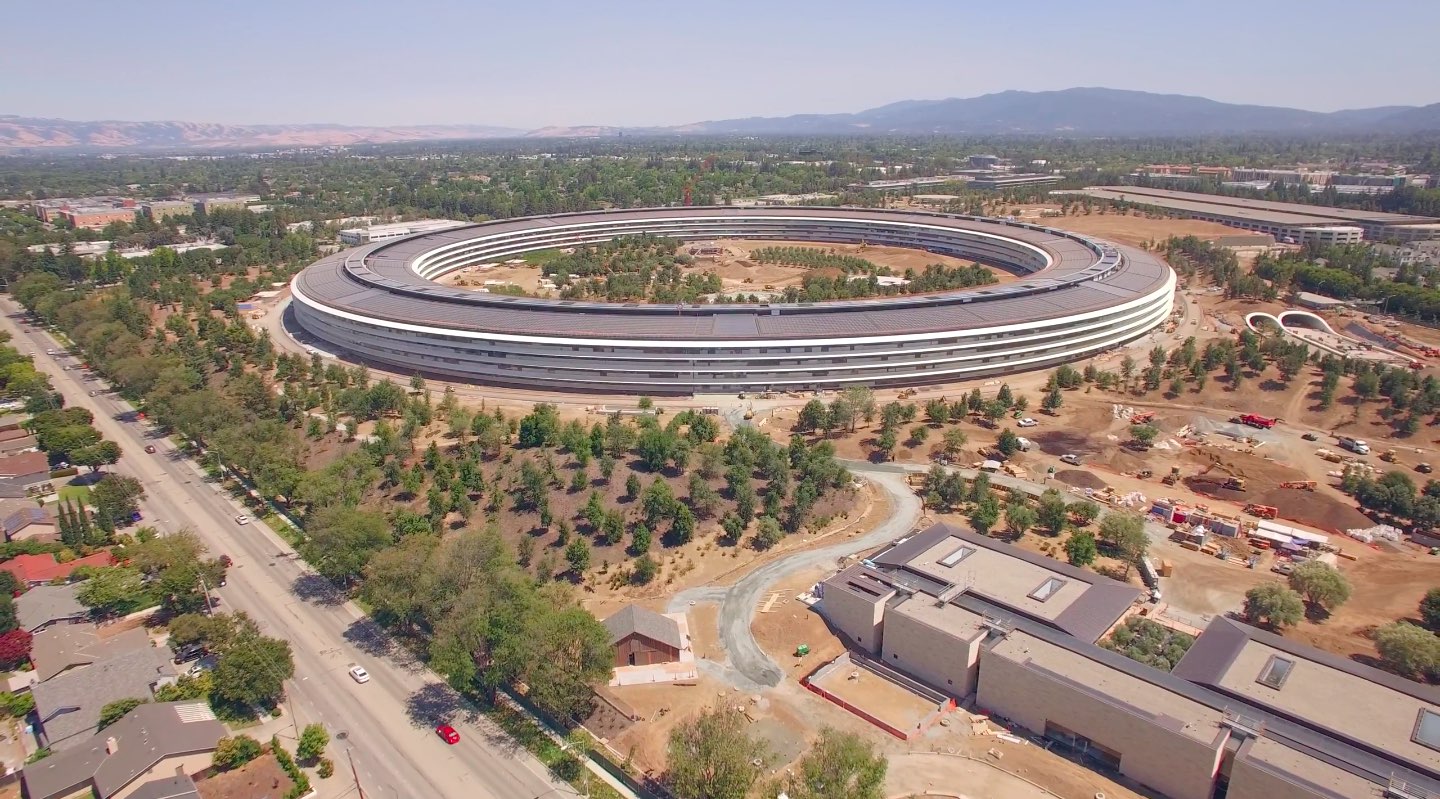
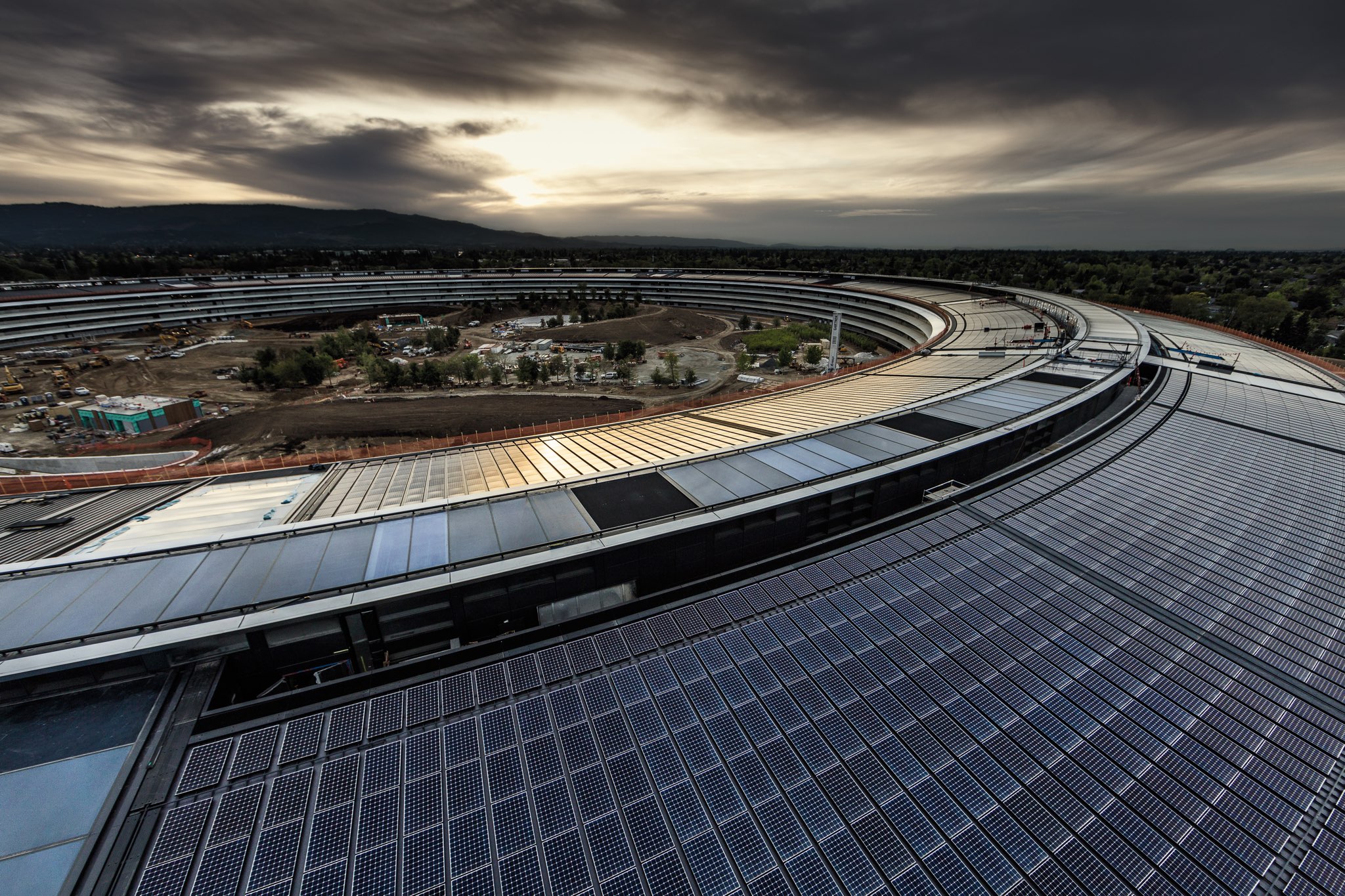
Aerial videographer Matthew Roberts posted new birds-eye footage of the upcoming Apple Park corporate campus, showing that a visitor center is slowly but surely takin shape.

The historic Glendenning Barn that the company dismembered plank by plank has now been fully reassembled (it's adjacent to a 100,000-square-foot gym for employees).

Among other highlights: a closer look at the 1,000-seat underground Steve Jobs Theater where Apple will host future press and corporate events, additional trees being planted and more.

As for the visitor center, it will include an Apple Store and a cafe open to the public.

https://www.youtube.com/watch?v=VwxQnI98CKw

As you can see for yourself, a pond inside the ring-shaped structure looks nearly complete. If the large sheet is an indication, Apple may soon fill the pond with water.

Landscaping work will continue for a few months after the offices inside the main building have been completed. Since April, employees have been gradually moving into Apple Park.

Hands-on video shows iPhone 8’s supposed industry-highest screen to body ratio

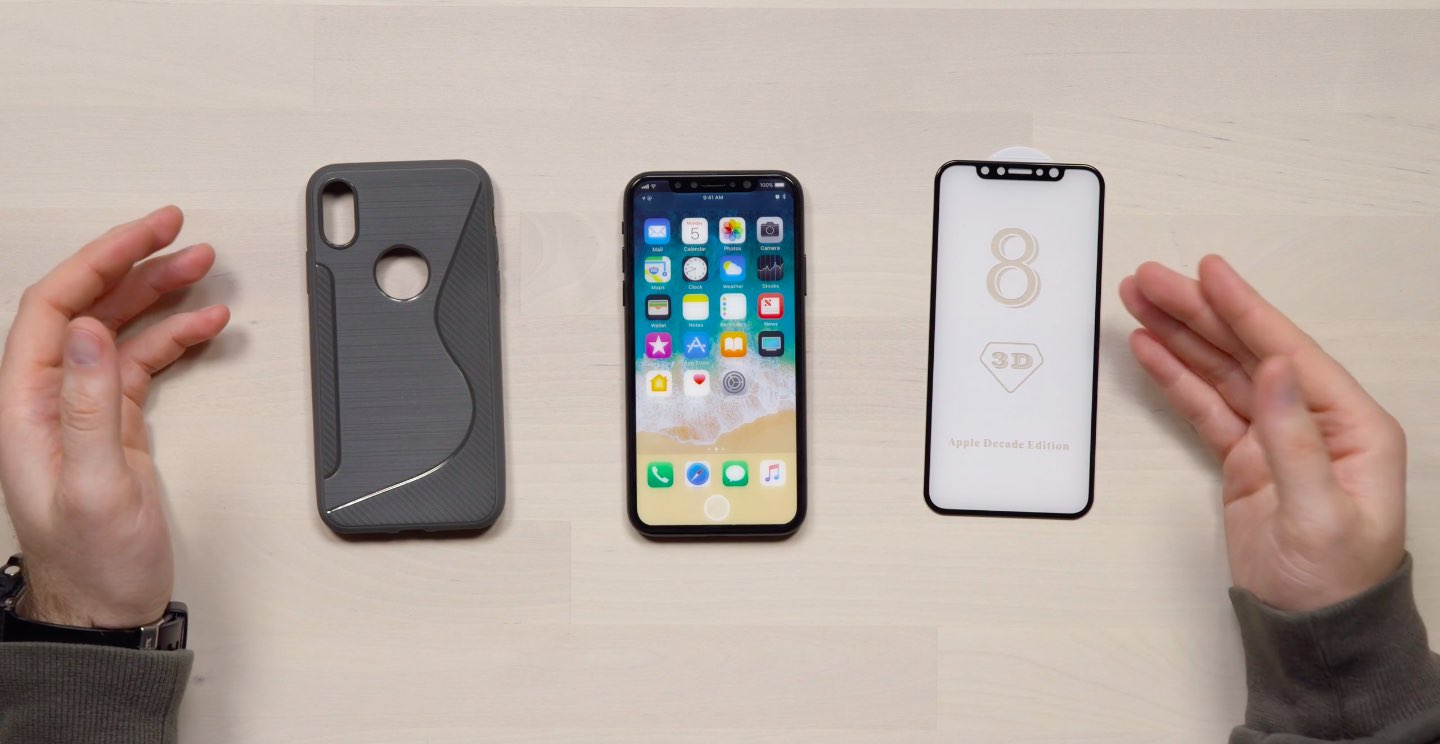
YouTuber Unbox Therapy got his hands on the most comprehensive CNC-machined iPhone casing “I've ever seen”, offering a look at the handset's screen to body ratio and other features.

According to trusted Apple analyst Ming-Chi Kuo of KGI Securities, Apple's flagship 5.8-inch OLED iPhone will have the highest screen-to-body ratio of any smartphone currently available.

According to the YouTuber:

iPhone 8 represents a very important device for Apple. In a market where smartphone prices are dropping rapidly companies like Apple and Samsung have to work much harder to convince customers that their products are worth the cost premium.

Some will say that Apple has copied Samsung in the design of the iPhone but I think the race for maximum screen to body ratio was inevitable for smartphone vendors. Current speculation puts this iPhone 8 design at the top in those terms.

There's no other phone currently available that has this much screen in a body this size.

Prior rumors alleged that iPhone 8 would switch from a 16:9 to an 18:9 display, resulting in a 2:1 aspect ratio that would make the screen appear taller and perhaps slightly narrower than the screens on existing iPhone models.

The 18:9 aspect ratio has been popularized by the latest phones from Samsung and LG with displays that are taller than the 16:9 ratio used by the majority of smartphones.

And here's his hands-on video, posted last week.

https://www.youtube.com/watch?v=4WHMgBs_C3s&t

Current speculation—supported by the CNC-machined iPhone 8 model in the video and analysts—appears to indicate the lack of a Touch ID fingerprint scanner.

It' remains unclear, however, if Apple might decide to opt for an advanced facial recognition unlock system similar to Samsung’s Galaxy S8 as a Touch ID replacement.

According to KeyBanc Capital Markets analyst Andy Hargreaves, iPhone 8 could launch without Apple Pay support unless the Touch ID situation is resolved in a timely manner.

“We do not believe facial recognition would be initially qualified as an acceptable verification method for Apple Pay,” said Hargreaves.

He explained that the solution wouldn’t work without clear line of sight to your face and, which could pose problems for customers using their iPhone 8 to pay with Apple Pay at stores.

New video provides one of the best looks yet at iPhone 8 dummy unit

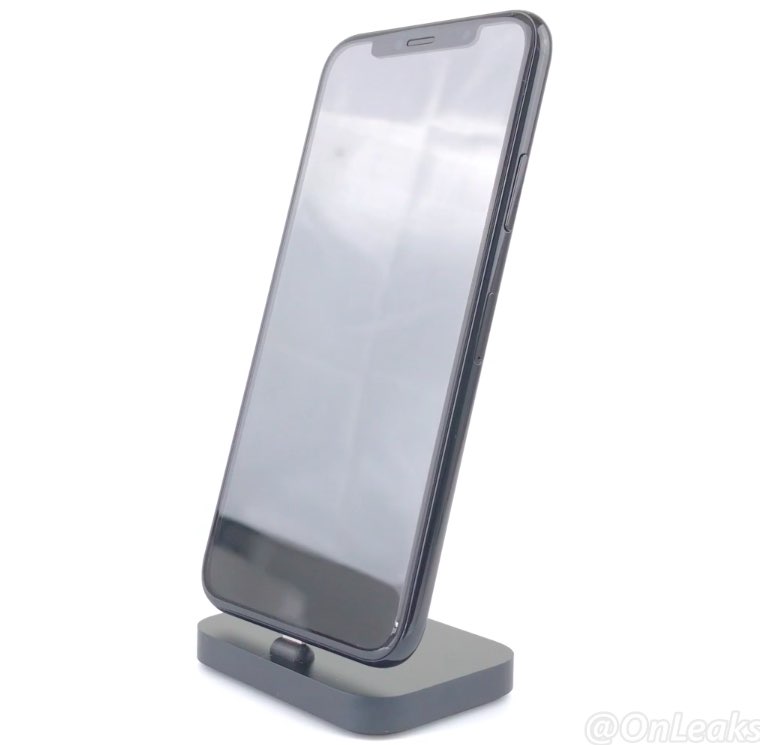
A new video that surfaced yesterday offers an up-close look, one of the clearest yet, at the prospective design of Apple's OLED-based iPhone 8. Shared by Steve Hemmerstoffer of OnLeaks, in partnership with Tiger Mobiles, the clip depicts a dummy device with a nearly full-screen face protected by a curved 2.5D glass cover.

The dummy unit has minimal side bezels. A Touch ID fingerprint sensor is built into the display and there's an area at the top of the display that will presumably accommodate the front-facing FaceTime camera along with a 3D sensor and potentially other sensors.

On the back, we see a vertically aligned dual-lens camera system like on prior leaks. The dummy unit measures 144mm long, 71mm wide and 7.5mm thick without the camera bump (with the bulge included, the thickness increases to 9.1mm).

And here's the video.

https://www.youtube.com/watch?v=pW1gx086ZxU

This particular iPhone 8 dummy unit is a CNC mockup manufactured based on CAD files that were posted to Twitter back in April. Because it's just a mockup based on the months-old CAD files and design schematics that have been circulating on the web for quite some time now, it may or may not be representative of the real iPhone 8 design.

This tweak helps break the habit of recording videos in portrait orientation

It bothers me from time to time when I watch videos on social media or YouTube and realize just how many people record their videos while their smartphone is in portrait orientation.

These services are formatted for computer screens, which naturally have displays longer than they are tall, so recording videos in this way usually degrades the viewing experience for the viewer. That’s why a free jailbreak tweak called VerticalVideoSyndrome 2 by iOS developer Andreas Henriksson is now available.

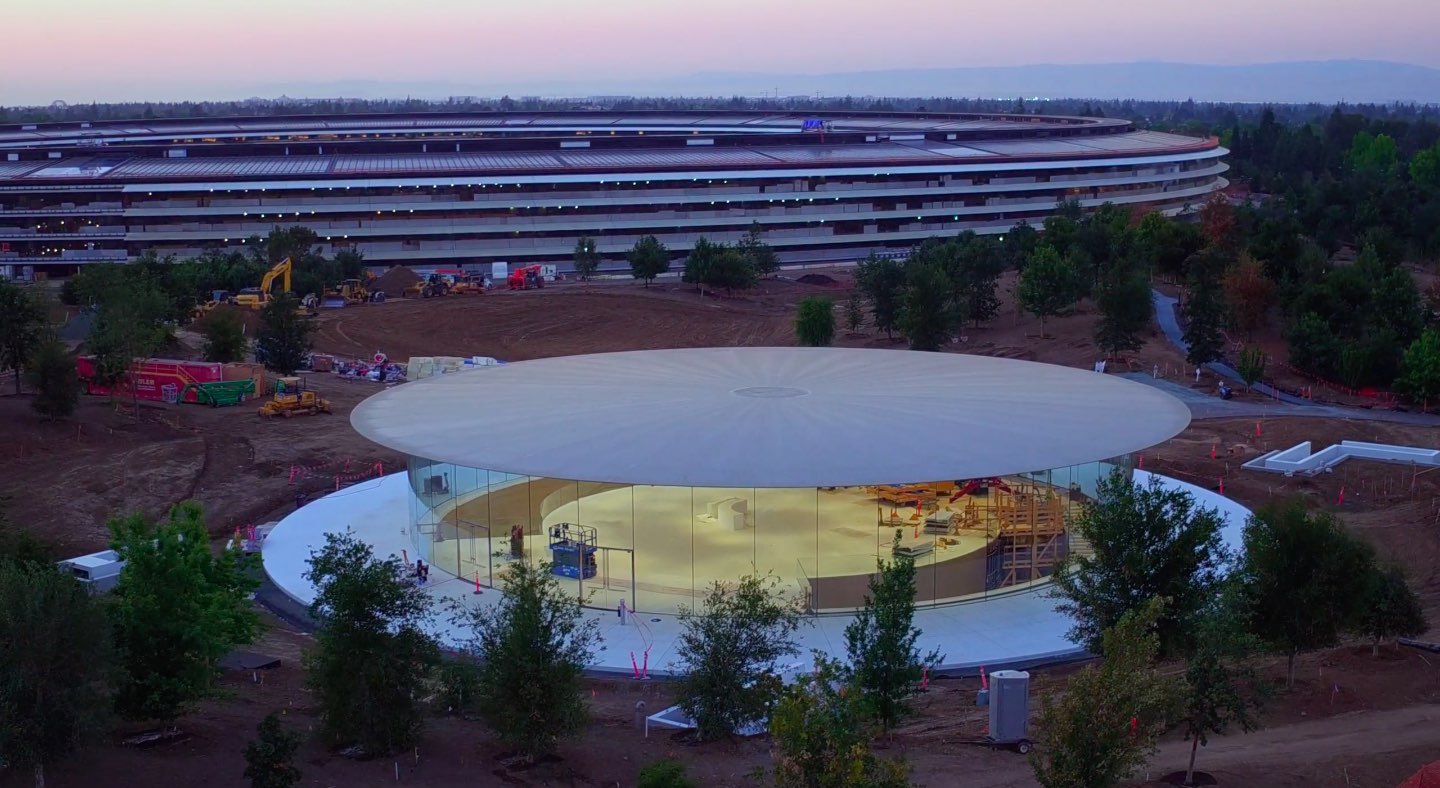
Apple Park sunset footage shows entrance to Steve Jobs Theater with its lobby lights on

Drone pilot Duncan Sinfield last Saturday published new aerial footage of the 175-acre Apple Park site on his YouTube channel, offering a glimpse at the entrance into the Steve Jobs Theater with its lobby light on.

“Opening day is getting closer at Apple Park, landscaping and road-striping are not the only things wrapping up,” reads the video's description.

Located atop a hill at one of the highest points of the upcoming campus, the Steve Jobs Theater sports the world's largest freestanding carbon-fiber rooftop.

Featuring glass staircase spiraling downward to an underground 1,000-people auditorium, the Theater will be used for corporate meetings and Apple media events, meaning the unveiling of iPhone 8 will most likely take place there.

https://www.youtube.com/watch?v=YgzZnfAqLW8

“Steve’s vision for Apple stretched far beyond his time with us. He intended Apple Park to be the home of innovation for generations to come,” said Tim Cook in April.

The video revels significant progress being continually made on the main ring-shaped building, offering a nice look at the main atrium with its floor-to-ceiling glass doors.

Landscaping work will continue for a few months after offices in the main ring-shaped building are completed. Since April, employees have been gradually moving into Apple Park.

Satellite time-lapse chronicles nearly two years of Apple Park construction progress

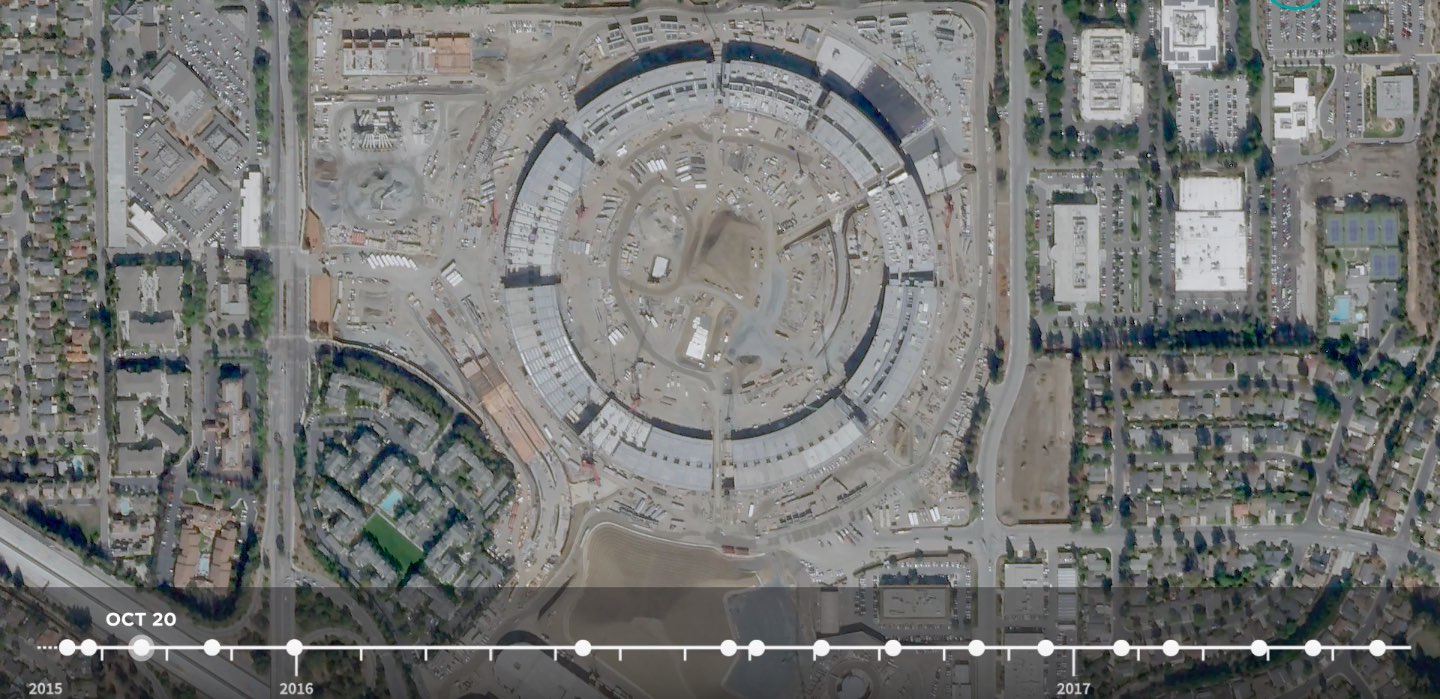
Apple Park began construction in 2014. A new time-lapse video based on high-resolution photos by satellite imaging provider Planet Labs has condensed nearly two years of work on the main ring-shaped building in an 18-second time-lapse video. Uploaded Tuesday to Planet Labs' YouTube channel, the clip was shared yesterday by Business Insider.

Aside from the main ring-shaped building, the video also depicts construction progress on Apple's twin research and development buildings, the 1,000-seat Steve Jobs Theater, a wellness facility for employees and more.

https://www.youtube.com/watch?v=mCZZXOmC-J8

For those wondering, they used the high-resolution imaging SkySats constellation to capture the construction of Apple's new Cupertino campus.

If the Planet Labs name rings familiar to you, that's because Google recently sold its previously acquired satellite-imaging startup Skybox Imaging to Planet Labs.

The search giant acquired Skybox Imaging in 2014 for a reported $500 million.

That startup was founded by Michael Trela, who was a spacecraft engineer at John Hopkins University, and John Fenwick, who served in the U.S. Air Force. Both men joined Apple this April following Planet Labs' acquisition of Skybox from Google.

As part of the acquisition, Planet Labs now has seven satellites and plans to sell high-resolution aerial imagery starting next year.

Hands-on with watchOS 4: pausing workouts in the background, Toy Story faces & more

Yesterday was a big day as Apple seeded a bunch of new betas to its developers. Earlier this morning, we posted a nicely done hands-on video walkthrough of the new features and changes in iOS 11 beta 2, but what about the latest watchOS 4 beta?

Your wish is our contributor Andrew O'Hara's command!

Andrew put together a quick video demonstration of everything new in the latest beta of watchOS 4. Keep in mind that watchOS 4 beta 2 is not as feature-packed as a second beta of iOS 11, but there's still plenty to get excited about.

Watch Andrew's video highlighting all the new stuff and important changes in beta 2.

https://www.youtube.com/watch?v=jD7D-F0mXXU

Subscribe to iDownloadBlog on YouTube

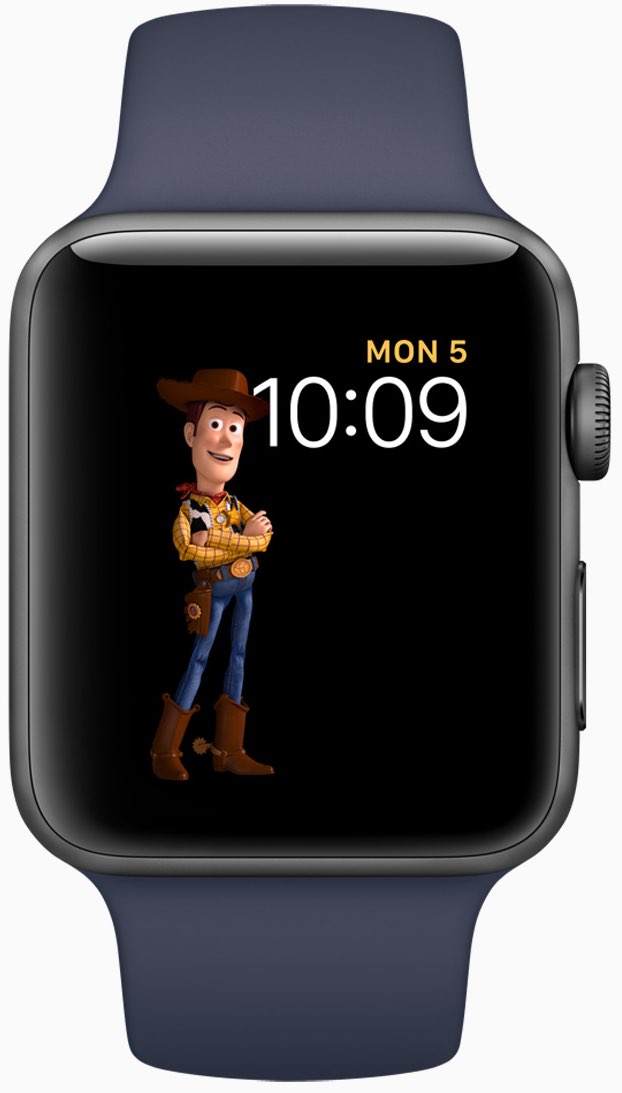
Aside from the gorgeously animated characters on the new Toy Story watch face, this beta lets you press the Side button and the Digital Crown simultaneously in order to quickly pause an active workout session, even if the Workout app is running in the background.

This is a very compelling feature for those who use their watch for swimming. Prior to watchOS 4, pausing a workout while swimming first required you to turn the Digital Crown to expel the water from the speaker. Then you had to swipe on the Workout app's screen to reveal the session controls, among them the Pause button.

The problem is, a wet Apple Watch display tends to behave erratically so getting to that screen while in water was difficult. With the new shortcut, this particular pain point goes away.

Haptics now play for frontmost apps in watchOS 4 beta 2, but some languages are unavailable for Dictation, including the newly released Shanghainese dictation.

New features and changes

Here are the new features and important changes in watchOS 4 beta 2.

Nicely animated Toy Story watch face Breathe notifications now respect your custom settings Location-based automation triggers now work if triggered from the alert on Apple Watch Pressing the Side Button and Digital Crown pauses an active workout session even if the Workout app is not in the foreground SiriKit requests no longer fail with a “Sorry I can’t do that” error. watchOS apps from TestFlight or the App Store now work with SiriKit Siri may not play music that has been synced to Apple Watch Music tracks now play from and sync to Apple Watch (Apple Watch must be on its charger for Music tracks to sync and Love/Dislike options are currently missing for locally synced music on your watch)

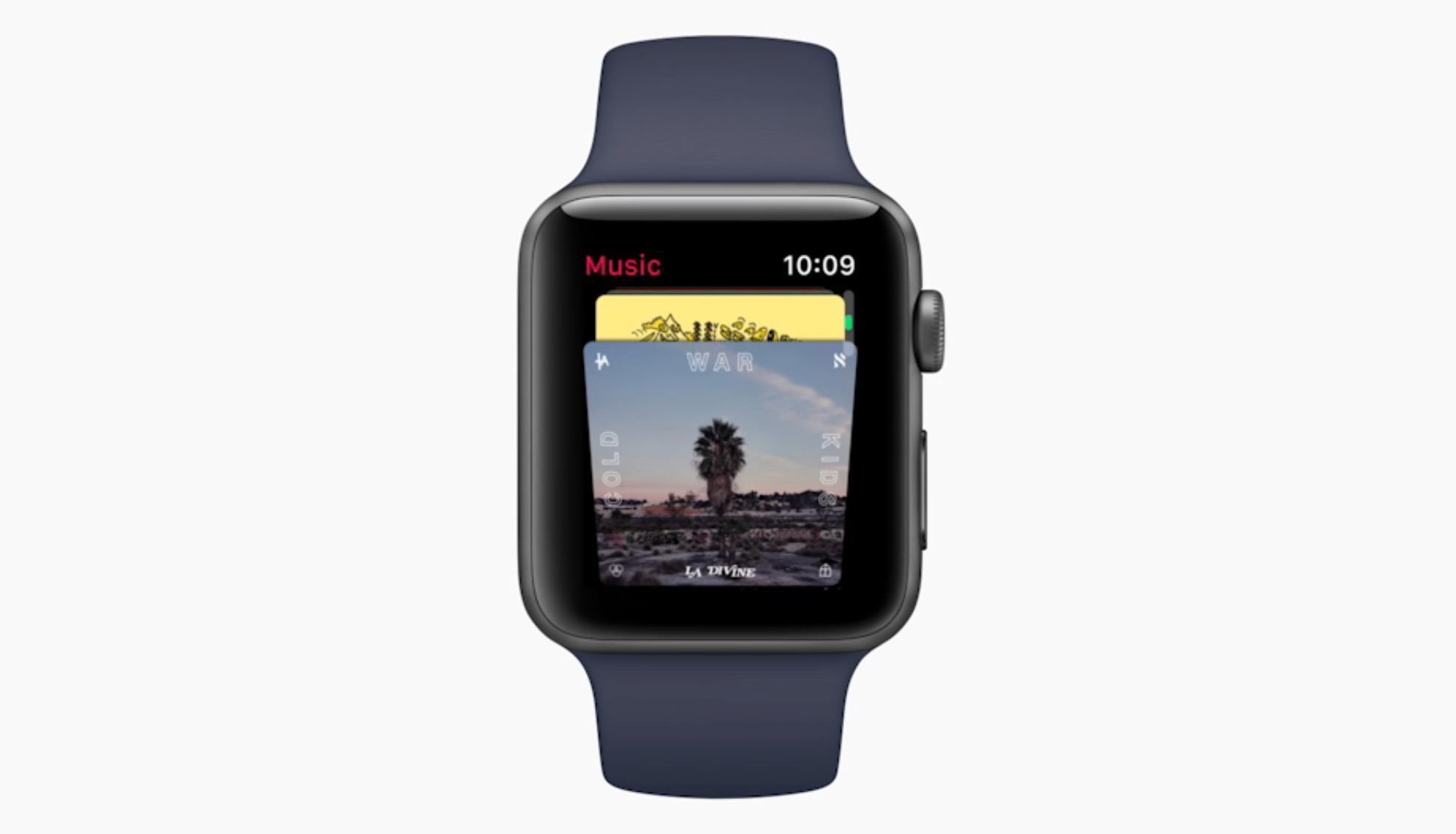
Aside from Woody, Jessie and Buzz Lightyear, the new Toy Story watch face in the second beta provides other animated characters, like Ham, Rex and Bullseye.

A separate video from Andrew shows off almost all the character animations available in the new Toy Story watch face, including additional customizations.

https://www.youtube.com/watch?v=NuEuxD9AJ7I

That's all, folks!

As we conclude our tour of watchOS 4 beta 2, we'd like to ask you to share any new feature discoveries of your own with fellow readers by posting them in the comment section.

You can also shoot us your findings via tips@iDownloadBlog.com.

What’s your favorite new feature in watchOS 4 beta 2, and why?

Hands-on with iOS 11 beta 2: DND While Driving and other new features, changes & fixes

Apple (somewhat surprisingly) dropped the second beta of iOS 11 to developers on Wednesday with a myriad of changes and bug fixes. While there doesn't seem to be a huge number of user-facing enhancements, there are still quite a few notable changes and new features in this beta.

A large number of prominent bugs have been fixed that have been plaguing users, like crashing when deleting a voicemail, manual screen brightness not staying set, 3D Touch on phone numbers and addresses not working.

Unfortunately, with all of those bug fixes are several new bugs and known issues.

For instance, an SOS alert may still be sent even though the user cancelled it. This is a good reminder this is an early developer beta that should only be run on secondary devices.

As for the new features, we have the initial implementation of the much touted Do Not Disturb While Driving mode that will lock your phone as well as send a custom auto-reply (customizable in Settings → Do Not Disturb) should someone text you.

Control Center can now be disabled inside of applications, like on prior iOS editions. And far from last, the Files app now has started to show external locations like Google Drive and Box.

New features and changes

This is what you probably wanted to know about iOS 11 beta 2.

CarPlay now has lane guidance in Maps Smaller speed in Maps To edit/add filters in Photos you now tap the edit button in the top right corner instead of the sliders icon Now Playing widget has been tweaked New phone placeholder icon when no album artwork present in Now Playing widget Audio source switcher is now available on Lock screen New orange color for the new Echo effect in Messages Do Not Disturb While Driving is enabled with extra options in Settings Control Center can be turned on or off while in apps New search options within Apple Music You can now select multiple items in Photos Bluetooth widget now works the same as Wi-Fi: instead of turning off, it will just disconnect from whatever is connected to it Notification Center pull down has a gradual blur New Share sheet extension: Save to Files app Safari has new experimental features in Settings Dictation is now available in Hindi New options in Settings to make notification banners permanent or permanent Built-in screen recorder boosts video capture resolution to 1080p

Take a look at our hands-on video to see all of these new features and more in action.

https://www.youtube.com/watch?v=TZ5pwZMPRxI

Subscribe to iDownloadBlog on YouTube

And here's a quick overview of the most important fixes.

Bug fixes 3D Touch data detectors are now working for phone numbers, addresses, etc. Screen brightness stays at set level YouTube search bar has returned More stable Bluetooth connections (Dexcom) Android Migration now works as intended Crashing when deleting voicemails is fixed Lock screen no longer rotates Long exposure photos are now higher quality than in first beta Wrapping it all up

As we conclude our tour of all the changes, fixes, improvements and new features in iOS 11 beta 2, feel free to tell us about your own discoveries and observations in comments or via tips@iDownloadBlog.com.

What's your favorite change in iOS 11 beta 2 thus far, and why?

Hands-on with beautifully animated Toy Story faces in watchOS 4

Aside from bringing more intelligence and fitness features to Apple Watch, the new watchOS 4 software includes a bunch of beautifully animated Toy Story faces. Not unlike the existing Mickey and Minnie Mouse watch faces, the Toy Story ones bring to life popular Pixar characters including Woody, Jessie, Buzz Lightyear, Ham, Rex and Bullseye.

Our own Andrew O'Hara did a quick video showing off almost all the character animations available in the new Toy Story watch faces in watchOS 4, including additional customizations.

Give the video a quick watch, then meet us in comments.

https://www.youtube.com/watch?v=NuEuxD9AJ7I

watchOS 4 packs in other new watch faces.

Kaleidoscope, for instance, turns static images into mesmerizing patterns and the new Siri watch face uses artificial intelligence and machine learning to display the information users need most throughout the day.

ROUNDUP: 60+ new features in watchOS 4

Plus, you have new complications for your watch faces, including Now Playing and Apple News.

These new watch faces, complications and other features all require watchOS 4, a free upgrade for all Apple Watch users later this year.

Are you excited for the new Toy Story-themdd faces for your Apple Watch? Share in the comments section below!

Watch rare interview with former iOS chief Scott Forstall and original iPhone team members

The Computer History Museum last night hosted Pulitzer Prize journalist John Markoff (formerly of the New York Times) who interviewed former iOS chief Scott Forstall and the original iPhone engineering team members Hugo Fiennes, Nitin Ganatra and Scott Herz.

“We knew we were doing something right with the user interface design,” Forstall told Markoff, citing an example of a two-year old girl and a 99-year old woman who could use iPhone and iPad without any user manual.

“The team was amazing and we knew we were doing something right,” he added.

“The first text I ever sent was on my iPhone, because texting on other devices was horrid,” he revealed. Commenting on Apple's late co-founder Steve Jobs, Forstall called him “the most intense person I’ve ever known.”

Jobs was “super driven, demanding and forced people to do their best,” Scott said.

“When he was sick, I’d go to his house every day. On some days, he couldn’t open his eyes,” he said of Steve's passing. “We got Siri right before he passed and he loved it because he was too weak to type. I was surprised, it just seemed like he’d always be there.”

Asked to comment on the then controversial skeuomorphic design, which imitates real-world materials like leather in software, Forstall responded by saying the following:

I never heard the term skeuomorphism, even years after we built iPhone.

I mean, that’s a horrible word. It sounds unnatural, it just sounds terrible. When I look at good design—when I look for good design—I look for something which is easy to use.

Approachable and friendly that you can use without a manual.

If you look at the designs we did at Apple, we talked about photo-illustrative, metaphorical designs. And those were infused into the design sense of Apple by Steve Jobs since the original Mac if not earlier. The original Mac had a desktop and folders that looked very much like the desktop on which that Mac sat.

And so we used these design philosophies. It doesn’t mean that we loved every single part of it. It doesn’t mean I loved every single part of it. There’s definitely things that I was less a fan of than others. But we built these designs that worked. And how do we know they worked? You just had to watch people use it.

Here's the full video of the interview (the Forstall part begins at 1:07).

https://www.youtube.com/watch?v=zjR2vegUBAo

The original video is available on Facebook.

Asked if there ever was a time he shook his head at something about iPhone (assuming he's still using one), Forstall said this:

That happens all the time. If you’re a designer, if you care about design, you can’t go through any part of your life without shaking your head and thinking that could have been done better. And I thought that for our design, even the first version. The second version you’re always making it better.

On Apple secrecy:

The thing about Apple is we all get it, we all live in that culture. They were very respectful. You develop a talent for describing what you’re working on without giving too many details.

Fiennes added that the first time he saw pinch-zooming was at the original iPhone keynote. Ganatra said he heard Forstall on many occasions talking about scrolling deceleration, adding he was “being very detailed about scrolling and how the UI responds to touch.”

“There’s a lot of math that goes into making it work so well,” said Ganatra.

And to illustrate Apple's legendary attention to detail, Fiennes said Jobs asked him to move the processor in an iPhone a couple of millimeters in order to make the printed circuit board (which ordinary users never get to see) symmetrical.

Forstall suggested Apple kicked off work on a tablet project, dubbed Project Purple, because Steve hated an unnamed Microsoft employee (Scott says it wasn't Bill Gates).

“It began because Steve hated this guy at Microsoft. That is the actual origin. Every time Steve had any social interaction with that guy, he would come back pissed off,” said Forstall.

“Steve came in on a Monday, there was a set of expletives and then he said, 'Let's show them how it's really done'.”

Steve later put the tablet project on hold to work on iPhone, asking Scott if they could take a rubber-band scrolling demo they were doing with the tablet and shrink it down to a phone.

The rest, as they say, is history.

I also like this anecdote on how Jobs scammed Apple for free lunch:

He and I would go to the cafeteria at Apple all the time, and he would insist on paying. I was like, you're paying me enough that I can afford the $8 lunch, but he'd always, if he got his food before he'd wait at the line for me to get up there and he'd pay.

And he made it so you could pay with your Apple badge.

So you'd come up there and you'd badge in, and it would be directly withdrawn from your paycheck. Somehow, I was like, 'Why are you, really, go sit down, I feel like an ass when you're sitting up there waiting for me and I can't get any long-cooking food.'

Steve said 'No, no, no, this is great. I only get paid $1 per year. I don't know who's paying every time I badge!' He was a multi-billionaire scamming Apple!"

The lunch story is at mark 1:56 in the video.

Although Forstall isn't currently building anything himself, he's “doing a lot” in terms of advising startups and Broadway (he has always loved theater and even used to act).

“It was always a passion” he said. “When I left Apple, I was introduced to a woman and we hit it off and she said ‘we should produce something on Broadway.’” Doing a Broadway show, he says, is like managing a startup.

“You start with the creative types, you invent something, then you put a bunch of money and effort and time behind it and you give it to the public.”

At the end of the interview, Forstall thanked everyone in the audience who had participated in creating iPhone, iPad and iOS. “It's not one person or even four people,” he said. “It was hundreds and thousands of people who made it happen.”

It is no secret that Forstall was a divisive figure within Apple due to its exacting standards, demanding demeanor and abrasive management style.

He was fired in a major management shakeup in October 2012, in part due to his alleged refusal to sign an apology letter over the Apple Maps debacle, prompting CEO Tim Cook to issue a public apology to Apple customers.