Jailbreak Apps

LockSpring adds a respring button to your Lock screen

LockSpring is a free jailbreak tweak that adds a respring button and toggle to your Lock screen. It's an incredibly simple tweak, and chances are you already have the same functionality in another tweak installed on your iDevice. For that reason, most won't see the value in adding a standalone tweak like LockSpring to their repertoire.

On the other hand, if you're looking for a singular tweak that performs a respring function only with no extra fluff, then LockSpring may be worth taking a look at.
Deck HD released on Cydia

[tube]http://www.youtube.com/watch?v=NwWTDyg_saY[/tube]

Deck HD - the iPad version of the popular Deck tweak for the iPhone - has finally made its way to Cydia for download.

A while back we posted a full walkthrough showcasing Deck HD in action. What we found was a tweak that worked just as well as the iPhone version, and in fact felt even better to use due to the extra screen real estate, and exclusive iPad customizations.

Deck HD can be downloaded from Cydia's ModMyi repo for $1.99. If you decide to try it, be sure to share your experience in the comments section.

How to add the iOS 6 Twitter Widget to iOS 5

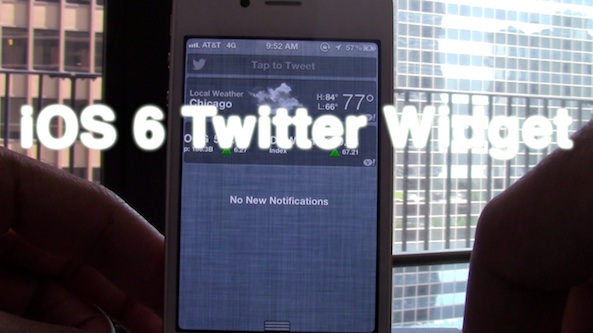
Now that iOS 6 has official built-in widgets for both Twitter and Facebook updates, wouldn't it be nice to be able to replicate those same widgets on iOS 5? Apparently that's the same thought the developer of iOS 6 Twitter Widget had when creating his tweak. This widget, as its name so plainly alludes to, allows you to have an exact replica of the iOS 6 Twitter widget on lesser firmware.

Take a look inside for the full video walkthrough...

MountainCenter now available on Cydia

[tube]http://www.youtube.com/watch?v=cC4BCZycKZM[/tube]

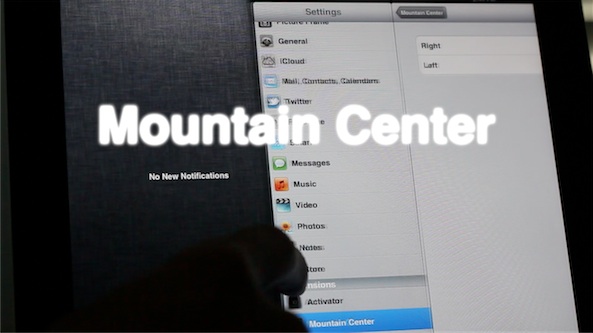
MountainCenter, the jailbreak tweak that brings OS X Mountain Lion's Notification Center to the iPad and iPhone, is now available on Cydia's BigBoss repo for $2.99.

While some may balk at that price point due to another similar tweak — MountainLionCenter — being available free of charge, Mountain Center provides you with more options, and support for devices other than the iPad. Be sure to check out our full walkthrough of MountainCenter for the entire scoop.

Which tweak will you be using? Let us know what you think in the comments section.

How to enable 3D maps on older devices

One of the biggest new features of iOS 6 is the new reinvigorated Maps app, which no longer relies on data from Google. The new Maps app also features turn-by-turn directions, and 3D capabilities.

Sadly, for owners of older devices like the iPhone 4 or the iPhone 3GS, you'll get the new Maps app sans 3D capabilities or turn-by-turn directions. As usual, the jailbreak community has come through with a solution to at least one of the omissions — 3D maps.

Check inside as we walk you through adding 3D maps to your officially unsupported older device...

Quickly shut down your device with QuickPowerDown

Fancy a way to shut down your device in the quickest fashion imaginable? Then you may want to give QuickPowerDown a look.

QuickPowerDown is a jailbreak tweak that allows you to outright bypass the "slide to power off" menu when shutting off your iPhone. Along with that, there is also a settings panel in the Settings app that lets you configure different actions to the power button...

How to add the iOS 6 photos menu to iOS 5

With iOS 6, the iPhone and its brethern gain an all new photo sharing menu interface that includes the likes of Facebook, Twitter, and more. Its interface is much more pleasing to the eye than the current bland sheet based interface used on iOS 5 and below.

Thankfully, you don't have to be a developer to enjoy the new iOS 6 interface, because there is a new jailbreak tweak that mimics the new interface and even provides greater functionality than what iOS 6 users have. Take a look inside as we go hands-on with iOS 6 Photos Menu...

Ask Jeff Episode 02 – That’s the company line

It's been a long time, but we've finally posted a new episode of Ask Jeff for your viewing pleasure. In this episode we discuss features from iOS 6, whether of not it's wise to upgrade to the iOS 6 beta, and various topics surrounding jailbreaking.

We've also decided to do something new this time around — taking questions via phone call. A very interesting discussion resides inside, be sure not to miss it...

Upcoming tweak brings another Mountain Lion inspired Notification Center to iOS

Mountain Center is an upcoming jailbreak tweak that brings an OS X Mountain Lion like Notification Center to iOS. Now if this all seems a bit familiar to you, that's probably because you've seen or read about MountainLionCenter, which performs a similar action.

Oddly enough, it seems that both tweaks were being developed around the same time, completely independent of one another, hence the overlapping of functionality. But there is good news, because the tweaks differ enough to warrant giving them both a separate look.

Mountain Center adds a few options that you won't find in MountainLionCenter, like the ability to invoke Notification Center from either side of the screen, and more. Take a look at our full video walkthrough inside...

Clockify adds a live clock to your Home screen and more

Clockify is a recently released jailbreak tweak that takes the fundamentals of Live Clock, and gives it a modern iOS 5 update. With Clockify you can add a live functioning clock on your Home screen, along with adding world clocks to the Lock screen and Notification Center.

There's a fairly impressive amount of customization to be had with Clockify, as you'll no doubt notice in our hands-on video walkthrough inside...

How to add download percentages to app installs

AppCent is a new jailbreak tweak that adds a percentage value beneath the app currently being installed on your iOS device. It's a very simple tweak, and for smaller sized apps you probably won't derive much value, but it's nice to have for larger apps that take a long time to download.

Although a progress bar indicating your download percentage already exists in iOS, there's something to be said for having actual numerical values that you can see and identify with...

BeeKeyboard: customizable Bluetooth keyboard shortcuts are finally coming to iOS

Although I've entertained the idea of using my iPad as a laptop replacement on and off during my tenure with the device, I always end up reneging on the thought. One of the primary reasons for this is the utter lack of keyboard shortcut customization within iOS.

Sure, some apps have minor Bluetooth keyboard interactivity, but those are few and far between. What about the ability to customize a keyboard's shortcut settings for all apps, and for those that do support a measure of keyboard support, how about even deeper customization?

That's where BeeKeyboard comes into the picture. It's an upcoming jailbreak tweak that will allow you to create custom shortcuts and add-ons for specific apps. Finally, the external keyboard just got a lot more powerful on iOS.