News

iTunes carrier billing expands to France and Turkey

If you live in France or Turkey and don't have a credit or debit card, you can now buy apps, media and Apple Music subscriptions from Apple's content stores and have those purchases billed to a monthly mobile phone bill from your carrier.

iTunes carrier billing in France is currently supported for Bouygues Telecom customers.

In Turkey, the feature works with Paycell.

According to Apple, carrier billing is now available in the following countries:

Austria (Drei) Belgium (Pay by Mobile) France (Bouygues Telecom) Germany (Vodafone, O2 and partner brands) Italy (Three) Japan (KDDI, Softbank and NTT DOCOMO) Norway (Telenor) Russia (Beeline and Megafon) Saudi Arabai (Zain) Singapore (M1 Limited) Switzerland (Swisscom) Taiwan (APTG, FET, Chunghwa Telecom, Taiwan Mobile and T Star) Turkey (Turkcell) United Arab Emirates (Etisalat and Du)

Our step-by-step tutorial explains the process of setting up carrier billing as a payment method for App Store, iTunes Store and iBooks Store purchases across your devices.

Instagram rolls out location and hashtag Stories in Explore tab

Photo-sharing service Instagram today announced that all-new location and hashtag-enabled Stories are now available through the app's Explore tab. These newly added Stories features require Instagram version 10.22 for iPhone and iPad, available at no charge via App Store.

“Now you can see what’s happening around you and find stories related to your interests,” says Instagram. Location-based Stories appear in a new Story ring at the top of Explore.

Additionally, you can now search for any location around the world.

When you search for a location, you'll see a Story ring for that place at the top of the location page. Location and hashtag-enabled Stories appear at the top of the Explore tab only if their creators have used location stickers or a new hashtag sticker.

“We’re also beginning to introduce hashtag stories on Explore to help you find Stories related to your interests,” added the company. “When you search for a hashtag, you may see a Story ring at the top of the page filled with Stories using that hashtag.”

If your location or hashtag-enabled Story was included in the larger Story on Instagram, you’ll see a line at the top of your Stories viewer list which tells you how many people saw your Story as part of the larger Story. To use a location or hashtag sticker without your Story appearing on the Explore tab, tap the “X” on your Stories viewer list.

Instagram's previous update brought out Snapchat-like face filters for your selfies, an eraser brush and a new hashtag sticker. Location stories on Explore are available on iOS and Android as part of Instagram version 10.22 in App Store and Google Play.

Hashtag stories will be rolling out over the coming weeks.

You can learn more about these features in Instagram's Help Center.

Instagram for iOS is a free download from App Store.

Duet Display brings even more desktop power to your iPad drawing experience

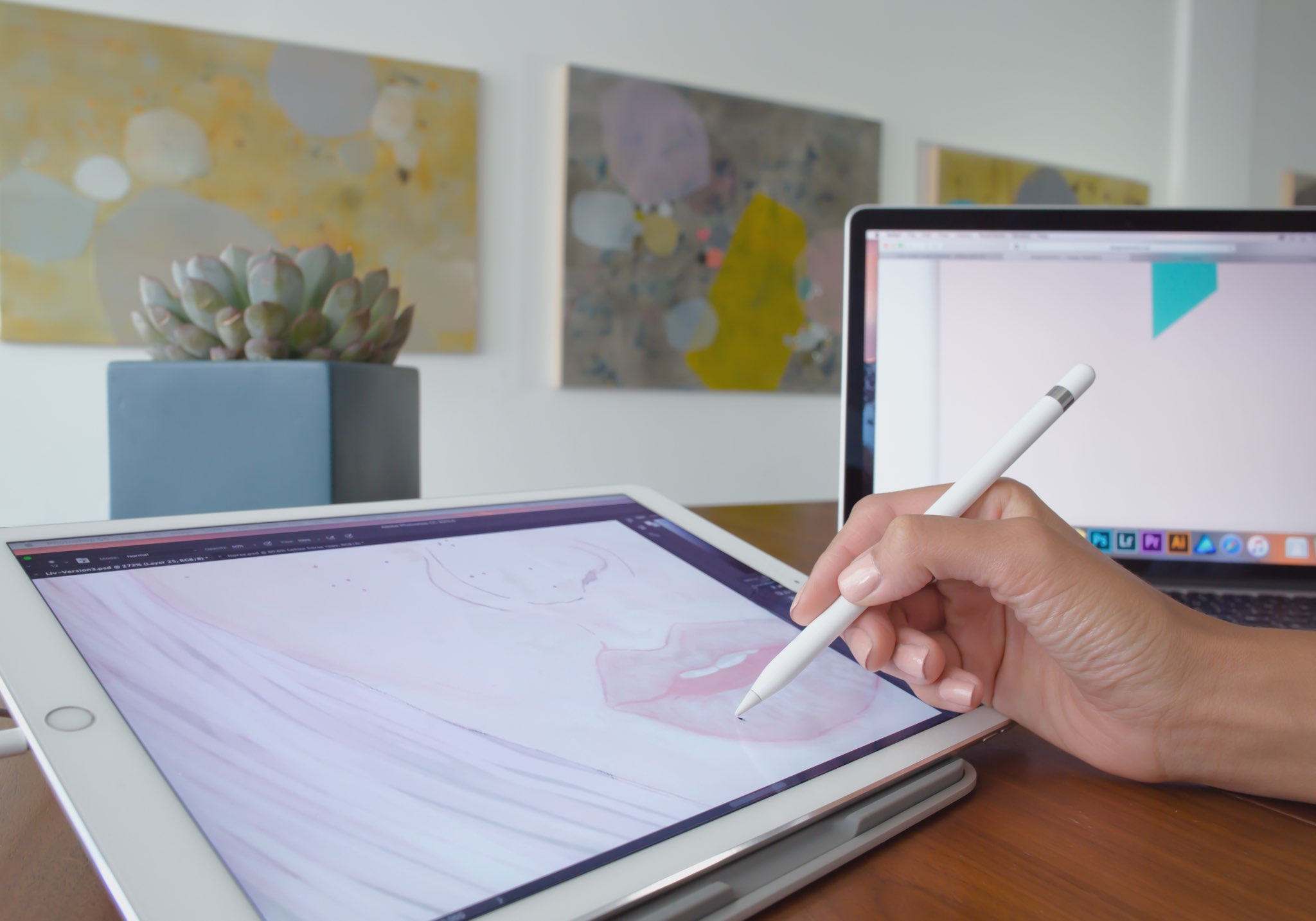
Duet Display, an app billed as the first solution to turn your Apple tablet into a second display and a high-performance drawing tablet for your Mac or Windows PC, was updated on App Store today with some new features.

The new Duet Display now lets you have the drawing experience on your iPad with the speedy rendering and sheer hardware power of a desktop.

The update brings out a number of enhancements and new customizations, including a customized pressure curve, advanced gesture support, a more fluid drawing experience, improved color quality and more.

Here are the key highlights in this release of Duet Display:

Customized pressure curve—You can now change the way macOS or Windows receives the data, allowing for a personalized drawing experience. Advanced gestures—We have added a lot of gestures to both standard and pro users. This should make drawing and using your iPad as the primary device much simpler. Line lead—To provide a faster drawing experience, we have spent some time making a line preview to predict where the Pencil is before macOS or Windows knows where it is. We plan to continue improving this to create an instant drawing experience. Touch Bar—We implemented Touch Bar support last Christmas. Pro users have really benefitted the most as they are using their iPad more than their computer, so it makes quick interactions much faster. We have improved the stability and speed of it, and many more apps support Touch Bar now. Improved color quality—We have improved rendering quality and speed for pro users under the Pixel Perfect setting, delivering a higher quality display in less time. We plan to continue improving performance as much as we can.

Duet Display works over a USB connection as wired connections are significantly faster and far more responsive than wireless solutions. The app's speedy rendering engine has a much lower latency than Apple's AirPlay technology.

Duet Display has proven to be very valuable to artists, designers and video editors as it essentially replaces a Wacom drawing tablet with your iPad Pro and Apple Pencil.

The app supports finger drawing, too.

Aside from drawing support, Duet Display can be used to turn your iPad into a second screen for your Mac or Windows PC. For instance, you could use your iPad Pro to keep tabs on your social media feeds while editing a document on your Mac's primary display.

The ability to turn a supported iOS device an external monitor for a Mac should be especially handy while you're traveling or if you cannot afford an eternal display for your computer.

Duet Display for iOS is a $19.99 value on App Store.

To celebrate today's update, the app is on sale today for $9.99.

A pro-level upgrade which unlocks the ability to use your Apple tablet as a drawing tablet for your computer costs an additional $19.99 per year as an in-app subscription.

Duet Display 2.0 for Mac or Windows is available directly from the official website.

Samsung reportedly signs new deal for OLED panel production for iPhone 9

The Korea Herald is reporting today that Samsung Display, the display-making unit of Samsung Electronics, recently signed yet another deal to build OLED panels for future iPhones. With up to 180 million screens demanded by the iPhone maker, this deal indicates that Apple is laying the groundwork for a much wider adoption of OLED panels in future iPhones.

The new deal is focused on supplying OLED panels for the new iPhone next year, tentatively called “iPhone 9”. To build OLEDs in 5.28 and 6.46-inch sizes, the conglomerate will break ground on a new factory in the South Chungcheong Province in South Korea.

The mentioned 6.46-inch size may point to a future iOS device, potentially due in 2018.

“The two companies have recently signed a non-disclosure agreement on general conditions, including the screen size,” said a source. “Other details such as screen design and functions could be adjusted considering the phone is still under development.”

Samsung Display is already supplying 80 million OLED screens for iPhone 8 this year. iPhone 8 is said to feature a 5.8-inch OLED screen with an active display area of 5.1 inches.

Image: CNC-machined iPhone 8 dummy via Benjamin Geskin

Indian government offers Apple tax incentives to boost local iPhone production

India has offered tax concessions to Apple to expand iPhone production in the country just days after it was announced that the Cupertino giant kicked off local iPhone SE production.

This is part of Prime Minister Narendra Modi's plans to boost local manufacturing.

Ravi Shankar Prasad, the central minister for Electronics and IT, told Reuters this morning that Apple has already approached the Indian government regarding potential expansion of its manufacturing facility in the southern Indian technology hub of Bengaluru, operated by its Taiwanese supplier Wistron which as of recently has been assembling iPhone SE there.

According to the news gathering organization, the Indian government has offered to permit Apple to import handset components intended for use in local manufacturing tax free.

Here's an excerpt from the article:

Among a set of tax concessions, Apple had initially sought a 15-years tax holiday for all components that it would import for setting up a manufacturing facility in India.

A panel of ministries rejected that demand and has offered a phased program to increase the share of local production in the manufacturing, Aruna Sundararajan, Secretary at the Ministry of Electronics and IT said.

“We have offered them tax exemptions on those components which could not be manufactured in India,” Sundararajan told Reuters.

Local manufacturing component would have to be increased gradually, he added.

The tax concessions will be subject to the condition of increasing local value addition over a period of time, to which Apple has reportedly agreed to.

“It will be a little early to say that India and Apple have agreed on the common ground,“ cautioned a government official.

It's been speculated that Apple and Wistron began making iPhone SE in India as a way to lower the handset's price point in order to make it more affordable to Indian consumers.

Microsoft unveils fifth-generation Surface Pro

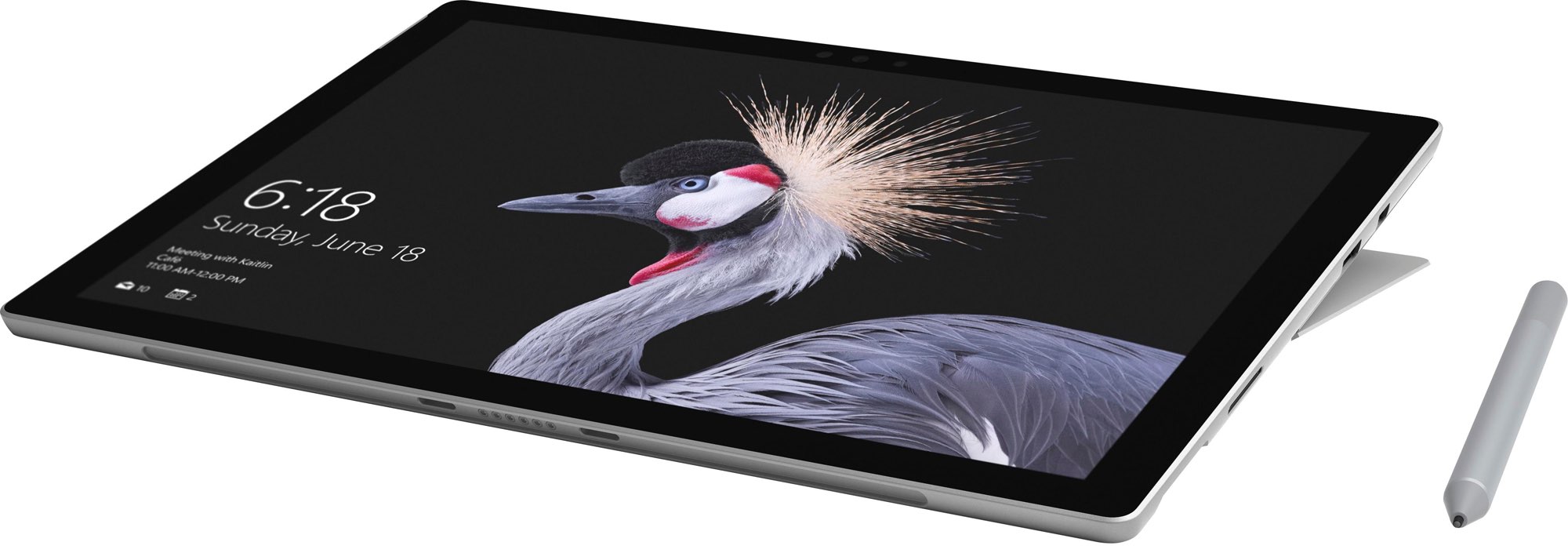
At today's media event held in Shanghai, China, where it promised to “show the world what's next,” software giant Microsoft announced a fifth-generation Surface tablet, now called Surface Pro. The tablet/notebook hybrid device is being launched globally on June 15, starting at $799, the same price its predecessor Surface Pro 4 started at.

Billed as “the most versatile laptop,” the new Surface has 13.5 hours of battery life, Intel's seventh-generation “Kaby Lake” Core processor (the same chip powering Microsoft's $999 Surface Laptop), a new Alcantara keyboard and a next-generation Surface Pen.

As per Microsoft, Surface Pro has up to 50 percent better performance and 50 percent better battery life than it predecessor and 35 percent better battery life than an iPad Pro. Its 12.3-inch PixelSense touch display supports Microsoft's Surface Dial and the new Surface Pen.

“Now better than ever, the new Surface Pro combines uncompromising mobility with exceptional power and performance,” says the Windows giant.

https://www.youtube.com/watch?v=TwWs2jIy4js

The device looks just like on the recently leaked press shots and includes a few new pen and keyboard colors. It sports a single USB Type-A port and Mini DisplayPort, along with a 3.5mm headphone jack and Microsoft's proprietary Surface Connect port, but no USB-C.

The new Surface Pro will be available globally on June 15, starting at $799. Microsoft is offering Type Covers, now known as Signature Type Covers, in four color finishes—Burgundy, Platinum, Graphite Gold and Cobalt Blue—mirroring the colors of its Surface Laptop.

https://www.youtube.com/watch?v=TCTExFYvL1g

The improved Surface Pen stylus features increased pressure sensitivity with up to 4,096 pressure points (from 1,024), tilt that adjusts the thickness and texture of your ink granularly, based on the angle of your pen, for artistic shading and true real-time writing.

“Like putting pen to paper or brush to canvas, the new Surface Pen supports a natural, immersive experience that sets you free to create, learn, and express yourself in completely new ways,” explains Microsoft.

Lastly, the new Surface will be available in an LTE cellular-enabled variant, which will be arriving this fall at a yet-to-be-disclosed price.

For the first time, Microsoft will be selling Surface Pen separately for $99.

Pre-orders for the new Surface Pro and Surface Pro Signature Type Cover begins later today in select markets at Microsoft Store, Microsoft.com, BestBuy.com and JD.com where available.

The new Surface Pen will be available in the coming weeks.

How to redeem iTunes or Apple Music gift cards

If you don't set up one of the supported payment methods for your Apple ID, you won't be able to upgrade your iCloud storage or buy music, movies and TV shows from iTunes Store, apps from App Store and Mac App Store, books and audiobooks from iBooks Store and more.

That's where an iTunes or Apple Music gift card should come in handy.

Upon redeeming, the amount shown on the card is added to your Apple ID in the form of good-as-cash credit that can be used for each purchase you make in Apple's content stores.

In this tutorial, you'll learn about the types of gift cards Apple supports, how they should be used, as well as how to redeem your iTunes or Apple Music gift card and apply the credit toward an individual Apple Music membership or to top up your Apple ID balance.

About iTunes and Apple Music gift cards

iTunes gift cards and Apple Music gift cards can be purchased from Apple, PayPal, Amazon, eBay, Best Buy and a number of other retailers. iTunes gift cards typically come in $25, $50 and $100 denominations. Apple Music gift cards are currently available in $30 and $100 denominations for three or twelve months of service, respectively.

You can buy them in physical form for delivery via mail or opt for a digital gift card, in which case your redemption code will be delivered straight to your inbox.

The 16-digit redemption code is hidden underneath the label on the card's back.

The redemption code always starts with an “X”.

The redemption code may appear in different places on the back of your card.

Redeeming an iTunes gift card adds store credit to your Apple ID.

Store credit is used for each purchase you make in iTunes Store, App Store or iBooks Store until it's gone. iTunes billing system always uses your store credit first, as long as the value of the item that you're buying is less than or equal to the value of your credit balance.

If you don't have any store credit left, the payment method that you designate when you sign up for an Apple ID is charged for the entire purchase.

You can use your store credit to buy the following items:

Apps from App Store and Mac App Store In-App Purchases Songs, albums, movies, TV shows and more from iTunes Store Books and audiobooks from iBooks Store iCloud storage

Store credit cannot be used to purchase more gift cards or iTunes Gifts.

NOTE: Some purchases might require that you have a credit card on file, even if you're using your credit balance to make the purchase. For instance, you must have a credit card on file in order to use store credit to pay for your iCloud storage upgrades.

You cannot use store credits for:

App gifting—When you gift an app or media item to someone else the payment method on file is always billed for the entire purchase, not the store credit. Family Sharing—You cannot share your store credit with other family members.

Even if a Family Sharing member buys something and the family organizer has store credit on their account, the item cost is still billed to the organizer's payment method on file rather than being deducted from their store credit.

TUTORIAL: How to gift apps

If a Family Sharing member with a credit on their account buys something from Apple's content stores, the amount is billed to their own account unless there's a remainder, in which case it bills to the family organizer's payment method.

You can use the credit from your Apple Music gift card to:

Sign up for a new Apple Music membership Extend your Apple Music membership by the number of months shown on the card Credit the amount to your Apple ID, like an iTunes gift card

Read Apple's support document for more on how iTunes Store purchases are billed.

How to redeem iTunes or Apple Music gift cards on iPhone and iPad

1) Open iTunes Store, App Store or iBooks on your iOS device.

2) In iTunes Store, App Store or iBooks, tap the Featured tab, then scroll to the very bottom of the screen and tap the Redeem option.

3) Sign in with the Apple ID that you use for iTunes Store or Apple Music purchases.

Tip: You can quickly get to the redeem feature by visiting the link below on your Apple device:

To redeem an iTunes gift card, follow this link To redeem an Apple Music gift card, follow this link

TIP: If your device has 3D Touch, you can press the iTunes Store or App Store icon and select the Redeem option from the Quick Actions menu on your Home screen.

4) Choose whether you'd like to type in your code manually or have the card scanned:

Scan the redemption code—If you have a physical gift card with a box around the code, use this option to redeem it via your built-in camera. Tap Use Camera, then hold the back of the card up to your iPhone's camera until it scans the code. Only gift cards with a focus box around the redemption code are redeemable via a camera. This feature is not available in all countries and regions. Type in the redemption code manually—Tap the field labeled ”You can also enter your code manually”, then peel off the label on the back of the card and type in the redemption code or paste the code from your purchase confirmation email.

When you redeem an iTunes gift card, your updated store balance appears onscreen. An error message appears if you try to redeem a gift card that's already been used.

Upon redeeming an Apple Music gift card, you're given the choice between topping up your iTunes store credit or using the code toward an individual Apple Music membership.

This is what happens if you choose to use the code for your Apple Music membership:

Apple Music members—Applying the credit to your ongoing membership extends your date of renewal by the number of months shown on the card. Apple Music non-members—Applying the credit signs you up for a membership.

If you've never been an Apple Music member, you can still get your free three-month trial in addition to the number of months your Apple Music gift card card is worth.

5) In the upper-right corner, tap Done to finish the process.

If you'd like to redeem another iTunes or Apple Music gift card, tap Redeem Another Code.

TIP: If you received your gift card via email, click the Redeem Now link in the email.

To get information about your iTunes Store or Apple Music balance:

iTunes Store balance—You can find your store balance underneath your Apple ID at the bottom of the Featured tab in iTunes Store, App Store or iBooks on your iOS device. Apple Music balance—To view your Apple Music membership, go to Settings → [your name] → iTunes & App Store and tap your Apple ID at the top of the screen. Tap View Apple ID, then Subscriptions. From the list, choose the subscription that you want to see more information about.

Your account balance automatically updates in iTunes Store, App Store and iBooks Store after redeeming the card. If your store credit does not update automatically, sign out and back in on all of your devices for it to refresh properly.

How to redeem Apple Music gift card in iOS Music app

1) Open the Music app on your iOS device.

2) Switch to the For You tab at the bottom of the screen.

3) Tap your profile image in the upper-right corner.

4) Tap the Redeem option.

5) Use your iPhone to scan the redemption code on the back of the card or enter it manually, then tap Redeem to continue.

7) Tap Done when finished redeeming the code.

How to redeem Apple Music gift card on Android

1) Open the Apple Music app on your Android device.

You can download Apple Music for Android free from Google's Play Store.

2) Tap tap the Menu icon in the upper-left corner.

3) Tap your Apple ID.

4) Tap Redeem.

5) Enter the code from the back of the card, then tap Redeem again.

An error message will appear if you try to redeem a card that's already been used.

How to redeem iTunes or Apple Music gifts card on Mac and Windows PCs

1) Open iTunes on your Mac or Windows PC.

2) Choose Music, Movies, TV Shows or Apps from the popup menu near the top-left corner, then click the Store tab near the top of the screen.

3) Click the Redeem link under the Quick Links heading on the right side.

Tip: Alternatively, choose the Redeem option from iTunes' Account menu.

To get to the Redeem feature faster, visit the link below on your computer:

To redeem an iTunes gift card, follow this link To redeem an Apple Music gift card, follow this link

4) Enter the password for the Apple ID you use for iTunes Store purchases or your Apple Music membership, then press the Return or Enter key on your keyboard, or click the Sign In button.

5) Choose how you'd like to redeem the code on the card:

Scan the redemption code—Use this option to redeem a physical card via your Mac's built-in camera. Click the Use Camera button, then hold the back of the card up to the FaceTime camera until it scans and redeems the code. Only gift cards with a focus box around the code are redeemable via a camera. This feature is not available in all countries and regions. Type in the redemption code manually—Click inside the field labeled ”You can also enter your code manually,” then type in the redemption code from the back of the card or paste it from your purchase confirmation email.

6) Click Redeem to continue.

You'll be asked if you'd like to apply the credit toward your individual Apple Music membership.

If not, select the option Use Credit for iTunes or App Store to add the amount shown on the card to your Apple ID store balance like a regular iTunes gift card.

Your updated store balance appears onscreen.

7) Click Done to finish redeeming the card.

To redeem an iTunes gift card in iBooks or App Store on your Mac:

iBooks—Open the iBooks app from your Dock, Launcher, Spotlight or the Applications folder. In the upper-left corner, click the iBooks Store button, then click the Redeem link underneath the Quick Links heading on the right side. App Store—Open the App Store app from your Dock, Launcher, Spotlight or the Applications folder. Click the Featured tab at the top, then click the Redeem link underneath the Quick Links heading on the right side.

An error message appears if you try to redeem a card that's already been used.

Related tutorials

You may find the following how-tos useful:

How to gift iTunes or App Store credit on iPhone and iPad How to redeem iOS app promo codes How to redeem Apple TV app promo codes Redeeming iTunes gift cards with iPhone's camera Redeeming iTunes gift cards with Mac's camera That's all, folks!

If you have a question, post a comment below and we'll do our best to answer it. Please share this tutorial on social media and pass it along to the folks you support.

Submit your ideas regarding future coverage via tips@iDownloadBlog.com.
YouTube TV app gains AirPlay support

Google today updated its official YouTube TV app with support for AirPlay, an Apple technology that lets you play video streamed from your iPhone or iPad on a TV set through your Apple TV.

“Announcing AirPlay! There are a few bug fixes and minor improvements in this thing, too. But mostly AirPlay,” reads the changelog for YouTube TV on App Store.

Prior to today's update, YouTube TV only supported broadcasting content from the app to a television set via Google's Chromecast HDMI dongle.

Google launched its new streaming television service back in April 2017.

In exchange for $35 per month, cord-cutters can enjoy live TV streaming from Fox, ABC, CBS, NBC and other popular cable networks along with content from an additional 39 local broadcast networks and channels, like ESPN.

Some sports channels like Fox Soccer Plus, as well as premium networks such as Showtime, are available for an additional monthly charge. DVR with unlimited storage is included in the subscription at no additional charge.

https://www.youtube.com/watch?v=qediav063xQ

YouTube TV can be used with up to six accounts in a single household without needing to share passwords between family members.

YouTube TV is separate from the YouTube Red service, which costs ten bucks per month.

YouTube TV is currently limited to select cities, like Chicago, Los Angeles, New York City, Philadelphia and the San Francisco Bay Area.

For more information, visit tv.youtube.com/tv/availability.

You can try YouTube TV free for 30 days by signing up at tv.youtube.com.

Apple’s new videos aim to lure Android users into switching to iPhone

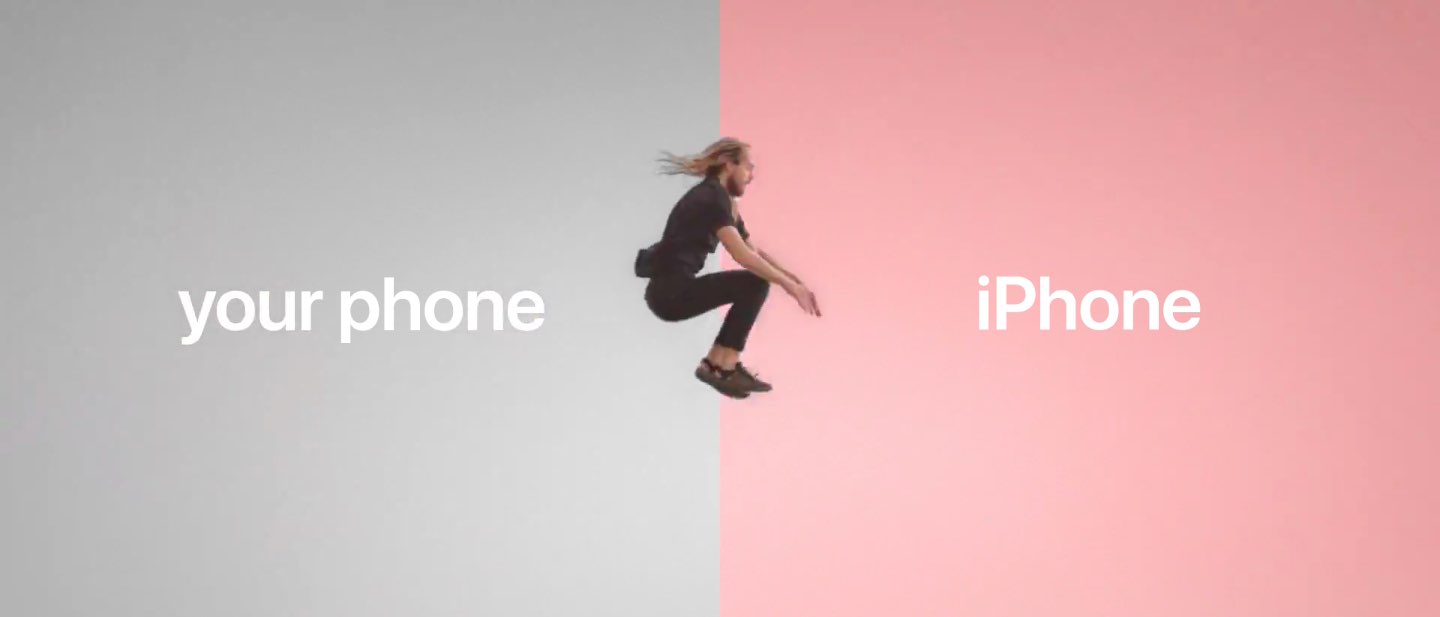
Apple on Monday shared five short switcher videos through its official channel on YouTube. Titled “Photos”, “Jump”, “Fast”, “Privacy” and “Music”, each runs sixteen seconds long.

The latest ad campaign uses the new tagline “Life's easier on iPhone”.

The new clips promote some of the benefits of being an iPhone user, ranging from the official “Move to iOS” Android app (available free on Play Store) to the company's in-house designed chips that make iPhone the fastest smartphone in the world in terms of single-core CPU benchmarks to Apple's commitment to privacy and more.

Here are the videos.

Photos

https://www.youtube.com/watch?v=R-kbqiLxZwM

“Switch to iPhone. The Move to iOS app makes it simple to move your photos, music and more to iPhone,” reads the video's description.

Jump

https://www.youtube.com/watch?v=OmdC2eEeQAI

Music

https://www.youtube.com/watch?v=99w8cdTcliA

Fast

https://www.youtube.com/watch?v=8IKxOIbRVxs

“iPhone is designed to run fast. Life’s easier when you switch to iPhone.”

Privacy

https://www.youtube.com/watch?v=poxjtpArMGc

“We build iPhone with your privacy in mind. Life's easier when you switch to iPhone.”

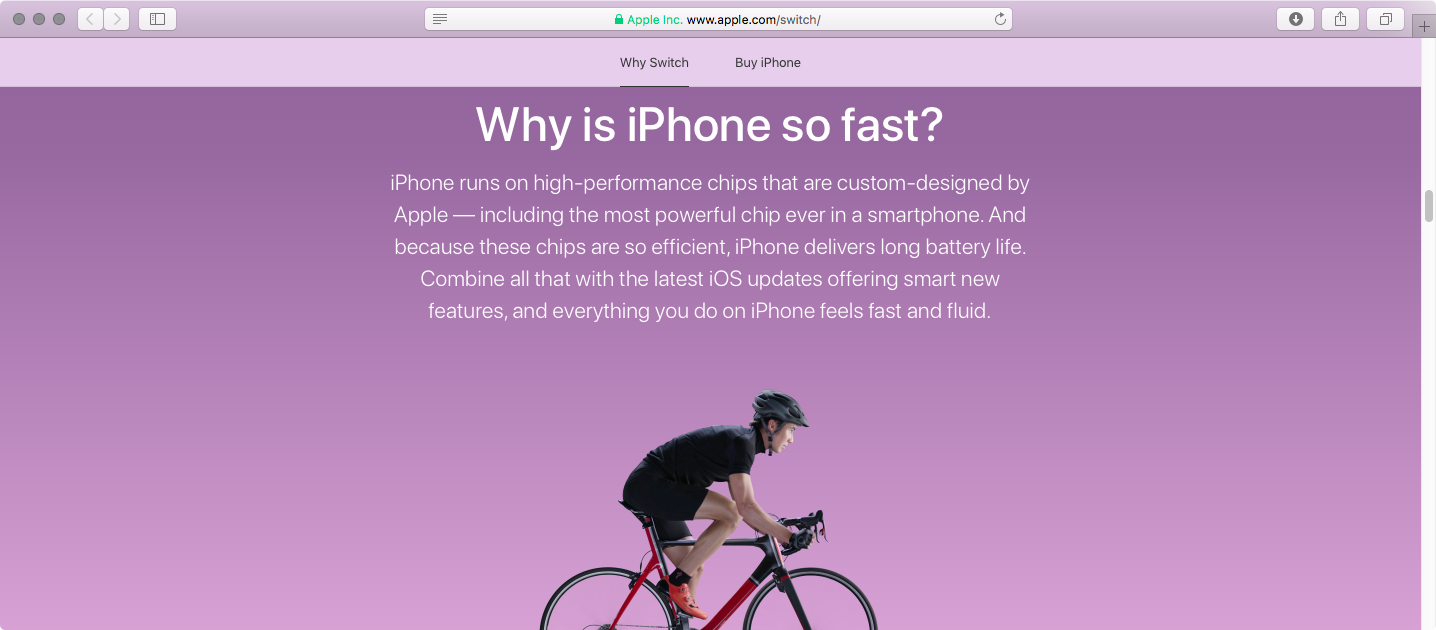
Apple also updated its “Switch to iPhone” webpage with a new design and additional information aimed at encouraging Android customers to consider switching to Apple's phone.

The mini-site offers additional information on switching from Android to an iPhone with FAQ-style answers to questions like “Is the camera as good as they say?”, “Why is iPhone so fast?”, “What makes Messages so great?” and “Will I love my iPhone”, among other topics.

How do you like Apple's new switcher videos?

Apple’s revamped “Switch to iPhone” webpage offers additional information to Android users

Apple's webpage dedicated to Android users who would switch to an iPhone has been refreshed with a modern web design and additional FAQ-style information on key iPhone features like speedy Apple-designed chips, Apple Pay, iMessage and more.

The refreshed webpage is divided into the following sections:

Will it be easy to switch to iPhone?

“Yes, it will,” says Apple. “There’s no need to save your stuff elsewhere before switching from Android.” This section promotes Apple's “Move to iOS” Android app. Available at no charge on Google's Play Store, the app can securely transfer a switcher's content from an Android phone to their brand spanking new Apple smartphone. “And you can trade in your old smartphone, if eligible, for credit toward your new iPhone,” reads the section.

Is the camera as good as they say?

Apple prides itself with the fact that more pictures are taken on iPhone than any other camera in the world, as per Flickr's camera stats. This section mentions some of the most popular iPhone photography features and shooting modes, such as Slo-Mo, Portrait and Time-Lapse.

“iPhone also has cool features like Memories, which automatically compiles your favorite moments into a movie,” says the company. As of recently, Apple is promoting iPhone photography via a series of mini-video tutorials on getting the most from your iPhone 7 camera, hosted on its “How to shoot on iPhone” webpage.

Why is iPhone so fast?

Even the last year's A9 chip that powers iPhone 6s is faster in single-core CPU benchmarks than today's top of the line Android handsets with quad-core chips outfitted with four gigabytes of RAM or even more. As you know, iPhones run on high-performance chips that are custom-designed by Apple for power efficiency. “Combine all that with the latest iOS updates offering smart new features, and everything you do on iPhone feels fast and fluid,” says Apple.

Will iPhone be easy to use?

Apple promotes its legendary ease of use, which it says is at the core of everything it creates. “With a swipe of your finger or a single tap, you can open apps, make a purchase with Apple Pay or customize your iPhone,” reads the webpage. Apple also mentioned the Tips app, preloaded on each iOS device to help users get the most out of their device, but that's hardly something I'd choose to highlight iOS's simplicity and intuitiveness.

How does iPhone help protect my personal information?

This is all about Apple's commitment to privacy and security, two major priorities with them. Since iOS 8, everything on your iPhone is “encrypted from the start” and protected by your passcode. Most flagship Android handsets have encryption disabled by default because full-disk encryption makes them sluggish due to the lack of hardware-assisted encryption.

https://www.youtube.com/watch?v=R17WDY3BIfo&t=5s

Subscribe to iDownloadBlog on YouTube

“Apple will not sell your information to anyone for any reason,” adds the mini-website.

The Cupertino giant notes yet another huge advantage it has over Android: its timely and easy-to-install software updates that don't have to be vetted by carriers and device vendors like major Android firmware updates do.

Can I get help from a real person?

“No matter where you are, we have real human beings ready to help,” says the firm. Apple's support team will help Android users learn about topics ranging from the switching process and software on their new iPhone to troubleshooting any issues they may have with their new phone. Support options listed here include phone, online chat, Apple's Support app and a dedicated Twitter handle @AppleSupport.

What makes Messages so great?

The expressive Messages app on iOS 10 “doesn’t just send messages, it also lets you hail rides, book restaurants, and even shoot lasers.” Apple is referring to new Messages features on iOS 10, like downloadable stickers, fullscreen effects and iMessage apps, as well as strong end-to-end encryption. “And, of course, you can use other messaging apps like WeChat, WhatsApp, or Facebook Messenger, too,” adds the company.

What about the environment?

Apple says:

We think about the environment all the time. Every time you send an iMessage, make a FaceTime call, or ask Siri a question, those tasks are handled by Apple data servers running on 100 percent renewable energy. And when you switch to iPhone, we’ll even recycle your Android phone for you.

Will I love my iPhone?

Of course you will.

Tim Cook likes to highlight Apple's customer satisfaction numbers that are the envy of the industry (customer sat, as he likes to put it), with a 451 Research-estimated 97 percent of people who have an iPhone saying they love it.

“That’s a lot of smiling selfies. A lot of happy emoji. And a lot of people who are glad they chose the world’s most loved smartphone,” reads the webpage.

How do you like Apple's reworked “Switch to iPhone” mini-site?

Be sure to watch short switcher videos Apple uploaded today to its YouTube channel.

Check out Nike’s four new Sports bands for Apple Watch

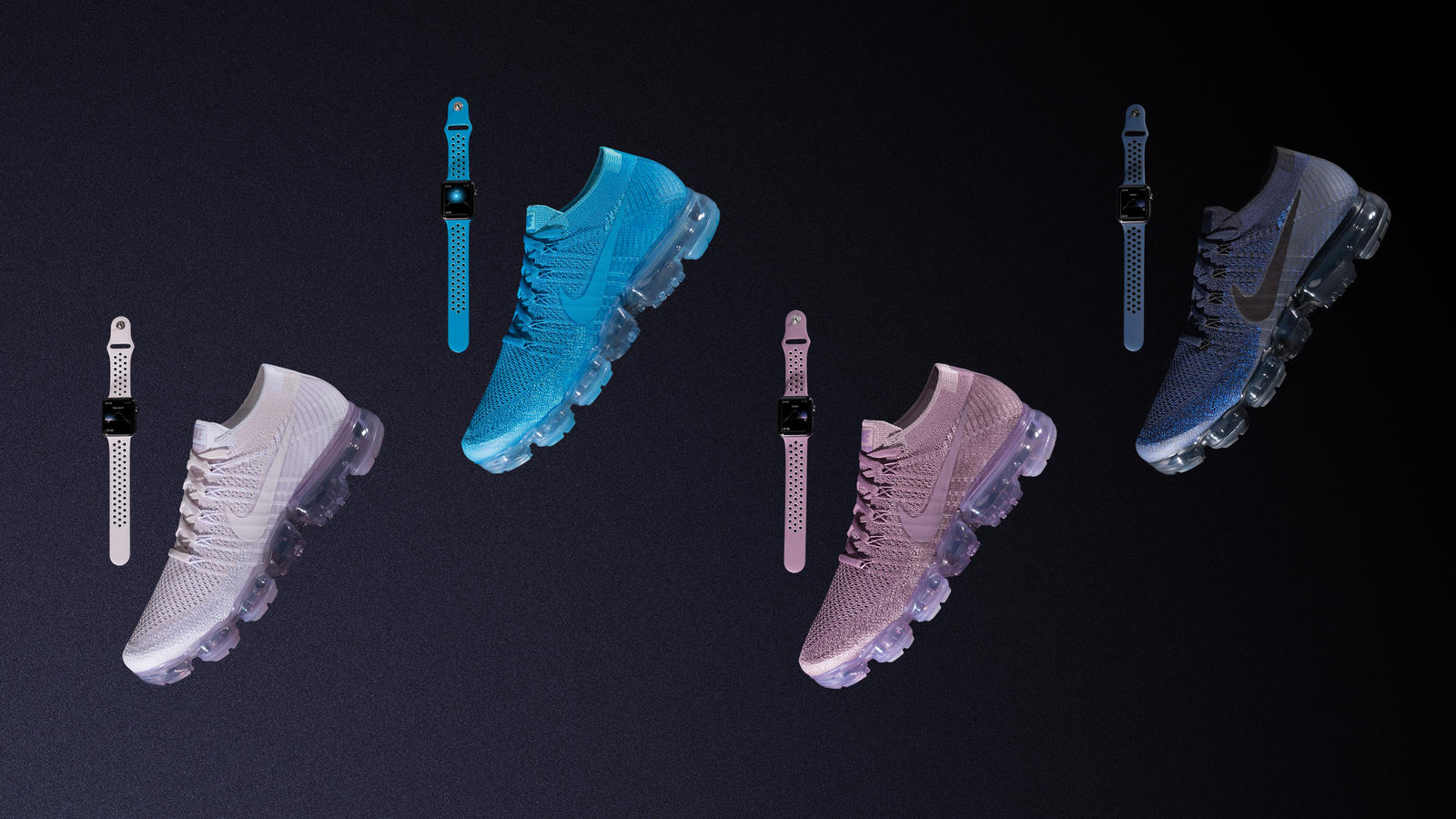
Footwear, apparel and sports accessories giant Nike on Monday announced four new bands for Apple Watch, designed to color-match the company's new Air VaporMax Flyknit “Day to Night” running shoe collection. The new bands work with any Apple Watch model, not just with the special-edition Apple Watch Nike+ collection, and are made from a flexible fluoroelastomer material that's lightweight and perforated for ventilation and sweat management, like other Sports bands.

The new bands are priced at $49 each as with other Sports bands.

They'll be available via Nike's online and retail stores on June 1, and Apple.com, select Apple Authorized Resellers and select specialty and department stores in early June.

The new Air VaporMax Flyknit “Day to Night” running shoe collection celebrates runners whenever they choose to run: at twilight, sunset and everything in between. Each of the new (previously unavailable) band colors is inspired by a shade of the sky, from dawn to dusk, according to the apparel giant.

The new band collection was designed to allow runners to “make a statement by matching their Apple Watch Nike+ bands to their footwear,” reads the press release. Nike's new running shoe collection launches next Thursday, June 1, at 10am, priced at $190.

In April 2017, Apple and NikeLab launched another limited-edition Apple Watch in the form of Apple Watch NikeLab, which pairs a Space Gray aluminum case with a new Light Bone band in a creamy color combination with black perforations.

Nike's new Light Bone/Black band combination for Apple Watch NikeLab coordinates nicely with their similarly neutral-toned “Oreo” and “White/Blue” VaporMax sneakers.

watchOS 3.2 added some new unique face colors, including the new band-matching Blue Orbit and Violet Dust options for Apple Watch Nike+ wearers and Camellia, Flamingo, Pollen, Mist Blue, Azure and Pebble as the new watch face color options for all Apple Watch models.

Nike began selling standalone versions of its unique Sports bands for Apple Watch earlier this year. Last but not least, earlier this month the company began selling iPhone 7 cases based on its Rosche and Air Force 1 sneakers, priced at $35 each.

Apple recently refreshed its own band lineup for Apple Watch with some interesting new Spring-themed straps.

Apple Music’s 3 month trial has gone from free to paid in some countries

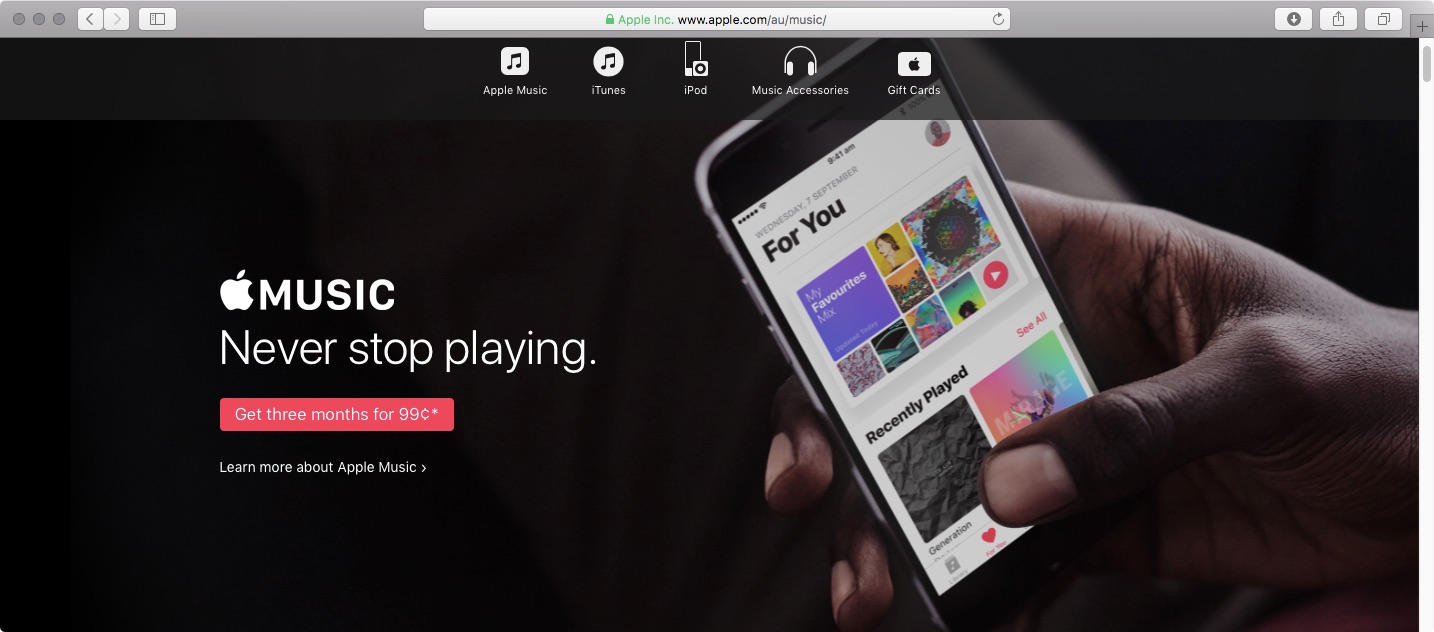
If you live in Australia, Spain or Switzerland, you can no longer try out Apple Music for three months for free. In those countries, Apple Music's three-month trial now requires a small payment. In Australia, three months of Apple Music is now AUD 0.99. In Spain, Apple Music trial is now a € 0,99 value and in Switzerland it comes in at SFR 0.99.

The trial was still free in those countries as of May 14, according to The Verge. In an email statement to the publication, Apple said: “Pricing and promotions for Apple Music vary from country to country.”

AppleInsider thinks the move may have something to do with Apple trying to recover some of those costs with paid trial periods.

https://www.youtube.com/watch?v=Yp1WwrX9APY

Subscribe to iDownloadBlog on YouTube

In all other countries, Apple Music's three-month trial remains available at no charge.

Apple Music lunched in 2015 with a fairly generous three-month free trial allowing customers to try the service before paying a monthly subscription.

It's interesting that rival Spotify also does not offer a free trial in Australia, Spain and Switzerland, charging the same fee for three months of its service in those markets.

On the other hand, Spotify's trial costs 99 cents elsewhere, too, including in the US and Canada.