iPod Touch

iWork apps gain editing improvements, 500 shapes & more in latest update

Apple's iWork productivity suite was updated today on Mac App Store and App Store with several new editing features and other improvements available across iPhone, iPad, iPod touch and Mac devices.

For starters, Pages, Numbers and Keynote for Mac, along with their iOS counterparts, now come with a brand new library of over 500 professionally drawn shapes that you can readily use in your documents, spreadsheets and presentations.

Across all the iWork apps, users can now reply to comments and join threaded conversations, making collaborative editing even easier than before, while new auto-correction and text replacement options save time while typing.

In Numbers, the new Insert Stock Quote feature and the Stock and Currency functions let you get data from the previous market day’s close. Keynote now lets you scroll like a pro on your Mac's trackpad with new pan and zoom options and your presenter notes can be edited while displaying slides in Light Table view.

Here's the full list of new features, fixes and enhancements in Pages 6.2, Numbers 4.2 and Keynote 7.2 for Mac, iPhone and iPad listed in release notes accompanying these downloads:

What's new in Pages 6.2 for Mac Enhance your documents using a library of over 500 professionally drawn shapes Reply to comments and join threaded conversations Add linked text boxes so text easily flows from one place to another New auto-correction and text replacement options save time while typing Export documents as fixed layout ePub books Change margins, headers, footers and paper size while collaborating Improved support for Hebrew and Arabic languages

Learn more about the new Pages for Mac features on Apple's website.

What's new in Numbers 4.2 for Mac Enhance your spreadsheets using a library of over 500 professionally drawn shapes Reply to comments and join threaded conversations Support for print preview in collaborative spreadsheets New auto-correction and text replacement options save time while typing The Insert Stock Quote feature and the Stock and Currency functions now return data from the previous market day’s close

Learn more about the new Numbers for Mac features on Apple's website.

What's new in Keynote 7.2 for Mac Enhance your presentations using a library of over 500 professionally drawn shapes Reply to comments and join threaded conversations New auto-correction and text replacement options save time while typing Scroll anywhere with new pan and zoom options Edit presenter notes while displaying slides in Light Table view Improved support for Hebrew and Arabic languages The Stock and Currency functions now return data from the previous market day’s close

Learn more about the new Keynote for Mac features on Apple's website.

What's new in Pages 3.2 for iOS Enhance your documents using a library of over 500 professionally drawn shapes Reply to comments and join threaded conversations Add linked text boxes so text easily flows from one place to another New auto-correction and text replacement options save time while typing New page thumbnail view allows you to easily navigate your document Export documents as fixed layout ePub books Change margins, headers, footers and paper size while collaborating

Learn more about the new Pages for iOS features on Apple's website.

What's new in Numbers 3.2 for iOS Enhance your spreadsheets using a library of over 500 professionally drawn shapes Reply to comments and join threaded conversations Support for print preview in collaborative spreadsheets New auto-correction and text replacement options save time while typing The Insert Stock Quote feature and the Stock and Currency functions now return data from the previous market day’s close

Learn more about the new Numbers for iOS features on Apple's website.

What's new in Keynote 3.2 for iOS Enhance your presentations using a library of over 500 professionally drawn shapes Easily rearrange your slides with the new Light Table view Edit presenter notes while viewing slides Reply to comments and join threaded conversations New auto-correction and text replacement options save time while typing Improved support for Hebrew and Arabic languages

Learn more about the new Keynote for iOS features on Apple's website.

These apps used to be paid downloads, but Apple recently made them free for all users.

Grab Pages, Numbers and Keynote for free from Mac App Store.

Pages, Numbers and Keynote for iPhone and iPad are available free on App Store.

Facebook could let you subscribe to news publications directly from the app

Facebook is working on a new feature to permit users to subscribe to news publications directly from its mainland mobile app. According to a report this morning from The Wall Street Journal, many details remain up in the air as discussions are currently underway.

The company is allegedly leaning toward a model that would let you read certain articles for free every month, before being prompted to pay. There's a catch: Facebook is said to limit this to the stories published natively through its Instant Articles service.

With that in mind, it may be no coincidence at all that Facebook recently launched new tools to help publishers make their Instant Articles compatible with the Apple News format as well as with Google's Accelerated Mobile Pages system.

This new functionality could roll out by the end of 2017, sources said. People familiar with the matter pointed out that the upcoming feature has long been requested by publishers.

While users currently can follow different news organizations, the rumored feature would permit them to use their credit card information on file with Facebook to directly subscribe to a news publication and have any subscriber-only content delivered to them through the app.

The development, if true, should pose some additional challenges to Google News platform as more and more people turn to Facebook for their daily news.

Image: Facebook's recent redesign of Trending pages.

iOS 11 and macOS High Sierra automatically update your Apple ID to use Two-Factor Authentication

If you haven't upgraded your Apple ID from Apple's older Two-Step Verification system to the more secure Two-Factor Authentication, iOS 11 and macOS High Sierra will do that for your when you install either operating system on your devices.

Apple communicated the change in an email to customers with Two-Step Verification enabled for their Apple ID. Here's the full text of the email communique, as obtained by MacRumors:

If you install the iOS 11 or macOS High Sierra public betas this summer and meet the basic requirements, your Apple ID will be automatically updated to use two-factor authentication. This is our most advanced, easy-to-use account security, and it's required to use some of the latest features of iOS, macOS, and iCloud.

Once updated, you'll get the same extra layer of security you enjoy with two-step verification today, but with an even better user experience. Verification codes will be displayed on your trusted devices automatically whenever you sign in, and you will no longer need to keep a printed recovery key to make sure you can reset a forgotten password.

Significantly improving the security of your Apple ID, Two-Factor Authentication requires both your Apple ID password and a one-time code when you sign in to a new device or browser with your Apple ID.

TUTORIAL: How to protect your Apple ID with Two-Factor Authentication

Unlike Two-Step Verification, which sends a six-digit verification code via SMS, Two-Factor Authentication is deeply integrated in iOS 9, OS X El Capitan, watchOS 2 and tvOS or later and features a mechanism that automatically delivers verification codes via push notifications to all trusted devices registered to a given Apple ID.

If you're not using either system to protect your Apple ID, you're wholeheartedly recommended to enroll your devices in Two-Factor Authentication. If your account isn't eligible for two-factor authentication, you can still use two-step verification to protect your Apple ID information.

One way or another, anyone installing Apple's latest OS updates this fall shall be asked to upgrade their Apple ID to the more modern Two-Factor Authentication system. Two-Factor Authentication is available in more than a hundred countries, listed in Apple's support document.

Minecraft to gain cross-platform multiplayer this summer, 4K HDR support coming in fall

An upcoming summer update to Minecraft: Pocket Edition for iPhone and iPad will include full support for cross-platform multiplayer, the game's developer Mojang announced today in a blog post ahead of the Electronics Entertainment Expo show, which runs from June 13-15, 2017 at the Los Angeles Convention Center.

“We’re releasing a new update for consoles, which brings players together across mobile, console and Windows 10,” developers wrote. They'll be adding in-game multiplayer server, too.

A server browser in the Minecraft start menu will let you search a list of servers which you can join right away. They'll be launching with four servers—Lifeboat, Mineplex, InPVP and CubeCraft—with more to follow at a later stage.

And as a cool bonus, any downloadable content you purchase will be accessible amongst the various devices at no extra charge!

Mojang highlighted the upcoming features in a promo video, embedded below.

https://www.youtube.com/watch?v=vyr3XZrZssk

The free update will permit fans of Minecraft on iOS to play the game with players on other devices, including Android, Xbox One, Nintendo Switch, Windows 10 PC and VR. Currently, Minecraft: Pocket Edition for iOS lets you play with friends on Xbox One consoles or PCs.

Mojan will be rebranding the game on Xbox One, Nintendo Switch, mobile and VR as just “Minecraft”. Support for Minecraft: Java Edition, which is the original PC game, will continue. “This means when you buy 'Minecraft', you're buying a game that can you can play with friends across devices,” said developers.

Plus, this fall, players will be able to explore endless worlds, rendered in 4K HDR resolution, via another upcoming update. Support for 4K resolution across platform will be free.

However, advanced effects will require a new “Super Duper Graphics Pack”, which will bring out features like dynamic shadows, lighting that streams through fog, movement in leaves and grass, new textures for mobs and villagers, directional lighting, edge highlighting and more.

They'll have additional information about the release date of the free 4K update and “Super Duper Graphics Pack” DLC closer to release. As always, we'll keep you in the loop.

Minecraft: Pocket Edition for iPhone, iPad and iPod touch is $6.99 on App Store.

Minecraft: Apple TV Edition is $19.99 on tvOS App Store.

Basic analytics coming to iOS 11’s Podcasts app

Like many stock apps in iOS 11, Apple's Podcasts app has been redesigned around an Apple Music-style appearance with consolidated tabs, bigger thumbnails and more.

As reported by Recode's Peter Kafka and Six Colors' Jason Snell, Apple is also making some notable changes to the way podcast feed works so that both podcast creators and advertisers can see what listeners actually like.

As for users, they'll be able to download full seasons of their favorite podcast shows and the Podcasts app will determine if a podcast should be played in chronological order.

There are other updates focused on making podcast creators' lives easier as well. According to Apple's own spec sheet regarding the Podcasts app updates in iOS 11, the updated Apple Podcasts specification now provides the following features:

Podcast creators can now provide clear, concise titles. Improvements to how episodes are ordered and recommended within a season. The ability for new subscribers to receive the full current season in their Library. Quick play lets users pick up listening where they left off.

Podcasts will be able to define individual seasons and explain whether an episode is a teaser, a full episode or bonus content. Snell explains that these extensions will be read by the Podcasts app and used to present a podcast in a richer way than the current linear approach in iOS 10.

https://www.youtube.com/watch?v=LFsAlcnlmSo

Subscribe to iDownloadBlog on YouTube

As explained, Apple is going to share more data with podcast creators and advertisers.

With basic analytics, podcast creators will have the ability to see when listeners play individual episodes, what part of individual episodes they listen to, which parts they skip over and when they stop listening. To protect your privacy and prevent targeted advertising, Apple will provide aggregated, anonymized performance data that cannot be tracked to individual users.

Currently, podcast creators can see when someone has downloaded an individual episode, but that's about it when it comes to analytics.

How do you like these changes coming to the Podcasts app?

Share your opinion in the comments section below.

Have iPhone automatically answer incoming calls on your behalf

Many iOS 11 features seemed to be inspired by the jailbreak community. Among them, a brand new call audio routing option in accessibility settings that allows you to set your iPhone to automatically answer incoming calls on your behalf, should you wish so.

This optional feature supports regular calls via your carrier's mobile network, as well as Wi-Fi calls, FaceTime audio and video calls and any VoIP calls originating from third-party apps that use Apple's CallKit framework, such as WhatsApp, Skype, Viber and more.

To enable this feature, go to Settings → Accessibility → Touch → Call Audio Routing.

There, you'll see the call routing options which include settings like Bluetooth headsets, the iPhone speaker and more. These options are also available on prior iOS editions. But look at the bottom and you'll see a brand new menu, labeled Auto-Answer Calls.

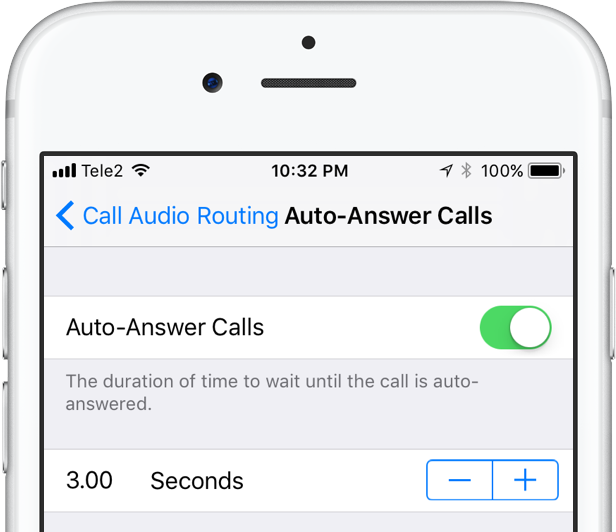
Tapping it takes you to a new screen where you can enable or disable the feature and set the duration of time your iPhone will wait when a call comes in before it's auto-answered for you.

This handy new option, as I already mentioned, is nowhere to be found in iOS 10 or earlier.

I can see myself using Auto-Answer Calls a lot, not just while jogging with my AirPods or working out with my PowerBeats in my ears but also in other situations when interacting with the phone may be impractical, like driving a car or swimming with my Apple Watch on.

How do you like this nifty feature? Will you be using this auto-answer call setting, and why?

Do let us know by posting a comment below!

TUTORIAL: How to set your iPhone to automatically answer calls

Apple now allowing developers to implement digital tip jars via In-App Purchase mechanism

Apple recently asked WeChat and other popular social networking apps in China to disable the popular tipping feature, and now we know why—the Cupertino giant has introduced an officially-sanctioned way for iPhone and iPad users to tip content creators in apps via the standard In-App Purchase mechanism.

Like with other In-App Purchases, tipping content providers is subjected to Apple's 70:30 revenue sharing scheme, meaning the company will keep 30 percent of any proceeds to itself.

According to TechCrunch, the updated App Store Review Guidelines now include a clause that deals with tips, here's a relevant excerpt:

Apps may use in-app purchase currencies to enable customers to “tip” digital content providers in the app. Apps may not include buttons, external links, or other calls to action that direct customers to purchasing mechanisms other than In-App Purchases.

According to the report, developers have the freedom to decide how much of the tips are passed to the content creators themselves (after Apple's 30 percent cut, of course).

At any rate, Apple was smart to implement this cool new feature.

Tipping content creators like musicians, comedians, e-sports athletes and others is tremendously popular in China. The company has lacked a tipping system for iOS apps, meaning it couldn't get in on the action to process such transactions through its own iTunes billing system.

With tips now being officially supported via the familiar In-App Purchase mechanism, many customers who were previously reluctant to use PayPal or their credit card for tipping their favorite content creators will now be able to do so, directly in the app.

And by taking tipping out of the grey area, as TechCrunch observes, more developers might implement digital tip jars— without fearing repercussions from Apple—as an alternative way to get creators paid without having to offer ad revenue sharing.

In turn, the feature may create a whole new revenue stream for Apple at a time when the company is monetizing its huge user base in an attempt to boost its ever-growing Services revenue.

iOS 11 brings lossless FLAC audio playback to iPhone and iPad

iOS 11 reportedly brings native support for lossless audio encoded in the popular FLAC format to iPhone, iPad and iPod touch. As discovered by Reddit users, Apple has included full playback support for FLAC audio files on iOS 11. iTunes and iOS 10 currently lack built-in support for the FLAC codec, though people can use a third-party app to enjoy FLAC audio.

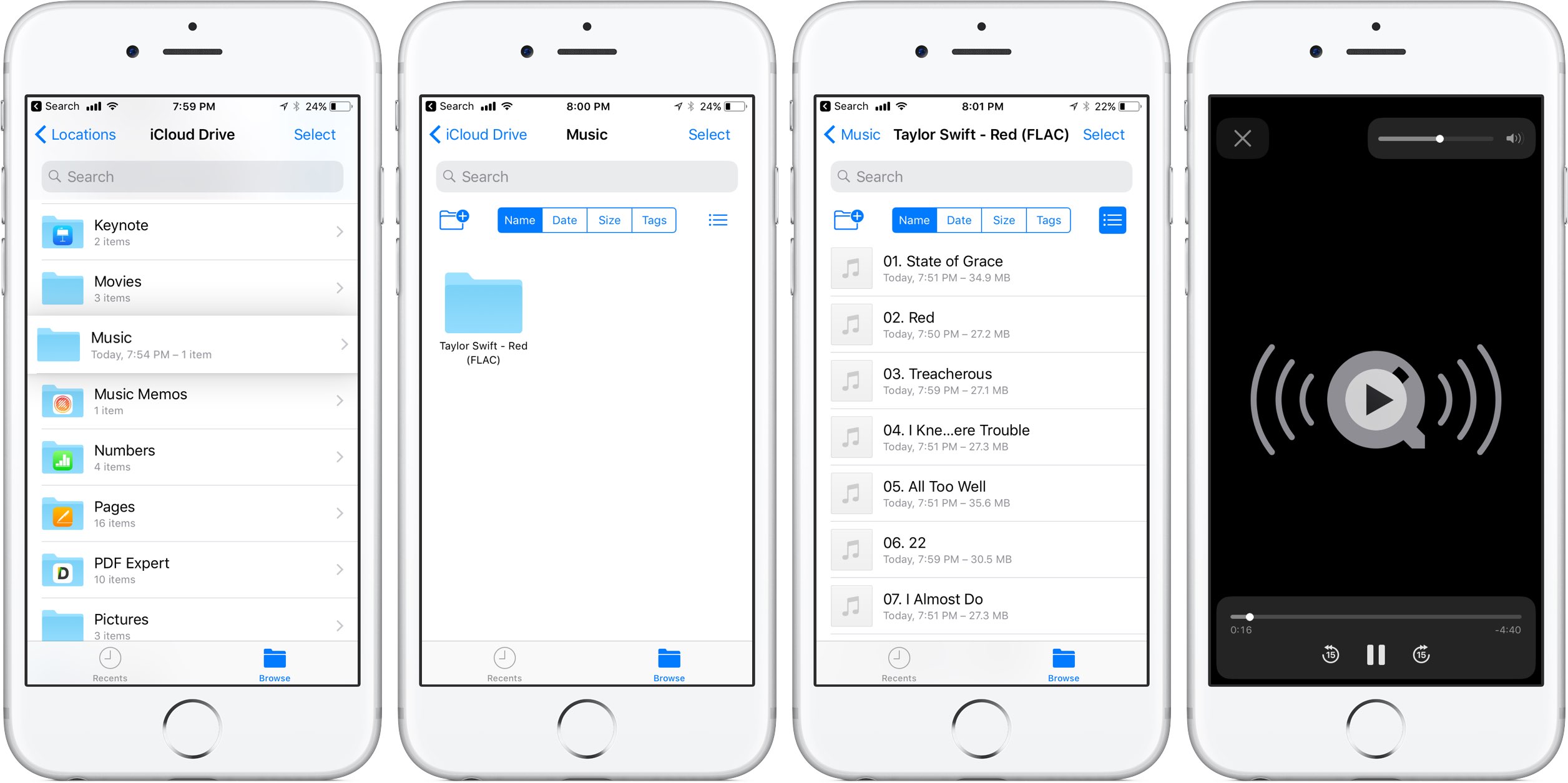
At this stage, only the new Files app has support for lossless playback of FLAC-encoded audio files. Of course, things could change in subsequent beats as Apple continues to refine iOS 11 ahead of its fall release, at which point iTunes could be updated with full playback support for the popular format.

As things currently stand, any FLAC files synced to an iOS device through iCloud Drive, Dropbox or Box can be played from within the Files app. FLAC files are currently unsupported via the Music app on iOS 11.

For what it's worth, I tried sending an FLAC audio file to my iOS 11-enabled iPhone through AirDrop, to no avail. My iPhone didn't know what to do with the file, putting up the standard prompt offering to download an app from App Store.

No matter how you look at it, this is a big win for music lovers and audiophiles.

The FLAC format bring the full quality of the original recording. FLAC, or Free Lossless Audio Codec, features lossless compression of digital audio which can reduce the size of the audio file to between 50 percent and 60 percent of its original size, without degrading audio quality of the original.

iOS 10 currently supports the AAC, Protected AAC, HE-AAC, MP3, MP3 VBR, Dolby Digital (AC-3), Dolby Digital Plus (E-AC-3), Audible (formats 2, 3, 4, Audible Enhanced Audio, AAX and AAX+), Apple Lossless, AIFF and WAV audio formats.

The ability to play lossless FLAC audio on an iPhone, iPad or iPod touch with iOS 11 could also signify that HomePod, Apple's upcoming smart speaker, may support high-quality FLAC audio.

AirPods Next/Previous track controls also work on iOS 10

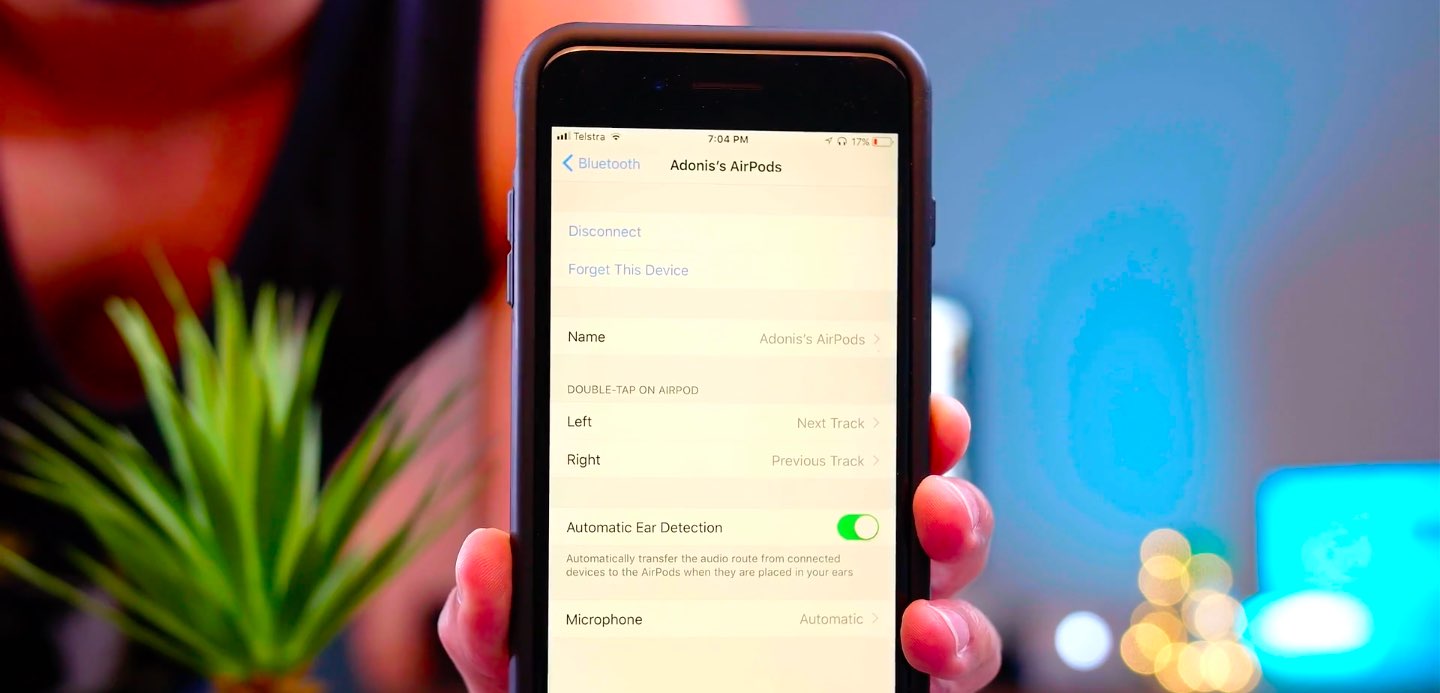
One of the little things in iOS 11 includes the ability to set up the AirPods double-tap action to skip forwards and backwards between tracks, cancelling the need to invoke Siri to change songs. As iDownloadBlog reader Harshit Yadav has discovered and shared with us, you can also get this next/previous track control functionality to work on your iPhone, iPad or iPod touch with iOS 10, here's how.

First of all, your AirPods must be running the firmware version 3.7.2 or later, which enables you to customize double taps independently for both the earbuds. To find out your AirPods current firmware version, go to Settings → General → About → AirPods on your iPhone.

Your AirPods must be connected to your iPhone to appear there.

TUTORIAL: How to install software updates for your AirPods

To ensure your AirPods have the latest available firmware, put both the earbuds inside their charging case, then close the case and connect it to a charger or a USB port on your computer. Your iPhone must be paired with your AirPods and connected to Wi-Fi in order for the firmware to download and install.

With the 3.7.2 firmware installed on your AirPods, do the following:

1) Connect your AirPods to an iOS device running iOS 11. This is very important that your AirPods be connected to an iOS 11 device. If not, the option to customize Left and Right ear will not appear.

2) Go to Settings → Bluetooth on your iOS 11 device.

3) Tap the “i” next to your AirPods.

4) Tap Left underneath the Double Tap on AirPod heading, then choose Previous Track from the list of double-tap actions for your left earbud.

5) Tap Right underneath the Double Tap on AirPod heading, then choose Next Track from the list of double-tap actions for your right earbud.

6) Close out the Settings app and play some music to verify that double-tapping either AirPod takes you to the next or previous track.

7) You're done.

With your AirPods updated to the firmware version 3.7.2 and the double-tap action set to next/previous track, you can now pair them back to an iOS 10 device and they will continue to work.

It's important to note that attempting to change your AirPods settings on iOS 10 will overwrite any changes made on your iOS 11 device, meaning you'll loose the next/previous track functionality.

Let us know in the comment section below how it went for you.

Video: watch iOS 11 Messages new “Echo” and “Spotlight” fullscreen effects in action

Apple's expressive Messages app gained some interesting fullscreen effects with last year's release of iOS 10. With iOS 11, Apple is bringing a pair of brand new effects to the built-in messaging app, called “Echo” and “Spotlight”.

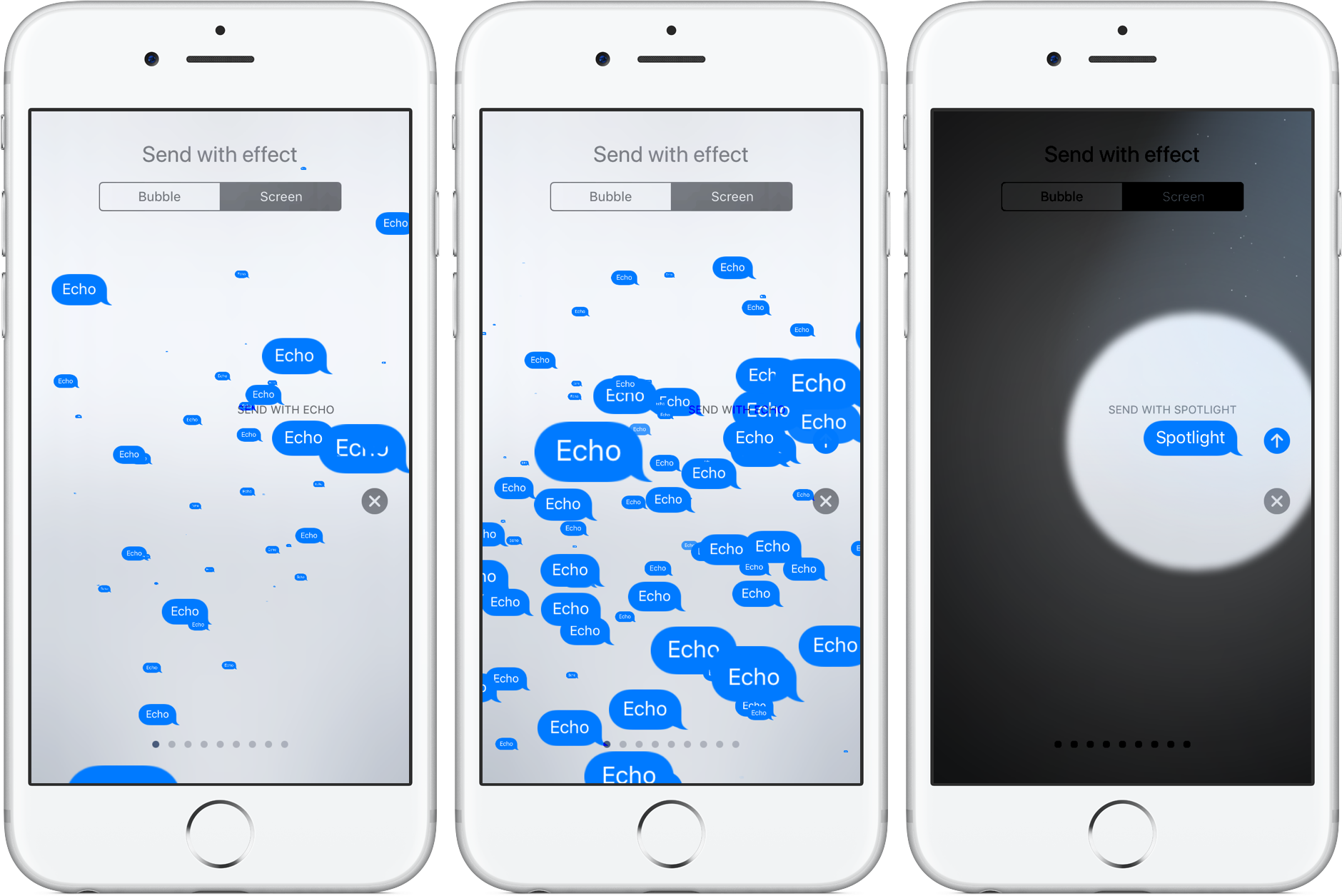
The two new effects are in addition to the existing ones: Balloons, Celebration, Confetti, Love, Lasers, Fireworks and Shooting Star. To use these effects, press the Send button in Messages with 3D Touch, then tap the Screen tab at the top to swipe through real-time effect previews.

Echo, as the title suggests, multiplies your text all over the screen. Spotlight puts a large spotlight on your chat bubble to emphasize your text.

Watch the new Messages effect in action.

https://www.youtube.com/watch?v=Ur08nXULKvo

Subscribe to iDownloadBlog on YouTube.

As for the so-called bubble effects, no new ones have been added in iOS 11. iOS 10 currently includes five different bubble effects: Slam, Loud, Gentle and Invisible Ink.

How do you like the two fancy new effects in Messages for iOS 11?

Let us know by posting a comment below.
iOS 11 makes it a cinch to share your Wi-Fi password with nearby devices

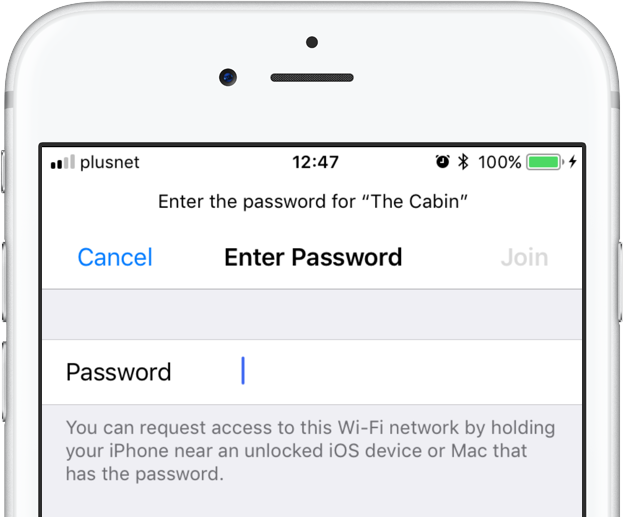
iOS 11 provides a nifty new feature for sharing your Wi-Fi hotspot password with nearby devices, without having to type the password on another device. When a nearby device running iOS 11 attempts to connect to your password-protected Wi-Fi network through Settings → Wi-Fi, a new message informs the owner they can now request access to the network.

To request Wi-Fi network access, they simply hold their device near an unlocked iPhone, iPad, iPod touch or Mac that's already connected to the network. A Wi-Fi sharing card pops up on the device already on the network, resembling the seamless AirPods pairing interface.

As first discovered by 9to5Mac, the device that has the network password automatically sends it to the nearby device over the air, allowing the receiving device to quickly and securely connect to your local wireless network.

This feature uses Wi-Fi and Bluetooth proximity information.

The beauty of this method, as I mentioned earlier, is that it just works—the device requesting access to your Wi-Fi network never sees the actual network password.

macOS High Sierra will support this time-saving feature as well.

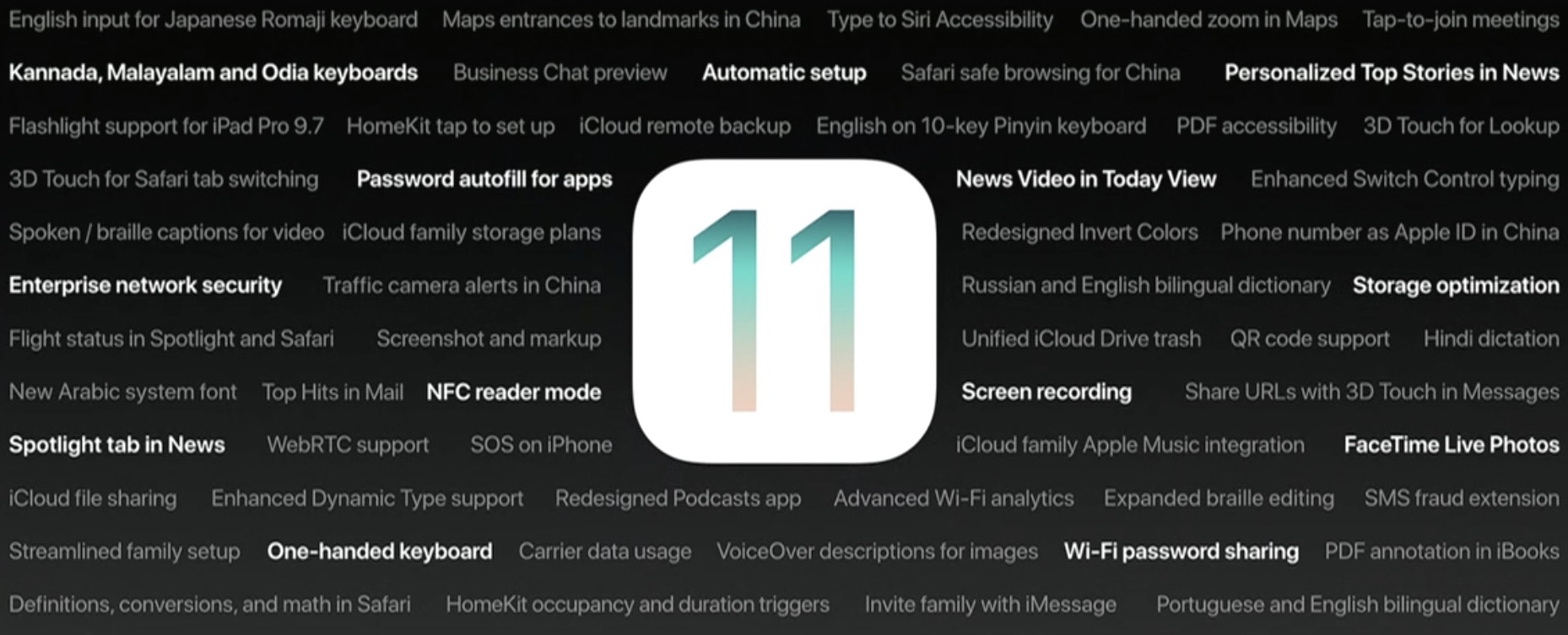
Speaking of which, iOS 11 includes automated first-time setup and account login features.

For instance, a feature called Automatic Setup lets you securely import most of the settings and data to your new iPhone or iPad by holding it near an iOS device or Mac you already own, using a process that's very similar to that of pairing an Apple Watch to a nearby iPhone.

iOS 11 is compatible with all 64-bit iPhone, iPad and iPod touch devices. The software update will release as a free download to all customers this fall.