iPod Touch

iOS 10 tidbit: battery life suggestions

One of the useful little things Apple's built into iOS 10 without even mentioning it during the WWDC keynote or in iOS 10 marketing materials is a brand new feature designed to suggest ways users can maximize their iPhone's battery life. Branded as Battery Life Suggestions, it appears automatically when your battery is not connected to power or using Low Power Mode.

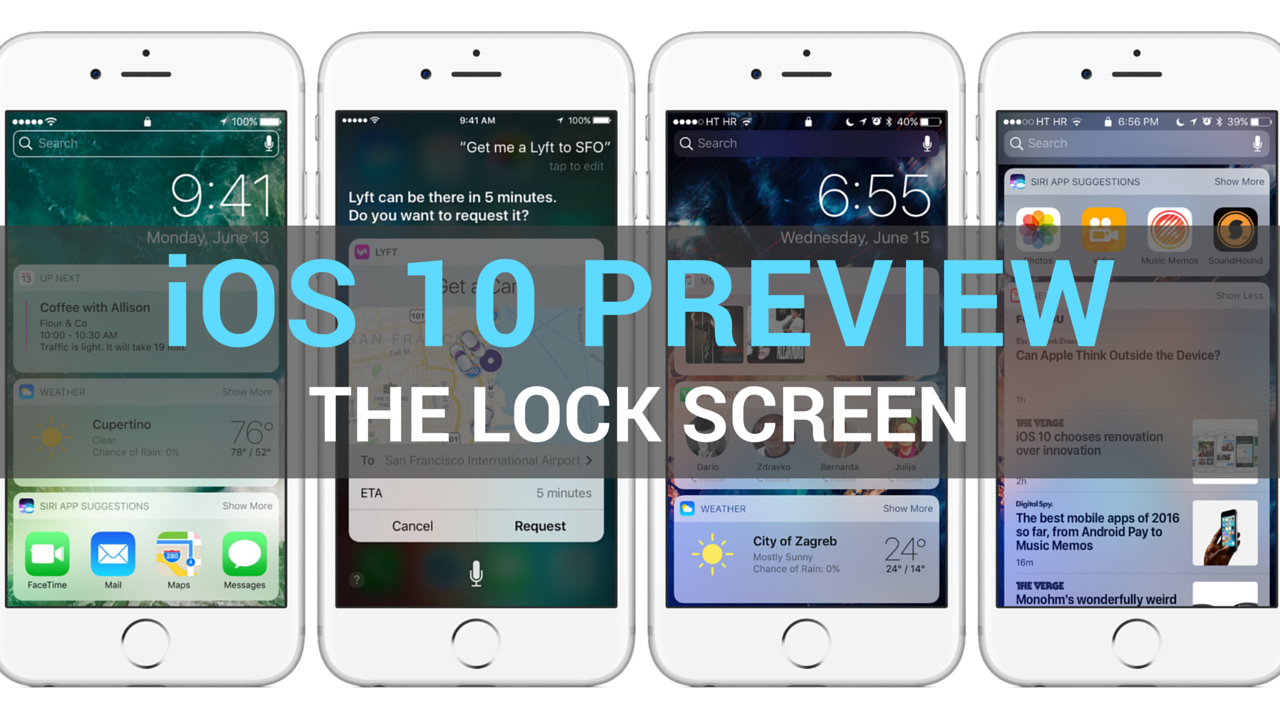
iOS 10 preview: your new Lock screen with Raise to Wake, widgets, interactive notifications & more

Having taken a closer look at a much improved Messages app, which delivers more expressive and animated ways to message friends and family, our preview of big new features in iOS 10 continues with a detailed overview of an all-new Lock screen. Wait, the Lock screen in iOS 10 warrants an article?

As you know, the Lock screen has remained virtually unchanged since the iPhone's inception. With iOS 10, however, it's  undergone some major improvements in the form of a refined look and feel, including vastly redesigned widgets, and new features such as interactive notifications, Raise to Wake and expanded use of 3D Touch shortcuts.

We think that many folks are going to appreciate how iOS 10 makes their device's Lock and Home screens way more functional than before, so here's a detailed walkthrough of all the goodies included in iOS 10's freshened up Lock screen experience.

Poll: will you upgrade to iOS 10 or keep your jailbreak?

Apple announced iOS 10 yesterday at the company's WWDC 2016 Keynote and awed the audience with some pretty neat new features.

Of course, the battle continues for those who want more control over their devices, and because of that, we want to know whether you're going to be updating to iOS 10 this Fall, or if you'll be keeping your iOS device(s) jailbroken on iOS 9 or earlier.

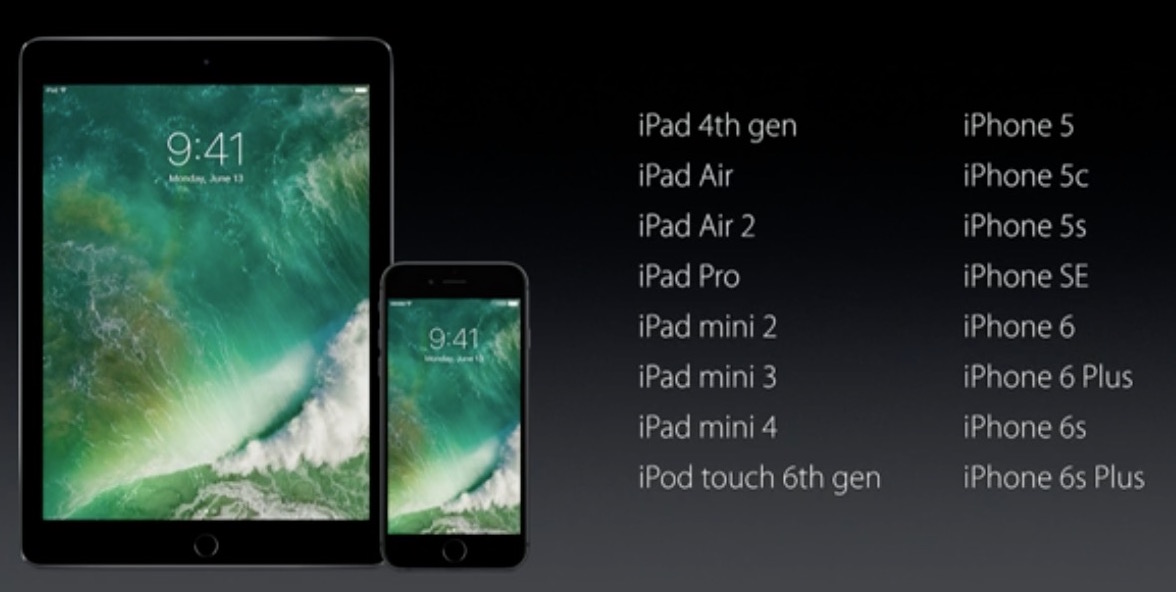
iOS 10 device compatibility list

Apple today during the WWDC 2016 keynote at the Bill Graham Civic Auditorium in San Francisco announced next major versions of its four main operating systems—iOS, tvOS, watchOS and macOS—that power its iOS devices, set-top boxes, watches and computers.

iOS 10, the tenth major revision of iOS, is now official, but will it work on your existing hardware? Not if you're still on the iPhone 4s or want to run iOS 10 on the original iPad mini or iPads older than the iPad 4.

Microsoft Office apps updated with support for exporting files in OpenDocument format

Ahead of WWDC keynote at 10am this morning, Microsoft refreshed its trio of Office productivity applications for the iPhone, iPod touch and iPad with a notable new export option. Word, Excel and PowerPoint apps can now export documents, spreadsheets and presentations in the cross-platform OpenDocument format, making the mobile apps even more suited for business use.

Save iPhone storage space by slimming down Photos library with Avast Photo Space

iCloud Photo Library has a nifty little feature that lets you store full-resolution photos and videos to iCloud while keeping device-optimized versions on your iPhone, which can save you quite a lot of storage space.

But not everyone uses iCloud Photo Library (do you?) and pays for iCloud storage beyond Apple's measly 5GB free tier (anyone?). That's where Avast's Photo Space for iPhone jumps in. With this app, your Photos library goes on a diet.

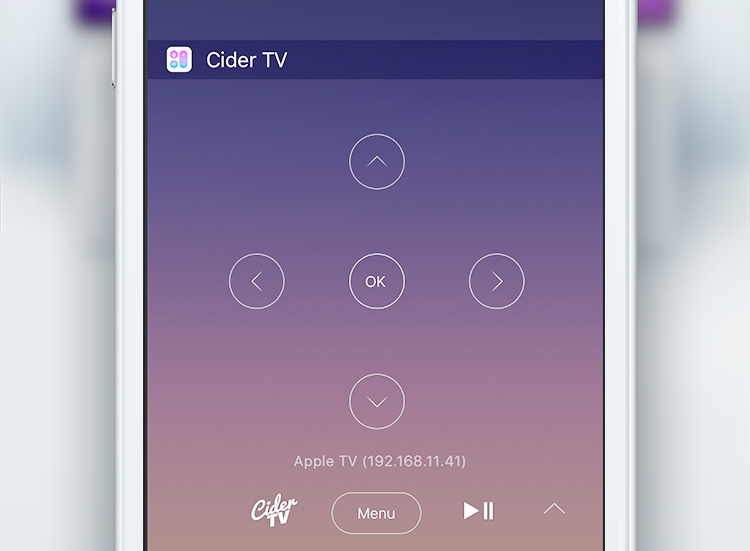
How to control Apple TV from your iPhone’s Lock screen with CiderTV widget

CiderTV, a software-based alternative for your Apple TV Remote, includes a built-in keyboard and has the ability to control linked Smart TV volume. As of recently, the app comes with a handy widget that makes it possible to control most of the functions of your Apple TV right from the Notification Center. It will save you a lot of time, here's how to get started with CiderTV and set up the widget.

Facebook starts accepting panoramic 360-degree photo uploads

Facebook today announced that it has started accepting 360-degree photo uploads. Panoramic photographs taken with your iOS device can now be uploaded to Facebook through the updated mobile app and are viewable in the web interface and on Facebook for iOS and Android.

Panoramic photos in your News Feed are marked with the compass icon. You can move your iOS device to pan around and even experience them in virtual reality with the Samsung Gear VR.

Camera+ 8: slow shutter, ultra-low ISO, new import options, action extension & more

Camera+ by oddly named developer taptaptap, one of the longest-standing camera applications (and one of the best out there, in my personal opinion), has received a major refresh on the App Store.

Camera+ 8.0 packs in a slew of improvements such as an innovative slow shutter feature, an extended range of effective ISO values, a handy extension for easier sending of photos from the share sheet of other apps and more.

How to fix boot loop on a jailbroken iPhone or iPad with ‘No Substrate Mode’

What happens when a jailbreak tweak bugs out on your device and ends up in a boot loop? Do you try to reboot the device to no avail? Do you take to the internet to ask how to fix it?

How about this: try booting into a form of booting up that Saurik calls 'No Substrate Mode,' then uninstall the faulty tweak.

In this piece, we'll talk about how you can use No Substrate Mode, an under-used feature of jailbroken iPhone or iPad that can truly save you from losing your precious jailbreak when you're unable to turn on your device.

Shazam brings back offline mode

Music and media identification service Shazam pushed a new update to its mobile application in the App Store which enables offline mode. The feature used to be present in Shazam from day one before it was temporarily removed in the overhauled app.

With it, you can still Shazam while offline and the app will name any songs you captured in offline mode when you're back online. Shazam is a free app. The paid $6.99 Shazam Encore app is available to those who want to get rid of ads and use advanced features.