In this tutorial, we will show you how to change the default notification sound for all chats or choose different sounds for each of your chats in the Viber app on your iPhone or iPad.
How to change the default notification sound in Viber for iPhone
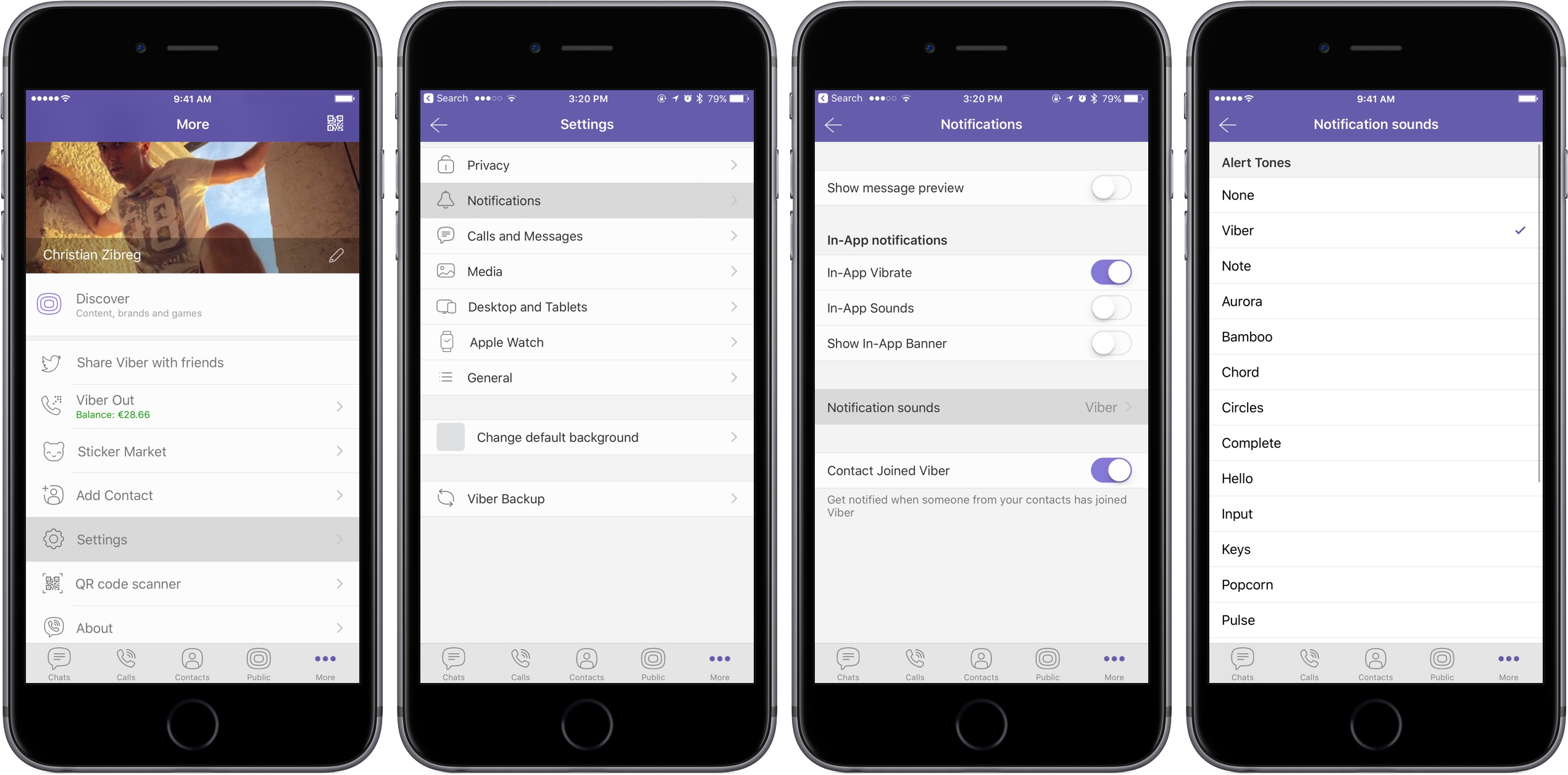
In this tutorial, we will show you how to change the default notification sound for all chats or choose different sounds for each of your chats in the Viber app on your iPhone or iPad.
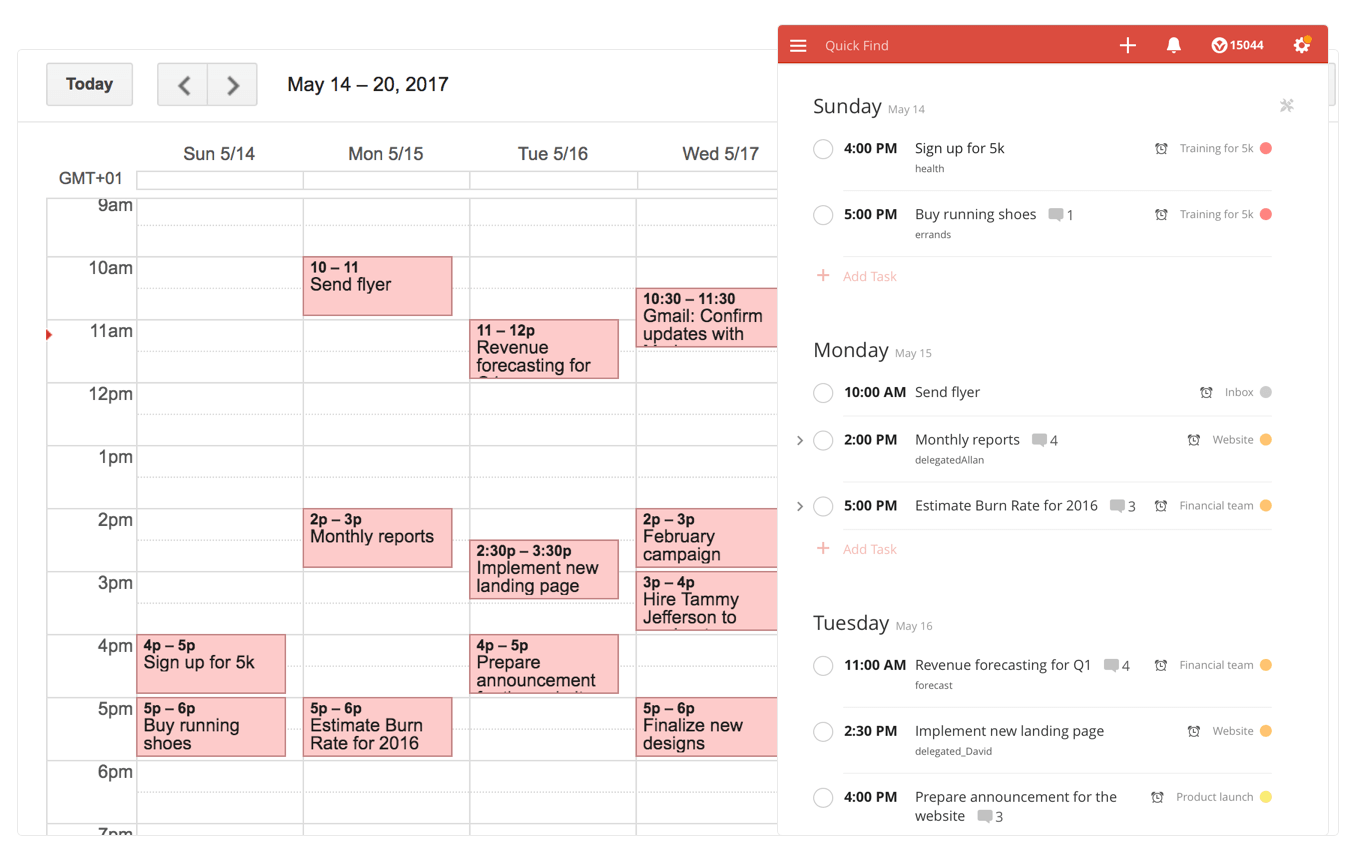
Todoist, the popular cross-platform app for organizing work and errands, is launching a deep two-way integration between it and Google Calendar that lets the app directly pull information from Google Calendar and vice versa. In addition, the app now supports iOS's system-wide Dynamic Type feature and you can now mark individual notifications as read or unread.
Todoist + Google Calendar = winning comboWith a two-way sync between Todoist and Google Calendar, you can visualize, organize and prioritize your tasks from inside your calendar, with any changes made in Google Calendar being instantly reflected back in Todoist and vice versa.
To connect Todoist with Google Calendar, sign into the Todoist web app, click on the gear icon in the upper-right corner and choose Settings from the popup menu. Navigate to the Integrations tab and click Connect next to Google Calendar.
After signing into your Google Account, you’ll be asked which calendar you want your tasks added to, whether you'd like to sync your entire Todoist account or just a specific project, which Todoist project you want new Google Calendar tasks added to, a default event duration for new Todoist tasks in Google Calendar and whether or not you want to sync tasks with a due date but no time.
Once you authorize the integration, any tasks with a due date and/or time in Todoist will automatically be added to a Google calendar of your choosing (recurring tasks will create multiple events) The two-way sync allows you to create events in Google Calendar within Todoist, knowing they'll be automatically added to the Todoist project of your choosing.
All tasks created from Google Calendar have a default @gcal label, but you can change the label by editing the integration after you’ve connected the apps. You can even choose to only sync tasks from a specific project, if you'd like.
On the iPhone and iPad side, Todoist now supports Dynamic Type, a feature that makes it easy to adjust the font size in apps that support this feature. To make words in Todoist bigger or smaller, simply update to the latest version of the app on App Store and set your preferred text size but dragging the slider in Settings → Display & Brightness → Text Size.
To make sure you don’t miss any important updates in shared projects, Todoist for iOS now allows collaborators to mark individual notifications as read or unread.
As for Todoist for Mac, the app's design was refreshed yesterday to make it feel more at home on your Mac, including extending the theme color all the way to the top.
The smart-task Quick Add action has been overhauled as well. Faster than ever before, it now includes a shortcut to assign a task to someone else (just type “+” into the task name field to pull up a list of collaborators).
Todoist for iPhone, iPad and Apple Watch is a free download from App Store.
Todoist for Mac is available free via Mac App Store.
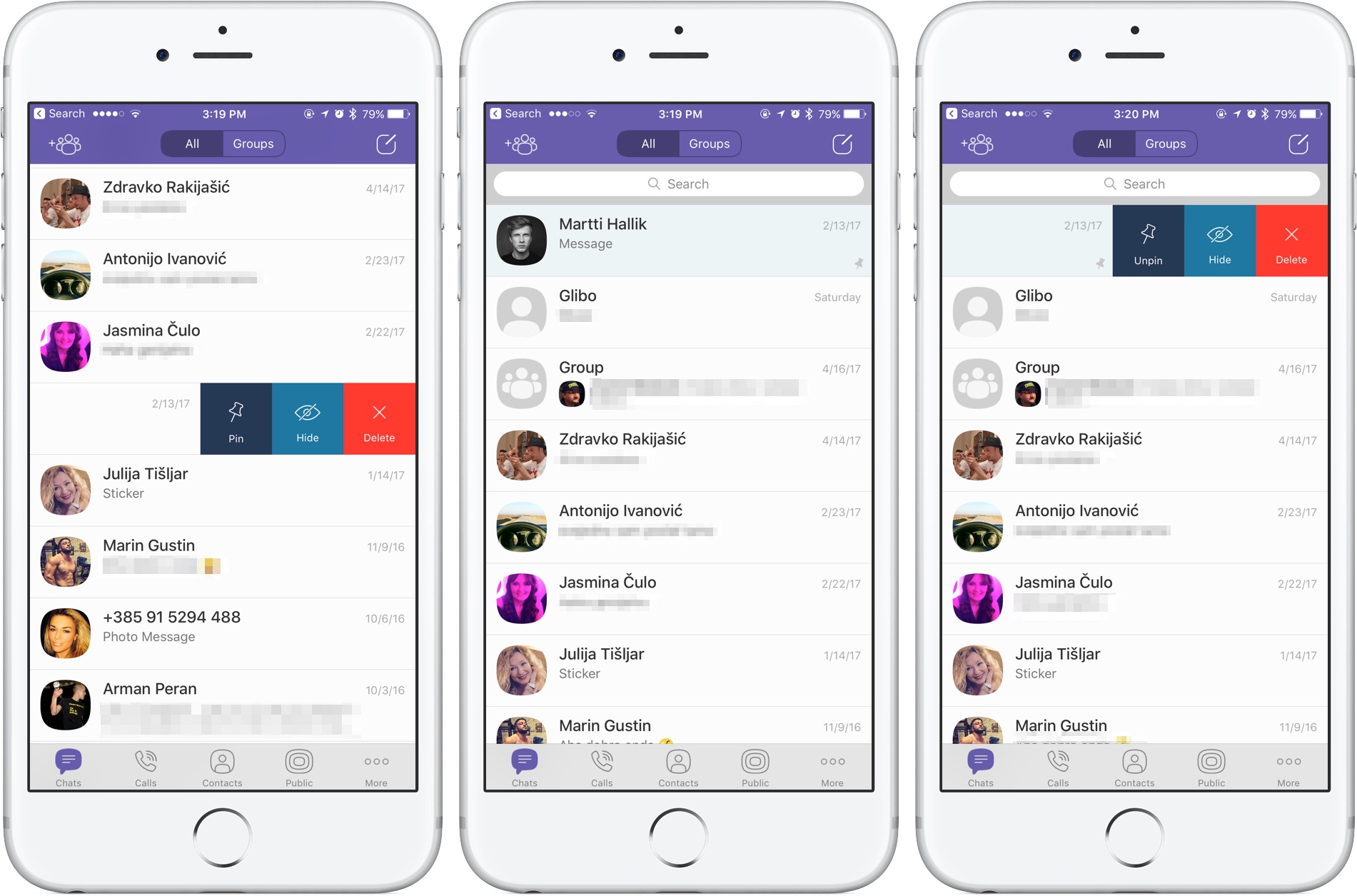
Rakuten-owned messaging app Viber is launching a pair of interesting enhancements in its mobile app for iPhone and iPad. The first improvement comes in the form of handy new options for adjusting Viber's default notification sound on a per-chat basis. The other enhancement lets you easily pin your favorite conversations to the top of the chat screen.
Aside from these improvements, Viber 6.8.8 for iPhone and iPad, a free download from App Store, includes unspecified bug fixes and performance improvements.
Chat pinningWith this feature, you can pin your favorite conversations to the top of the chat list where they're easier to spot. To pin a chat, swipe the conversations in the chat list, then select Pin to pin it to the top of the screen or Unpin if it's already pinned and you'd like to unpin it, as shown on the screenshots top of post.
Rival WhatsApp from Facebook is said to be working on chat pinning, too.
Custom notification soundsViber now allows you to override its default notification sound and replace it with the sounds listed in Settings → Sounds. You can choose a new default sound for all Viber notifications or select a different notification sound on a per-chat basis to make it easier to audibly distinguish between notifications for new messages from, say, your Mom and a co-worker.
Download Viber 6.8.8 for iOS via App Store.
According to an Apple Support email sent out today, all native third-party apps for iPhone, iPad, Mac and other platforms will be required to use app-specific passwords to access user data stored in iCloud, not Apple ID credentials.
App-specific passwords went into effect in October 2014.
Back then, enabling two-step verification for Apple ID would turn on app-specific passwords for web-based apps and services. Starting on June 15, app-specific passwords will become a mandatory requirement for any native app that wishes to access user data in iCloud.
You can generate app passwords in the Password & Security section of the Apple ID website.
A password created for one app, like Outlook, doesn't work in another app like Spark.
Come June 15, you'll be automatically signed out of all apps that use your Apple ID credentials. As an example, if you set up Fantastical for Mac with your Apple ID to access your iCloud calendars, you'll need to generate an app-specific password to continue accessing your iCloud calendars from within the app on and after June 15.
In simpler terms, you'll be required to enable two-factor authentication for your Apple ID and generate individual passwords for each app after the cutoff date.
The change is platform-agnostic: if you use Windows 10's Mail app to receive your iCloud data like contacts and calendars, you'll need to create an app-specific password for it. This is for the sake of everyone's security because signing into third-party apps with your primary Apple ID password may expose you to various attacks and hacking attempts.
To be clear, this only affects apps which access iCloud in a non-native way, which includes email clients like Outlook, Thunderbird and others. If an app has been updated to use iCloud Drive, it won't need an app-specific password to access user data in iCloud.
Bottom line: Apple still lets you grant apps access to your iCloud data, but soon you'll be able to do so in such a way that keeps your primary Apple ID password safe and secure.
Apple's first-party apps are not affected by this change.
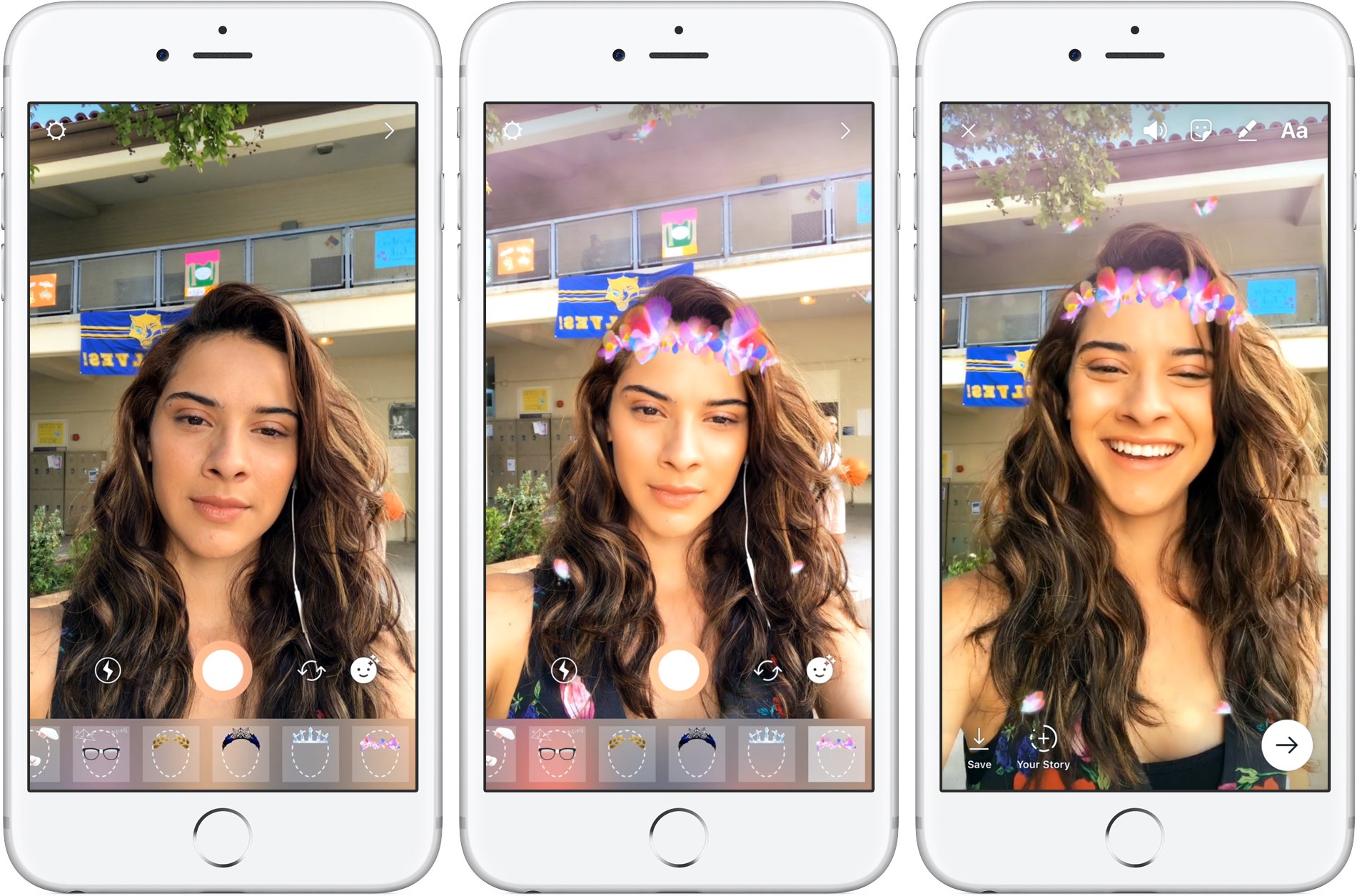
Instagram today announced several new capabilities for its mobile app, including selfie filters via the front-facing camera in what appears to be yet another effort to copy the last big Snapchat feature. Aside from face filters, Instagram 10.21 also includes a rewind playback option for videos, a new hashtag sticker an an eraser brush tool.
Face filtersWith all-new face filters in the Instagram camera, you can turn an ordinary selfie into something fun and entertaining. A total of eight different face filters are included at launch, with more to be added at a later stage via future updates. To get started with this feature, tap the new face icon in the bottom-right corner of the Instagram camera.
Simply tap a filter to try it on.
The filters include effects ranging from math equations swirling around your head to furry koala ears that move and twitch. “Whether you're sitting on the couch at home or out and about, face filters help you express yourself and have playful conversations with friends,” noted the Facebook-owned company.
https://vimeo.com/217551217
Some of the filters work with a friend.
Moreover, all the face filters included in this edition of Instagram work with Boomerang, meaning you can now add an unexpected twist to the videos you share.
Rewind option for videosInstagram also provides a new Rewind playback option for videos.
A new camera format next to “Boomerang” and “Hands-Free”, “Rewind” lets you share a rewind of your video. This mode captures your video normally, then makes it play in reverse.
Hashtag stickersA new hashtag sticker joins Instagram's existing stickers and geofilters. To get started with it, tap the sticker icon in the top-right corner, then choose and customize the new hashtag sticker before adding it to your own Story.
Like with mentions, you can add hashtags using regular text as well.
Hashtag stickers are interactive: folks watching your Story can tap the hashtag sticker or text to visit the hashtag page and explore related posts.
Eraser toolWith the new eraser brush, you can remove parts of drawings or color.
Instagram advises selecting the fill tool after you’ve taken a photo or video to fill the entire screen with color. Then, using the new Eraser tool, you can easily and quite creatively reveal parts of your photo or video underneath.
These new features are available as part of Instagram 10.21 for iOS.
To learn more about these updates, check out Instagram's Help Center.
Instagram is available at no charge from App Store.
After unveiling Assistant at Google I/O a year ago, the search giant is now expected to bring its AI conversational helper to iPhone and iPad in the form of a standalone app, AndroidPolice reported Monday. The app should be announced at Google's annual developers conference, which kicks off on Wednesday, May 17, at Shoreline Amphitheatre Mountain View in California.
Assistant for iOS will only be available in the US at launch, said a trusted source cited in the report. Assistant's SDK was just made available to developers so bringing the app to Apple's mobile platform could encourage more developers to integrate with its functionality.
Here's an excerpt from the article:
The app would likely feature a blend of the "chat" style functionality in the Google Allo version of Assistant and the voice-controlled version found on Android, but again, details are scant.
Rather than roll out Assistant as a standalone app, Google could fold its functionality into the existing search app for iOS, which supports Google Now cards but not Assistant.
https://www.youtube.com/watch?v=Wsic12MXlsc
A company executive hinted two months ago that Google's general philosophy is that “we would like to have the Assistant available to as many people as possible.”
After debuting exclusively on Google's Pixel line of smartphones in October of last year, Google Assistant soon after made its way into into Google’s voice-activated speaker, called Home, the latest version of Android Wear and a few devices from third-party vendors.
It powers AI features in Google's messaging app Allo and will be at the heart of the new Android operating system for touchscreen car consoles and in-car infotainment systems.
You can expect the feature to become integrated over time into virtually every major device Google makes, as well as into its most important consumer-facing services and mobile apps.
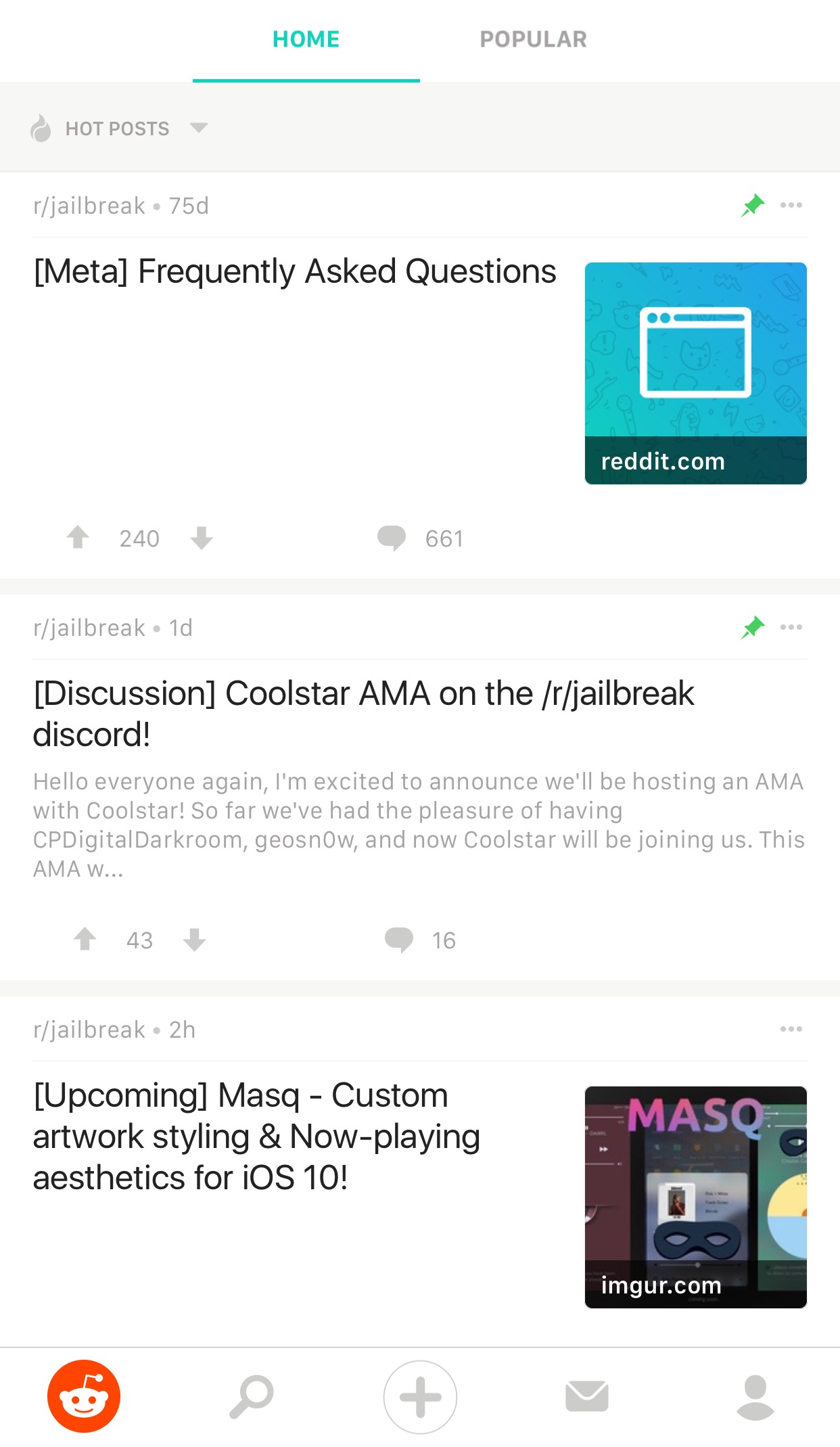
If you frequently use Reddit, then chances are you have the Reddit app on your iPhone or iPad for ease of access. While it’s useful for perusing the boards, it does have its shortcomings.
To get around many of the shortcomings, a new free jailbreak tweak called Reddit Enhanced by iOS developer Tom Effects offers a bevy of new options that let you fine-tune the Reddit app to better fit your personal needs.

This week's edition of our Apps of the Week roundup includes a third-party keyboard with extra large keys, a new app for saving money, and a mobile-friendly web browser. And as always, we have two great new games for you to check out this weekend.
Big KeysBig Keys is exactly what it sounds like: a third-party iOS keyboard with extra large keys. I'm sure this isn't a brand new concept and the third-party keyboard implementation in iOS is pretty rough, but with Mother's Day this weekend, I figured this was worth a mention. Anyone who has trouble typing on (or seeing) the tiny keys on the iOS keyboard will love this. Now it only works in landscape mode, but you get large keys and large emojis. Plus it has a numeric keypad, supports gestures, and it's customizable. Big Keys is available for $2.99.
SubtotalGet up to 10% cash back when eating out with the app Subtotal. It's simple: at the end of your meal, select your restaurant. Follow the on-screen instructions to enter and pay your bill (supports Apple Pay). Present the on-screen barcode to your waiter—it works just like a gift card. You get your cash back in a few days. Now it's a new thing, so only a handful of restaurants are supported so far (Applebee's, Chili's, Red Robin, etc.), but this seems like an app worth checking out for folks who want to save money with little effort. Subtotal is available for free.
Dazzle BrowserThe third-party iOS web browser space is a tough one to get into. Apple's Safari, of course, has a huge head start with prominent placement and performance enhancements. Google's Chrome has solidified itself as the official runner-up. Then there are a bunch of smaller browsers fighting for a distant third. Dazzle throws its hat into the ring with a simple, mobile-first interface. It was built for one-handed usage with a unified search bar located towards the bottom of the app, and the ability to quickly swipe between pages. Dazzle Browser is available for free.
Sky Gamblers RacesYour favorite fighter plane franchise is back with the ultimate air racing game. Featuring more than 90 highly detailed WWII planes, Sky Gamblers Races tasks players with building their reputation on the air racing circuit. Unique visuals, sound effects, and gyroscope controls make for an immersive gaming experience. There are over 100 races in different environments and 5 game modes: normal, slow down, elimination, timed races and death races. You of course can customize your plane and even race opponents in real time. Sky Gamblers Races is available for $2.99.
Crash ClubIf you're looking for something a little different this weekend, Crash City is the anti-racing game. Drive anywhere you want in this big coastal city, break everything and take down other drivers for points to rule the leaderboard! Massively multiplayer action with over 30 players live and real time in every game. Everything can be crashed, with weapons and abilities available in the middle of the action. There are over 25 unique cars that can be customized in both looks and performance. Crash City is available for free (with some IAPs).
More apps to check out Drop everything (except your bags) – this app is all you need for grocery shopping Apple’s free app of the week: Little Kitten Meet Breaker, a young podcast app with a social twist Infuse media player gains supercharged subtitles, 10-bit video playback & more PDF Expert 6 for iOS is out with revamped look, enhanced search, new editing tools & more Apple’s Workflow app gains new Apple Music actions, brings back Chrome and Pocket integrations
Google is working on a new feature for its mobile messaging app Allo that will permit iPhone users to create stickers based on their selfies. Taking advantage of neural networks, machine learning and the work of artists, the app will create virtual avatars personalized to match the user's own distinct look, said the company.
“Photography in the form of a selfie is a very direct form of expression. It comes with a set of rules bounded by reality,” wrote Google. “Illustration, on the other hand, empowers people to define themselves—it’s warmer and less fraught than reality.”
The feature is pretty straightforward: you just snap a selfie and the app returns an automatically generated illustrated version of you. You can also customize your new sticker manually with various facial features and other options.
What makes you, you?Rather than algorithmically determine the colors, shapes and textures in selfies, Google's system takes advantage of an advanced algorithm that picks out qualitative features of one's face in a manner similar to the way people do.
“While we could have trained a large convolutional neural network from scratch to attempt to accomplish this, we wondered if there was a more efficient way to get results, since we expected that learning to interpret a face into an illustration would be a very iterative process.”
Toying with its existing more general-purpose computer vision neural networks, Google found out that a few neurons in these networks were good at focusing on things they weren’t explicitly trained to look at.
The company explains:
By virtue of being large general-purpose neural networks, they had already figured out how to abstract away things they didn’t need.
All that was left to do was to provide a much smaller number of human labeled examples to teach the classifiers to isolate out the qualities that the neural network already knew about the image.
They fed the neural network illustrations created by an artistic team which captured a wide variety of facial features, such as different hairstyles, skin tones and nose shapes. Human curators then trained the network to match the right illustration to the right selfie.
Google's research team has taken special care to ensure that the illustrations cover a range of race, age, masculinity, femininity and androgyny. Furthermore, they're working with a range of artistic voices because “it’s not enough to make an avatar that is a literal representation of yourself when there are many versions of you.”
The feature began rolling out today in Allo for Android, and will come soon to Allo on iOS.
The most recent update to Allo for iOS included Incognito chats for group conversations and new notification settings for selectively enabling and disabling individual notifications.
Google Allo is a free download from App Store.

If you haven't heard about Pagico before, it's a productivity app that allows individuals and team members to easily manage all their tasks, files and notes across iPhone, iPad, Mac, Windows, Ubuntu and Android devices.
With Pagico, you can organize everything related to your projects in one place, stay informed with handy flowcharts, access data anywhere, manage your day, visualize workloads, cross-link everything, organize stuff into collections, collaborate and much more.
Now bumped to version 8.7, the app sports some interesting new features designed to help you be more productive and stay on track with support for sub-containers, enhanced container duplication features, smart filters, teammate filters, improved email handling and printing, plus a lot more.
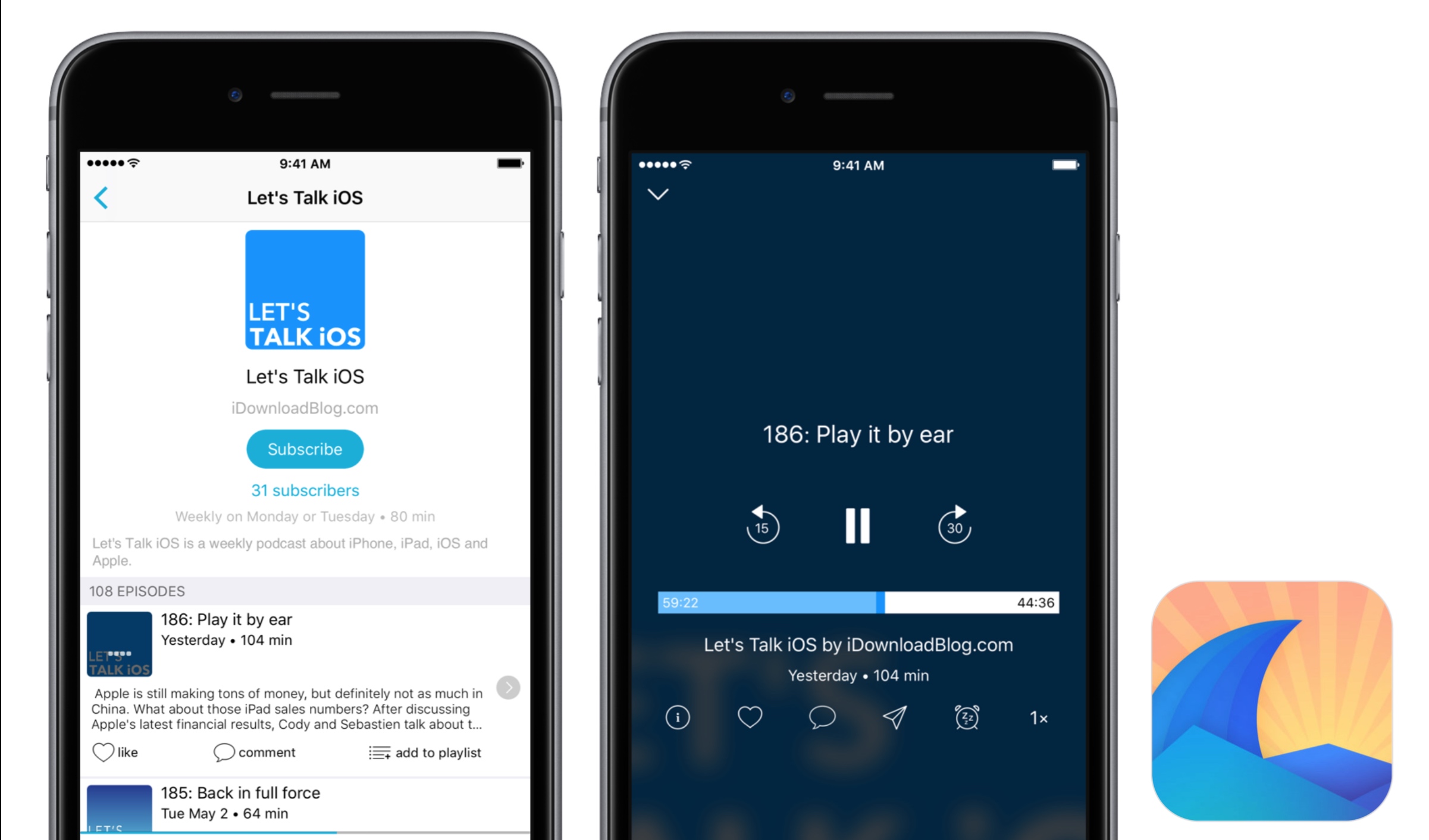
Podcast listeners are traditionally creatures of habit when it comes to the app of choice to access all their favorite shows. Thus, whenever a new gateway to podcasts comes along, it often cops the ‘not as good as Overcast’ treatment and is passed into oblivion.
The guys and girls at Breaker, a fresh podcast app available on your iPhone, look poised to buck that trend by trying something novel in the rubric: marry a solid podcast app to a social network, enabling the community of listeners to discuss, recommend and share the content.
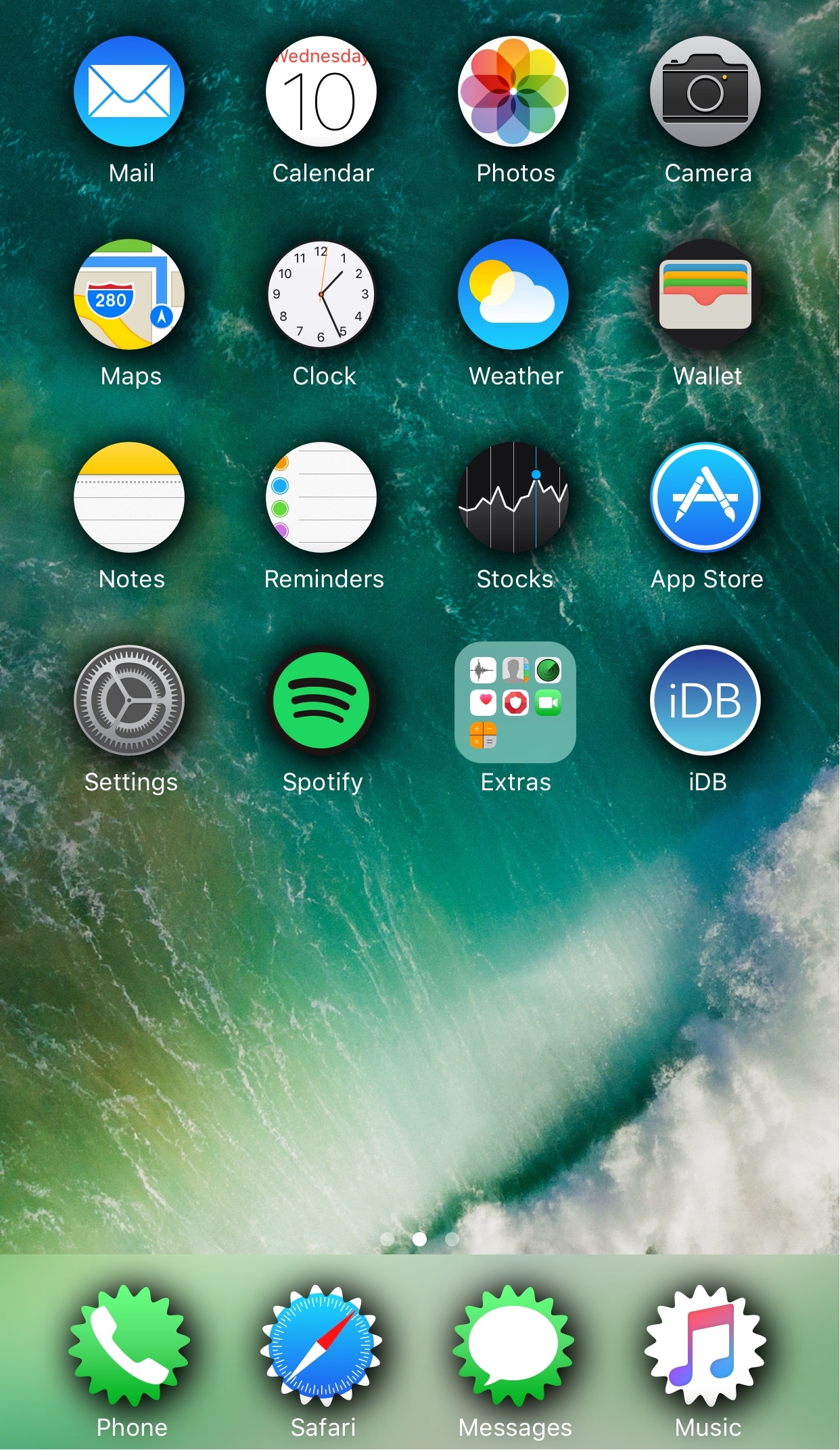
Looking to spice up your Home screen a little bit more? A new free jailbreak tweak called SpringToolz by iOS developer Stoyan Stoyanov lets you change the shape of your Home screen icons, add drop shadows, and much more.
The tweak comes loaded with a vast number of shape options to choose from and can give your device that distinct appearance you’re looking for to make it stand out from the rest.