App Updates

Netflix app now supports Picture in Picture on compatible iPads

Netflix on Tuesday pushed out an update for its iOS app, brining the client to version 8.7. It's a minor release, with just a few items mentioned in the change log, but there's one significant new feature that's going to really please iPad fans: Picture in Picture support.

That's right, folks with a compatible iPad can now watch Netflix in a floating, resizable window while continuing to perform tasks like checking email or browsing Safari. Netflix says you'll have to be on iOS 9.3.2 or later, and of course you'll need an iPad Air or later.

Microsoft Office apps updated with support for exporting files in OpenDocument format

Ahead of WWDC keynote at 10am this morning, Microsoft refreshed its trio of Office productivity applications for the iPhone, iPod touch and iPad with a notable new export option. Word, Excel and PowerPoint apps can now export documents, spreadsheets and presentations in the cross-platform OpenDocument format, making the mobile apps even more suited for business use.

How to control Apple TV from your iPhone’s Lock screen with CiderTV widget

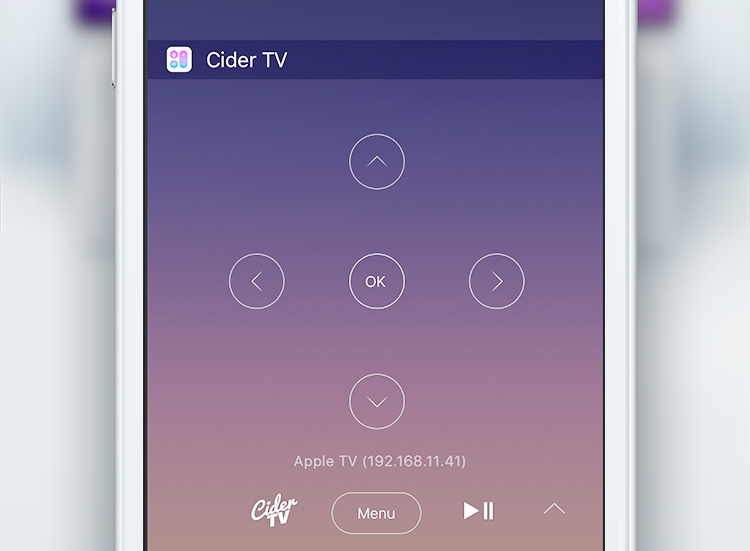
CiderTV, a software-based alternative for your Apple TV Remote, includes a built-in keyboard and has the ability to control linked Smart TV volume. As of recently, the app comes with a handy widget that makes it possible to control most of the functions of your Apple TV right from the Notification Center. It will save you a lot of time, here's how to get started with CiderTV and set up the widget.

Facebook starts accepting panoramic 360-degree photo uploads

Facebook today announced that it has started accepting 360-degree photo uploads. Panoramic photographs taken with your iOS device can now be uploaded to Facebook through the updated mobile app and are viewable in the web interface and on Facebook for iOS and Android.

Panoramic photos in your News Feed are marked with the compass icon. You can move your iOS device to pan around and even experience them in virtual reality with the Samsung Gear VR.

Camera+ 8: slow shutter, ultra-low ISO, new import options, action extension & more

Camera+ by oddly named developer taptaptap, one of the longest-standing camera applications (and one of the best out there, in my personal opinion), has received a major refresh on the App Store.

Camera+ 8.0 packs in a slew of improvements such as an innovative slow shutter feature, an extended range of effective ISO values, a handy extension for easier sending of photos from the share sheet of other apps and more.

Voice calls come to Slack, video calling and screen sharing in the works

Slack, a cloud-based, cross-platform team collaboration service, has rolled out support for voice calling, the team announced yesterday. With it, team members can call one another without leaving Slack, and calls even have an emoji response feature.

Calls are currently voice-only, but Slack says that features like video calling and screen sharing will come in the future. Slack is available across iOS, OS X, the web and other platforms.

iTunes U gains new import options and other perks in latest App Store update

Apple's iTunes U application has received a refresh in the App Store, bringing out a few new features. For starters, iTunes U 3.3 for iOS now takes advantage of third-party Document Provider extensions.

This enables iPhone, iPod touch and iPad owners to easily add new materials from various cloud services for which they have an app installed on their device, such as iCloud Drive, Google Drive, Dropbox and so forth.

Shazam brings back offline mode

Music and media identification service Shazam pushed a new update to its mobile application in the App Store which enables offline mode. The feature used to be present in Shazam from day one before it was temporarily removed in the overhauled app.

With it, you can still Shazam while offline and the app will name any songs you captured in offline mode when you're back online. Shazam is a free app. The paid $6.99 Shazam Encore app is available to those who want to get rid of ads and use advanced features.

Foursquare’s Swarm app now offers real-life perks

If every day is a game, then there should be prizes, right? Foursquare's Swarm app has started offering just that, real-life perks depending on where and how often you check in. Called Swarm Challenges, this is yet another feature that Foursquare has brought back to Swarm from its main mobile application, which is now focused on places reviews while Swarm is all about the check-in game.

Instagram’s new iOS extension finally lets you share without needing to launch the app

It's hard to tell from release notes alone, which only mention bug fixes and performance improvements, but Instagram's version 8.2 update that went live this morning on the App Store packs in a much improved Share sheet extension.

Long overdue, the new extension finally lets you upload photos and videos directly to the service, without needing to open the app at all.

Viber gains iCloud backup, support for sending money, animated GIFs and more

Messaging service Viber this morning pushed a new update to its App Store app, adding several new long overdue features. For starters, iPhone users can now back up and restore their chat history through iCloud, making keeping their conversations after an iOS restore possible.

The application now has a brand new native watchOS 2 app for your wrist with canned responses on your Apple Watch. Other new features in this edition of Viber include support for sending and receiving animated GIF images, sending money from within the app and low-rate Viber Out calling plans via a redesigned screen.

Get ready for WWDC 2016 with official Apple TV app

Just ahead of WWDC 2016, which kicks of with a keynote presentation on Monday, June 13, at 10am, Apple issues a timely refresh to its official WWDC app for the iPhone, iPod touch and iPad.

The refreshed app has an all-new dark interface and now runs on the fourth-generation Apple TV so you can watch WWDC action from the comfort of your couch.