App Store

PayPal for Apple ID expands to 11 markets, now with support for Apple TV & Apple Watch

PayPal announced today that it's expanding support for App Store and other purchases made with Apple ID across Apple devices to eleven new markets, including the United Kingdom, Germany, France, Italy, Austria, Spain, Canada, Mexico, Israel and Australia.

The roll out began today in Canada and Mexico, with other markets including the US due soon.

Before today, the PayPal option was limited to customers in the United States with limited integration requiring a credit card on file with PayPal as a linked method of payment.

As part of an expanded partnership with Apple, your App Store purchases can be now deducted directly from your PayPal account. The new system provides a “secure and versatile payment method to meet the growing demand for digital entertainment,” in PayPal's own words.

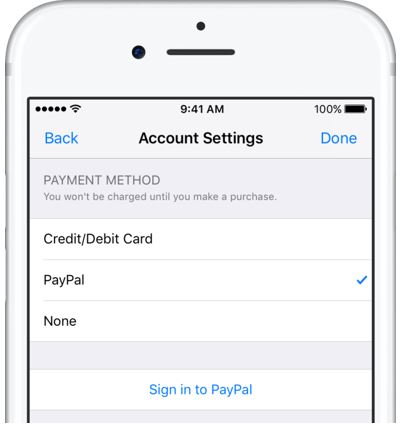
Adding PayPal as a payment method now works in the App Store, iTunes Store and iBooks Store apps for iPhone, iPad and iPod touch: just go to Settings → iTunes & App Stores, tap your Apple ID in the list and choose payment information to link PayPal with your Apple ID.

Previously, customers had to go through iTunes for Mac and Windows PCs to configure their Apple account for PayPal integration. Once PayPal has been selected, all future purchases with the customer's Apple ID will be automatically charged to their PayPal account, including:

Apps on App Store and Mac App Store Apple Music subscriptions Music, movies, TV shows, ringtones and more on iTunes Store Books on iBooks Store iCloud storage upgrades

As a bonus, the feature now supports PayPal's One Touch technology,

One Touch skips the PayPal login screen at checkout after the first use as long as you’re in the same device or browser. In other words, after buying something using your Apple ID from App Store and other stores, One Touch will skip the password field that PayPal normally requires.

More importantly, One Touch allows for simple purchasing from all Apple devices—including your Apple TV and Apple Watch for the first time—since you no longer need to provide your PayPal credentials for every purchase.

Both new and existing customers will be able to switch their account to use PayPal as the default method when the feature goes live in their market.

For more information on how to set up PayPal with your Apple ID account on your iOS device, visit paypal.com/ituneslaunch.

The best thing about using PayPal as a payment method on App Store and elsewhere is the fact that you can add credit cards to your PayPal account to use with your Apple ID without having to enter any financial details into your Apple ID account.

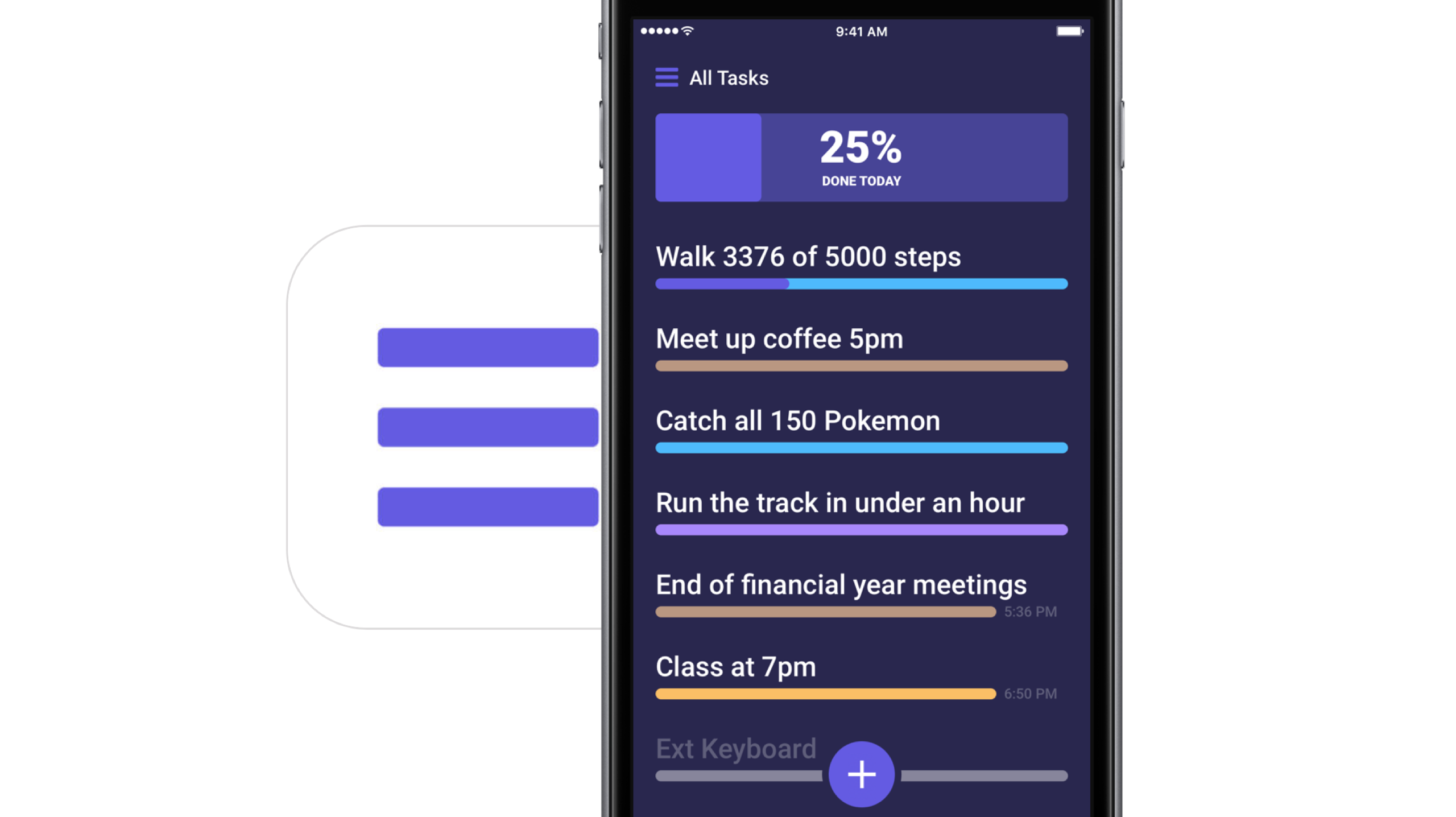
Frustrated with Reminders? Taskful could be the answer to your woes

Not all tasks are created equal. No doubt you either have taken the trash out or you have not, but there is a vast number of daily challenges that are conquered in increments, tasks that can be taken on for an hour, then sidelined at their half way point and ultimately capped off in the afternoon. Users of Apple’s Reminders app might know the struggle to approximate a progression-based task to the binary reminder framework we are provided: ever tried to make the Reminders app nudge you every day until you have hit the treadmill five times per week, or let's say read ten chapters of your book? For all intends and purposes, it’s cumbersome.

Taskful sets out to remedy the pain of that. It also lets the user select only certain days of the week to remind you of due tasks (e.g. weekdays) and will smartly display the items relevant to you on a specific day and, more crucially, blank out tasks set for a future date. Needless to say this can be priceless for people quickly throwing their hands up when faced with a dauntingly long list of tasks. To bolster the sentiment, the app also automatically breaks up longer tasks into daily chunks.

How intelligent is this thing really?

Naturally, for a smart task manager to really hit its stride, it takes equally smart data input. Such being the case, you’re going to want to learn the nitty-gritty of Taskful before judging the application’s utility. So let’s briefly talk about the mechanics of it:

On the face of it, Taskful and Apple’s Reminders app share some structural traits. That is, both offer category based sorting of items, in which each category (Urgent, Finance, Work) is represented by a color of your choosing. That’s about where the similarities come to an end however, because on Taskful, filing away a task properly is swiftly accomplished by swiping left and right to change the background color of your note during creation. At the same time, the app will analyze your task as you scribble it down and immediately glean information such as dates and numbers.

Based on its reading, smart bubbles right below the draft will interpret your input and suggest measuring sticks for your task. You can tap and confirm or manually alter them. To exemplify, use a number like '4' in your task, now mark the little ‘Amount: 4’ bubble magically popping up beneath the text and as a result, the reminder needs to be tapped four times to be considered finished by Taskful. Until then, a big and rewarding progress bar will grow in 25% increments every time you come one stop closer to your goal.

Along the same lines, Taskful is also capable of acting as a quirky step tracker. On launch, the app asks permission to read and write HealthKit data, meaning the app can track your step count and remind you to get off the couch if you haven't ticked the ‘walk 600 steps’ reminder at night.

It goes without saying that these are just two hands-on examples of how to put Taskful to good use, not so much selected at random but rather intentionally to demonstrate the app's versatility. What's more is that it comes with a good deal of UI customizations such as a built-in dark mode. In other words, both in scope and depth Taskful decidedly one-ups Apple’s Reminders. And above all else, it feels good to look at one unifying 'All Tasks' tab, something Reminders’ stacked business cards look sort of makes impossible.

Competing in the world of task managers and to-do lists is a tough gig on the App Store, yet it appears as though Taskful has found the sweet spot to prevail. It is also earning the right accolades along the way, with Apple just recently featuring the app in the ‘Apps We Love’ category in various countries including the US, Australia and New Zealand.

Taskful is available on iPhone and iPad, the latter of which just added split screen support to round the package off nicely. If you want to give the app a whirl, it is currently priced at a reasonable $1.99.

Link to App Store: Taskful ($1.99)

Apple asks developers to update their pages for iOS 11’s all-new App Store

Apple on Tuesday invited its registered developers and members of the Apple Developer Program to update their product pages for iOS 11's much redesigned App Store.

Specifically, developers can showcase their content with subtitles, promotional text, additional app previews that they can localize and up to 20 promoted In-App Purchases that users can buy on App Store, even if they haven't downloaded an app that offers them.

A dedicated section on Apple's portal for developers offers useful resources for making the most of the new product pages. Like before, new metadata is entered in iTunes Connect.

“Metadata you provide in iTunes Connect is shared across App Store on iOS 11 and iOS 10.3 and earlier, so you only need one version of product page elements, such as app name, icon, screenshots and keywords,” notes Apple.

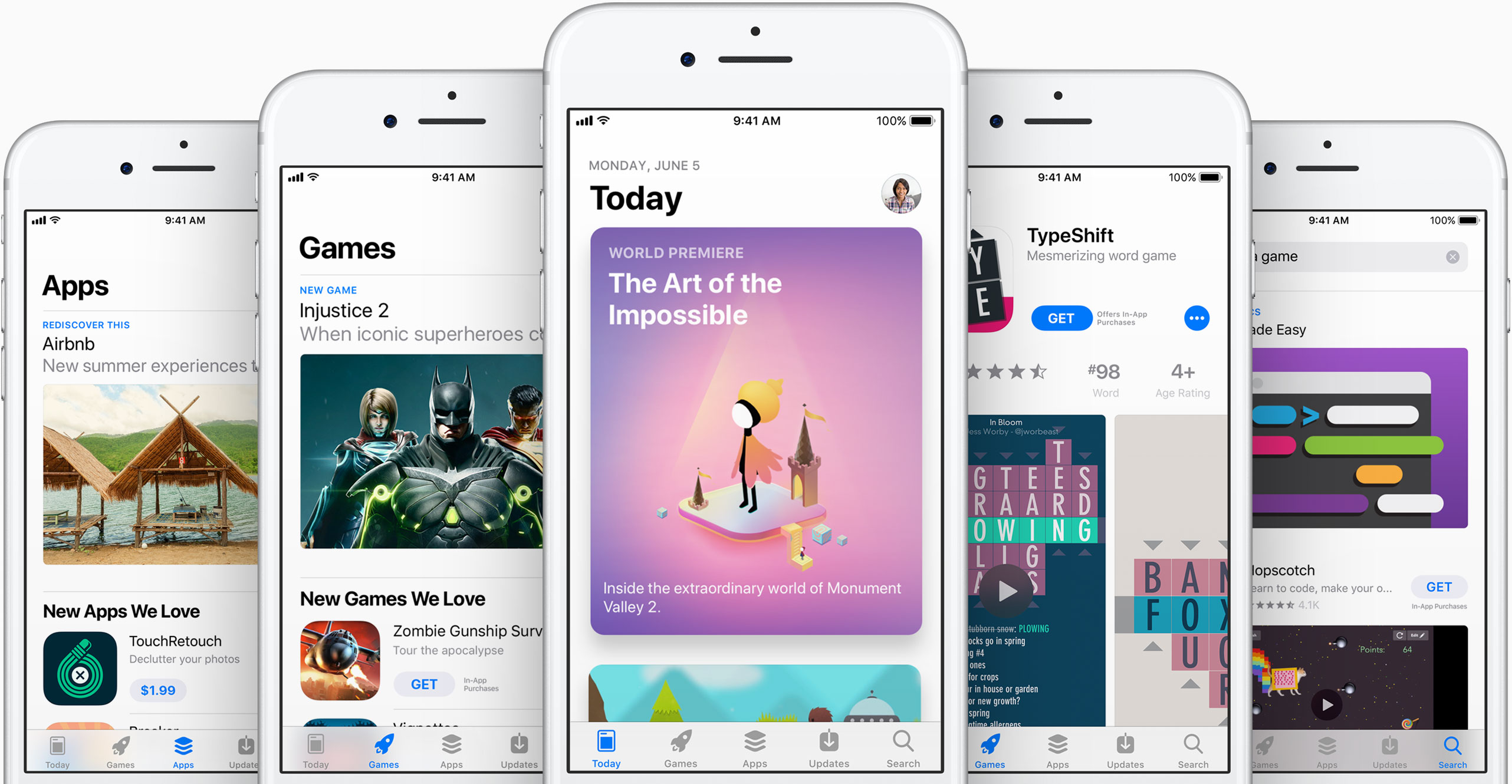
iOS 11's App Store features competently revamped product pages while providing dedicated Apps and Games tabs along with a new Today tab with original stories, editorial, tips, how-tos, interviews and more, updated daily, in a blog-like format.

https://www.youtube.com/watch?v=-hoPcMPvL88

Subscribe to iDownloadBlog on YouTube.

The App Store redesign lets developers spotlight apps with more engaging content, putting the most important information front and center for the customer making a download decision.

Developers can now submit up to three video app previews and five screenshots, which can now be localized so a user in any country can have a customized version of the video.

Accolades including Editors’ Choice and chart position are now highlighted by App Store, as are In-App Purchases and customer ratings and reviews.

The new App Store is now available as a preview to users of the iOS 11 public beta. Once iOS 11 launches for public consumption this fall, the redesigned App Store will be in the hands of hundreds of millions of users around the world.

App Store customers have now downloaded more than 180 billion apps and Apple has paid out over $70 billion to developers since the store launched in 2008, making it the most vibrant software marketplace in the world, according to the Cupertino giant.

The best iPhone apps for tracking steps

No matter the extend, or amount of joy we derive from it, until anti-gravity boots have been invented and immobilized humanity once and for all, we all have to walk. To work, from work, to run errands, to take the dog to the park, to pick up the kids, to the pub on weekends. Sometimes home on all fours after that. But it is also a loved activity for those seeking a healthy lifestyle or regular exercise. In any event, with your iPhone in the pocket, it is easier than ever to record, visualize, or even gamify your endeavors.

To do justice to the wide array of step trackers available, we have parsed the App Store with the aim to only pick apps standing out for at least one unique quality. The result is - hopefully - a small but diverse sample of the best step tracker apps that is representative of the larger flock of step counters, some of which you might argue should or should not have been included based on merit, features or simply personal allegiance.

If that’s the case, as always do let us and your fellow readers know in the comments. And now, without further ado, let’s get into our list of the best pedometer apps!

The best pedometer apps Activity Tracker

We’re starting at the proverbial shallow end with Activity Tracker, meaning an app not too complex with respect to stats and analytics. Instead of drowning the user in numbers and tabs, Activity Tracker is a great candidate for those appreciating aesthetics and simplicity. A the same time, it manages to smartly condense the most important information about your activity and hide it in plain sight.

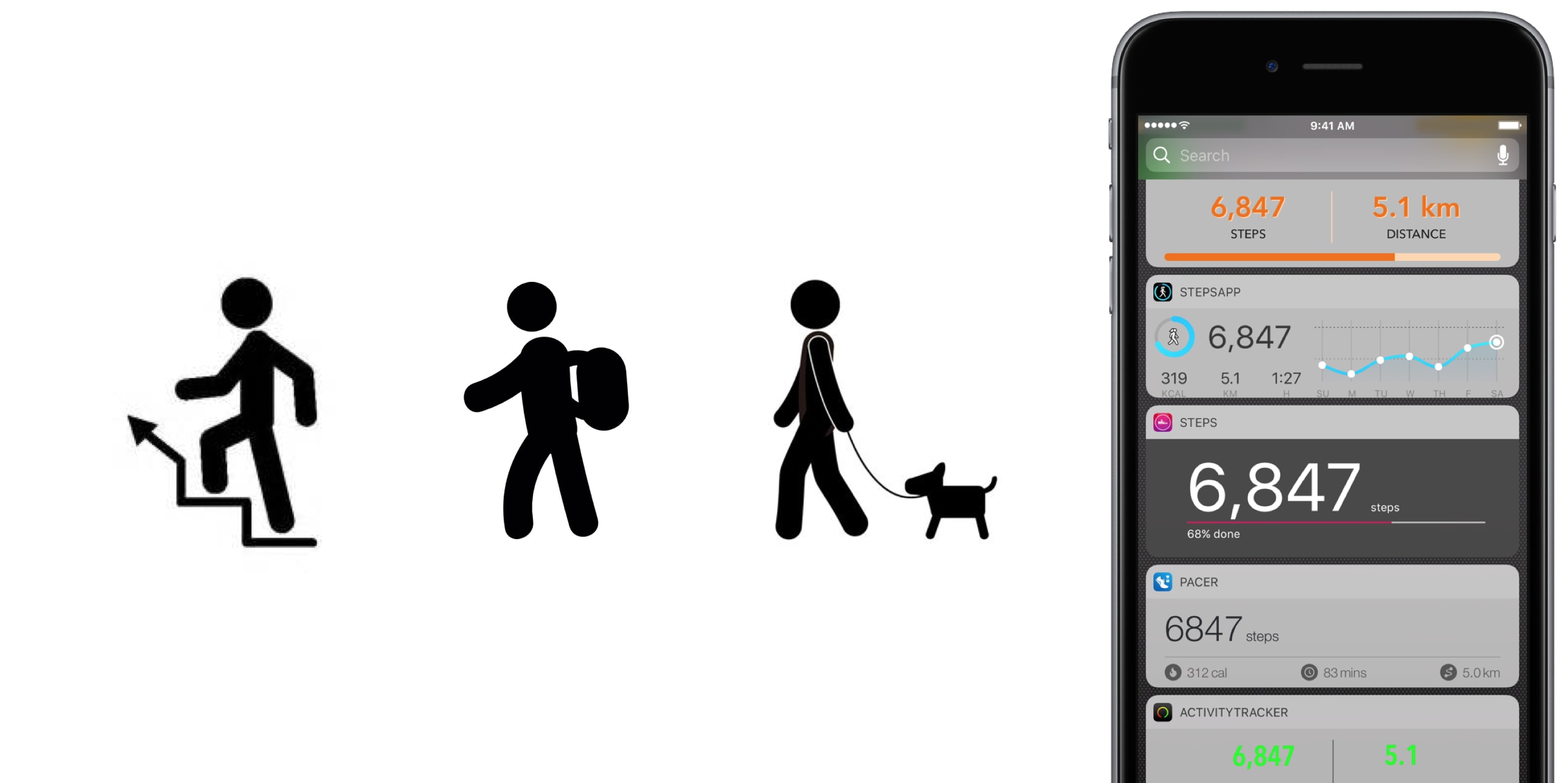
Activity Tracker records and presents your daily steps in a very familiar activity ring fashion, in addition logs flights, time, distance and also calories burnt, a giveaway other apps will already demand you go premium for. Moreover, the app icon badge can display your daily number of steps and a reasonable widget is being offered as well, certainly not the best among the pack but a nice to have all the same.

Finally, Apple Watch users are likely to appreciate the wrist implementation of Activity Tracker, as it bundles all the important information (steps, kcal, miles) in one quick glance. For more stats (hourly, monthly) and complete HealthKit integration you’ll have to upgrade to premium for $4.99. Either way, the basic app is a solid place to start your step counting journey.

• Device support: iPhone, Apple Watch • Widget: Yes (Steps, Miles) • Notable features: app icon badge, weekly goals, calories • Cost: free ($4.99 premium)

Pacer

Pacer’s full name - Pacer: Pedometer plus weight loss and BMI tracker - more aptly encompasses the allrounder that this app really is. To its credit, it somehow manages to not stretch itself too thinly taking on step counting, weight monitoring, personal coaching, but also social challenges and group forums. Yet on the flip side, it can for sure be a little overwhelming to those seeking out a straightforward pedometer.

To flesh it out briefly, the free app boasts a regular step counter comprising steps, flights, distance and plenty of graphs (for both portrait and landscape orientation). More exclusively to Pacer, it also features stats for weight, BMI & blood pressure. Refreshingly, Pacer houses a free community of user groups, which can be joined for discussions and the hunt for shared goals. Public events can be attended as well, boosting morale as you sure don’t want to sit at the bottom of the participant's list.

Pacer offers a subscription based Pro service (at $3.99 per month) that covers a plethora of goodies such as a personal coach for exercise plans and weight loss, guided challenges, plus more personal stats. And as you would expect from a jack-of-all-trades app like Pacer, it packages a potent Apple Watch companion as well.

• Device support: iPhone, Apple Watch • Widget: Yes (Steps, Cals, Time, Distance) • Notable features: calories, public events, groups  • Cost: free ($3.99 a month)

Pedometer++

Pedometer++ dates back all the way to 2013 and the release of Apple’s M7 motion coprocessor. Back then, it spearheaded the new movement and was among the first apps to embrace the freshly-fitted piece of hardware. Because of that pedigree alone, we’d be remiss to ignore the application. Besides, it’s the only app (next to StepsApp) to equip you with a nifty iMessage chat extension for friendly banter between you and your friends.

Outside of that, Pedometer++ is a straight shooter, only asking for a daily step goal and taking over from there. Perhaps its biggest strength is the UI, managing to boil down all the information (steps, floors, distance, a color chart) of the tracker in one single page, all the while retaining a clean look. As a result, there is no learning curve with this tracker, no hidden gestures or buttons, no fear of missing out. Via settings, Pedometer++ can also make use of the app icon badge to display the current step count. In addition, the app earns its stripes through accessibility features such as a wheelchair mode and a switch for rest days.

In closing, Pedometer++ can be stripped off its ads for a small tip of $0.99, plus comes in conjunction with an Apple Watch app capable of timing and recording your walks.

• Device support: iPhone, Apple Watch • Widget: Yes (Steps, Miles, Floors) • Notable features: app icon badge, daily goals, wheelchair mode, rest days • Cost: free

Stepz

Stepz most distinguishing feature is not its atrociously spelled name, but an emphasis on social and trophy hunting. The app has dedicated tabs for Achievements and Friends, each making clear where priorities lay during the development of Stepz. Fortunately, that gamble has paid dividends, as scoring and sharing achievements like ‘You have walked the length of the London Underground’ is actually a playful source of motivation.

At the same time, Stepz has been mindful with the implementation and ensured it doesn’t bleed into the core step tracking functions. The latter performs slightly above average amongst all apps featured, with rich and informative data, detailed graphs and an outstanding history tab for everything ever archived on your iPhone. To make sure they leave no stone unturned, an app badge switch and Lock screen widget (Steps & Distance) have been thrown into the bargain as well.

Suffice it to say that the dev team has done their homework on watchOS too, which for all intents and purposes wraps up the package nicely. For $0.99, you get to wipe the interface clean and remove all ads.

• Device support: iPhone, Apple Watch • Widget: Yes (Steps, Miles, Progress) • Notable features: app icon badge, daily goals, calories, achievements badges, friends • Cost: free ($0.99 premium)

Steps

Steps not only beats Stepz to its grammatically sound name, but also broaches the concept of a step counter from an entirely different angle. Essentially, Steps is the cleanest, least pompous pedometer in our line up, so much so that the entire display can be reduced to a single number (your step count).

Under its surface, one tap will reveal distance and time travelled, a swipe up invokes a brief history of the previous three days, while a swipe to the left is utilized to set a daily steps goal. Believe me that we are not trying to shortchange the app, but with the exception of a daily update notification, this is practically it. And that’s precisely the sales pitch.

If you grow fond of the slim step counter, for $1.99 Steps complements its service with a calories tracker.

• Device support: iPhone • Widget: Yes (Steps, Progress) • Notable features: daily goals • Cost: free ($1.99 premium)

StepsApp

StepsApp will tickle your fancy for various reasons, most likely though because of its breadth of customization abilities, especially with regard to your daily goals and notifications along the way. To give you an idea, you can flick on or off notifications for steps, calories, distance, time, weekly reports and an app icon badge. It additionally boasts the option to alter colors inside the app (limited until you go premium), which even redesigns the app's look on your iPhone's Home screen. Nice little touch there, StepsApp.

That is just the tip of the iceberg though, and the foundation is equally solid: the app sports a beautiful interface including a monthly calendar view akin to Apple’s own activity app calendar, interesting diagrams and submits one of the best widgets on iPhone any app in this roundup has to offer.

What’s more is that on Apple Watch, StepsApp's prowess (i.e. amount of data and breakdowns) comes close to rivalling Apple’s proprietary activity and exercise app, so much so that it can serve as a fully fledged outdoor GPS tracking device for walking and running. For $2.99, even more customization, Apple Health integration, and Apple Watch complications await.

• Device support: iPhone, Apple Watch • Widget: Yes (Steps, Miles, kcal, Time, Graph) • Notable features: app icon badge, various daily & weekly goals, app customization, calories, GPS tracking • Cost: free ($2.99 premium)

Step Counter

Step Counter arguably tries to accomplish a little less at once, albeit rocking a design quirky enough to have earned a spot in our list. Unlike the majority of step trackers, Step Counter asks you to select a character and matching attire first, presuming that a personalized avatar is going to funnel extra inspiration and ultimately motivation.

Once completed, the app emulates a fairly plain step counter sans notable bells and whistles. Such being the case, you will get steps and distance measurements, plus gratis hourly breakdowns. Furthermore, step, calories and distance goals can be adjusted and notifications hooked up to help you meet them as you go. Contrary to what some freemium apps at first skimp on, Step Counter is fully integrated into HealthKit from the get-go.

Conversely, they too are guilty of holding back some items to sway you in the direction of the $1.99 in-app upgrade, most pertinently calories analytics and personalized goals. Irrespective of redeeming the entry ticket or not, Step counter does not come with an Apple Watch application or a tailor-made widget for your iPhone.

• Device support: iPhone • Widget: No • Notable features: personal avatar, hourly breakdowns  steps and distance • Cost: free ($1.99 premium)

Honorable Mention

Wokamon 

Before we draw the curtain on this, one final app for you to consider goes by the name of Wokamon. If the success of Pokemon Go has proven anything last year, it would be that above all else, gamifying walks is going to get certain people off the couch. If you are guilty of the need for instant gratification, Wokamon could be the one app closest to a regular step tracker appealing to you. Start by walking to hatch an egg, subsequently keep logging steps to grow and foster your digital pet. Wokamon even features a weekly breakdown of your steps, so by any standards it sure is a pedometer, if slightly whacky at that.

• Cost: free (in-app purchases)

Conclusion

It is easy to get lost in the vast ocean of pedometers out there, and in the likely event that you bank on an application not featured in our roundup, as mentioned earlier, don't hesitate to fill us in!

Apart from that, the time has come to download one of the iPhone apps for tracking steps above, put on some walkable shoes and rediscover the joys of the great outdoors!
Apple now allowing developers to implement digital tip jars via In-App Purchase mechanism

Apple recently asked WeChat and other popular social networking apps in China to disable the popular tipping feature, and now we know why—the Cupertino giant has introduced an officially-sanctioned way for iPhone and iPad users to tip content creators in apps via the standard In-App Purchase mechanism.

Like with other In-App Purchases, tipping content providers is subjected to Apple's 70:30 revenue sharing scheme, meaning the company will keep 30 percent of any proceeds to itself.

According to TechCrunch, the updated App Store Review Guidelines now include a clause that deals with tips, here's a relevant excerpt:

Apps may use in-app purchase currencies to enable customers to “tip” digital content providers in the app. Apps may not include buttons, external links, or other calls to action that direct customers to purchasing mechanisms other than In-App Purchases.

According to the report, developers have the freedom to decide how much of the tips are passed to the content creators themselves (after Apple's 30 percent cut, of course).

At any rate, Apple was smart to implement this cool new feature.

Tipping content creators like musicians, comedians, e-sports athletes and others is tremendously popular in China. The company has lacked a tipping system for iOS apps, meaning it couldn't get in on the action to process such transactions through its own iTunes billing system.

With tips now being officially supported via the familiar In-App Purchase mechanism, many customers who were previously reluctant to use PayPal or their credit card for tipping their favorite content creators will now be able to do so, directly in the app.

And by taking tipping out of the grey area, as TechCrunch observes, more developers might implement digital tip jars— without fearing repercussions from Apple—as an alternative way to get creators paid without having to offer ad revenue sharing.

In turn, the feature may create a whole new revenue stream for Apple at a time when the company is monetizing its huge user base in an attempt to boost its ever-growing Services revenue.

Apple honors select app developers in its 2017 Design Awards

Unlike the name might imply, Apple’s Design Awards are not exclusively dedicated to chasing the pinnacle of visual design, but more comprehensively appraise other app elements such as user interface innovation, sound design and also gameplay for apps offering unique gaming experiences. The latter, games, have easily stolen the show this year with 5 out of the 12 winners coming from said category.

In a slightly embellished press release, Apple announced the names and links of all twelve winning applications, each coming with a punchy story to explain and celebrate the selection in addition to screenshots and pictures of each developer team.

Apple announces completely redesigned App Store

Phil Schiller just made perhaps the most surprising and impactful announcement at Apple's WWDC keynote: the App Store is getting a complete redesign. This is the first time this has happened since the App Store was introduced back in 2008.

“Together with our incredible developer community, we’ve made the App Store the best app platform in the world, and more than 500 million unique customers visit it every week,” said Philip Schiller, Apple’s senior vice president of Worldwide Marketing. “Now, we are taking everything we’ve learned from the App Store over the past nine years and putting it into a stunning new design. Every element of the new App Store is richer, more beautiful and more engaging.”

As you can see in the above images, the new App Store looks a lot like Apple Music and Apple News. Images are larger with rounded corners, and header text is large and bold. There's a new Today tab, with big, color cards you scroll through that shows app previews and updates, news, tips and guides, and more. There will also be an app of the day, game of the day, and a daily list of suggestions.

"It all starts with the Today tab, a daily destination all about games, apps and app culture. Through in-depth features and interviews filled with beautiful artwork and videos, the App Store’s global team of editors will share the stories behind the apps and games that change the way we live and the developers whose ideas push and shape the world as we know it. Today will feature exclusive premieres, new releases and a fresh look at all-time favorites, as well as recommended tips and how-to guides to help customers use apps in innovative ways."

Games also now have their own tab, separate from apps, which should make non-game developers pretty happy. This is going to be one of those things where we are going to have to go hands on with to cover the extent of the changes.

"Games is the most popular category on the App Store, and with the new design there will now be a dedicated home just for games. It will feature recommendations of new releases and updates, compelling videos, top charts just for games and hand-picked collections. It's now easier than ever to navigate the over half a million games available, and find the perfect game for everyone from the casual player to the hardcore enthusiast."

What do you think of the new App Store design?

App Store placeholder listing for Apple Files app appears briefly ahead of WWDC keynote

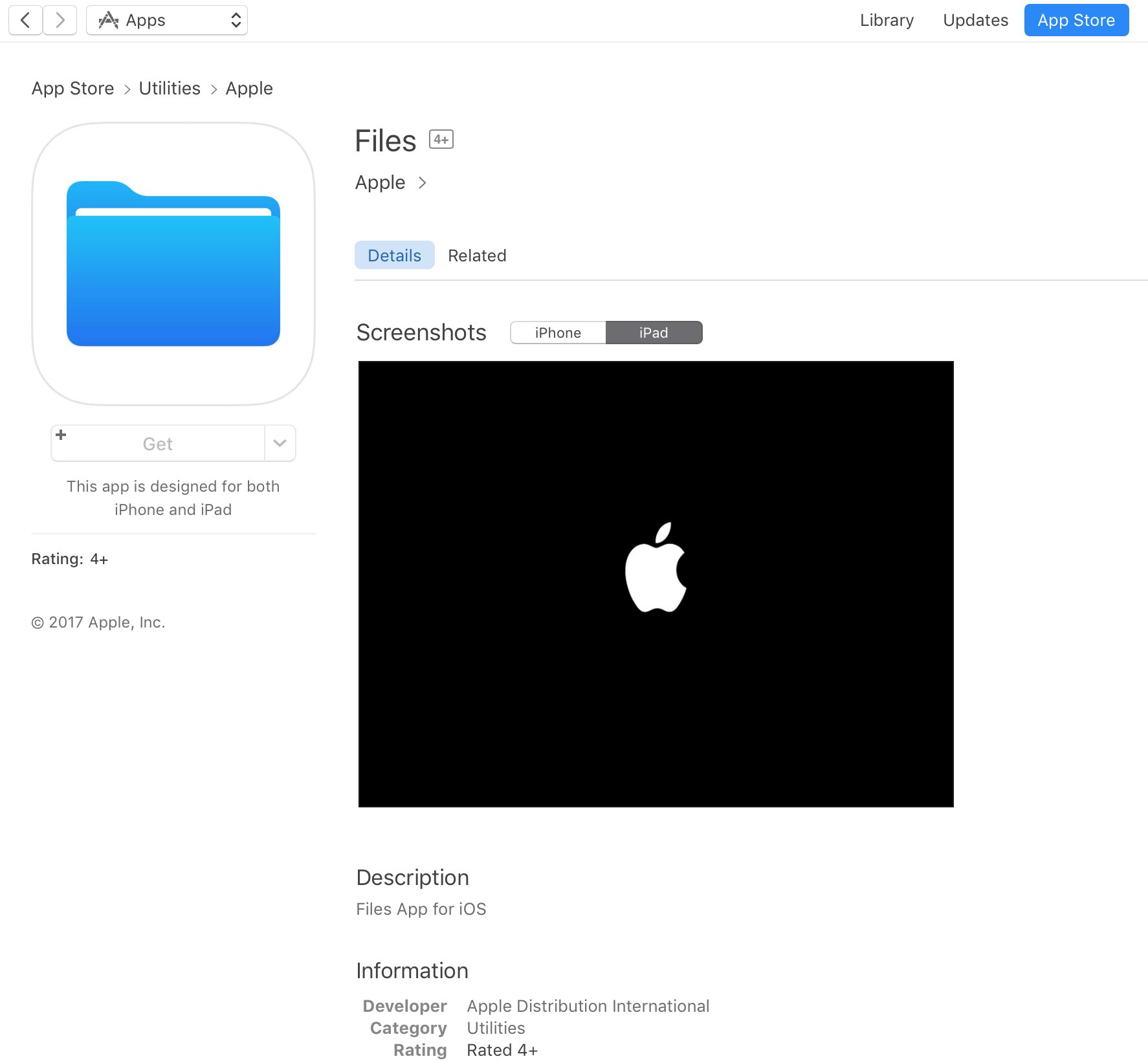
A placeholder listing for a new Apple Files app has briefly appeared on App Store ahead of today's live-streamed WWDC keynote, as spotted by iOS developer Steven Troughton-Smith late Sunday. It's surfaced in the Utilities section of App Store and has since been removed.

No screenshots or the official description were provided.

The app requires iOS 11 and 64-bit support and is designed for both iPhone and iPad. It sports a blue file folder icon resembling the design for folder icons in macOS. It's entirely possible that the new Files app is really just a rebranded version of the existing iCloud Drive app.

It's unclear if the forthcoming app will be a new stock item in iOS 11 or an optional download. If I had to guess, I'd say it will likely come pre-installed with iOS 11. Since iOS 10, Apple has allowed users to hide most of the stock apps from their Home screen.

To help users easily re-install any removed stock apps, Apple has provided all of its first-party iOS apps that are removable as downloadable App Store items. iOS 11 will be previewed at WWDC later today along with tvOS 11, watchOS 4 and macOS 10.13.

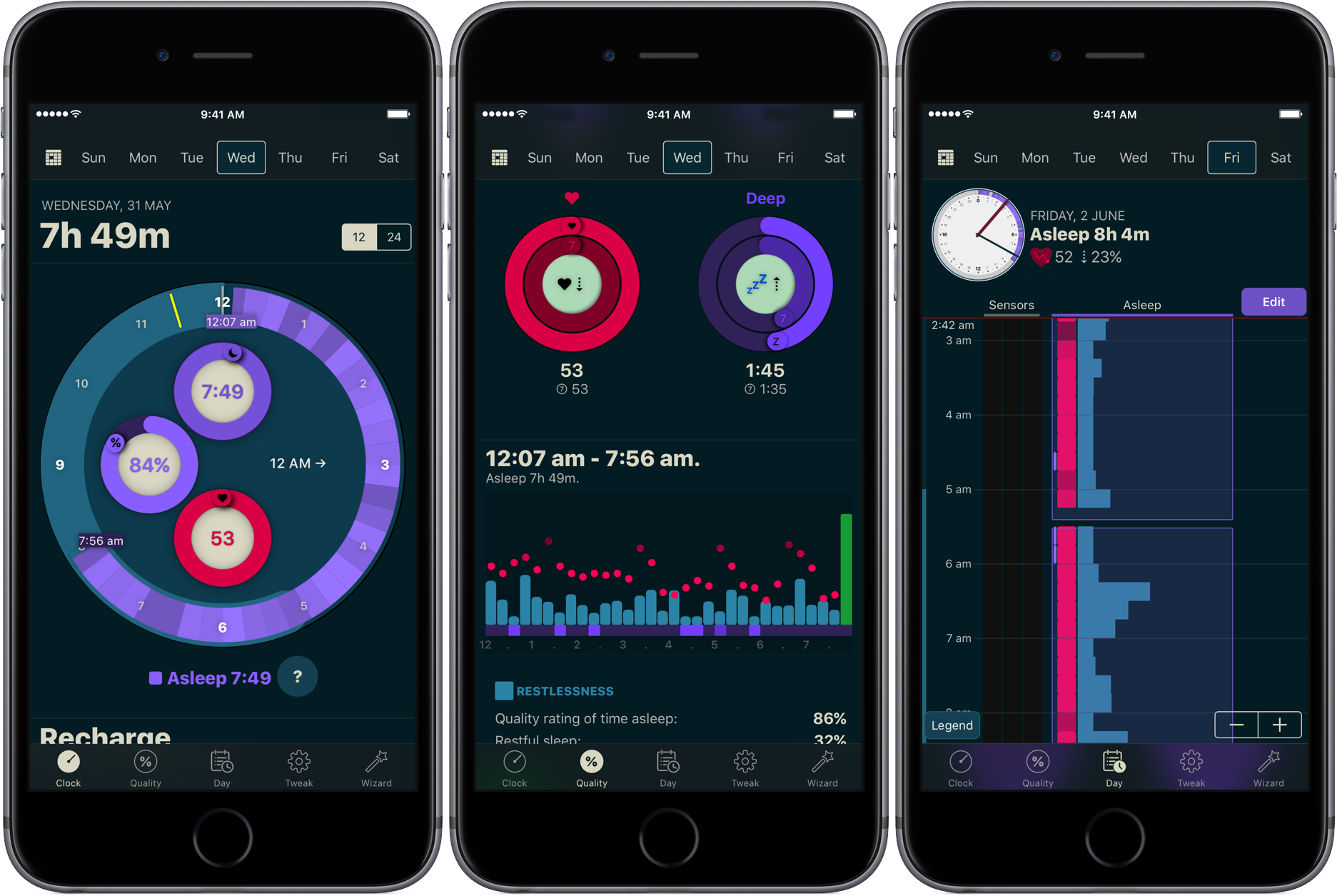
How to track your sleep using AutoSleep

You don’t have to be a scientist to know that a good night’s sleep is conducive to your overall wellbeing and health. On that note, a while ago we have screened the App Store for the best sleep trackers available on iPhone and Apple Watch so as to make it easy for you to pick and choose your new sleep companion.

While varying in looks and features, all of the apps listed serve the same purpose: record how you slept and explain possible discrepancies in perceived quality of sleep and your actual rest. With the hands-off roundup in mind, we decided to select the most requested and popular app featured - AutoSleep - and throw a complementary hands-on tutorial on sleep tracking into the mix. Want to learn more about how to track your sleep using your iPhone, Apple Watch, and the AutoSleep app? Then join us for the tour!

Apple: App Store developers earned over $70 billion in revenue since debut

Apple announced Thursday morning that developers all over the world for its platform have generated over $70 billion in total revenue, a new record since the launch of the App Store almost nine years ago in 2008.

The number 70 appears to be Apple’s lucky number this year, as app downloads have also soared 70% in the last 12 months, illustrating interest in numerous new app titles that took the App Store by storm.