Apple has just released the second beta for iOS 5. Beta 2 is now available for download in Apple's developer channel.
iOS 5 Beta is a 740MB download and available for all Apple devices from the 3rd gen iPod touch and up.

Apple has just released the second beta for iOS 5. Beta 2 is now available for download in Apple's developer channel.
iOS 5 Beta is a 740MB download and available for all Apple devices from the 3rd gen iPod touch and up.

Remember when Skype finally enabled video calling for the iPhone late last year? The iPhone 4 debuted with FaceTime in the summer and it was nearly 6 months before we saw Skype add video calling to its iOS application.
Fast forward to March of this year, and Apple launched the iPad 2 with a front facing camera and FaceTime support. Since then, everyone has wondered if Skype would port its video calling application to the popular tablet.
Well, we are about at the 6 month mark since Apple released its second tablet, and it just so happens that a mysterious Skype promo video is making its way around the internet...

Apple has published a transition Q&A that outlines how MobileMe's services will be dissolved and transitioned into iCloud offerings. As of June 30, 2012, MobileMe will cease to exist, and Gallery, iWeb and iDisk will be discontinued.
Among other details, Apple has confirmed that iCloud will in fact offer web apps for Mail, Contacts, Calendar and Find My iPhone.
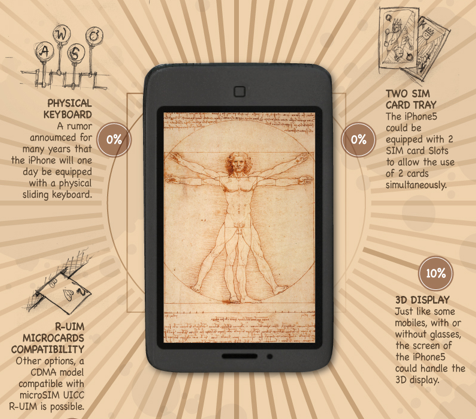
The iPhone receives its fair share of rumors on a daily basis. It can be difficult to make sense of all the conflicting reports and claims that fly around the internet, so sometimes we need a way to get a 10,000 foot view of all the stories out there.
Thanks to Infographic Labs, you can now see most of the rumored features for Apple's iPhone 5 in one place. This graphic gives a percentage of likelihood for each feature, and it adds a sense of renaissance style.

We recently told you about the nation's second largest carrier dropping its unlimited data plan for a tiered structure similar to that of AT&T. More details have surfaced, and the good news is that existing customers will be able to keep their coveted $29.99 unlimited data plans with an ongoing Verizon contract.
Like AT&T, Verizon will be grandfathering in existing customers for continued use of the unlimited data plan.
In our second installment of the, "What are they putting in the water at PCMag?" series, we take a look at an article titled, "Is the iPhone Now the Underdog?" by PCMag's Editor-in-Chief, Lance Ulanoff.
Sebastien grilled Mr. Ulanoff over his last article on the proposition of Apple selling unlocked iPhones in the United States. This time, we're going to take a look at Mr. PCMag's idea that Apple needs to make "drastic improvements" to the iPhone to "maintain market share and mindshare."
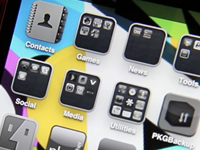
It's almost the end of June, so it's no secret that I'm a little overdue with this month's What's On My iPhone? Video. Better late than never, right?
This month, as usual, it's all about my favorite jailbreak tweaks and apps.
Inside, you'll find a moderately thorough walkthrough of biteSMS, along with four other highly useful jailbreak tweaks that I use on my personal iPhone.
Interested in seeing which Cydia tweaks and apps have me hooked? Then check inside for the full disclosure...
Apple's change in release cycle this year has resulted in the speculation that there will not be an iPod touch refresh this Fall. Because of the iPhone 5's postponed announcement, it was believed that Apple's typical music event in September would take a backseat to new iPhone hardware.
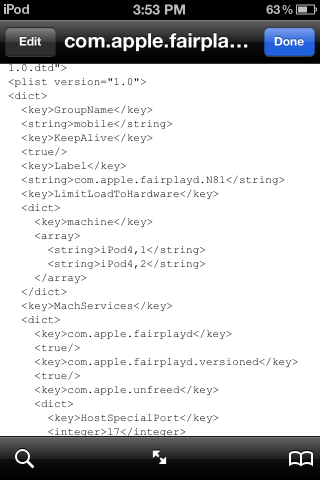
An iFans forum member has done some snooping in the iOS 5 beta and found references to a future generation iPod touch. Will we see an iPod touch 5G after all this Fall?

When you put your iPhone on silent, there are certain notifications that can go unnoticed if your iPhone is in your pocket or purse. Sure, your iPhone will vibrate for missed calls and messages, but that's about the extent of the option.
As part of the ongoing TweakWeek daily challenge, jailbreak developer Dan Zimmerman has released a utility to remedy this problem. VibLert enables the vibrating notification option for all applications...

The popular iPhone photography app, Camera+, recently had its one year App Store anniversary. The folks at tap tap tap are no strangers to success in the App Store, and the development company is known for its smart marketing tactics and quality applications.
The developers of Camera+ have released an infographic detailing the success of their app, including an accumulative $2.7 million in revenue. The infographic shows what types of photos people are sharing the most with Camera+ as well. The winners include dinner, beer and cats...

Still wondering why Apple COO Tim Cook was wandering around China Mobile HQ earlier this week? Well, it may have something to do with the company's upcoming iPhone 5.
A worker for China Mobile allegedly revealed on Weibo.com (China's substitute to Twitter) that Apple's fifth-generation iPhone will indeed launch in September like previous speculation has suggested — possibly even earlier in the U.S. and other key markets.

It's no secret that Twitter has become incredibly successful as a social network and publication tool. A large part of the site's success is thanks to the mobile implementation we've seen in an array of third party clients over the years.
Particularly, on the iPhone, Twitter apps are a dime a dozen. You've got the official client, TweetDeck, Echofon, Tweetbot, etc. all clamoring for attention in the App Store.
The folks at Onavo Insights have put together a nice infographic detailing Twitter's statistics on the iPhone. Check it out after the break...