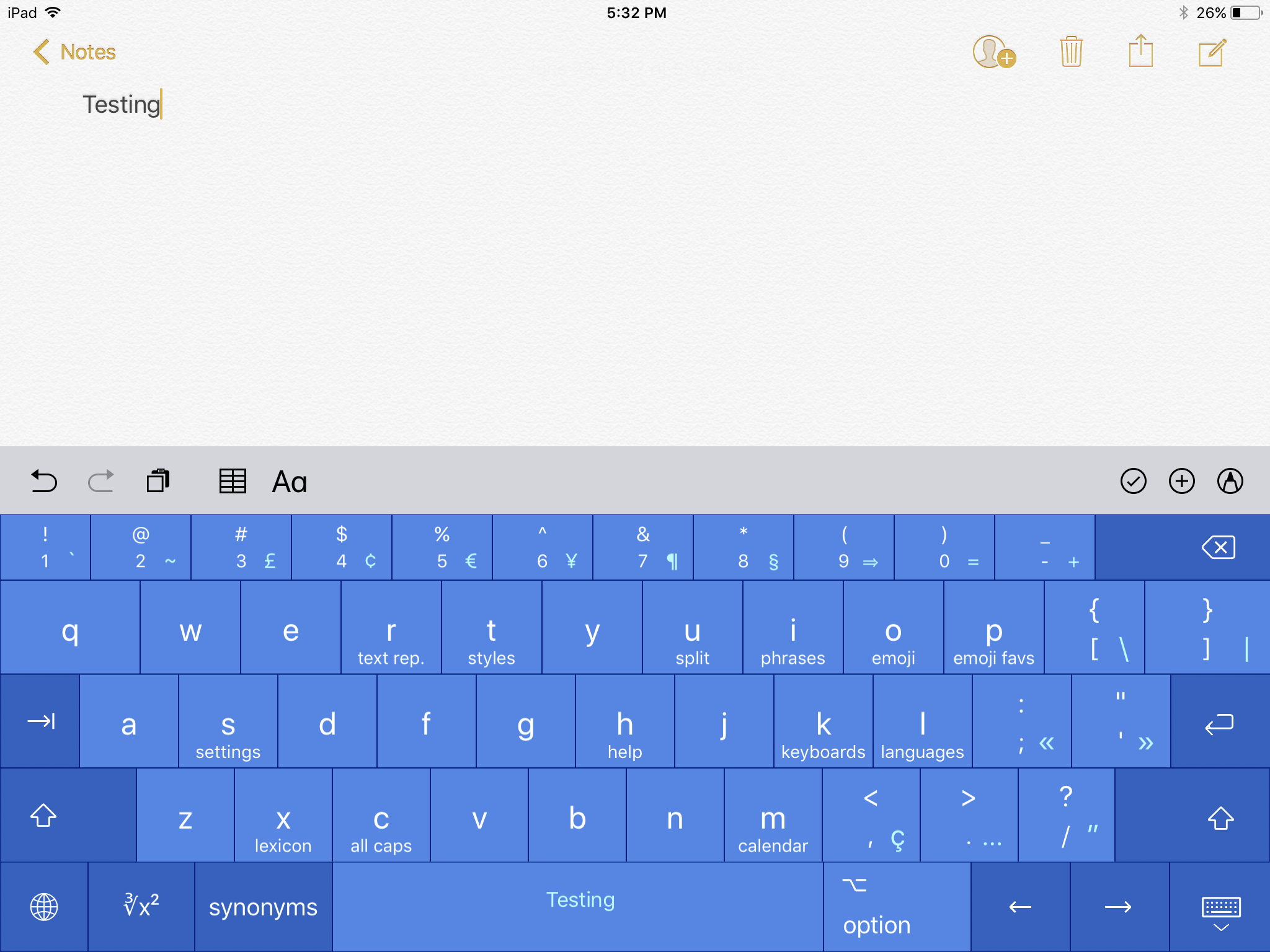
Apps

Pocketdex app by Majd Alfhaily and Surenix complements Pokémon GO

Although fewer people are as excited to play Pokémon GO today as when the game first launched last Summer, it still stands as one of the world’s most popular mobile games.

A new Pokémon GO companion app called Pocketdex is now available on the App Store, and was created with love by two prominent members of the jailbreak community: iOS developer Majd Alfhaily and graphic designer Surenix.

Augmented reality is the future of home decor shopping

A great little ARKit-powered hackathon project by Melbourne, Australia developer Jacqui Hyslop of RedBubble shows off the tremendous potential of Apple's new framework for building augmented reality experiences for iPhone and iPad with iOS 11.

The simple proof-of-concept app allows the user to place virtual cushions (and other home decor items) on a couch and other pieces of furniture in their real world, but without the psychedelic surface-shifting effect plaguing many other AR platforms.

This app clearly proves that home decor shopping in augmented reality beats having to drive to a store just to see how that cushion would look like on a bed that isn't yours in a showroom that shares little resemblance to your own home.

The video demonstration, embedded below for your viewing pleasure, highlights the full sophistication of ARKit's reliable plane and object detection and precision tracking. It's remarkable that all of this is happening so fluidly without any special hardware involved.

https://www.youtube.com/watch?v=bwNAykf4IKw

ARKit uses machine learning, artificial intelligence, computer vision and sophisticated algorithms to analyze live camera feed and “see” the world around you. It also taps into data from on-board device sensors, such as the accelerometer and gyroscope, to detect horizontal planes in your real world, determine local lighting conditions and so forth.

Those kinds of ARKit-powered apps should be even better on iPhone 8 due to the rumored rear-facing 3D laser sensor that will allow the device to accurately sense depth and map objects.

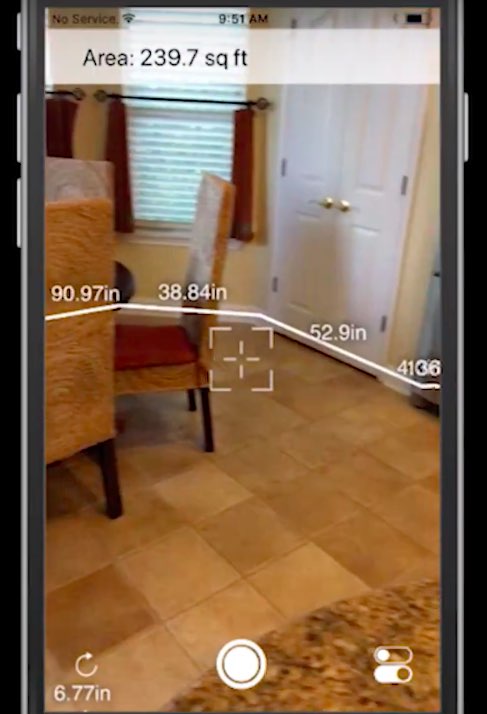
Be sure to watch another sophisticated ARKit demo showing off an app that basically allows the user to map out the floorspace by walking around a room. It calculates total footage of the room and may even produce detailed blueprints that could be exported to CAD apps.

And here it is.

https://www.youtube.com/watch?v=iw9MPZoPqCQ

The future of furniture shopping looks bright, too, as furniture giant Ikea has partnered with Apple on an ARKit-powered app of its own that promises to let users try out virtual furniture at home before placing an actual order right inside the app.

Just imagine the possibilities: with Ikea's app, you could make sure that the bookshelf you've been eyeing for some time would fit in that corner—again, without being bothered to actually, you know, visit one of their stores.

Are you excited for ARKit-powered apps?

ARKit demo: accurate room measurement in augmented reality

If the augmented reality (AR) tape measure app we recently featured has gotten you excited for the possibilities that Apple's ARKit framework brings to developers, you're wholeheartedly recommended to watch this video demonstration of an upcoming ARKit-driven app that will let you take precise room measurement by pointing your iPhone's camera at the corners.

The app will help generate 3D models and automatically calculate the footage for the user. It's a really cool-looking demo and I can't wait to try this app out when it releases.

Watch the demonstration video below.

https://www.youtube.com/watch?v=iw9MPZoPqCQ

The app was created by a company called Smart Pictures, which provides the Measurement Cloud system that enables dimensioning intelligence for the interior world.

Here's a recent ARKit-powered tape measure demo that set the Internet on fire.

https://www.youtube.com/watch?v=z7DYC_zbZCM

This level of precision is made possible by ARKit's accurate plane detection and reliable object tracking. On existing devices, the ARKit framework leverages data from on-board sensors and uses computer vision algorithms constantly analyzing live camera feed.

ARKit-driven apps should be even better on iPhone 8 because Apple's OLED iPhone is said to feature a dedicated 3D laser sensor on both its front and back for even better augmented reality features and faster, more precise autofocus.

Fantastical for Mac gains attachment and travel time support, time to leave alerts & more

Developer FlexiBits today released a major update to the Mac edition of its award-winning calendar application, Fantastical, that you may be familiar with.

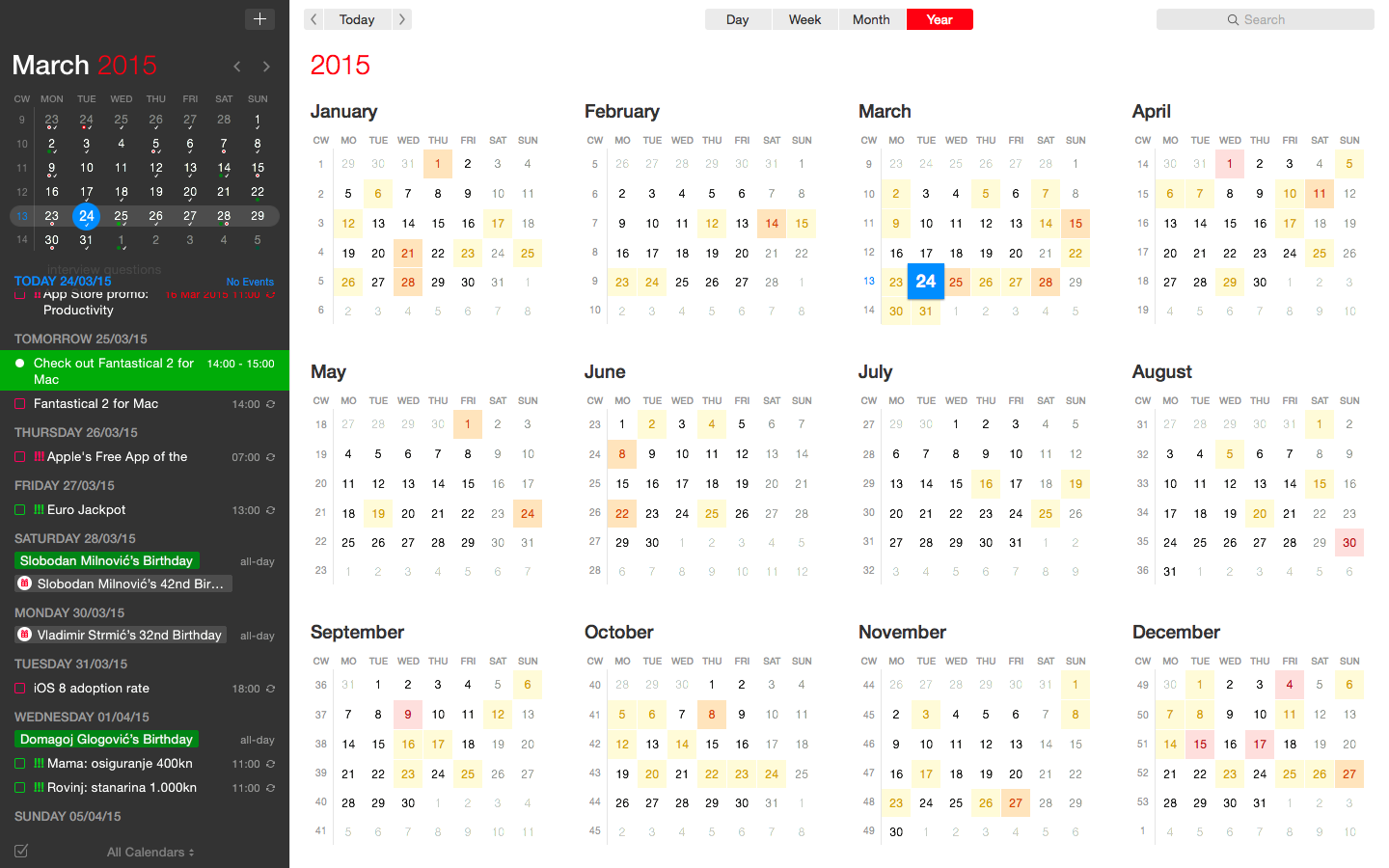
Version 2.4 brings a host of improvements, including new features like time to leave alerts, attachment support for iCloud and Exchange calendar events, undo/redo and more.

You can now view, create, and edit attachments on iCloud and Exchange (or view them on Google Calendar). With this feature, you can attach things like images, videos, Keynote presentations and other files to your calendar events.

The feature works on other CalDAV servers that support managed attachments.

https://www.youtube.com/watch?v=s2lJ5p8hd8A

Another new feature, aptly named Travel Time, allows customers to receive notifications when they need to leave to help ensure they reach an event on time. You can even define your own travel time so you can plan how long it will take to reach an event.

https://www.youtube.com/watch?v=_tVOwXgnipE

Fantastical 2.4 also improves invitation support for Google Calendar and Exchange with response messages, invitation guest count for Google, the ability to forward Exchange invitations and the option to respond to Exchange invitations without sending a reply.

TUTORIAL: How to create app-specific passwords for Fantastical and other apps

The app includes a bunch of refinements and under-the-hood fixes, like full undo/redo support for adding, editing, and deleting events and reminders, the ability to combine identical events that are on multiple calendars, to mention a few.

There's also a new More link in the Month view to show additional events and reminders, Facebook push updates are now instantaneous while new options in preferences at long last permit you to customize the number of weeks per month.

Have a look at everything new in Fantastical 2.4 for Mac.

https://www.youtube.com/watch?v=GZm3PWDBh5k

Last but not least, you can now forward invitations to other people on Exchange accounts, see the year of the anniversary for contacts and respond to an Exchange invitation without sending a message to the sender by clicking and holding the Accept, Decline or Maybe buttons.

Fantastical requires macOS El Capitan 10.11 or later.

Current users can get the update for free via the Mac App Store's Updates tab or through the in-app updater if the app was purchased directly from the Flexibits Store.

Fantastical 2.4 for Mac is $49.99 on Mac App Store.

A three-week trial is available via the Flexibits website.

YouMap, Purp To-Do List, RecordBird, and other apps to check out this weekend

This week's edition of our App of the Week roundup features a new map-based social app, a to-do list with a twist, and a new app that keeps you informed on new music releases from your favorite artists. And as usual, we've selected two great new games for you to check out.

YouMap

Events are constantly shaping the way we interact with each other and helping us decide where we go on any given day. With YouMap, you can let the world know what you’re thinking, seeing and feeling, while getting the latest updates at a moment’s notice. Obviously we're skeptical anytime a new social network comes on the scene, but YouMap seems to have the UI and user engagement needed to gain some traction. The early reviews are glowing, with one user saying this is the first social app to "get the map thing right." So if you're feeling adventurous this weekend, see what's going on around you with YouMap. It's available for free.

Purp To-Do List & Goal Tracker

Purp is a well-organized helper, to-do list and task manager app that allows you to achieve your goals and complete your daily tasks. Whatever your goals are—like completing projects, managing daily tasks, work todos, learning languages, mastering skills, sports or travel—Purp will help you to collect, keep, organize and track them, so you can reach them. Features include iCloud sync, task timer, progress dash board, and much more. The first reviews on iTunes are pretty rough, but the UI are feature set are unique enough that I think it's worth checking out. Purp To-Do List & Goal Tracker is available for free.

RecordBird

Record Bird informs you about new and upcoming music releases of your favorite artists and genres. Be the first to know of a new album or single by your favorite bands and musicians and share the news directly with your friends. With Record Bird, you will never miss a new release again. There have been more than a few apps that have tried a similar strategy, that didn't gain much traction. But the early user feedback (4.5 stars on 90 ratings in iTunes) suggest this one might have finally gotten it right. RecordBird is available for free.

Mini DAYZ - Survival Game

How long can you survive in a post-apocalyptic world? Find out in Mini DAYZ—an official pixel art rendition of the massively successful PC survival game (played by over 3 million fans). It's you against the world in Mini DAYZ: explore a randomly generated map and scavenge for food, ammo and supplies. Use anything you find to craft advanced items. Protect yourself against aggressive infected and ferocious wolves. But most important of all: make sure to stay dry, warm and well fed at all times. The weather out there can quickly get under your skin and your wounds will not heal without you treating them. Mini DAYZ - Survival Game is available for free.

Flippy Hills

Flippy Hills is an original arcade game with cool physics that will give you plenty of thrills, spills, epic wins, fails and tricks in two modes of your choice: campaign or arcade. Campaign mode features an adventure spanning over dozens of levels that get progressively harder, and arcade mode puts you in an endless barrage of assault courses to compete with your friends and gain records. The gameplay is surprisingly addictive, but you are going to have to put up with some annoying ads unless you're willing to fork over a few bucks via an in-app purchase. Flippy Hills is available for free (with some IAPs).

More apps to check out Apple’s free app of the week: Ridge Racer Slipstream You can now reply to Instagram Stories with photos and videos

Arty, Frame App, Redacted, and other apps to check out this weekend

This week's edition of our Apps of the Week roundup features a new artsy-photo editor, a new app for making stop-motion and animated videos, and an app for redacting sensitive information in a photo. And as usual, we've selected two great new games for you to check out.

Arty

I know what you're thinking: come on Cody, not another photo editor. But hear me out. Unlike other editors Arty does more than just apply filters. You can use it to create accurate line drawings, zoom in to view and edit tiny details, and pick out colors. It even tracks how long you've been working on your project. Other features include Faber Castell Polychromos color-matching, custom color swatches, shadows, outline, overlay grid, and much more. Turn your device into a Lightbox and trace your image or print your photo to an AirPrint printer from within the app. Arty is available for free.

Frame App

If you're looking for something fun and new to do this weekend, try making a stop-motion or animated film using Frame App. Here's how it works: open Frame App and take a picture. A transparent overlay of the first image will appear on top of your live camera view in a ghost-like manner. Use this ghost image as your guide to easily align and frame your next shot. Take as many photos as you need, then select the ones you like, and staring them together to make your movie. You can edit playback speed, direction and image size, and then export your clip into a GIF or MP4 video. Of course there are other apps that perform similar functions, but I appreciate the simple design here, and the early reviews are glowing. Frame App is available for free.

Redacted

Want to share a hilarious screenshot of your Facebook feed, but afraid to expose your friends or family? Check out Redacted. Yes, I know iOS has built-in image annotation tools and there are countless apps that do this for free, but it's a bit of a chore and it never seems to look right. Redacted makes it quick and easy to redact parts of an image by simply clicking and dragging. You have three options, pixelate, blur and black bar, and once you're done you can share the image to your favorite social network and other apps in the iOS Share Sheet. The app doesn't support PDF files yet, but the developer says it's working on it. This obviously isn't going to be for everyone, but the folks I have shared this app with bought it instantly. Redacted is available for $0.99.

Filmoji

The title explains it all. Filmoji is a game that presents you with a movie title written in emoji, and you have to guess what it is. As you can see from the screenshots, this is definitely a low-budget, indie-style game, but I thought it looked fun and it's nice to highlight lesser-known developers every now and then. I'm sure there's a similar title out there from Zynga (and if not they are probably working on one), but if you want to put your cinema knowledge to the test without a slew of ridiculous IAPs, this game is worth checking out. Filmoji is available for free.

Futurama: Worlds of Tomorrow

Chances are, you've already heard about this game releasing this week, but it was still worth mentioning here. Futurama: Worlds of Tomorrow is the next epic adventure for the popular animated franchise. Play with all your favorite characters, build your own New New York, combat against alien specials and explore unfamiliar planets on a mission to save the universe. The game is based on an all-new story, written by the creators of the original Fox series, and it features actual dialogue from David Cohen and his team. Yes, you're going to have to deal with pesky in-app purchases, but this is about as good as it gets for Futurama fans. Futurama: Worlds of Tomorrow is available for free.

More apps to check out Enhance your iPad productivity with the new Prokeyboard app [sponsored] Apple’s free app of the week: Day One Journal Instagram unveils offensive comment filter, anti-spam tool in 9 languages Frustrated with Reminders? Taskful could be the answer to your woes New demos show how easy it is to bring 3D models to life with ARKit Skype for iPhone gains chat bots, its version of Stories, message & in-call reactions and more You can now edit text files right from Dropbox app Take notes on the fly with Apple Watch and SnipNotes

Instagram launches stickers for Independence Day and Canada Day

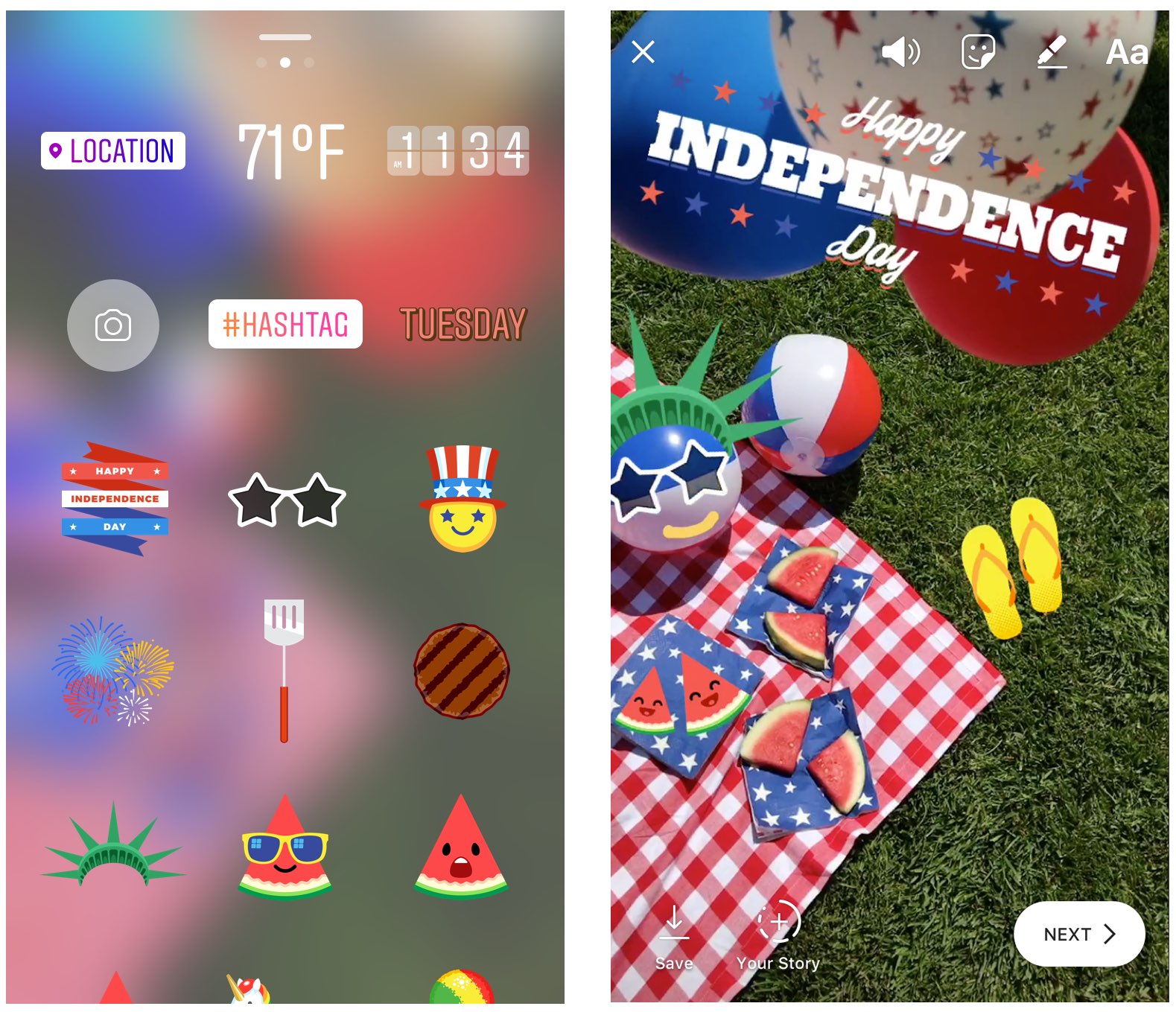
Instagram during the weekend launched stickers in its mobile app for iPhone and iPad which are dedicated to the 4th of July holiday and Canada Day celebrations across North America.

Instagram users in the United States can celebrate Independence Day by posting a Story adorned with one of the stickers in the app's new star-spangled sticker pack, ranging from backyard BBQs to fireworks at night.

Canadians get a sticker to celebrate Canada Day, available in both English and French.

The sticker was designed by Jenn Kitagawa, a multidisciplinary artist and illustrator who grew up in the prairies of Alberta and currently lives in Toronto.

Instagram is available at no charge on App Store.

Frustrated with Reminders? Taskful could be the answer to your woes

Not all tasks are created equal. No doubt you either have taken the trash out or you have not, but there is a vast number of daily challenges that are conquered in increments, tasks that can be taken on for an hour, then sidelined at their half way point and ultimately capped off in the afternoon. Users of Apple’s Reminders app might know the struggle to approximate a progression-based task to the binary reminder framework we are provided: ever tried to make the Reminders app nudge you every day until you have hit the treadmill five times per week, or let's say read ten chapters of your book? For all intends and purposes, it’s cumbersome.

Taskful sets out to remedy the pain of that. It also lets the user select only certain days of the week to remind you of due tasks (e.g. weekdays) and will smartly display the items relevant to you on a specific day and, more crucially, blank out tasks set for a future date. Needless to say this can be priceless for people quickly throwing their hands up when faced with a dauntingly long list of tasks. To bolster the sentiment, the app also automatically breaks up longer tasks into daily chunks.

How intelligent is this thing really?

Naturally, for a smart task manager to really hit its stride, it takes equally smart data input. Such being the case, you’re going to want to learn the nitty-gritty of Taskful before judging the application’s utility. So let’s briefly talk about the mechanics of it:

On the face of it, Taskful and Apple’s Reminders app share some structural traits. That is, both offer category based sorting of items, in which each category (Urgent, Finance, Work) is represented by a color of your choosing. That’s about where the similarities come to an end however, because on Taskful, filing away a task properly is swiftly accomplished by swiping left and right to change the background color of your note during creation. At the same time, the app will analyze your task as you scribble it down and immediately glean information such as dates and numbers.

Based on its reading, smart bubbles right below the draft will interpret your input and suggest measuring sticks for your task. You can tap and confirm or manually alter them. To exemplify, use a number like '4' in your task, now mark the little ‘Amount: 4’ bubble magically popping up beneath the text and as a result, the reminder needs to be tapped four times to be considered finished by Taskful. Until then, a big and rewarding progress bar will grow in 25% increments every time you come one stop closer to your goal.

Along the same lines, Taskful is also capable of acting as a quirky step tracker. On launch, the app asks permission to read and write HealthKit data, meaning the app can track your step count and remind you to get off the couch if you haven't ticked the ‘walk 600 steps’ reminder at night.

It goes without saying that these are just two hands-on examples of how to put Taskful to good use, not so much selected at random but rather intentionally to demonstrate the app's versatility. What's more is that it comes with a good deal of UI customizations such as a built-in dark mode. In other words, both in scope and depth Taskful decidedly one-ups Apple’s Reminders. And above all else, it feels good to look at one unifying 'All Tasks' tab, something Reminders’ stacked business cards look sort of makes impossible.

Competing in the world of task managers and to-do lists is a tough gig on the App Store, yet it appears as though Taskful has found the sweet spot to prevail. It is also earning the right accolades along the way, with Apple just recently featuring the app in the ‘Apps We Love’ category in various countries including the US, Australia and New Zealand.

Taskful is available on iPhone and iPad, the latter of which just added split screen support to round the package off nicely. If you want to give the app a whirl, it is currently priced at a reasonable $1.99.

Link to App Store: Taskful ($1.99)

Facebook brings animated reactions, filters, masks and effects to Messenger calls

As part of celebrating its two billion monthly active users milestone, Facebook on Monday unveiled new video chat features for its mobile Messenger app, such as the beautifully animated reactions, interactive filters, masks and effects. “Video chats with your friends and family in Messenger just got a whole lot more fun,” said the firm.

You can use these new video features in one-on-one video calls, as well as in your group video conversations. The new capabilities let you easily share your emotions during a video call with one of the five Facebook reactions, alter your appearance (how about making your friend laugh with a bear mask?) by taking advantage of the many built-in filters and much more.

I like how reactions animate onto the screen and then disappear.

Many reactions have different versions, depending on whether your face is on or off the screen. For instance, tap the love reaction when the camera is facing you, then tap it again when the camera is facing outward to see the difference.

A variety of in-call filters are now available to Messenger users, ranging from subtle lighting tweaks to color changes, like black and white, red or yellow. Each one has a live preview so you can test it on yourself before letting others see it. Many new masks are available for video calls, too, including some with hidden effects that react to your facial movements.

From the Facebook blog:

We have also added animated effects, like falling hearts and twinkling stars, to give your video chats expressive flair. Check out what happens when you wave your arm in front of the camera while using one of those effects! Unlike reactions, masks and effects stay on the screen for the duration of the video chat (or until you take them off or switch to another one).

One of the best new in-call video features is the screenshotting ability.

During an one-on-one or group video call with one or more friends, tap the camera icon at the bottom to take a screenshot of your time together and share it with other friends via Messenger Day or other social media accounts

The image of your video conversation will be saved to your iPhone's Camera roll. Plus, you can quickly send the screenshot to the person or group that you’re video chatting with.

Check out the new Messenger video features in Facebook's video embedded below.

Earlier today, Microsoft started rolling out a much redesigned Skype for iPhone with a Snapchat-like Stories feature, dubbed Highlights.

Moreover, Skype for iPhone now lets you talk to Cortana and other chat bots, as well as post message and in-call reactions by adding huge emoticons, live text and photos with drawings to an overlay that appears on top of the call.

Facebook Messenger is available free on App Store.

Skype for iPhone gains chat bots, its version of Stories, message & in-call reactions and more

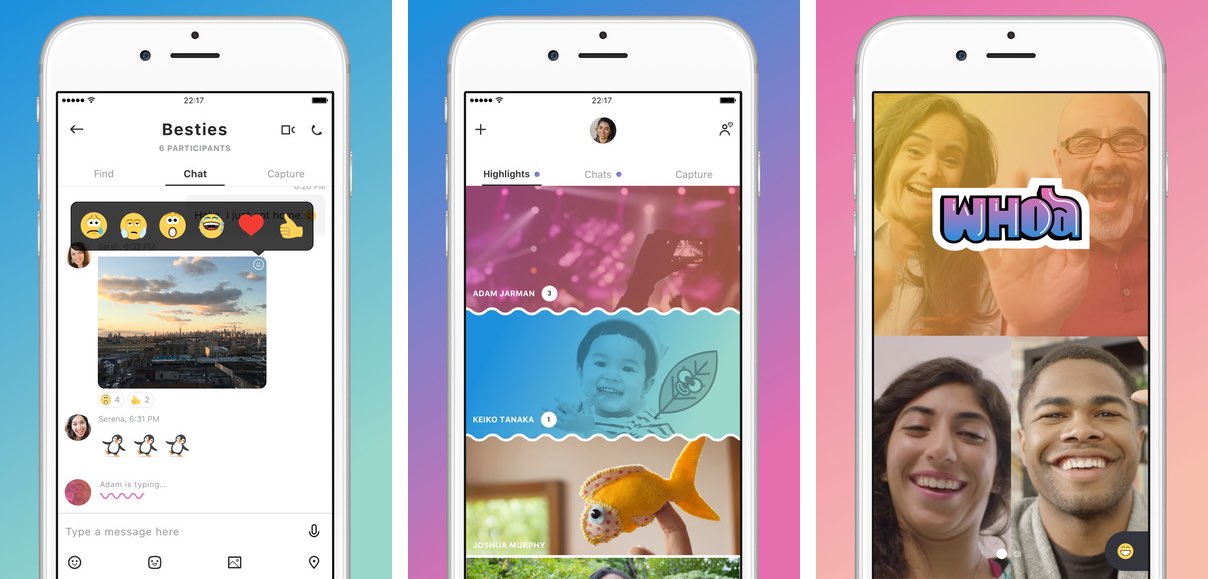
Following a preview at the start of June, Microsoft today began rolling out a redesigned Skype for iPhone app with a refined user interface and new capabilities such as chat bots, a Snapchat-like Highlights feature, message and in-call reactions, easier photo capture and more.

Aside from Microsoft's own smart assistant Cortana, other chat bots now available or coming soon to Skype for iPhone include Gfycat, Giphy, MSN Weather, Bing, Polls, Expedia, Stubhub, BigOven, YouTube and Upworthy.

With in-call reactions, users can add live emoticons, live text and even real-time photos to an overlay that appears on their video and voice calls. Similarly, message reactions let you inform your chat participants how you feel by adding expressive reactions to your chats.

The new Home screen launches with your chat view, but you can now swipe left to get to the Skype camera or swipe right to show your Highlights. Speaking of which, Highlights is a new Snapchat-like feature that lets you share your day-to-day with friends and family on Skype while keeping up with what they are up to.

Your highlight is basically a collection of photos and videos that you can decorate with emojis and text. Only people who follow you on Skype can see your highlights.

You can also respond to others' highlights by reacting with emoticons or even use them as a conversation starter. Unlike Snapchat, your published highlights remain live for a full week.

It remains to be seen if Highlights gains any traction given that every major chat app now has a similar feature of its own. Between Snapchat Stories, Facebook and Instagram Stories, I'm not sure I have the time to update Skype Highlights for my contacts on a daily basis.

https://www.youtube.com/watch?v=qItfRVJFljM

Microsoft readily admits that Highlights is a Snapchat clone.

“There’s a new medium that has risen,” Amritansh Raghav, Corporate Vice President of Skype, said recently of Stories in a comment to TechCrunch. “When you think about this new way of interacting, we want that to be available also in this app.”

The new features are available in Skype for iPhone, but not in Skype for iPad. Skype for Mac and Windows computers will receive the new capabilities within the next few months.

According to Microsoft, a future version of Skype will integrate gaming features into video calls and users will have the ability to synchronize and watch streaming videos together.

Visit skype.com/new to learn more about the app's latest feature additions.

Skype for iPhone and Skype for iPad are available free on App Store.

Facebook passes two billion monthly active users

Facebook yesterday announced that more than two billion people are now actively using the service every single month. This is a significant milestone that will further solidify Facebook's position as the dominant social network and online identity system.

“We’re making progress connecting the world, and now let’s bring the world closer together,” said CEO Mark Zuckerberg. “It’s an honor to be on this journey with you.”

According to Facebook, more than 175 million people share a Love reaction daily.

On average, more than 800 million people like something on Facebook while over one billion people use Facebook Groups every month.

To celebrate bringing the world closer together, they've created a new personalized video which will appear in your News Feed.

You can also see it by visiting facebook.com/goodaddsup, where Facebook is featuring fun facts about how people are contributing to the community.

I visited the link and was greeted with the following message: “Your video isn't quite ready yet, but we're working on it”. I guess I better check back later.

Facebook added that its mobile app will now thank users for sending Love reactions, happy birthday wishes and creating groups as part of the milestone celebration.

The automatically generated thank-you message will appear in your News Feed.

Mark Zuckerberg recently communicated his company's brand new mission statement.

Speaking last week in Chicago at Facebook’s first Communities Summit, he said, “For the last decade we’ve been focusing on making the world more open and connected.”

He then introduced the company’s new mission statement: Facebook, he said, is a place “to give people the power to build community to bring the world closer together.”