Sébastien Page

Sebastien is the Founder and Editor in Chief of iDB. Once a BlackBerry user, Sebastien instantly fell in love with the iPhone when it was first announced in 2007. Shortly after, he decided to start sharing his knowledge of the iPhone and its nascent ecosystem, which led to the creation of this blog. Sebastien currently owns 14 iPhones, 4 iPads, a MacBook Pro with Touch Bar, a MacBook Air, 2 Apple Watches, 3 Apple TVs, countless HomePods and AirTags as well as a few pairs of AirPods.

The iDownloadBlog top news stories of the week – Jun 23, 2013 edition

Like every Sunday, we bring you the stories that were the most popular on iDB during this past week. Whether it is a news piece, an editorial, a tutorial, a new jailbreak tweak, or an accessory review, we sum it all up in one convenient place.

If you like what you're reading, please make sure to spread the love by sharing our posts on your favorite social network.

We're usually hanging out a lot on Twitter and Facebook, more rarely on Google+.

A closer look at App Store in iOS 7 A closer look at smarter keyboard in iOS 7 How iOS 7 makes auto-correct better Hidden settings in iOS 7 beta show extra gesture, multitasking and folder options Why some features are missing in iOS 7 Interactive iOS 7 demo lets you play with the update without a dev account iOS 7 beta GUI PSD file now available for download New photos of alleged iPhone 5S with dual LED flash surface pod2g is considering switching to Android How to add iOS 7 Control Center inspired toggles to iOS 6 Instagram now does video Weekend apps: Foresee, Photoful, Vjay, and more

Of course, don't forget to listen to the latest episode of our podcast, Let's Talk Jailbreak:

We’re social! Find iDB on Twitter, Facebook, Google+, App.net, YouTube, and in your RSS reader. Also make sure to subscribe to our new podcast!


How iOS 7 makes auto-correct better

I'd be lying if I said I've never been embarrassed by a text message I sent containing an accidentally auto-corrected word. I'm sure you've been there too. It can be embarrassing, or it can be hilarious, depending who's receiving the message and what's being said, but at the end of the day, it's something that could have been prevented should your iPhone auto-correct be a little smarter.

And smarter it appears to be in iOS 7! Christian touched on this earlier today with a post on how the keyboard features in iOS 7 have gotten smarter, but I'd like to focus a little more on auto-correct with a few real life examples and comparison points with iOS 6...

The iDownloadBlog top news stories of the week – June 17, 2013 edition

Like every Sunday, we bring you the stories that were the most popular on iDB during this past week. Whether it is a news piece, an editorial, a tutorial, a new jailbreak tweak, or an accessory review, we sum it all up in one convenient place.

If you like what you're reading, please make sure to spread the love by sharing our posts on your favorite social network.

We're usually hanging out a lot on Twitter and Facebook, more rarely on Google+.

Everything you need to know about Apple’s WWDC keynote 24 new iOS 7 features Apple didn’t talk about during WWDC iOS 7: first boot iOS 7: the Lock screen iOS 7: Charging A closer look at Messages in iOS 7 A closer look at the new Notification Center in iOS 7 New in iOS 7: dynamic and panoramic wallpapers Icon comparison: iOS 6 vs iOS 7 iOS 7 availability and the devices that will be supported Ten iOS 7 features that were borrowed from the jailbreak community Give your iPhone an iOS 7 makeover with this new theme How to downgrade iOS 7 to iOS 6.1.3 iOS 7 beta 1 download available for developers

Of course, don't forget to listen to the latest episode of our podcast, Let's Talk Jailbreak:

We’re social! Find iDB on Twitter, Facebook, Google+, App.net, YouTube, and in your RSS reader. Also make sure to subscribe to our new podcast!
iOS 7 to allow FaceTime audio calls

Ask and you shall receive.

This is what I thought when I found out that iOS 7 will have a new feature which will let you perform audio calls via FaceTime. It was only two weeks ago that I publicly asked for this new feature and it's is now a reality. Did Apple hear me? Probably not, but it's good to know this is coming to an iOS device near you soon.

Dubbed as FaceTime audio, it's not hard to imagine this feature being a direct competitor to Skype...

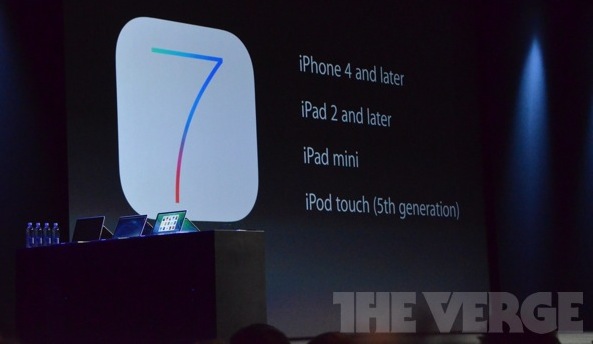
iOS 7 availability and the devices that will be supported

Although the beta version of iOS 7 is already available to registered developers, it was announced today that the public version won't be available until this Fall, presumably around the same time the new iPhone will be released.

The question that might come to your mind is "will my device be supported?" Chances are it will...

iOS 7 beta 1 download available today for developers

Eager to get your hands on all the goodness that's packed in iOS 7? The good news is that if you're a developer, you can get access to it today, assuming you can get into the Dev Center, which is crawling under massive amounts of traffic right now.

Everybody else, you'll have to wait for the Fall to be able to enjoy iOS 7, once it becomes available to the general public...

The iDownloadBlog top news stories of the week – June 9, 2013 edition

Like every Sunday, we bring you the stories that were the most popular on iDB during this past week. Whether it is a news piece, an editorial, a tutorial, a new jailbreak tweak, or an accessory review, we sum it all up in one convenient place.

If you like what you're reading, please make sure to spread the love by sharing our posts on your favorite social network.

We're usually hanging out a lot on Twitter and Facebook, more rarely on Google+.

7 features from jailbreak tweaks we could see in iOS 7 Celebrate WWDC with these gorgeous iOS 7 wallpapers First WWDC 2013 banners go up at Moscone West (hint: flat icons) iOS 7 and OS X logos go up at Moscone West What some iOS 7 stock app icons might look like Interactive iPhone 5S concept lets you play with Jony Ive-sanctioned flat iOS 7 Kevin Rose: iOS 7 is ‘very different’ and ‘a big change’ Auxo for iPad review SemiRestore brings an easy one-click restore to jailbroken iOS devices New hack allows you to run Plex on Apple TV without jailbreaking Here’s the crazy machine Apple uses to replace iPhone 5 screens Samsung’s Galaxy S4 dead in the water

Of course, don't forget to listen to the latest episode of our podcast, Let's Talk Jailbreak:

We’re social! Find iDB on Twitter, Facebook, Google+, App.net, YouTube, and in your RSS reader. Also make sure to subscribe to our new podcast!
7 features from jailbreak tweaks we could see in iOS 7

Now just a few days away from WWDC, excitement among Apple fans is at its climax. From predictions to speculations to wish lists, we're all trying to chime in on what Apple might unveil on Monday, and more specifically, what iOS 7 will hold for us.

There are a few details that appear to be set in stone. Namely, iOS is believed to have been flattened by design guru Jony Ive and his collaborators. Besides the visual make over, we're certain that iOS 7 will also bring new feature to the table, and if history gives us any hindsight, Apple's new mobile operating system might draw some inspiration from the jailbreak community once again.

In this post, I will detail a few features from various jailbreak tweaks that Apple should could implement in iOS 7...

Q: Has Apple stopped innovating? A: No

As often, MG Siegler hits the nail about Apple's nonexistent lack of innovation:

One question during the D interview was about if Apple had stopped innovating. After all, it’s been so long since the last truly innovative product, the iPad, came out. Um, the iPad came out three years ago. Three years! Guess how much time there was between that product and the last “truly innovative” product, the iPhone? Three years. Guess how much time there was between that product and the last “truly innovative” product, the iPod? Five and a half years.

Newsflash: true innovation takes time. Apple has by far the best track-record in recent history when it comes to such products. But how quickly we forget how long each one took to come to market. There needs to be a Turn so we can appreciate the Prestige. But screw that. We want more, better, faster. Cue Louis CK.

What some iOS 7 stock app icons might look like

Much has been said about Apple's management shakeup that happened last October. If Scott Forstall's departure came out as a bombshell, the fact that Jony Ive, Senior Vice President of Industrial Design, was made the head of the newly created Human Interface group was less of surprise.

Now in charge of everything design, Ive has been expected to give iOS a facelift by getting rid of, or at least by minimizing all use of skeuomorphism in Apple's mobile operating system. But it doesn't stop here!

Something we've been hearing for a while when talking about Ive's possible take on an iOS makeover is the word "flat". Not flat as in boring. Flat as in simpler. This was confirmed last week when 9to5Mac reported that according to their sources, iOS 7 might be black, white, and flat all over.

What does that mean for parts of the UI such as app icons? Our friend Sonny Dickson got his hands on a blurry screenshot showing the Home screen of an iPhone running iOS 7. The image quality is terrible, but with the help of talented designer Surenix, we were able to reproduce some of these icons to give you an exclusive look at what some stock app icons on iOS 7 might look like.

If we had to describe the changes in one word, that would be: unified...

The iDownloadBlog top news stories of the week – June 2, 2013 edition

Like every Sunday, we bring you the stories that were the most popular on iDB during this past week. Whether it is a news piece, an editorial, a tutorial, a new jailbreak tweak, or an accessory review, we sum it all up in one convenient place.

If you like what you're reading, please make sure to spread the love by sharing our posts on your favorite social network.

We're usually hanging out a lot on Twitter and Facebook, more rarely on Google+.

Tim Cook talks iTV, iWatch, iOS 7 and more at D11 conference Tim Cook says Apple will open iOS up more for third party developers Apple launches new 16GB iPod touch without iSight camera for $229 Don’t expect new iPhones or iPads at WWDC Background Manager brings true backgrounding back to Cydia How to nest App Store preferences and Cydia preferences into separate folders How to customize your app icons without jailbreaking Pics show iPad mini prototype with 2 microphones The best weather apps for the iPhone Give your iPhone’s UI a reboot with Motif Apple Web OS: a theme that mimics Apple’s online store WhiteLine HD: a gorgeous minimal theme for your iPhone New iOS 7 concept features panoramic wallpaper, quick reply and more Make sure you check out these apps this weekend Leading lines: powerful tools for your iPhone photography compositions

Of course, don't forget to listen to the latest episode of our podcast, Let's Talk Jailbreak:

We’re social! Find iDB on Twitter, Facebook, Google+, App.net, YouTube, and in your RSS reader. Also make sure to subscribe to our new podcast!
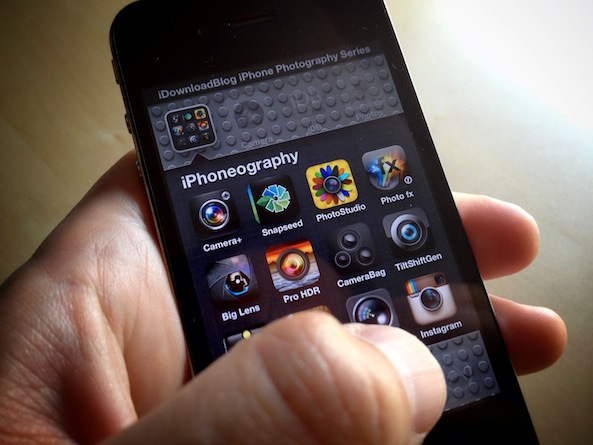
Leading lines: powerful tools for your iPhone photography compositions

In the past we have talked about ways to capture our viewer's attention and imagination in our photographs. We've talked about compositional rules, focus effects and exposure techniques. One thing we haven't talked about is "leading lines". If your goal is to draw our viewer into your image, there's no better way to do it than by providing them a path to follow.

A "leading line" is just that. It is line that leads the viewer's eye from one point in the photograph to another. The age old classic is railroad tracks. Sure, it's a bit cliche but it's a perfect example of the concept...