Cody Lee

Cody Lee, iDownloadBlog.com’s longest-serving Editor, joined the site in 2008. He specializes in uncovering the best deals on Apple products, apps, and accessories. With years of experience in technology journalism, Cody helps readers save money while staying informed about the latest trends and updates in the Apple ecosystem. Cody’s history with smartphones goes almost as far back as he does. As the son of a Nokia employee, he was exposed early on to handsets like the N91 and the Communicator. He has since been involved in nearly every aspect of the mobile phone industry. While going to college, he worked at a Nokia factory, building handsets, and later moved on to a sales position at a major wireless carrier.

Jailbreak Your Apple TV2 on 4.3.1 with PwnageTool [Tutorial]

For those of you who own an Apple TV2 and have been looking to jailbreak it, the time has arrived. Although the ATV2 has been hacked before, this is the first official solution available for those who have the latest iOS 4.3 software.

Even the tutorial we released last week on jailbreaking your Apple TV 4.3 with Seas0nPass wasn't an official release. It was extremely buggy and required you to connect your ATV2 to your computer every time it restarted.

Well, thanks to the hard work of the Dev Team, Saurik and NitoTV, we finally have an official jailbreak solution for iOS 4.3. So for those interested in hacking their Apple TVs and adding tons of extra capabilities to that little black box, let's get started.

Important Note: This is only for 2nd generation Apple TVs, the black one. Also this particular tutorial is only for Mac users, as it uses PwnageTool which is currently only available for Mac OS.

Before we start hacking, you want to make sure your Apple TV is on the latest software version. You can do this by connecting the device to a computer with iTunes or from the Apple TV main menu. Just go to Settings > General > Update Software.

Step 1: You will need a micro-USB cable. This are the most common USB cables and are typically used to charge smartphones. Also you will need the latest version of iTunes. Finally, you need PwnageTool 4.3, which can be downloaded here. I always download tools to my desktop so I can keep track of them.

Step 2: If you updated your software via the Apple TV itself, you will still need the firmware file which you can get here. If you updated through iTunes, move along to step 3.

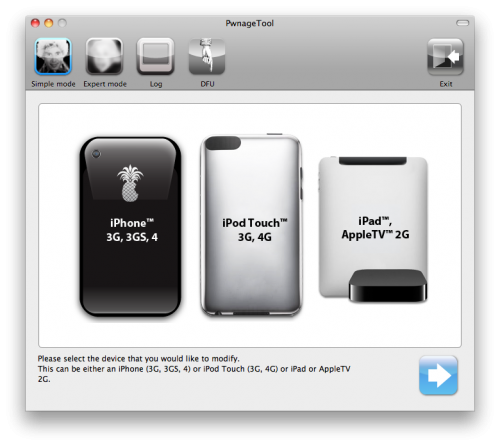
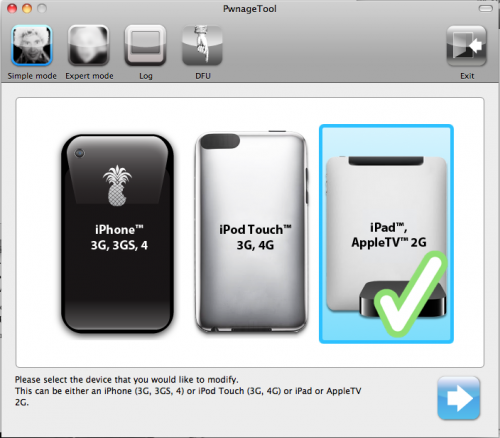
Step 3: Open up PwnageTool and select your device. Obviously for this tutorial we want the Apple TV2. Click the blue arrow and let the software find the file. When it's done, select the Apple TV firmware file and click next.

Step 4: PwnageTool will now create a custom jailbroken file out of the firmware, so give it some time. Once it's done working its magic, plug your Apple TV into your computer using the micro-USB cable. Make sure your power and HDMI cables are left unplugged.

Step 5: The software will walk you through the DFU process, which will prep your Apple TV for the custom firmware. If successful, it should look like this:

Step 6: You can now close PwnageTool and open up iTunes. With your Apple TV plugged in, iTunes should immediately go to the ATV page. You'll see a big button that says restore. While holding down your Mac's Option key, click restore. This should launch a Finder window and allow you to choose the custom firmware, that PwnageTool made, from your desktop.

Step 7: Let iTunes do its thing and once it says completed, you're done. Unplug your Apple TV from your computer and back into your TV set. If you see the NitoTV option in the main menu, you're jailbroken!

From here you can begin to experiment. Stay tuned to our blog as we post more tutorials on some of the cool things you can do with your new jailbroken Apple TV, such as browse the web and even watch Hulu.


Jailbreak Your iPad on 4.3.1 with PwnageTool [Tutorial]

The long-awaited jailbreak for Apple's iOS 4.3.1 is finally here. It is the first official jailbreak since Apple released iOS 4.3 almost a month ago. Those with iDevices wanting to take advantage of some of the new features in 4.3, haven't been able to upgrade without losing their jailbreaks.

That all changed in the wee hours of last night, when the Dev Team members finally released the anticipated software. The exploit is available in 2 different forms of software: PwnageTool, which is for Mac users only, and RedSn0w, which will work on either Windows or Mac.

This step by step tutorial will show you how to jailbreak your iPad on iOS 4.3.1, using PwnageTool. This software is for Mac users only. If you are on a PC, follow our RedSn0w tutorial here.

Important Note: Just remember this is not for the iPad 2, there is no jailbreak available for this device yet.

Before we get started, you want to make sure your iPad is on iOS 4.3.1. Backing up your iPad to iTunes is also recommended, better safe than sorry. But don't worry, the process is super simple and will have your iPad jailbroken in no time.

Step 1: For this tutorial, you'll need PwnageTool 4.3, which you can download here. Make sure you select the 4.3 version, as it is the only one that will work. I always download my tools to my desktop so they're easier to find.

Step 2: Load up PwnageTool, select the iPad/Apple TV option and click the blue arrow. With this method, PwnageTool should actually locate your iPad firmware on your hard drive for you, so there is no need to download the .ipsw file.  Select the iPad firmware and click next.

Step 3: Sit tight as PwnageTool does its thing, it can take a while. It is taking the file you selected and jailbreaking it. Then we will load the jailbroken firmware onto your iPad.

Step 4: Once done, you will be prompted to connect your device via usb. PwnageTool will now help you put your device into DFU mode. If you don't get it the first time, don't fret. Just wait until it's finished giving DFU instructions, and click try again. If you did it correctly, it should look like this:

Step 5: Now you can close PwnageTool. Open iTunes with your iPad still connected, and you should receive this message:

Step 6: Don't just click restore because you will just install Apple's original firmware. While holding down your Mac's Option key, click restore. This should open up a window for you to browse for the file. Select the custom firmware from your Desktop that PwnageTool just created, and restore it.

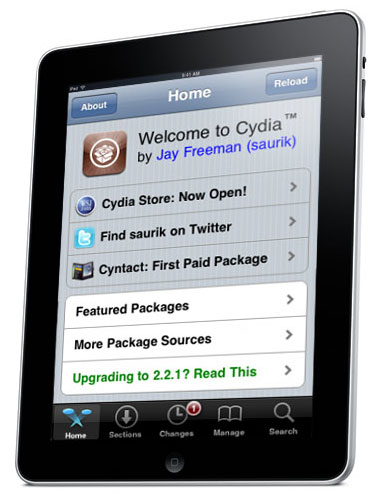
Step 7: It may take a while for iTunes to install the custom firmware on your iPad. But once completed, your iPad should restart itself and the Cydia icon should be on your home screen.

That is how you jailbreak your iPad on 4.3.1 with PwnageTool, any questions?

Jailbreak Your iPad on 4.3.1 with RedSn0w [Tutorial]

The long-awaited jailbreak for Apple's iOS 4.3.1 is finally here. It is the first official jailbreak since Apple released iOS 4.3 almost a month ago. Those with iDevices wanting to take advantage of some of the new features in 4.3, haven't been able to upgrade without losing their jailbreaks.

That all changed in the wee hours of last night, when the Dev Team members finally released the anticipated software. The exploit is available in 2 different forms of software: PwnageTool, which is for Mac users only, and RedSn0w, which will work on either Windows or Mac.

This step by step tutorial will show you how to jailbreak your iPad on iOS 4.3.1, using RedSn0w. If you are a Mac user and prefer to use Pwnage Tool, stay tuned. We will provide a tutorial for that software shortly. Either method is extremely easy, and will have your iPad jailbroken in no time.

Important Note: Just remember this is not for the iPad 2, there is no jailbreak available for this device yet.

Before we get started, you want to make sure your iPad is on iOS 4.3.1. Backing up your iPad to iTunes is also recommended, better safe than sorry.

Step 1: For this tutorial, you'll need RedSn0w which you can download here. Make sure you select version 0.9.6rc9, as it is the only one that will work. I always download my tools to my desktop so they're easier to find.

Step 2: For this method, you will need the actual 4.3.1 firmware file. If you don't know where to find it on your hard drive, just download it to your desktop from here. Make sure you download the iPad file, 4.3.1.

Step 3: Launch RedSn0w and click Browse. Find your 4.3.1 firmware from the previous step and select it.

Step 4: The software will then give you a few options before continuing. For most of us, all we need is the Cydia icon. Make sure there is a checkmark by Install Cydia and click Next.

Step 5: Plug in your device to your computer and turn it off. Now get ready to follow some onscreen instructions. RedSn0w will walk your through a few steps to put your iPad into DFU mode.

Step 6: If you're successful, RedSn0w will start its magic. Don't worry if it doesn't happen right away, just turn your iPad off, click back and try it again.

Step 7: Once the software is done loading the exploit, your iPad will restarted, and your home screen should load up with the Cydia icon installed. Success!

That is how you jailbreak your iPad on iOS 4.3.1 with RedSn0w. Any questions?

Analysts Claim iPhone is Thriving, Verizon iPhone Most Acquired Handset in the Month of February

Although they are still far behind other companies like Nokia and Samsung in total mobile market share, Apple is making a name for itself in the smartphone industry. Because of its popularity, Apple's products and sales garner a lot of speculation from marketing research firms. These companies do tons of research and conduct poles to analyze a company's performance.

This data is useful for a number of reasons, such as, guiding investors who are looking to make large stock purchases. Popular tech intelligence company comScore has done some number crunching that should give anyone contemplating Apple stock the green light.

Not only did Apple gain more mobile phone market share in the last 6 months than any other company, their Verizon branded iPhone was the most acquired handset in the month of February....

Dev Team Releases Jailbreak for iPads on iOS 4.3.1


After weeks of waiting, a jailbreak solution for Apple's latest firmware has finally been released. The announcement that so many iDevice hackers have been waiting for, arrived extremely early this morning courtesy the Dev Team.

The jailbreak released is for iOS 4.3.1. It covers the iPhone 4, iPhone 3GS, the latest 2 generations of the iPod touch, the Apple TV2, and of course the iPad. As we've reported previously, the iPad 2 cannot be jailbroken with this software.

But don't worry, if you have an iPad 2 and are itching to customize it, known iPad hacker Comex is hard at work to bring you an iPad 2 jailbreak solution. We are told he has a working exploit, but hasn't figured out how he wants to package it for mass distribution. We will certainly let you know when we have more information on his progress.

If you have an original iPad, and are wanting to jailbreak it, feel free to go ahead and upgrade to iOS 4.3.1 via iTunes.You will also want to make sure that your iTunes is updated to the latest version. If you've done both of those already, sit tight, we will bring you a complete step by step guide on how to jailbreak your iPad shortly.

Is anyone ready to jailbreak their iPad?

First Official iPad 2 Commercial Hits Air Waves

Although we've brought you iPad 2 videos before, they were obviously pokes at the famous Cupertino commercials and not the real deal. Apple's marketing team has been relatively quiet about the iPad 2, until now. Yesterday, the first official iPad 2 commercial hit the air waves.

In typical Apple fashion it was simple, elegant, and to the point. The 30 second spot showed off some popular iPad 2 apps like Garage Band and iBooks, but what really stood out was the commentary.

In what appears to be a nod to puzzled competitors, the voice over vaguely reveals Apple's secret to the iPad's success.

"Faster, thinner, lighter, those are all good things. But when technology gets out of the way, everything becomes more delightful, even magical. That's when you leap forward."

While other companies are worried about the technical specs, Apple is after the best end user experience. This explains why tablets such as the Motorola Xoom are experiencing dismal sales.

If you market your product with buzz words like dual core and megapixels, you are pitching to a small audience that actually cares about hardware specs. That's why Apple uses magical in their commercials, it appeals to more people.

Check the commercial out below. What do you think?

http://www.youtube.com/watch?v=tyEpaPEbjzI

Original iPad 4.3.1 Jailbreak to be Released Today

Those of you who have been waiting on a jailbreak for iOS 4.3, pay attention!  There was some major news in the community early this morning and it looks like the jailbreak we reported on yesterday could be released sooner than expected.

MuscleNerd was at it again this morning, tweeting details of the impending jailbreak announcement. The popular iPhone hacker claims that the Dev Team is looking to release the jailbreak today for Apple's new software. If you recall, there hasn't been an official hack released since Apple launched iOS 4.3 alongside their iPad 2.

After weeks of silence, it looks like the Dev Team is ready to drop the much anticipated software. It will become available for Mac users via Pwnage Tool and PC users via RedSn0w. For those who haven't used either title, they are very similar to GreenPois0n which we cover here. These programs make jailbreaking your iDevice as easy as plugging it into your computer, and following the onscreen directions.

Although it is looking like the software won't go live until late tonight, i0n1c has been telling the Twitter world that if the topic #sundayisfunday becomes trending, the Dev Team might be enticed to release the jailbreak early.

As a reminder, the jailbreak released today is only for devices running iOS 4.3.1 and excludes the iPad 2. MuscleNerd was kind enough to give those that await the iPad 2 jailbreak some info as well. Although the exploit works, he mentions, it isn't suitable for mass distribution yet.

Original iPad owners looking to jailbreak Apple's latest firmware, stay tuned. We will let you know when the software is available, as well provide you with an easy step by step tutorial to help you through it. Those of you with iPad 2s, keep checking back for the latest in the iPad 2 jailbreak story.

Anyone looking to jailbreak their original iPad on 4.3.1?

Jailbreakers to Become New Targets for Major Corporate Marketing?

Since its inception, there was a dark cloud hovering over the jailbreak scene. People feared legal ramifications from Apple for "hacking" their iDevices, similar to what GeoHot is involved in with Sony. That all changed last summer when the government made an announcement that jailbreaking was legal by U.S. law.

Here we are, almost a year after the official statement, and the community is as big as ever. Saurik, the mastermind behind Cydia, estimates that there are between 10-15 million jailbroken devices in the wild. ModMyi founder Kyle Matthews shared a few other interesting statistics this morning about the iDevice hacking community that should catch the attention of major marketing firms.... 

New Apple TV2 4.3 Jailbreak Available Soon

While we have shown you how to jailbreak your Apple TV2 with Seas0nPass, there hasn't been an untethered solution available for the latest firmware. The tethered jailbreak requires you to connect your Apple TV2 to your computer every time it restarts.

Well good news to all of you folks who have been waiting to jailbreak your second edition Apple TVs on iOS 4.3, for real. The latest news in the iDevice community is that an official jailbreak is near from the famous Dev Team. This will work for the iPhone, the original iPad, and it looks like the Apple TV2.

Expert iDevice hacker MuscleNerd shared the good news yesterday via Twitter that the ATV2 was covered in the latest jailbreak. He also gives nods to Saurik and NitoTV for helping finish the Apple TV2 exploit.

For those not familiar with the names, Saurik is extremely popular on the jailbreaking scene thanks to all of his work on Cydia. NitoTV is jailbroken software for Apple TV. It serves as an advanced media player and the front end for several plugins.

If you want to take advantage of the new features in iOS 4.3, but you also like having your Apple TV jailbroken, stay tuned. We will keep you up to date on the latest Apple TV2 jailbreak news.

Is anyone excited for an official Apple TV2 jailbreak?

The Dev Team's 4.3.1 Jailbreak Doesn't Work With iPad 2


If you just recently got an iPad 2 and are wondering if there is a jailbreak available, there isn't. The iOS 4.3.1 jailbreak that is so close to being released by the Dev Team, will not work on Apple's new tablet. Those who were looking forward to hacking their new gadgets will have to wait a little longer.

A series of tweets from known iDevice hacker MuscleNerd yesterday helped shine some light on the current status of the iOS 4.3 jailbreak. He hinted that the 4.3.1 jailbreak by the Dev Team, popular iDevice hackers, will be released sometime in the near future.

It will likely be distributed via RedSn0w and Pwnage Tool, and should work fine for iOS 4.3.1 on the original iPad. Although MuscleNerd claimed the RedSn0w-bound exploit would't work on Apple's latest tablet, he did mention that Comex has found another solution that does.

For those who weren't aware, Comex had a jailbreak for 4.3 almost ready to go, and then Apple dropped iOS 4.3.1 last week. This update magically patched the hole that Comex was using for his hack, forcing him back to the drawing board.

Comex's new exploit is based on the same one he used for Jailbreak Me, so hopefully iPad 2 owners get the benefit of a Userland jailbreak. This method is the easiest by far from a user's perspective, as it just requires them to navigate to a website in Safari. Other jailbreak techniques require additional software and multistep processes.

The bottom line is that an official jailbreak for the iPad 2 is imminent, we just aren't sure of when that will be. As always we will keep you updated on the latest iPad and iPad 2 jailbreak news.

Does anyone have an iPad 2 and are dying to jailbreak it?

Viber Gets Serious About Challenging Skype, Adds Free Text Messaging

Viber is the product of a small Israeli startup, Viber Media Inc. They launched the first version of their VoIP app back in December of last year to rave reviews.

Much like Skype, Viber makes free phone calls over Wi-Fi and 3G to other users with the Viber client. Unlike Skype, there's no need to create an account.

The typical process for making calls with 3rd party applications can be tedious. Signing up for accounts, verifying email address, and setting up contact lists are usually involved when using Skype or similar services. Viber made some waves with their no-username policy, and is set to do so again with the app's latest update...

Sony Confirms Making an 8-Megapixel Camera for the iPhone 5

The details keep coming together for Apple's next-generation smartphone. The device that is set to sell over 100 million units is certainly one of the most popular topics for tech blogs for several reasons. Apple products in general tend to garner more attention; both for their secrecy, and their history of changing the industry.

It's hard to separate rumors from facts. To be honest, until somebody like a Steve Jobs or a Tim Cook makes the announcement, nothing should be considered fact. It gets even tougher to tell the difference when you have major corporations dishing out the gossip.

9to5 Mac is reporting that Sony's CEO, Howard Stringer, just dropped a major bombshell during an interview with Walt Mossberg yesterday...