Cody Lee

Cody Lee, iDownloadBlog.com’s longest-serving Editor, joined the site in 2008. He specializes in uncovering the best deals on Apple products, apps, and accessories. With years of experience in technology journalism, Cody helps readers save money while staying informed about the latest trends and updates in the Apple ecosystem. Cody’s history with smartphones goes almost as far back as he does. As the son of a Nokia employee, he was exposed early on to handsets like the N91 and the Communicator. He has since been involved in nearly every aspect of the mobile phone industry. While going to college, he worked at a Nokia factory, building handsets, and later moved on to a sales position at a major wireless carrier.

Apple: 4K iTunes content same price as HD, previous purchases upgraded for free

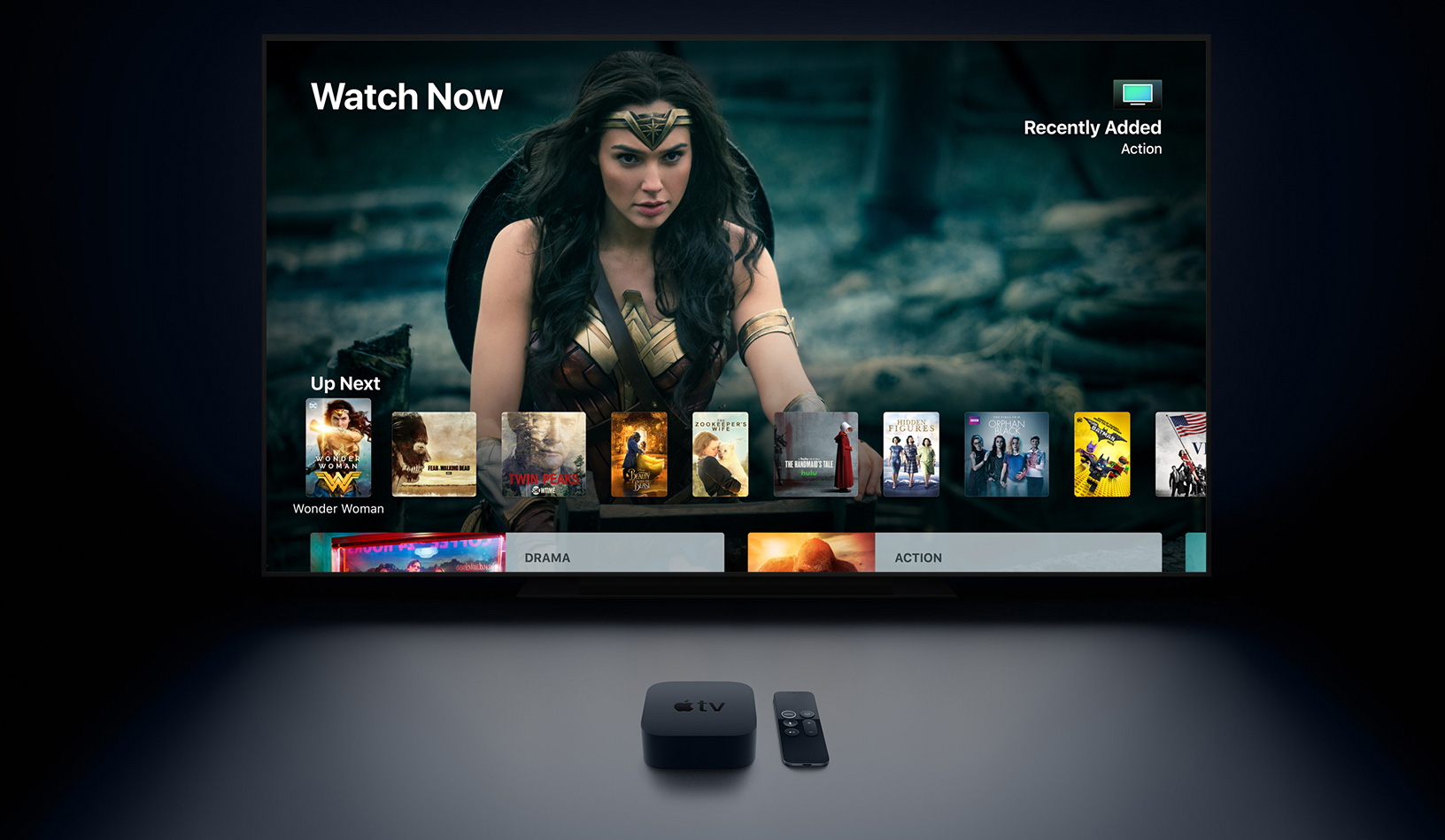
Apple TV with Wonder Woman on screen

Apple SVP Eddy Cue is on stage now at Apple's event to announce the new 4K Apple TV. In addition to the hardware, Cue made a couple of major ( and frankly, surprising) announcements regarding 4K content in iTunes.

Apparently, when iTunes rolls out its 4K content, it will be priced the same as high definition content. So no need to worry about that big price gap between 4K and HD that you've seen in physical media. Also, folks wondering what happens to all of their previous HD purchases will be happy to hear that Apple will upgrade them to 4K versions (where available) for free.

Here's more on the move from Eddy Cue:

“Bring the magic of the cinema straight to your living room with the new Apple TV 4K,” said Eddy Cue, Apple’s senior vice president of Internet Software and Services. “Customers will love watching stunning 4K HDR movies from an impressive catalog on iTunes, while also getting automatic upgrades of 4K HDR movies already in their iTunes library and enjoying 4K content on services like Netflix and Amazon Prime Video, coming soon.”

These are nice surprises indeed, given that folks were expecting to pay more for new and upgraded 4K content, and should help push Apple TV 4K sales.

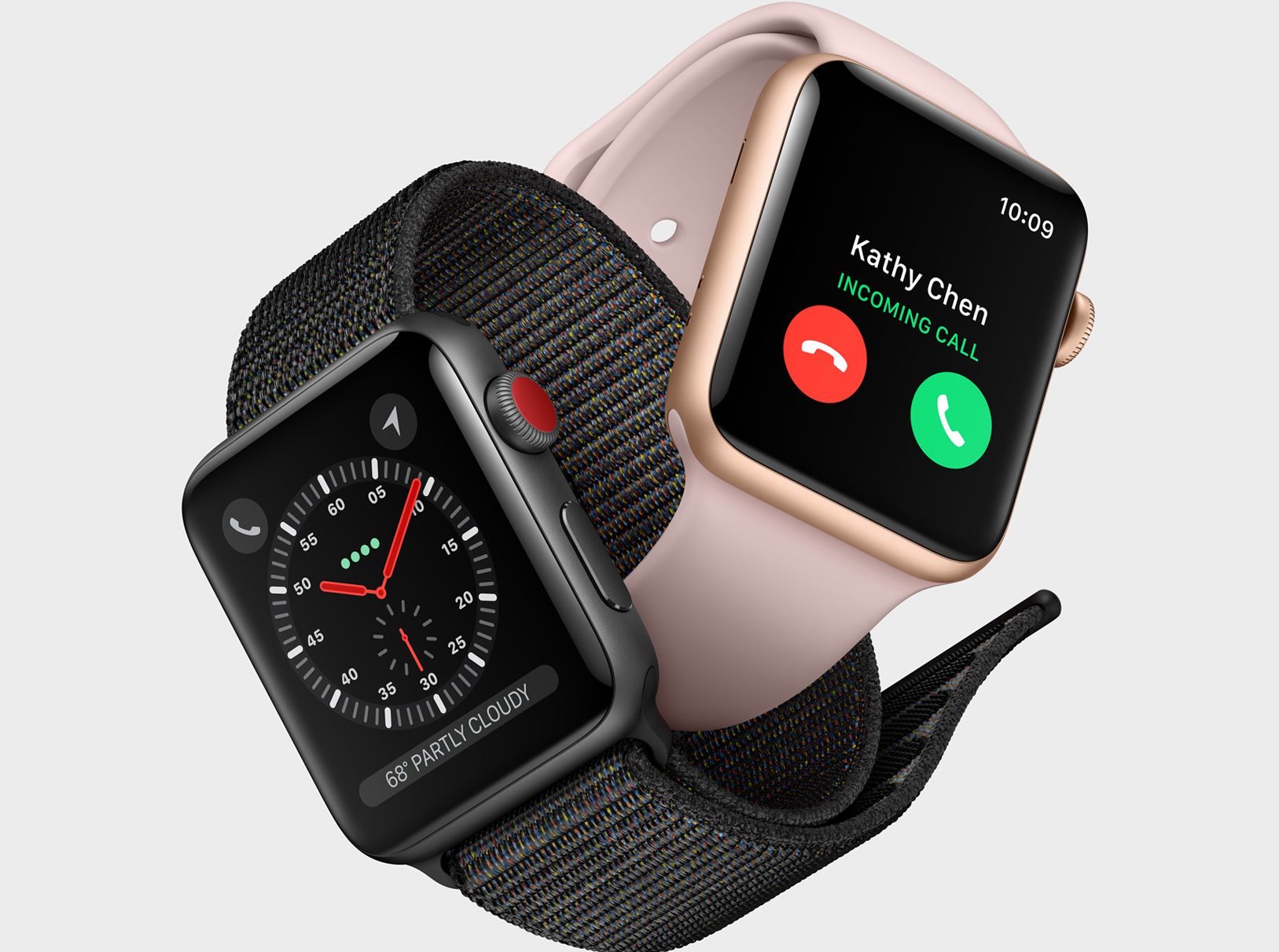
Here is Apple Watch Series 3 with cellular support

We're covering Apple's iPhone X event in Cupertino this morning, and the first major product announcement is the Apple Watch Series 3. Apple's COO Jeff Williams has taken the stage to announce the third generation of Apple's wearable. Its has built-in cellular support (well there is cellular and non-cellular models), a 70% faster dual core processor, and it's 50% more power efficient.

Cellular

Williams demonstrated the Watch's cellular capabilities on-stage by calling Deirdre Caldbeck of the Apple Watch team from his Series 3 Watch (sans iPhone), using AT&T. Caldbeck was shown on video, paddle-surfing in the ocean, and it actually made for a really impressive live demo. The call connected quickly, and the audio quality was surprisingly clear given the conditions.

Here's more from Apple on cellular:

Apple Watch Series 3 (GPS + Cellular) features a full LTE and UMTS cellular radio that switches seamlessly to cellular when it is away from iPhone. The watch shares the same number as iPhone so there’s no need to provide an additional number to family, friends or colleagues; and to help get customers started, participating carriers are also offering special introductory cellular plans at launch. Customers have the ability to make cellular calls directly with Apple Watch Series 3 (GPS + Cellular) and, when paired with AirPods, enjoy a seamless and fully wireless experience. Apple also pioneered an industry-first antenna design that uses the display itself as both a transmitting and receiving element for LTE and UMTS, while introducing a built-in eSIM that is over one-hundredth the size of a traditional SIM card, making over-the-air activation possible without compromising space.

Apple says that the Watch will also be capable of streaming Apple Music without an iPhone, although it doesn't sound like this feature will be ready at launch time.

Internals

Powering the Apple Watch Series 3 is Apple's S3 chip. It features a faster dual-core processor, which allows for quicker app launch times and smoother graphics, and, for the first time, enables Siri to speak using the built-in speaker. It also features a new W2 wireless chip with 85% faster Wi-Fi and Bluetooth, and better power efficiency, and a barometric altimeter that assists with tracking activities, elevation gained, stairs climbed, and more.

Apple Watch Series 3 is the same size as its predecessor (Apple does say, however, that they extended the crystal that encases the heart rate monitor by two sheets of paper) and comes in a host of new case and band colors/designs. It will be available for pre-order on September 15, and start shipping on the 22nd, starting at $329. Apple also notes that carriers will be offering special introductory cellular plan pricing.

Fullcourt, Todotxt+, Appetence, and other apps worth checking out this weekend

This week's edition of our Apps of the Week roundup features a powerful a new social network for folks who like to play basketball, a unique to-do manager, and a dating app with an interesting twist. And as always, we've picked two great new games for you to check out.

Fullcourt

Like to play basketball? Then you have to check out Fullcourt. This app connects you with local basketball players, games, courts and gyms. See things like peak times and real-time traffic at some 10,000+ courts throughout the United States, create games, add your friends and more. Other features include push notifications, zip code search, invites via text message, court player count, and ratings. Fullcourt is available for free.

Todotxt+

Todotxt+ is a powerful client for managing tasks using just Plain Text, based on the todotxt.org format. Use simple rules to describe tasks, prioritize, categorize and annotate tasks with ease. And because it's plain text, it's ultra-portable - any computer in the world can understand it, and you are never locked into any service. Other features include metadata filter, multi-file importing, split-screen support, Spotlight indexing, and much more. Todotxt+ is available for free (with an IAP).

Appetence

Here's an interesting take on the now crowded, swipe-filled dating app space. Conversation is what matters most in Appetence. So as you talk to someone, and let the magic happen, your photos and similarities you share will gradually be revealed. The app uses a 'Slow Matchmaking' algorithm to pair you up with only people who shares your interests, ideas and view of life. As you talk to each person, you can distribute and collect likes and use them to reveal more of their profiles. I also like the UI design and that the app team says it constantly verifies profiles to avoid inactive and spam accounts. Appetence is available for free.

Nuzzle

If you enjoy number puzzle games, you're going to want to check out Nuzzle. It's similar to Sudoku, but it's a little more challenging. The goal is to align numbers from top to bottom and from left to right. There technically is no time restriction, but that does not mean the game will last forever. Share your top scores on social media and even challenge your friends. Nuzzle is available for $1 (with a single IAP to unlock a bigger board).

Blocky Beastmode Football

In honor of the NFL season kicking off this weekend, I thought I'd highlight Blocky Beastmode Football. As you'd expect, it's a football game starring Raiders running back Marshawn Lynch. In it you must rush, maneuver, and drive your way through the defense in full "BEASTMODE" as Lynch. It's an endless runner of sorts—think of it like Temple Run, but with a football theme. There are collectable characters and playing fields, retro-style arcade graphics, and you can compete with friends. Blocky Beastmode Football is available for free (with some IAPs).

More apps to check out WWDC app gains Handoff support, better Apple TV navigation & more Elk’s smart use of a Live Wallpaper tackles your biggest peeve with currency converters Popular Readdle apps are getting feature packed updates in time for iOS 11 Apple’s free app of the week: Streaks Workout YouTube for iOS gains support for live streaming via Apple’s ReplayKit Pixelmator Pro with advanced machine learning features is coming this fall
Our favorite back to school tech gear

It's that time of year again. Summer is drawing to a close, and kids of all ages are headed back to school (in fact, many are already there). This of course means back to school shopping is now in full swing, so we wanted to put together a list of some of our favorite tech gear that we think will help set you up for success this year.

Boston Red Sox caught using Apple Watch to steal opponents’ signs

Investigators for Major League Baseball have determined that the Boston Red Sox executed a scheme to illicitly steal hand signals from opponents' catchers in games, reports The New York Times. Citing several people briefed on the matter, the outlet says a member of the Red Sox's training staff used his Apple Watch to communicate with video replay personnel and then passed the intel onto his players.

The inquiry began roughly two weeks ago, after the Yankee's general manager Brian Cashman filed a detailed complaint with the commissioner's office that included a video the team shot of the Red Sox dugout during a three-game series last month. The video showed the staff member looking at his Apple Watch in the dugout and relaying a message—possibly what type of pitch was going to be thrown—to players.

Spying on other teams to try and steal their hand signals has long been a part of baseball. It's frowned upon, but not illegal, as long as you don't use any electronic devices. When confronted by the commissioner's office, the Red Sox admitted the operation has been up and running for several weeks. They also said the Yankees were using cameras to steal their hand signals. No word yet on possible penalties.

Source: The New York Times

Top image: AP Elise Amendola

Weather Atlas, Stream Time, Bloom, and other apps to check out this weekend

This week's edition of our Apps of the Week roundup features a new weather app, a TV guide for live streaming, and a sharp-looking new coloring book. And as always, we've selected two interesting new games for you to check out.

Weather Atlas

Looking for a new weather app? Check out Weather Atlas. This beautiful app offers a window into current and future weather conditions, with a great mix of sharp design and powerful features. It has both hourly and 10-day forecasts, weather map with radar and clouds, Notification Center widget, and more. Unfortunately some of the app's best features—themes, custom icon, no ads etc.—are hidden behind a monthly subscription, but at least you can use most of the basic features before committing to pay. Weather Atlas is available for free (with some IAPs).

Stream Time

Stream Time is the ultimate scheduling and discovery app for live streaming—no more missed streams or tiresome browsing for something interesting to watch. Build your schedule feed by following friends and favorite broadcasters. Set reminders for must-see broadcasts. Discover new broadcasters and see who is scheduled to go live soon. Twitch, YouTube and all other major live stream platforms are supported, and there are even tools for broadcasters to help keep their fans in the know. I know you're envisioning a lot of social media kids here, but a lot of professional athletes and popular comics/personalities live stream regularly, so it's worth checking out. Stream Time is available for free.

Bloom

Add color to your life, engage your creativity and relax by making beautiful art with Bloom. This coloring book app gives you access to over 500 exclusive designs from award-winning artists around the world, hundreds of colors, and the tools you need to create the effects you want and make each design a unique piece of art. I know there are several apps like this out there already, but this one looks promising and worth checking out if you don't have a favorite already. There are a few in-app purchases, to unlock new images and other content, but you can start coloring for free. Bloom is available for free (with some IAPs).

Battle Golf Online

The first rule of Battle Golf is that you don't talk about Battle Golf. I guess that would mean that I'm breaking the first rule, but hey what can I say? I'm a renegade. Anyway Battle Golf Online is an arcade golf game that you can play either by yourself, against the AI, or against a friend in real time. The graphics are pretty basic and the controls are straightforward (one tap), but there are cool hats and masks to unlock and daily challenges to complete. Battle Golf Online is available for free (with some IAPs).

Noblemen: 1896

Looking for something way different? Checkout Noblemen: 1896. The year is 1896, and war has begun... To your right, militia are cut down by saber wielding cavalry. In the distance, cannon fire echoes as a lumbering Steam Tank fires its auto cannons. Your gatling gun team unleashes a salvo of fire, cutting down an enemy squad like wheat. Behind you, the drone of your frigate class airship reassures you before unleashing its salvo of supporting fire. ou are a Nobleman, and it's up to you to lead your armies to victory! Noblemen: 1896 is available for free (with some IAPs).

More apps to check out Instagram Stories come to the web Apple’s free app of the week: 8mm Vintage Camera Microsoft releases Mixer Create app for broadcasting mobile games on the go Facebook is rolling out its new video hub to everyone in the US over the next few days Video: YouTube’s overhauled look and new features coming to iOS app The best voice recording apps for Apple Watch

Apple seeds macOS High Sierra beta 9 to developers

Following yesterday's beta 9 releases of iOS 11 and tvOS 11, Apple on Friday seeded beta 9 of macOS High Sierra to developers. The update can be downloaded over the air through the Mac App Store’s Updates tab, or for those who aren’t already running a previous beta, you can grab the full install from Apple’s Dev Center.

As indicated in its name, macOS High Sierra is more of a fine-tuning update to macOS Sierra, rather than a full-blown refresh. That doesn't mean there aren't any noticeable changes though. In fact, we were able to find 100 changes in the update. Be sure to check out our video below.

https://www.youtube.com/watch?v=QBna9ChoJd4

Subscribe to iDownloadBlog on YouTube

Yesterday, Apple sent out press invitations for an event to be hosted on Tuesday, September 12. We believe it will use the stage to unveil new iPhones and other hardware and announce official launch dates for macOS High Sierra and other updates.

Apple seeds beta 9 of iOS 11 and tvOS 11 to developers

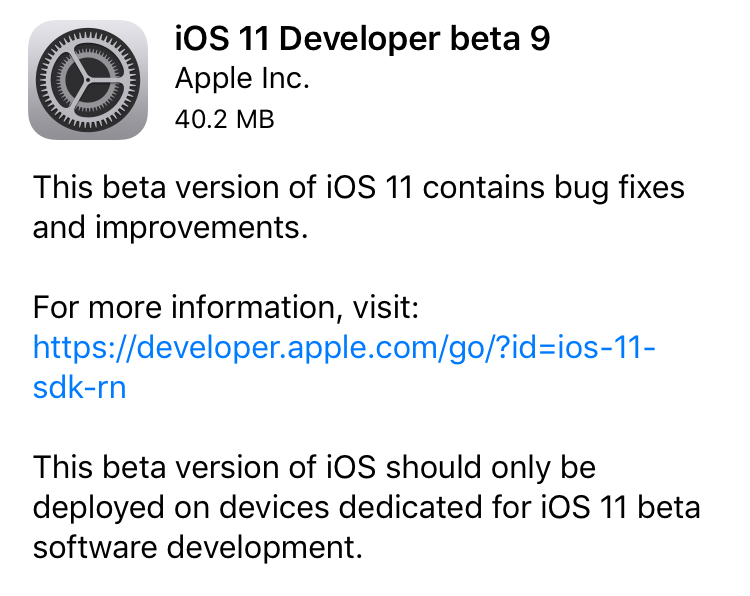
Apple on Thursday seeded iOS 11 beta 9 to developers. The release comes just days after beta 8 of the software was rolled out, suggesting that either a significant bug or security issue was discovered, or that Apple is charging hard down the final stretch of beta testing in an effort to finish the update on time for public release next month.

iOS 11 beta 9

If you're a registered developer with a device already running a previous iOS 11 beta, you can upgrade to the latest build (15A5370a) over the air using the Software Update mechanism in the Settings app.

Given the short lead time between beta 8 and beta 9, we don't expect many (if any) user-facing changes. But here are the new things we spotted in beta 8:

https://www.youtube.com/watch?v=b--2ov6pcIk

Subscribe to iDownloadBlog on YouTube

tvOS 11 beta 9

Developers with the appropriate configuration profile on their Apple TV (4th gen) can install today’s beta (build number 15J5378a) by visiting Settings > System > Software Update.

Otherwise, it requires you to hook up your Apple TV to your Mac via a USB-C cable and a quick trip to the Dev Center. tvOS 11 has shown to be a modest update, with just a handful of user-facing improvements.

As always, if you see something notable in the new betas you think we’ve missed, feel free to tell us about it in the comments below, or on Twitter @iDownloadBlog.

Apple sends out invites for September 12 iPhone event at Steve Jobs theater

It's official! Apple has sent out press invitations for its first-ever event to be held at the Steve Jobs Theater on Apple Campus 2. As usual the event is on a Tuesday, September 12, and it's scheduled to start at 10:00 am (PST).

The invites don't say specifically what will be announced, but the consensus is that Apple will use the stage to unveil next-generation iPhones. Most of the rumor mill evidence thus far has pointed to an all-new iPhone 8, with an edge-to-edge OLED display, wireless charging and 3D face scanning, as well as more tame iPhone 7s and 7s Plus handsets.

In addition to the new smartphones, Apple is also expected to announce a third-generation Apple Watch with possible LTE connectivity, and a new Apple TV with support for 4K and HDR content.

Apple has confirmed that it will be live-streaming the event, but as always you are welcome to join us here at iDB on September 12, as we will be covering all of the major and subsequent announcements as they happen.

Apple releases beta 8 of iOS 11, watchOS 4, macOS 10.13, and tvOS 11

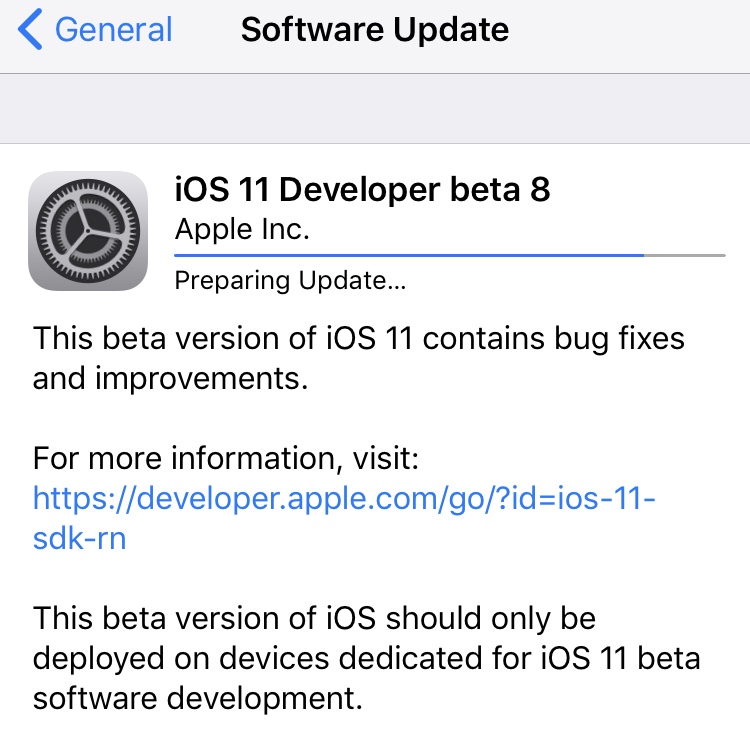
Apple on Monday released the eighth beta of iOS 11, watchOS 4, macOS 10.13, and tvOS 11 to registered developers. The new betas come just a week after beta 7 and two weeks ahead of the anticipated iPhone 8 event, so it's likely Apple is gearing up for a public release of the updates.

iOS 11 beta 8

If you're a registered developer with a device already running a previous iOS 11 beta, you can upgrade to the latest build (15A5368a) over the air using the Software Update mechanism in the Settings app.

We’re installing iOS 11 beta 8 on our devices to hunt for new features, but in the meantime check out our video regarding beta 7 changes:

https://www.youtube.com/watch?v=NXeaoEi5J3I

Subscribe to iDownloadBlog on YouTube

macOS 10.13 beta 8

Similarly, macOS High Sierra 10.13 beta 8 (build number 17A358a) can be downloaded over the air through the Mac App Store's Updates tab. If you aren't already running a previous beta, you can grab the full install from Apple's Dev Center. If you're curious about what's new in High Sierra, check out our 100+ new feature overview:

https://www.youtube.com/watch?v=QBna9ChoJd4

watchOS 4 beta 8

Registered developers with an Apple Watch already running a previous beta version can install beta 8 (build number 15R5371a) over the air using the Software Update option in Settings. Here's our video on what's new in watchOS 4:

https://www.youtube.com/watch?v=1kB5mSgdvk4

tvOS 11 beta 8

Developers with the appropriate configuration profile on their Apple TV (4th gen)  can install today's beta (build number 15J5374a) by visiting Settings > System > Software Update.

Otherwise, it requires you to hook up your Apple TV to your Mac via a USB-C cable and a quick trip to the Dev Center. tvOS 11 has shown to be a modest update, with just a handful of user-facing improvements.

We'll update this post (or create a new one, if warranted) with any major changes found in today's betas. If you see something notable you think we've missed, feel free to tell us about it in the comments below, or on Twitter @iDownloadBlog.

Slope, Showtime PPV, Mirage World, and other apps to check out this weekend

This week's edition of our Apps of the Week roundup features a new personal finance tracking app with a gorgeous interface, the PPV app showing the fight everyone is going to be talking about this weekend, and a new social app with an AR twist. And as always, we've selected two interesting new games for you to check out.

Slope

Slope was designed from the ground up to be unlike any financial app you’ve ever seen. With its user friendly interface, Slope gives you the power to see your entire financial history at your fingertips. Lightning fast transaction input allows you to input expenses on the go and reconcile with your bank statement later. Other features include categories and tags, multiple account support, receipt storage and much more. There is a SlopePro subscription option, but it looks like most features are available without it. Slope is available for free.

Showtime PPV

Unless you've been living under a rock for the past 6 months, chances are you've heard about the fight coming up tonight between boxing legend Floyd Mayweather and MMA star Conor McGregor. There are a few ways to stream the fight, but the official way is via the SHOWTIME PPV app. It works on iPhone, iPad and Apple TV, and makes buying the fight as easy as an in-app purchase. Features will include the stream, fight-related news and behind-the-scenes look at the fighters. The app is free, of course, but the Main Event is going to cost you $100. Showtime PPV is available for free.

Mirage World

This is kind of a cool app, and somewhat relevant given all of the talk these days about VR and AR. Mirage World allows you to create and "leave" digital, interactive artwork in the real world. Think virtual graffiti. You can place gifs, objects, hostages, photos and drawings anywhere for others to see. Just create, post and share using the Mirage app, and your friends can view them and share their own. As with all newcomer social media apps, I am skeptical this will gain much traction, but the idea is interesting enough it might make it into bigger apps. Check it out! Mirage World is available for free.

Death Point

Death Point is a hardcore single-player, top-down, stealth shooter with dual stick control that will test your abilities at every level. Here's the setup: only two from your group have survived—you (agent) and your operator. She is blocked somewhere within the enemy’s territory and you woke up in a prison, barely alive, but determined to get revenge. The countdown has started. Elimination sensors are already ticking in your heads. The mission success and your future depends solely on you. All you have to do is to find the girl and call for evacuation. Hurry up! Death Point is available for $6.

Cat Bird!

If Death Point isn't really your style, then check out Cat Bird! It couldn't be more opposite. This cute little platform adventure game sends you on an epic quest to help Cat Bird get home. You'll venture through unique worlds hovering across pits, traps, enemies, and saw blades. But beware of the mighty guardians that block your path! Other game features include 40+ challenging levels, 3 epic bosses, stylish pixel art, and a beautiful soundtrack. Cat Bird! is available for free (with a single IAP).

More apps to check out Google Assistant for iOS expands to Germany, France and UK Apple’s free app of the week: Colossatron: Massive World Threat You can now take 360-degree photos in Facebook’s iOS app Spark gains Touch ID inbox protection, Apple Reminders support & integration with 10 new services

The best USB-C monitors for MacBook and MacBook Pro

This is an easy-to-follow guide aimed at folks who are in the market for an external display for their MacBook or MacBook Pro. These laptops feature USB-C ports exclusively, so if you want to hook them up to a display without the need for dongles, you'll need to find one that supports the tech.

Since the USB-C port is relatively new, there aren't a ton of monitors out there that are compatible with it just yet. But as usual we've taken the time to track down the best USB-C monitors for MacBook and MacBook Pro available, based on a variety of factors, including price, features, expert and user reviews, and of course our own experiences.