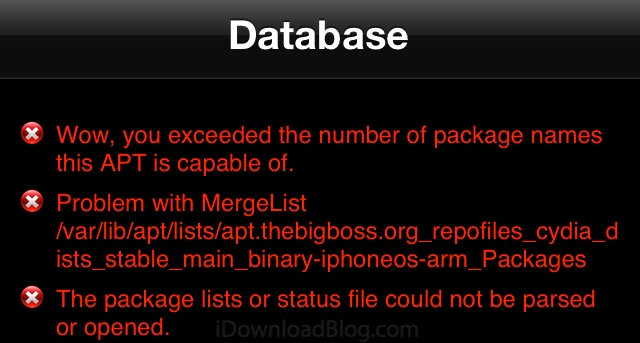
How to fix Cydia error “wow, you exceeded the number of package names this APT is capable of”

By , Mar 5, 2013

exceeded number of cydia package names

Ever since the evasi0n jailbreak came out, we’ve been inundated with the same support request about a Cydia error that displays the following message: wow, you exceeded the number of package names this APT is capable of. The message also shows a couple more lines of errors but the first one really is the source of the problem.

In this post, we’ll explain what “the number of package names this APT is capable of” means, and most importantly, we’ll provide you with a quick and simple fix for it…

Why does this problem occur?

According to Saurik himself, Cydia “downloads all of the package listings locally, and then APT consolidates them into a single efficient data structure that can be used even on memory-constrained devices to access the massive wad of packages later.” The problem is that this data structure is only capable of hosting a total of 65,535 packages.

Because the default repositories in Cydia already come with about 40,000 packages, you only have room for an additional 25,000. It means that if you decide to add more sources, especially sources that pirate jailbreak tweaks, you will likely quickly exceed this number and face the mighty error telling you “you exceeded the number of package names this APT is capable of.”

How to fix this error?

The fix is pretty simple, and if you’ve actually read the previous paragraph, you’ve probably already figured it out. In order to fix the excess of package name entries, you need to remove some of the extra repo sources you added in Cydia.

To do so, go to Cydia > Manage > Sources > Edit, then remove a few sources in there. Note that it’s not necessarily a good idea to remove some of the default repositories (BigBoss, Cydia/Telesphoreo, Dev Team, ModMyI, ZodTTD) as they are the ones that actually provide the most bang for your bucks, so to speak.

Apparently this error has been around for a long time, but to be quite frank, I had never heard of it until evasi0n was released.

  • Share:
  • Follow:
  • http://twitter.com/DvdGman David Gitman

    if you are using a simfree phone i suggest removing the ultrasnow repo..

  • luckyarcher

    I have this error all the time. I mean there are SO many legit repos out there, how does one get to sample each and every one. Thanks to this post, I can go ahead and install those 10,632 tweaks which I haven’t been able to.

  • RarestName

    Wow

  • http://www.facebook.com/waleed.taha Waleed M. Taha

    i always remove the “ZodTTD” source.

    • http://www.facebook.com/jamie.tilden.9 Jamie Tilden

      Yeah that’s a good call. I think I’ll do that now. Are there even ANY tweaks in that repo or is it all themes? Because I have no use for themes.

      • http://www.facebook.com/TiT0109 Abdullah Adhami

        themes & ringtones

      • http://www.facebook.com/waleed.taha Waleed M. Taha

        yeah it has themes and ringtones only.

        i’ve been using cydia for almost 3 years now and never installed anything from ZodTTD.

      • http://twitter.com/Cesuva Matthew

        There are tweaks. Try hiding everything except tweaks and utilities in categories and check it

      • http://twitter.com/brittagus Britta

        The ZodTTD/MacCiti repository hosts a bunch of popular emulators as well as many themes and a few tweaks.

    • http://twitter.com/HeitorStifler Heitor Castro 

      ZodTTD is pretty much useless for me, thanks for the tip anyway. Also removed ultrasn0w source. Hope it free some storage for additional sources.

      • http://www.facebook.com/waleed.taha Waleed M. Taha

        ultrasn0w source has only one package, so it wouldn’t make a difference.
        ZodTTD is useless and i’m guessing it has more than 2000 packages :D

      • totushi

        yeap problem solved! ZodTTD gone…

    • Aleksander Azizi

      ZodTTD is the one hosting VLC tho ;)

      • Cornerstar31

        I have the original appstore one yeah

      • http://www.facebook.com/mellematyler Tyler Mellema

        that’s cool. the new appstore is better

    • http://socialspit.com/ XweAponX

      If you don’t theme it’s a good idea – But I theme, and I make my own, so I’m always downloading themes from there. I had a couple of Private Repos and other “unsavory” repos, I got rid of one of the unsavory ones, problem is, it installed stuff into cYdia so it keeps coming back. Also, I still have a package I got from it. ZodTTD is the only Theme repo, there used to be a Winterboarders Repo but it’s long gone. I use ZodTTD and ModMyi for most of my themes, plus a couple of private repos. I never knew there was an upper limit – I’m glad this was fixed so easily.

  • http://www.facebook.com/alain.vasquez Alain Vasquez

    That happen when I installed xsellize

    • JV

      same here when i installed xsellize this error occurs

      • http://socialspit.com/ XweAponX

        xSellize sometimes has errors connecting. There is a LOT of stuff on there, its one of the biggest repos. I had xSellize and Sinful, both of those are huge – I need something on each of those, that only they have. I added Insanely, and that is another gigantic repo, that’s what pushed me over the edge. If you have a bunch of repos that host just a few items, you can stuck 20 repos in. But once you add repos that have thousands of files, you have to limit your repo list.

  • http://www.facebook.com/LuigiWillEatYourSoul Alex Mercer Bunt

    Type this into terminal
    sudo gedit /etc/apt/apt.conf.d/70debconf.
    Then put this code
    APT::Cache-Limit “100000000″;
    at the bottom of that file and then save it.
    Next typing this code on your terminal
    sudo apt-get clean && sudo apt-get update –fix-missing

    This should fix the problem, though only works if you have terminal installed, obviously.

    • http://twitter.com/cramirezsutton carlos.ramirez 

      can you be more expecific please. does it means you type on mobile terminal one after another or just type and save the firs two and then go with the third. thanks

      • EpicFacepalm

        What he is trying to say is:

        go to /etc/apt/apt.conf.d/ and create 70debconf file if it doesn’t exist.

        Next, edit it and put APT::Cache-Limit “100000000″; at the end of the file and save.

        Install OpenSSH if it is not installed. Then fire up either MobileTerminal or connect to your iDevice via SSH

        type ‘su’ and enter the password (default password is ‘alpine’ if you haven’t changed yet).

        Finally enter this code: “apt-get clean && apt-get update –fix-missing”

      • http://twitter.com/cramirezsutton carlos.ramirez 

        Thanks but i did as you said. create 70debconf. file than add the rest at the end of that file but terminal says not found
        maybe my mistake is when i add at the end of the 70debcnf. file
        Alex says at the bottom of the file and you say at the end
        im just learning but i have to ask. thanks

      • http://www.facebook.com/waalboer Marvin Waalboer

        /etc/apt/apt.conf.d/ and create 70debconf

        How can I create that file? I have tried /etc/apt/apt.conf.d/70debconf.

      • Cornerstar31

        You have to use nano to create the file.
        Please think.
        So go to mobileterminal–>type sudo nano /etc/apt/apt.conf.d/70deb.conf in the file(if it doesn’t find it it’s probably empty) you type APT::Cache-Limit “100000000″ Click save and exit.
        You will now be back in the root terminal, type apt-get clean && apt-get update –fix-missing –>Click Enter
        Wait and exit the MobileTerminal by pressing the home button.
        After this respring or reboot your device and your done.
        It’s so easy.
        Why do people ask these questions?

      • Cornerstar31

        Je bent een Nederlander zeker

    • EpicFacepalm

      Thanks for the tip but, “Gedit” is not available on iOS. And usually people do not install nano or vim (most of them never heard of).

      I don’t have enough repositories to reproduce this problem so, I’m not sure it works. It works on Debian though.

    • http://twitter.com/brittagus Britta

      This isn’t useful – changing the cache limit doesn’t actually change anything important/relevant to this problem. (If solving the issue were this easy, saurik could just change this limit for everyone, instead of having to devote a lot of work to updating APT.) Instead, you just have to remove some repositories.

  • Damian W

    it usually happens when you install more than 3 pirate repos.

    • Florian Lerch

      I’ve pirated in the past and never had this issue, and I had more then just 3 repos added. My friend still pirates with much more repos added… So not all users with many repos are affected :)
      PS: I don’t pirate anymore, all my apps/tweaks etc. are paid, so don’t get angry ;P

      • Damian W

        you are right, but I usually got this message at some point after a month or so. Last time I checked i had 6 extra repos and I got this message after few weeks. I had to remove repos down to 3 and never saw this message again.

      • Florian Lerch

        Ok, thanks. I’m curious if that’ll happen to my friend, I’m gonna ask him some day.

      • http://twitter.com/brittagus Britta

        This limitation is not about the number of repositories – instead, it’s about the number of packages available from those repositories. You could have a dozen additional repositories installed as long as the total packages available from your repositories added up to less than 65k.

      • Damian W

        Yes, of course we know it. Thats why if you have more than 3 extra big reapiratories you are more likely to get this error. So far i have 3 extra repos and i dont see this error. I just added the forth one today and the error poped out right away

  • f1ght3r

    Shouldn’t be a problem unless you have a few pirate repos. I use to pirate in the past however the tweaks generally work much better when you have legit copies. Support the devs out there, they deserve it for their hardwork. It takes quite a bit of effort to develop a tweak

  • AndyDontCare

    It’s the max of an unsigned short. Wonder if it’s a coincidence or programming short-sightedness? If it’s the latter, use an integer.

  • Guest

    You call that a fix? Damn, you are really retarded.

  • http://twitter.com/DanielRodich Daniel Rodich

    Best Solution is to go in ifile to var/Lib/apt/lists and delete the 8.3MB File from BigBoss,them Revome Backgrounded Apps and everything Works Fine:)

  • Utopia

    This is not really a fix, it’s just a workaround.

  • Adam Daieh

    Good thing this is a common issue, I think it’s only me getting this error. Time for me to re-jailbreak my iphone at WWW.JAILBREAKHOME.COM

  • http://www.facebook.com/toothmeblue Thomas Adrian Beeston

    I’ve had to restore my iphone and getting this error. Problem is, I use xbackup to restore my jb apps. Since it restores all my sources, I get this error. This is also the reason why I’m guessing xbackup doesn’t work properly as it restores the all the sources, then is unable to reinstall my jb apps because of the resulting error. Currently trying to find a way for xbackup not to restore all sources but not having much luck. This bug is a pain!

  • http://www.facebook.com/ismail.belabbaci Ismail Belabbaci

    Delete only xsellize and it will be fixed

  • JasiuStasiu

    You are THE MAN ! propss

  • http://www.facebook.com/profile.php?id=100005271910392 Cesar Martinez

    How do you delete the default sources ? Or the sources with no red minus next to it ?

  • Reekz

    If I uninstall a repo would it remove the packages I installed from it?

  • pletter

    delete all repos……. and the error will coming :C

  • ARA#

    i downloaded a tweak that actually installs more sources. so wen i went to delete them, i couldn’t since its a tweak that put them there. any suggestions? i think my only option would be to uninstall then reinstall..

  • ARA#

    fixed it, allgood(:

  • Mohanad Alsaedi

    thank you so much my problem fixed

  • http://www.facebook.com/kimokiven Mohamed Hegazy

    thanks a lot it works now (Y)

  • Hani

    It works thank you

  • Gabriel

    What happens if i delete a repo and i have a tweak from that repo will something happen?

  • http://www.facebook.com/kmc1970 Kevin McCarthy

    I get this and I remove a repo and it works, but it comes up again and I have not added another repo..

  • Michael Mitrev

    thank you!!you help me!! this is awesome i deleted only DevTeam and ZodTTD and CYDIA is working again!! :D

  • Najib

    Its work Thanks to all

  • http://www.facebook.com/smartalx Alex Schamenek

    Why are we blaming pirate repos when the problem is really the 40,000 outdated apps listed in the default repos?? Cheese. Haven’t you ever noticed how many 2.0 apps are still listed? If they would clean the repos then this won’t happen. And if they continue to leave in the trash, this is eventually going to be a problem with just the default repos.

  • http://www.facebook.com/mostapha.yahi.5 Mostapha Yahi

    Thank you very much