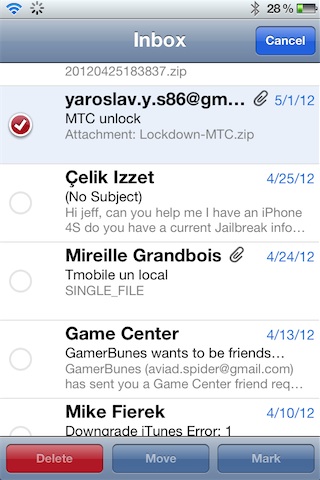
‘Check’ allows you to select a range of emails more efficiently

By , Jul 9, 2012

Check is a new jailbreak tweak that allows you to select a range of emails on the iPhone or iPad’s stock mail app in a more efficient manner. Instead of selecting each email one-by-one, Check utilizes a new tap and hold shortcut to make it simpler to select a range of emails.

If you’re an avid email user on the iPhone or the iPad, and you happen to be jailbroken, then you should definitely check out our hands-on video walkthrough…

The best jailbreak tweaks are those that solve common problems in a simple and straightforward manner, and Check excels at this. In fact, there are no options to configure upon installation, and it’s ready to use immediately.

The fact that it’s a free download on Cydia’s BigBoss repo is just icing on the cake. The only reason you wouldn’t want to try Check is if you’re not a user of iOS’ stock mail app.

If you decide to give Check a try, let us know how you liked it in the comments below.

  • Share:
  • Follow:
  • jose castro

    i love it…..
    it works very well….

  • Ken Oliver

    It doesn’t seem to be compatible with Mail Enhancer Pro

  • http://twitter.com/DannyWR88 Danny Waugh

    My only criticism is the flashing. It would be better if the check badge were either dimmed, made pale or less opaque whilst ‘active’.
    I can see me using this tweak quite often however, big thanks to the dev.

    • jose castro

      looks like some ones clicking it repeatably

  • http://twitter.com/RudyVFrancis Rudy Francis

    I keep receiving a “Size mismatch” error during the download. Tried several times. Even restarted phone just in case.

    • Ken Oliver

      Yes same for me I had assumed it was a mismatch as I have Mail Enhancer Pro installed do you ?

      • http://twitter.com/RudyVFrancis Rudy Francis

        I don’t have Mail Enhancer Pro installed.

    • Dan

      same here and I don’t have MailEnhancer Pro. Guess i’ll pass on this tweak

  • http://www.facebook.com/people/Chuck-Solomon/1783675231 Chuck Solomon

    I installed, but i havent figured how to activate it yet, havent been able to find after installing. sucks

    • http://joshmtucker.tumblr.com/ Joshua Tucker

      Press Edit and then hold on any cell until it flashes. Tap another email and there you have it.

    • http://www.facebook.com/people/Chuck-Solomon/1783675231 Chuck Solomon

      how do i activate it ?

  • M Last

    it’s super easy for these people every day delete to many junk mails :) LOL

  • http://joshmtucker.tumblr.com/ Joshua Tucker

    For users of Mail Enhancer (and Pro),

    I tested Check and it works fine. No issues whatsoever. If you’re still having problems, please send a report through Cydia. That’s the best way for us to solve the potential problem.

  • http://twitter.com/TomTomRichter Tom Richter

    imho a sliding over the Mail’s is the better solution.

  • http://www.facebook.com/TomRichter2407 Tom Richter

    imho a sliding over the Mail’s is the better solution.

  • http://twitter.com/Mrarkon Lady Mrarkon

    Cool to see that they released a tweak individually for this. I’ve just been using the hold and deselect glitch so the phone will glitch out and select all of the mail, and then I can just mark it all as unread. :P

  • SimonReidy

    One of those tweaks that feels so natural and obvious that you wonder why Apple didn’t include it in the first place. Really handy for those of us who have to sort a lot of mail from our phones and tablets.

    Until Sparrow for iPad is released, combine this with mail enhancer Pro and RichHTML (for adding embedded links and proper HTML support) and you nearly have a decent mail program.