PKGBackup Tutorial – How To Backup And Restore Your Jailbreak Apps, Settings, and Preferences

Jeff Benjamin, May 3, 2011

If there’s one area of jailbreaking that continues to be a source of confusion, it’s backing up all of your jailbreak apps and tweaks.

There are many different methods devised by just as many people, but there continues to be a lingering sense of misunderstanding among the throngs of jailbreakers.

Fortunately there is one surefire way to backup your iPhone, and all of your jailbreak settings each and every time by means of a handy little jailbreak app called PKGBackup…

But if this tool is so good, why are so many people still confused about how to backup their jailbreak apps, tweaks, and settings on their iPhone?

The main problem with PKGBackup is its learning curve. Due to its many settings, and its not so intuitive UI, it can be quite confusing.

Add that to the steep overall initial investment — the app rings up at $7.99 on the Cydia store — and you have the perfect recipe of cost + confusion; just enough to keep would be PKGBackup-ers away.

Let me be the first to admit that indeed, PKGBackup can be confusing. The good news is that if you follow this guide step-by-step, you’ll be on your way to backing up and restoring your iPhone’s jailbreak data with confidence.

Before we get started

Before backing up and restoring your jailbreak settings, I highly suggest that you become familiar with iTunes‘ built in backup feature for all of your App Store apps, SMS messages, email settings, and things like that.

There is a so-called “Apple Default Apps” setting in PKGBackup, but I recommend that you keep the two backup functions separate. Let iTunes do the heavy lifting for all of your official stuff, and let PKGBackup handle all of your jailbreak data.

Keeping these two duties separated will ensure that things remain simple and concise; that’s important when it comes to backing up and restoring your precious data.

Purchase and Download PKGBackup

This part is simple enough. If you have a jailbroken iPhone, head over to Cydia, and do a search for PKGBackup.

Once you find the package, you will have to purchase it for $7.99. That’s admittedly very pricey, but you’ll have to decide if the convenience factor is worth the up front investment.
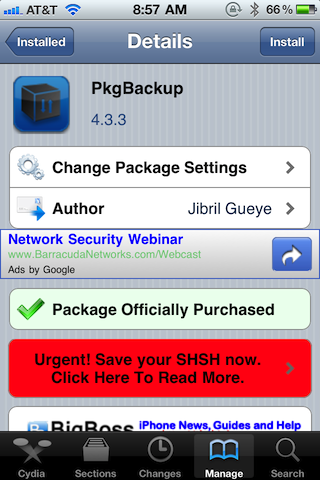
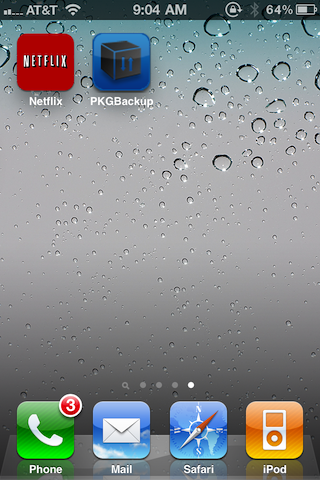
After installing PKGBackup, open up the app from your springboard.
You may be asked to provide location information. This information is used to display where PKGBackup is being used throughout the world using this map. Feel free to decline this, as it won’t impact your ability to use PKGBackup.

Setting up PKGBackup to Work With Dropbox

This is a relatively recent addition to PKGBackup, and is really the thing that sold me on its usage. Prior to Dropbox integration, your preferences and things were saved by means of a contact entry. That option is still available to use, but I highly recommend you go the Dropbox route when it comes to using PKGBackup.

At the main PKGBackup Screen, you will see a little gear icon in the upper left-hand corner. Tap that gear icon to venture into PKGBackup’s main settings screen.
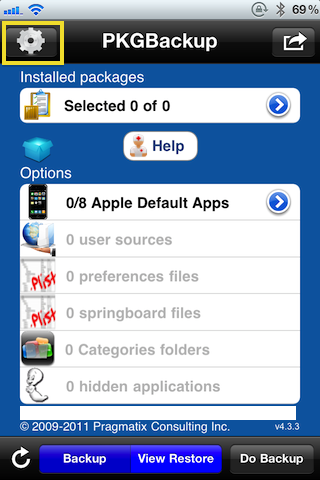
Once you’re in the settings screen, locate the Dropbox option near the upper right and tap it. Here is where you will be prompted for your Dropbox information.
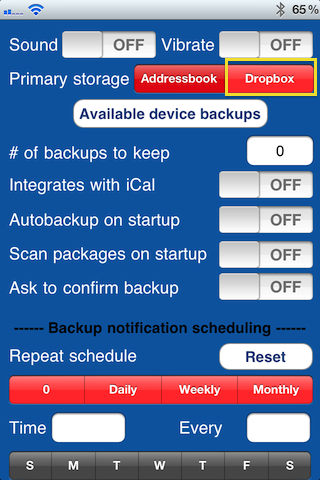
If you’ve been living under a rock for the past few years Dropbox is a cloud storage solution that’s free for up to 2GB. That’s more than enough space for all of your backups. Head over to Dropbox and sign-up if you don’t already have an account.

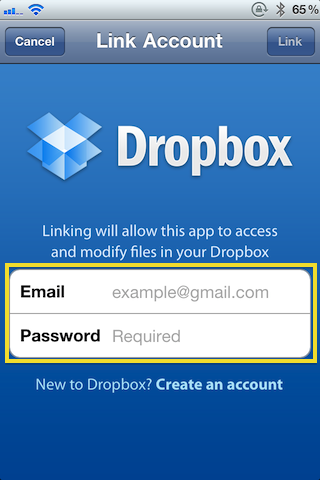
Next, provide your Dropbox information so that your Dropbox account can be linked to PKGBackup and tap ‘Link.’
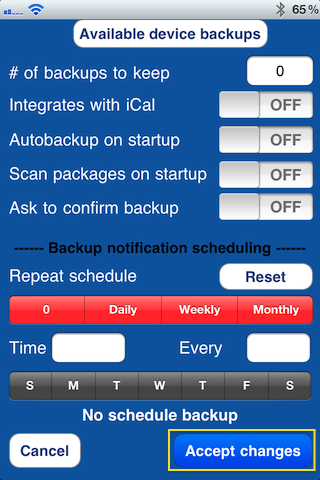
Once your Dropbox account is linked, scroll down to the bottom of the current screen, and tap ‘Accept Changes.’
Deciding What You Want to Backup

One of the best things about PKGBackup, and ironically one of its downfalls, is the sheer amount of options provided to the user.

PKGBackup is very granular in the sense that you can literally decide on each and every aspect of your jailbreak settings that you want backed up and restored.

This is awesome for those who are intimately familiar with file structure and jailbreaking, but it can be a tad overwhelming for someone who just wants to make sure that biteSMS is installed the next time they restore their iPhone.

For that very reason, I’m keeping this tutorial fairly high level, and will recommend settings that will cover all of the major bases.

At the bottom of your main PKGBackup screen you will notice four separate buttons — Refresh, and three others that change depending on which mode you’re in.

Backup mode options look like this:
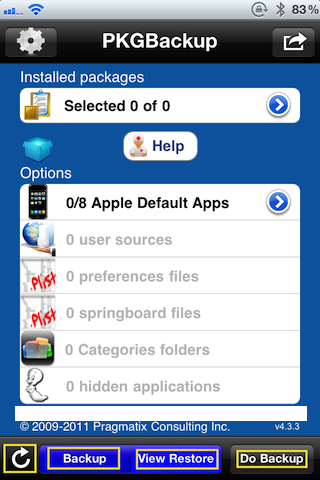
Restore mode options look like this:
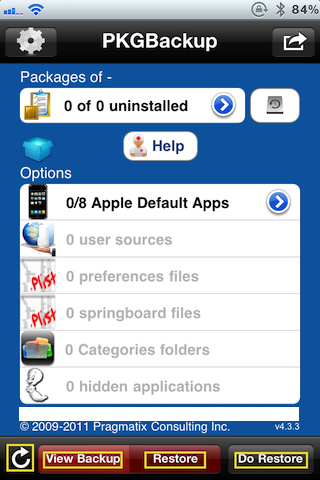
Notice that the refresh button is static, meaning it doesn’t change, it only does one thing — refresh your packages and options. This button is extremely important, so don’t overlook it.

In fact, while in backup mode, go ahead and tap the refresh button, and you should see the following dialogue box:
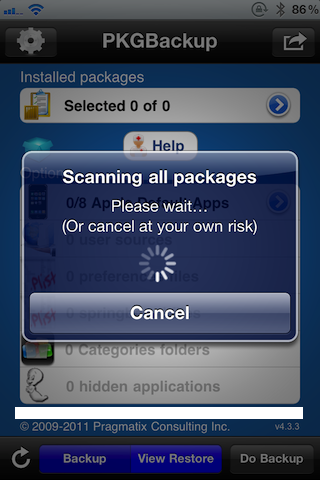
After the refresh is complete, you’ll notice that the installed packages, and options are now populated with info. Depending on what you have installed by way of jailbreak tweaks and apps, these numbers will vary.
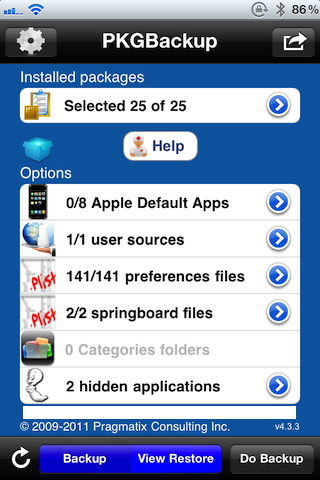
Notice those little blue arrows to the right of each section, those allow you to select or deselect individual preferences, packages, sources, etc. As I stated before, PKGBackup is very granular, and you can pretty much configure each aspect of your backup to your liking.

For simplicity sake, I won’t be going there in this tutorial, but I wanted to make you aware that the option does indeed exist.

Performing a Backup

Now it’s time to actually perform our backup. Can you guess what we’ll do next? Exactly, tap the ‘Do Backup’ button at the bottom-right.
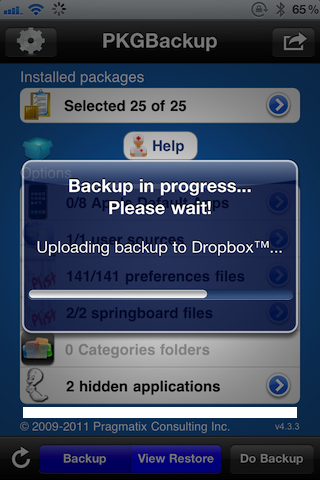
If everything was successful you should see the following message:
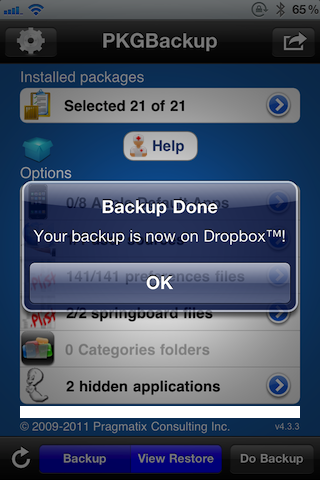
Congratulations, your jailbreak backup should now be on Dropbox! If you go to your Dropbox folder on your computer, you should see a PKGBackup folder with data contained within.

Now you have a working backup that can be used in the event that you need to restore your apps, settings, preferences, springboard configuration, and more.

Performing a Restore

After you’ve successfully created a backup, restoring that backup is extremely easy, especially since you’re using your Dropbox account.

For illustration purposes, lets say you’ve completely restored your iPhone to factory settings, jailbroken your iPhone, and used iTunes to restore all of your App Store Apps, emails, SMS messages, etc. What now? Well the only thing missing is all of your jailbreak apps and data.

The first thing you need to do is go into Cydia and reinstall PKGBackup. After PKGBackup is reinstalled, use the instructions above to link your Dropbox account with PKGBackup.

Once your Dropbox account is linked, select restore mode, and tap the refresh button to grab your backups for Dropbox.

If you have multiple backups, you can select the backup that you want to work with by tapping the disk icon and then selecting a specific backup as shown below:
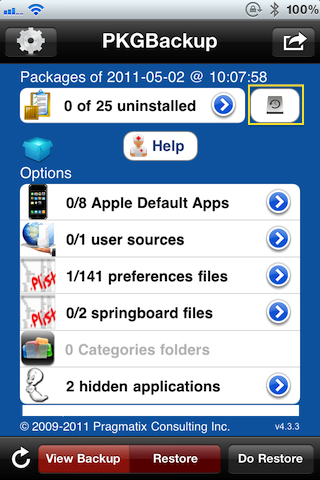
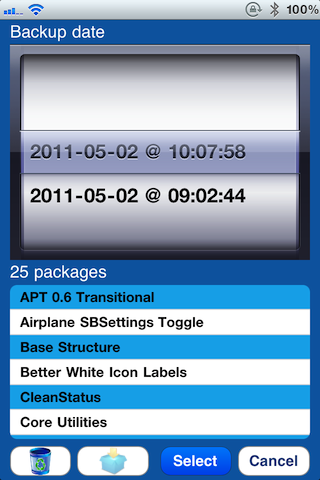
Once you have identified the backup you want to use, simply tap ‘Do Restore’ and then you will be presented with a dialogue to confirm your selection.
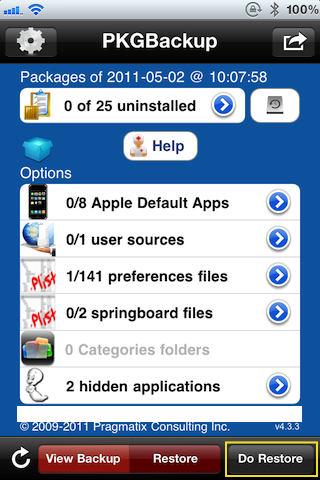
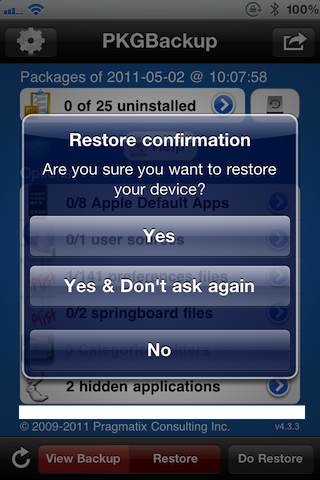
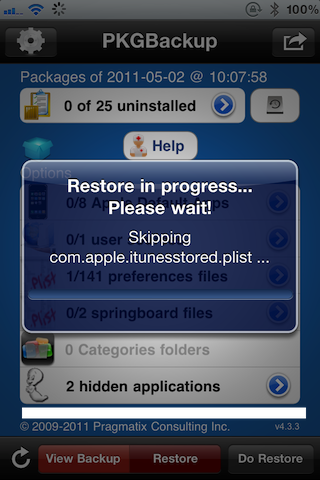
Once you confirm that you want to restore your jailbreak info from backup, PKGBackup will go through the restoral process, and upon completion will prompt you to reboot your iPhone.
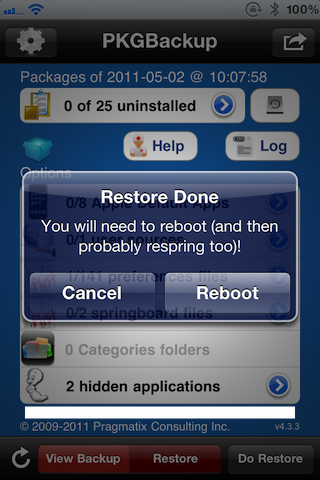
Folks that’s it. Your iPhone should be completely restored to your desired settings from a jailbreak perspective.

Summing it All Up

To sum things up, here’s what I recommend for those of you who might restore their iPhone often.

  1. Configure your iPhone just how you like it, that means App Store Apps, iPhone settings, preferences, jailbreak apps, preferences, everything.
  2. Backup your iPhone with iTunes, and take note of the specific backup.
  3. Backup you iPhone with PKGBackup, and take note of the specific backup.

When you perform a full restore on your iPhone, meaning you install firmware from scratch and you have to re-jailbreak, perform the following.

  1. Restore your iPhone.
  2. Jailbreak your iPhone.
  3. Restore from iTunes backup.
  4. Restore from PKGBackup backup.

Once you master the tandem of iTunes and PKGBackup backups, performing a full restore on your iPhone will seem like a true walk in the park, and not a daunting venture into the unknown.

Was this tutorial helpful, could it be improved? Let me know in the comments below, we’re here to help.

 
  • Haider Ijaz

    Lovely guide.. So easy to understand thanks for such a nice tutorial.

    • taco

      Jeff, i didn’t notice anywhere in your “guide” for PkgBackup that you credited iClarified !!

      you seem to have just copied it from them and didn’t give credit. unless i’m mistaken?

      • http://www.idownloadblog.com Sebastien

        iClarified doesn’t have a monopoly on tutorials. This tutorial has nothing to do with iClarified’s, images are different, text is different, everything but the “pkgbackup tutorial” title is different.

      • http://www.idownloadblog.com Jeff

        And this one is more thorough as well. Yeah, pretty much everything Sebastien said.

  • Daniel Courtney-Gregerson

    What if you don’t want to restore from backup in iTunes? (example: iTunes backups from previous firmwares cause problems)

    • http://www.iphonedownloadblog.com Jeff

      Then you don’t have to. Just go with PKGBackup backup instead.

  • Brett

    iOS 3.1.3 or below doesn’t get a settings button. At least I didn’t.

    • Sascha

      I can confirm that. Downloaded PkgBackup 4.3.3 on my iPhone 3G (running iOS 3.1.3) but when I start it, it says it’s v4.0.5c. No option to link to dropbox.

      Is PkgBackup 4.3.3 incompatible with the 3G?

      Cheers,
      Sascha

      • Sascha

        OK, I got a reply from Jibril the developer. PkgBackup v4.1+ is only compatible with iOS4x. That’s why it only runs as 4.0.5 on my 3G with 3.1.3.

      • Sascha

        One more amendment: The dropbox feature is only supported as of iOS 4 or higher. So my 3G, which remains on 3.1.3, will not be able to use that, even in any future release.

  • http://klouud.deviantart.com/ Tim/klouud

    The thing about restoring from a backup with iTunes is that it copies many of the “old” jailbreak items and installs them with the restore – this is why it is so important to restore as a new phone with iTunes – Now restoring from a backup isn’t the end of the world… I did this with my wife’s iPhone 3GS when she made the jump from 3.1.2 to 4.1 and things went well. But for me… I’d much prefer a fresh jailbreak… probably because I am constantly messing with tweaks that could possibley soft brick my phone and want the piece of mind that nothing “broken” is being installed with the restore.

    Do you have recommendations for people like me? I like to manually backup things with Chronus as well as copy and paste system files like the speed dial file.

    Chronus has not been updated to work well with 4.x, so it does not back up contacts – for that I use Funambol. If PkgBackup will backup all of the stuff that iTunes backs up… and backs up poorly I might add… then this is a sure/streamlined purchase for me. As I use so many different methods and tools when backing up/restoring.

    tim

    • http://www.iphonedownloadblog.com Jeff

      That’s true. To be honest there are way to many scenarios to consider them all. Generally you won’t find many instances where an iTunes backup will cause problems by importing old jailbreak stuff.

      I always generally try to have a fresh restore, but I realize I’m in the minority with this thinking.

  • george

    Jeff, what if i’m gonna try and do an update from 4.1 to 4.2.1? i know most of cydia packages are compatible, but what if there are compatibility issue from 4.1 to 4.2.1? would it still install or what’s gonna happen?

    • http://www.iphonedownloadblog.com Jeff

      No way to know 100% sure, but as I posted below, you can deselect certain items from restoring if there is a known issue. 4.2.1 is so old I doubt you will have any issues. In a worst case scenario, you may have to restore your iPhone, or it may go into safe mode.

    • Ant1Soc1al

      That’s why it’s best to install what you know is compatible first. Then one by one install iffy items that you might find on Compatibility Lists on the Web. Remember to take pictures of your screen in Cydia before you finalize an install. That way if you have to remove something, you will always know what other dependencies that tweak or Mobile Substrate had.

  • G Funk

    I think this isn’t a good idea when upgrading your iPhone firmware. The jailbreak apps you restore might not be compatible with your new iOS.

    • http://www.iphonedownloadblog.com Jeff

      That’s something to keep in mind, but the nice thing is that you can selectively choose what you want restored and what you want to leave out. So it’s pretty flexible when it comes to upgrading.

  • Biff

    Nice tutorial! Could have used this many iOS’s ago. Thanks!

  • Martin

    I wish I could do fresh restore all once in a while, but what about apps settings and games progress? iTunes backup restore is necessary I think and PKgbackup after works great for me… And what’s most important… All the settings of enhanced folder restores fine all the 500 apps icons are in the right folders :-D

    • tfx

      Are you talking about FolderEnhancer? I was wondering exactly that. That’s the most annoying thing to have to re-setup.

  • http://www.iphonedownloadblog.com Sebastien

    Awesome tutorial, Jeff! I’m sure a lot of iDB readers will benefit from this.

  • michael

    Just wondering. We have 2 iphone4s and one ipad1. Would I need to buy 3 copies of the backup software? And can I save backups for all 3 devices to one DropBox account?

    Thanks

    • Juan

      To answer your first question..

      Once you’ve purchased the application, just log into Cydia with the same account (used to make purchase via facebook or google) on the rest of the devices. When you do this, you’ll see a list of ‘paid and installable’ applications. You may or may not have to link device to account, but you’ll generally /want/ to link devices to an account.

    • Juan

      Actually, you will have to link devices to account if you want to pay once and install on multiple devices.

  • iProf.

    I lold at pricetag. You can just copy all your files using OpenSSH and store them manually on your computer. Superb guide though!

    • neal

      the app is to backup your jailbreak Apps, Settings, and Preferences.. not just any files..

  • Juan

    btw, excellent guide Jeff.

  • Gary

    Great review Jeff! I’ve been waiting for something this. From now on I’m going the dropbox route.

    How do I remove the contract groups “pkgbackup data”? I’ve googled so much. Still haven’t found it.

    • Rick

      just delete like any other contact. go to ur contacts and u shld c the pkg_(numbers…)
      scroll to the bottom and hit delete

      • Gary

        I’m talking about the pkgbackup group, not the contact.
        Do you know anything about this Jeff?

  • boser

    Excellent tutorial dude!
    ip4 was on 4.3.1 just moved to 4.3.2

    You suggested:
    Restore your iPhone.
    Jailbreak your iPhone.
    Restore from iTunes backup.
    Restore from PKGBackup backup.

    I did it a little different with PKGBackup.
    Reason being that if you are using folders and want all your jb apps in their folders and in specific positions on the ip4 screens then you need to jb first and lastly restore from iTunes backup.

    1) Use Pwnage Tool to create custom ipsw of 4.3.2
    2) Use Tiny Umbrella to preserve baseband by running TSS Server (Optional for some who need unlock.)
    3) Use Pwnage to enter DFU
    4) Use iTunes to Restore ip4 with custom ipsw
    5) Do not let iTunes restore apps, songs, etc yet.
    6) Use Cydia to install PKGBackup
    7) Restore all your jb apps and setting with Restore from PKGBackup
    8) Let iTunes restore from backup and all your apps, settings, jb apps will be back but now you have ios upgraded

    Took less than 2 hrs for the whole process and used to take 4 or more hours.
    Fantastic and worth the $$$

  • Potamus

    Pkg backup is a great application, BUT there is one thing users MUST know so they don’t panick should this happen to them:

    When yo try to restore data from an old iphone/ipad into a new one, (i.e. replacement unit from Apple or just a plain upgrade), don’t be surprised when you don’t see your saved backup data neither on your Contacts nor on your Dropbox account. This is due to pkbackup associating the backup per se to the terminal itsel (iphone/ipad). The developer states this in his website (scroll down to the BLUE font):

    http://www.pragmatixconsulting.com/iphoneApps/FAQ.html

    On second thought, read the ENTIRE FAQ to avoid encountering problems.

    I think the developer should dissasociate the restore files from the ipshones, thus dissolving this misleading “marriage”, as well as redesign the UI completely, making it more intuitive.

    As mentioned earlier by Jeff, pkgbackup is not a user-friendly application and should be used with great care to avoid any disaster, but if you can cough up the extra bucks and follow this excellent guide you can save yourself A LOT or precious time.

    I hope this helped.

    • http://www.iphonedownloadblog.com Jeff

      Very good points Potamus. I never understood the need for the “mariage” either.

  • George

    Question: I got a popup that said:

    “Corrupted data warning! Your previous backup data is either corrupted or non-existent! Would you like to use any available device backup?”

    Can I hit “No” and skip this? I recently backed up my device via iTunes so I’[m not sure why it’s giving me this error.

    • help!

      did you get an answer? got same problem and i can’t backup! ios 4.2.1, pkgbackup 4.3.9

      • neoDEx

        go to settings and slide “scan packages on startup” and “scan applications on startup” to ON. apply and it should work for you…

  • GatorBob

    Terrific step-by-step instructions. I was forgetting to re-link with Dropbox. Thanks!

  • George

    Rebooted halfway through, but no issues other than some icon moves. Worked great for me after a 4.3.3 update and RedSnow JB.

  • Yuval Marcus

    Can u make a video on youtube about this?

  • Peter Ajala

    Will pkgbackup automatically back up my icon positions so that when I have to do a restore it sets everything exactly the way it was before without me having to rearrange them all over again?

    • PKGBackup developer

      yes it will

      • http://euphoricgames.net ben

        that’s really cool :P

      • Carrie

        I need to back up text message bad

      • Carrie

        Need to back up text bad

  • DannyC

    I updated to 4.3.3 from 4.0.2 and downloaded this app. It showed me all my backed up apps, etc but would not let me restore. I kept hitting the restore button and nothing happened. Any advice?

  • JGBlake

    Does anyone know how to restore just Folder Enhancer configuration? FE loses it’s mind sometimes and dumps all my icons out of their folders. I’ve tried restoring the FE app and the it’s plist but no luck.

  • Peter Ajala

    I did a restore but the icons aren’t back in the positions I put them in.
    Any suggestions?

  • AvenGerMK

    so i went into pkg backup and tried to link my drop box account but it says app disabled? any suggestions?

  • LOLgiraffe

    Unable to Login
    This app has been disabled.

  • Peter Ajala

    Hello…..

  • Basil

    Unable to Login
    This app has been disabled.

    Does this mean that all users are no longer able to backup their devices to Dropbox ? Do you think this scenario is permanent or do you have any other enlightening information to share ?

    • Sascha

      No, it is working like a charm. After updating to the latest version of PkgBackup I had to re-login to my dropbox account but other than that there was no problem with it.

    • Negm

      Same problem here Basil,
      did you have any advice??

  • Basil

    To Sascha

    Did as you suggested and had no difficulty with running a backup. I do check for updates in cydia from time to time and did so up to last week – obviously PkgBackup had posted an upgrade since. Thanks very much for such a speedy response.

  • Deltaforce

    dodgy

  • Sascha

    Glad I could help :-)

  • Peter Ajala

    No packages found????

    • Sascha

      Have you enabled the package scan on startup in the Settings app?

  • Peter to Sascha

    The first thing that pops up when I go into the pkgbackup app is this:
    Warning!
    Scanning of packages and of applications are disabled. Please go to the settings to configure the application.
    I then hit ok then settings. There are three options at the very top, Addressbook, Dropbox Logout which is what is ticked, and SugarSync.
    Below it says device backup, 3
    Then the notifications scheduling
    Then at the bottom it says cancel/ accept changes
    What do I do?

    • Sascha

      No, you have to go to the Settings-app from your springboard (usually on the first page), not from within PkgBackup.

      There are more settings to make for most of your installed apps and there is also one for PkgBackup where you can enable scanning on startup.

      Cheers,
      Sascha

  • Peter Ajala

    Yes thanks, after I emailed you I saw it. I was going to post a message but thanks so much!

    • http://www.facebook.com/profile.php?id=614660490 Matt Jacoby

      I don’t have this setting. I just downloaded the latest version of pkg backup and there is no setting for this app in the main settings off the springboard. What gives?

  • Peter to Sascha

    One last thing. I still havent figured out how to get PKGBackup to back up the order of my apps. Every now and again when I do an app update, my iphone will respring and once it does the apps are out of the their folders and scattered all over the place. I then go into restore backup but it doesnt put them back in order.
    Thanks

    • Sascha

      Re-arranging your app icons in the way they were at the time of backup requires a separate package, the name of which I don’t remember right now. It has been featured here on idownloadblog a while ago.

  • Digilike

    Pkgbackup seems not to be working very well, when upgrading to iOS5. Jb apps happen to crash or aren’t running at all. I consider a clean restore and installing the jb apps manually.

  • u_no_fr u_no_fr

    Hi all,

    I met problem with the restore process with pkgbackup 4.3.12
    Indeed when I look my Restore Log I ahve lot of failures :
    Err http://apt.saurik.com…...
    HTTP/1.1 401 Unauthorized

    Pleas help me

    Tchusss

  • http://www.facebook.com/lucas.villalon Lucas Villalon

    When I try to link with Dropbox, this text shows up:
    Unable to Login
    This app has been disabled.

    Any idea what’s wrong?

  • David Kennedy

    Thanks very much, very easy to understand. Thanks for taking the time!

  • http://twitter.com/twofouronenine Scott Graham

    Thank you for the tutorial. I’m curious to know if, upon restoring, I can select individual settings/packages/etc to restore (versus doing the whole thing in one sealed set)?

    Long-story-short on the issue: phone irreparably froze on 4.3.3 JB so I blitzed it to 5.0.1 and JB’d with the newly-released untethered (using Pwnage Tool 5.0.1). Essentially, I never had the chance to backup my contacts or notes or other specific icon settings or behaviour settings — and am now trying to pick and choose from a prior backup.

    Anyone have a similar issue/solution?

    Thanks. Happy 2012.

    SG

  • http://www.facebook.com/billy.w.smithmier Billy Wayne Smithmier

    How do I do a backup from my contacts?

  • http://twitter.com/jlash1 Jason LaShomb

    i restored with PKGBackup after an upgrade to 5.0.1 and after the restore, my phone went into safe mode. I cant figure out how to get out of safe mode. Can someone please help me ASAP. Thanks.

  • http://profile.yahoo.com/SRUK3VUO5VITRM4KXXE27ON4I4 6seven

    Just a quick Question. For apps like download manager pro where you download music and videos , do u have to Defoe load those or will it also be a back up of it self( like copying music and videos)?

    • http://profile.yahoo.com/SRUK3VUO5VITRM4KXXE27ON4I4 6seven

      Just a quick Question. For apps like download manager pro where you download music and videos , do u have to Redownload ***those or will it also be a back up of it self( like copying music and videos)?

  • http://www.facebook.com/Vote.For.Beejay Beau James Guy

    Ummm… Dropbox no longer works with this app… So how about you update it so we can use it with Contacts?

  • http://profile.yahoo.com/YAUSRYE262BHJD3LAV4KQGSK4A Dennis

    I think to use xBackup and AppBackup is better ’cause the two categories (App;Packages) are
    two Applications so it’s saver.