Privacy

ProxySwitcher lets you toggle your favorite proxy server from the Status Bar

Some people resort to using proxy servers to maintain internet privacy and to get around website blocks at educational institutions and/or at work. On the other hand, anyone who’s ever used a proxy server knows how cumbersome it can be.

With a new jailbreak tweak called ProxySwitcher by iOS developer mbo42, toggling your favorite proxy server in iOS any time you’re connected to Wi-Fi just got a whole lot easier.

This tweak hides your Safari history without Private Browsing mode

Your web browsing history can say a lot about you, so it’s no surprise that people go great lengths to hide it. One way to do this on an iPhone is by using the Private Browsing feature in Safari, but this will do more than just protect your browsing history; perhaps more than most people want.

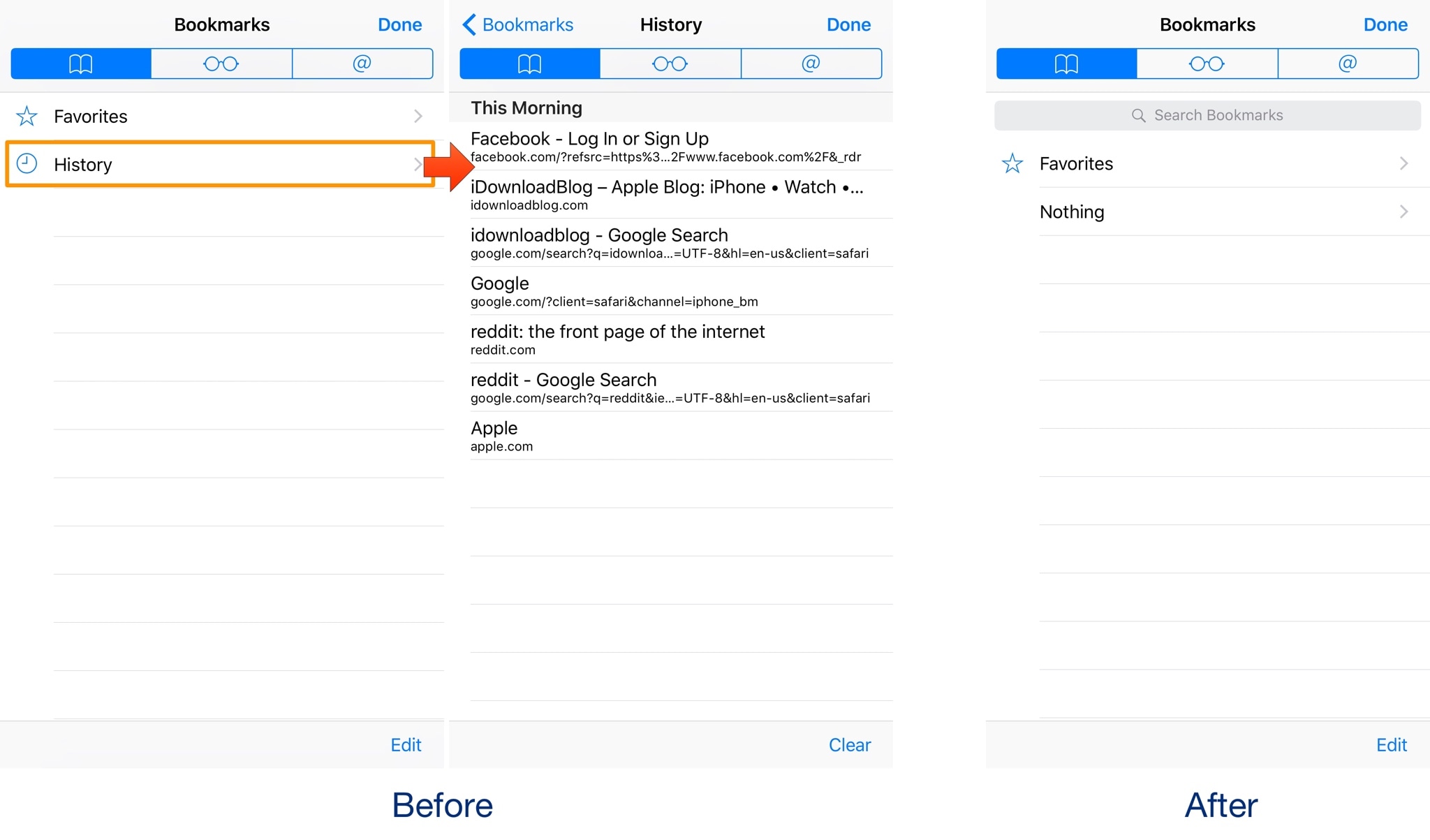
With a new free jailbreak tweak dubbed NoHistorySafari by iOS developer Wisy Channel, you can prevent Safari from keeping a history of the websites you visit without using Private Browsing mode.

Choose which apps are allowed to use Wi-Fi with ConditionalWifi2

iOS lets you restrict apps from using cellular data, so it only makes sense to let users do the same with Wi-Fi networks. Although cellular data is more prone to being limited by caps and speed reductions, Wi-Fi networks can sometimes cause issues with apps because of how they're configured or raise security concerns.

By installing a new jailbreak tweak called ConditionalWiFi2 (iOS 10) by iOS developer Creatix, you can choose what apps can connect to the internet over a Wi-Fi connection.

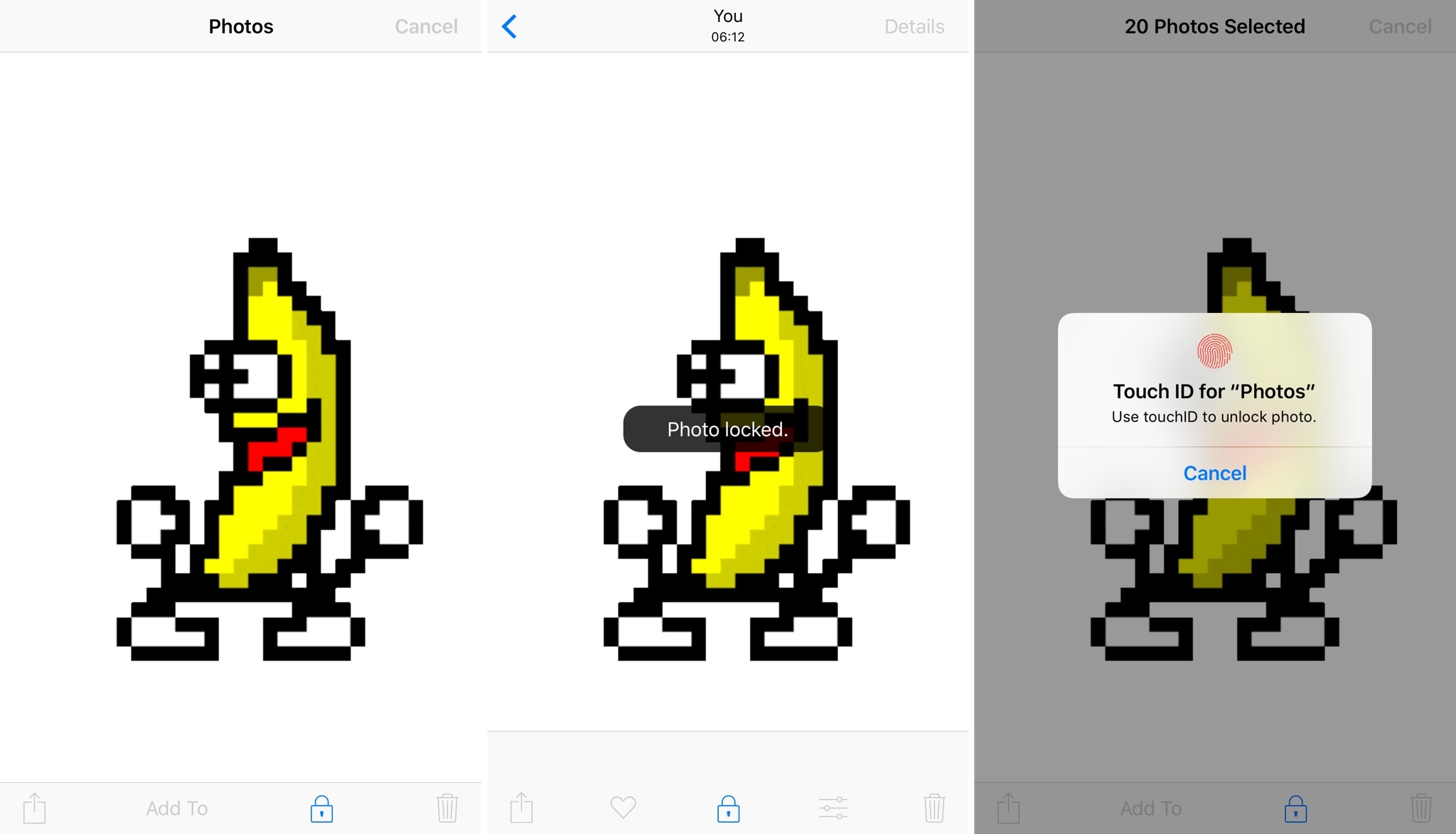
SurpriseSelfie brings new security options to the Photos app

When you let someone hold your iPhone to look at a picture or two in your Camera Roll, do you ever get the voice of reason in your head that says, “I hope they don’t swipe into the rest of my photos?”

If you do, then you might want to try a new jailbreak tweak called SurpriseSelfie by iOS developer Frozen Penguin. This tweak provides management options for locking people out of the rest of your photos or to impose consequences if they try.

Differential Privacy sees wider adoption since Apple first embraced it

Differential Privacy technology is about a decade old, but major tech players had shied away from embracing it until Apple rolled it out across iOS, macOS, watchOS and tvOS in September of last year. Today, major Silicon Valley giants like Microsoft, Uber and Google are readily experimenting with the technology, reports The Wall Street Journal.

Uber uses it to improve services without being overexposed to user data. Microsoft uses it in a pilot project to make smart-meter data available to researchers and government agencies for analysis, while making sure “any data set cannot be tied back to our customers”. Even Google, one of the Differential Privacy's earliest adopters, uses it to a certain extent.

Apple has now expanded its use of Differential Privacy to cover its collection and analysis of web browsing and Health-related data, as first announced at the Worldwide Developers Conference in June. According to the report, the Cupertino technology giant is currently receiving millions of pieces of information on a daily basis from iPhones, iPads and Macs.

All those items are protected by Differential Privacy, which blurs the data being analyzed by adding a measurable amount of statistical noise. This allows Apple to analyze sensitive data like your Health-related information without being able to tie the data back to specific people.

Plus, data-analysis apps are unable to find usable links between large data sets protected with Differential Privacy, making it virtually impossible to de-anonymize such data.

Differential Privacy is key to Apple’s artificial intelligence efforts for it lets the firm advance Siri and other products by analyzing user data without learning too much about users.

According to some people, Differential Privacy can be a double-edged sword and many folks were quick to point out that Apple's refusal to collect huge amounts of data on users, like Google is doing, is hurting its ability to compete in the AI space.

To that extend, a company spokesman told the Wall Street Journal via email that “Apple believes that great features and privacy go hand in hand.”

So, what's this stuff about blurring the data and statistical noise?

Differential Privacy is best explained with real-world examples.

In one particular example, Differential Privacy techniques swap out the answer to one question (“Have you ever committed a violent crime?”) with a question that has a statistically known response rate (“Were you born in February?”).

“Someone trying to find links in the data would never be sure which question a particular person was asked,” the article explains. “That lets researchers analyze sensitive data such as medical records without being able to tie the data back to specific people.”

To learn more about how Differential Privacy works and why it's important and key to Apple's mission of protecting the privacy of its users, check out our previous write-up on the topic.

Keep in mind there's isn't an explicit setting that would let you turn differentially private data collection on or off on your iPhone, iPad, Mac, Apple Watch or Apple TV.

Instead, your device automatically uses Differential Privacy when you opt-in to sending diagnostics and usage data to Apple or app developers. In other words, you must specifically elect to share analytics data with Apple (or developers) before Differential Privacy is used.

According to the descriptions in the “About Diagnostics & Privacy”, “About App Analytics & Privacy” and “About iCloud Analytics & Privacy” links found in Settings → Privacy → Analytics, your personal data is either not logged at all, is subject to privacy preserving techniques such as Differential Privacy or is removed from any reports before they’re sent to Apple.

“Analysis of data is undertaken only after the data has undergone privacy preserving techniques such as Differential Privacy,” notes Apple. “Analysis of such data will allow Apple to improve intelligent features and services such as Siri and other similar or related services.”

You can review diagnostics/analytics data and other information being sent to Apple at any time by going to Settings → Privacy → Analytics and looking under Analytics Data.
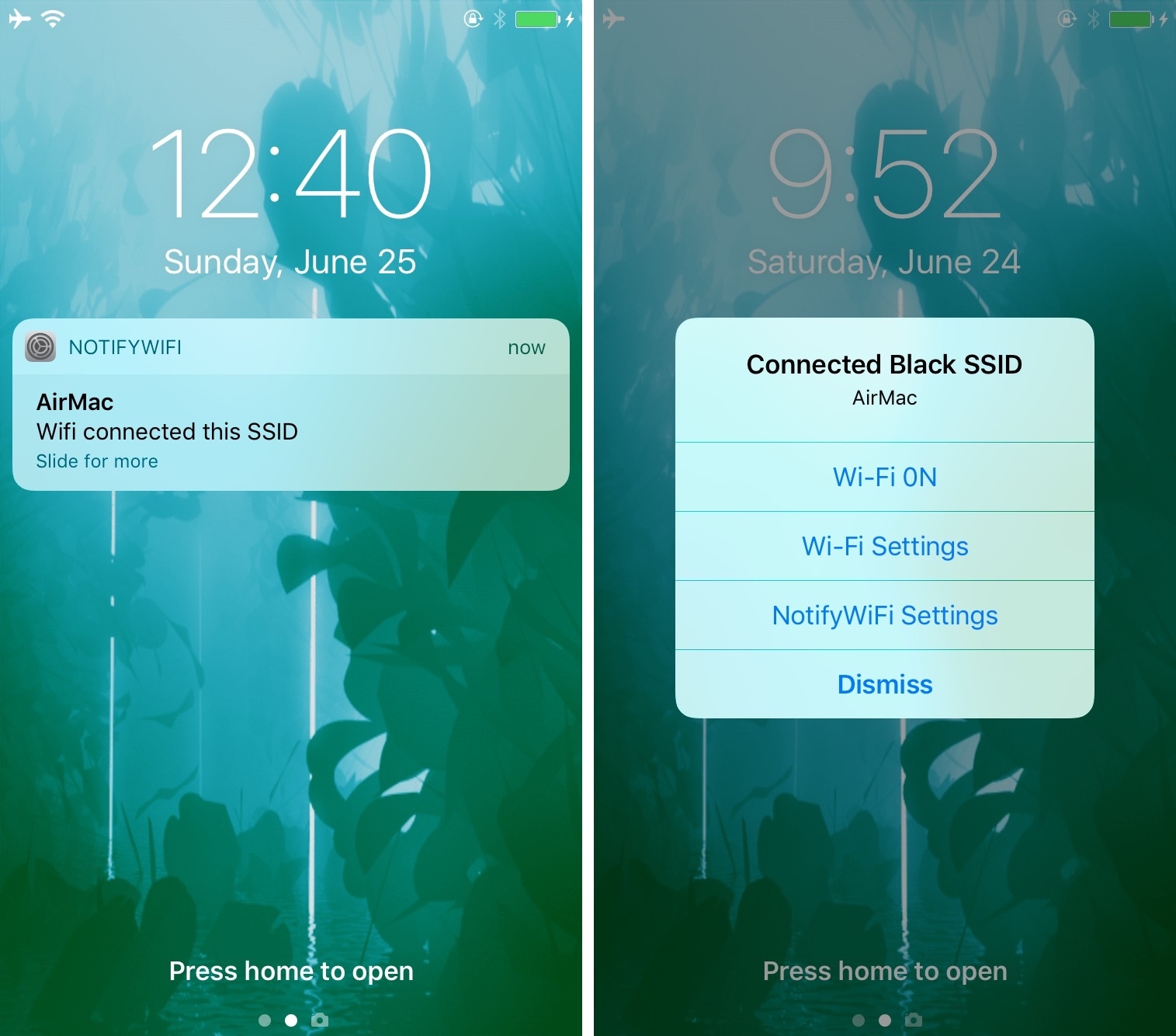
Get notifications when your iPhone switches Wi-Fi networks with this tweak

As you leave your home to visit over places, you probably bounce from Wi-Fi network to Wi-Fi network to save your cellular data. In some cases, your device automatically connects to known or trusted Wi-Fi networks, whether you want it to or not.

A new jailbreak tweak called NotifyWiFi10 by iOS developer ichitaso is a Wi-Fi notification management platform that alerts you every time your device connects to different Wi-Fi network. It comes with a slew of features for choosing what happens after connecting to certain ones.

Instagram unveils offensive comment filter, anti-spam tool in 9 languages

Instagram today announced some much-needed new tools to help users of its mobile app enjoy the service without toxic comments and spam. One is a new filter designed to block certain offensive comments and the other is basically a spam filter supporting nine languages.

Instagram claims that the pair of newly announced tools at their users' disposal will help keep the service a safe place for self-expression and inclusive communities.

Clamping down on toxic comments is now easier with the comment filter that automatically blocks certain offensive comments on your published posts, as well as in live video.

The new offensive comment filter is in addition to Instagram's existing arsenal of tools, like comment reporting, account blocking and so forth. To access this automatic filter, tap Instagram's “...” menu from your profile, then tap the new Comments option.

“We’ll launch this comment filter in English first, but will offer it in more languages over time,” notes the Facebook-owned company. The filter is optional and can be turned off at any time.

To help fight spam, Instagram is rolling out another new filter. Powered by machine learning, it looks for any obvious spam in comments and blocks it from your posts and live videos.

According to Instagram:

Our team has been training our systems for some time to recognize certain types of offensive and spammy comments so you never have to see them. The tools will improve over time, enabling the community’s experience of sharing to improve as well. We hope to make these filters available in more languages as our algorithms improve.

At launch, this dedicated filter will remove spam written in a total of nine languages—English, Spanish, Portuguese, Arabic, French, German, Russian, Japanese and Chinese—with additional language support to be implemented in the future.

Instagram is available free of charge via App Store.

Auto SilentMe silences your iPhone based on calendar events

There are times when you can take notifications, and then there are times when you just can't. While Do Not Disturb is a great tool for this, it’s not the perfect solution to avoiding unwanted notifications because it relies on you to manually enable or schedule it, and sometimes we forget.

That’s a weak link that a new jailbreak tweak called Auto SilentMe by iOS developer IArrays hopes to strengthen, as it brings new notification-suppressing features to your device that will prevent embarrassing notifications from coming in when you don't want them knocking at the door.

Instagram testing private sharing feature

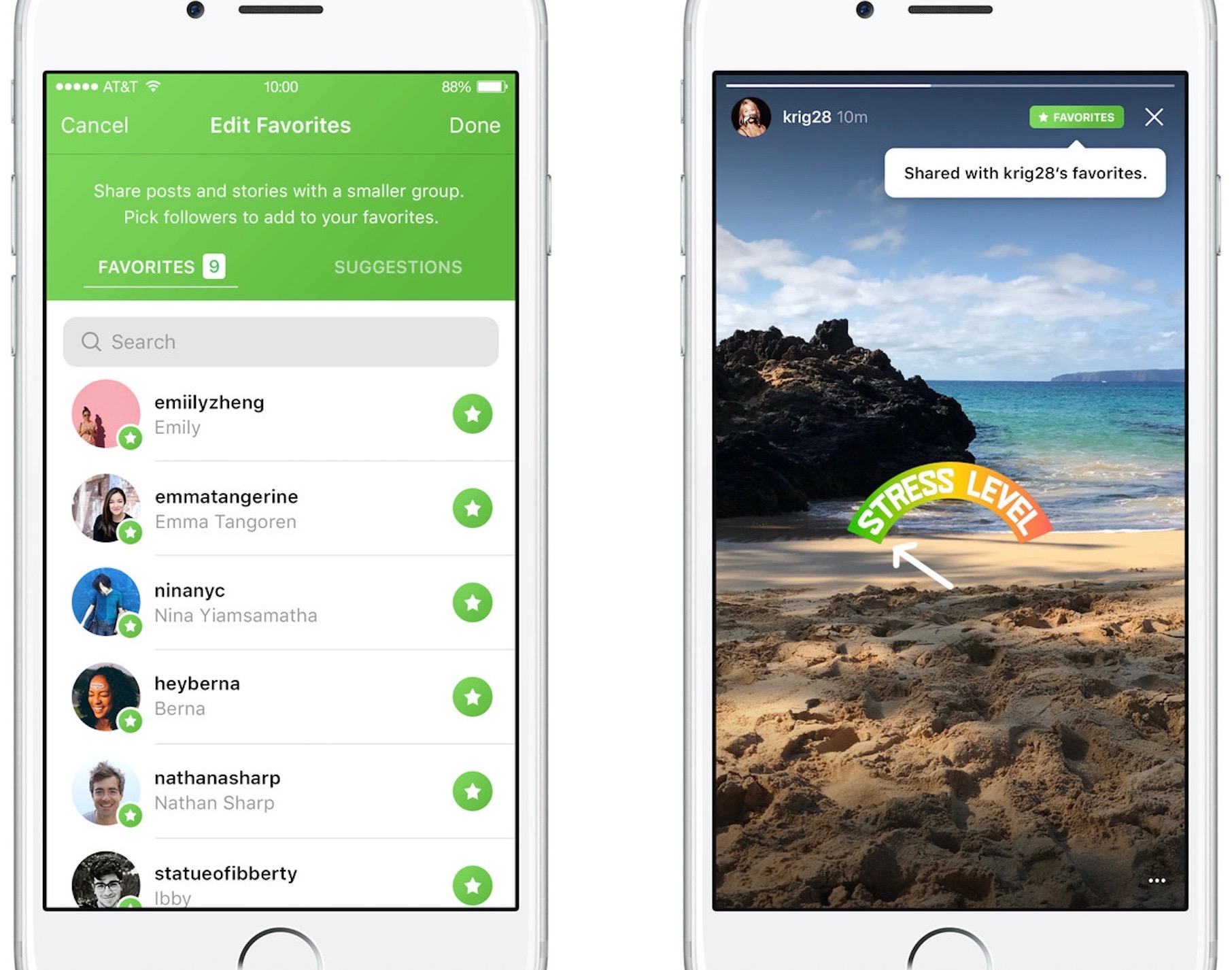
Photo-sharing service Instagram on Friday kicked off a small test for a new private-sharing feature. Called Favorites, it should roll out to all users over the next few months.

Instagram's product lead Robby Stein told The Verge that they've been working on the new private-sharing feature for more than a year.

Privately shared content is denoted by a green Favorites badge on the post.

By hand-picking followers for the new Favorites section, users can easily create a more limited group of the closest friends with whom they can privately share posts and Story updates.

Anyone not in the Favorites list won't be able to see your privately shared posts.

You'll be able to browse all the non-ephemeral posts you’ve shared to your Favorites over time by tapping a new Favorites tab on your Instagram profile.

According to The Verge:

No one gets notified when you add or remove them to the list. They’ll know they’re your favorite only when they see a green Favorites badge at the top of your posts. They can’t request to be added to your list through the app.

And if you remove them from your Favorites, they lose access to all of your private posts. If they visit the Favorites tab in your profile, it will appear to be empty.

There is currently no way to share Instagram posts with select friends only.

You can set your Instagram account to private at any time to personally approve follow requests from a handful of your closest friends, but that approach has many flaws of its own.

According to Stein, people with private accounts often approve hundreds of follow requests due to social pressures and are using Instagram less as a result. “People are trying to hack Instagram to create smaller audiences, and we’re trying to recognize that,” said Stein.

It remains to be seen if Instagram Favorites will come to all users. Given they've been working on this feature for more than a year, I'll be surprised should they decide to pull it.

Will you use the Favorites feature when it rolls out, and why?

Do chime in with your thoughts in the comments section!

Gmail will stop scanning your emails for ads personalization

Google's pledged to stop scanning users' emails in Gmail for personalized ads. The important change, coming later this year, will bring personal Gmail accounts in line with Google's business-focused G Suite Gmail service which does not scan emails for ads personalization.

“Consumer Gmail content will not be used or scanned for any ads personalization after this change,” Diane Green, Senior Vice President of Google Cloud, announced Friday in a post on the search giant's official blog.

Ads you see across Google properties and on websites that use Google ads are still going to be personalized based on other factors, including users' settings at myaccount.google.com.

“Users can change those settings at any time and disable ads personalization,” Green said.

Gmail is the world’s preeminent email provider with more than a whopping 1.2 billion users.

“G Suite customers and free consumer Gmail users can remain confident that Google will keep privacy and security paramount as we continue to innovate,” reads Green's post.

Google's ad-driven business model is notoriously reliant upon the company's ability to personalize ads to your interests. The company uses many signals and various tracking techniques to collect anonymized data, which is then fed to its machine learning and artificial intelligence systems to derive useful intelligence for ads personalization.

On the flip side, Gmail scanning has been a common point of contention among privacy-minded users who dislike having their Gmail scanned for advertising purposes. Given that more than three million paying companies currently use the paid G Suite service, Google can certainly afford to stop scanning personal Gmail inboxes for ads personalization.

Apple's iCloud Mail service has never scanned the contents of users' inboxes because the entire iCloud suite of apps and services is 100 percent free of advertising, in line with Apple's commitment to protecting the privacy of its users.