iPhone

Stay up-to-date on the latest iPhone news and learn new tips and tricks with our comprehensive tutorials. From software updates to new features, we’ve got you covered.

Things 3 is out with overhauled interface and multiple new features

German developer Cultured Code on Thursday released Things 3, a major new iteration of its powerful personal task manager for iPhone, Apple Watch, iPad and Mac. Things 3 brings out a beautiful timeless new design with delightful interactions and animations. Aside from the new look and feel, the refreshed app is packed to the gills with a host of new features.

Released as three separate apps (they've kept the current pricing), Things 3 is Cultured Code's first paid update for existing users since versions 1.0.

Here's what developers had to say about the app's gorgeous new UI:

The all-new Things comes with an all-new design. It's not just how it looks—but also how it works, and how it feels. The interactions are delightful. The animations are smooth. The content is more structured. The concepts are clearer.

Open a to-do and you'll immediately get a sense of how the new apps feel.

Nicely animated transitions expand the selected to-do into an empty white piece of paper. You can add additional details to your to-do, neatly tucked away in the corner until you need them.

“There are no distractions here, it’s just you and your thoughts,” said developers.

The choice is yours: you can create either a simple to-do that looks like text on a piece of paper or opt for a richer to-do which may include additional details such as tags, checklists (a new feature for to-dos in Things 3), a start date, a deadline and so forth.

Speaking of to-dos, Things 3 introduces an all-new Magic Plus Button.

Found in the corner of the screen, you can tap it to quickly add a new to-do or actually drag the button to a particular list in order to generate a to-do in a specific location. Plus, managing to-dos is now way easier than before with expanded support for gestures, like dragging and dropping, swiping, tapping to expand and more.

Seasoned Things users will be delighted to know that developers have implemented one of the most-requested features: time-based reminders. For those to-dos you absolutely cannot miss, adding a reminder will give you peace of mind.

While scheduling a to-do in Jump Start, click Add Reminder and set the time. There are three ways to set the time: manually, using the app's natural language parser (just type “Wed 8pm” or some such, and you're all set) or you can speak to Siri (“Remind me to call Seb at 5am.”)

Watch the promotional video for Things 3.

https://www.youtube.com/watch?v=2R6o5t0VK_A

Things 3 now supports headings to break up complex projects into sections.

And with the app's Magic Plus Button, you can create and place headings in new projects like a pro. The app's cleaner design extends to your Today and Upcoming sections which now combine calendar events and to-dos into one unified view with a timeline at the top, giving an outline of your schedule.

A new This Evening section is your at-a-glance overview of any to-dos that you won’t get to until later in the day, like things you can only do when you get home. The This Evening section is a handy way to keep these to-dos separate from the rest, in their own discrete list.

And to help you find a needle in the haystack, Things 3 now includes a Quick Find feature.

Just pull down on any list to reveal search, which can now find content across the entire app. Quick Find also includes handy shortcuts to your to-dos, lists, tags and more.

Type Travel, another new feature in Things 3, lets you navigation to any project, area or to-do in the app. On iPad, you can now swipe away the sidebar and focus on just the current list you’re working on, both in portrait and landscape orientations.

On your Mac, Things now has a Slim Mode which cuts out distractions so you can focus on the task at hand. To enter this mode, collapse the sidebar with a two-finger swipe. Slim Mode is especially great when you’re working in macOS's Split View multitasking mode.

You can even open multiple windows in Slim Mode and drag and drop items between them.

https://culturedcode.cachefly.net/things/videos/2017-05-03-allnewthings-when/video.mp4

Developers have completely rewritten core layers of the apps, which are now shared between macOS and iOS for increased reliability. The Apple Watch app has been updated as well (it now shows checklists and headings), there's a new structure for Areas in the iOS app and you can now import data from Wunderlist or OmniFocus into Things 3.

And with TouchBar support, owners of the new MacBook Pro can take advantage of convenient access to the app's most-used commands.

Things is fully integrated with all the latest iOS technologies: Apple Watch, Calendars, Siri, Reminders, Today Widget, Quick Actions, Action Extension, Handoff and Notifications.

The apps all stay updated via Things Cloud, which is the push sync service that Cultured Code custom-built for the app. Unfortunately, iCloud syncing is not supported in Things.

For the complete overview of what's new in the app, visit the official Things website.

Things 3 for iPhone and Apple Watch is $9.99 on App Store.

Things 3 for iPad is $19.99 on App Store.

Things 3 for Mac is $49.99 on Mac App Store.

To celebrate the launch of Things 3, all apps are 20 percent off until next Thursday, May 25.

A 14-day trial of Things for Mac is available via the Cultured Code website.

This iPhone 8 mockup is believed to feature Apple’s final design

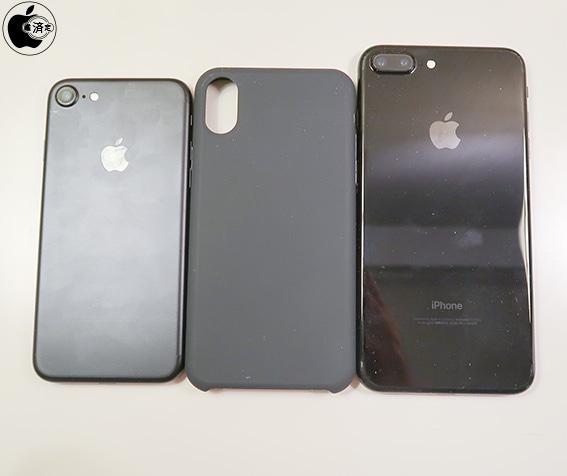
The design of iPhone 8 has seemingly been finalized and BGR has now obtained the first photos of a poorly built iPhone 8 mockup which it says is “believed to feature Apple’s final design.” It was likely built using claimed schematics that were leaked from Asian factories in the past few weeks. Some of these schematics have been debunked as fake so take BGR's report with a few pinches of salt.

The cheap-looking mockup appears to suggests that Apple has managed to integrate a Touch ID sensor into the display assembly because there isn't any indication of a fingerprint scanner on the back of the phone.

Assuming the mockup does in fact approximates iPhone 8's design closely, iPhone 8 should feature a full-screen face and a “glass sandwich” design where it would have 2.5D glass panels on the front and back that curve slightly at their edges, sandwiched between a polished stainless steel frame that's rounded as well.

At the bottom, we still see Lightning I/O rather than USB-C.

The Mute switch and the Volume Up and Down buttons are on the left side of the device. The Power button and a SIM tray are on the right side. The Power button does not appear to be elongated like with some earlier mockups.

A 3.5mm headphone jack is nowhere to be seen.

The back of the mockup shows a vertically aligned dual-camera system with an LED flash and a microphone built directly into an oversized bump. Even if this mockup has been built to closely match genuine iPhone 8 manufacturing drawings, there's no telling if it represents the actual device that Apple is expected to ship come this fall.

The Cupertino giant is said to be testing nearly a dozen iPhone prototypes.

Aside from iPhone 8, Apple should release the iterative iPhone 7s and iPhone 7s Plus smartphones with screens based on the traditional LCD technology.

All 2017 iPhones should feature wireless charging, according to analysts.

To help with the wireless charging feature, iPhone 7s and iPhone 7s Plus are expected to switch from the aluminum rear side to the back made from glass.

What do you think, guys?

Is Apple trolling us all? Could this particular iPhone 8 mockup represent the real deal?

Let us know by leaving a comment below!

Futurama: Worlds of Tomorrow coming to iOS, will contain some entirely new episodes

Game developers FoxNext Games and Jam City (via its game studio TinyCo) announced today that Futurama: Worlds of Tomorrow for iPhone and iPad will arrive sometime in early summer.

The new game will blend simulation, combat, galactic exploration and choose-your-own-adventure mechanics together to bring the escapades of the Planet Express crew to life. In his February interview with USA Today, Matt Goering said that the game will contain some entirely new episodes of the show.

“Oh, you guys wanna do a game? That’s fine,” he said. “But we’re gonna sneak some more Futurama episodes in there on whatever device people are gonna be using.”

The game features two main settings: New New York, which focuses on simulation and character progression gameplay, and Space Adventures, in which players explore and battle their way through planets, nebulas and other weird stuff across the Futurama universe.

Futurama: Worlds of Tomorrow is being developed in partnership with Futurama and The Simpsons creator Matt Groening and his Curiosity Company, along with executive producer David X. Cohen and original Futurama writers.

“Jam City is working with the writers, animators, and cast to produce even more original animation that will have fans waving their tentacles in the air,” according to developers.

The official teaser trailer embedded below is the first new animation from the Futurama universe since the show's original TV run ended in 2013.

“I'm proud to say that Futurama lives! In mobile-video-game teaser trailer form, anyway,” said the series' creator Matt Groening. “If you squint, it's kind of like a little episode!”

https://www.youtube.com/watch?v=k2Izx4MQCwQ

“Working on this new Futurama animation has been a thrilling adventure,” said David X. Cohen.

“I finally understand how Neil Armstrong must have felt when he first landed on the lunar surface, watched some funny cartoons on the control screen, and did whatever else was on his schedule that day,” he added, jokingly.

In the New New York setting, your main focus will be on rescuing characters, collecting special items and materials, expanding your characters' capabilities by leveling them up and crafting ability-defining character outfits and tackling story-driven quests.

According to developers, events that occur in New New York will often move the game's overarching narrative forward, by allowing players to assemble a crew of their favorite Futurama characters and take to the stars for Space Adventures.

“While traversing the depths of space, players will fight alien enemies in retro arcade-style combat, rendered in beautiful 16-bit graphics, and explore strange lands in which their choices determine their fate,” they said.

Futurama: Worlds of Tomorrow will arrive sometime in early summer to iPhone, iPad, Android and Amazon devices. More information on the game will be released in the near future and we'll be making sure to keep you in the loop.

You can pre-register at youwillplayfuturama.com to receive a special in-game gift when you start playing. More original Futurama animation is coming too, so stay tuned.

Is the rumored Siri speaker on cannibalization course with Apple TV?

It’s only two more weeks until WWDC '17, which means crunch time for experts and armchair analysts alike. A popular topic of gossip around this time of the year relates to one of Apple's less pompous devices, one that’s been marketed for years as our low-key living room hub, as Siri on the couch and more recently as the silent orchestrator of our smart home.

Fittingly, chatter of that kind is indeed coming to a head again, yet before you rub your eyes and wonder how you could have missed the news of a 5th generation Apple TV, this time the similar sounding rumors swirl around a brand new device, the alleged Siri speaker. My cheap attempt at having you mix up the two devices for a brief moment there admittedly wasn’t a real zinger, however it does typify a potentially sticky situation for Apple: at least on grounds of what we presume to know, we - the customers - would be forgiven for mistaking the two on the fly.

If we indulge in a sketchy juxtaposition of each devices’ (purported) capabilities, it quickly begs the question of what we have been overlooking so far. It is declaredly fishy to make inferences about a device that is all but fictitious to this date, nevertheless there are pieces of information we can glean from competitors' devices like Amazon’s Alexa, as well as telling interview snippets straight from the horse's mouth. Does that make a comparison of the Siri speaker and Apple TV less premature or ill-founded? Probably not, but jotting down what we (think to) know does become insightful when we try to ascertain the spaces the two products are likely going to occupy in the customers’ minds and households. What's the insight? Well, they could have a hell of a lot in common.

Always provided we don’t fail to understand the alleged Siri speaker correctly, the large overlap in features is on all accounts eye-catching. Both devices fundamentally vie for a central spot in your home, both offer to AirPlay (most of) your media, both boast Siri and HomeKit integration. The putative fork in the road is that unlike Apple TV’s focus on visual media, Siri speaker’s backbone will reportedly be advanced Siri capabilities and the simple fact that it will serve as a standalone speaker with formidable acoustic performance.

All these things considered though, is this going to be a unique enough selling proposition? It is clear that no product in Apple's line-up sits as brazenly in the spot of the new arrival as Apple TV does. If this was a game of musical chairs, and the music stopped playing on June 5, Apple TV would be defiantly hogging the one spot designated for the shiny new speaker. Naturally, this opens the door for product cannibalization in either direction, and that's where things get juicy. The implications for both products and their strategies mid to long term are plentiful. In my book, there's three possible outcomes to speak of: the two product lines (keep) selling like hot cakes, them selling like damp and cold cakes, or the two lines merging into one. The determinant? The speaker’s x-factor, or lack thereof.

Which cake are you going to sell, Apple? 

Option 1

The most lucrative (and arguably still most probable) outcome in this tale of two devices is for Apple to quietly have a Siri speaker killer feature up their sleeve. It goes without saying that we’re dealing with hypotheticals and it could plainly be the case that we don’t know jack. In order to establish and sustain strong sales for both Apple TV and the new assistant, the latter would have to come up with some seriously innovative ideas; ideas that make the device indispensable to your household, without raining on your Apple TV’s parade.

What could that look like? In one of our previous podcast episodes of Let's Talk iOS, we have speculated about built-in security features, but realistically your guess is as good as ours. Two distinct devices with two distinct purposes would entail little overlap, and in turn minimal cannibalization.

Option 2

The cold cake theory is that analysts have indeed pretty much figured out the device prior to release and there is no blind spot on our radar. In other words, the overlap is real. Such being the case, potential customers would in all likelihood wind up pitting the two devices against each other and ultimately picking the one that comes closest to fitting their needs.

This route would most definitely spell product cannibalization, since only the hardcore would entertain both devices at home, plus the mere existence of Apple TV could already hamper the launch success of the Siri speaker. By the same token, current Apple TV owners could be swayed towards a more mobile AirPlay station and the existing customer base would effectively be split in halves. Before they know it, both devices could be relegated back to the company’s ominous ‘hobby’ status.

Option 3

Lastly, the new Siri speaker could (organically or forcibly) usurp the role of Apple TV at some point down the line. Once launched, the people will vote with their wallets and it is not a stretch to imagine a smarter, more capable home hub by Apple outsell and eventually dwarf Apple TV. If a chunk of Apple TV owners in addition migrated to the Siri speaker, the product line itself would barely be feasible for much longer.

As a result, Apple could easily equip the more potent Siri speaker with streaming functionalities as soon as the tide has turned in the device’s favor. Customers would no longer have to weigh up two similar-but-different products, but rather purchase the same one and thereafter decide the role it will play in their household. Coffee table device or television box, whatever they see fit.

What's your take?

One way or another, the reported new arrival is going to make massive waves at and after WWDC 17. Are we witnessing the quiet axing of Apple TV or not? What's Apple's secret ingredient for the Siri speaker going to look like? Not much longer until we will know, so place your bet in the comments now!

Tim Cook talks assistive technologies with Accessibility evangelists

Apple CEO Tim Cook sat down with three YouTubers who are Accessibility evangelists to discuss the importance of the assistive technologies built into the company's iOS, macOS, tvOS and watchOS platforms.

James Rath, a legally blind filmmaker; Tatiana Lee, a model, actress and lifestyle blogger; and Rikki Poynter, a North Carolina-based writer and deaf awareness activist, all published their video interviews with Apple's chief on their respective YouTube channels on Wednesday.

James Rath interview

https://www.youtube.com/watch?v=kXy8KcONTSs

Rikki Poynter interview

https://www.youtube.com/watch?v=t6_iOVSavdE

Cook explained to Poyter what Apple is all about when it comes to Accessibility:

Apple is founded on giving people power to create things, to do things that they couldn't do without those tools. And we've always viewed accessibility as a human right. And so just like human rights are for everyone, we want our products to be accessible for everyone.

He added that accessibility should be a basic human right:

It's a basic core value of Apple. We don't make products for a particular group of people. We make products for everybody.

We feel very strongly that everyone deserves an equal opportunity and equal access. So we don't look at this thing from a return on investment point of view—I've been asked that before. The answer is no, I've never looked at that. We don't care about that.

A lot of these Accessibility features, everyone can use. With HomeKit, I use HomeKit every day and control my house with my voice.

“It’s a basic core value of Apple,” said Cook.

Tatiana Lee interview

https://www.youtube.com/watch?v=58ZZFUDIM0g

Lee's whole video was shot with her iPhone 7 and edited using Apple's new app Clips.

Cook did the interviews to honor Global Accessibility Awareness Day, an initiative that promotes inclusion when it comes to creating products, content and experiences for everyone.

The company is currently highlighting apps on App Store that implement Accessibility features.

Lastly, Apple posted seven inspiring videos showcasing how people with disabilities are using assistive technologies built into iPhone, iPad and Mac. For the full overview of the extensive assistive features built into Apple products, check out its dedicated Accessibility webpage.

IconCert lets you know when your Yalu certificate expires

The Yalu iOS 10 jailbreak, just like the iOS 9.3.3 jailbreak before it, is a semi-untethered jailbreak. This means you must re-sign the jailbreak app after 7 days with Cydia Impactor in order to keep your jailbreak app functioning after a reboot.

A new free jailbreak tweak called IconCert by iOS developer faz helps you keep better track of your Yalu app’s signing status so you can take the proper action to re-sign it accordingly.

Add the Dock to the Today view with this handy tweak

The Dock is a special part of the Home screen that houses your favorite apps and appears on all pages except for the Today page, which is where your widgets appear. On the other hand, if you wanted to change that, you officially can.

A new free jailbreak tweak dubbed ViewDockOnTodayView by CydiaGeek allows the Dock appear on the Today page with all of your widgets and in addition to all of your regular Home screen pages.

This tweak masks your iPhone’s Personal Hotspot password

Your iPhone’s Personal Hotspot password is displayed as a string of text in the Settings app, which means anyone can look over your shoulder and figure out your password without you knowing.

A new free jailbreak tweak called MaskedHotspotPass by iOS developer Andreas Henriksson helps to do away with this problem by concealing your Personal Hotspot password from the preferences pane.

Google Home is gaining hands-free calling, Apple Music streaming via Bluetooth & visual responses via iPhone

Google's AI-powered speaker, called Home, is getting new features announced earlier today during the keynote address at the company's annual conference for developers. Soon, Home owners will be able to stream songs from Apple Music and other apps running on their iPhone, iPad, Mac or Android device via Bluetooth.

Hands-free calling

And with hands-free calling, customers will be able ask Assistant running on the device to place calls to mobile phones or landlines in the US or Canada for free.

Even better, there’ll be no setup and no need for a phone or additional app.

Visual responses

Yet another upcoming enhancement, called visual responses, will let the smart speaker put responses to queries on a supported display, including your iPhone's.

That's right, you’ll be able to see Assistant answers on the biggest screen in your house, whether you're asking “What's on YouTube TV right now?” or “What's on my calendar today?”

https://www.youtube.com/watch?v=dpnxTXILS4s

Getting visual responses from Home's Assistant on a TV will be even easier with Chromecast.

Bluetooth streaming

Google is adding Bluetooth support to let Home users enjoy more music, movies and TV shows in apps running on Bluetooth-enabled smartphones, tablets and computers, like Apple Music.

Soundcloud, Deezer and Spotify’s free music offering are coming soon to Home as well. On the video front, they've already added Netflix, and have more partners on the way like HBO NOW, CBS All Access and HGTV.

Reminders, additional countries

You can now use your Home speaker to schedule new calendar appointments and create reminders (support for adding reminders is coming soon). “Since it’s the same Google Assistant across devices, you’ll be able to get a reminder at home or on the go,” said the firm.

Google provided this brief explanation for proactive notifications:

Conversations can take place in many different ways. Sometimes your Assistant should be the one to start it—so over the next few months, we’re bringing proactive notifications to Google Home.

Google Home is currently available in a few markets, but that's about to change later this year as they expand it to new places, including Australia, Canada, France, Germany and Japan.

Assistant updates

Hands-free calling, adding reminders, Bluetooth streaming and visual responses will all be enabled for Google Home users in the coming months via a free firmware update.

Google Home is powered by Google Assistant (now available as a dedicated iPhone app).

Speaking of Assistant, the AI-powered helper will be rolling out to eligible Android phones in Brazilian Portuguese, French, German and Japanese. By the end of the year, Assistant will support Italian, Korean and Spanish.

Starting today, developers can build conversational apps for the Google Assistant on phones. As a result, you’ll soon be able to not only get help and answers from Google, but also from third party services.

The company currently has 70+ smart home partners backing Assistant across Google Home, Android phones and iPhone, including August locks, TP-Link, Honeywell, Logitech and LG.

Google Photos launching automatically curated albums, photo books & sharing suggestions

During today's keynote address at Google's annual I/O conference for developers, the company announced a trio of smart features powered by machine learning intelligence.

For starters, the app now automatically curates albums for the user.

Even better, Google Photos provides suggestions when sharing photos with others. As a bonus, there's now an Apple Photos-like feature for ordering printed photo books from within the app.

But first, check out the new features for yourself in Google's video embedded below.

https://www.youtube.com/watch?v=SN_7r0mFf5Y

Sharing suggestions

Photos now uses Google's machine learning technology to remind you when it's time to share some photos. The app automatically select the right photos and even suggest who you should send them to based on who was in the photos.

All that's left for you to do is review the choices the app's made on your behalf before hitting that Send button. People you're sharing with will see all your photos and get a reminder to add theirs too. Your sharing activities are collated in the app's new Sharing tab.

This feature will be rolling out on Android, iOS and web in the coming weeks.

Automatically curated albums

Google Photos can now automatically share relevant photos with specific people. Say you took a bunch of photos of your kids: Photos may offer to automatically share them with your wife.

Called Shared Libraries, it lets you give a person access to your full photo library.

Don't worry, you can easily choose to limit sharing by having the app include just the photos of certain people or the images taken from a certain date forward. When the other person shares their library with you, you can automatically save their photos to your own library.

Shared Libraries will be rolling out on iOS, Android and web in the coming weeks.

Photo Books

Like with Apple Photos or services like Shutterfly, you can now order a printed coffee table book comprised of your best photographs without ever leaving the app. Simply select the images you'd like to fill your album with and Google's machine learning algorithm will pick the best shots, removing duplicates and poor quality images.

When placing your order, choose between a high-quality twenty-page softcover book for ten bucks a piece or a hardcover variant for twice as much. Your photo book will be delivered to that special person in your life in the mail.

This feature is rolling out today in the US on web, and on Android and iOS next week.

“We’ll bring photo books to more countries soon,” said the search giant.

Another feature that's coming soon to Photos: personalized suggestions for photo books (i.e. your trip to the Grand Canyon, time with family during the holidays, your puppy and so forth). Machine learning powers features in other Google apps, including smart replies in Gmail for iOS and the newly launched Assistant for iPhone app.

Grab Google Photos for free from App Store.