Apps

Add the Dock to the Today view with this handy tweak

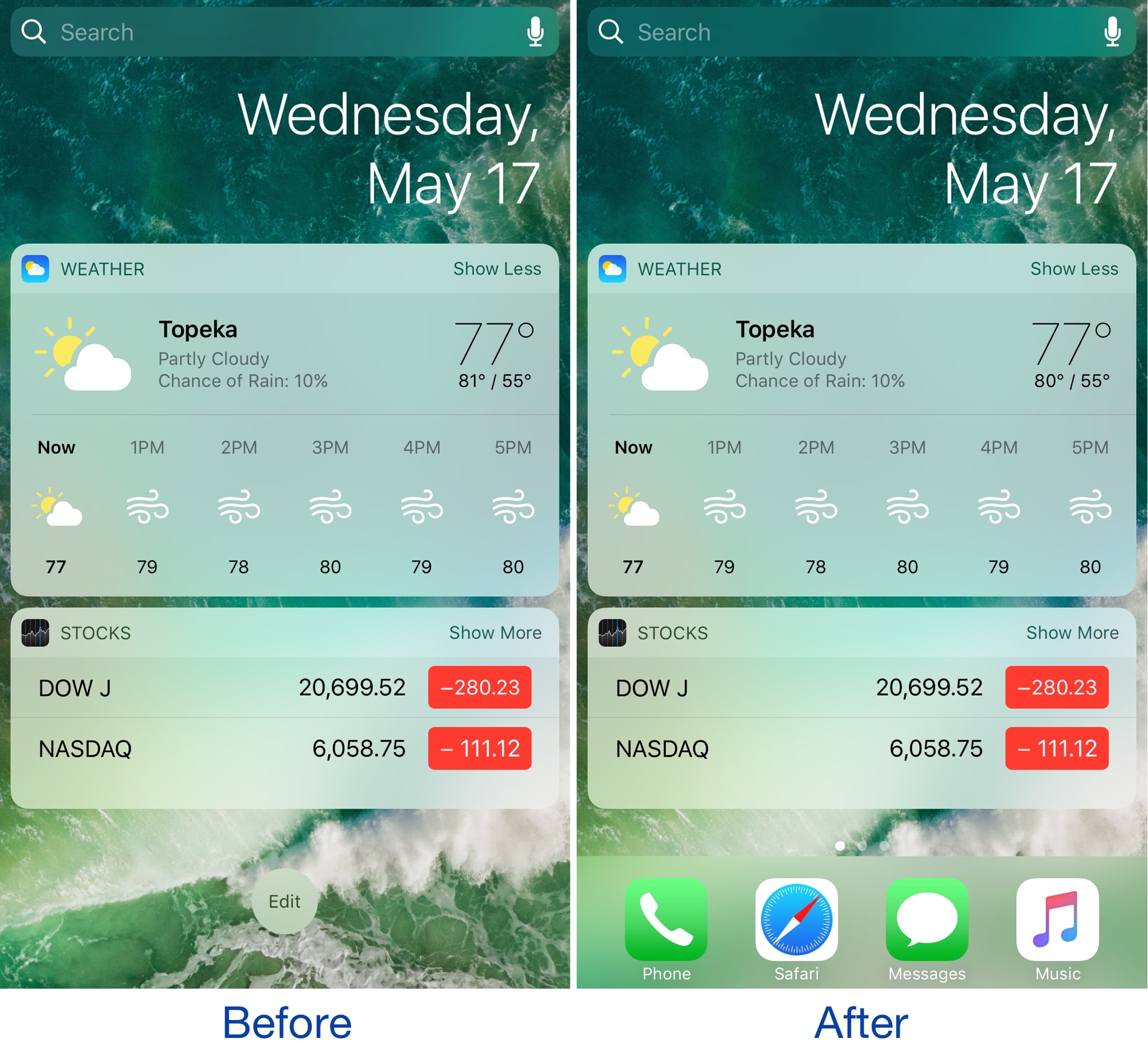
The Dock is a special part of the Home screen that houses your favorite apps and appears on all pages except for the Today page, which is where your widgets appear. On the other hand, if you wanted to change that, you officially can.

A new free jailbreak tweak dubbed ViewDockOnTodayView by CydiaGeek allows the Dock appear on the Today page with all of your widgets and in addition to all of your regular Home screen pages.

Google Photos launching automatically curated albums, photo books & sharing suggestions

During today's keynote address at Google's annual I/O conference for developers, the company announced a trio of smart features powered by machine learning intelligence.

For starters, the app now automatically curates albums for the user.

Even better, Google Photos provides suggestions when sharing photos with others. As a bonus, there's now an Apple Photos-like feature for ordering printed photo books from within the app.

But first, check out the new features for yourself in Google's video embedded below.

https://www.youtube.com/watch?v=SN_7r0mFf5Y

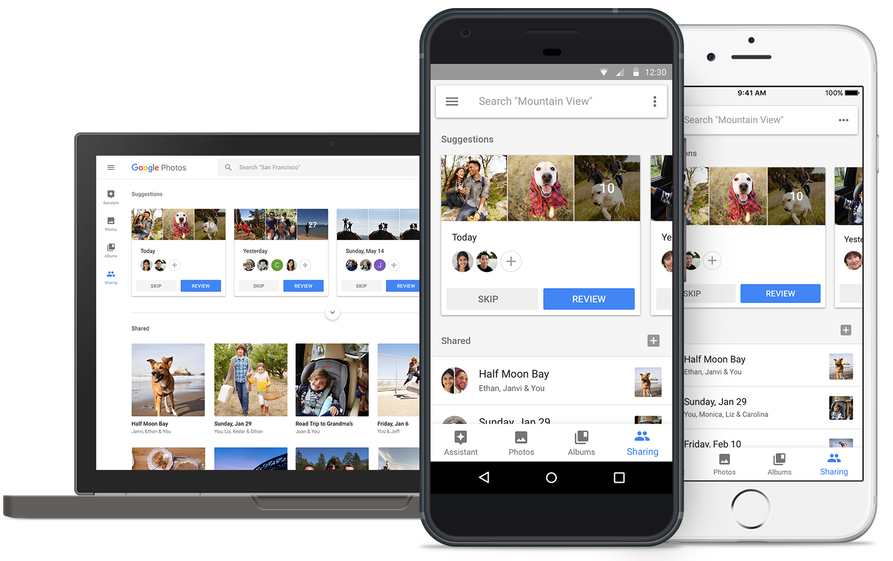
Sharing suggestions

Photos now uses Google's machine learning technology to remind you when it's time to share some photos. The app automatically select the right photos and even suggest who you should send them to based on who was in the photos.

All that's left for you to do is review the choices the app's made on your behalf before hitting that Send button. People you're sharing with will see all your photos and get a reminder to add theirs too. Your sharing activities are collated in the app's new Sharing tab.

This feature will be rolling out on Android, iOS and web in the coming weeks.

Automatically curated albums

Google Photos can now automatically share relevant photos with specific people. Say you took a bunch of photos of your kids: Photos may offer to automatically share them with your wife.

Called Shared Libraries, it lets you give a person access to your full photo library.

Don't worry, you can easily choose to limit sharing by having the app include just the photos of certain people or the images taken from a certain date forward. When the other person shares their library with you, you can automatically save their photos to your own library.

Shared Libraries will be rolling out on iOS, Android and web in the coming weeks.

Photo Books

Like with Apple Photos or services like Shutterfly, you can now order a printed coffee table book comprised of your best photographs without ever leaving the app. Simply select the images you'd like to fill your album with and Google's machine learning algorithm will pick the best shots, removing duplicates and poor quality images.

When placing your order, choose between a high-quality twenty-page softcover book for ten bucks a piece or a hardcover variant for twice as much. Your photo book will be delivered to that special person in your life in the mail.

This feature is rolling out today in the US on web, and on Android and iOS next week.

“We’ll bring photo books to more countries soon,” said the search giant.

Another feature that's coming soon to Photos: personalized suggestions for photo books (i.e. your trip to the Grand Canyon, time with family during the holidays, your puppy and so forth). Machine learning powers features in other Google apps, including smart replies in Gmail for iOS and the newly launched Assistant for iPhone app.

Grab Google Photos for free from App Store.

Gmail for iOS now uses machine learning to provide smart replies

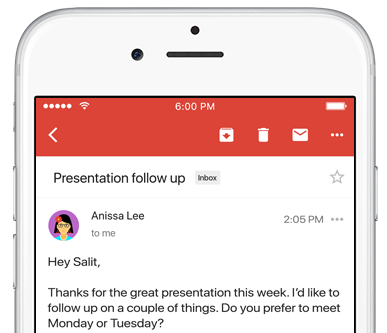
Google on Wednesday launched an updated version of the mobile Gmail app for iOS and Android, bringing out a handy new Smart Reply feature based on the company's machine learning technology. Like with canned responses in Apple's own Messages app, Gmail analyzes the contents of your emails to provide up to three canned responses based on what it thinks the sender is asking in their original message.

Smart Replies may include simple “Yes” and “No” responses. If the sender is asking whether to meet on Wednesday or Friday, Gmail may provide a bit more complex replies such as “Let's do Wednesday”, “Friday works for me” or “Either day works for me”.

Once you’ve selected one, you can send it immediately or edit your response starting with the Smart Reply text. By utilizing machine learning, the Smart Reply feature produces better responses the more you use it. “If you're more of a 'thanks!' than a 'thanks.' person, we'll suggest the response that's, well, more you,” says Google.

To learn about the smarts behind Smart Reply, check out the Google Research Blog.

Smart Reply will roll out globally in English first, with Spanish following in the coming weeks. Additional languages for Smart Replies will be added soon, Google has promised.

According to the search monster, the machine learning-assisted Smart Reply feature already drives twelve percent of replies in its Inbox email app.

Aside from Smart Replies in the Gmail app, today's keynote address at Google's annual I/O conference for developers saw the release of the official Google Assistant app for iOS.

Gmail for iOS is available at no charge from App Store.

Hey Siri, make some room for Google Assistant on my iPhone

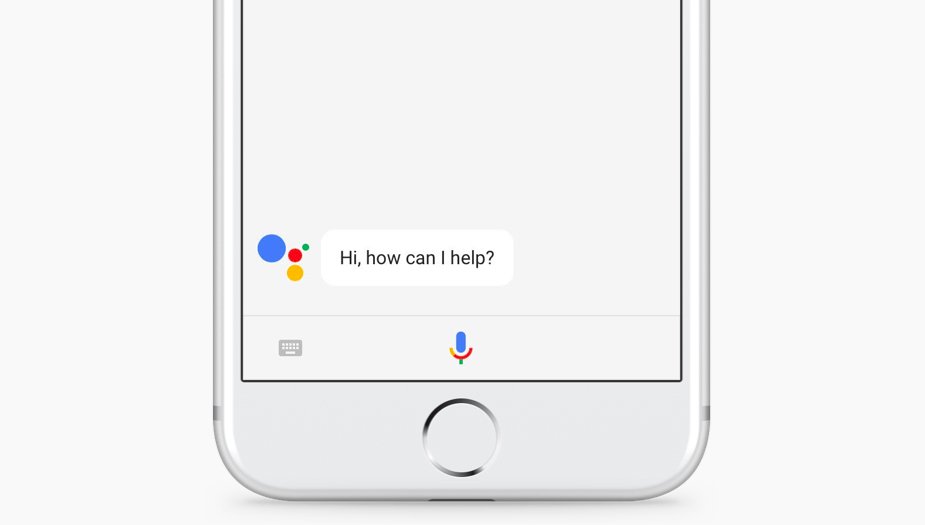
The rumors were true: the search giant Google today released a standalone Assistant app for iPhone to take on Siri. Available at no charge on App Store, it features a blend of the chat style functionality found in in the Google Allo version of Assistant and the voice-controlled version found on Android.

It even lets you call friends on Google Home or out on the town with your iPhone.

“Whether you need a reminder to pick up milk, help finding your travel photos or need to make a dinner reservation, your Assistant is ready to help,” says the company.

To get started with Assistant, press the microphone icon or start typing.

https://www.youtube.com/watch?v=VZ9MBYfu_0A

“And for when you want to see what you’ve previously asked, we’ll also soon add history within your conversation,” notes Google. And with an upcoming firmware update for Google Home, customers will be able to put responses to queries from Home's Assistant on a supported display, including your iPhone and even your TV (with Chromecast).

Apple users can use Assistant's chatbot-like capabilities as well as all of its interactive features without having to purchase Google's Pixel smartphone or another Android smartphone.

Here are a few things Assistant can help you with:

Make quick phone calls (“Call Mom”) Send text messages (“Text my bestie”) Send emails (“Email my boss the latest TPS report”) Set reminders (“Remind me to buy a birthday gift for Sarah”) Set calendar events (“Set a calendar event for dinner with Charlie tomorrow from 7-9”) Play music (“Play Jazz music on YouTube”) Navigate to places (“Get me directions home”) Ask it anything (“Will I need an umbrella today?”)

Google has promised to enhance Assistant with new features, including:

New chatbot abilities Integration with Google Lens technology

Google Lens will give Assistant for iPhone and Android some pretty cool camera capabilities with a little help from advanced artificial intelligence features. You'll be able to, for example, easily identify an object by pointing your phone's camera at it.

The company even demonstrated how Lens technology will permit Assistant users to snap up a photograph of a business's sign to quickly pull up useful information such as reviews, menu items, friend check-ins and other relevant data.

And in yet another example, Google demoed how Assistant could help Android users connect to a Wi-Fi network simply by taking a picture of a sticker on a router.

“If you see a marquee for your favorite band, you can hold up your Assistant, tap the Lens icon and get information on the band, tickets and more,“ said the firm.

Plus, starting today developers can build conversational apps for the Google Assistant on phones. In other words, soon you’ll be able to not only get help and answers from Google, but also from third party services.

The AI-powered helper will be rolling out to eligible Android phones in Brazilian Portuguese, French, German and Japanese, Google said. By the end of the year, Assistant will include additional language support for Italian, Korean and Spanish.

The company has more than 70 smart home partners supporting Assistant across Google Home, Android phones and iPhone, including August locks, TP-Link, Honeywell, Logitech and LG.

Assistant is already available on more than 100 million devices, said Google.

Grab Google Assistant for iOS for free via App Store.

The app requires an iPhone, iPad or iPod touch with iOS 9.1 or later.
Todoist gains 2-way Google Calendar integration, Dynamic Type support & more

Todoist, the popular cross-platform app for organizing work and errands, is launching a deep two-way integration between it and Google Calendar that lets the app directly pull information from Google Calendar and vice versa. In addition, the app now supports iOS's system-wide Dynamic Type feature and you can now mark individual notifications as read or unread.

Todoist + Google Calendar = winning combo

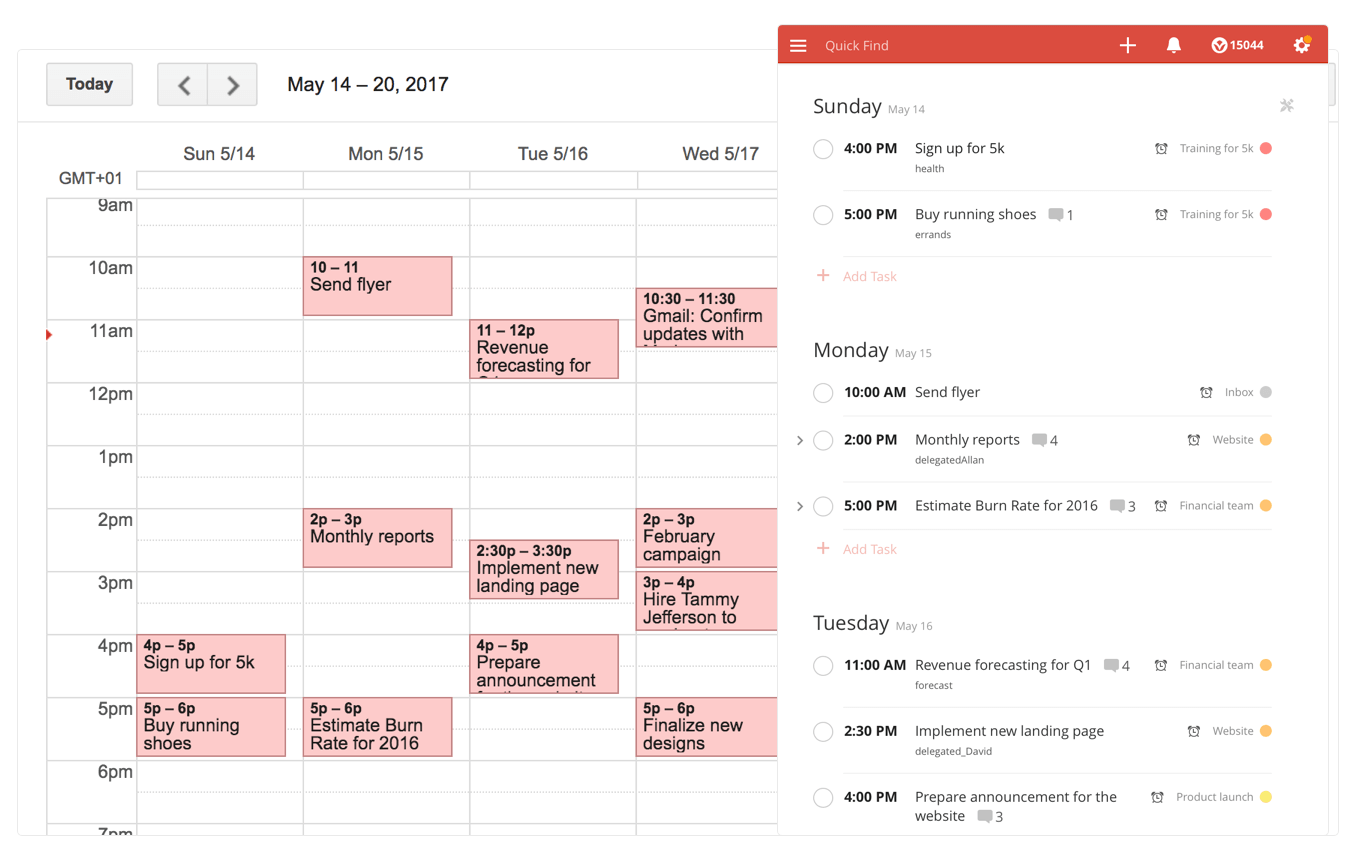
With a two-way sync between Todoist and Google Calendar, you can visualize, organize and prioritize your tasks from inside your calendar, with any changes made in Google Calendar being instantly reflected back in Todoist and vice versa.

To connect Todoist with Google Calendar, sign into the Todoist web app, click on the gear icon in the upper-right corner and choose Settings from the popup menu. Navigate to the Integrations tab and click Connect next to Google Calendar.

After signing into your Google Account, you’ll be asked which calendar you want your tasks added to, whether you'd like to sync your entire Todoist account or just a specific project, which Todoist project you want new Google Calendar tasks added to, a default event duration for new Todoist tasks in Google Calendar and whether or not you want to sync tasks with a due date but no time.

Once you authorize the integration, any tasks with a due date and/or time in Todoist will automatically be added to a Google calendar of your choosing (recurring tasks will create multiple events) The two-way sync allows you to create events in Google Calendar within Todoist, knowing they'll be automatically added to the Todoist project of your choosing.

All tasks created from Google Calendar have a default @gcal label, but you can change the label by editing the integration after you’ve connected the apps. You can even choose to only sync tasks from a specific project, if you'd like.

On the iPhone and iPad side, Todoist now supports Dynamic Type, a feature that makes it easy to adjust the font size in apps that support this feature. To make words in Todoist bigger or smaller, simply update to the latest version of the app on App Store and set your preferred text size but dragging the slider in Settings → Display & Brightness → Text Size.

To make sure you don’t miss any important updates in shared projects, Todoist for iOS now allows collaborators to mark individual notifications as read or unread.

As for Todoist for Mac, the app's design was refreshed yesterday to make it feel more at home on your Mac, including extending the theme color all the way to the top.

The smart-task Quick Add action has been overhauled as well. Faster than ever before, it now includes a shortcut to assign a task to someone else (just type “+” into the task name field to pull up a list of collaborators).

Todoist for iPhone, iPad and Apple Watch is a free download from App Store.

Todoist for Mac is available free via Mac App Store.

Viber for iPhone gains chat pinning and adjustable notification sounds

Rakuten-owned messaging app Viber is launching a pair of interesting enhancements in its mobile app for iPhone and iPad. The first improvement comes in the form of handy new options for adjusting Viber's default notification sound on a per-chat basis. The other enhancement lets you easily pin your favorite conversations to the top of the chat screen.

Aside from these improvements, Viber 6.8.8 for iPhone and iPad, a free download from App Store, includes unspecified bug fixes and performance improvements.

Chat pinning

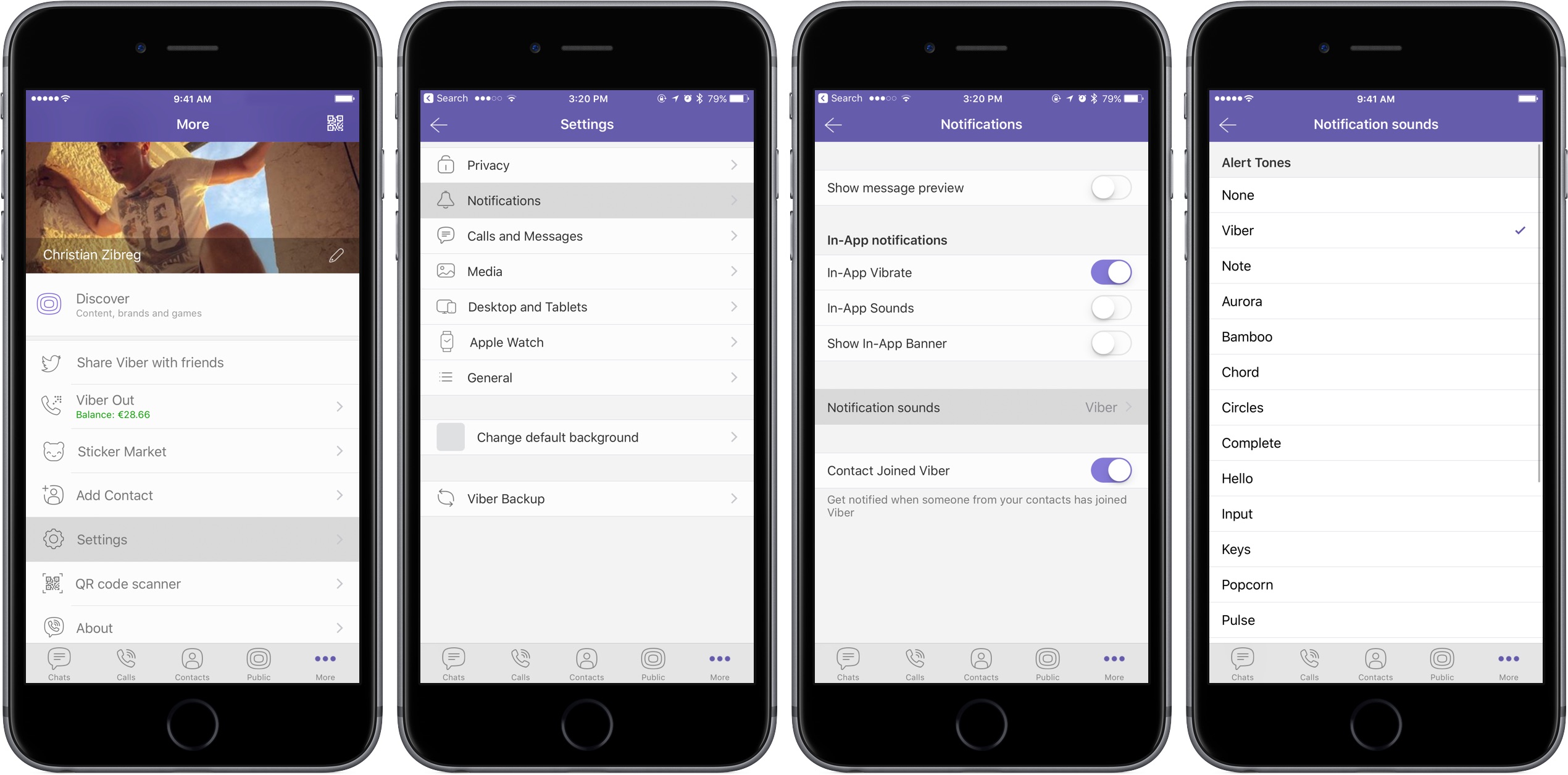
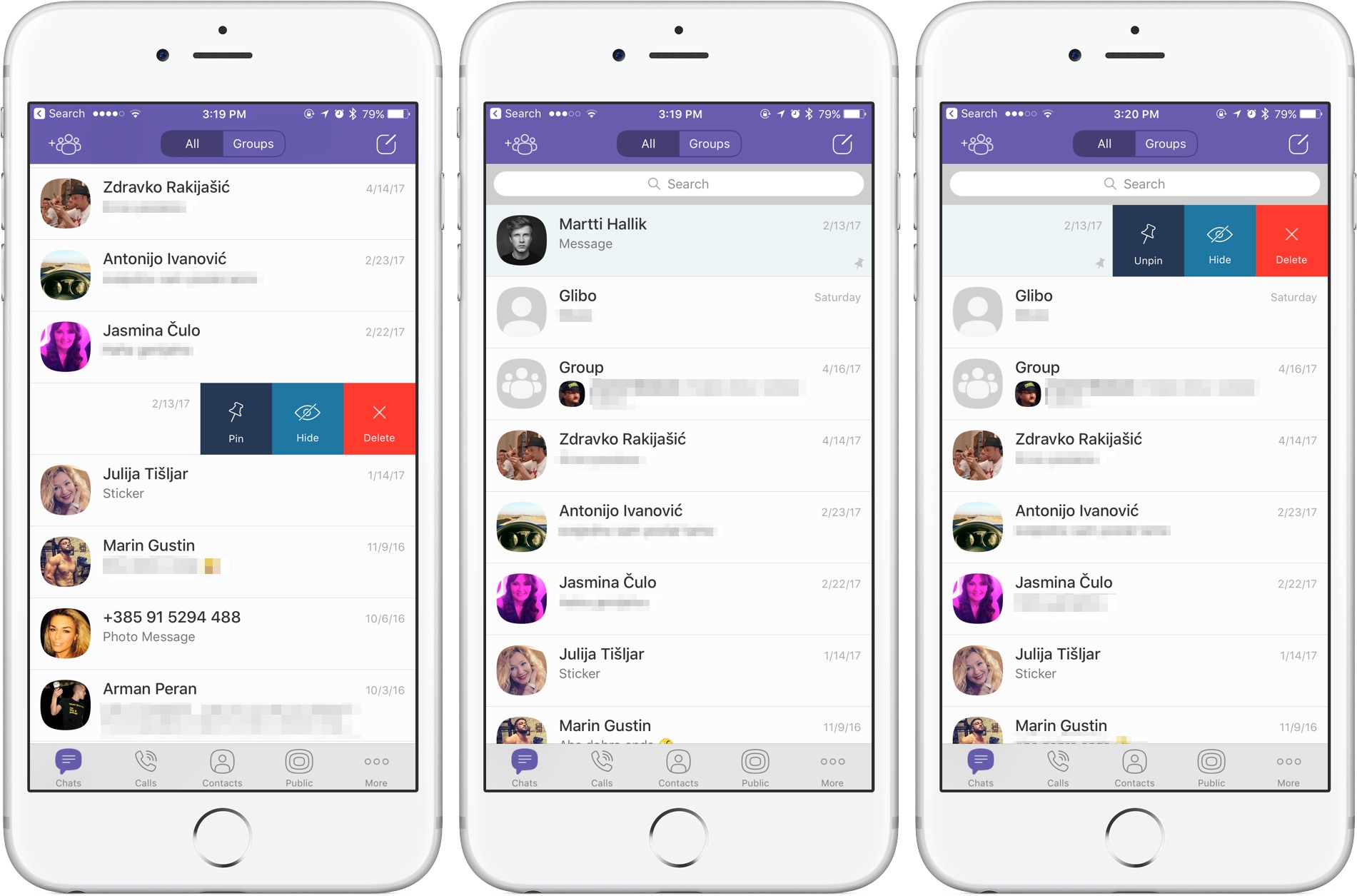
With this feature, you can pin your favorite conversations to the top of the chat list where they're easier to spot. To pin a chat, swipe the conversations in the chat list, then select Pin to pin it to the top of the screen or Unpin if it's already pinned and you'd like to unpin it, as shown on the screenshots top of post.

Rival WhatsApp from Facebook is said to be working on chat pinning, too.

Custom notification sounds

Viber now allows you to override its default notification sound and replace it with the sounds listed in Settings → Sounds. You can choose a new default sound for all Viber notifications or select a different notification sound on a per-chat basis to make it easier to audibly distinguish between notifications for new messages from, say, your Mom and a co-worker.

Download Viber 6.8.8 for iOS via App Store.

Apple to soon require app-specific passwords to access your iCloud data

According to an Apple Support email sent out today, all native third-party apps for iPhone, iPad, Mac and other platforms will be required to use app-specific passwords to access user data stored in iCloud, not Apple ID credentials.

App-specific passwords went into effect in October 2014.

Back then, enabling two-step verification for Apple ID would turn on app-specific passwords for web-based apps and services. Starting on June 15, app-specific passwords will become a mandatory requirement for any native app that wishes to access user data in iCloud.

You can generate app passwords in the Password & Security section of the Apple ID website.

A password created for one app, like Outlook, doesn't work in another app like Spark.

Come June 15, you'll be automatically signed out of all apps that use your Apple ID credentials. As an example, if you set up Fantastical for Mac with your Apple ID to access your iCloud calendars, you'll need to generate an app-specific password to continue accessing your iCloud calendars from within the app on and after June 15.

In simpler terms, you'll be required to enable two-factor authentication for your Apple ID and generate individual passwords for each app after the cutoff date.

The change is platform-agnostic: if you use Windows 10's Mail app to receive your iCloud data like contacts and calendars, you'll need to create an app-specific password for it. This is for the sake of everyone's security because signing into third-party apps with your primary Apple ID password may expose you to various attacks and hacking attempts.

To be clear, this only affects apps which access iCloud in a non-native way, which includes email clients like Outlook, Thunderbird and others. If an app has been updated to use iCloud Drive, it won't need an app-specific password to access user data in iCloud.

Bottom line: Apple still lets you grant apps access to your iCloud data, but soon you'll be able to do so in such a way that keeps your primary Apple ID password safe and secure.

Apple's first-party apps are not affected by this change.

Instagram rolls out selfie filters, rewind option for videos, hashtag sticker & eraser brush

Instagram today announced several new capabilities for its mobile app, including selfie filters via the front-facing camera in what appears to be yet another effort to copy the last big Snapchat feature. Aside from face filters, Instagram 10.21 also includes a rewind playback option for videos, a new hashtag sticker an an eraser brush tool.

Face filters

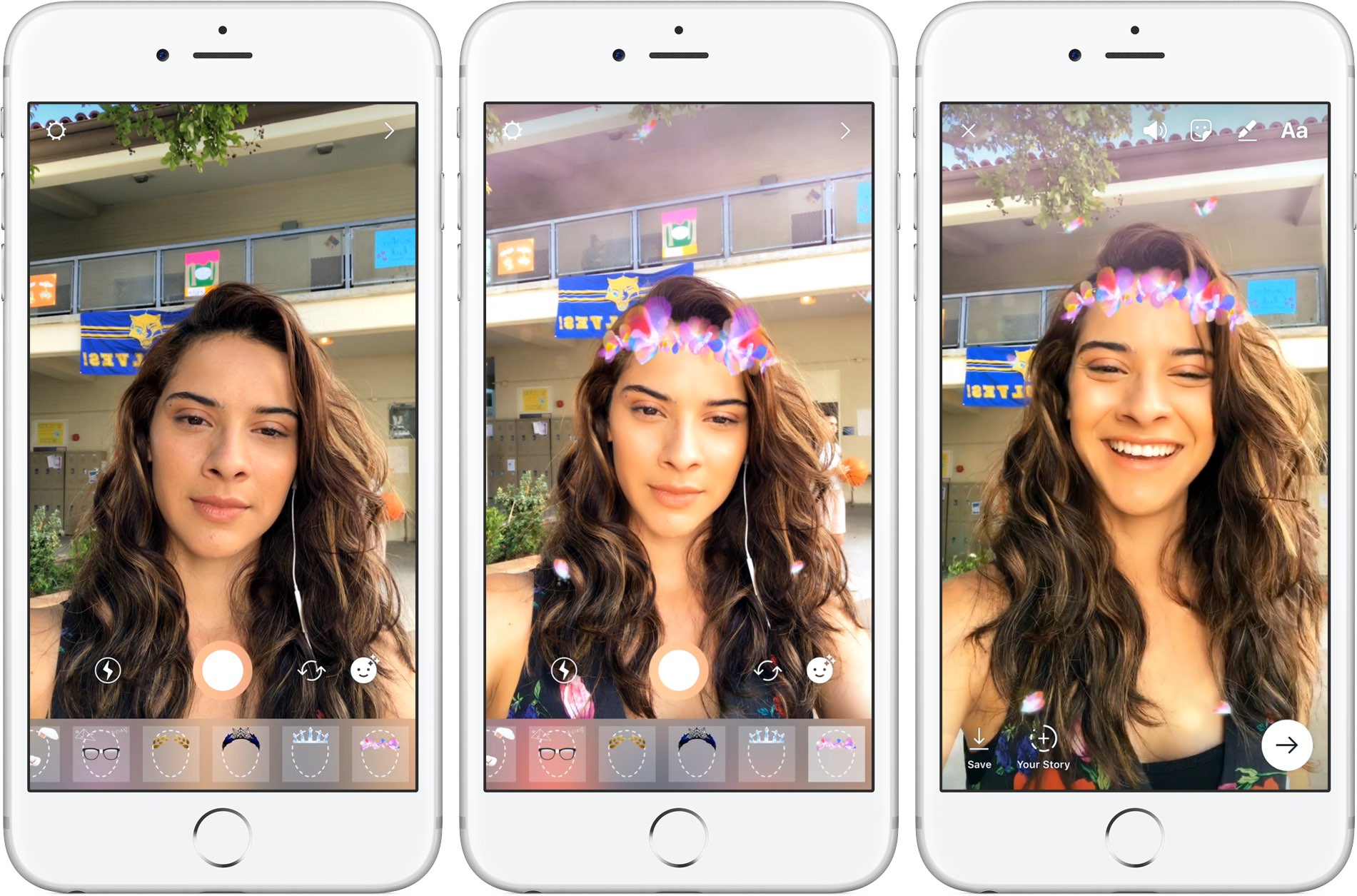
With all-new face filters in the Instagram camera, you can turn an ordinary selfie into something fun and entertaining. A total of eight different face filters are included at launch, with more to be added at a later stage via future updates. To get started with this feature, tap the new face icon in the bottom-right corner of the Instagram camera.

Simply tap a filter to try it on.

The filters include effects ranging from math equations swirling around your head to furry koala ears that move and twitch. “Whether you're sitting on the couch at home or out and about, face filters help you express yourself and have playful conversations with friends,” noted the Facebook-owned company.

https://vimeo.com/217551217

Some of the filters work with a friend.

Moreover, all the face filters included in this edition of Instagram work with Boomerang, meaning you can now add an unexpected twist to the videos you share.

Rewind option for videos

Instagram also provides a new Rewind playback option for videos.

A new camera format next to “Boomerang” and “Hands-Free”, “Rewind” lets you share a rewind of your video. This mode captures your video normally, then makes it play in reverse.

Hashtag stickers

A new hashtag sticker joins Instagram's existing stickers and geofilters. To get started with it, tap the sticker icon in the top-right corner, then choose and customize the new hashtag sticker before adding it to your own Story.

Like with mentions, you can add hashtags using regular text as well.

Hashtag stickers are interactive: folks watching your Story can tap the hashtag sticker or text to visit the hashtag page and explore related posts.

Eraser tool

With the new eraser brush, you can remove parts of drawings or color.

Instagram advises selecting the fill tool after you’ve taken a photo or video to fill the entire screen with color. Then, using the new Eraser tool, you can easily and quite creatively reveal parts of your photo or video underneath.

These new features are available as part of Instagram 10.21 for iOS.

To learn more about these updates, check out Instagram's Help Center.

Instagram is available at no charge from App Store.

Google could launch Assistant for iOS soon as a standalone app

After unveiling Assistant at Google I/O a year ago, the search giant is now expected to bring its AI conversational helper to iPhone and iPad in the form of a standalone app, AndroidPolice reported Monday. The app should be announced at Google's annual developers conference, which kicks off on Wednesday, May 17, at Shoreline Amphitheatre Mountain View in California.

Assistant for iOS will only be available in the US at launch, said a trusted source cited in the report. Assistant's SDK  was just made available to developers so bringing the app to Apple's mobile platform could encourage more developers to integrate with its functionality.

Here's an excerpt from the article:

The app would likely feature a blend of the "chat" style functionality in the Google Allo version of Assistant and the voice-controlled version found on Android, but again, details are scant.

Rather than roll out Assistant as a standalone app, Google could fold its functionality into the existing search app for iOS, which supports Google Now cards but not Assistant.

https://www.youtube.com/watch?v=Wsic12MXlsc

A company executive hinted two months ago that Google's general philosophy is that “we would like to have the Assistant available to as many people as possible.”

After debuting exclusively on Google's Pixel line of smartphones in October of last year, Google Assistant soon after made its way into into Google’s voice-activated speaker, called Home, the latest version of Android Wear and a few devices from third-party vendors.

It powers AI features in Google's messaging app Allo and will be at the heart of the new Android operating system for touchscreen car consoles and in-car infotainment systems.

You can expect the feature to become integrated over time into virtually every major device Google makes, as well as into its most important consumer-facing services and mobile apps.

Reddit Enhanced is a tweak that lets you customize the official Reddit app

If you frequently use Reddit, then chances are you have the Reddit app on your iPhone or iPad for ease of access. While it’s useful for perusing the boards, it does have its shortcomings.

To get around many of the shortcomings, a new free jailbreak tweak called Reddit Enhanced by iOS developer Tom Effects offers a bevy of new options that let you fine-tune the Reddit app to better fit your personal needs.

Big Keys, Subtotal, Dazzle Browser, and other apps to check out this weekend

This week's edition of our Apps of the Week roundup includes a third-party keyboard with extra large keys, a new app for saving money, and a mobile-friendly web browser. And as always, we have two great new games for you to check out this weekend.

Big Keys

Big Keys is exactly what it sounds like: a third-party iOS keyboard with extra large keys. I'm sure this isn't a brand new concept and the third-party keyboard implementation in iOS is pretty rough, but with Mother's Day this weekend, I figured this was worth a mention. Anyone who has trouble typing on (or seeing) the tiny keys on the iOS keyboard will love this. Now it only works in landscape mode, but you get large keys and large emojis. Plus it has a numeric keypad, supports gestures, and it's customizable. Big Keys is available for $2.99.

Subtotal

Get up to 10% cash back when eating out with the app Subtotal. It's simple: at the end of your meal, select your restaurant. Follow the on-screen instructions to enter and pay your bill (supports Apple Pay). Present the on-screen barcode to your waiter—it works just like a gift card. You get your cash back in a few days. Now it's a new thing, so only a handful of restaurants are supported so far (Applebee's, Chili's, Red Robin, etc.), but this seems like an app worth checking out for folks who want to save money with little effort. Subtotal is available for free.

Dazzle Browser

The third-party iOS web browser space is a tough one to get into. Apple's Safari, of course, has a huge head start with prominent placement and performance enhancements. Google's Chrome has solidified itself as the official runner-up. Then there are a bunch of smaller browsers fighting for a distant third. Dazzle throws its hat into the ring with a simple, mobile-first interface. It was built for one-handed usage with a unified search bar located towards the bottom of the app, and the ability to quickly swipe between pages. Dazzle Browser is available for free.

Sky Gamblers Races

Your favorite fighter plane franchise is back with the ultimate air racing game. Featuring more than 90 highly detailed WWII planes, Sky Gamblers Races tasks players with building their reputation on the air racing circuit. Unique visuals, sound effects, and gyroscope controls make for an immersive gaming experience. There are over 100 races in different environments and 5 game modes: normal, slow down, elimination, timed races and death races. You of course can customize your plane and even race opponents in real time. Sky Gamblers Races is available for $2.99.

Crash Club

If you're looking for something a little different this weekend, Crash City is the anti-racing game. Drive anywhere you want in this big coastal city, break everything and take down other drivers for points to rule the leaderboard! Massively multiplayer action with over 30 players live and real time in every game. Everything can be crashed, with weapons and abilities available in the middle of the action. There are over 25 unique cars that can be customized in both looks and performance. Crash City is available for free (with some IAPs).

More apps to check out Drop everything (except your bags) – this app is all you need for grocery shopping Apple’s free app of the week: Little Kitten Meet Breaker, a young podcast app with a social twist Infuse media player gains supercharged subtitles, 10-bit video playback & more PDF Expert 6 for iOS is out with revamped look, enhanced search, new editing tools & more Apple’s Workflow app gains new Apple Music actions, brings back Chrome and Pocket integrations