iPad

From the latest news to the most comprehensive tutorials, learn how to get the most out of your iPad with our step-by-step guides and expert tips.

How to decrease ‘Other’ storage on iPhone or iPad

The infamous 'Other' storage section displayed in iTunes after connecting an iPhone, iPod touch or iPad to a computer is definitely one of the pain points for users mainly because it keeps increasing on its own.

'Other' storage is a combination of system settings, caches and various files that iOS stores temporarily to speed up system performance and minimize your dependency on network connectivity.

This all happens automatically and without any intervention on part of the user. That said, software can (and will) break and so these files may not get cleaned out properly. And when that happens, a large amount of storage will be lumped into the 'Other' category. The good news is, your proactiveness in dealing with this issue should pay off.

It's actually fairly easy to recover your usable storage lost to 'Other' space hogs by specifically targeting certain items. In this post, we'll lay out a few different techniques to decrease 'Other' storage on your iPhone or iPad.

How to open ZIP files on iPhone using the Notes app

Although neither Apple's Safari nor Google's Chrome browser can extract files from ZIP archives on iOS, it has been discovered that Apple's Notes app lets users view the contents of ZIP files by taking advantage of iOS's built-in file attachment viewers.

Starting with iOS 9, Notes has received several new features, among them support for adding content to a new or existing note through iOS's multi-purpose Share menu in apps like Safari, Maps, Pages and more.

As it turns out, you can also use iOS's Share menu in conjunction with the “Open In” feature to add a downloaded ZIP file to a note on your iPhone, iPod touch or iPad.

Apple promises a fix for iPhone bricking stemming from date and time bug

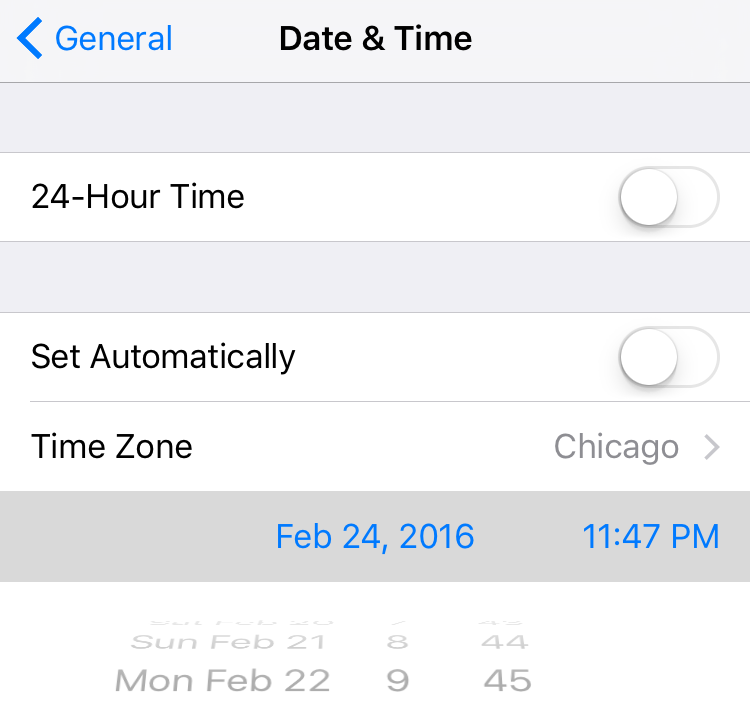
A newly published support document from Apple, which was first discovered by German blog Apfelpage.de, has acknowledged an issue where any 64-bit iPhone could be bricked by setting the date back to a specific time, causing it to fail to boot properly and requiring a physical repair to put the device back into working order.

According to the document, a permanent fix for the problem will be released as part of a future software update. Meanwhile, the affected iPhone owners are advised to contact Apple Support.

How to share iCloud calendars

Apple's Calendar application for the iPhone, iPod touch, iPad, Mac and iCloud.com makes it simple to share events and to-dos with select people, or let anyone with a link subscribe to a read-only calendar.

For example, you could share a “To Do” calendar with your significant other, create a calendar for your entire family so every member can put errands on it, invite your wife to a shared “Kids” calendar to keep parents in the loop about school activities and more.

Not only do shared calendars increase your productivity in the workplace, they help those who use them become more organized in everyday life. You can assign edit privileges to invitees, adjust how participants access the calendar and more.

Invitees have a myriad of options at their disposal to view shared calendars, including the iCloud Calendar web app, the stock Calendar app on the iPhone, iPad, iPod touch and Mac or Microsoft Outlook on a Windows computer.

In this tutorial, you will learn how to share a calendar privately or publicly on iPhone, iPad, Mac and iCloud.com. You will also learn how to manage calendar sharing by adding or removing participants, changing privileges, adjusting calendar notifications, and more.

iPhone 5se and iPad Air 3 expected to launch March 18

Apple is planning to launch the iPhone 5se and iPad Air 3 on Friday, March 18th, reports 9to5Mac. Citing sources familiar with the matter, the outlet claims the launch of the long-rumored 4-inch iPhone and third-gen iPad Air will follow their unveiling at an event on Tuesday, March 15th.

If true, this would mark a departure from Apple's usual launch cycle, in which products are introduced one to two weeks before they are available for sale to the public. Unsurprisingly, 9to5Mac's Mark Gurman says that because of the quick turnaround, Apple is unlikely to offer pre-orders.

How to view, search and edit Safari passwords

If you're tired of always having to log in, Safari will happily save web passwords in your keychain. Even better, the browser can automatically fill in your user names and passwords the next time you visit your favorite websites.

And with the iCloud Keychain feature, your saved passwords can be synchronized across devices in a safe, secure manner. In this tutorial, you're going to learn how to search saved Safari passwords without needing to visit their websites, view your saved logins, as well as add, delete and manage saved passwords. 

Abstract puzzler The Mesh goes free as Apple’s App of the Week

Apple on Thursday updated its weekly App of the Week promotion with a game called The Mesh. This means that for the next 7 days, you'll be able to pick up the popular puzzler for free for both iPhone and iPad—a solid savings of $2.

In The Mesh, players are tasked with combining numbered tiles to match target values and clear the board without running out of space. The game features beautifully-designed graphics and animations, and an incredible soundtrack.

Don’t try this at home: iPhones apparently getting bricked after date is set back to a specific time

According to a post on Reddit and reports out of China, it is possible to brick an iPhone by setting the date back to a specific time.

I wasn't brave enough to test it myself, but the post claims the bug only affects 64-bit iOS devices.

It would seem that changing the device's Date & Time values to a specific point in time would cause it to fail to boot properly.

Basically, it gets bricked and stuck at the Apple logo boot image. Neither DFU mode nor restoring from a backup would bring a bricked device back to life as a physical repair is required to put it back into working order.

‘Other’ storage on your iPhone and iPad explained

For most users, the ‘Other’ iOS storage category—reported after connecting an iOS device to desktop iTunes—is something of a mystery. ‘Other’ storage starts at one to five percent of total device capacity but can quickly creep in to a few gigabytes.

This post will unravel the mysteries behind 'Other' iOS storage, explain what it's used for, how iOS manages it and what you can do to decrease it.

Twitter rolls out a new timeline feature

Twitter's bird logo set against a transparent background

The pressure mounts on Twitter to re-ignite growth, which has virtually come to a halt as average users increasingly find the service too confusing and difficult to use. Today, the micro-blogging service unveiled yet another refinement designed to adjust how the timeline surfaces interesting content.

Similar to the “While you were away” timeline feature which released a year ago, Twitter will now put recommended, not the newest, tweets at the top of your timeline so that you never miss important updates from people you follow.