iPad

From the latest news to the most comprehensive tutorials, learn how to get the most out of your iPad with our step-by-step guides and expert tips.

PreferMyFi 2 lets you designate preferred Wi-Fi networks

A lot of times, there might be more than one Wi-Fi network in a given location. Sometimes one wireless router is broadcasting multiple channels on a guest/private basis, and other times there are simply more than one wireless network. In any case, you likely have a personal preference in terms of which one you like to connect to.

For anyone in this kind of predicament, a new free jailbreak tweak called PreferMyFi 2 by DillanCodez can be very useful in ensuring you’re always connected to your network of preference whenever possible.

Apple seeds fifth betas of iOS 10.3, watchOS 3.2 and tvOS 10.2

Following yesterday's release of macOS Sierra 10.12.4 beta 5, Apple on Wednesday issued fifth betas of iOS 10.3, watchOS 3.2 and tvOS 10.2. Registered developers and members of the Apple Developer Program can install iOS 10.3 beta 5 (build 14E5269a), watchOS 3.2 beta 5 (build 14V5243a) and tvOS 10.2 beta 5 (build 14W5260a) over-the-air through the Software Update mechanism provided their devices have a special configuration profile, available on Apple's portal for developers.

Apple says many exploits revealed in WikiLeaks dump are already patched

Yesterday, WikiLeaks stunned the world by publishing a cache of 8,761 secret documents detailing dirty tactics that organizations like the CIA leverage in order to hack not just iOS and Android devices, but also computers, routers and televisions. In a statement issued to news outlets like TechCrunch, and subsequently posted to Twitter by BuzzFeed's John Paczkowski, a company spokesperson confirmed that Apple had already patched many of the fourteen exploits mentioned in the WikiLeaks dump, codenamed “Vault 7”.

Neverthink takes cues from TV era, plays videos in place of programs

If you sampled a bunch of people and asked them about their favorite downtime activities, chances are there would be a fairly even split in numbers between respondents choosing a good book over other forms of entertainment and those drawn to the audiovisual media instead. Folks of the latter segment know best for themselves where to get their daily dose of videos from, but places such as Netflix, Youtube or Hulu are generally speaking a solid bet. Internet empowered services aside, there is credible chatter that in the shadows of society, some renegades continue to resort to a traditional TV set for their spate of mindless diversion.

Whether you find yourself all too often hunting for new videos to watch during lunch break or you identify with the dwindling TV crowd, a brand new app called neverthink could be for you. That’s because it marries the old-fashion convenience of always-on programming with the excitement of the sometimes mercurial internet. Neverthink wants you to never again think about what videos to dig up next and their way of going about it is unique enough to potentially strike a chord with you.

Instagram launches geostickers in Stories

Instagram has aped Snapchat all over again, this time by launching geostickers which I'm sure you know are location-based stickers originally popularized by Snapchat. This cool feature is live in just two cities, for now, but you can bet they'll be aggressively rolling it out in additional markets as rapidly as humanly possible. If you happen to live in Jakarta or New York City, use geofilters to spice up your Instagram Stories with visual accessories representing your present location, down to the neighborhood.

Adobe brings HDR RAW capture to Lightroom for iPhone and iPad

Adobe's mobile Lightroom app is slowly but surely becoming a viable alternative to Google Photos and Apple's Photos app with iCloud Photo Library.

In the most recent update to Lightroom for iPhone and Lightroom for iPad, a dynamic range RAW capture that was previously only possible when shooting with a DSLR or mirrorless camera is now available on latest iOS devices.

Additional improvements in this edition of Lightroom for iOS include 3D Touch support on iPhone 6s/7 series, a Notification Center widget, the ability to export your original images, including DNGs and RAW files, and more.

Save your custom edits and share them as reusable looks via QR codes in latest Snapseed update

Google today rolled out another update to its free of charge photography app, Snapseed. In Snapseed 2.16, you can now save your complex edits as reusable looks.

You can apply saved looks to other images with a few taps or share them with friends and other Snapseed users via QR codes. This Snapseed update also lets you apply the Structure filter to individual areas with the Selective tool.

WikiLeaks reveals CIA’s tactics for breaching iPhones, iPads, Windows, smart TVs & more

WikiLeaks today published a cache of 8,761 secret documents detailing tactics the United States Central Intelligence Agency (CIA) relies on for breaching iPhones, iPads, Android smartphones and tablets, Windows PCs and even routers and smart TVs. It's currently unclear if the documents—available to peruse on the group’s website—have serious privacy and security implications. Dubbed “Vault 7”, the leak has been teased on WikiLeaks' Twitter account for a few weeks prior to its release.

Customize Control Center with CCPlus

Control Center made iOS devices more usable after debuting post-iOS 7, as it allows you tinker with settings and shortcuts without ever having to open an app to do so. On the other hand, Apple still doesn’t give the user even the most basic of customization options, which leaves a lot to be desired. Fortunately, the jailbreak community picks up the slack in this department.

With a new free jailbreak tweak called CCPlus by iOS developer Skitty, you can configure the look and feel of Control Center so it reflects what you want, rather than what Apple expects it to be.

TapTap Statusbar lets you hide and show your Status Bar with a tap

There may be times when you actually want to see your Status Bar, but sometimes you might feel just the opposite and have the desire to hide it away from view. One might want to do this when inside of certain apps where the Status Bar appears on top of an interface, like in the Pokémon GO app, for instance.

With a new free jailbreak tweak called TapTap Statusbar by pxcex, you can easily hide or show your Status Bar on demand with a simple tap gesture.

This tweak hides the background of the predictive keyboard

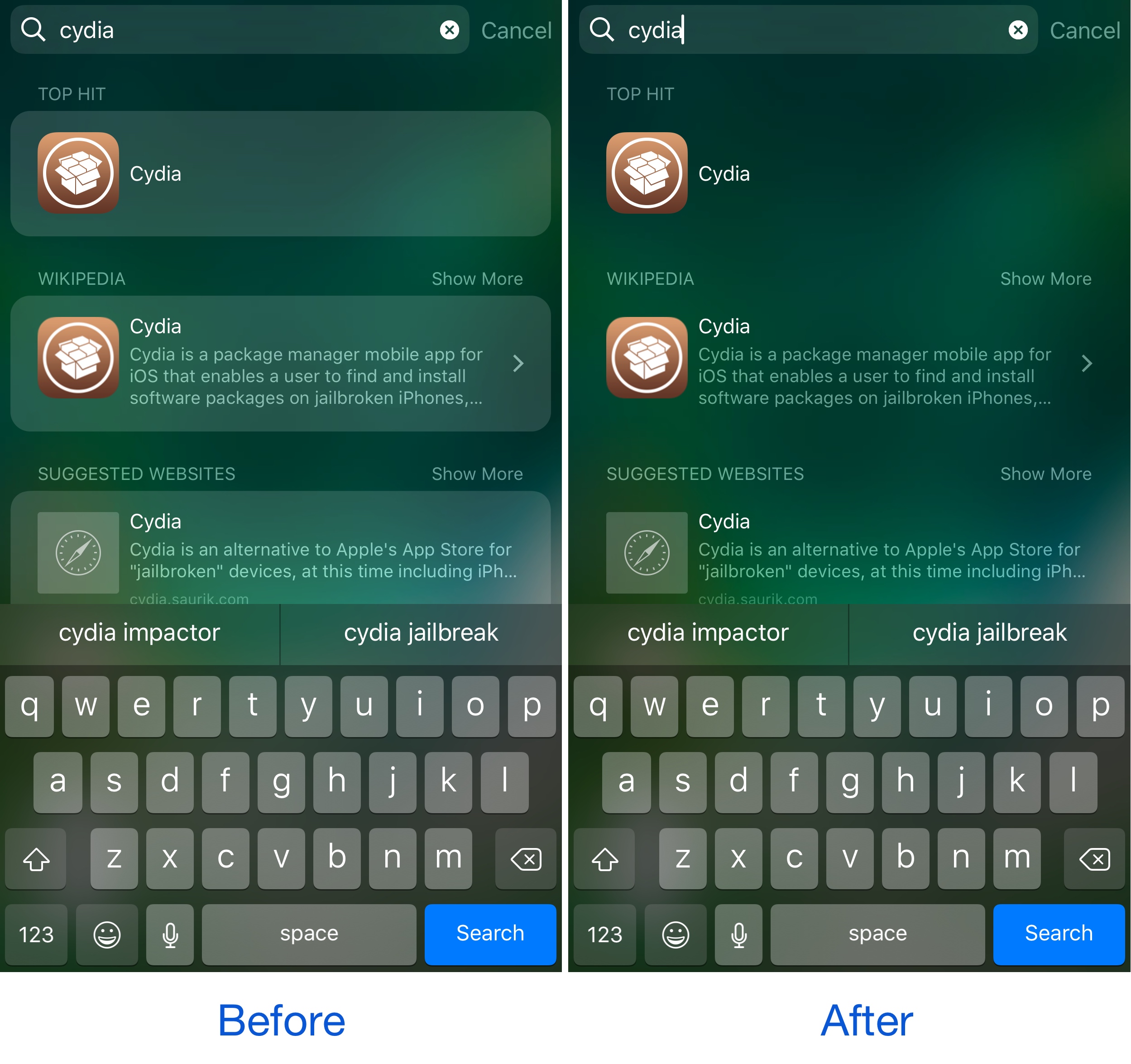
If you ever use the predictive keyboard to type faster responses to people from your device, then you’re likely familiar with those ugly separator lines in between the suggested words and the unappealing difference in background color that the buttons have when compared with the rest of the keyboard.

A new free jailbreak tweak called KB - NoPredictiveBackground by pxcex removes the background color and lines from the predictive keyboard buttons, leaving you with much cleaner-looking buttons.