Apps

Say ‘hello’ to Overglide, a tiny game playable from the Lock screen and Notification Center

I should have suffixed the headline with “no jailbreak required” for added punch. Yes, Overglide for the iPhone and iPad indeed is a tiny game that you play within iOS 8's Notification Center and right on the Lock screen, even while your iOS device is locked.

This cave flyer has you piloting a paper plane as far as possible while dodging the obstacles, and it even comes with Game Center leaderboards and achievements.

How's that possible? Read on or grab Overglide for 99 cents in the App Store and see for yourself.
Ubisoft releases official companion app for Assassin’s Creed Unity

Ubisoft has today posted the official companion app for its new hit console and PC video game, Assassin's Creed Unity. Set within Paris, during the French Revolution, this is the seventh major installment in the popular Assassin's Creed series.

Those who have purchased the game, or plan to, will definitely want to check out the app, which includes a 3D, interactive map and glyph puzzles that unlock new Brotherhood missions. It also offers useful content like tutorials and training tips.

Netflix’s iOS 8 refresh adds 1080p playback on iPhone 6 Plus and support for iPhone 6 screens

Netflix, a $7.99 per month over-the-top streaming video service, at last has gotten around updating its iPhone and iPad application for Apple's latest mobile operating system.

Released Tuesday, the new version is now optimized for iOS 8 while supporting 4.7-inch and 5.5-inch display sizes of Apple's latest iPhone 6 and iPhone 6 Plus, respectively.

And if you own an iPhone 6 Plus and are a Netflix subscribers, you can now stream TV shows and movies in glorious full HD and enjoy 1080p content natively on that stunning Retina HD display.

Netflix 7.0 is available for free in the App Store.

Living Earth gains universe simulator, adds weather essentials to iOS 8’s Notification Center

Living Earth by Radiantlabs marries world clock functionality to a gorgeous weather app where you spin a virtual globe (similar to Google Earth) to get a visual overview of the current weather conditions for any part of our planet.

Bumped to version 3.5 on Tuesday, the app now features support for the new iPhone 6 and iPhone 6 Plus screens and includes a Today widget giving you a quick overview of your current weather along with sunrise and sunset times, your world clock and more, right within the Notification Center in iOS 8.

In the app itself, the virtual globe now acts as a universe simulator of sorts, with the stars, constellations and the Milky Way backdrop created from a database of thousands of stars and celestial object and placed exactly “as if you were floating in space orbiting our planet.”

Living Earth sells for $1.99 for the iPhone and iPad.

SoundHound gets iPhone 6 support and fresh new look for faster music discovery

SoundHound's music-tagging iOS app has received a makeover Tuesday morning putting the software in line with the design aesthetic in iOS 7. New features are available for faster music discovery, with native display support for the new 4.7-inch iPhone 6 and 5.5-inch iPhone 6 Plus display sizes and other goodies.

The refreshed interface features swiping based navigation that tucks the Search button and other options under a left-side column revealed by swiping left.

You can also swipe right like you would in other iOS 7 apps to go back to the previous page and you'll notice a new nicely animated listening screen as well.

SoundHound is free in the App Store.

Mailbox for iOS updated with new interactive notification options

The popular email client Mailbox has been updated this morning, bringing the app to version 2.3.3. As the build number suggests, it's a minor release, but it does include a slew of bug fixes and performance improvements and a pair of new interactive notification options.

Among the many new features added in iOS 8 is interactive push notifications. These allow developers to add simple actions to their app's notifications, which is what the Mailbox team has done in 2.3.3. You can now choose to archive or snooze emails with just a single tap.

Notability updated with iOS 8 compatibility, iPhone 6 support, new light/dark themes and more

Notability by Ginger Labs, Apple's Free App of the Week in May 2014 and one of the most popular note-taking apps in the App Store, on Monday issued its long-expected iOS 8 compatibility release in the App Store.

Version 5.3 offers support for iOS 8 and the new 4.7 and 5.5-inch resolutions of the iPhone 6 and iPhone 6 Plus, respectively.

In addition to enhancing compatibility with the current version of Apple’s mobile operating system, this edition of Notability brings out a pair of new themes, revamped icons and menus in line with the overall iOS 8 look and feel and improvements regarding iCloud Drive support.

Notability for the iPhone and iPad is $2.99 in the App Store. The Mac edition will run you ten bucks.

Paper by FiftyThree updated with push notifications, Adobe integration and more

FiftyThree has updated its popular Paper app this weekend, bringing it to version 2.1. The update is significant in that it adds a handful of major features such as push notifications for Mix, and the ability to export drawings to Adobe's Creative Cloud.

Pulled out of beta last month, Mix is a collaboration platform that offers templates, outlines, tools and tutorials for users to openly share projects. When launched, the feature would send you alerts you via email, but now it sends them via notifications.

IGN names ‘Ridge Racer Slipstream’ its Free Game of the Month

Heads up gamers, IGN has named BANDAI NAMCO's 'Ridge Racer Slipstream' its Free Game of the Month for November. So for those who missed it when it was Apple's App of the Week earlier this year, you now have the chance to grab the popular game for free.

Normally priced at $2.99, Ridge Racer Slipstream recreates the ultimate arcade racing franchise on your iPhone and iPad with console-quality graphics and high octane gameplay. It includes 12 customizable cars, over 100 competitions and a lengthy career mode.

Fleksy Keyboard can now use iOS typing shortcuts

Despite not being an avid user of third-party keyboards in iOS 8, I'm always eager to try out any new soft-keyboard that hits the App Store.

Fleksy's recent update caught my attention by making me realize that I didn't know everything there is about the scope and limitations of third-party keyboards under iOS 8.

For example, did you know soft-keyboards are allowed to use your typing shortcuts defined in Settings > General > Keyboard > Shortcuts? Fleksy's latest update has implemented just that and it works like a charm.

Fleksy Keyboard costs $0.99 in the App Store.

Facebook introduces new ways to customize your News Feed

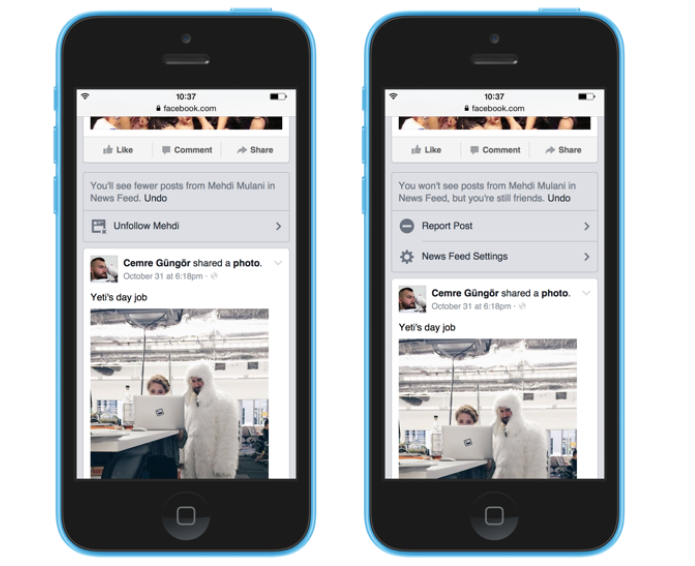
As part of an ongoing mission to improve its News Feed experience, Facebook today announced that it has built and updated a few tools to help you customize the content you see everyday. These tools are located in the News Feed settings menu (More > Help & Settings, on mobile).

Of course customizing your News Feed is all about controlling who you see posts from. Starting today, you'll be able to quickly unfollow and re-follow people, Pages and Groups. Unfollowing of course means you're still friends with the user, but will no longer see their status updates.

Vevo’s iOS app gains Recently Watched, Google login, search improvements and more

Vevo, a video hosting service operated by a joint venture of Universal Music Group, Google, Sony Music Entertainment and Abu Dhabi Media, on Friday refreshed its iPhone and iPad application with a few new features.

You can now log in to the app using a Google Account and keep track of what you've watched in a new "Recently Watched" section. You should see improvements in Vevo's search and visual tweaks on the browse page and artist pages.

Vero is available at no cost in the App Store.