iOS 11

Apple confirms 3D Touch app switching was intentionally removed from iOS 11

The convenient 3D Touch power-user gesture for quickly opening iOS's app switcher has disappeared from iOS 11 beta. According to Apple Engineering's response to a Radar that developer Bryan Irace recently filed regarding its removal, the gesture was pulled intentionally from iOS 11 beta and might not be coming back in subsequent betas.

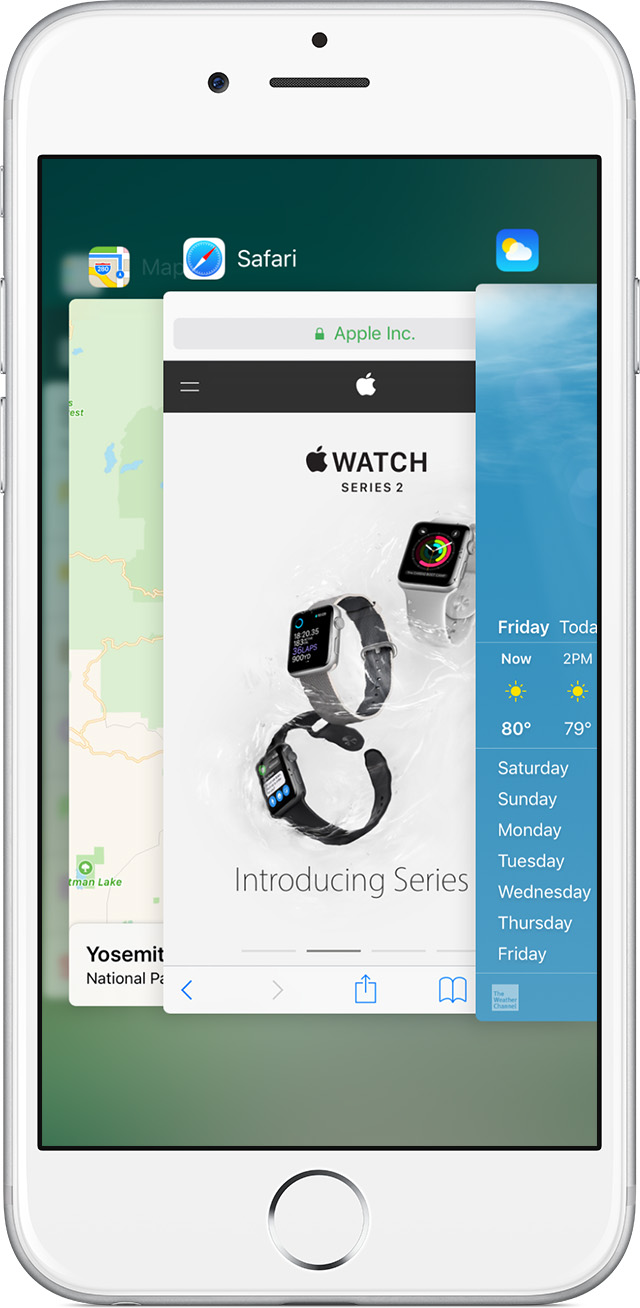
On iOS 10 and older, you can view your recently used apps by pressing the left side of the screen with 3D Touch. You can also use 3D Touch to quickly switch to a previous app by pressing the left edge of the screen hard, then swipe right.

Neither gesture works in iOS 11 beta.

When asked about the removal, Irace received the following reply from Apple Engineering:

Please know that this feature was intentionally removed.

The wording confirms it's not a bug—Apple did remove this power-user gesture on purpose.

Here's the screenshot of Apple's response to Irace's Radar.

I have a problem with the wording of the statement.

For starers, it doesn't make it 100 percent clear whether or not they intentionally removed the gesture from iOS 11 beta only for it to return in subsequent betas. We were, of course, hoping it was merely a bug. But the fact that it isn't listed as a known issue in the release notes accompanying the iOS 11 installer is rather telling.

This could be related to iPhone 8.

With major design changes coming to the next iPhone in the form of a nearly full-screen face with a seamless OLED display, the feature's removal might quite possibly indicate a brand new way of accessing iOS's app switcher on iPhone 8.

I wish Apple made it an optional setting rather than remove it completely. That way, people who still wanted it could keep it. On the other hand, Apple has stats on iOS features people use and perhaps numbers for the app switching 3D Touch thing were dismal, who knows?

The fact is, it doesn't make much sense if you use your Plus iPhone model right-handed. Besides, I know many people who accidentally activate it all the time and get annoyed.

Could it have been deprecated by iPhone 8, because it was too easy to trigger accidentally without a bezel around the display? Will iPhone 8's rumored function area at the bottom doubles as an app switcher of sorts? Last but not least, has Apple decided to remove the gesture because very few people were using it or were unaware it existed in the first place?

Tell us what you think in the comments section!

How to stop iCloud Photo Library from eating into your iPhone’s cellular data plan

iCloud Photo Library is an optional feature on iPhone, iPad, iPod touch and Mac that uploads every photo and video you take or import to iCloud and keeps everything synchronized across all your Apple gear. I've been using it for years and it really “just works”.

On iOS 10 and earlier, Photos syncs with iCloud each time your device connects to Wi-Fi and the battery is charged. On iOS 11 and later, Photos can also use your iPhone's cellular data connection to sync and update the image library.

Do you take many photos on the go? Are you on a metered rather than an unlimited plan? Then you don't need me to tell you that you must ensure you're not wasting huge amounts of cellular data to this feature.

Here's how to stop the Photos app from eating into your iPhone's cellular data plan.

Before we get to it, keep in mind the following:

iOS 10 and earlier—Your Photos library syncs with iCloud each time your device connects to Wi-Fi and the battery is charged. iOS 11 or later—You decide if Photos syncs with iCloud via cellular or Wi-Fi only.

In other words, you should double-check that cellular updates for iCloud Photo Library are turned off only if you're on iOS 11 or later. Folks on older iOS editions needn't do that because Photos syncs with iCloud only when their iPhone is connected to power and Wi-Fi.

How to stop iCloud Photo Library on iPhone from using cellular data

12-megapixel images and 4K videos captured on your iPhone take up quite a bit of storage space. For most people, there's no point allowing iOS to gobble up cellular data just to keep the image library synchronized with iCloud at all times.

Thankfully, you can prevent this from happening, and here's how:

1) Launch the Settings app on your iPhone or cellular iPad.

2) Tap Photos in the list.

3) Tap Cellular Data.

4) Slide the button labeled Cellular Data to the OFF position.

This device will no longer use your carrier's cellular data for updating the Photos library. Any changes to your image library will automatically upload to iCloud as soon as the device connects to power and Wi-Fi.

TIP: If you really need Photos to be in perfect sync with iCloud at all times, even on the go, via cellular and Wi-Fi, be sure to slide the toggle labeled Unlimited Updates to the ON position.

The feature's description says “unlimited updates may cause you to excess your quota“.

Need help? Ask iDB!

If you like this how-to, pass it along to your support folks and leave a comment below.

Got stuck? Not sure how to do certain things on your Apple device? Let us know via help@iDownloadBlog.com and a future tutorial might provide a solution.

Submit your how-to suggestions via tips@iDownloadBlog.com.

Apple (again) reminds developers that iOS 11 won’t run 32-bit apps

Following the iOS 11 public beta release, Apple has reminded developers that iOS 11 will be 64-bit only. The notice posted yesterday on Apple's Dev Center cautions that all 32-bit apps previously installed on users’ devices will not launch after they upgrade to iOS 11.

“As a reminder, new iOS apps and updates submitted to the App Store must support 64-bit,” reads the notice. Apple recommends that developers who haven’t updated their apps to support 64-bit submit an update “so your users can continue to run your apps on iOS 11”.

TUTORIAL: How to identify 32-bit apps installed on your iPhone and iPad

Because iOS 11 is 64-bit only and doesn't support legacy 32-bit apps, users should experience a bit faster performance and fewer crashes. That's because iOS 11 will never need to load 32-bit frameworks, libraries and the kernel alongside their 64-bit counterparts needed to support legacy apps, which effectively strains the RAM and other resources.

https://www.youtube.com/watch?v=-hoPcMPvL88

Subscribe to iDownloadBlog on YouTube.

Apple’s Clips app already requires a 64-bit iOS device and iOS 11's new Files app is optimized for 64-bit computing, too. Starting with iOS 10.3, Apple began naming and shaming legacy apps via a new App Compatibility section in Settings → General → About → Applications.

The new advisory regarding 32-bit apps was posted just a day after the company invited developers to update their product pages on App Store for iOS 11's much-improved, thoroughly redesigned App Store.

iOS 11 will be in the hands of “hundreds of millions of customers” this fall.

Apple asks developers to update their pages for iOS 11’s all-new App Store

Apple on Tuesday invited its registered developers and members of the Apple Developer Program to update their product pages for iOS 11's much redesigned App Store.

Specifically, developers can showcase their content with subtitles, promotional text, additional app previews that they can localize and up to 20 promoted In-App Purchases that users can buy on App Store, even if they haven't downloaded an app that offers them.

A dedicated section on Apple's portal for developers offers useful resources for making the most of the new product pages. Like before, new metadata is entered in iTunes Connect.

“Metadata you provide in iTunes Connect is shared across App Store on iOS 11 and iOS 10.3 and earlier, so you only need one version of product page elements, such as app name, icon, screenshots and keywords,” notes Apple.

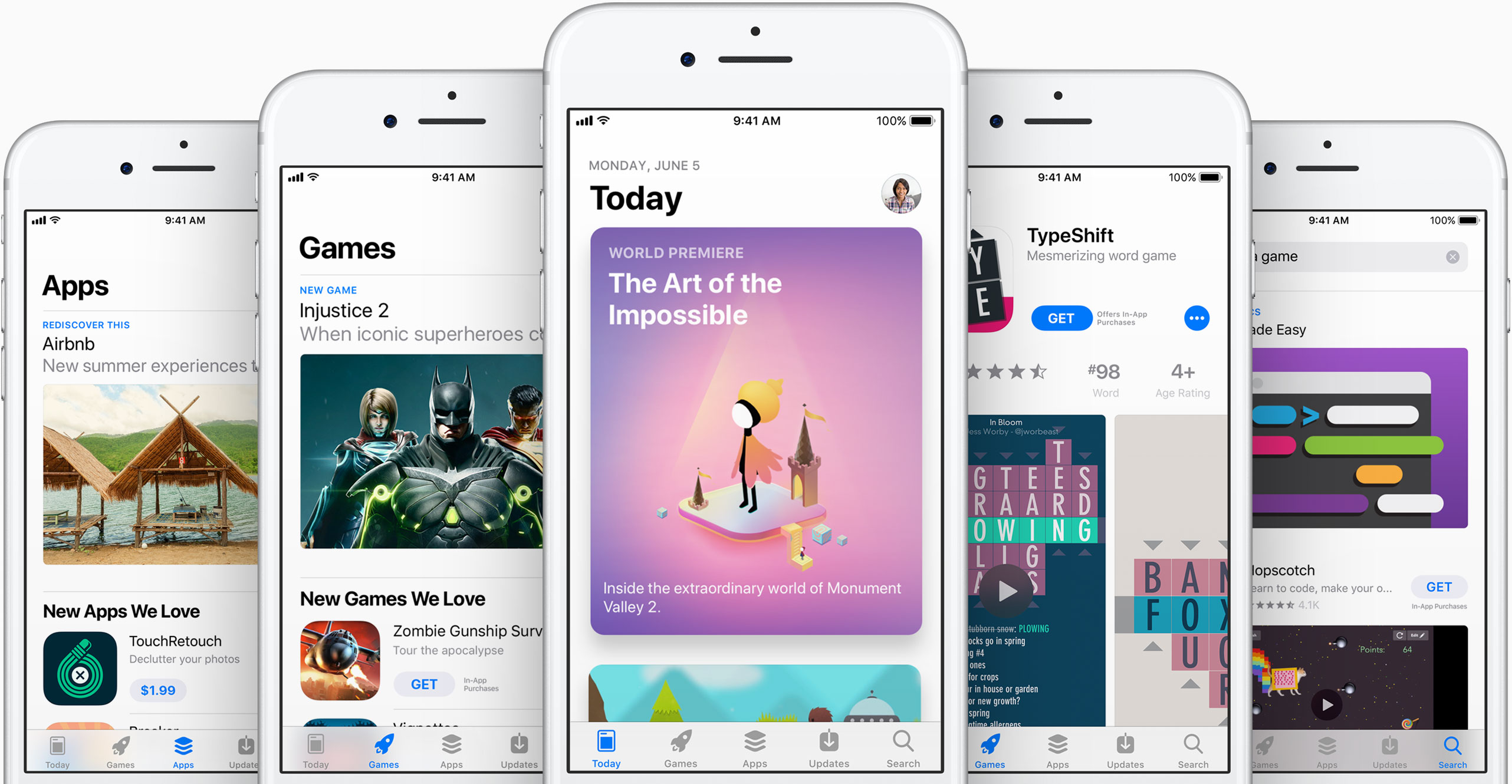
iOS 11's App Store features competently revamped product pages while providing dedicated Apps and Games tabs along with a new Today tab with original stories, editorial, tips, how-tos, interviews and more, updated daily, in a blog-like format.

https://www.youtube.com/watch?v=-hoPcMPvL88

Subscribe to iDownloadBlog on YouTube.

The App Store redesign lets developers spotlight apps with more engaging content, putting the most important information front and center for the customer making a download decision.

Developers can now submit up to three video app previews and five screenshots, which can now be localized so a user in any country can have a customized version of the video.

Accolades including Editors’ Choice and chart position are now highlighted by App Store, as are In-App Purchases and customer ratings and reviews.

The new App Store is now available as a preview to users of the iOS 11 public beta. Once iOS 11 launches for public consumption this fall, the redesigned App Store will be in the hands of hundreds of millions of users around the world.

App Store customers have now downloaded more than 180 billion apps and Apple has paid out over $70 billion to developers since the store launched in 2008, making it the most vibrant software marketplace in the world, according to the Cupertino giant.

More ARKit demos: Falcon 9 rocket landing, Van Gogh bedroom tour & more

Wouldn't it be great if you could take a tour of Van Gogh's virtual bedroom in augmented reality? How about witnessing a Falcon 9 rocket descending from the skies?

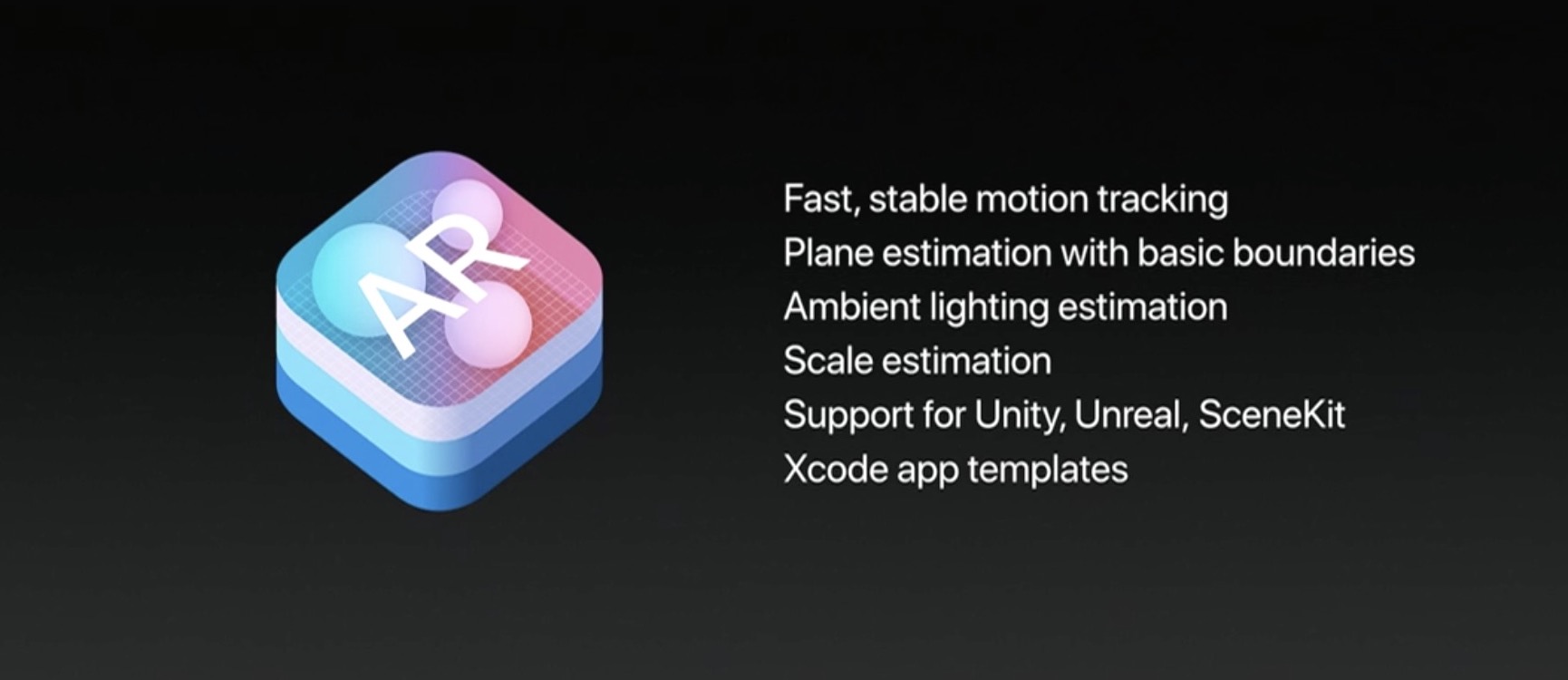
ARKit, Apple's new framework for building augmented reality apps for iPhone and iPad, has captured the imagination of many iOS developers out there who have already created some truly awesome examples of what's possible with ARKit.

For starters, here's an example of ARKit's accurate tracking.

https://www.youtube.com/watch?v=dMEWp45WAUg

Developer Mark Dawson used ARKit to create a virtual copy of Van Gogh’s bedroom which you can walk around and examine detailed furniture, paintings on the wall and more.

ARKit has “amazing tracking,” Dawson said.

https://www.youtube.com/watch?v=lvjVgt_ce5Q

ARKit combines live camera feed and sensor data to find tables, floors and other horizontal planes in your real world. Speaking of which, This example shows ARKit's plane detection.

https://www.youtube.com/watch?v=9ZnG9wrVxtM

And this is adding geometry and physics with ARKit.

https://www.youtube.com/watch?v=Vsk9erdCvdk

In this demo, ARKit is tracking a virtual cube and providing a light estimate for the scene, which makes it easy to change the light intensity of the virtual object to match the real world.

https://www.youtube.com/watch?v=7Kk6iVr5ULo

Notice how when the lights are dimmed down the virtual cube also automatically dims, then when the lights are raised the virtual cube also gets brighter. Pretty neat, wouldn't you say so?

And here you can see ARKit detecting horizontal planes in the real world and rendering content using SceneKit with physically based rendering.

https://www.youtube.com/watch?v=rNFQl7I4T6Y

Developer Tomás García shared this cool demo depicting a Falcon 9 landing at the ASDS in a swimming pool, which he accomplished using ARkit and Unity.

https://www.youtube.com/watch?v=NodGjd3C0SQ

And lastly, German company Econsor Mobile GmbH has been working on an ARKit-powered app for commissioning of construction projects directly on the construction site.

https://www.youtube.com/watch?v=PJWTXefVDK8

Apple CEO Tim Cook thinks augmented reality is a big idea like the smartphone.

“The smartphone is for everyone, we don’t have to think iPhone is about a certain demographic, or country or vertical market: it’s for everyone. I think augmented reality is that big, it’s huge. I get excited because of the things that could be done that could improve a lot of lives. And be entertaining,” he said in the past.

How do you like these latest ARKit demos, which one is your favorite, and why? Does ARKit show a lot of promise, do you think? Share your thoughts by posting in the comment section.

Apple launches public betas of iOS 11 and tvOS 11

Following the June 5 release of developer-only previews of Apple's four main software platforms at the Worldwide Developers Conference, the Cupertino giant today released first public betas of iOS 11 and tvOS 11.

You must enroll in the official Apple Public Beta Software Program (available at no charge) and download a special configuration profile via the website beta.apple.com to your iPhone, iPad, or the fourth-generation Apple TV.

Sign in with your Apple ID through the website to get started. iOS 11 public beta has the same features as iOS 11 beta 2. The same goes for the tvOS 11 public betas.

After installing a configuration profile (click “Enroll Your Devices”), restart your iPhone, iPad, iPod touch or the fourth-generation Apple TV, then and use the built-in Software Update mechanism in the Settings app to download and install the public beta.

watchOS betas are not available to the general public.

https://www.youtube.com/watch?v=TZ5pwZMPRxI

Subscribe to iDownloadBlog on YouTube.

“If you were testing a prior operating system, please re-enroll your device to start testing the next release,” the company notes.

TUTORIAL: How to unenroll from Apple Beta Software Program

Be sure the check out the official system requirements for iOS 11 before installing their public betas. tvOS 11 requires a fourth-generation Apple TV.

Will you be taking iOS 11 and tvOS 11 for a spin, do you think? If so, what features are you looking forward to the most, and why?

Tell us in comments!

Updated builds of iOS 11 and tvOS 11 betas now available

Apple on Monday issued a slightly revised build of iOS 11 beta 2 for iPhone, iPad and iPod touch, as well as an updated build of tvOS 11 beta 2 for the fourth-generation Apple TV.

The new builds appear on select devices only.

iOS 11 Developer Beta 2 Update 1, as it's called, has the build number of 15A5304j, up from the build number of 15A5304i in iOS 11 beta 2 which was seeded to developers five days ago.

According to the official release notes on Apple's Dev Center portal, iOS 11 Developer Beta 2 Update 2 resolves an issue preventing reverting to iOS 10 from iOS 11 beta.

To revert to an earlier version of iOS, follow the instructions shown in Apple's support doc.

As for the updated tvOS 11 beta, the new version has a higher build number of 15J5310h versus build number of 15J5310e for the original tvOS 11 beta 2.

https://www.youtube.com/watch?v=TZ5pwZMPRxI

Subscribe to iDownloadBlog on YouTube.

The revised beta builds may also patch dangerous exploits while addressing performance issues on older hardware like iPhone 6.

iOS 11 cuts off 32-bit devices like the iPhone 4s/5/5c handsets.

The new builds are available over the air via the Software Update mechanism in Settings on iPhone, iPad, iPod touch and Apple TV. As mentioned before, they appear on select devices.

Build numbers for beta 2 of macOS High Sierra 10.13 and watchOS 4 have stayed intact. Public betas of iOS 11, macOS High Sierra 10.13 and tvOS 11 are coming later this month.

watchOS betas are currently unavailable for public beta-testing.

Watch new ARKit demos: Minecraft and measuring tape

The website madewitharkit.com dedicated to highlighting cool apps made with Apple's new ARKit framework, was updated today with a pair of new video demonstrations showing off some of the augmented reality possibilities coming to iPhone and iPad with iOS 11 this fall.

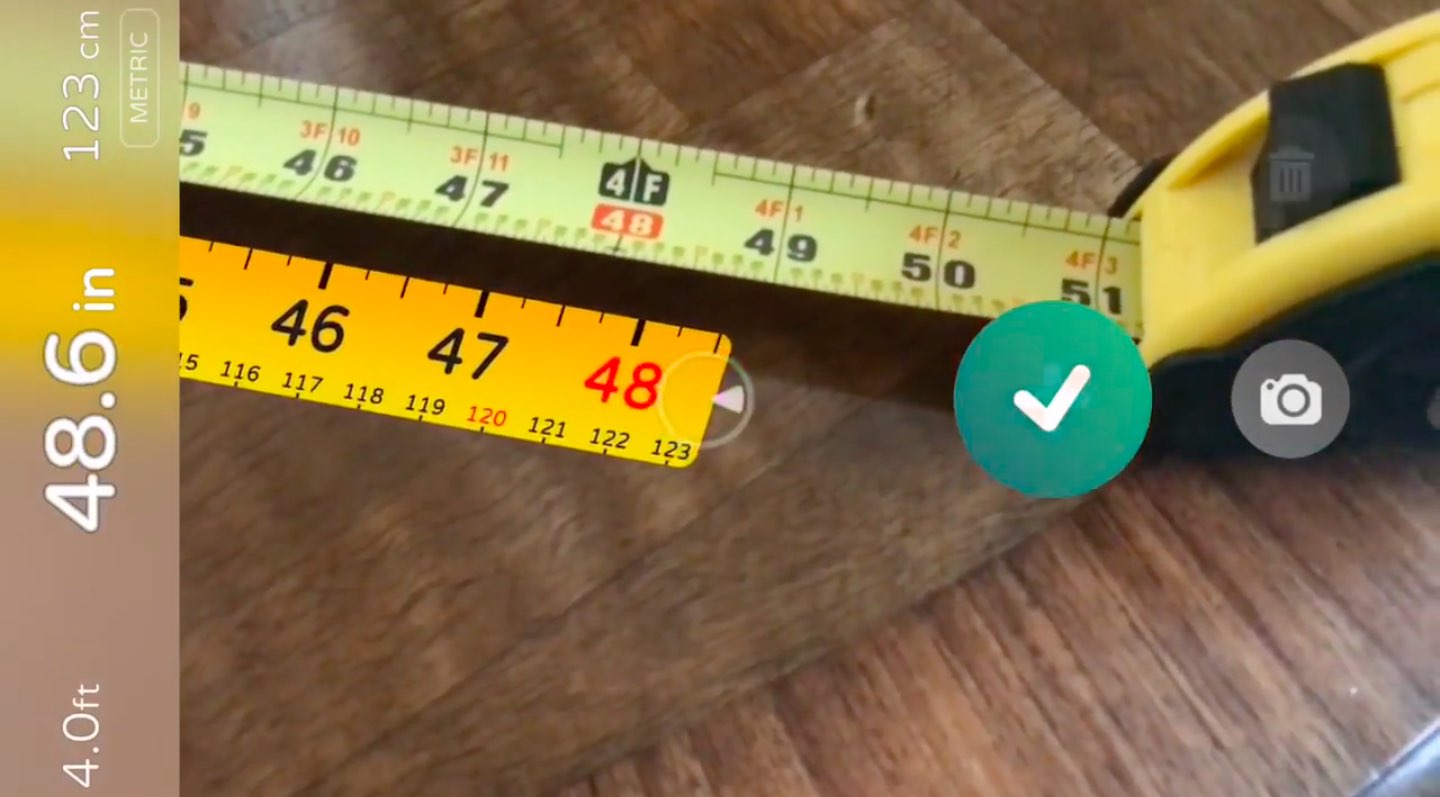
The first demo has the user selecting two spots in the real world, as viewed through an iPhone's lens, to calculate the distance between them, transforming the device into a working tape measure. That's a great example of the power of the ARKit framework.

https://www.youtube.com/watch?v=z7DYC_zbZCM

The app was built by Laan Labs and, like other ARKit-enabled apps, uses an iOS device's camera along with sensor data to precisely find horizontal planes in the real world, such as tables, floors and other objects.

You can beta-test the app by signing up at armeasure.com.

Measure distances with your iPhone. Just because you can. Clever little #ARKit app by @BalestraPatrick https://t.co/b2mXe2FS84 pic.twitter.com/pyoHp99Yts

— Made With ARKit (@madewithARKit) June 25, 2017

Laan Labs has other examples of proof-of-concept apps built using ARKit on their Twitter, like the following example of impressive 3D drawing in augmented reality.

https://twitter.com/laanlabs/status/878692051889655808

As for an AR-enabled Minecraft, we don't know if Minecraft creator Mojang is working on one, but that didn't stop developer Matthew Hallberg from recreating Minecraft in AR using the ARKit framework and the Unity engine.

By superimposing Minecraft building blocks on top of the real-world, and taking advantage of ARKit's super accurate tracking, the user is able to walk around their environment and place Minecraft blocks at arbitrary spots. “I love that you are able to place life size objects because the tracking with ARkit is so good,” Matthew said.

https://www.youtube.com/watch?v=qFGx9QcE5Gk

Apple is also using ARKit tracking for an impressive virtual reality mode in Apple Maps on iOS 11. The Cupertino giant is even helping Ikea build an ARKit-powered app which will let you try out virtual furniture at home before purchasing it.

ARKit requires a device with an Apple A9 or A10 chip because those processors deliver “breakthrough performance that enables fast scene understanding and lets you build detailed and compelling virtual content on top of real-world scenes,” as per Apple.

How do you like the aforementioned ARKit demos? Are you looking forward to augmented reality-enabled apps, and why? Chime in with your thoughts in the comments section.

iOS 11 Maps has crazy cool VR mode that lets you move around by walking

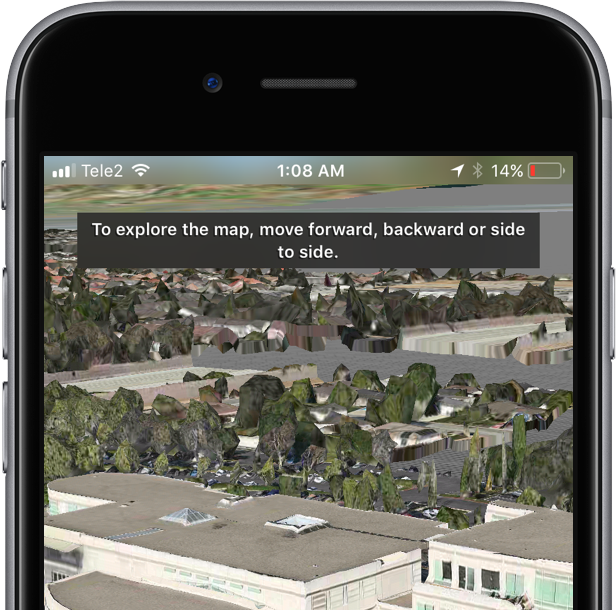
Apple Maps on iOS 11 beta 2 features a great new virtual reality (VR) mode that takes advantage of Apple's new ARKit framework to let you move around in 3D by walking.

This unapologetically cool feature seems to be tied to Flyover, which replaces satellite imagery with three-dimensional buildings, landmarks and other points of interest.

The new VR mode on iOS 11 Maps was highlighted yesterday by Twitter user @StijnDV, but it appears to have been originally discovered by Tweetbot developer Paul Haddad on Wednesday.

To try it out yourself, open Maps on iOS 11 beta 2, switch to 3D mode by tapping “3D”, then use the search field at the bottom to find a place that has Flyover.

On the place card, tap the Flyover button and move the device around to rotate the view. Better still, why don't you actually move forward, backward or side to side to explore the map in VR?

Mind blown.

So, how do we know this nifty feature actually uses ARKit? Because it displays a message when you cover the camera, just like any ARKit-powered app does, saying you should aim the device at a different surface because “more contrast is required”.

As a quick backgrounder, ARKit analyzes live camera feed in real-time, using computer vision to find horizontal planes in your real world, such as tables and floors. I was able to successfully test the feature on my iPhone 6s running a second beta of iOS 11. Because I don't currently own an iPad, I couldn't test VR mode in Maps on the Apple tablet.

WOW There is an VR mode in Apple maps on iOS 11! It seems to use ARKit for positioning! pic.twitter.com/IdXiGoed26

— Stijn (@StijnDV) June 24, 2017

At any rate, this appears to be the default mode for Flyover now, not a special setting. But don't you worry, there's the option to switch back to the old Flyover mode where you rotate and zoom your Flyover view using touch interactions.

This is honestly one of the coolest features in iOS 11! pic.twitter.com/Zjr6RRkKHk

— Stijn (@StijnDV) June 24, 2017

This is a wicked cool feature and I cannot help but wonder how it might look like when experienced through Apple's rumored digital glasses that, as per Robert Scoble, should use optics by German lens specialist and optical instruments maker Carl Zeiss.

You can actually move around by walking! This is crazy cool! pic.twitter.com/ttR6RaAo7D

— Stijn (@StijnDV) June 24, 2017

Some people couldn't get Maps' new VR mode to work, but I suspect it may have something to do with their hardware. Maps' VR mode uses ARKit, which tracks your actual position in the real world with the camera but requires newer hardware.

Holy Flyover Magic Window batman. pic.twitter.com/Fb8nPeLT5J

— Paul Haddad (@tapbot_paul) June 22, 2017

According to Apple, ARKit runs on the Apple A9 and A10 processors. “These processors deliver breakthrough performance that enables fast scene understanding and lets you build detailed and compelling virtual content on top of real-world scenes,” says the company.

In other words, anything older than iPhone 6s, iPhone 6s Plus, iPhone 7, iPhone 7 Plus, the 9.7-inch iPad (early-2017 model) or iPad Pro won't be able to run iOS 11 Maps' VR mode.

So, is this cool or what?

We'd obviously love to hear your thoughts and predictions regarding iOS 11 Maps' new VR mode and what it might signify in terms of possible new VR hardware from Apple.

Do us a favor and chime in with your thoughts in the comments section.

Hands-on with iOS 11 beta 2: DND While Driving and other new features, changes & fixes

Apple (somewhat surprisingly) dropped the second beta of iOS 11 to developers on Wednesday with a myriad of changes and bug fixes. While there doesn't seem to be a huge number of user-facing enhancements, there are still quite a few notable changes and new features in this beta.

A large number of prominent bugs have been fixed that have been plaguing users, like crashing when deleting a voicemail, manual screen brightness not staying set, 3D Touch on phone numbers and addresses not working.

Unfortunately, with all of those bug fixes are several new bugs and known issues.

For instance, an SOS alert may still be sent even though the user cancelled it. This is a good reminder this is an early developer beta that should only be run on secondary devices.

As for the new features, we have the initial implementation of the much touted Do Not Disturb While Driving mode that will lock your phone as well as send a custom auto-reply (customizable in Settings → Do Not Disturb) should someone text you.

Control Center can now be disabled inside of applications, like on prior iOS editions. And far from last, the Files app now has started to show external locations like Google Drive and Box.

New features and changes

This is what you probably wanted to know about iOS 11 beta 2.

CarPlay now has lane guidance in Maps Smaller speed in Maps To edit/add filters in Photos you now tap the edit button in the top right corner instead of the sliders icon Now Playing widget has been tweaked New phone placeholder icon when no album artwork present in Now Playing widget Audio source switcher is now available on Lock screen New orange color for the new Echo effect in Messages Do Not Disturb While Driving is enabled with extra options in Settings Control Center can be turned on or off while in apps New search options within Apple Music You can now select multiple items in Photos Bluetooth widget now works the same as Wi-Fi: instead of turning off, it will just disconnect from whatever is connected to it Notification Center pull down has a gradual blur New Share sheet extension: Save to Files app Safari has new experimental features in Settings Dictation is now available in Hindi New options in Settings to make notification banners permanent or permanent Built-in screen recorder boosts video capture resolution to 1080p

Take a look at our hands-on video to see all of these new features and more in action.

https://www.youtube.com/watch?v=TZ5pwZMPRxI

Subscribe to iDownloadBlog on YouTube

And here's a quick overview of the most important fixes.

Bug fixes 3D Touch data detectors are now working for phone numbers, addresses, etc. Screen brightness stays at set level YouTube search bar has returned More stable Bluetooth connections (Dexcom) Android Migration now works as intended Crashing when deleting voicemails is fixed Lock screen no longer rotates Long exposure photos are now higher quality than in first beta Wrapping it all up

As we conclude our tour of all the changes, fixes, improvements and new features in iOS 11 beta 2, feel free to tell us about your own discoveries and observations in comments or via tips@iDownloadBlog.com.

What's your favorite change in iOS 11 beta 2 thus far, and why?

Second beta of iOS 11 seeded to developers

Apple today seeded a second beta of iOS 11 to its registered developers and members of the Apple Developer Program. To download and install the update, use the Software Update mechanism on your iPhone, iPad or iPod touch, which must be running the previous beta and have an appropriate configuration profile installed (you can download it through Dev Center).

This second beta doesn't seem to come with new features, but rather looks like it is focusing on the usual bug fixes and performance improvements.

The first developer-only beta of iOS 11 brought out a bunch of new features and platform technologies, including a major revamp for App Store, advanced multitasking features on iPad, drag and drop, a new Files app, AirPlay 2 with multi-room audio, new Siri capabilities and more.

https://www.youtube.com/watch?v=-hoPcMPvL88

Subscribe to iDownloadBlog on YouTube

iOS 11 also packs in many visual refinements across the system designed to make Apple's mobile operating system look prettier than ever. Some of the visual tweaks include bolder headlines across stock apps, a redesigned app drawer in Messages and much, much more.

If you spot new user-facing features, changes or important refinements in iOS 11 beta 2, be sure to ping us on Twitter or shoot us an email via tips@iDownloadBlog.com (attach any screenshots, if necessary) and we'll update the article with any relevant new information.