iPhone

Stay up-to-date on the latest iPhone news and learn new tips and tricks with our comprehensive tutorials. From software updates to new features, we’ve got you covered.

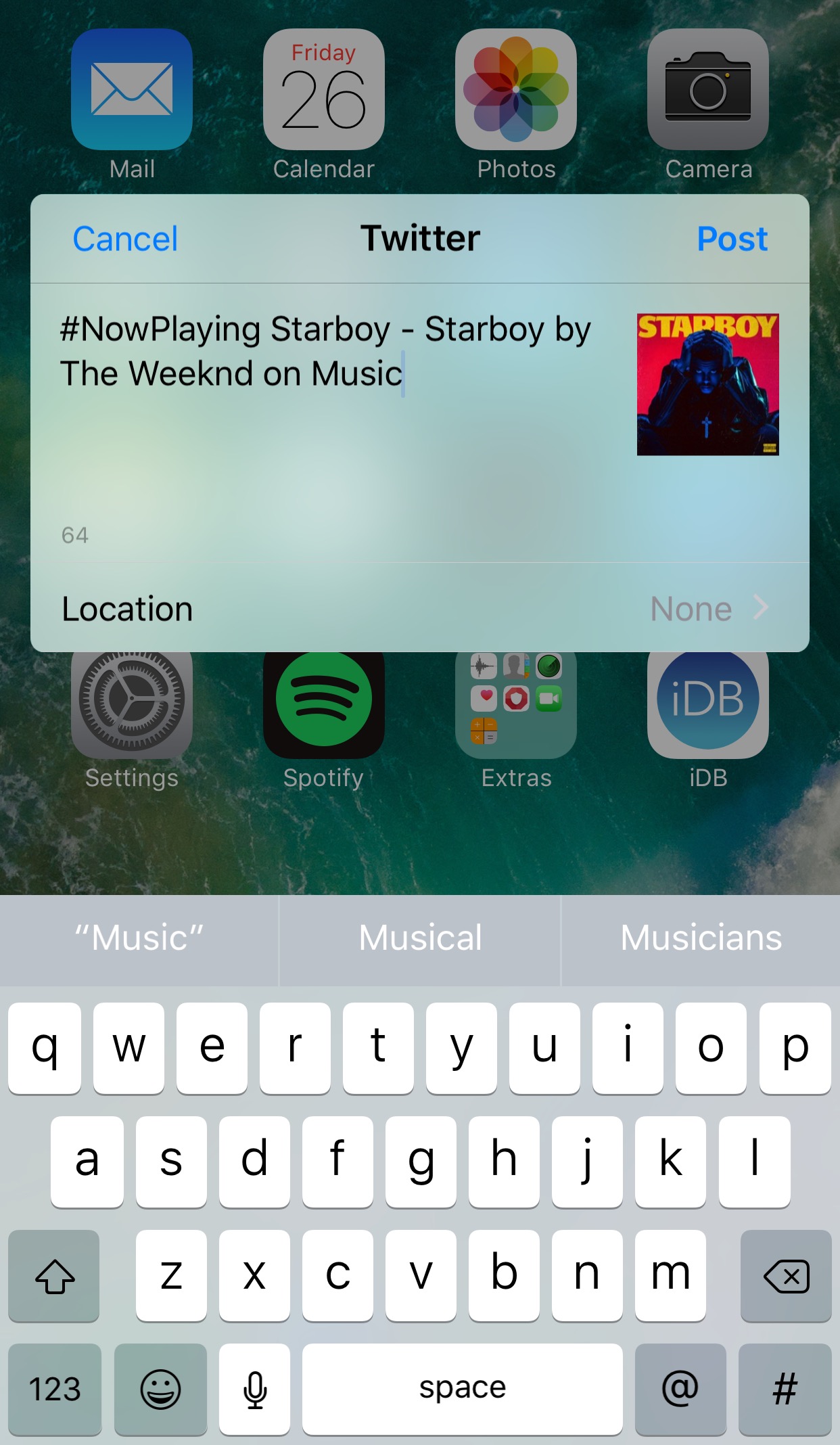
Tweet your Now Playing music from anywhere with NPTweet

The rhythmic souls out there who listen to their songs on a daily basis generally like to talk about and share their music with other connoisseurs.

Fortunately, a new free jailbreak tweak dubbed NPTweet by iOS developer ichitaso is now available that makes it super easy to Tweet a Now Playing track from anywhere in iOS by calling upon the help of Flipswitch.

You can now order photo books and archive images on Google Photos

At its annual developers conference earlier in the month, Google announced three new features for its Photos app: automatically curated albums, photo books and sharing suggestions.

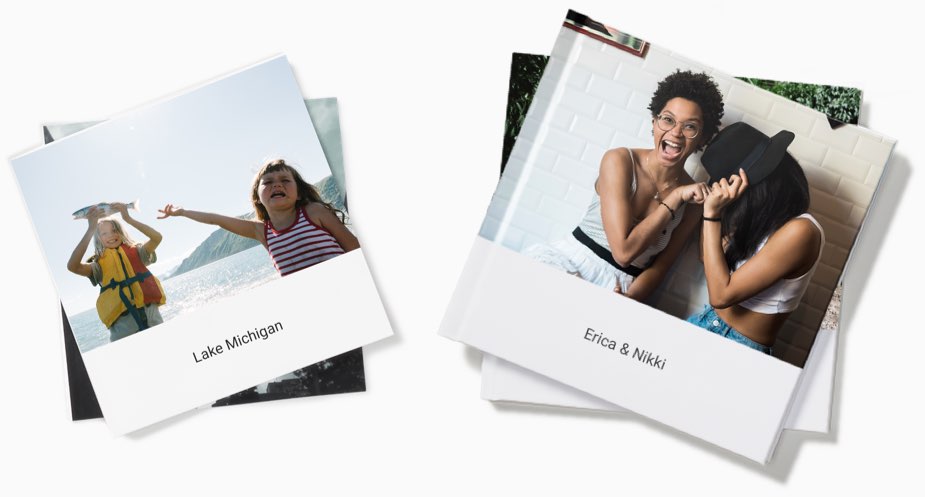
Today, the company pushed an update to its Photos app for iOS, Android and the web, bringing support for ordering printed photo books comprised of your best photographs. You can make a photo book in minutes with automatic photo curation and easy customization.

Photo books

To order a printed photo book, select the images you’d like to fill your album with. Google’s machine learning picks the best shots for your, removing duplicates and poor quality images.

In fact, the app will even offer personalized suggestions for photo books, like your trip to the Grand Canyon, time with family during the holidays, your puppy and so forth.

You can order a seven-inch square softcover book for $10 a piece or its nine-inch hardcover version for twice as much. Each has twenty pages though you can buy additional pages if you'd like:

Softcover—$0.35 per additional page Hardcover—$0.65 per additional page

Photo books are currently available to users in the US only.

However, the search company has made promises to bring them to more countries soon.

Google photo books key highlights:

Quickly find your best shots— Start from an album or search for a person, place or thing. Then, Google Photos can automatically pick out your best photos—helping you save time. Perfect your book in minutes—Easily move around your photos, add a book title and tweak your cover design. Beautifully crafted for you—Just choose a size and get started on your phone or computer. Photo books are made in the USA from premium, responsibly sourced materials.

Apple's Photos app supports photo books, too. As a matter of fact, ordering photo books has been part of the now phased-out iPhoto app for almost a decade.

Archive photos

Aside from photo books, today's update includes the Archive feature.

Chances are your photo library includes not only your selfies, food shots and cherished memories, but the more mundane pictures as well, like recipes, receipts, scanned documents and so forth.

Now you can move images to the app's new Archive section to tidy up your photo grid.

To get started, simply select a few photos you'd like to archive, tap the Menu icon and choose Archive from the popup menu. This simply moves the selected photos to your archive rather than delete them. Any archived images and videos remain visible in search and albums.

Aside from the image archival feature and photo books, this update includes performance improvements and reduces the amount of on-device storage space used by the app.

Instagram Direct now lets you send links and images in landscape and portrait orientations

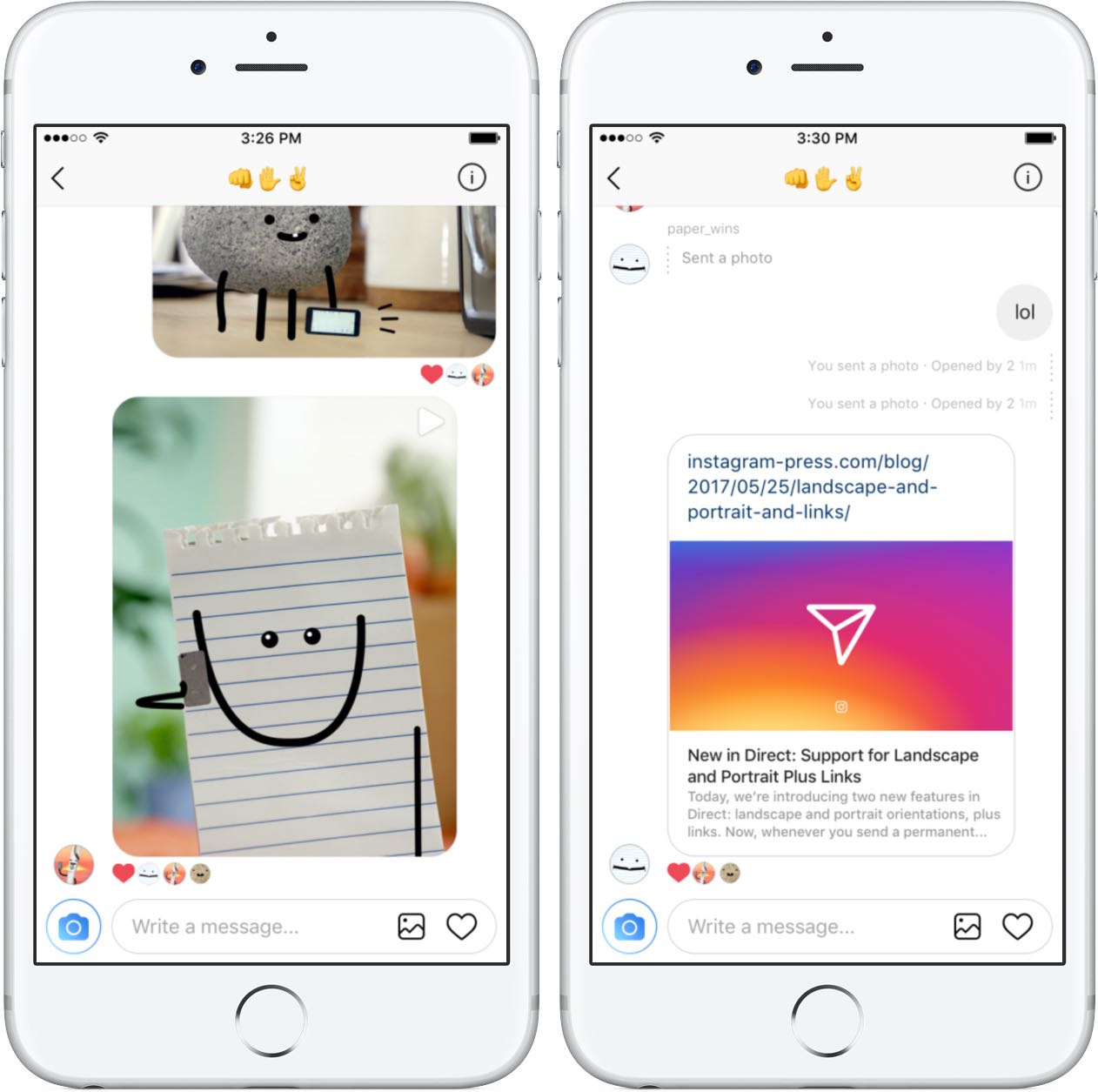
Instagram yesterday announced a pair of minor updates for Direct, a direct-messaging feature built into its mainland mobile app for iOS and Android. For starters, Instagram Direct now supports sending images and videos in portrait and landscape orientations.

Plus, Instagram is just now offering support for sending links in direct messages.

The ability to send a permanent photo or video in landscape and portrait orientations through Direct means you no longer have to worry about weirdly cropping it as it will now show up properly in its intended orientation.

“We’ve added support for links in Direct,” noted the company. “You can share website links with friends and preview them directly from your thread.” As a bonus, the team also has implemented automatic links to phone numbers and addresses send through Direct.

Landscape and portrait uploads in Direct are available today on iOS, with Android coming soon. Links in Direct messages are available today on both iOS and Android.

Today's features are part of Instagram's version 10.22 update.

Grab Instagram for free via App Store.

iPhone 8’s Touch ID said to use on-screen optical fingerprint scanning

Apple is said to have developed a next-generation Touch ID sensor where an OLED display of the device doubles as a fingerprint sensor. This should enable users to rest their finger on the display to authenticate themselves.

According to a Chinese-language Economic Daily News report, citing sources from Apple's chip supplier Taiwan Semiconductor Manufacturing Company, Apple has managed to develop an optical fingerprint sensor to enable authentication directly on the screen.

KGI Securities analyst Ming-Chi Kuo first called it in January.

He said because Touch ID’s capacitive sensor does not work through the display’s cover glass, Apple could go with an optical sensor which doesn’t require physical contact with a user’s finger.

Other iPhone 8 features, according to a TSMC source, include no physical Home button, the screen ratio of 18.5:9 instead of the previous 16:9 and invisible infrared image sensors to enhance camera functionality and enable augmented reality features.

Apple is understood to have been plagued with yield issues regarding the new optical fingerprint sensor. It's unclear if the company has managed to resolve those technical issues.

New video compares alleged iPhone 8 case to iPhone 7

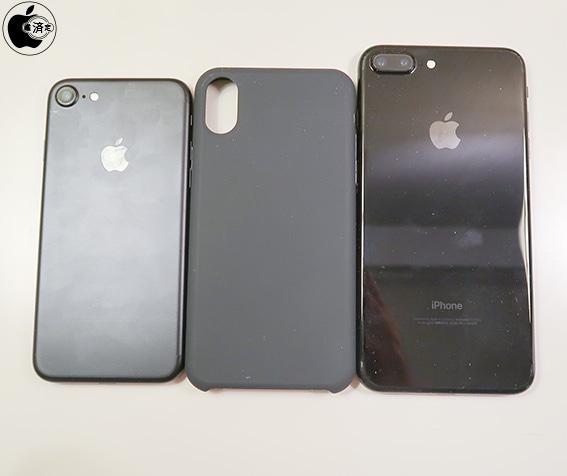
Mac Otakara on Thursday published a slew of photos and a video comparing the size of an alleged iPhone 8 case to the iPhone 7 and 7 Plus. The noted Japanese outlet says it purchased the case from Alibaba, and its dimensions match up with previous information.

The case itself is pretty uninteresting, but seeing it next to both a 4.7-inch and 5.5-inch iPhone gives us a good idea of how big the iPhone 8 could be, should the leaks prove authentic. Notice how the iPhone 8 case is only slightly taller and a hair wider than the iPhone 7.

https://www.youtube.com/watch?v=T-vzLBN3K-Y

Rumor has it that the iPhone 8 will house an edge-to-edge display, with ultra slim or no bezels, allowing Apple to fit a much larger screen in a smaller body. The case in these photos seemingly corroborates that theory, as it sits significantly smaller than the iPhone 7 Plus. Other details worth noting in regards to the case include a cutout for the often-rumored vertically-stacked dual lens camera, and the usual openings for volume rocker and power switches.

The iPhone 8 isn't expected to be revealed until September, and Apple is known to test multiple prototypes, so it's impossible to tell if this case is truly based on the handset's final design. We should see more leaks as Apple ramps up production later this summer.

Source: Mac Otakara

New Pokémon game is based on Magikarp, the weakest Pokémon ever

If you're no longer interested in playing Pokémon GO on a regular basis, how about another mobile Pokémon game? Your wish is Pokémon Company's command! Today, they released a new Pokémon game on App Store, based on the weakest Pokémon ever— Magikarp.

Titled Pokémon Magikarp Jump and available on App Store as a freemium download with optional In-App Purchases, the game requires you to raise multiple generations of Magikarp.

You must feed and train your creatures, boosting their stats and Jump Power before challenging other players in six leagues to increase your own Trainer Rank. Those who do well in jumping tournaments can get commemorative photos of their achievement that can be shared on social media to show the world how well they’ve trained their Magikarp.

If you're new to the Pokémon phenomenon, here's a little backgrounder on Magikarp.

Magikarp is a creature famous for being pathetically weak, unreliable and generally useless. It cannot be taught any powerful moves—all it does is flop around and splash. If your Magikarp flops too high, it is sometimes snagged by the bird Pokémon Pidgeotto.

Check out the launch trailer below.

https://www.youtube.com/watch?v=cZ0c9s5UoMI

If Magikarp gets knocked out during a training session, or retires upon reaching level 20, you’ll start over with a new generation of Magikarp that's a little bit stronger than your last.

Some Pokémon you encounter may give you food to keep your Magikarp nourished.

Following the initial launch in Italy, Japan and several other countries, Pokémon Magikarp Jump is now officially available in the US App Store. Non-obligatory In-App Purchases let you spend cash on various upgrades to speed up your training, replenish your food stock, catch more Magikarp and so forth.

Grab Pokémon Magikarp Jump for free from US App Store.

First hands-on video with iPhone 8 dummy surfaces on the web

Apple's iPhone 8 should feature a whole new industrial design with an almost full-screen face, a 2.5D curved OLED screen, no physical Home button, an in-screen fingerprint reader and other perks. Earlier this week, leakster Benjamin Geskin posted what files as the first hands-on video featuring a CNC-machined iPhone 8 dummy model.

Don't read too much into this report— this is a dummy iPhone 8 unit after all, and as such for display only. It's not a real working phone nor is it one of the iPhone 8 prototypes.

And here it is.

https://www.youtube.com/watch?v=9U-h3kEU2h0

Don't let the lack of an Apple logo on the backside confuse you: this is, as I've said, a mockup that matches up with a bunch of the rumors we've heard thus far.

That said, the clip provides a good approximation of what a future iPhone with a nearly full-screen front face might look like. Be sure to check out another iPhone mockup that leaked last week, which could be representative of the final design Apple settled on.

Apple is said to have tested about ten different iPhone prototypes.

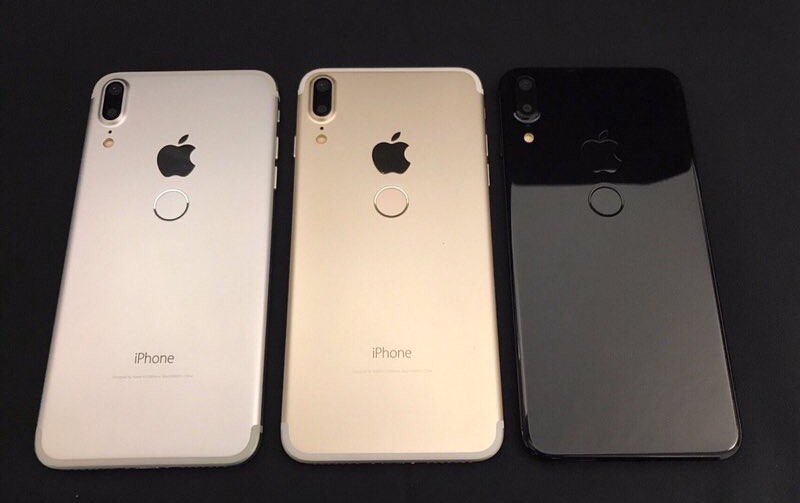
Some of them probably sport a rear Touch ID, just in case Apple's plan to integrate a next-generation fingerprint sensor into the display assembly falls apart. To give you a better idea what an iPhone with a rear Touch ID might look like, do check out the images of an iPhone 8 clone from China, some of which you can see above.

Apple is likely to unveil its 2017 iPhone lineup at a media event in September.

Aside from a new premium design and a full-front OLED display, iPhone 8 is widely expected to feature wireless charging, 3D facial scanning, a ten-nanometer A11 chip designed by Apple, augmented reality features and, of course, iOS 11 that Apple will preview at WWDC next month.

Check out this iPhone 8 clone with rear fingerprint sensor

The images of an iPhone 8 clone that hit the web yesterday give us a good indication what an iPhone 8 with a rear-mounted Touch ID sensor might look like. According to Benjamin Geskin, who tweeted out the rendered images, the device is based on an early iPhone 8 prototype.

The images were originally posted on Chinese social media platform Weibo. “All my sources said that this is totally wrong design,” Geskin cautioned, adding that iPhone 8 “is not going to look like that.”

The phone sports a slim bezels on the front face with no physical Home button.

On the back, we can clearly see a vertically stacked dual-lens camera and a Touch ID-like sensor, positioned below the Apple logo. The copycat device features an aluminum chassis.

iPhone 8, as you know, is said to feature a glass sandwich design in order to avoid any potential interference with its wireless charging components.

The placement of the fingerprint sensor on China's iPhone 8 clone actually makes sense to me: it's relatively easily reachable with one's index finger, as opposed to Galaxy S8's fingerprint sensor positioned next to the rear camera.

Some reports have suggested that one of the more than ten iPhone prototypes Apple has been testing has a rear Touch ID. Newer reports, however, have indicated that Apple has managed to integrate Touch ID into the display assembly after all.

Still, the company was smart enough to engineer an iPhone with a rear Touch ID as a fallback device, just in case.

To me, the biggest takeaway from looking at these renderings is that iPhones would look much better with some additional color options beyond the usual black, silver and gold choices.

Can you guess what the only app on Trump’s iPhone is?

Of course you can, it's Twitter.

Axios reporter Mike Allen wrote on Thursday that he learned from White House officials that the key to forcing a more disciplined President Trump is limiting his screen time. “In Trump's case, it's curtailing his time watching TV and banging out tweets on his iPhone,” he wrote.

Here's an excerpt from the report:

Trump himself has been pushing staff to give him more free time. But staff does everything it can to load up his schedule to keep him from getting worked up watching cable coverage, which often precipitates his tweets. It has worked well overseas so far.

During last year's campaign, Trump tweeted from an Android device.

After The New York Times described Trump's Galaxy S3 phone as an “old, unsecured” device posing a hacking risk because it had not received a security update since 2015, Trump switched to an iPhone this summer.

In terms of security and software updates, iPhone has a distinct advantage over Android.

iOS software updates are immediately available across all supported devices in the wild because carriers don't get to vet them.

iPhone is also a better pick than older Android devices in terms of security.

Alleged Apple vacation blackout could suggest iPhone keynote in September

Apple is reportedly canceling vacations for retail specialists between September 17 and November 4, according to a leaked memo sent to AppleCare Advisors and Leaders which was shared on Twitter this morning by prolific leakster Benjamin Geskin.

Based on the aforementioned blackout days, and assuming the pattern follows previous years, it's easy to imagine an iPhone keynote on either Wednesday, September 20 or September 13.

Conversely, pre-orders should go live on Friday, September 22, meaning iPhone 7s and iPhone 7s Plus (maybe even iPhone 8?) could go on sale on Friday, September 29.

Here's an excerpt from Apple's message:

The upcoming months are going to very exciting for all of us and for our customers. As you know, there are new product announcements and launches in September. In anticipation of the upcoming events and the corresponding heightened call volume expected, we will be increasing our staff across all of our programs over the summer.

In order to support our client during this very important time of year, we will be implementing Black Out Days in all AppleCare programs for Advisors and Leaders. The upcoming Black Out dates will be September 4 through November 4.

Apple notes that these dates are subject to change “as our support volume expectations fluctuate.” During blackout days, employees are restricted from requesting vacation.

“It is extremely important that everyone works their assigned scheduled days during this period—absences are unacceptable,” notes the firm.

https://twitter.com/VenyaGeskin1/status/867774248219267072

As with all leaks by Geskin, take this report with a pinch of salt until we're able to verify this piece of information with other sources. For instance, there are spelling mistakes in the memo.

You can now drag and drop files on iPad between Readdle’s productivity apps

Readdle, Ukrainian makers of fine productivity software for iPhone, iPad and Mac, today announced that, for the first time ever, they're making it possible to drag and drop items in the split screen mode on iPad between its most popular productivity apps: Documents, PDF Expert, Scanner Pro and Spark.

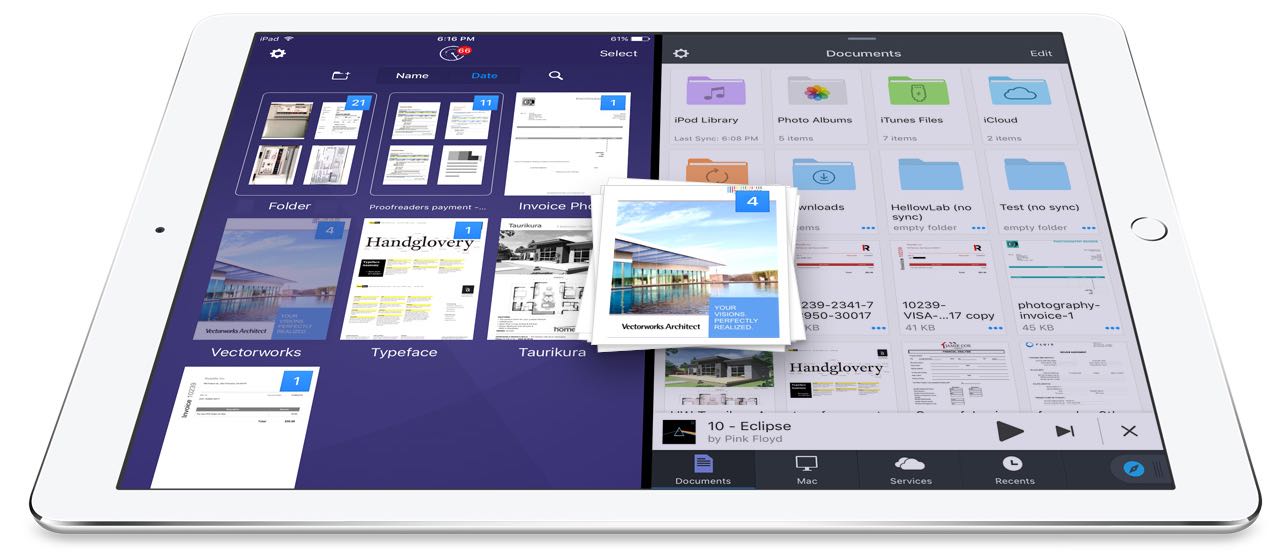
In addition to cross-app drag and drop in Split View multitasking mode, Readdle's excellent Documents app has received a major update that turns it into a Finder on iOS of sorts.

Cross-app drag and drop

Drag and drop between Readdle apps works like a charm, really.

For instance, you can drag a file from Documents and drop it on Spark to instantly create a new email message with an attachment. Or, you can drag and drop scans from Scanner Pro to PDF Expert for further editing.

How about moving that attached contract from Spark to PDF Expert to sign it before sending the signed document back to Spark as a reply? You can do all that—and much, much more—across the aforesaid Readdle apps on your iPad.

The promo video below showcases drag-and-dropping files between Readdle apps.

https://www.youtube.com/watch?v=epzh9-rd-AI

True, some third-party iOS apps do support direct manipulation of content within the app.

That being said, however, the ability to drag and drop files and other content between multiple apps has not been utilized on iOS at all. While Apple could enhance iOS's Split View multitasking mode in the future with useful interactions like drag and drop, Readdle has already found a way to make cross-app drag and drop work.

Denys Zhadanov, Readdle's Vice President of Marketing, said via email:

We see it as a major improvement of iOS and this is how all iPad apps should work between each other. It’s so freaking awesome—glues all our apps into a phenomenal productivity ecosystem.

“The Readdle Team hopes that Apple will introduce their own implementation of inter app drag and drop one day,” developers noted. “That will support other apps and make iPad a much better productivity device than it is now.”

New features in Documents 6

As mentioned earlier, Readdle's capable (and free) file manager, called Documents, is getting a major update today turning it into the iOS Finder you’ve always wanted. The update brings out various enhancements, including an overhauled design with Spark-like quick actions, an easier way to import files, improved file management, an all-new media player, on-the-fly editing of cloud files, music and video streaming and more.

https://www.youtube.com/watch?v=i-314ezmBgE

According to Readdle:

iOS has always been a 'no-file-manager' system. Everything is taken care of by the apps. That’s a blessing and a curse at the same time.However, some of us are very comfortable with controlling things on our devices, especially when it comes to getting real work done.

This is why we created Documents, an extremely powerful, versatile hub for all of your files on iPhone or iPad. It’s your Swiss knife that removes iOS file management woes.

Documents has always been a powerful iOS file manager and now it's gotten even better.

The completely rethought user interface is very functional.

As the screenshots attest, you can now easily edit, zip, tag, move or sync your files with fewer taps than before. Bigger file preview thumbnails give you a better idea of the content of that Excel spreadsheet or PPT presentation before you even open it.

A prominently featured “+” button lets you quickly import files, including documents from your computer, Dropbox, Google Drive, Box, WebDAV or any other cloud-based storage source. Files are now organized into folders exactly the way you are comfortable with.

Just select one or a few of them and easily drag them to the right location. And with cross-app drag and drop support, you can move a single or multiple files between Documents and Spark, Scanner Pro or PDF Expert.

“The best part is that you can access any of the locally stored files in any app with the ‘Open in’ option,” notes Readdle. “This is a unique experience on iOS, and it’s what finally gives you that Finder feel on your iPhone or iPad.” Now you can work directly with your cloud files in Documents and even stream photos, videos and music from any cloud storage without needing to download the files to your device.

The new media player helps you organize your music into playlists, with the ability to shuffle and loop your favorite tracks. And if you have PDF Expert installed on your device, Documents will let you annotate and edit PDFs, fill out forms, sign applications and more.

If you haven't played with Documents before, you should really give it a try.

Acting a central hub for all of your files, it lets you view almost any file format natively, store your files directly on the device or connect to the popular cloud storage service to keep everything together in perfect sync.

Availability

Spark and Documents are available at no charge from App Store.

PDF Expert is $9.99 on App Store.

Scanner Pro is $3.99 on App Store.

You should really download the latest version of Spark, Documents, Scanner Pro and PDF Expert and see for yourself what kind of a productivity device your iPad can be with proper drag and drop support.