iPad

From the latest news to the most comprehensive tutorials, learn how to get the most out of your iPad with our step-by-step guides and expert tips.

More ARKit demos: Falcon 9 rocket landing, Van Gogh bedroom tour & more

Wouldn't it be great if you could take a tour of Van Gogh's virtual bedroom in augmented reality? How about witnessing a Falcon 9 rocket descending from the skies?

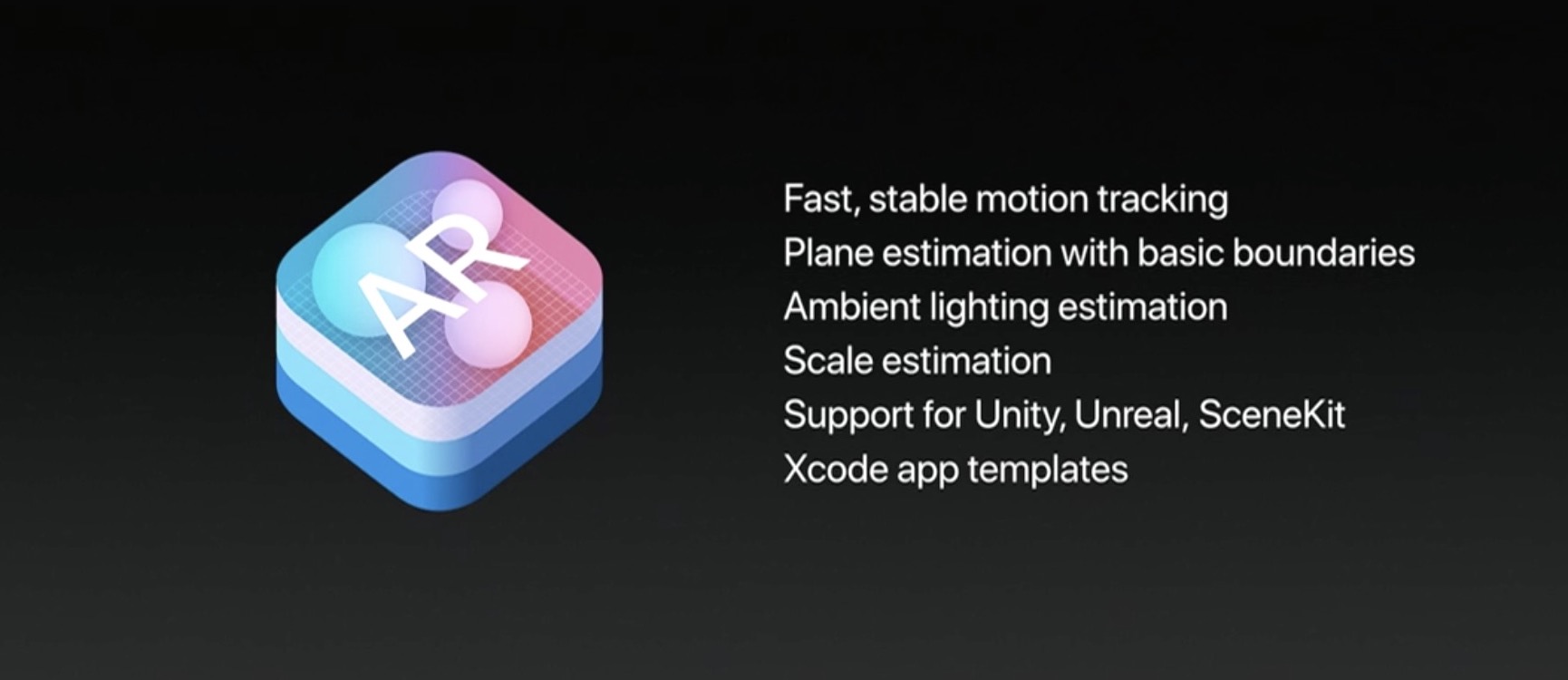
ARKit, Apple's new framework for building augmented reality apps for iPhone and iPad, has captured the imagination of many iOS developers out there who have already created some truly awesome examples of what's possible with ARKit.

For starters, here's an example of ARKit's accurate tracking.

https://www.youtube.com/watch?v=dMEWp45WAUg

Developer Mark Dawson used ARKit to create a virtual copy of Van Gogh’s bedroom which you can walk around and examine detailed furniture, paintings on the wall and more.

ARKit has “amazing tracking,” Dawson said.

https://www.youtube.com/watch?v=lvjVgt_ce5Q

ARKit combines live camera feed and sensor data to find tables, floors and other horizontal planes in your real world. Speaking of which, This example shows ARKit's plane detection.

https://www.youtube.com/watch?v=9ZnG9wrVxtM

And this is adding geometry and physics with ARKit.

https://www.youtube.com/watch?v=Vsk9erdCvdk

In this demo, ARKit is tracking a virtual cube and providing a light estimate for the scene, which makes it easy to change the light intensity of the virtual object to match the real world.

https://www.youtube.com/watch?v=7Kk6iVr5ULo

Notice how when the lights are dimmed down the virtual cube also automatically dims, then when the lights are raised the virtual cube also gets brighter. Pretty neat, wouldn't you say so?

And here you can see ARKit detecting horizontal planes in the real world and rendering content using SceneKit with physically based rendering.

https://www.youtube.com/watch?v=rNFQl7I4T6Y

Developer Tomás García shared this cool demo depicting a Falcon 9 landing at the ASDS in a swimming pool, which he accomplished using ARkit and Unity.

https://www.youtube.com/watch?v=NodGjd3C0SQ

And lastly, German company Econsor Mobile GmbH has been working on an ARKit-powered app for commissioning of construction projects directly on the construction site.

https://www.youtube.com/watch?v=PJWTXefVDK8

Apple CEO Tim Cook thinks augmented reality is a big idea like the smartphone.

“The smartphone is for everyone, we don’t have to think iPhone is about a certain demographic, or country or vertical market: it’s for everyone. I think augmented reality is that big, it’s huge. I get excited because of the things that could be done that could improve a lot of lives. And be entertaining,” he said in the past.

How do you like these latest ARKit demos, which one is your favorite, and why? Does ARKit show a lot of promise, do you think? Share your thoughts by posting in the comment section.
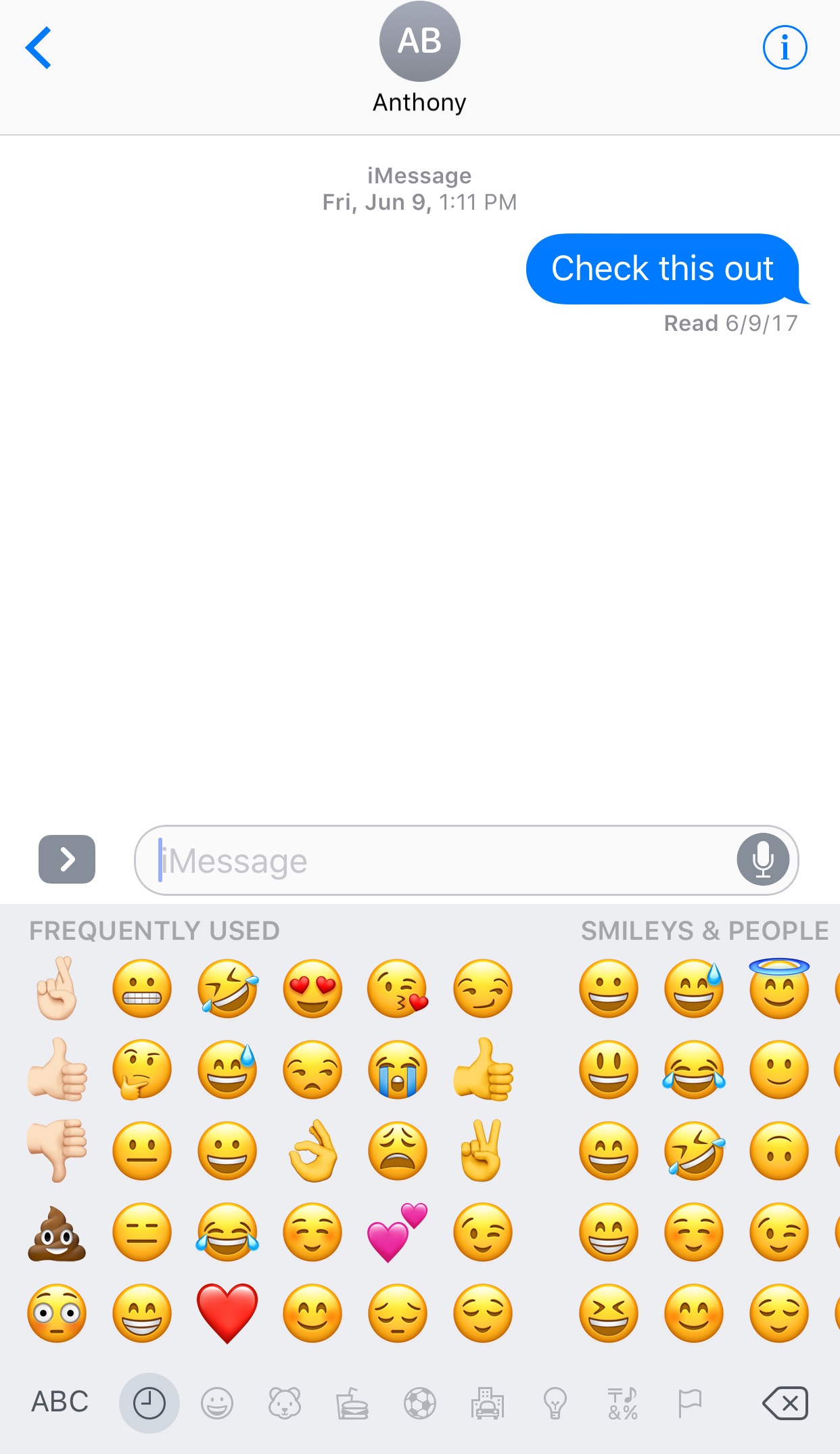
This tweak lets you manually designate favorite Emojis

The iOS keyboard includes a key dedicated specifically to accessing the host of Emojis you can use to express your mood. Part of this interface includes a section for Emojis you use frequently, and while it can be useful, suggestions aren't always ideal.

With a new jailbreak tweak dubbed FavoriteEmojis by iOS developer Adeem Mawani, you can manually designate your favorite Emojis by choice; these are the ones that will begin populating the “Frequently Used."

QuietWhileUnlocked silences obtrusive notifications when your iPhone is unlocked

When you’re using your iPhone, sometimes the influx of notification sounds and vibrations can be enough to frustrate even the most tolerant of multitaskers who are trying to get things done.

Fortunately, a free jailbreak tweak called QuietWhileUnlocked by iOS developer The Holy Confluency of the Summer Triangle helps solve this problem by supressing notification sounds and vibrations whenever your device is unlocked.

Apple launches public betas of iOS 11 and tvOS 11

Following the June 5 release of developer-only previews of Apple's four main software platforms at the Worldwide Developers Conference, the Cupertino giant today released first public betas of iOS 11 and tvOS 11.

You must enroll in the official Apple Public Beta Software Program (available at no charge) and download a special configuration profile via the website beta.apple.com to your iPhone, iPad, or the fourth-generation Apple TV.

Sign in with your Apple ID through the website to get started. iOS 11 public beta has the same features as iOS 11 beta 2. The same goes for the tvOS 11 public betas.

After installing a configuration profile (click “Enroll Your Devices”), restart your iPhone, iPad, iPod touch or the fourth-generation Apple TV, then and use the built-in Software Update mechanism in the Settings app to download and install the public beta.

watchOS betas are not available to the general public.

https://www.youtube.com/watch?v=TZ5pwZMPRxI

Subscribe to iDownloadBlog on YouTube.

“If you were testing a prior operating system, please re-enroll your device to start testing the next release,” the company notes.

TUTORIAL: How to unenroll from Apple Beta Software Program

Be sure the check out the official system requirements for iOS 11 before installing their public betas. tvOS 11 requires a fourth-generation Apple TV.

Will you be taking iOS 11 and tvOS 11 for a spin, do you think? If so, what features are you looking forward to the most, and why?

Tell us in comments!

Updated builds of iOS 11 and tvOS 11 betas now available

Apple on Monday issued a slightly revised build of iOS 11 beta 2 for iPhone, iPad and iPod touch, as well as an updated build of tvOS 11 beta 2 for the fourth-generation Apple TV.

The new builds appear on select devices only.

iOS 11 Developer Beta 2 Update 1, as it's called, has the build number of 15A5304j, up from the build number of 15A5304i in iOS 11 beta 2 which was seeded to developers five days ago.

According to the official release notes on Apple's Dev Center portal, iOS 11 Developer Beta 2 Update 2 resolves an issue preventing reverting to iOS 10 from iOS 11 beta.

To revert to an earlier version of iOS, follow the instructions shown in Apple's support doc.

As for the updated tvOS 11 beta, the new version has a higher build number of 15J5310h versus build number of 15J5310e for the original tvOS 11 beta 2.

https://www.youtube.com/watch?v=TZ5pwZMPRxI

Subscribe to iDownloadBlog on YouTube.

The revised beta builds may also patch dangerous exploits while addressing performance issues on older hardware like iPhone 6.

iOS 11 cuts off 32-bit devices like the iPhone 4s/5/5c handsets.

The new builds are available over the air via the Software Update mechanism in Settings on iPhone, iPad, iPod touch and Apple TV. As mentioned before, they appear on select devices.

Build numbers for beta 2 of macOS High Sierra 10.13 and watchOS 4 have stayed intact. Public betas of iOS 11, macOS High Sierra 10.13 and tvOS 11 are coming later this month.

watchOS betas are currently unavailable for public beta-testing.

Watch new ARKit demos: Minecraft and measuring tape

The website madewitharkit.com dedicated to highlighting cool apps made with Apple's new ARKit framework, was updated today with a pair of new video demonstrations showing off some of the augmented reality possibilities coming to iPhone and iPad with iOS 11 this fall.

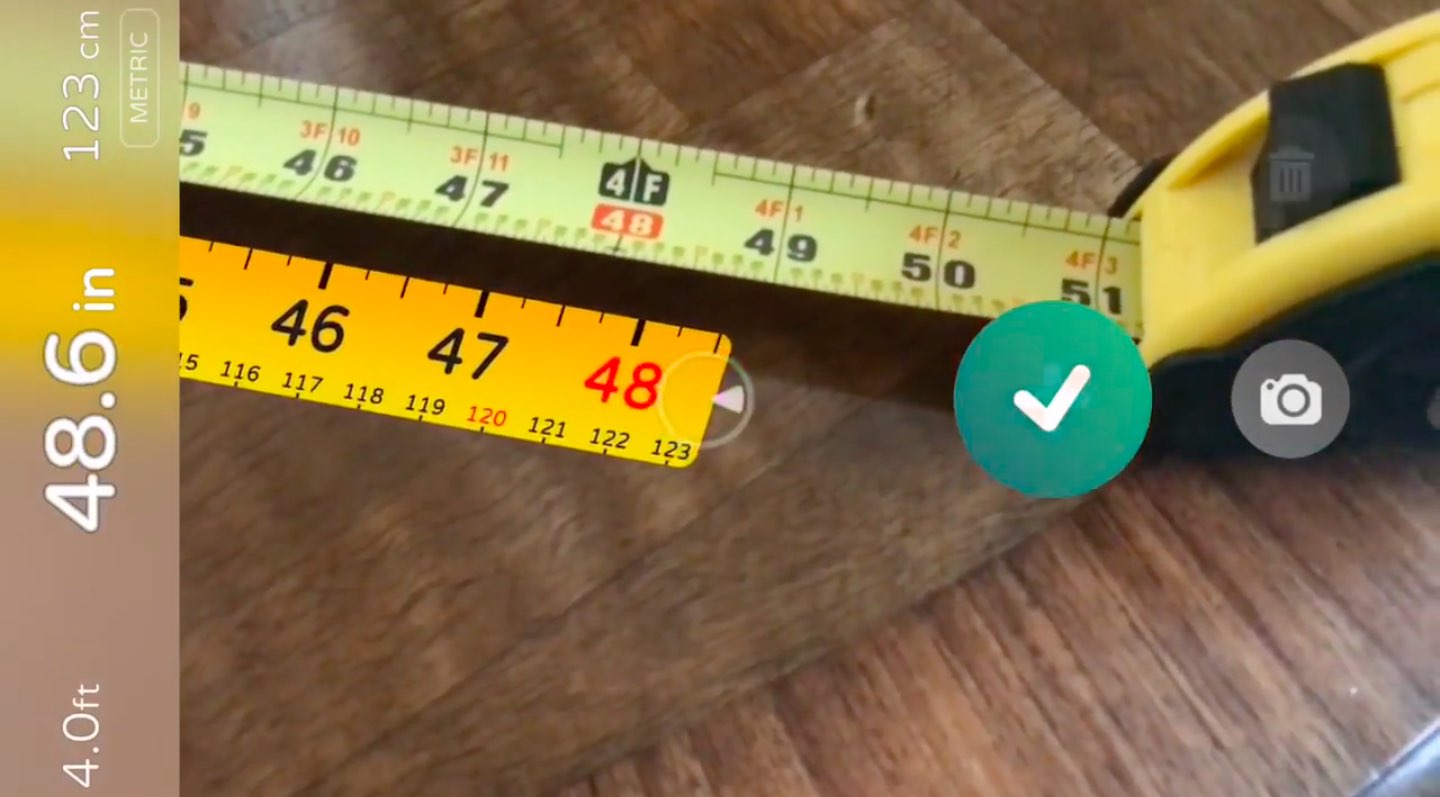
The first demo has the user selecting two spots in the real world, as viewed through an iPhone's lens, to calculate the distance between them, transforming the device into a working tape measure. That's a great example of the power of the ARKit framework.

https://www.youtube.com/watch?v=z7DYC_zbZCM

The app was built by Laan Labs and, like other ARKit-enabled apps, uses an iOS device's camera along with sensor data to precisely find horizontal planes in the real world, such as tables, floors and other objects.

You can beta-test the app by signing up at armeasure.com.

Measure distances with your iPhone. Just because you can. Clever little #ARKit app by @BalestraPatrick https://t.co/b2mXe2FS84 pic.twitter.com/pyoHp99Yts

— Made With ARKit (@madewithARKit) June 25, 2017

Laan Labs has other examples of proof-of-concept apps built using ARKit on their Twitter, like the following example of impressive 3D drawing in augmented reality.

https://twitter.com/laanlabs/status/878692051889655808

As for an AR-enabled Minecraft, we don't know if Minecraft creator Mojang is working on one, but that didn't stop developer Matthew Hallberg from recreating Minecraft in AR using the ARKit framework and the Unity engine.

By superimposing Minecraft building blocks on top of the real-world, and taking advantage of ARKit's super accurate tracking, the user is able to walk around their environment and place Minecraft blocks at arbitrary spots. “I love that you are able to place life size objects because the tracking with ARkit is so good,” Matthew said.

https://www.youtube.com/watch?v=qFGx9QcE5Gk

Apple is also using ARKit tracking for an impressive virtual reality mode in Apple Maps on iOS 11. The Cupertino giant is even helping Ikea build an ARKit-powered app which will let you try out virtual furniture at home before purchasing it.

ARKit requires a device with an Apple A9 or A10 chip because those processors deliver “breakthrough performance that enables fast scene understanding and lets you build detailed and compelling virtual content on top of real-world scenes,” as per Apple.

How do you like the aforementioned ARKit demos? Are you looking forward to augmented reality-enabled apps, and why? Chime in with your thoughts in the comments section.

Jailbreak tweaks of the week: ActIf 2, Kairos 2, & more…

With the jailbreak community becoming a bit more active in recent weeks, we've seen a number of interesting releases and even teases of upcoming releases that are sure to knock your socks off.

In this roundup, we'll talk about all of the jailbreak tweaks that were released during the past week, starting with our favorites. We'll outline all of the rest of the tweak releases after we get through the best of the best.

Kairos 2 lets you schedule text messages for future dates and times

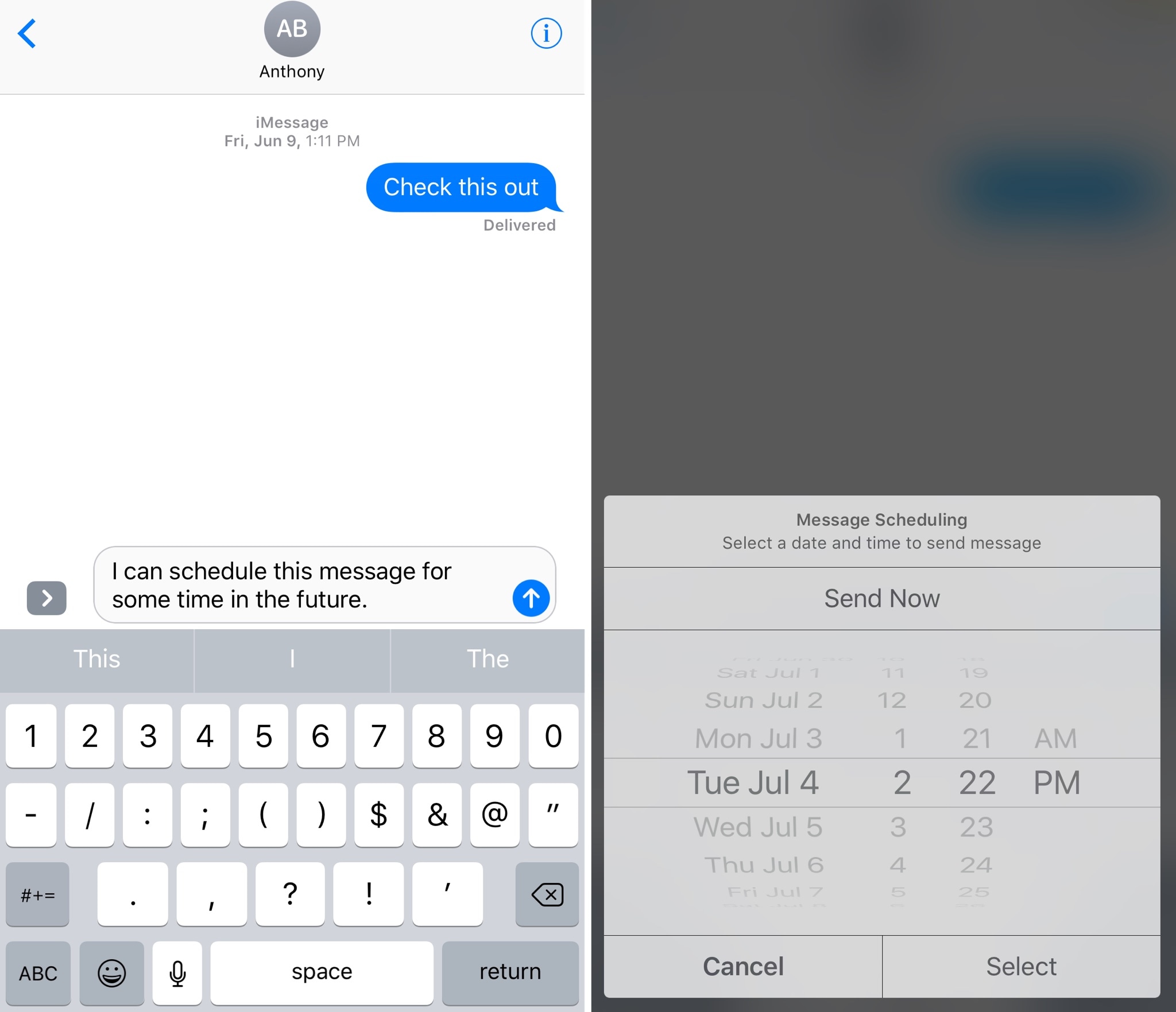
Have you ever thought to yourself, “I wish I could schedule iMessages or text messages to send at a future date?” Well, now you don’t have to just sit and wish for such functionality anymore.

A jailbreak tweak called Kairos 2 by iOS developer CP Digital Darkroom enables iMessage and SMS scheduling right from the stock Messages app on your jailbroken iPhone or iPad.

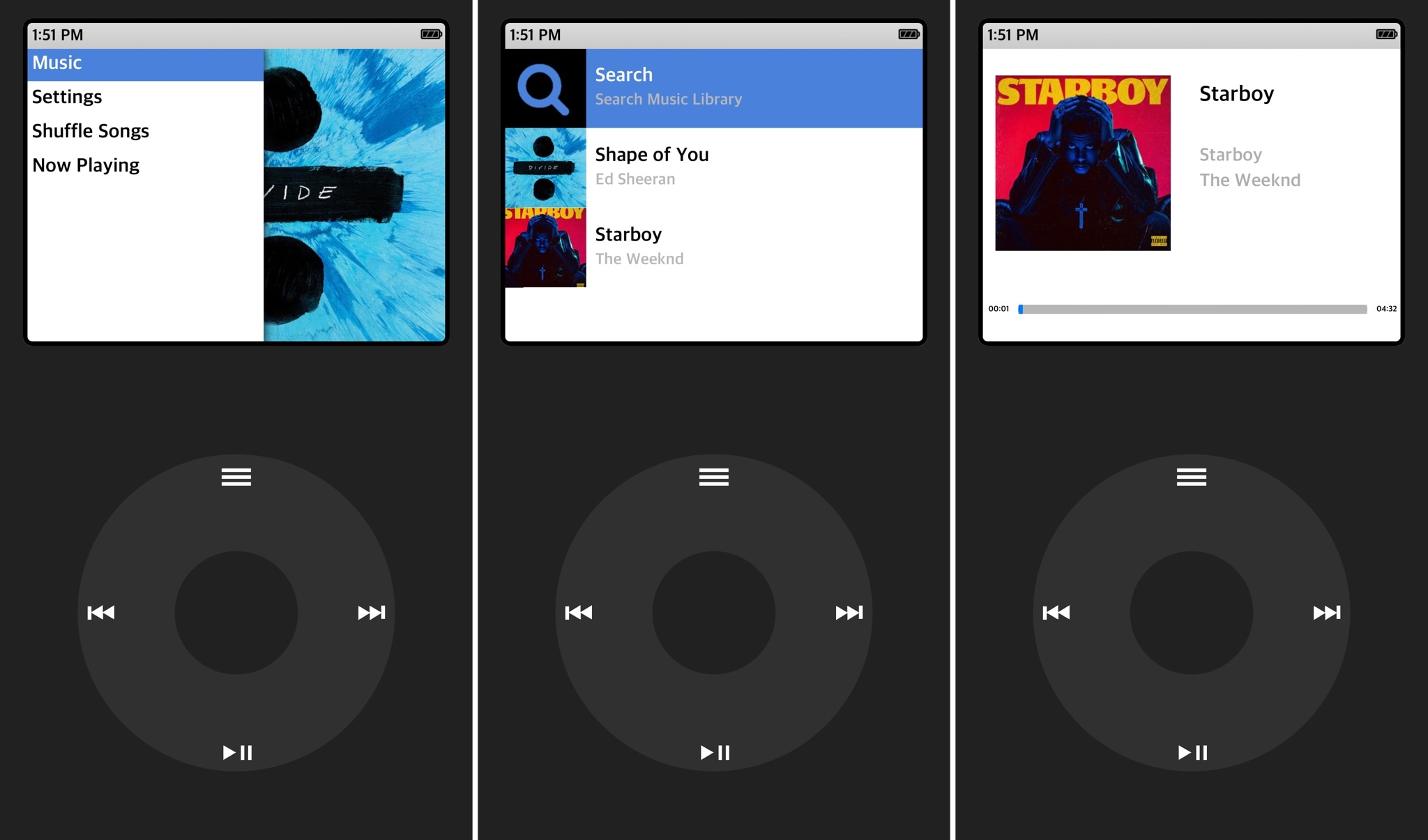
ClassicPlayer turns your iPhone into an iPod Classic

Those who've been using Apple products for years might be familiar with the days when the iPod Classic reigned supreme as a music player. It was made famous by its click-wheel design, which responded to touch and drag gestures for navigating your music.

A new jailbreak app dubbed ClassicPlayer by iOS developer Guillermo Moran (fr0st)  brings this experience to the iPhone for all the nostalgic folks out there who are missing the click-wheel experience from the days of yore.

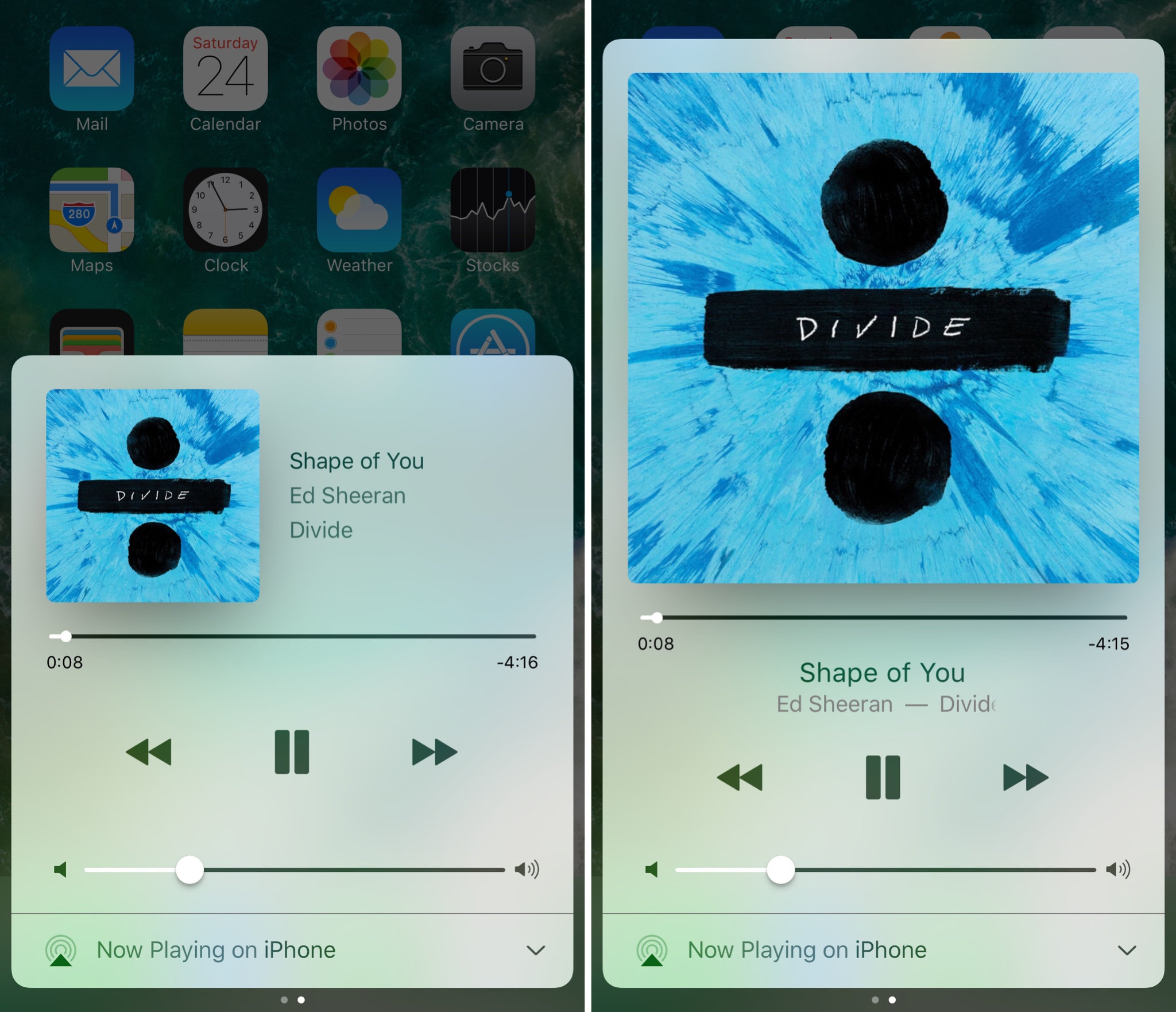
Make Control Center’s Now Playing interface full screen with Sinatra

iOS’ Now Playing interface showcases any music you’re listening to and includes controls for adjusting your playback settings, but there are so many ways the interface could be improved.

A new jailbreak tweak called Sinatra by iOS developer candoizo takes some first steps towards improving the Now Playing interface in Control Center while still maintaining an Apple-esque design standard.

iOS 11 Maps has crazy cool VR mode that lets you move around by walking

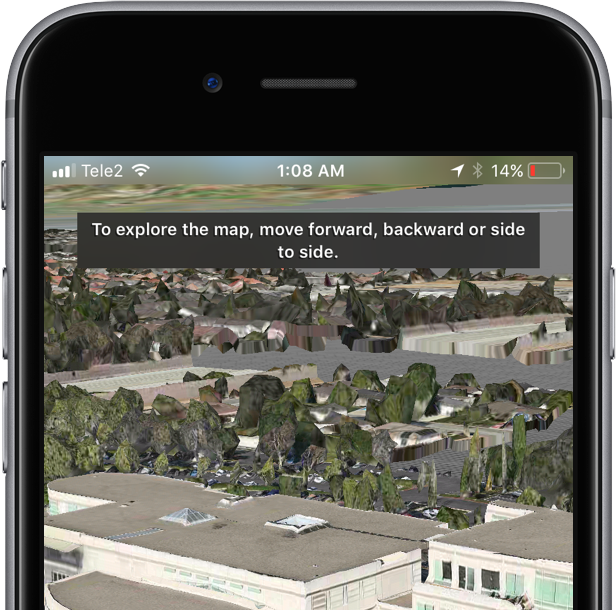
Apple Maps on iOS 11 beta 2 features a great new virtual reality (VR) mode that takes advantage of Apple's new ARKit framework to let you move around in 3D by walking.

This unapologetically cool feature seems to be tied to Flyover, which replaces satellite imagery with three-dimensional buildings, landmarks and other points of interest.

The new VR mode on iOS 11 Maps was highlighted yesterday by Twitter user @StijnDV, but it appears to have been originally discovered by Tweetbot developer Paul Haddad on Wednesday.

To try it out yourself, open Maps on iOS 11 beta 2, switch to 3D mode by tapping “3D”, then use the search field at the bottom to find a place that has Flyover.

On the place card, tap the Flyover button and move the device around to rotate the view. Better still, why don't you actually move forward, backward or side to side to explore the map in VR?

Mind blown.

So, how do we know this nifty feature actually uses ARKit? Because it displays a message when you cover the camera, just like any ARKit-powered app does, saying you should aim the device at a different surface because “more contrast is required”.

As a quick backgrounder, ARKit analyzes live camera feed in real-time, using computer vision to find horizontal planes in your real world, such as tables and floors. I was able to successfully test the feature on my iPhone 6s running a second beta of iOS 11. Because I don't currently own an iPad, I couldn't test VR mode in Maps on the Apple tablet.

WOW There is an VR mode in Apple maps on iOS 11! It seems to use ARKit for positioning! pic.twitter.com/IdXiGoed26

— Stijn (@StijnDV) June 24, 2017

At any rate, this appears to be the default mode for Flyover now, not a special setting. But don't you worry, there's the option to switch back to the old Flyover mode where you rotate and zoom your Flyover view using touch interactions.

This is honestly one of the coolest features in iOS 11! pic.twitter.com/Zjr6RRkKHk

— Stijn (@StijnDV) June 24, 2017

This is a wicked cool feature and I cannot help but wonder how it might look like when experienced through Apple's rumored digital glasses that, as per Robert Scoble, should use optics by German lens specialist and optical instruments maker Carl Zeiss.

You can actually move around by walking! This is crazy cool! pic.twitter.com/ttR6RaAo7D

— Stijn (@StijnDV) June 24, 2017

Some people couldn't get Maps' new VR mode to work, but I suspect it may have something to do with their hardware. Maps' VR mode uses ARKit, which tracks your actual position in the real world with the camera but requires newer hardware.

Holy Flyover Magic Window batman. pic.twitter.com/Fb8nPeLT5J

— Paul Haddad (@tapbot_paul) June 22, 2017

According to Apple, ARKit runs on the Apple A9 and A10 processors. “These processors deliver breakthrough performance that enables fast scene understanding and lets you build detailed and compelling virtual content on top of real-world scenes,” says the company.

In other words, anything older than iPhone 6s, iPhone 6s Plus, iPhone 7, iPhone 7 Plus, the 9.7-inch iPad (early-2017 model) or iPad Pro won't be able to run iOS 11 Maps' VR mode.

So, is this cool or what?

We'd obviously love to hear your thoughts and predictions regarding iOS 11 Maps' new VR mode and what it might signify in terms of possible new VR hardware from Apple.

Do us a favor and chime in with your thoughts in the comments section.