Firmware

Use iSHSHit to Easily Backup Your SHSH Blobs Directly on Your iPhone

Backing up your firmware SHSH blobs is an important step if you ever decide to jailbreak your iPhone, because it allows you to downgrade your firmware if the need ever arises, and sometime it does.

Although Cydia takes a lot of the pain out of this for you by backing up your iPhone's blobs itself, it gives me peace of mind to have a second copy backed up personally, just in case something goes wrong. Step inside, and we'll show you how iSHSHit allows you to do just that...

Download iOS 4.2 for iPhone Now [Jailbreakers Beware]

As we reported earlier today, iOS 4.2 for iPhone is now available for download. To get iOS 4.2 on your iPhone, simply make sure your have updated iTunes to the latest version available (version 10.1), then plug your iPhone in.

iTunes should tell you that a newer software is available for download and prompt you to update. If iTunes doesn't tell you anything, click "check for updates". If you still can't see anything, try again later as iOS 4.2 might not be available in your area just yet, as it takes time to propagate throughout the servers...

Firmware Changer Will Fake Your iPhone Firmware Version Without Updating

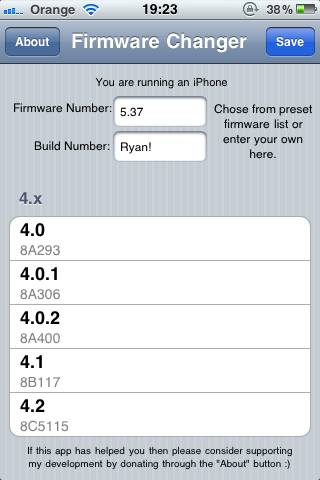
Here's another interesting Cydia tweak! Firmware Changer can change your iPhone to iOS 4.1 (or any other one) without updating. Basically, it will not let you update to 4.1, but it will fake to be on 4.1 (or any other version you want to pretend to be on).

Why would you want change your firmware version? You can use it so that whenever your connect your device to your computer, iTunes will not show this annoying message asking you to update to the latest firmware... 

iOS 4.2 Beta 2 Now Available

Apple just dropped iOS 4.2 beta 2 to developers. If you're not a developer, I'd suggest you stay away from it as it might mess up your chances of jailbreaking, and more importantly unlocking, in the near future.

If you do get it though, make sure to let us know what you think by leaving a comment here.

[9 to 5 Mac]

How to Make iTunes Believe You Are on Firmware 3.1.3

Are you tired of telling iTunes NOT to update to 3.1.3 every time you plug your iPhone in? Well, there's an app for that. It's called Fake 3.1.3 and it is ideal for people like me who don't like being bugged by recurring iTunes alerts.

Fake 3.1.3 will make iTunes believe that you are running firmware 3.1.3, although you will still be on 3.1.2 with the older baseband. It kinda reminds me of FWchanger, although this one just helped make the App Store believe you were on a different firmware.

Fake 3.1.3 is available for free on Cydia via the http://cy.sosiphone.com repo.

How to Fake Your iPhone Firmware for Apps That Require A Newer Firmware

If like me you are still running on OS 3.0, you sometimes probably encounter an issue when trying to download an application from the App Store. The issue in question is that "this application requires the iPhone 3.1 firmware update", which comes under the form of a popup saying "Application Not Compatible".

There is a quick and dirty fix for that: simply install the FWchanger app from Cydia.

Firmware Changer is an app that lets you change the plist file that contains the version of firmware you are running. This is useful for things that refuse to install or run on one firmware version even though they can. Note this only changes the reported firmware, not the actual firmware.

After installing FWchanger, launch the app and enter a fake firmware and build.

Hit "Set Custom Firmware", and voila! Go to Settings > General > About and you should see your fake firmware there.

Now you can trick these applications that require you to be on 3.1 into thinking you are running OS 3.1 even though you are not. This works for older 2.X firmwares as well. Note that it doesn't always work as advertised but in most cases, it was spot on for me.

Pretty slick, huh?

How to Downgrade iPhone 3GS From Firmware 3.1 to 3.0

Saurik, the creator of Cydia, has come up with a way to downgrade the iPhone 3GS from firmware 3.1 to firmware 3.0. The method is not for the faint of heart but it can be a life saver if you accidentally upgraded your iPhone 3GS to 3.1. Saurik did a great job at explaining how and why this downgrade works and I invite you to read his article for detailed information. On my part, I will only give you a step by step on how to downgrade from 3.1 to 3.0.

1. First and foremost, you must have saved your ECID file through Cydia. If this was done, you should see the following message at the top of Cydia's homepage: This iPhone 3G[S] has an ECID SHSH on file.

2. Now we're going to duplicate the functionality exposed by Apple's signature server and trick iTunes into thinking it is connected to Apple's servers. Make sure you have iTunes 9 installed on your computer.

On a Mac, go to /etc/hosts. On a PC, go to C:\Windows\System32\drivers\etc\hosts. Open the file in a text editor and add the following entry at the bottom of the file: 74.208.105.171 gs.apple.com

Save the file and close it.

3. Now we have to put your iPhone into DFU mode. To do this, open iTunes, plug your iPhone and hold down the power and home buttons for 10 seconds, then let go of the power button but continue to hold the home button until iTunes recognizes the device with the message: "iTunes has detected an iPhone in recovery mode. You must restore this iPhone before it can be used with iTunes." Your iPhone screen should be completely black. If you see an image on your screen, you most likely didn't perform the previous step correctly. Try again.

4. You can now do a "normal" restore to the 3.0 software. To do this, hold down the Option key (on Mac OS X) or the SHIFT key (Windows) while clicking the Restore button in iTunes. Select the firmware 3.0 (which can be downloaded here).

Theoretically, you should be done with the downgrade. That's just for the theory though... You're most likely going to get several errors.

If you get the "unknown error (3002)", it's because you probably don't have your ECID SHSH's for 3.0 on file with Cydia and it is unfortunately impossible to register your device with Cydia anymore. There is no solution, your iPhone can't be downgraded from 3.1 to 3.0 and you're gonna have to wait for a new jailbreak.

If you get the "The iPhone "iPhone" could not be restored. An unknown error occured (1015)" error, then re-do the process all over again. You will get the same error again and it is normal. Ignore the error and jailbreak your iPhone using RedSn0w.

I agree that this is definitely not the easiest way to downgrade your iPhone from firmware 3.1 to firmware 3.0, but you don't have much choice at this point. If you don't feel like taking on this project, I suggest you just wait for a proper 3.1 jailbreak, which may take days, weeks, or months. I am very confident that the jailbreak community is getting closer to a 3.1 jailbreak though.

If you have any tips and tricks to make this whole process smoother, or if you have any question, please leave a comment.

UPDATE: If you have an iPhone 3G, you can now downgrade from baseband 05.12.01 to o4.26.08.
Prediction: MMS Coming to the iPhone Within Two Weeks

I am no psychic but if you read this blog on a daily basis, you should know that I am usually right when it comes to making predictions on future events or features coming to the iPhone.

My latest prediction is that within 2 weeks, Apple will release firmware 3.1. This is actually pretty obvious as they are about to unveil a new line of iPod Touch at an Apple even on September 7.

I also predict that this new 3.1 firmware will come with some type of carrier update that will allow AT&T users to finally be able to send and receive MMS through their iPhones.

As usual, as a measure of precaution, I want to say that I might be completely wrong and that Apple won't unveil a new iPod Touch, and that there won't be any 3.1 firmware or MMS for a while, but someone something tells me otherwise ;)

iPhone 3G S 3.0 Firmware Available For Download

The 3.0 firmware for the iPhone 3G S is now available for download on Apple's website: iPhone2, 1_3.0_7A341_Restore.ipsw

Installing it on your iPhone 3G won't give you video recording or copy/paste. No, unfortunately it's pretty useless for the time being as it can only be uploaded on an iPhone 3G S. So don't waste your time downloading it and trying to install it on your iPhone.

Apple Releases iPhone 3.0 Beta 5 – Dev Team Says It’s Already Jailbroken

You gotta love the Dev Team! It hasn't been 24 hours since Apple released the fifth beta of their OS 3.0 that our favorite team of iPhone hackers has already shown proofs that it has been jailbroken. And better than that, the Dev Team says that unless Apple changes the hardware of the iPhone, all future version of the OS will be jailbreakable as well.

As should be expected, the modern devteam jailbreak process is still valid.   The picture below is 3.0beta5 jailbroken on an iPhone 3G.   As we’ve said in previous posts, nothing other than a hardware respin can prevent our jailbreak from working on all exisiting iPhone and iPod Touches.  They’ve chased our jailbreak so far down in the chain of trust, the only way they can fix it is in hardware.

One thing worries me a bit here though. Why is the Dev Team so open about it? I mean, they said several times now that Apple would have to spin the iPhone hardware to prevent all future jailbreak. If I was the Dev Team, that's something I would keep for myself. I assume by now Apple has figured out what little piece of electronics it needs to add to the future iPhone to prevent any jailbreak.

What I think about that is that the Dev Team likes challenges. It likes to be fair play too! It's as if the Dev Team said to Apple "hey, look what you need to do to prevent me from hacking your phone. I'm telling you all that because I'm smarter than you and whatever you do, I'll still me able to hack your phone".

In its blog post today, the Dev Team also warns us about the non-official version of QuickPwn:

Because there are so many beta releases, we couldn’t possible refine, test, and release both PwnageTool and QuickPwn for each of them.  That’s why we’re waiting until the final release.  You may have seen other “hijacked” versions of QuickPwn out there, but all of them are buggy, none of them work on OSX, and almost everyone who uses them reverts back to 2.2.1 (because none of the useful jailbroken apps (Qik, Cycorder, and others) work on 3.0 yet).

As usual, it is safe to remind everyone that if you care about the YellowSn0w unlock, you should NOT play with the 3.0 betas as they may prevent you from ever being able to unlock your iPhone.

How to Downgrade Baseband 2.30.03 to 2.28.00

If you like this post, please feel free to digg it, or subscribe to our RSS feed, or follow me on Twitter, or all of the above ;)

[digg-me]Since firmware 2.2.1 came out and updated the baseband from 2.28.00 to 2.30.03, many people accidentally updated, and are now stuck on baseband 2.30.03. I wonder how you can "accidentally update" your firmware as it takes a few steps, but anyways... I've had a few emails from people asking me how to downgrade baseband 2.30.03 to 2.28.08.

If you're looking to unlock your iPhone with YellowSn0w, you can't do that as long as you will on baseband 2.30.03. Unfortunately, you can not downgrade baseband 2.30.03 to 2.28.00! Sorry folks but you should have read the Dev Team's warning!

Now the good news is that I'm very confident the Dev Team is working on updating YellowSn0w so it works with firmware 2.2.1, baseband 2.30.03.

You can still downgrade your firmware from 2.2.1 to 2.2 in iTunes by hitting SHIFT + RESTORE and selecting firmware 2.2 but you will most likely have errors and even if you manage to downgrade, you still won't be able to downgrade the baseband.

UPDATE: It's now possible to downgrade your baseband thanks to pHaseBanDowngrader

pH (Pedro Henrique Franceschi) created a tool to help you downgrade your baseband from 2.30.03 to 2.28.00. To use this tool, you have to have to have an iPhone with bootloader 5.8. If your iPhone was manufactured before September 2008, you're good. If you bought your iPhone after September 2008 with firmware 2.2.1 out of the box, then you can't use pHaseBanDowngrader because your bootloader is 5.9.

Here are the instructions on how to downgrade using pHaseBanDowngrader:

1. Download this file 2. SSH into your iPhone and put the downloaded folder (phasebandowngrader) inside the folder /Applications/ 3. In MobileTerminal.app, type “login” and enter “root” as user, the default password is “alpine” 4. Now, type “cd /Applications/phasebandowngrader && ./phasebandowngrader”. Follow the screen instructions 5. Done!

Again, a big Thank You to pH for developing this tool.