Apps

More ARKit demos: Falcon 9 rocket landing, Van Gogh bedroom tour & more

Wouldn't it be great if you could take a tour of Van Gogh's virtual bedroom in augmented reality? How about witnessing a Falcon 9 rocket descending from the skies?

ARKit, Apple's new framework for building augmented reality apps for iPhone and iPad, has captured the imagination of many iOS developers out there who have already created some truly awesome examples of what's possible with ARKit.

For starters, here's an example of ARKit's accurate tracking.

https://www.youtube.com/watch?v=dMEWp45WAUg

Developer Mark Dawson used ARKit to create a virtual copy of Van Gogh’s bedroom which you can walk around and examine detailed furniture, paintings on the wall and more.

ARKit has “amazing tracking,” Dawson said.

https://www.youtube.com/watch?v=lvjVgt_ce5Q

ARKit combines live camera feed and sensor data to find tables, floors and other horizontal planes in your real world. Speaking of which, This example shows ARKit's plane detection.

https://www.youtube.com/watch?v=9ZnG9wrVxtM

And this is adding geometry and physics with ARKit.

https://www.youtube.com/watch?v=Vsk9erdCvdk

In this demo, ARKit is tracking a virtual cube and providing a light estimate for the scene, which makes it easy to change the light intensity of the virtual object to match the real world.

https://www.youtube.com/watch?v=7Kk6iVr5ULo

Notice how when the lights are dimmed down the virtual cube also automatically dims, then when the lights are raised the virtual cube also gets brighter. Pretty neat, wouldn't you say so?

And here you can see ARKit detecting horizontal planes in the real world and rendering content using SceneKit with physically based rendering.

https://www.youtube.com/watch?v=rNFQl7I4T6Y

Developer Tomás García shared this cool demo depicting a Falcon 9 landing at the ASDS in a swimming pool, which he accomplished using ARkit and Unity.

https://www.youtube.com/watch?v=NodGjd3C0SQ

And lastly, German company Econsor Mobile GmbH has been working on an ARKit-powered app for commissioning of construction projects directly on the construction site.

https://www.youtube.com/watch?v=PJWTXefVDK8

Apple CEO Tim Cook thinks augmented reality is a big idea like the smartphone.

“The smartphone is for everyone, we don’t have to think iPhone is about a certain demographic, or country or vertical market: it’s for everyone. I think augmented reality is that big, it’s huge. I get excited because of the things that could be done that could improve a lot of lives. And be entertaining,” he said in the past.

How do you like these latest ARKit demos, which one is your favorite, and why? Does ARKit show a lot of promise, do you think? Share your thoughts by posting in the comment section.

Watch new ARKit demos: Minecraft and measuring tape

The website madewitharkit.com dedicated to highlighting cool apps made with Apple's new ARKit framework, was updated today with a pair of new video demonstrations showing off some of the augmented reality possibilities coming to iPhone and iPad with iOS 11 this fall.

The first demo has the user selecting two spots in the real world, as viewed through an iPhone's lens, to calculate the distance between them, transforming the device into a working tape measure. That's a great example of the power of the ARKit framework.

https://www.youtube.com/watch?v=z7DYC_zbZCM

The app was built by Laan Labs and, like other ARKit-enabled apps, uses an iOS device's camera along with sensor data to precisely find horizontal planes in the real world, such as tables, floors and other objects.

You can beta-test the app by signing up at armeasure.com.

Measure distances with your iPhone. Just because you can. Clever little #ARKit app by @BalestraPatrick https://t.co/b2mXe2FS84 pic.twitter.com/pyoHp99Yts

— Made With ARKit (@madewithARKit) June 25, 2017

Laan Labs has other examples of proof-of-concept apps built using ARKit on their Twitter, like the following example of impressive 3D drawing in augmented reality.

https://twitter.com/laanlabs/status/878692051889655808

As for an AR-enabled Minecraft, we don't know if Minecraft creator Mojang is working on one, but that didn't stop developer Matthew Hallberg from recreating Minecraft in AR using the ARKit framework and the Unity engine.

By superimposing Minecraft building blocks on top of the real-world, and taking advantage of ARKit's super accurate tracking, the user is able to walk around their environment and place Minecraft blocks at arbitrary spots. “I love that you are able to place life size objects because the tracking with ARkit is so good,” Matthew said.

https://www.youtube.com/watch?v=qFGx9QcE5Gk

Apple is also using ARKit tracking for an impressive virtual reality mode in Apple Maps on iOS 11. The Cupertino giant is even helping Ikea build an ARKit-powered app which will let you try out virtual furniture at home before purchasing it.

ARKit requires a device with an Apple A9 or A10 chip because those processors deliver “breakthrough performance that enables fast scene understanding and lets you build detailed and compelling virtual content on top of real-world scenes,” as per Apple.

How do you like the aforementioned ARKit demos? Are you looking forward to augmented reality-enabled apps, and why? Chime in with your thoughts in the comments section.

Take notes on the fly with Apple Watch and SnipNotes

Since watchOS 4 is not poised to deliver all answers to some of our lofty demands, it is time to get serious about alternative solutions to replicating a Notes-esque experience on your wrist. And as though the people behind SnipNotes had known of Apple’s continuing blind spot all along, in late 2015 the app originally designed for iOS went out on a limb and added an Apple Watch extension to its core competencies. Since then, the note taking app has gone from strength to strength and, even if only philosophical at this point, provides a standard of note sharing between iPhone and Watch that Apple themselves could hardly topple.

Let’s get the major pitfall out there first: just like Apple’s (still fictitious) Notes app on watchOS would only correspond with the original Notes app on iPhone, SnipNotes too only works and syncs inside its very own cosmos.

Accordingly, if you want to create, share or store notes (including locations, images, links) on your wrist, you are going to have to embrace SnipNotes as your default gateway for note taking. If you weren’t expecting anything else great, nothing to see here. If you thought of SnipNotes as a third-party app to read and feed into your proprietary Apple Notes, unfortunately that is still off limits.

That’s about as far as (subjective) caveats go, and with that it is time to turn our focus to the glorious meat of the app.

Take notes, Apple!

SnipNotes earns its first brownie point right on launch. When activated, the app is going to ask for Touch ID authentication before breaking the seal to your data. This is not only a much appreciated safety net for when your nosy friend handles your iPhone, but generally gives most users peace of mind and a sense of privacy protection that Apple Notes is slowly getting whiff of as well.

The second brownie point is scored by an intuitive file system inside, consisting of multiple categories (such as Travel notes, Snapshots, etc.) which can all be edited, deleted or supplemented with the addition of new rubrics.

Brownie point number three - yes we’re keeping score - is conferred due to the fact that SnipNotes allows you to individually determine which categories sync their contents with your Apple Watch. It all starts with the ‘Inbox’, the overarching folder on both your devices, which functions as the initial collecting tank for new notes. From there, you can assign any file or note to a category, filter them or favorite notes to permanently pin them atop of your lists.

As for Apple Watch devotees, here's your lowdown: Notes can be created by way of voice input and Scribble. Neither might ever truly rival bigger screen note taking, however the ability to swiftly capture fleeting thoughts might be priceless to some. So talk to your wrist or jot down a few letters and before you know it, the note will be seamlessly relayed to your iPhone.

Conversely, SnipNotes on iPhone can be a great agent to storing pictures or screenshots on Apple Watch, since the app's category structure enables a folder like organization of your images. This little detail can't be stressed enough, because frankly, to this day, Photos on Apple Watch is egregiously half baked. That’s four out of five brownie points.

Suffice it to say that there is a whole lot more to discover, especially for advanced users, such as clipboard-to-note shortcuts and smart widgets. SnipNotes has clearly not spared any expenses to ultimately please every type of user, which is admirable in its intent but can sometimes produce an air of clutter to the untrained eye.

If you’re curious or in need of a notes app for your wrist, iPhone or iPad, grab SnipNotes for $0.99 on the App Store today.

Live Photo Wallpapers for iPhone with Wally Papes

One of my favorite features of iOS is the ability to take Live Photos. It is shocking how drastically different a memory expresses itself over 3 seconds, as opposed to a single instance in time. I frequently find myself going back through a photo album, to play through each Live Photo.

Launching with the feature, came the ability to set Live Photos as wallpapers, both on the Lock and Home screens. However, there is really no great way to share Live Photos as posts on the internet. Dave Gorum comes to the rescue with Wally Papes, a curated collection of Live Photo wallpapers for your iPhone.

Holo, Sweat Deck, Radio Callbox, and other apps to check out this weekend

This week’s edition of our Apps of the Week roundup features a fun augmented reality app, a deck of cards that will help you mix up your fitness routine, and a two-way radio client. And as usual, we've got two great new games for you to check out.

Holo

This app isn't new but with all of the augmented reality talk lately, I felt it was pertinent. Holo lets you add holograms of real people and animals into your world and take photos & videos to share with friends. Choose from a variety of holograms including movie characters, celebrities, athletes, musicians and comedians, as well as fun original characters and animals. New content added weekly. Now there are a few negative reviews complaining about performance, and this seems like something that could really benefit from Apple's new ARKit. But it's still worth checking out. Holo is available for free.

Sweat Deck

Sweat Deck is a deck of cards-style workout that will help you mix up your fitness routine with an endless combination of simple and effective workouts! The concept is simple: assign an exercise to each suit and perform them as cards are drawn from the deck—do you have what it takes to make it through an entire deck of cards? Features include a built-in list of common exercises to choose from, joker cards for adding an extra challenge, deck and rep multipliers for higher intensity workouts, and more. Sweat Deck is available for free (with one IAP).

Radio Callbox

Have an instant 2-way, push-to-talk audio connection with friends, family, or colleagues, without the burden of creating an account, logging in, or joining another social network. Now I know that there are other apps that do this, but the no-account needed really stood out to me. And some of you might be thinking if you have the cell service to download and use this app, why not just call the person? But I do think there are times and situations that are more conducive to 2-way radio-style conversations. Maybe a family uses this while camping, or at a theme park. Radio Callbox is available for free.

Touchdowners

Touchdowners is a simple, yet crazy physics-based sports game where you need to grab the ball and touch it down in your opponents end zone. You control a team of three highly trained Touchdowners who must pass, wrestle and jump their way to the end zone then slam the ball to the ground. Features include an arcade mode with global rankings, and a head-to-head 2 player mode. Touchdowners is available for free (with a single IAP).

Age of Rivals

Age of Rivals was inspired by strategy boardgames and designed to be ideal for 1 or 2 players to play in 10 minutes with plenty of depth and replayability. It's the "anti-deckbuilding" CCG, where having only minimal control over your deck encourages endless variety in each game and puts the focus on in-the-moment tactical decision-making. Unfortunately, there is no way to play this game offline at the moment (developers say they are working on that), but there are also no in-app purchases. All game content unlocks at a constant pace just by playing the game. Age of Rivals is available for $0.99.

More apps to check out The best iPhone apps for tracking steps Apple’s free app of the week: Telepaint Instagram testing private sharing feature

The best iPhone apps for tracking steps

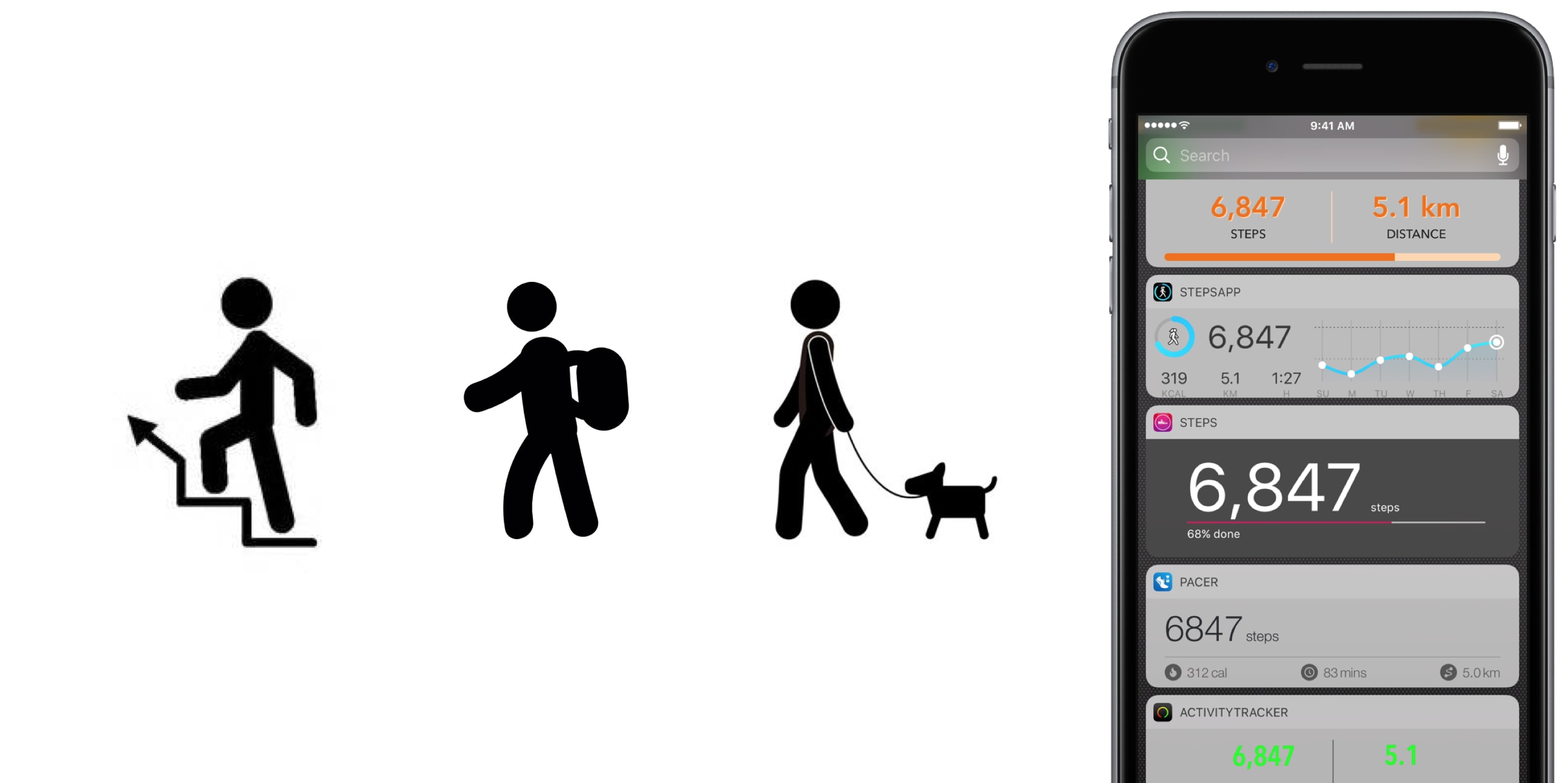
No matter the extend, or amount of joy we derive from it, until anti-gravity boots have been invented and immobilized humanity once and for all, we all have to walk. To work, from work, to run errands, to take the dog to the park, to pick up the kids, to the pub on weekends. Sometimes home on all fours after that. But it is also a loved activity for those seeking a healthy lifestyle or regular exercise. In any event, with your iPhone in the pocket, it is easier than ever to record, visualize, or even gamify your endeavors.

To do justice to the wide array of step trackers available, we have parsed the App Store with the aim to only pick apps standing out for at least one unique quality. The result is - hopefully - a small but diverse sample of the best step tracker apps that is representative of the larger flock of step counters, some of which you might argue should or should not have been included based on merit, features or simply personal allegiance.

If that’s the case, as always do let us and your fellow readers know in the comments. And now, without further ado, let’s get into our list of the best pedometer apps!

The best pedometer apps Activity Tracker

We’re starting at the proverbial shallow end with Activity Tracker, meaning an app not too complex with respect to stats and analytics. Instead of drowning the user in numbers and tabs, Activity Tracker is a great candidate for those appreciating aesthetics and simplicity. A the same time, it manages to smartly condense the most important information about your activity and hide it in plain sight.

Activity Tracker records and presents your daily steps in a very familiar activity ring fashion, in addition logs flights, time, distance and also calories burnt, a giveaway other apps will already demand you go premium for. Moreover, the app icon badge can display your daily number of steps and a reasonable widget is being offered as well, certainly not the best among the pack but a nice to have all the same.

Finally, Apple Watch users are likely to appreciate the wrist implementation of Activity Tracker, as it bundles all the important information (steps, kcal, miles) in one quick glance. For more stats (hourly, monthly) and complete HealthKit integration you’ll have to upgrade to premium for $4.99. Either way, the basic app is a solid place to start your step counting journey.

• Device support: iPhone, Apple Watch • Widget: Yes (Steps, Miles) • Notable features: app icon badge, weekly goals, calories • Cost: free ($4.99 premium)

Pacer

Pacer’s full name - Pacer: Pedometer plus weight loss and BMI tracker - more aptly encompasses the allrounder that this app really is. To its credit, it somehow manages to not stretch itself too thinly taking on step counting, weight monitoring, personal coaching, but also social challenges and group forums. Yet on the flip side, it can for sure be a little overwhelming to those seeking out a straightforward pedometer.

To flesh it out briefly, the free app boasts a regular step counter comprising steps, flights, distance and plenty of graphs (for both portrait and landscape orientation). More exclusively to Pacer, it also features stats for weight, BMI & blood pressure. Refreshingly, Pacer houses a free community of user groups, which can be joined for discussions and the hunt for shared goals. Public events can be attended as well, boosting morale as you sure don’t want to sit at the bottom of the participant's list.

Pacer offers a subscription based Pro service (at $3.99 per month) that covers a plethora of goodies such as a personal coach for exercise plans and weight loss, guided challenges, plus more personal stats. And as you would expect from a jack-of-all-trades app like Pacer, it packages a potent Apple Watch companion as well.

• Device support: iPhone, Apple Watch • Widget: Yes (Steps, Cals, Time, Distance) • Notable features: calories, public events, groups  • Cost: free ($3.99 a month)

Pedometer++

Pedometer++ dates back all the way to 2013 and the release of Apple’s M7 motion coprocessor. Back then, it spearheaded the new movement and was among the first apps to embrace the freshly-fitted piece of hardware. Because of that pedigree alone, we’d be remiss to ignore the application. Besides, it’s the only app (next to StepsApp) to equip you with a nifty iMessage chat extension for friendly banter between you and your friends.

Outside of that, Pedometer++ is a straight shooter, only asking for a daily step goal and taking over from there. Perhaps its biggest strength is the UI, managing to boil down all the information (steps, floors, distance, a color chart) of the tracker in one single page, all the while retaining a clean look. As a result, there is no learning curve with this tracker, no hidden gestures or buttons, no fear of missing out. Via settings, Pedometer++ can also make use of the app icon badge to display the current step count. In addition, the app earns its stripes through accessibility features such as a wheelchair mode and a switch for rest days.

In closing, Pedometer++ can be stripped off its ads for a small tip of $0.99, plus comes in conjunction with an Apple Watch app capable of timing and recording your walks.

• Device support: iPhone, Apple Watch • Widget: Yes (Steps, Miles, Floors) • Notable features: app icon badge, daily goals, wheelchair mode, rest days • Cost: free

Stepz

Stepz most distinguishing feature is not its atrociously spelled name, but an emphasis on social and trophy hunting. The app has dedicated tabs for Achievements and Friends, each making clear where priorities lay during the development of Stepz. Fortunately, that gamble has paid dividends, as scoring and sharing achievements like ‘You have walked the length of the London Underground’ is actually a playful source of motivation.

At the same time, Stepz has been mindful with the implementation and ensured it doesn’t bleed into the core step tracking functions. The latter performs slightly above average amongst all apps featured, with rich and informative data, detailed graphs and an outstanding history tab for everything ever archived on your iPhone. To make sure they leave no stone unturned, an app badge switch and Lock screen widget (Steps & Distance) have been thrown into the bargain as well.

Suffice it to say that the dev team has done their homework on watchOS too, which for all intents and purposes wraps up the package nicely. For $0.99, you get to wipe the interface clean and remove all ads.

• Device support: iPhone, Apple Watch • Widget: Yes (Steps, Miles, Progress) • Notable features: app icon badge, daily goals, calories, achievements badges, friends • Cost: free ($0.99 premium)

Steps

Steps not only beats Stepz to its grammatically sound name, but also broaches the concept of a step counter from an entirely different angle. Essentially, Steps is the cleanest, least pompous pedometer in our line up, so much so that the entire display can be reduced to a single number (your step count).

Under its surface, one tap will reveal distance and time travelled, a swipe up invokes a brief history of the previous three days, while a swipe to the left is utilized to set a daily steps goal. Believe me that we are not trying to shortchange the app, but with the exception of a daily update notification, this is practically it. And that’s precisely the sales pitch.

If you grow fond of the slim step counter, for $1.99 Steps complements its service with a calories tracker.

• Device support: iPhone • Widget: Yes (Steps, Progress) • Notable features: daily goals • Cost: free ($1.99 premium)

StepsApp

StepsApp will tickle your fancy for various reasons, most likely though because of its breadth of customization abilities, especially with regard to your daily goals and notifications along the way. To give you an idea, you can flick on or off notifications for steps, calories, distance, time, weekly reports and an app icon badge. It additionally boasts the option to alter colors inside the app (limited until you go premium), which even redesigns the app's look on your iPhone's Home screen. Nice little touch there, StepsApp.

That is just the tip of the iceberg though, and the foundation is equally solid: the app sports a beautiful interface including a monthly calendar view akin to Apple’s own activity app calendar, interesting diagrams and submits one of the best widgets on iPhone any app in this roundup has to offer.

What’s more is that on Apple Watch, StepsApp's prowess (i.e. amount of data and breakdowns) comes close to rivalling Apple’s proprietary activity and exercise app, so much so that it can serve as a fully fledged outdoor GPS tracking device for walking and running. For $2.99, even more customization, Apple Health integration, and Apple Watch complications await.

• Device support: iPhone, Apple Watch • Widget: Yes (Steps, Miles, kcal, Time, Graph) • Notable features: app icon badge, various daily & weekly goals, app customization, calories, GPS tracking • Cost: free ($2.99 premium)

Step Counter

Step Counter arguably tries to accomplish a little less at once, albeit rocking a design quirky enough to have earned a spot in our list. Unlike the majority of step trackers, Step Counter asks you to select a character and matching attire first, presuming that a personalized avatar is going to funnel extra inspiration and ultimately motivation.

Once completed, the app emulates a fairly plain step counter sans notable bells and whistles. Such being the case, you will get steps and distance measurements, plus gratis hourly breakdowns. Furthermore, step, calories and distance goals can be adjusted and notifications hooked up to help you meet them as you go. Contrary to what some freemium apps at first skimp on, Step Counter is fully integrated into HealthKit from the get-go.

Conversely, they too are guilty of holding back some items to sway you in the direction of the $1.99 in-app upgrade, most pertinently calories analytics and personalized goals. Irrespective of redeeming the entry ticket or not, Step counter does not come with an Apple Watch application or a tailor-made widget for your iPhone.

• Device support: iPhone • Widget: No • Notable features: personal avatar, hourly breakdowns  steps and distance • Cost: free ($1.99 premium)

Honorable Mention

Wokamon 

Before we draw the curtain on this, one final app for you to consider goes by the name of Wokamon. If the success of Pokemon Go has proven anything last year, it would be that above all else, gamifying walks is going to get certain people off the couch. If you are guilty of the need for instant gratification, Wokamon could be the one app closest to a regular step tracker appealing to you. Start by walking to hatch an egg, subsequently keep logging steps to grow and foster your digital pet. Wokamon even features a weekly breakdown of your steps, so by any standards it sure is a pedometer, if slightly whacky at that.

• Cost: free (in-app purchases)

Conclusion

It is easy to get lost in the vast ocean of pedometers out there, and in the likely event that you bank on an application not featured in our roundup, as mentioned earlier, don't hesitate to fill us in!

Apart from that, the time has come to download one of the iPhone apps for tracking steps above, put on some walkable shoes and rediscover the joys of the great outdoors!


Instagram testing private sharing feature

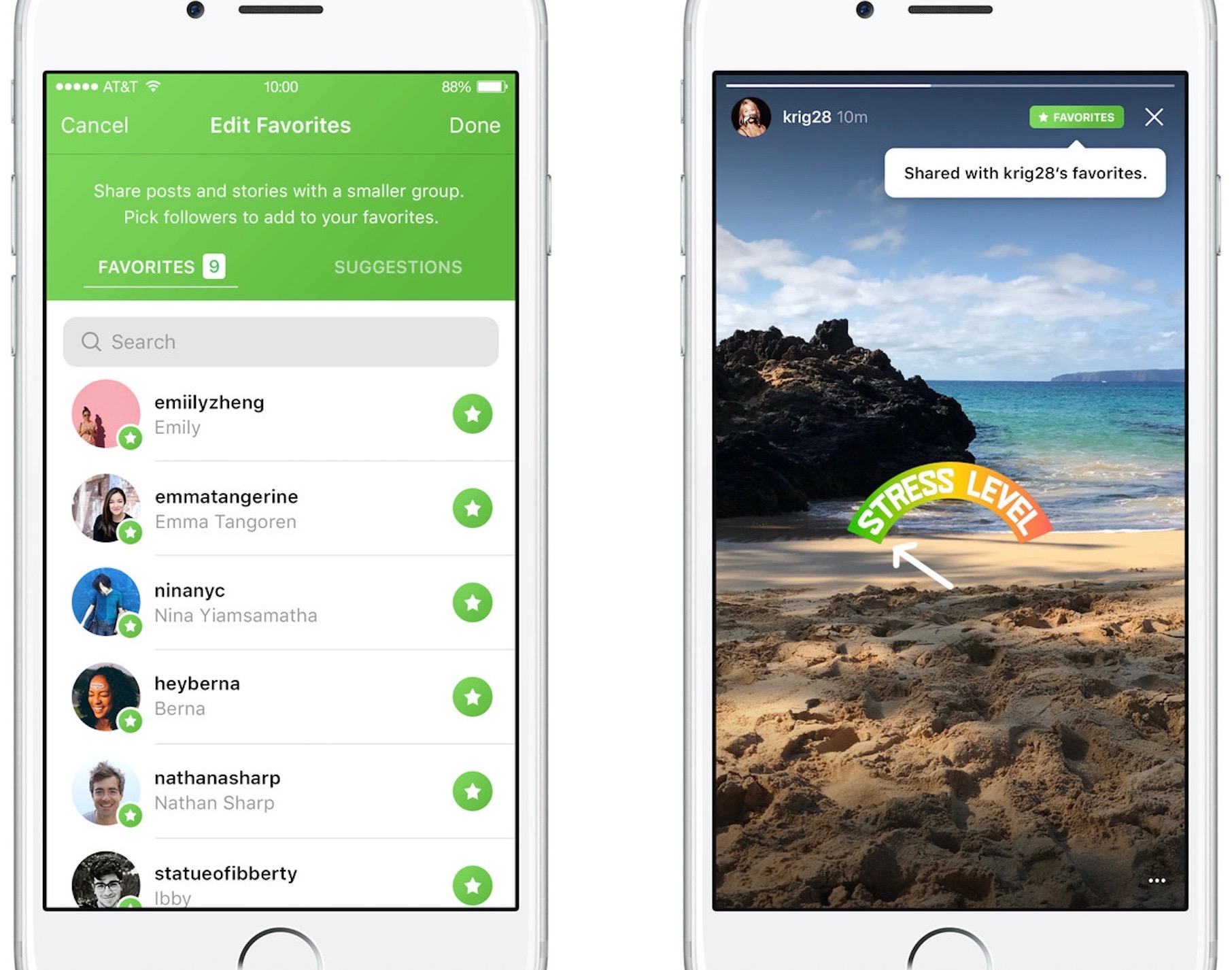
Photo-sharing service Instagram on Friday kicked off a small test for a new private-sharing feature. Called Favorites, it should roll out to all users over the next few months.

Instagram's product lead Robby Stein told The Verge that they've been working on the new private-sharing feature for more than a year.

Privately shared content is denoted by a green Favorites badge on the post.

By hand-picking followers for the new Favorites section, users can easily create a more limited group of the closest friends with whom they can privately share posts and Story updates.

Anyone not in the Favorites list won't be able to see your privately shared posts.

You'll be able to browse all the non-ephemeral posts you’ve shared to your Favorites over time by tapping a new Favorites tab on your Instagram profile.

According to The Verge:

No one gets notified when you add or remove them to the list. They’ll know they’re your favorite only when they see a green Favorites badge at the top of your posts. They can’t request to be added to your list through the app.

And if you remove them from your Favorites, they lose access to all of your private posts. If they visit the Favorites tab in your profile, it will appear to be empty.

There is currently no way to share Instagram posts with select friends only.

You can set your Instagram account to private at any time to personally approve follow requests from a handful of your closest friends, but that approach has many flaws of its own.

According to Stein, people with private accounts often approve hundreds of follow requests due to social pressures and are using Instagram less as a result. “People are trying to hack Instagram to create smaller audiences, and we’re trying to recognize that,” said Stein.

It remains to be seen if Instagram Favorites will come to all users. Given they've been working on this feature for more than a year, I'll be surprised should they decide to pull it.

Will you use the Favorites feature when it rolls out, and why?

Do chime in with your thoughts in the comments section!

Ikea and Apple building AR app that’ll let you try out virtual furniture at home

Ikea is co-building a new augmented reality app together with Apple that will allow customers to try out virtual furniture at home, and then buy it.

Built on ARKit, Apple's new framework for powering augmented reality experiences on iOS devices, the app will basically superimpose tables, chairs and other furniture on top of your room, as seen through the lens of an iOS device's camera.

The app leverages ARKit's scene understanding and lighting estimation features that permit it to automatically find horizontal planes like tables and floors in a scene, as well as track and place objects on smaller feature points. ARKit even applies the correct amount and type of light to any virtual objects to match the current lighting conditions in your room.

According to a local report in Di Digital, the app is launching in the Fall of 2017, shortly after iOS 11 releases for public consumption.

“This will be the first augmented reality app that will enable you to make buying decisions,” said Michael Valdsgaard, Leader of Digital Transformation at Inter Ikea, to Di Digital. The executive couldn't promise that the in-app payment feature will work in the first version of the app.

The app will launch with 500-600 products available in AR. “When we launch new products in the future, they will first appear in the AR app,” Valdsgaard says.

Ikea said recently that its LED bulbs and other smart lighting products would soon gain compatibility with HomeKit, Apple’s smart home management platform.

At WWDC 2017, Apple announced a number of improvements for HomeKit, including software-based encryption that could enable existing non-HomeKit-compliant devices to gain support for HomeKit via a simple firmware update.

ClippyCam, Groovebox, Taskful, and other apps to check out this weekend

This week's edition of our Apps of the Week roundup features a new picture-in-picture sharing app, an easy-to-use beat-maker, and a task manager app with a unique twist. And as always, we've selected two new games for you to check out.

ClippyCam

ClippyCam is a new app that aims to make sharing photos and videos with your friends more fun. No, not with text or stickers or emojis—but with videos. Basically you record a video of yourself and it gets embedded in your photo or video in a picture-in-picture style. Think of it as a way to explain the photo or video you're sharing, or even as a way to brag about what you are doing. "Just hanging out in Hawaii, wish you were here!" The app itself is free, but you'll have to fork over $3 to remove the annoying watermark. ClippyCam is available for free.

Groovebox

Groovebox is a free, beautifully designed music studio app packed with inspiring synths and drum machines. In minutes you’ll be making beats, melodies, and playing with world-class instruments. Play with touchable instruments to quickly create your own beats and melodies, or draw in notes. Need inspiration? Groovebox has hundreds of patterns and sounds to get you started. I know there are a ton of these types of apps on the App Store already, but this one looks sharp and appears to have the features to make it worth checking out. Groovebox is available for free (with some IAPs).

Taskful

Taskful is a smart to-do list and task manager app that helps you stay on track and meet your deadlines. It breaks down all of your tasks and only shows you what you need to do today, so you can stay focused and motivated. Whether you are trying to track your steps, drink more water, or read that book you haven't picked up in a while, Taskful is designed to help you get stuff done. This is another app that is competing in a super crowded space, but again I think the design and feature set here make it worth a look. Taskful is available for $2.

Flipping Legend

Unleash the power of your fists, spells and weapons in this pattern-based adventure game. Hone your reflexes and be one with the environment as speed and rhythm become second-nature. Play with powerful heroes and unlock all their abilities and secrets to help better dispense your foes. Reach new and faraway lands not yet discovered by fellow travelers. Be a Flipping Legend! The game does have some annoying IAPs, but it has a 5-star rating on nearly 300 early reviews. Flipping Legend is available for free.

forma.8 GO

For those who aren't familiar with it, forma.8 is a unique take on the proven Metroidvania action-adventure formula, with a striking visual style and a huge world to explore. As the small exploration probe forma.8 you're stranded alone on the surface of an alien planet. Separated from your companions by accident you have a life or death mission to accomplish: find and recover a lost, powerful energy source before it's too late. Ancient civilisations, great perils and dystopian visions await you. And not everything is what it seems... Forma.8 GO is available for $4 (sale price).

More apps to check out This 5-star Mac productivity tool is on sale for just $4.99 Apple’s free app of the week: Beat Stomper Twitter revamped with dynamically updated Reply/Like/Retweet counts, Safari Reader support & more Box introduces macOS client for its cloud syncing service

Google prepping new app for backing up your Mac to Drive

Are you a fan of Drive, the search giant's cloud-storage service? If so, a new app from Google will soon let you back up any folder(s) on your computer to Drive and keep them in sync.

This is welcome news because Drive's current desktop client does not allow for selective sync of any folders that don't live inside of the Google Drive folder on your Mac or Windows PC.

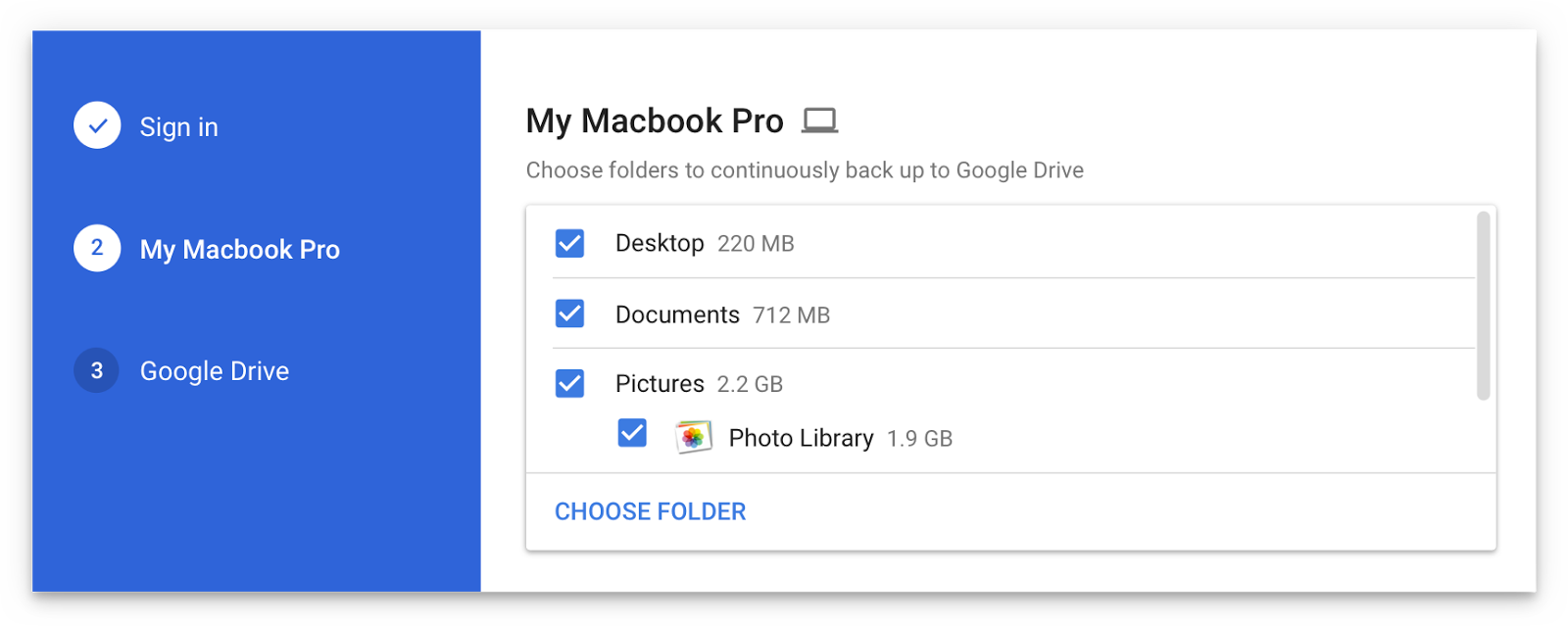
The forthcoming Backup and Sync app is better integrated with your computer than the existing client and will replace it on Wednesday, June 28.

According to the search firm, Backup and Sync is intended to “help everyday users back up files and photos from their computers, so they’re safe and accessible from anywhere”.

As mentioned, you'll be able to continually back up any items found in custom folders on your computer, like the Desktop, Photos, Documents and so forth.

Backup and Sync will replace Google's existing desktop uploader for Photos, too.

Basically, you could use the new app to back up and sync your entire Mac account's home folder to Drive and use Google's powerful search engine via Drive's web interface to quickly identify that needle in the haystack you were looking for.

However, you'll probably need to upgrade your cloud storage to keep your Mac safely backed up to Drive. Each Google account gets 15GB of free Drive storage versus Apple's 5GB free tier.

If you need more storage, you can upgrade to one of the paid Drive tiers:

100GB for $1.99 per month 1TB for $9.99 per month 10TB for $99.99 per month

And here are Apple's recently refreshed iCloud storage upgrades:

50GB for $0.99 per month 200GB for $2.99 per month 2TB for $9.99 per month

Google Drive for Mac and Windows is available via google.com/drive/download.

Google Drive for iPhone and iPad is a free download from App Store.

Do you use Google Drive? If so, are you looking forward to backing up your Mac to the Google cloud? If not, what's your preferred online service for storing files, documents and other data?

Tell us in comments!

IBM’s new Garage initiative aims to accelerate development of iOS enterprise apps

Building upon the Apple-IBM enterprise mobility partnership established three years ago, Big Blue (that's a nickname for IBM) today announced a new initiative to help accelerate the development of MobileFirst enterprise apps for iPhone and iPad.

Upcoming app development studios, called Garages, will soon go online in Shanghai, China and Bucharest, Romania, in addition to IBM's existing MobileFirst for iOS studio in Bangalore, India.

IBM's other app studios and Garages can be found in US cities Atlanta, Cupertino, Toronto and Chicago. Plus, the company has committed to establishing new app studios in Shanghai, China and Bucharest, Romania. Lastly, mobile enterprise apps designed by IBM can now be embedded with the cognitive capabilities of its Watson cognitive system.

Bridget van Kralingen, Senior Vice President, IBM Industry Platforms, said:

Four years ago, we made enterprise mobility a reality, and we’ve seen how transformative mobile can be. Today, companies are now reigning in mobile faster than ever, creating a critical need for powerful innovations that will reinvent how they do business. We’re combining the power of mobile with cognitive and analytics to continue to push the market forward.

IBM has officially named some of the clients adopting iOS enterprise apps for their own employees, such as Lufthansa Group, City Furniture, Singapore Airlines and Japan Airlines.

Since its introduction three years ago, the partnership between Apple and IBM has resulted in several billion dollars in signings with more than 3,800 client engagements supported by market-ready and custom iOS apps designed for professions across all industries, including store associates, flight attendants and field technicians.