Apps

Arty, Frame App, Redacted, and other apps to check out this weekend

This week's edition of our Apps of the Week roundup features a new artsy-photo editor, a new app for making stop-motion and animated videos, and an app for redacting sensitive information in a photo. And as usual, we've selected two great new games for you to check out.

Arty

I know what you're thinking: come on Cody, not another photo editor. But hear me out. Unlike other editors Arty does more than just apply filters. You can use it to create accurate line drawings, zoom in to view and edit tiny details, and pick out colors. It even tracks how long you've been working on your project. Other features include Faber Castell Polychromos color-matching, custom color swatches, shadows, outline, overlay grid, and much more. Turn your device into a Lightbox and trace your image or print your photo to an AirPrint printer from within the app. Arty is available for free.

Frame App

If you're looking for something fun and new to do this weekend, try making a stop-motion or animated film using Frame App. Here's how it works: open Frame App and take a picture. A transparent overlay of the first image will appear on top of your live camera view in a ghost-like manner. Use this ghost image as your guide to easily align and frame your next shot. Take as many photos as you need, then select the ones you like, and staring them together to make your movie. You can edit playback speed, direction and image size, and then export your clip into a GIF or MP4 video. Of course there are other apps that perform similar functions, but I appreciate the simple design here, and the early reviews are glowing. Frame App is available for free.

Redacted

Want to share a hilarious screenshot of your Facebook feed, but afraid to expose your friends or family? Check out Redacted. Yes, I know iOS has built-in image annotation tools and there are countless apps that do this for free, but it's a bit of a chore and it never seems to look right. Redacted makes it quick and easy to redact parts of an image by simply clicking and dragging. You have three options, pixelate, blur and black bar, and once you're done you can share the image to your favorite social network and other apps in the iOS Share Sheet. The app doesn't support PDF files yet, but the developer says it's working on it. This obviously isn't going to be for everyone, but the folks I have shared this app with bought it instantly. Redacted is available for $0.99.

Filmoji

The title explains it all. Filmoji is a game that presents you with a movie title written in emoji, and you have to guess what it is. As you can see from the screenshots, this is definitely a low-budget, indie-style game, but I thought it looked fun and it's nice to highlight lesser-known developers every now and then. I'm sure there's a similar title out there from Zynga (and if not they are probably working on one), but if you want to put your cinema knowledge to the test without a slew of ridiculous IAPs, this game is worth checking out. Filmoji is available for free.

Futurama: Worlds of Tomorrow

Chances are, you've already heard about this game releasing this week, but it was still worth mentioning here. Futurama: Worlds of Tomorrow is the next epic adventure for the popular animated franchise. Play with all your favorite characters, build your own New New York, combat against alien specials and explore unfamiliar planets on a mission to save the universe. The game is based on an all-new story, written by the creators of the original Fox series, and it features actual dialogue from David Cohen and his team. Yes, you're going to have to deal with pesky in-app purchases, but this is about as good as it gets for Futurama fans. Futurama: Worlds of Tomorrow is available for free.

More apps to check out Enhance your iPad productivity with the new Prokeyboard app [sponsored] Apple’s free app of the week: Day One Journal Instagram unveils offensive comment filter, anti-spam tool in 9 languages Frustrated with Reminders? Taskful could be the answer to your woes New demos show how easy it is to bring 3D models to life with ARKit Skype for iPhone gains chat bots, its version of Stories, message & in-call reactions and more You can now edit text files right from Dropbox app Take notes on the fly with Apple Watch and SnipNotes

Instagram launches stickers for Independence Day and Canada Day

Instagram during the weekend launched stickers in its mobile app for iPhone and iPad which are dedicated to the 4th of July holiday and Canada Day celebrations across North America.

Instagram users in the United States can celebrate Independence Day by posting a Story adorned with one of the stickers in the app's new star-spangled sticker pack, ranging from backyard BBQs to fireworks at night.

Canadians get a sticker to celebrate Canada Day, available in both English and French.

The sticker was designed by Jenn Kitagawa, a multidisciplinary artist and illustrator who grew up in the prairies of Alberta and currently lives in Toronto.

Instagram is available at no charge on App Store.

High Sierra will be last macOS release to support 32-bit apps “without compromise”, says Apple

We know that iOS 11 marks the end of the road for legacy 32-bit apps and now we're learning about Apple's new 64-bit requirement for Mac apps.

In an advisory on Dev Center yesterday, the Cupertino giant announced that macOS High Sierra will be the last macOS release to support 32-bit apps “without compromise.”

Apple originally said at the Worldwide Developers Conference that macOS apps submitted to Mac App Store must support 64-bit computing starting January 2018. The new advisory states that Mac app updates and existing apps must support 64-bit starting June 2018.

“If you distribute your apps outside Mac App Store, we highly recommend distributing 64-bit binaries to make sure your users can continue to run your apps on future versions of macOS,” reads Apple's note to developers.

In a separate notice, the company reminded developers to submit updates to their 32-bit apps because iOS 11 is 64-bit only. ”Support for 32-bit apps is not available in iOS 11 and all 32-bit apps previously installed on a user’s device will not launch,” reads the note.

Two days ago, Apple asked developers to update their product pages for iOS 11’s redesigned App Store.

Apple (again) reminds developers that iOS 11 won’t run 32-bit apps

Following the iOS 11 public beta release, Apple has reminded developers that iOS 11 will be 64-bit only. The notice posted yesterday on Apple's Dev Center cautions that all 32-bit apps previously installed on users’ devices will not launch after they upgrade to iOS 11.

“As a reminder, new iOS apps and updates submitted to the App Store must support 64-bit,” reads the notice. Apple recommends that developers who haven’t updated their apps to support 64-bit submit an update “so your users can continue to run your apps on iOS 11”.

TUTORIAL: How to identify 32-bit apps installed on your iPhone and iPad

Because iOS 11 is 64-bit only and doesn't support legacy 32-bit apps, users should experience a bit faster performance and fewer crashes. That's because iOS 11 will never need to load 32-bit frameworks, libraries and the kernel alongside their 64-bit counterparts needed to support legacy apps, which effectively strains the RAM and other resources.

https://www.youtube.com/watch?v=-hoPcMPvL88

Subscribe to iDownloadBlog on YouTube.

Apple’s Clips app already requires a 64-bit iOS device and iOS 11's new Files app is optimized for 64-bit computing, too. Starting with iOS 10.3, Apple began naming and shaming legacy apps via a new App Compatibility section in Settings → General → About → Applications.

The new advisory regarding 32-bit apps was posted just a day after the company invited developers to update their product pages on App Store for iOS 11's much-improved, thoroughly redesigned App Store.

iOS 11 will be in the hands of “hundreds of millions of customers” this fall.

Instagram unveils offensive comment filter, anti-spam tool in 9 languages

Instagram today announced some much-needed new tools to help users of its mobile app enjoy the service without toxic comments and spam. One is a new filter designed to block certain offensive comments and the other is basically a spam filter supporting nine languages.

Instagram claims that the pair of newly announced tools at their users' disposal will help keep the service a safe place for self-expression and inclusive communities.

Clamping down on toxic comments is now easier with the comment filter that automatically blocks certain offensive comments on your published posts, as well as in live video.

The new offensive comment filter is in addition to Instagram's existing arsenal of tools, like comment reporting, account blocking and so forth. To access this automatic filter, tap Instagram's “...” menu from your profile, then tap the new Comments option.

“We’ll launch this comment filter in English first, but will offer it in more languages over time,” notes the Facebook-owned company. The filter is optional and can be turned off at any time.

To help fight spam, Instagram is rolling out another new filter. Powered by machine learning, it looks for any obvious spam in comments and blocks it from your posts and live videos.

According to Instagram:

Our team has been training our systems for some time to recognize certain types of offensive and spammy comments so you never have to see them. The tools will improve over time, enabling the community’s experience of sharing to improve as well. We hope to make these filters available in more languages as our algorithms improve.

At launch, this dedicated filter will remove spam written in a total of nine languages—English, Spanish, Portuguese, Arabic, French, German, Russian, Japanese and Chinese—with additional language support to be implemented in the future.

Instagram is available free of charge via App Store.

Frustrated with Reminders? Taskful could be the answer to your woes

Not all tasks are created equal. No doubt you either have taken the trash out or you have not, but there is a vast number of daily challenges that are conquered in increments, tasks that can be taken on for an hour, then sidelined at their half way point and ultimately capped off in the afternoon. Users of Apple’s Reminders app might know the struggle to approximate a progression-based task to the binary reminder framework we are provided: ever tried to make the Reminders app nudge you every day until you have hit the treadmill five times per week, or let's say read ten chapters of your book? For all intends and purposes, it’s cumbersome.

Taskful sets out to remedy the pain of that. It also lets the user select only certain days of the week to remind you of due tasks (e.g. weekdays) and will smartly display the items relevant to you on a specific day and, more crucially, blank out tasks set for a future date. Needless to say this can be priceless for people quickly throwing their hands up when faced with a dauntingly long list of tasks. To bolster the sentiment, the app also automatically breaks up longer tasks into daily chunks.

How intelligent is this thing really?

Naturally, for a smart task manager to really hit its stride, it takes equally smart data input. Such being the case, you’re going to want to learn the nitty-gritty of Taskful before judging the application’s utility. So let’s briefly talk about the mechanics of it:

On the face of it, Taskful and Apple’s Reminders app share some structural traits. That is, both offer category based sorting of items, in which each category (Urgent, Finance, Work) is represented by a color of your choosing. That’s about where the similarities come to an end however, because on Taskful, filing away a task properly is swiftly accomplished by swiping left and right to change the background color of your note during creation. At the same time, the app will analyze your task as you scribble it down and immediately glean information such as dates and numbers.

Based on its reading, smart bubbles right below the draft will interpret your input and suggest measuring sticks for your task. You can tap and confirm or manually alter them. To exemplify, use a number like '4' in your task, now mark the little ‘Amount: 4’ bubble magically popping up beneath the text and as a result, the reminder needs to be tapped four times to be considered finished by Taskful. Until then, a big and rewarding progress bar will grow in 25% increments every time you come one stop closer to your goal.

Along the same lines, Taskful is also capable of acting as a quirky step tracker. On launch, the app asks permission to read and write HealthKit data, meaning the app can track your step count and remind you to get off the couch if you haven't ticked the ‘walk 600 steps’ reminder at night.

It goes without saying that these are just two hands-on examples of how to put Taskful to good use, not so much selected at random but rather intentionally to demonstrate the app's versatility. What's more is that it comes with a good deal of UI customizations such as a built-in dark mode. In other words, both in scope and depth Taskful decidedly one-ups Apple’s Reminders. And above all else, it feels good to look at one unifying 'All Tasks' tab, something Reminders’ stacked business cards look sort of makes impossible.

Competing in the world of task managers and to-do lists is a tough gig on the App Store, yet it appears as though Taskful has found the sweet spot to prevail. It is also earning the right accolades along the way, with Apple just recently featuring the app in the ‘Apps We Love’ category in various countries including the US, Australia and New Zealand.

Taskful is available on iPhone and iPad, the latter of which just added split screen support to round the package off nicely. If you want to give the app a whirl, it is currently priced at a reasonable $1.99.

Link to App Store: Taskful ($1.99)

New demos show how easy it is to bring 3D models to life with ARKit

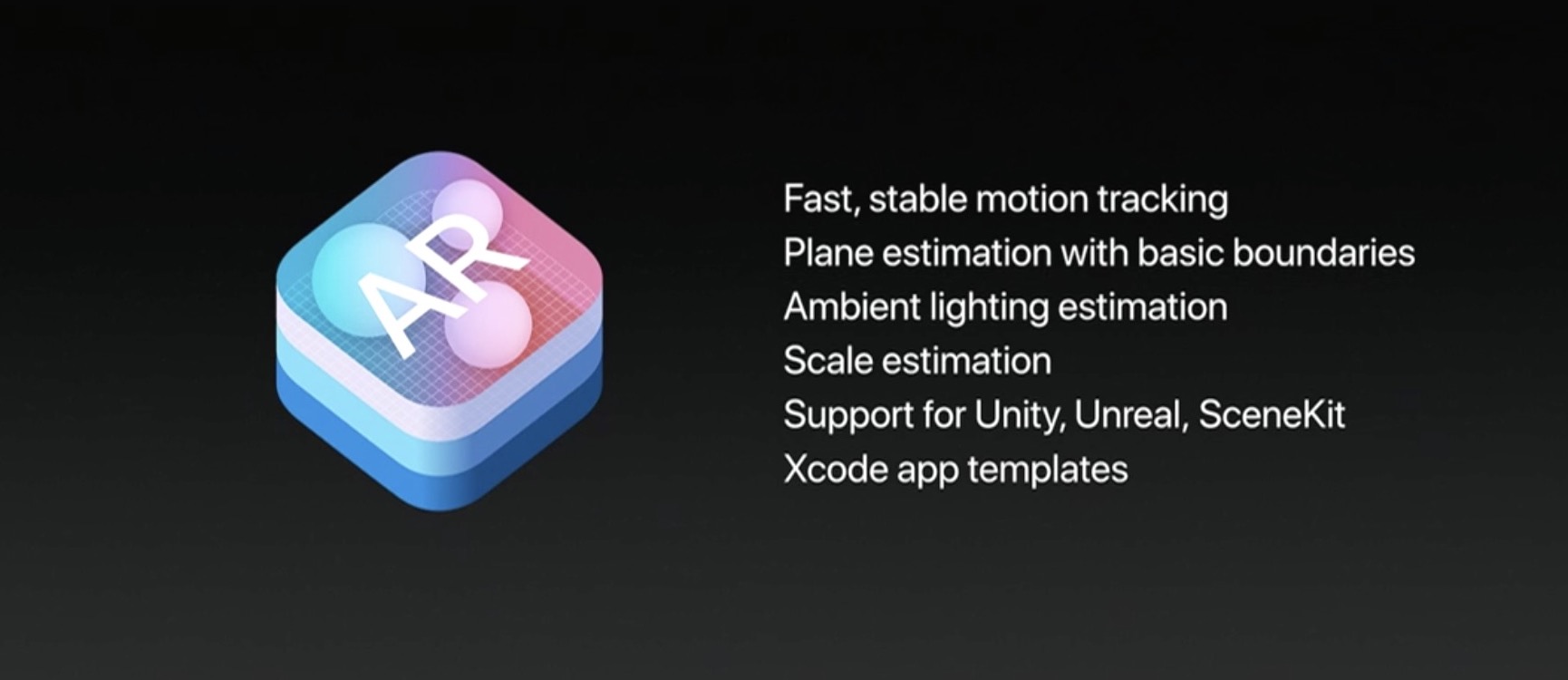
One of the best aspects of ARKit, Apple's new framework for building augmented reality apps, is the fact that it does all the incredibly complex heavy lifting like detecting room dimensions, horizontal planes and light sources, freeing up developers to focus on other things.

ARKit analyzes the scene presented by the camera view, in real time.

Combined with sensor data, it is able to detect horizontal planes, such as tables and floors, as well as track and place objects on smaller feature points with great precision.

And because it uses the camera sensor, ARKit can accurately estimate the total amount of light available in a scene to apply the correct amount of lighting to virtual objects.

First, check out this demo from Tomás Garcia.

https://www.youtube.com/watch?v=1G2YbQuQHps

Children's bedtime stories will never be the same come this fall!

Another developer has put together a quick demo showing off his AI bot, named “Pepper”.

https://www.youtube.com/watch?v=brFKo_tSkw8

According to the video's description:

I've been working on an AI bot for a while now. To be short, it's like V.I.K.I in the movie “I, Robot”. With the help of ARKit, I was able to bring it close to a real life assistant.

Due to obvious reasons, I'm not demonstrating her functionality in this video. So I ended up showing you guys how easy and simple it is to bring 3D models to life with Apple's new framework.

These videos clearly demonstrate how easy ARKit makes it for developers to match the shadows of their virtual objects to lighting conditions in the real world.

https://www.youtube.com/watch?v=lQt96saECfM

Here are some additional ARKit-enabled demos.

https://www.youtube.com/watch?v=-o7qr1NpeNI


https://www.youtube.com/watch?v=sJR_f7XCuvA


https://www.youtube.com/watch?v=lQt96saECfM

ARKit requires A9 or A10 processors, meaning ARKit apps will require an iPhone 6s or newer or one of the latest iPad Pro models, either the 9.7-inch or the 10.5-inch one.

If anything, these videos demonstrate just how easy Apple has made it to put together an AR app. Are you looking forward to ARKit, and why? Leave a comment below to let us know.

Facebook brings animated reactions, filters, masks and effects to Messenger calls

As part of celebrating its two billion monthly active users milestone, Facebook on Monday unveiled new video chat features for its mobile Messenger app, such as the beautifully animated reactions, interactive filters, masks and effects. “Video chats with your friends and family in Messenger just got a whole lot more fun,” said the firm.

You can use these new video features in one-on-one video calls, as well as in your group video conversations. The new capabilities let you easily share your emotions during a video call with one of the five Facebook reactions, alter your appearance (how about making your friend laugh with a bear mask?) by taking advantage of the many built-in filters and much more.

I like how reactions animate onto the screen and then disappear.

Many reactions have different versions, depending on whether your face is on or off the screen. For instance, tap the love reaction when the camera is facing you, then tap it again when the camera is facing outward to see the difference.

A variety of in-call filters are now available to Messenger users, ranging from subtle lighting tweaks to color changes, like black and white, red or yellow. Each one has a live preview so you can test it on yourself before letting others see it. Many new masks are available for video calls, too, including some with hidden effects that react to your facial movements.

From the Facebook blog:

We have also added animated effects, like falling hearts and twinkling stars, to give your video chats expressive flair. Check out what happens when you wave your arm in front of the camera while using one of those effects! Unlike reactions, masks and effects stay on the screen for the duration of the video chat (or until you take them off or switch to another one).

One of the best new in-call video features is the screenshotting ability.

During an one-on-one or group video call with one or more friends, tap the camera icon at the bottom to take a screenshot of your time together and share it with other friends via Messenger Day or other social media accounts

The image of your video conversation will be saved to your iPhone's Camera roll. Plus, you can quickly send the screenshot to the person or group that you’re video chatting with.

Check out the new Messenger video features in Facebook's video embedded below.

Earlier today, Microsoft started rolling out a much redesigned Skype for iPhone with a Snapchat-like Stories feature, dubbed Highlights.

Moreover, Skype for iPhone now lets you talk to Cortana and other chat bots, as well as post message and in-call reactions by adding huge emoticons, live text and photos with drawings to an overlay that appears on top of the call.

Facebook Messenger is available free on App Store.

Skype for iPhone gains chat bots, its version of Stories, message & in-call reactions and more

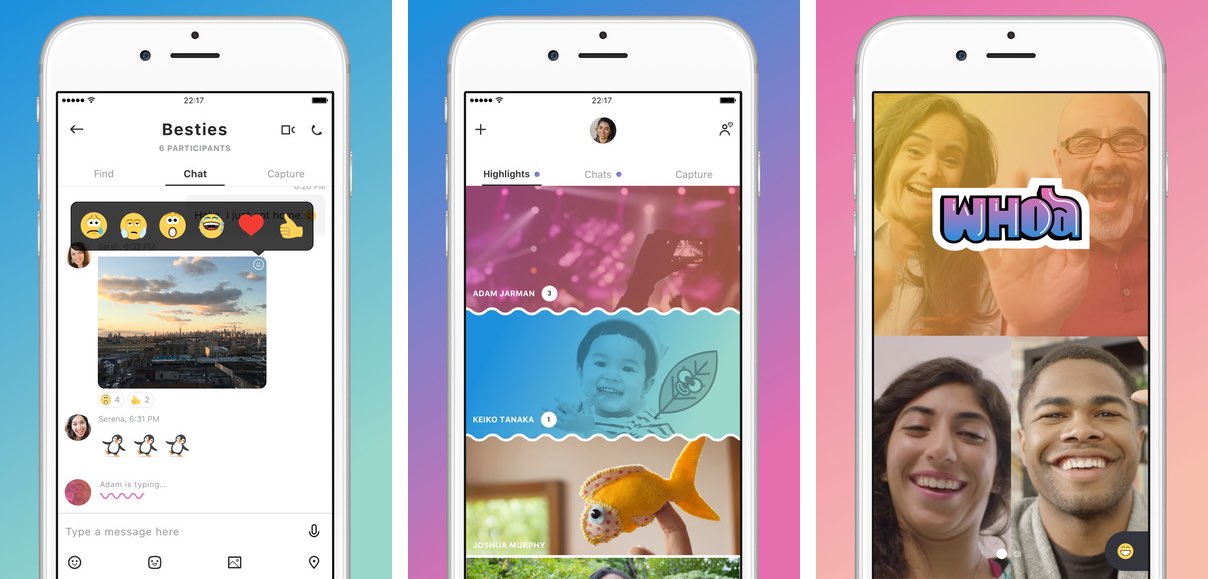
Following a preview at the start of June, Microsoft today began rolling out a redesigned Skype for iPhone app with a refined user interface and new capabilities such as chat bots, a Snapchat-like Highlights feature, message and in-call reactions, easier photo capture and more.

Aside from Microsoft's own smart assistant Cortana, other chat bots now available or coming soon to Skype for iPhone include Gfycat, Giphy, MSN Weather, Bing, Polls, Expedia, Stubhub, BigOven, YouTube and Upworthy.

With in-call reactions, users can add live emoticons, live text and even real-time photos to an overlay that appears on their video and voice calls. Similarly, message reactions let you inform your chat participants how you feel by adding expressive reactions to your chats.

The new Home screen launches with your chat view, but you can now swipe left to get to the Skype camera or swipe right to show your Highlights. Speaking of which, Highlights is a new Snapchat-like feature that lets you share your day-to-day with friends and family on Skype while keeping up with what they are up to.

Your highlight is basically a collection of photos and videos that you can decorate with emojis and text. Only people who follow you on Skype can see your highlights.

You can also respond to others' highlights by reacting with emoticons or even use them as a conversation starter. Unlike Snapchat, your published highlights remain live for a full week.

It remains to be seen if Highlights gains any traction given that every major chat app now has a similar feature of its own. Between Snapchat Stories, Facebook and Instagram Stories, I'm not sure I have the time to update Skype Highlights for my contacts on a daily basis.

https://www.youtube.com/watch?v=qItfRVJFljM

Microsoft readily admits that Highlights is a Snapchat clone.

“There’s a new medium that has risen,” Amritansh Raghav, Corporate Vice President of Skype, said recently of Stories in a comment to TechCrunch. “When you think about this new way of interacting, we want that to be available also in this app.”

The new features are available in Skype for iPhone, but not in Skype for iPad. Skype for Mac and Windows computers will receive the new capabilities within the next few months.

According to Microsoft, a future version of Skype will integrate gaming features into video calls and users will have the ability to synchronize and watch streaming videos together.

Visit skype.com/new to learn more about the app's latest feature additions.

Skype for iPhone and Skype for iPad are available free on App Store.

You can now edit text files right from Dropbox app

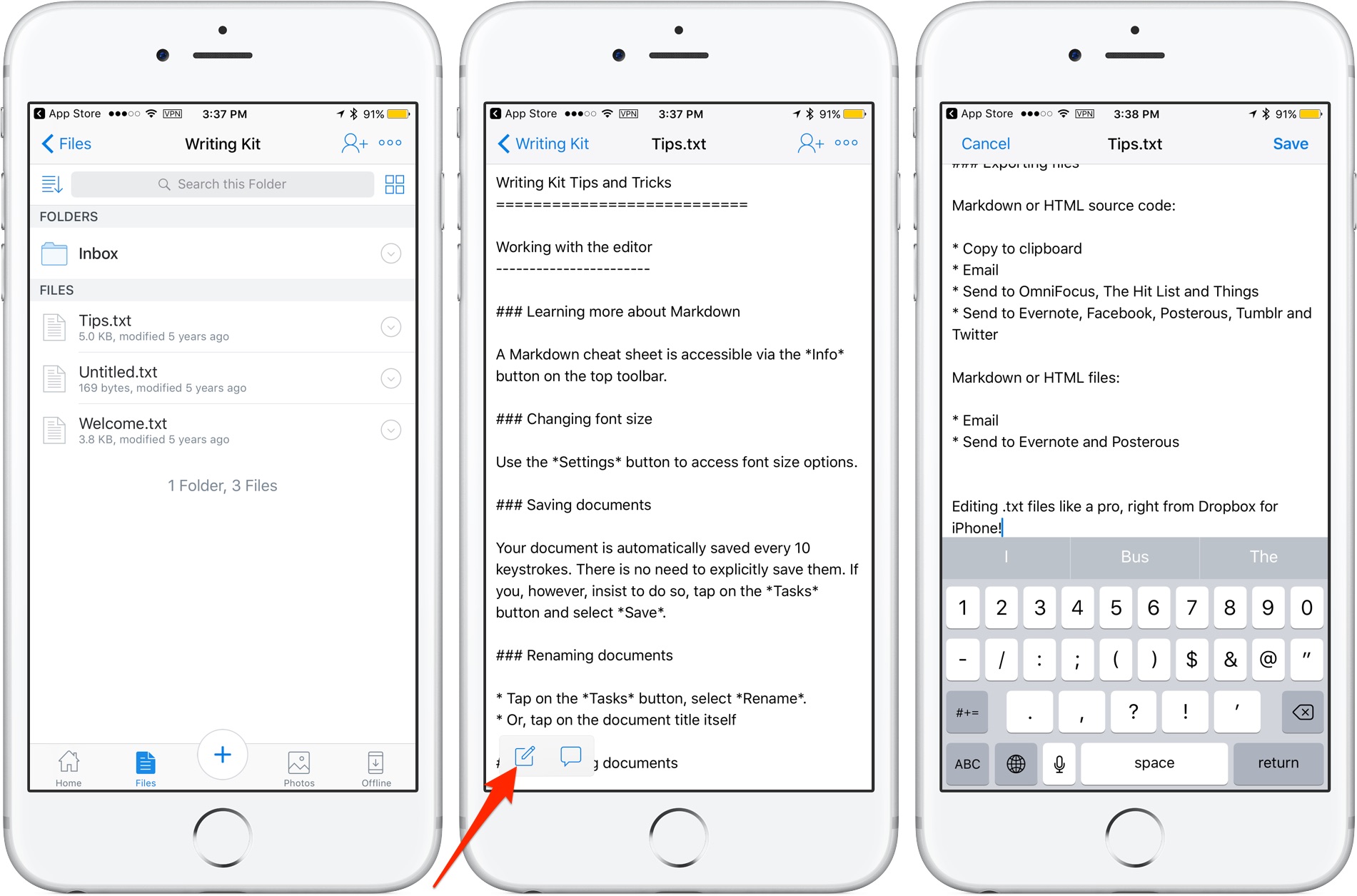
Cloud storage provider Dropbox today updated its app on App Store with the ability to edit text files right from the mobile app. Now when you browse the files in your Dropbox, simply view any text file then tap a new Edit icon to enter the app's new built-in text editor.

When done editing, tap Save to save the changes directly to the text file in your Dropbox. No more emailing the file back and forth. The bast part is, no longer do you need to use a third-party editor just to make a few quick changes to a text file saved in your Dropbox.

Aside from the built-in text editor, Dropbox for iOS version 54.2 has gained a new auto-capture function. When scanning documents, simply focus on the document and this feature will take a picture automatically.

Dropbox for iOS is a free download via App Store.

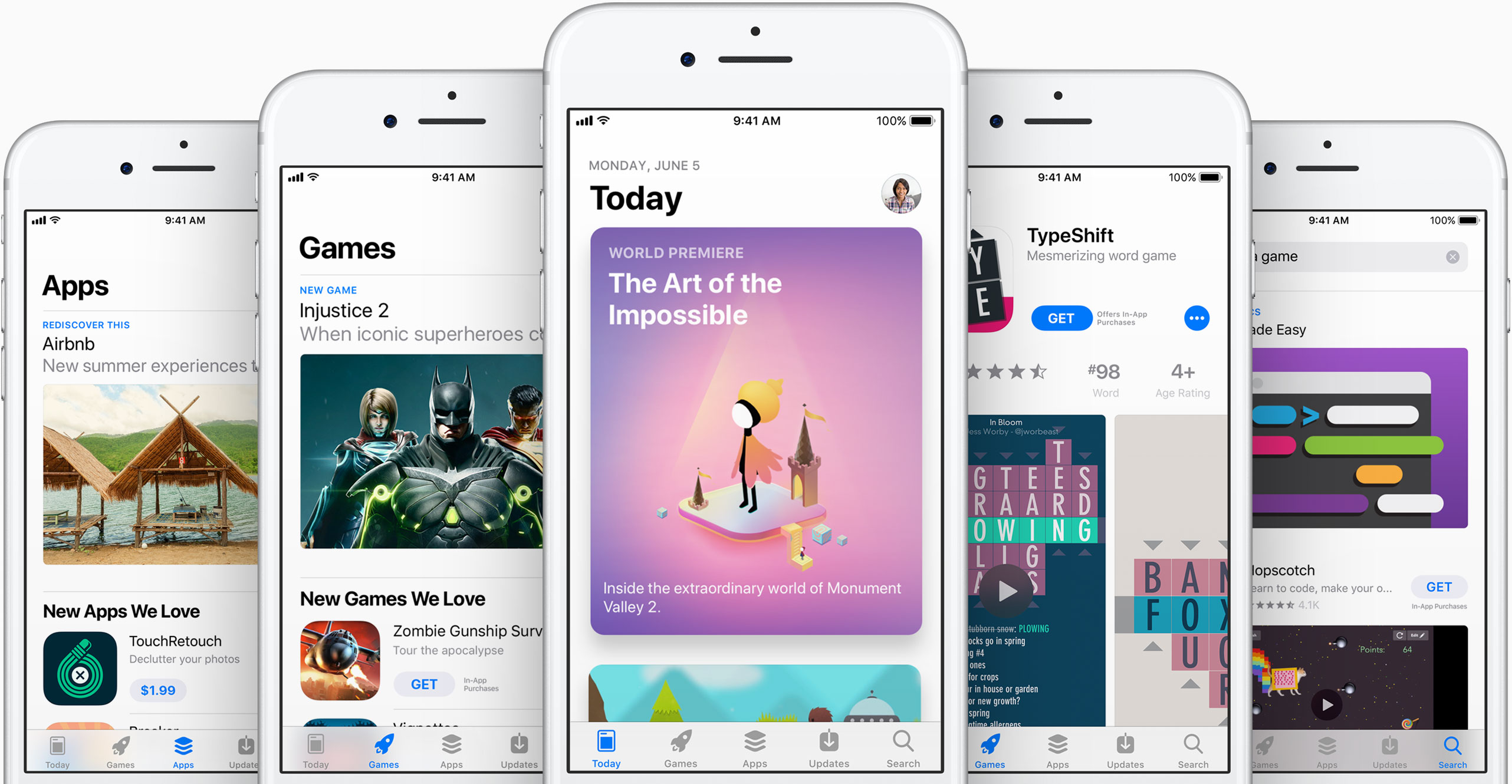
Apple asks developers to update their pages for iOS 11’s all-new App Store

Apple on Tuesday invited its registered developers and members of the Apple Developer Program to update their product pages for iOS 11's much redesigned App Store.

Specifically, developers can showcase their content with subtitles, promotional text, additional app previews that they can localize and up to 20 promoted In-App Purchases that users can buy on App Store, even if they haven't downloaded an app that offers them.

A dedicated section on Apple's portal for developers offers useful resources for making the most of the new product pages. Like before, new metadata is entered in iTunes Connect.

“Metadata you provide in iTunes Connect is shared across App Store on iOS 11 and iOS 10.3 and earlier, so you only need one version of product page elements, such as app name, icon, screenshots and keywords,” notes Apple.

iOS 11's App Store features competently revamped product pages while providing dedicated Apps and Games tabs along with a new Today tab with original stories, editorial, tips, how-tos, interviews and more, updated daily, in a blog-like format.

https://www.youtube.com/watch?v=-hoPcMPvL88

Subscribe to iDownloadBlog on YouTube.

The App Store redesign lets developers spotlight apps with more engaging content, putting the most important information front and center for the customer making a download decision.

Developers can now submit up to three video app previews and five screenshots, which can now be localized so a user in any country can have a customized version of the video.

Accolades including Editors’ Choice and chart position are now highlighted by App Store, as are In-App Purchases and customer ratings and reviews.

The new App Store is now available as a preview to users of the iOS 11 public beta. Once iOS 11 launches for public consumption this fall, the redesigned App Store will be in the hands of hundreds of millions of users around the world.

App Store customers have now downloaded more than 180 billion apps and Apple has paid out over $70 billion to developers since the store launched in 2008, making it the most vibrant software marketplace in the world, according to the Cupertino giant.