Accessories

The Wi.U, Because Every Smartphone Deserves a Smart Charger

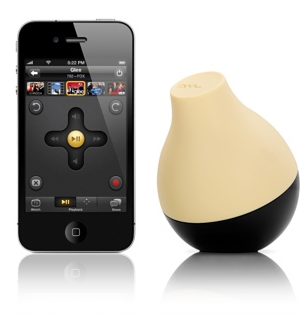
Chalk this one up to another interesting innovation involving Apple's iPhone. We've shown you the 360-degree lens and the dual sim case, now let me introduce you to the Wi.U. It's the smartest portable battery charger you've ever seen.

The Wi.U case pairs the iPhone with the battery charger through the device's 30-pin connector. The charger has the ability to detect when your iPhone battery is getting low, and will automatically start charging it up...

The Ultimate iPad Stand

Have you ever tried looking at a recipe application on your iPad while trying to cook? Or tried to learn how to play the guitar via an iPad app? These things would be so much easier if you had someone or something to hold your tablet for you.

Enter the Kickstarter project by designer Seth Quest. It looks like him and his partner just recently raised enough money to fund production of their prototype, the Hanfree.

The iPad accessory is designed to hold your iPad for you, leaving your hands free to do other things. The Hanfree is essentially a case attached to a wide base, with a steel neck and a ball and socket joint.

This setup allows for 360 degree rotation of the iPad, so it can easily be switched from landscape to portrait mode. The see-through case securely grips your iPad as you're using it, and the stainless steel neck pivots so you can swing the device out of the way when you're not.

http://www.youtube.com/watch?v=q9VkOTONWaM

I think the design is fairly brilliant given the options of iPad stands currently available. Apparently others think so too. The Kickstarter project has exceeded its $15,000 goal and is set to be funded early next month.

Even though they've already collected enough to start production, they are still taking donations. If you pledge $50 or more, you get a Hanfree once they start shipping. Not a bad deal considering the product will retail for $79.99.

What do you think?

2Phone Case Gives Your iPhone Dual Sim Cards

Dual-SIM adapters have been available for the iPhone for a while. It's even speculated that we could see dual-SIM technology show up in the iPhone 5. If none of the current offerings for dual-SIM adapters appeal to you, you might want to see what Rebel Simcard has cooked up.

The Rebel 2Phone case for the iPhone 4 will give your device the ability to make and receive phone calls on 2 different lines, or 2 different carriers. The coolest part is that both SIMs are active at the same time, meaning you can make calls on both lines simultaneously...

RainBallet Case Makes the iPhone Waterproof

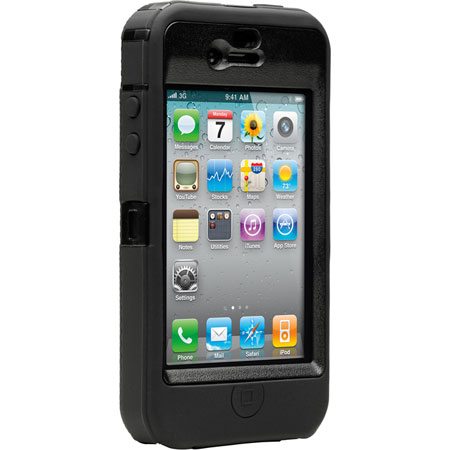
There's a chance that your iPhone has come into contact with water, and you've probably figured out that the device isn't exactly waterproof. There are some heavy duty cases out there that help protect the iPhone from water damage, but not many can guarantee that your iPhone will be totally waterproof.

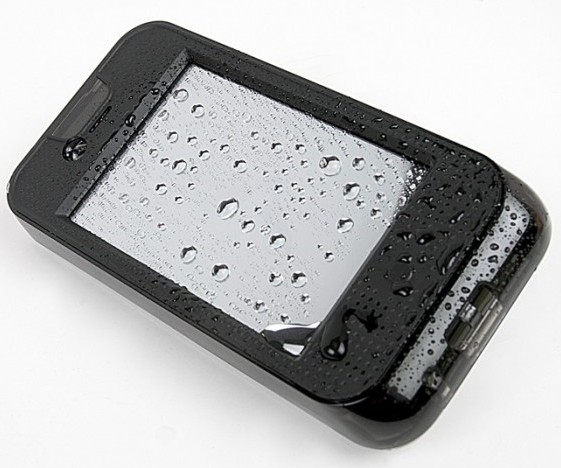
The RainBallet case, by The Joy Factory, is a waterproof case for the iPhone 4. Now your iPhone can accompany you on those long days at the beach.

InvisibleShield for iPad 2 Review

Why use InvisibleShield

I'm not much of an accessories guy. I don't put my iPad into a case because I think it's too beautiful to be hidden under some rubber casing. Yet you have to protect your device. I purchased a Smart Cover with my iPad 2 but it's only good at protecting the front of my iPad. What about the back?

Yes, the back of my iPad 2 is what worries me most. I use this thing every single day, and unlike my iPhone that usually ends up in my pocket, my iPad travels around the house all the time. It goes from the couch to the coffee table, from the bathroom to the kitchen countertops, outside on our patio. How to you prevent the back of your iPad from being scratched, while not sticking it into a case?

Enters InvisibleShield by Zagg, a thin clear protective film that has been protecting iPhones and iPads for several years now. The guys over at Zagg were nice enough to send me a sample of their iPad 2 InvisibleShield to try out and review. Before going further, I want to make it clear that even though I received an Invisible Shield for free, it doesn't alter the outcome of this review in any way.

This is not my first Invisible Shield. Since 2007, I've used many of those for my iPhones and also for my previous iPad, and I've always been a big fan of the product. When Zagg said they were going to send me one of those InvisibleShields for iPad 2 to review, I didn't expect any surprise. After all, the product is the same, just the shape is different.

So no surprise on that side. The InvisibleShield came in a nice box with the front and back protective film. Also included is a little pouch with a lint free cloth, some spraying solution and a squeegee.

InvisibleShield installation

I know how to install the InvisibleShield but I still bothered reading the instructions and watched the demo video. After making sure I had everything ready, I cleaned the back of my iPad with the cleaning cloth, washed my hands, and sprayed my fingers with the application solution before handling the shield, as advised. I removed the paper backing of the shield, sprayed it with the solution and applied it to the back of my iPad.

http://www.youtube.com/watch?v=m3sO5fBD77Y

It took me a couple tries to get it perfectly aligned, then I used the squeegee to remove all excess spraying solution stuck between the film and the iPad. It took me about 2 minutes from start to finish.

Although I didn't want to use a shield for the front of the iPad, I still decided to put it on to see how easily I could apply it. Turns out that I kinda ran out of spraying solution. I guess I used way too much during the installation of the back shield. Nevertheless, I was able to properly install the InvisibleShield on the iPad screen in just a few seconds.

It is advised not to use your device after applying the InvisibleShield to give it some time to cure. Can you imagine not using your iPad for 24 hours? No, me neither, so I used it right away.

It takes about 2-3 days for the shield to completely cure and get rid of all the air bubbles that you might have accidentally left under. During that time, needless to say that your screen will not look good, but again, it's just a matter of time.

After a few days, I removed the front shield because I just don't like it on my screen. It's barely there, but it bugs me to have something on the screen.

Success!

It's been over 10 days now and the InvisibleShield on the back of my iPad 2 hasn't moved at all. It has done a great job at protecting my iPad, and I am no longer afraid to put my device on any surface because I know it is well protected.

On top of bringing great protection to your device, having an Invisible Shield on the back of the iPad makes it easier to hold the device as it doesn't slip as much while in your hand. It's a little detail that has great importance to me.

My biggest concern about having the Invisible Shield on the back of my iPad was to see how it would work with the magnets of the Smart Cover. When you snap the Smart Cover on the side of your iPad, it covers part of the Invisible Shield. After snapping and unsnapping the Smart Cover probably a couple hundred times since I got the shield, I haven't noticed any difference at all. It still snaps perfectly, and most importantly, it doesn't damage or peel off the shield.

I've heard people complain about an orange peel effect on the back of the iPad before. I personally never experienced that, and I suspect it has a lot to do with the way you install the Invisible Shield.

Conclusion

Do I recommend InvisibleShield for iPad 2? Absolutely, however, and depending on your iPad usage, it might be a better idea just to get the back coverage only. That's what I did and it works out great for me, especially because I have the Smart Cover for the front.

The InvisibleShield for iPad 2 starts at $29.99 for the front or back coverage. For $39.99, you get the full back and front coverage, so again, depending on your usage, you should make the decision that will best fit your needs.

You can get 20% off your InvisibleShield (or any Zagg accessories) by ordering from here and entering coupon code zagg20 at check out.
iTable: Where the iPhone and Furniture Meet

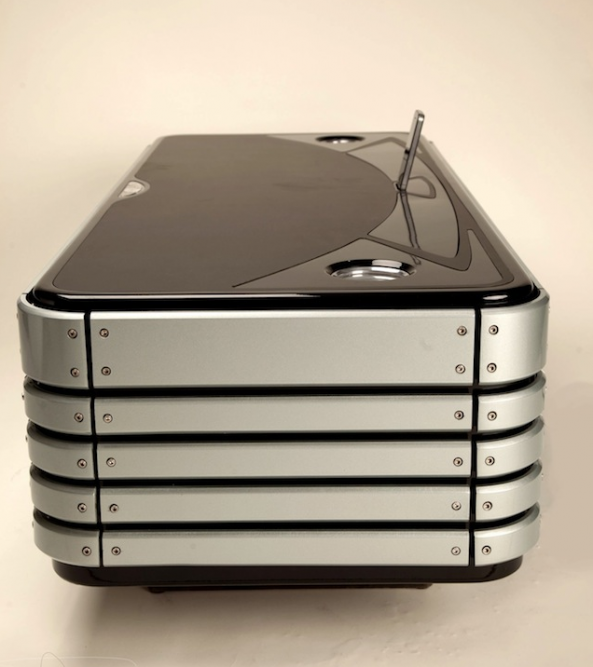
The iTable is the first coffee table made out of a giant stack of iPhone 4s. Well, at least it looks like it's made out of a giant stack of iPhone 4s.

Based on a concept by Kyle Buckner, the iTable is the first venture into Apple-themed furniture. Equipped with an iPhone dock, sound system, touch sensitive controls, and LED cup holders, the iTable is the ultimate living room piece for the Apple enthusiast.

The only sad thing is that you probably won't be able to jailbreak the iTable...

Start Up Looking to Change the Way the iPhone 4 Shoots Video

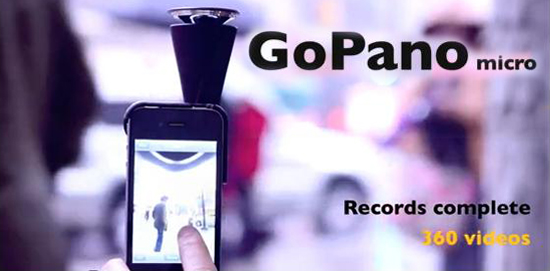
If you've been looking for a way to shoot 360-degree videos with your iPhone 4, get out your checkbook. The start up company EyeSee360 has a working prototype of a lens that will fulfill all of your multidirectional photography needs.

The company isn't just hoping to change the way we shoot videos on the iPhone, they want to change the way we interact with videos completely. EyeSee360 has decades of research in robotic vision and image rendering under the hood of their GoPano micro concept. Their lens not only lets you capture 360-degree videos, you can manually pan around the video during playback...

Would You Pay $800 for an iPhone Accessory?

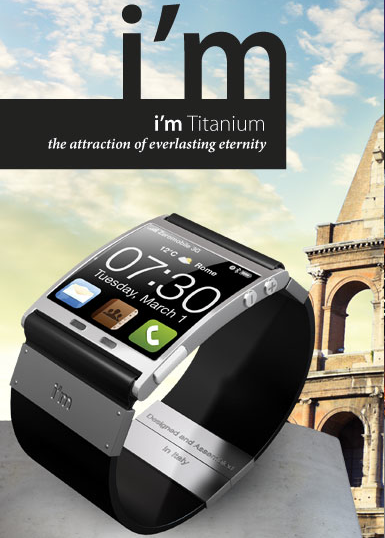
Retail chains don't just make money on the handset you buy, they make a killing from selling accessories too. If you have ever purchased any type of portable electronic, particularly a smartphone, you know what the clerk's first comment is: "You're going to need a case." And he's usually right.

I would generally recommend a case for the iPhone, screen protectors are a good buy too. There are also a lot of accessories that you don't necessarily need. But if they make themselves appear to be a necessity, you as the customer are more apt to buy. That being said, one look at the new i'm, and you'll see why your iPhone needs this new accessory...

The $8,000,000 iPad 2

Do you have an extra $8,000,000 to spend? If so this iPad might just be what you need. It was designed by Stuart Hughes who is famous for turning electronics in multi million dollars pieces of jewelry.

Undoubtably the world’s most unique gadget is the Ipad 2 Gold History Edition. Encrusted with 12.5 cts of ‘I'F' Flawless diamonds, a magnificent total of 53 individually set sparkling gems dwell beautifully in solid 24ct Apple logo with rear section formed again in 24ct gold weighing an immense 2,000 grams. The unrivalled imagination towards the craftmanship of the iapd is down to its main front frame which is made from the oldest rock the world has to offer in the form of Ammolite , sourced from Canada this stone is over 75 million years old. However to make this masterpiece even more individual, sections of a 65 million year old T-REX Dinosaur’s thigh bone was splintered and then shaved into the Ammolite , then finished off with ultimate jewel , as single cut 8.5ct flawless diamond inlaid in its own platinum surround with 12 outer flawless diamonds. A magnificent combination of top of the industry technology and unique thought were involved in creating this piece of History !. Material spec, 16.5 ct diamonds & 8.5ct single diamond, 57 grams of T-REX bone, 750 grams of Ammolite stone and 2000 grams of solid 24ct Gold. This item is of a limited edition of only 2 units to be made.

iPad 2 Destroyed in Slow Motion

ZAGG.com has put together a riveting video to portray the dangers the outside world has that threaten your precious new iPad 2. Grant it, your iPad 2 will most likely not be shot with a shotgun but it does entice you to pay the extra bucks to protect your new iDevice. Watch the video below and enjoy the slow motion explosions!

Remember, you can get 20% off any ZAGG product by ordering from here and entering coupon code zagg20.

invisibleSHIELD for iPad 2 Now Available [20% Off]

You just spent $500+ on a new iPad, don't you think it'd be smart to spend a few more bucks on a nice screen and casing protection? That's what the ZAGG Invisible Shield has to offer. I'm a big believer in ZAGG products especially the Invisible Shield, which offers great protection for the front and the back of your iPad.

The price isn't bad either. $40 for both the front and the back, or $30 for either the front or the back. I'm currently using Apple's Smart Cover which does a great job at protecting the screen but leaves the back of the iPad vulnerable to virtually anything (especially that coffee table I usually put my iPad on), so I know I'm going to go with the InvisibleShield for the back only.

If you think you might benefit from this, make sure to buy your InvisibleShield from here and enter coupon code zagg20 to get 20% off your order.

iPad 2 Smart Cover Magnet Magic Revealed

Along with Apple's exciting new iPad 2 launch, was the unveiling of a new accessory. The Smart Cover, made by Apple, uses a magnet system to attach itself to the iPad 2's screen.

At first glance it can appear magical. The cover literally snaps itself into place. Need an impromptu stand for your iPad 2? The Smart Cover converts into a stand with ease, practically on its own. It certainly makes you wonder, "How did they do that?"

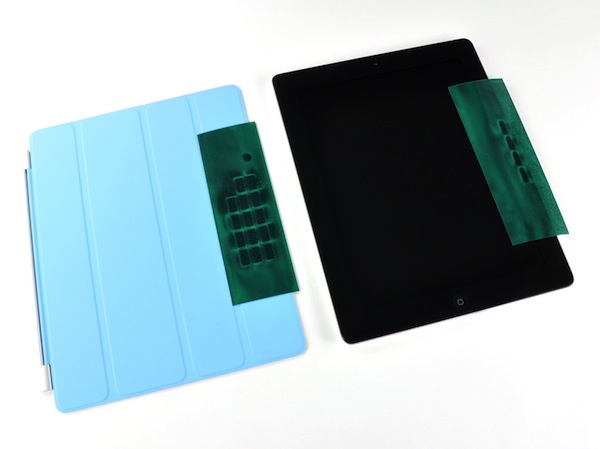
Luckily veteran iDevice dismantler, iFixit, had the guts to rip one open and find out. The answer was obviously simple, magnets. But how many magnets does it take to make a Smart Cover work? Thirty-one. Ten in the iPad 2, in the right bezel, and twenty-one in the Smart Cover.

Interestingly enough, they are just your run-of-the-mill, two-pole magnets. It's the way they are configured that makes manipulating the Smart Cover so easy. iFixit also noted that there is one, specific magnet, that is used to lock and unlock the iPad 2 as the cover's attached.

So it appears this magical magnet myth has been busted (say that 3 times fast). It turns out it was just really good engineering mixed with some good marketing, neither of which Apple is a stranger to.

Does anyone use a Smart Cover for their iPad 2? How does it work as a stand? Tell us below!