Learn how to remove the snooze option from the alarm on your iPhone or iPad so you’re not tempted to delay waking up in the morning by snoozing (i.e., pausing the alarm).
How to disable alarm snooze button on iPhone or iPad
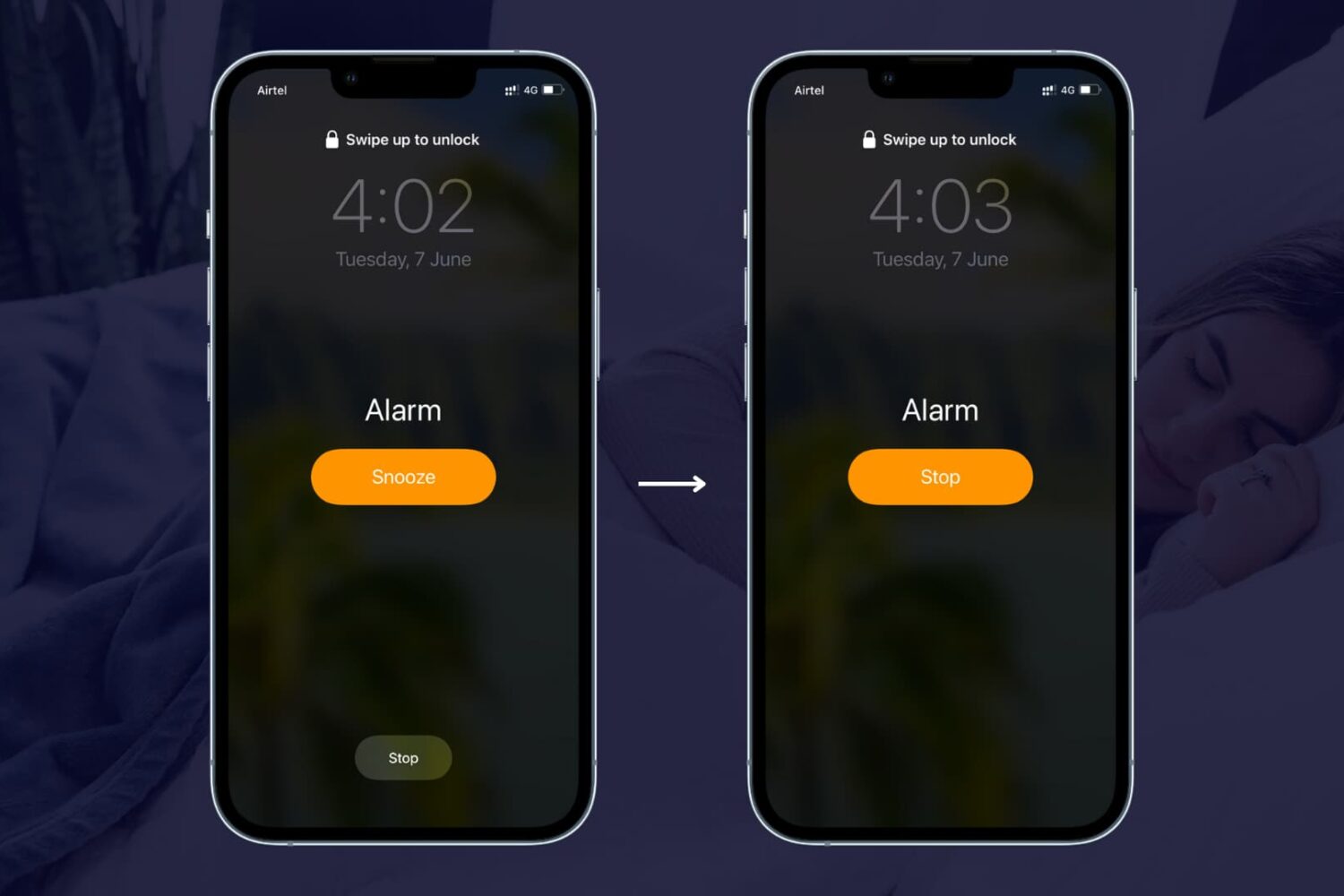
Learn how to remove the snooze option from the alarm on your iPhone or iPad so you’re not tempted to delay waking up in the morning by snoozing (i.e., pausing the alarm).

WhatsApp on Tuesday launched a native desktop app for Mac and Windows computers. The Facebook-owned messaging service says the app provides a "new way to stay in touch anytime and anywhere - whether on your phone or computer at home or work."
To download the new desktop version of WhatsApp, visit whatsapp.com/download from your desktop browser. Then, open the app and scan the QR code using the WhatsApp app on your smartphone (be sure to look for WhatsApp Web menu under Settings).

Ukrainian developer MacPaw, the makers of the versatile and powerful CleanMyMac and CleanMyDrive apps, today pushed a major new update for Gemini as a brand new app. For those unfamiliar with it, Gemini is an intelligent duplicate file finder that can help recover tons of storage space on your Mac wasted to duplicate files.
Aside from identifying identical duplicates, Gemini 2 uses a proprietary algorithm to spot similar files that are not 100 percent identical, but can be considered redundant due to little difference between them.
It scans your iTunes and Photos libraries in search of retakes of the same picture or different formats of the same song, and becomes smarter and more precise in automatic selection of duplicates the more you use it.
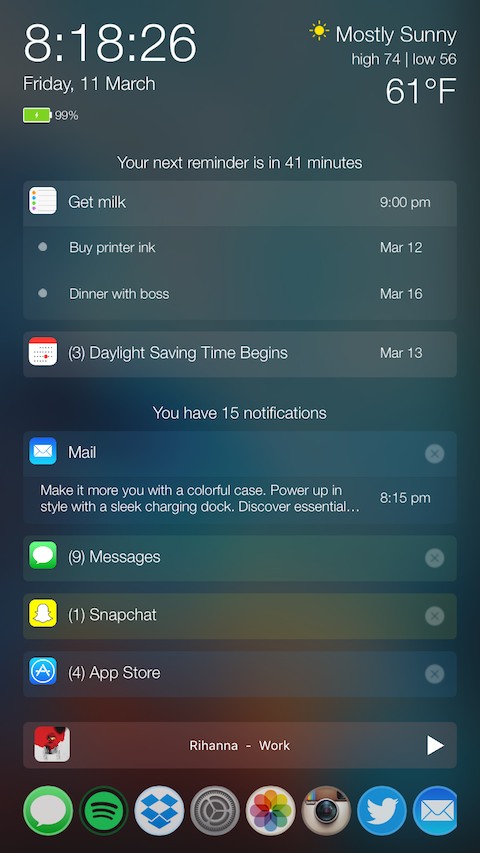
There comes a time every once in a while where a jailbreak tweak is groundbreaking and has the potential to shake up the entire jailbreak community, and folks, we definitely think a new tweak release in Cydia called PersonalAssistant is one of those tweaks.
In this review, we'll walk you through this monster of a tweak, which the developer notes has seven tweaks built into one unified interface.
Excited yet? You should be...

Voice over IP (VoIP), a technology for the delivery of voice communications and multimedia sessions over the Internet, is at the heart of an unbelievable $2.8 billion patent infringement lawsuit that VoIP-Pal, a Bellevue-based company, filed this morning against the iPhone maker.
“We are confident the current good will on both sides will result in a favorable outcome for all parties involved,” said VoIP-Pal CEO Emil Malak in a prepared statement.

Amazon this morning announced a brand new self-service aimed at content producers and storytellers: Video Direct. With it, content makers can upload their videos to the Amazon cloud and decide if they wish to optionally make them available to buy or rent.
Content owners can choose to receive royalties depending on how popular their content is on Amazon based on hours streamed, which will limit their work to Prime members or Instant Video subscribers, or opt to monetize their content with advertising, in which case their videos will be available to all Amazon customers.

Among the plethora of built-in OS X features that help keep your Mac secure is something called File Quarantine, a download validation technology that checks any downloads for known malware when you try to open them.
File Quarantine is also available in compatible applications like Safari, Messages, iChat and Mail that download files from the Internet or receive files from external sources, such as email attachments.
Additionally, OS X blocks compromised versions of web plug-ins from functioning, including Java web apps and Adobe Flash content, to further limit your Mac's exposure to potential zero day exploits.
In this tutorial, we'll discuss how you can make sure that File Quarantine updates are turned on, which will allow your Mac to receive latest malware definitions and information about compromised web plug-ins from Apple.

Not everyone is a fan of bing watching. I, for one, rarely watch a dozen episodes of Friends in a row. If you're anything like me, Netflix's autoplay feature is probably something of an annoyance to you.
It's especially worrisome if Netflix uses cellular data: forgetting to stop the playback after you've just finished watching an episode won't stop Netflix from playing the next one automatically, resulting in unwanted data charges.
iDownloadBlog's tutorial series is here to help you with that: in this quick how-to, we'll show you how to turn off the video autoplay feature across all your Netflix devices—they're calling it Post-Play—with just a few clicks.

Yesterday, iDownloadBlog detailed a cool new one-handed zoom gesture during video capture which Snapchat's latest update has implemented.
This incredibly convenient shortcut permits you to zoom in and out as you're shooting video with Snapchat's camera, in real time. As one of our commenters pointed out, Google Maps has long had a similar shortcut on its native iOS app.
With it, iPhone, iPod touch and iPad users can zoom in and pan around in one-handed mode, without needing to use a two-fingered pinch-zoom gesture. Here's how one-handed zoom mode works on Google Maps for iOS.

The guys discuss Tim Cook going on TV to do damage control, and the rumor that Apple has met with major podcast networks. And of course, the inevitable discussion about the possible overhaul of the Apple Music app, likely to be announced at WWDC next month. This is a great show, so listen to it right now!
Subscribe on iTunes
Support Let’s Talk iOS: Bushel makes managing Apple devices in the enterprise easier. Try it for free! Your first three devices are free. Check them out at bushel.com/letstalkios.
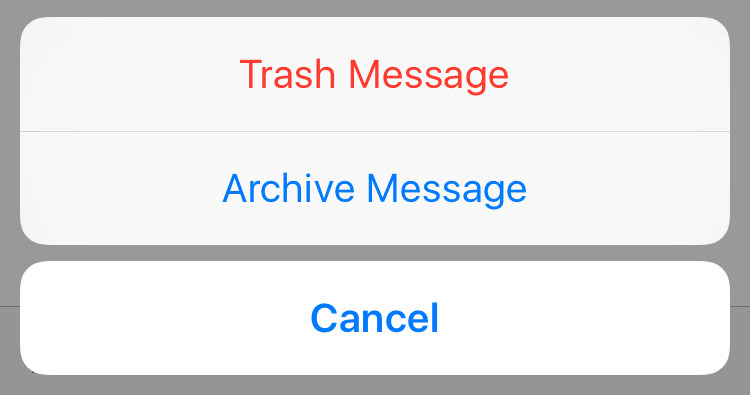
Last week I shared with you how Gmail and Google Apps users can easily stop their iPhone from archiving emails by changing a single feature inside the Mail app's settings. Today, I want to show you something similar, but different.
We're going to stay on topic with this quick tip that allows you to choose on a per email basis whether you want to send it to the trash, or archive it.

I hate pop-ups, and chances are, you probably do too. They're not only a nuisance, but most of the time they're also designed to get in your way to purposely try and scam you and get you to click on malicious material.
Safari in macOS comes with anti-pop-up measures, but those with malicious intent are always coming up with ways to get around those measures.
In this post, we'll talk about what you can do in a scenario when you get these annoying pop-up messages on your Mac and why you might be getting them.