Accessories

Start Up Looking to Change the Way the iPhone 4 Shoots Video

If you've been looking for a way to shoot 360-degree videos with your iPhone 4, get out your checkbook. The start up company EyeSee360 has a working prototype of a lens that will fulfill all of your multidirectional photography needs.

The company isn't just hoping to change the way we shoot videos on the iPhone, they want to change the way we interact with videos completely. EyeSee360 has decades of research in robotic vision and image rendering under the hood of their GoPano micro concept. Their lens not only lets you capture 360-degree videos, you can manually pan around the video during playback...

iCade Turns Your iPad Into a Mini Arcade Machine

Most of us remember going to the arcade as kids. But gaming has changed a lot since those old coin operated machines. Now most of our video games can fit in our hands and pockets.

If you've been longing for a way to relive the good old days, iCade might be just what you are looking for. What started out as an April Fools day joke last year has become a must have accessory for any iPad-toting arcade fan.

ThinkGeek is well known for their offerings of goofy gadgets. Their products range from wrist chargers to light sabers, and everything in between. They could be on to something though with one of their latest inventions, the iCade.

Essentially the product looks like a mini arcade system. It contains a joystick and 8 buttons, as well as a place for your iPad to sit vertically. iCade pairs with your iPad via bluetooth and allows you to play games via the arcade controls.

The product is currently listed as shipping in early June for $99.99. The iCade will initially only be able to work with select games inside the Atari iPad app, but the code will be available to developers for future implementation. Check out the video below to see the iCade in action at CES earlier this year.

What do you think of the iCade?

http://www.youtube.com/watch?v=VShbi-hSjhQ

Would You Pay $800 for an iPhone Accessory?

Retail chains don't just make money on the handset you buy, they make a killing from selling accessories too. If you have ever purchased any type of portable electronic, particularly a smartphone, you know what the clerk's first comment is: "You're going to need a case." And he's usually right.

I would generally recommend a case for the iPhone, screen protectors are a good buy too. There are also a lot of accessories that you don't necessarily need. But if they make themselves appear to be a necessity, you as the customer are more apt to buy. That being said, one look at the new i'm, and you'll see why your iPhone needs this new accessory...

The $8,000,000 iPad 2

Do you have an extra $8,000,000 to spend? If so this iPad might just be what you need. It was designed by Stuart Hughes who is famous for turning electronics in multi million dollars pieces of jewelry.

Undoubtably the world’s most unique gadget is the Ipad 2 Gold History Edition. Encrusted with 12.5 cts of ‘I'F' Flawless diamonds, a magnificent total of 53 individually set sparkling gems dwell beautifully in solid 24ct Apple logo with rear section formed again in 24ct gold weighing an immense 2,000 grams. The unrivalled imagination towards the craftmanship of the iapd is down to its main front frame which is made from the oldest rock the world has to offer in the form of Ammolite , sourced from Canada this stone is over 75 million years old. However to make this masterpiece even more individual, sections of a 65 million year old T-REX Dinosaur’s thigh bone was splintered and then shaved into the Ammolite , then finished off with ultimate jewel , as single cut 8.5ct flawless diamond inlaid in its own platinum surround with 12 outer flawless diamonds. A magnificent combination of top of the industry technology and unique thought were involved in creating this piece of History !. Material spec, 16.5 ct diamonds & 8.5ct single diamond, 57 grams of T-REX bone, 750 grams of Ammolite stone and 2000 grams of solid 24ct Gold. This item is of a limited edition of only 2 units to be made.

invisibleSHIELD for iPad 2 Now Available [20% Off]

You just spent $500+ on a new iPad, don't you think it'd be smart to spend a few more bucks on a nice screen and casing protection? That's what the ZAGG Invisible Shield has to offer. I'm a big believer in ZAGG products especially the Invisible Shield, which offers great protection for the front and the back of your iPad.

The price isn't bad either. $40 for both the front and the back, or $30 for either the front or the back. I'm currently using Apple's Smart Cover which does a great job at protecting the screen but leaves the back of the iPad vulnerable to virtually anything (especially that coffee table I usually put my iPad on), so I know I'm going to go with the InvisibleShield for the back only.

If you think you might benefit from this, make sure to buy your InvisibleShield from here and enter coupon code zagg20 to get 20% off your order.

iPad 2 Smart Cover Magnet Magic Revealed

Along with Apple's exciting new iPad 2 launch, was the unveiling of a new accessory. The Smart Cover, made by Apple, uses a magnet system to attach itself to the iPad 2's screen.

At first glance it can appear magical. The cover literally snaps itself into place. Need an impromptu stand for your iPad 2? The Smart Cover converts into a stand with ease, practically on its own. It certainly makes you wonder, "How did they do that?"

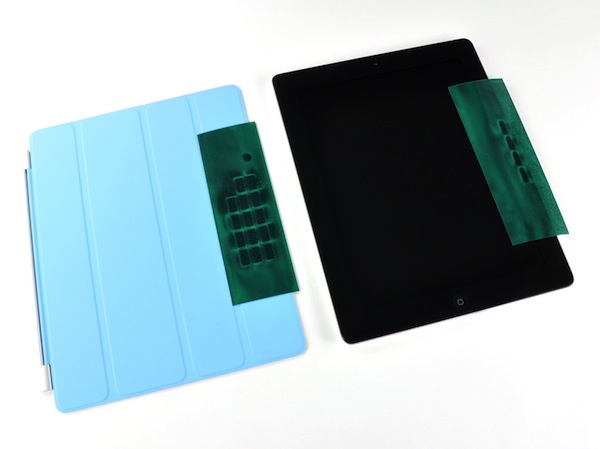
Luckily veteran iDevice dismantler, iFixit, had the guts to rip one open and find out. The answer was obviously simple, magnets. But how many magnets does it take to make a Smart Cover work? Thirty-one. Ten in the iPad 2, in the right bezel, and twenty-one in the Smart Cover.

Interestingly enough, they are just your run-of-the-mill, two-pole magnets. It's the way they are configured that makes manipulating the Smart Cover so easy. iFixit also noted that there is one, specific magnet, that is used to lock and unlock the iPad 2 as the cover's attached.

So it appears this magical magnet myth has been busted (say that 3 times fast). It turns out it was just really good engineering mixed with some good marketing, neither of which Apple is a stranger to.

Does anyone use a Smart Cover for their iPad 2? How does it work as a stand? Tell us below!
Peel, Not Just Another TV Remote App for iPhone

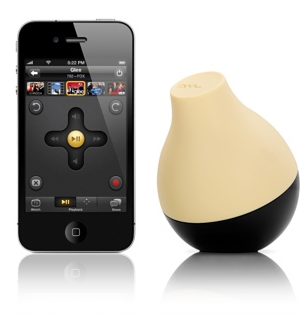
Peel's journey has been an interesting one. It started last fall when we started hearing about an FCC filing from a Santa Clara start-up company named Zelfy. The product's tagline was "every remote and TV guide now on your phone." Fast forward to January of this year, and we get some more information about the mysterious Peel Fruit.

The Peel system uses an IR dongle, built into a fruit shaped casing, that must sit somewhere in IR range of all of your components. The plastic shaped fruit works like a middleman between your iPhone (or iPad for that matter) and your home theater. How does the fruit receive commands from your iPhone? Wifi of course...

iPhone 4 Case Built for Fun (Literally)

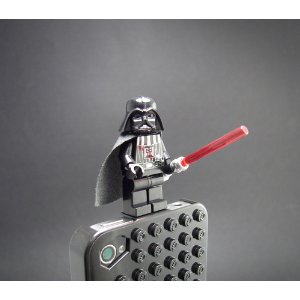
If you've been looking for an iPhone 4 case and a good time, look no further. This iPhone 4 LEGO® case by SmallWorks is cooler than the other side of the pillow. Its backing is made up of real, evenly spaced LEGO® blocks that provide you with a 12 x 7 base to build on until your hearts content.

The product is actually the brainchild of SmallWorks co founders' 12 year old son, whom they claim is "a complete LEGO® Brickmaster."

The Verizon iPhone 4, What’s Changed?

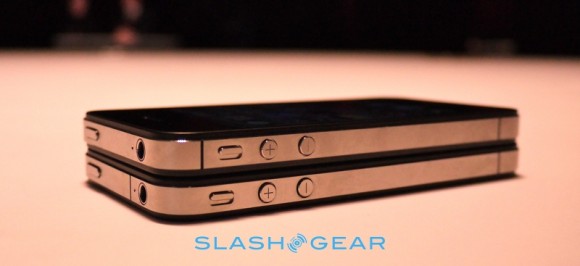
Wondering what the differences between the Verizon iPhone 4 and the AT&T version are? Well maybe we can clarify a few things for you. For starters, let's talk appearance. The volume and ringer mute buttons have been moved, to accommodate the new antenna design (see extra notch above mute button). Current bumpers and cases with just a hole for the side controls will not fit the Verizon iPhone 4 model.

Now as far as the internals go, the 2 models are almost identical, save for the obvious fact that the new Verizon model will have CDMA chipsets and AT&T models use GSM technology. For those not so tech savvy that means that you will be unable to use an AT&T version of the iPhone on the Verizon network.  And in case you haven't heard the bad news, CDMA also means that you are unable to be on the phone and use data at the same time...

Upgrade Your Air Hockey App Experience with Table Connect for iPhone

If you have ever tried to play a two-player multi-touch game on your iPhone, then you know how tricky it can be. While it's still fun, and debateably a better experience than the dollar-eating barroom games, you will soon have the opportunity to completely upgrade your multiplayer iPhone game experience.

Enter the coolest iPhone peripheral to date: Table.Connect for iPhone. While still in development, this brilliant idea proposes a beautifully designed table that connects directly to the iPhone via the dock connector. The mockups boast a 58" capacitive multitouch surface, sculpture and design to match the appearance of an iPhone, a power button, a Home button, and a built-in AC power supply...

This is the Best Way to Hold Your iPad

The Hand-E-Holder is the best way to make sure you will never drop your iPad. Ever!

The Hand-e-holder is a simple device that consists of two parts: an adhesive disk applied to the back of your iPad, and a strap that looks vaguely like a biking glove and fits snuggly around your hand. You can then attach the disk to the holder and securely carry the iPad around with a single hand, without any worry about it slipping out of your fingers when you're not paying attention.

Selling at $40, that might not be a bad investment, especially for those of you who move around a lot with your iPad.

[Home Klondike]

Awesome Etch A Sketch iPad Case

Give your iPad a retro look with this Etch A Sketch iPad case.

But the Etch A Sketch® iPad case is more than just cool! It is specially designed to protect and enhance your iPad. Made of impact resistant plastic, the Etch A Sketch® iPad case will help protect your iPad. Rubber feet and a felt backing gently cradle your iPad inside the Etch A Sketch® case. Strategically placed windows throughout the Etch A Sketch® iPad case allow for easy use of all your iPad switches, ports, and buttons. And retractable kick stands allow you to either lay your iPad flat, or angle it for easy use of the iPad keyboard.