Jeff Benjamin

Jeff has been with iDownloadBlog since 2010, acting as resident video specialist, and tutorial expert. He earned his degree in Computer Network Systems back in 2001, but decided Cisco routers and the like just weren’t for him. Since then, he’s been heavily involved with online writing. He’s written for numerous tech and video game sites since the late 1990′s, and has a knack for explaining things in a simple, clear, and concise manner. Jeff works primarily from the east coast on his Retina Macbook Pro, and shoots video with a Canon DSLR. During downtime he likes to travel the world, visiting the various Apple Stores across the globe. You can email him at jeff [at] idownloadblog.com and follow him on Twitter @JeffBenjam or on Google+.

‘CameraLock’ Jailbreak Tweak Brings iOS 5 Style Camera Button to Your iPhone

It was only a matter of time before an iOS 5 inspired lock screen camera shortcut appeared for current gen iOS firmware, and that time is now.

CameraLock is a tweak by tweaking expert Filippo Bigarella, who unsurprisingly is behind the similar FlashLock tweak inspired by our very own Sebastien Page.

In the very same vein of the iOS 5 feature, CameraLock places a handy little camera shortcut on your lock screen for easy access.

But there are a few differences between this implementation, and the version that is featured in iOS 5, as I highlight in the following video walkthrough...

Here’s What iOS 5’s Initial Setup Looks Like on the iPad 2 and iPhone 4

Sure, the iPhone has been receiving the most press regarding iOS 5, but some of Apple's other devices stand to benefit greatly from the update as well.

I've had the privilege of being able to update both my iPhone 4 and iPad 2 with the latest and greatest mobile operating system, and frankly, it rocks.

As you likely are already well aware of, Apple has adopted a well received PC Free mantra for iOS 5, and that makes setting up a new device a relatively painless affair.

It's so nice to see your device welcome you, instead of staring blankly at that ugly "connect to iTunes" message when turning on your device for the first time.

Check out the following video walkthroughs of both the iPad 2 and iPhone 4 in iOS 5 initial setup action...

Bring Infinite Swiping to Your iPhone’s Home Screen with ‘Wraparound’

It's time to add another entry to the, "why didn't Apple think about that?" list.

Introducing: Wraparound -- a jailbreak tweak for the iPhone that allows you to scroll indefinitely on your Home screen.

Normally when you reach your last page of apps, you're restricted from going any further. With Wraparound installed, this restriction is a thing of the past.

Instead of reaching a dead end on your iPhone's Home screen, you'll be rerouted back to the Spotlight page for another go 'round, and you can do so until your fingers get tired of swiping...

‘Homescreen Settings’ Adds Settings App Shortcuts to Your Home Screen

Homescreen Settings is the type of innovative tweak that doesn't come around too often, but when it does, you wonder, what took so long?

It's one of those, "well, duh!" tweaks that leave you scratching you head as to why it hasn't been done before.

That's what I love about the jailbreak community, because no matter how far we think the developers have pushed the envelope, they continue to amaze us with their work.

Homescreen Settings is just that, an amazing tweak, and worth every cent of its $1.99 asking price. It allows you to place any, literally, any settings panel onto your iPhone's Home screen as a quick and convenient shortcut.

Not convinced? Check inside and be convinced...

‘OpenOther’ Jailbreak Tweak is Guaranteed to Bring the Practical Jokester Out of You

Every so often you'll stumble across a jailbreak tweak that's absolutely perfect for use as a practical joke.

OpenOther fits well into this category; it's great for driving your iPhone owning friends or family up a wall.

That's of course assuming that your friends or family have jailbroken iPhones, since OpenOther is a tweak available on Cydia for jailbroken iPhone's only.

This sneaky tweak allows you to reroute an app to another app, meaning that when you open one app, it opens another instead.

Check inside for a full video demo of OpenOther in action...

DreamBoard iPhone Theming Framework Receives a Huge Update

A few days ago, iPhone theming platform DreamBoard received a much-needed update that brought stability, full keyboard access, app icon caching, and much more to the table.

It was such a big update, that I figured it warranted a whole new walkthrough to show off its new fresh coat of paint.

With DreamBoard's core updates comes a refresh to the built in Endroid HD theme as well, and let me tell you, it's very easy on the eyes.

Before, it was safe to say that DreamBoard was a promising, but much maligned theming framework. With this latest update, a lot of its ailments have been cured, transforming it into a legitimate springboard replacement for the iPhone...

‘multislide’ Supercharges Your ‘Slide to Unlock’ Bar

Wouldn't it be nice if you could get some extra mileage out of that one-trick pony Slide to Unlock bar?

That's the purpose behind the latest TweakWeek tweak, and first entry by developer Tyler Nettleton. multislide allows you to open up pre-specified apps directly from the iPhone's lock screen by means of the Slide to Unlock bar.

Although the name of the game with TweakWeek is short, simple, and to the point, you've got to respect the obvious extra effort that went into conceptualizing and designing this handy tweak...

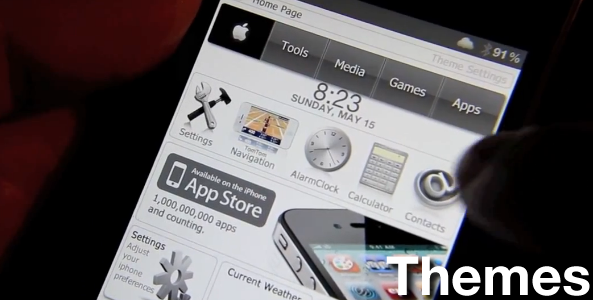
Introducing the iDB ‘Themes’ Page

Judging by the popularity of pasts posts regarding themes, we understand that there's a very strong theming interest in the jailbreak community.

For that reason, we are proud to unveil our new "Themes" page which will be the permanent hub for all of our theme coverage, video tutorials, walkthroughs, and faqs.

We plan to update our theme page with at least one new walkthrough of a popular theme each week, but likely more.

Interested in seeing what our new Themes page looks like? Step inside for a look around...

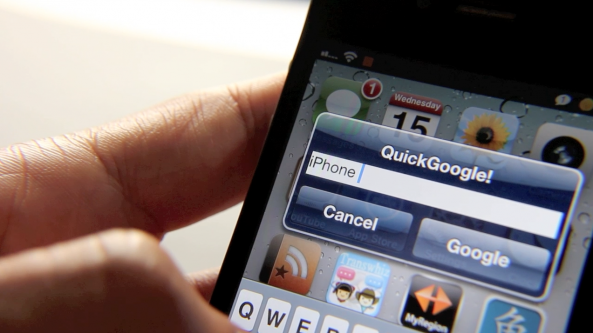
QuickGoogle Jailbreak Tweak Lets You Search Google from Anywhere

I can't believe that I'm just now finding a tweak that lets you search Google from anywhere. There's another tweak out there that does something similar, right?

If not, I'm shocked that it took this long to get a tweak like QuickGoogle on the Cydia store, but the good news is that it's here, and it works marvelously.

QuickGoogle is a very simple tweak that uses an Activator action to pull up a Google search pop up notification box anytime and anywhere you please. Want to see how QuickGoogle performs in action? Then check inside for the full video walkthrough...

‘PrivateSMS’ Hides Your SMS Messages From Prying Eyes

PrivateSMS is a new TweakWeek jailbreak tweak for the iPhone that sets out to hide your personal SMS messages from view.

The only issue is that if the person who's trying to read your SMS messages really wants to read them, it's not too hard to figure out how to do so.

PrivateSMS makes it so that it appears that you have no SMS messages in your inbox, but with just a couple of taps, all of your messages are instantly viewable.

This fact alone eliminates PrivateSMS from candidacy when it comes to genuinely securing your SMS messages, but it might be the first line of defense that you've been looking for...

‘PocketMode’ Conveniently Boosts Your iPhone’s Ringer While It’s In Your Pocket

How many times have you found yourself missing an important call because you simply didn't hear it in the depths of your cavernous pockets or bag?

I've encountered that situation quite a few times myself, and unfortunately it led to me missing a few very important phone calls.

PocketMode is a new jailbreak tweak available on Cydia that aims to work around this issue by strategically putting your iPhone's ambient light sensor to good use.

Interested in seeing how it works? Check inside for the full video details of PocketMode in action...